2010 CHEVROLET HHR clock
[x] Cancel search: clockPage 22 of 480
Setting the Clock
To set the time and date for the Radio with CD (MP3)
and USB port or Radio with a Single CD (MP3) player:1. Turn the ignition key to ACC/ACCESSORY or ON/RUN.
2. Press
Oto turn the radio on.
3. Press
Hand the HR, MIN, MM, DD, YYYY
(hour, minute, month, day, and year) displays.
4. Press the softkey located below any one of the tabs that you want to change.
5. Increase or decrease the time or date by turning
fclockwise or counterclockwise.
For detailed instructions on setting the clock for your
specific audio system, see Setting the Clock
on
page 4‑61.
Satellite Radio
XM is a satellite radio service that is based in the
48 contiguous United States and 10 Canadian
provinces. XM satellite radio has a wide variety of
programming and commercial-free music,
coast-to-coast, and in digital-quality sound.
A fee is required to receive the XM service.
For more information, refer to:
.www.xmradio.com or call 1-800-929-2100 (U.S.)
.www.xmradio.ca or call 1-877-438-9677 (Canada)
See “XM Satellite Radio Service” underRadio(s)
on
page 4‑62.
Portable Audio Devices (Auxiliary
Input or USB Port)
This vehicle may have an auxiliary input jack and a
USB port, located on the audio faceplate. External
devices such as iPods
®, laptop computers, MP3
players, CD changers, USB storage devices, etc. can
be connected to the auxiliary input jack using a 3.5 mm
(1/8 in) cable or the USB port depending on the audio
system.
1-16
Page 121 of 480
Doors and Locks
Door Locks
{WARNING:
Unlocked doors can be dangerous.
.Passengers, especially children, can easily
open the doors and fall out of a moving
vehicle. When a door is locked, the handle will
not open it. The chance of being thrown out of
the vehicle in a crash is increased if the doors
are not locked. So, all passengers should
wear safety belts properly and the doors
should be locked whenever the vehicle is
driven.(Continued)
WARNING: (Continued)
.Young children who get into unlocked vehicles
may be unable to get out. A child can be
overcome by extreme heat and can suffer
permanent injuries or even death from heat
stroke. Always lock the vehicle whenever
leaving it.
.Outsiders can easily enter through an
unlocked door when you slow down or stop
your vehicle. Locking your doors can help
prevent this from happening.
There are several ways to lock and unlock your vehicle.
To lock the driver's door from the outside, turn the key
clockwise. To unlock the door, turn the key
counterclockwise.
You can also use the remote keyless entry transmitter
to lock and unlock the doors.
From the inside, use the manual lock knobs on each
door or the power door lock switch to lock and unlock
all doors.
3-9
Page 168 of 480
Section 4 Instrument Panel
Fog Lamp Light . . . . . . . . . . . . . . . . . . . . . . . . . . . . . . . . 4-39
Highbeam On Light . . . . . . . . . . . . . . . . . . . . . . . . . . . . 4-39
Fuel Gauge . . . . . . . . . . . . . . . . . . . . . . . . . . . . . . . . . . . . 4-40
Boost Gauge . . . . . . . . . . . . . . . . . . . . . . . . . . . . . . . . . . 4-40
Reconfigurable PerformanceDisplay (RPD) . . . . . . . . . . . . . . . . . . . . . . . . . . . . . . . 4-41
Driver Information Center (DIC) . . . . . . . . . . . . . . . . . . 4-46
DIC Operation and Displays . . . . . . . . . . . . . . . . . . . 4-46
DIC Warnings and Messages . . . . . . . . . . . . . . . . . . 4-48
DIC Vehicle Personalization . . . . . . . . . . . . . . . . . . . 4-54 Audio System(s)
. . . . . . . . . . . . . . . . . . . . . . . . . . . . . . . . . . 4-60
Setting the Clock . . . . . . . . . . . . . . . . . . . . . . . . . . . . . . 4-61
Radio(s) . . . . . . . . . . . . . . . . . . . . . . . . . . . . . . . . . . . . . . . 4-62
Using an MP3 . . . . . . . . . . . . . . . . . . . . . . . . . . . . . . . . . 4-74
XM Radio Messages . . . . . . . . . . . . . . . . . . . . . . . . . . . 4-80
Bluetooth
®. . . . . . . . . . . . . . . . . . . . . . . . . . . . . . . . . . . . . 4-82
Theft-Deterrent Feature . . . . . . . . . . . . . . . . . . . . . . . . 4-92
Audio Steering Wheel Controls . . . . . . . . . . . . . . . . 4-92
Radio Reception . . . . . . . . . . . . . . . . . . . . . . . . . . . . . . . 4-94
Fixed Mast Antenna . . . . . . . . . . . . . . . . . . . . . . . . . . . 4-95
XM™ Satellite Radio Antenna System . . . . . . . . . 4-95
Chime Level Adjustment . . . . . . . . . . . . . . . . . . . . . . . 4-95
4-2
Page 185 of 480
9(Off):Turn the fan control to this position to turn
the fan off.
Temperature Control: Turn clockwise or
counterclockwise to increase or decrease the
temperature.
9(Fan): Turn clockwise or counterclockwise to
increase or decrease the fan speed. In any setting other
than off, the fan runs continuously while the ignition is in
ON/RUN. The fan must be turned on to run the air
conditioning (AC) compressor.
Air Delivery Mode Control: Turn clockwise or
counterclockwise to change the direction of the airflow
inside the vehicle.
To change the current mode, select:
H(Vent): Air is directed to the instrument panel
outlets.
)(Bi-Level): Air is divided between the instrument
panel outlets and the floor outlets.
6(Floor): Air is directed to the floor outlets, with some
air directed to the windshield and side windows.
-(Defog): This mode clears the windows of fog or
moisture. Air is directed to the windshield, side window,
and floor outlets. In this mode, the system runs the air
conditioning compressor. To defog the windows faster,
turn the temperature control knob clockwise to the
warmest setting.
0(Defrost): This mode removes fog or frost from
the windshield more quickly. Air is directed to the
windshield, with some air directed to the side window
and floor outlets. In this mode, the system runs the air
conditioning compressor. To defrost the windows faster,
turn the temperature control knob clockwise to the
warmest setting.
#(Air Conditioning): Press to turn the air
conditioning system on or off. An indicator light comes
on to show that the air conditioning is on.
On hot days, open the windows to let hot inside air
escape; then close them. This helps to reduce the time
it takes for your vehicle to cool down. It also helps the
system to operate more efficiently.
4-19
Page 208 of 480

Region A Gauge and Speedometer
Displays
Change the information displayed in Region A by
turning the knob either clockwise or counterclockwise.
The available gauges are:
BOOST:Displays positive boost pressure as
determined by the manifold air pressure (MAP) sensor.
AIR/FUEL RATIO: Displays the mass ratio of air to fuel.
CAM PHASER ANGLES: Displays orientation of the
intake and exhaust cam shafts relative to their park
positions as commanded by the engine control module.
OVERLAP represents the total distance the intake and
exhaust cam shafts have phased.
SPARK ADVANCE/ KNOCK RETARD: The spark
advance gauge displays ignition timing. Knock retard
indicates the amount of ignition delay to reduce spark
knock.
ENGINE POWER & TORQUE : Displayed engine
power and torque are engine flywheel output values
calculated by the engine control module. These
values are approximate and may change with the air
conditioning load, generator output, air temperature, air
pressure, and fuel octane. SPEEDOMETER & G FORCE :
The G FORCE meter
displays lateral acceleration. While turning right,
G forces are felt on the left, and vice versa. PEAK
values are stored indefinitely, and can be reset with
a press and hold of the RPD knob while viewing the
G FORCE meter.
SETUP MENU: Press the RPD knob to enter this
menu. The vehicle should be stopped while configuring
the setup menu selections.
SCREEN OFF: Turns the screen off.
Region B Readout Displays
Press the RPD knob to highlight Region B. The
information displayed can be changed by turning the
RPD knob either clockwise or counterclockwise.
Press the RPD knob again, to store the selection. The
selection will also be stored after a few seconds of no
activity. Available modes are:
Readouts #1
SHIFT LIGHTS/GEAR INDICATION: The shift lights
provide visual identification of engine speed for a
transmission gear. Shift light minimum and maximum
RPM settings can be viewed and configured in the
SETUP screen. The gear indication on manual
transmission vehicles is calculated by the engine
control module. The gear is only displayed when
enough torque is available to determine the selected
forward gear.
4-42
Page 227 of 480
Setting the Clock
Without Date Display
AM/FM Base Radio with a Single CD Player
To set the time:1. Turn the ignition key to ACC/ACCESSORY or ON/RUN. Press
Oto turn the radio on.
2. Press
Huntil the hour begins flashing on the
display. Press
Ha second time and the minute
begins flashing on the display.
3. While either the hour or the minute numbers are flashing, turn
fto increase or decrease the time.
4. Press
Hagain until the clock display stops flashing
to set the currently displayed time; otherwise, the
flashing stops after five seconds and the current
time displayed is automatically set.
To change the time default setting from 12 hour to
24 hour, press the
Hbutton until 12H or 24H is
displayed. Once 12H or 24H is displayed, turn
the
fknob to the desired option to select the setting.
Press the
Hbutton again to apply the setting, or let the
screen time out.
With Date Display
Radio with CD (MP3) and USB Port, and
Radio with Single CD (MP3) Player
To set the time and date:
1. Turn the ignition key to ACC/ACCESSORY or ON/RUN. Press
Oto turn the radio on.
2. Press
Hand the HR, MIN, MM, DD, YYYY
(hour, minute, month, day, and year) displays.
3. Press the softkey located below any one of the tabs that you want to change.
4. To increase the time or date do one of the following:
.Press the softkey located below the
selected tab.
.Press¨SEEK, or\FWD.
.Turnfclockwise.
5. To decrease the time or date do one of the following:
.Press©SEEK orsREV.
.Turnfcounterclockwise.
4-61
Page 233 of 480
Storing a Radio Station as a Preset
Radios that have numbered pushbuttons store radio
stations as presets.
Up to 18 stations (six FM1, six FM2, and six AM), can
be programmed on the six numbered buttons.
To store preset stations:1. Tune in the desired station.
2. Press and hold one of the six numbered buttons for three seconds until a beep sounds.
3. Repeat the Steps 1 and 2 for each numbered button.
Setting the Tone (Bass/Midrange/Treble)
BASS/MID/TREB (Bass, Midrange, or Treble): The
radio may display some or all tones such as BASS,
MID, and TREB.
To adjust the tone settings on the Radio with
CD (Base):
Press
funtil the tone control labels display, then
turn
fto change the setting. To adjust the tone settings on the Radio with CD (MP3)
and USB Port or the Radio with CD (MP3):
1. Press
funtil the tone control tabs display.
2. Press the softkey below the desired tab to be adjusted.
3. To increase the level of the bass, midrange, or treble:
.Press¨SEEK, or\FWD.
.Turnfclockwise.
4. To decrease the level of the bass, midrange, or treble:
.Press©SEEK, orsREV.
.Turnfcounterclockwise.
The radio may be capable of adjusting bass, midrange,
or treble to the middle position by pressing the softkey
below the BASS, MID, or TREB tab for more than
two seconds. The radio beeps once and the level
adjusts to the middle position.
4-67
Page 276 of 480
Steering Tips
It is important to take curves at a reasonable speed.
Traction in a curve depends on the condition of the tires
and the road surface, the angle at which the curve is
banked, and vehicle speed. While in a curve, speed is
the one factor that can be controlled.
If there is a need to reduce speed, do it before entering
the curve, while the front wheels are straight.
Try to adjust the speed so you can drive through the
curve. Maintain a reasonable, steady speed. Wait to
accelerate until out of the curve, and then accelerate
gently into the straightaway.
Steering in Emergencies
There are times when steering can be more effective
than braking. For example, you come over a hill and
find a truck stopped in your lane, or a car suddenly pulls
out from nowhere, or a child darts out from between
parked cars and stops right in front of you. These
problems can be avoided by braking—if you can stop
in time. But sometimes you cannot stop in time because
there is no room. That is the time for evasive
action —steering around the problem.
The vehicle can perform very well in emergencies like
these. First apply the brakes —but, unless the vehicle
has antilock brakes, not enough to lock the wheels. See
Braking
on page 5‑3. It is better to remove as much speed as possible from a collision. Then steer around
the problem, to the left or right depending on the space
available.
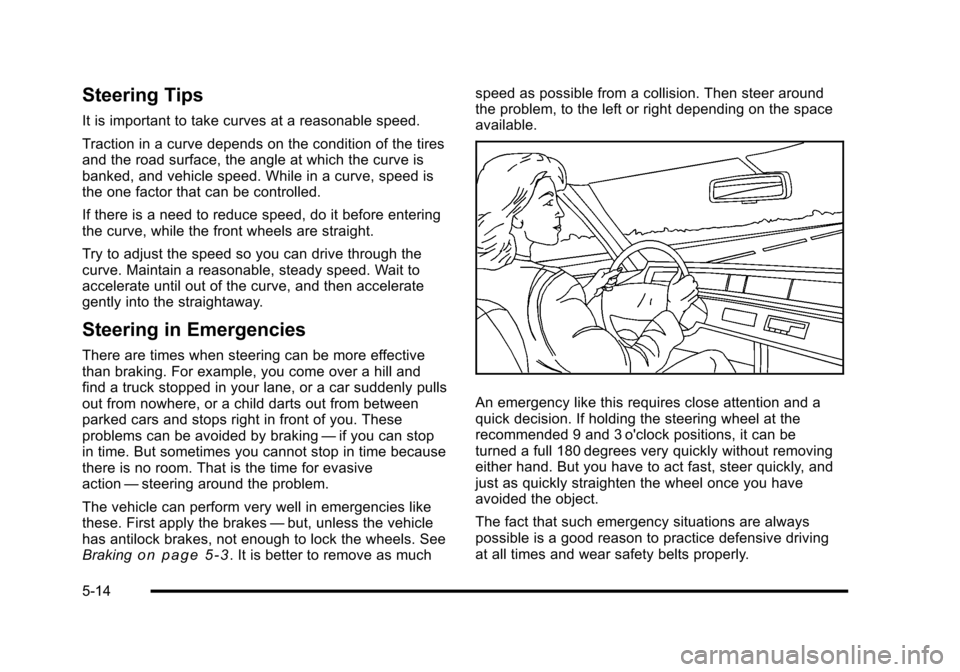
An emergency like this requires close attention and a
quick decision. If holding the steering wheel at the
recommended 9 and 3 o'clock positions, it can be
turned a full 180 degrees very quickly without removing
either hand. But you have to act fast, steer quickly, and
just as quickly straighten the wheel once you have
avoided the object.
The fact that such emergency situations are always
possible is a good reason to practice defensive driving
at all times and wear safety belts properly.
5-14