2010 CHEVROLET EQUINOX door lock
[x] Cancel search: door lockPage 52 of 394
2-26 Seats and Restraints
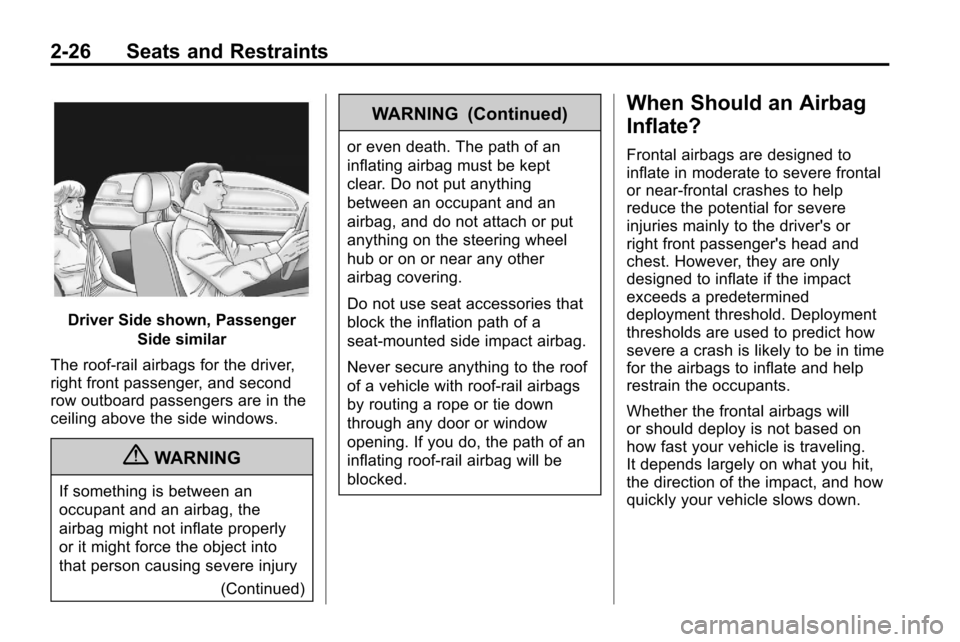
Driver Side shown, PassengerSide similar
The roof-rail airbags for the driver,
right front passenger, and second
row outboard passengers are in the
ceiling above the side windows.
{WARNING
If something is between an
occupant and an airbag, the
airbag might not inflate properly
or it might force the object into
that person causing severe injury (Continued)
WARNING (Continued)
or even death. The path of an
inflating airbag must be kept
clear. Do not put anything
between an occupant and an
airbag, and do not attach or put
anything on the steering wheel
hub or on or near any other
airbag covering.
Do not use seat accessories that
block the inflation path of a
seat-mounted side impact airbag.
Never secure anything to the roof
of a vehicle with roof-rail airbags
by routing a rope or tie down
through any door or window
opening. If you do, the path of an
inflating roof-rail airbag will be
blocked.
When Should an Airbag
Inflate?
Frontal airbags are designed to
inflate in moderate to severe frontal
or near-frontal crashes to help
reduce the potential for severe
injuries mainly to the driver's or
right front passenger's head and
chest. However, they are only
designed to inflate if the impact
exceeds a predetermined
deployment threshold. Deployment
thresholds are used to predict how
severe a crash is likely to be in time
for the airbags to inflate and help
restrain the occupants.
Whether the frontal airbags will
or should deploy is not based on
how fast your vehicle is traveling.
It depends largely on what you hit,
the direction of the impact, and how
quickly your vehicle slows down.
Page 55 of 394
Seats and Restraints 2-29
The parts of the airbag that come
into contact with you may be warm,
but not too hot to touch. There may
be some smoke and dust coming
from the vents in the deflated
airbags. Airbag inflation does not
prevent the driver from seeing out of
the windshield or being able to steer
the vehicle, nor does it prevent
people from leaving the vehicle.
{WARNING
When an airbag inflates, there
may be dust in the air. This dust
could cause breathing problems
for people with a history of
asthma or other breathing trouble.
To avoid this, everyone in the
vehicle should get out as soon as
it is safe to do so. If you have
breathing problems but cannot
get out of the vehicle after an
airbag inflates, then get fresh air
by opening a window or a door.
If you experience breathing(Continued)
WARNING (Continued)
problems following an airbag
deployment, you should seek
medical attention.
The vehicle has a feature that may
automatically unlock the doors, turn
on the interior lamps and hazard
warning flashers, and shut off the
fuel system after the airbags inflate.
You can lock the doors, turn off the
interior lamps and hazard warning
flashers by using the controls for
those features.
{WARNING
A crash severe enough to inflate
the airbags may have also
damaged important functions in
the vehicle, such as the fuel
system, brake and steering
systems, etc. Even if the vehicle
appears to be drivable after a
moderate crash, there may be (Continued)
WARNING (Continued)
concealed damage that could
make it difficult to safely operate
the vehicle.
Use caution if you should attempt
to restart the engine after a crash
has occurred.
In many crashes severe enough to
inflate the airbag, windshields are
broken by vehicle deformation.
Additional windshield breakage may
also occur from the right front
passenger airbag.
.Airbags are designed to inflate
only once. After an airbag
inflates, you will need some new
parts for the airbag system.
If you do not get them, the
airbag system will not be there
to help protect you in another
crash. A new system will include
airbag modules and possibly
other parts. The service manual
for your vehicle covers the need
to replace other parts.
Page 88 of 394
4-2 Instruments and Controls
Vehicle Messages
Vehicle Messages . . . . . . . . . . . 4-27
Battery Voltage and ChargingMessages . . . . . . . . . . . . . . . . . . 4-28
Brake System Messages . . . . 4-28
Compass Messages . . . . . . . . . 4-28
Cruise Control Messages . . . . 4-28
Door Ajar Messages . . . . . . . . . 4-29
Engine Cooling System Messages . . . . . . . . . . . . . . . . . . 4-29
Engine Oil Messages . . . . . . . . 4-30
Engine Power Messages . . . . 4-30
Fuel System Messages . . . . . . 4-30
Key and Lock Messages . . . . . 4-31 Object Detection System
Messages . . . . . . . . . . . . . . . . . . 4-31
Ride Control System Messages . . . . . . . . . . . . . . . . . . 4-31
Airbag System Messages . . . . 4-32
Safety Belt Messages . . . . . . . 4-32
Anti-Theft Alarm System
Messages . . . . . . . . . . . . . . . . . . 4-32
Service Vehicle Messages . . . 4-32
Tire Messages . . . . . . . . . . . . . . . 4-33
Transmission Messages . . . . . 4-33
Vehicle Reminder Messages . . . . . . . . . . . . . . . . . . 4-34
Vehicle Personalization
Vehicle Personalization . . . . . . 4-34
OnStar®System
OnStar®System . . . . . . . . . . . . . 4-39
Page 91 of 394

Instruments and Controls 4-5
A.Air Vents on page 7‑6.
B. Turn and Lane-Change Signals
on page 5‑3.Exterior Lamp
Controlson page 5‑1. Fog
Lampson page 5‑3(If
Equipped).
C. Instrument Cluster
on
page 4‑12.
D. Windshield Wiper/Washer
on
page 4‑7. Rear Window
Wiper/Washer on page 4‑8.
E. Power Door Locks
on
page 1‑7.
F. Instrument Panel Storage
on
page 3‑1.
G. Safety Locks on page 1‑7. H.
AM-FM Radio
on page 6‑11.
Navigation System (If
Equipped). See Navigation
System Manual.
I. Cruise Control
on page 8‑44.
J. Instrument Panel Illumination
Control
on page 5‑4.
K. Steering Wheel Adjustment
on
page 4‑6.
L. Horn on page 4‑7.
M. Steering Wheel Controls
on
page 4‑6.
N. Ignition Positions on page 8‑28.
O. Climate Control Systems
on
page 7‑1or Automatic Climate
Control System on page 7‑3. P. Shift Lever. See
Shifting Into
Park on page 8‑32.
Q. Fuel Economy Mode
on
page 8‑37(If Equipped).
R. StabiliTrak System
on
page 8‑43.
S. Cupholders on page 3‑1.
T. Power Outlets on page 4‑10.
U. CD Player on page 6‑19.
V. Driver Information Center Buttons. See Driver Information
Center (DIC) on page 4‑24.
W. Hazard Warning Flashers
on
page 5‑2.
X. Glove Box on page 3‑1.
Page 120 of 394
4-34 Instruments and Controls
Vehicle Reminder
Messages
Ice Possible Drive With Care
This message is displayed when ice
conditions are possible.
Turn Wiper Control to
Intermittent First
This message is displayed when
attempting to adjust the intermittent
wiper speed without intermittent
selected on the wiper control. See
Windshield Wiper/Washer
on
page 4‑7.
Vehicle
Personalization
The audio system controls are used
to access the personalization
menus for customizing vehicle
features.
CONFIG (Configuration): Press to
access the Configuration
Settings Menu.
MENU / SELECT Knob: Press the
center of this knob to enter the
menus and select menu items. Turn
the knob to scroll through the
menus.
0BACK: Press to exit or move
backwards in a menu.
Entering the Personalization
Menus
1. Turn the infotainment system on and press the CONFIG button to
access the Configuration
Settings menu.
2. Turn the MENU / SELECT knob to highlight Vehicle Settings. 3. Press the center of the
MENU / SELECT knob to select
the Vehicle Settings menu.
The following list of menu items will
be available:
.Climate and Air Quality
.Comfort and Convenience
.Collision/Detection Systems
.Languages
.Lighting
.Power Door Locks
.Remote Lock/Unlock/Start
.Return to Factory Settings
Turn the MENU / SELECT knob to
highlight the menu. Press the knob
to select it. Each of the menus is
detailed in the following information.
All of the menus may not be
available. Only those tied to the
features on your vehicle will be
shown.
Page 123 of 394
Instruments and Controls 4-37
Press the MENU / SELECT knob
when“Exit Lighting” is highlighted.
Turn the knob to select “Off”,
“30 Seconds”, “1 Minute”,
or “2 Minutes”. Press the knob to
confirm and go back to the
last menu.
Power Door Locks
Select Power Door Locks and the
following will be displayed:
.Unlocked Door Anti Lock Out
.Auto Door Unlock
.Delayed Door Lock
Unlocked Door Anti Lock Out
When on, this feature will keep the
driver's door from locking when the
door is open. If off is selected, the
Delayed Door Lock menu will be
available.
Press the MENU / SELECT knob
when “Unlocked Door Anti Lock
Out” is highlighted to toggle between
“On”or“Off”. Press
0
BACK to confirm the selection and
go back to the last menu.
Auto Door Unlock
This allows selection of which of the
doors will automatically unlock when
the vehicle is shifted into P (Park).
Press the MENU / SELECT knob
when “Auto Door Unlock” is
highlighted. Turn the knob to select
“All Doors”, “Driver Door”, or “Off”.
Press the knob to confirm and go
back to the last menu.
Delayed Door Lock
When on, this feature will delay the
locking of the doors. If you want to
override the delay you can press the
power door lock on the instrument
panel.
Press the MENU / SELECT knob
when “Delayed Door Lock” is
highlighted. Turn the knob to select
“On” or“Off”. Press the knob to
confirm and go back to the
last menu.
Remote Lock/Unlock/Start
Select Remote Lock/Unlock/Start
and the following will be displayed:
.Remote Unlock Light Feedback
.Remote Lock Feedback
.Remote Door Unlock
.Memory Remote Recall
.Remote Vehicle Start
Remote Unlock Light Feedback
When on, the exterior lamps will
flash when unlocking the vehicle
with the RKE transmitter.
Press the MENU / SELECT knob
when “Remote Unlock Light
Feedback” is highlighted. Turn the
knob to select “Flash Lights”or
“Off”. Press the knob to confirm and
go back to the last menu.
Page 124 of 394
4-38 Instruments and Controls
Remote Lock Feedback
This allows selection of what type of
feedback is given when unlocking
the vehicle with the RKE transmitter.
Press the MENU / SELECT knob
when“Remote Lock Feedback” is
highlighted. Turn the knob to select
“Lights and Horn”, “Lights Only”,
“Horn Only”, or “Off”. Press the knob
to confirm and go back to the
last menu.
Remote Door Unlock
This allows selection of which doors
will unlock when pressing the unlock
button on the RKE transmitter.
Press the MENU / SELECT knob
when “Remote Door Unlock” is
highlighted. Turn the knob to select
“All Doors” or“Driver Door”. Press
the knob to confirm and go back to
the last menu. Memory Remote Recall
This allows the
“Memory Remote
Recall” feature to be turned on or
off. “Memory Remote Recall” is
when the memorized settings will be
recalled as you unlock the vehicle.
Press the MENU / SELECT knob
when “Memory Remote Recall” is
highlighted to toggle between “On”
or “Off”. Press
0BACK to confirm
the selection and go back to the
last menu.
Remote Vehicle Start
This allows the “Remote Vehicle
Start” to be turned on or off, if the
vehicle has this feature. Press the MENU / SELECT knob
when
“Remote Vehicle Start” is
highlighted to toggle between “On”
or “Off”. Press
0BACK to confirm
the selection and go back to the
last menu.
Return to Factory Settings
Select “Return to Factory Settings”
to return all of the vehicle
personalization to the default
settings. Turn the knob to select
“Yes” or“No”. Press the knob to
confirm and go back to the
last menu.
Page 125 of 394
Instruments and Controls 4-39
OnStar®System
OnStar®uses several innovative
technologies and live advisors to
provide a wide range of safety,
security, navigation, diagnostics,
and calling services.
Automatic Crash Response
In a crash, built in sensors can
automatically alert an OnStar
advisor who is immediately
connected to the vehicle to see if
you need help.
How OnStar Service Works
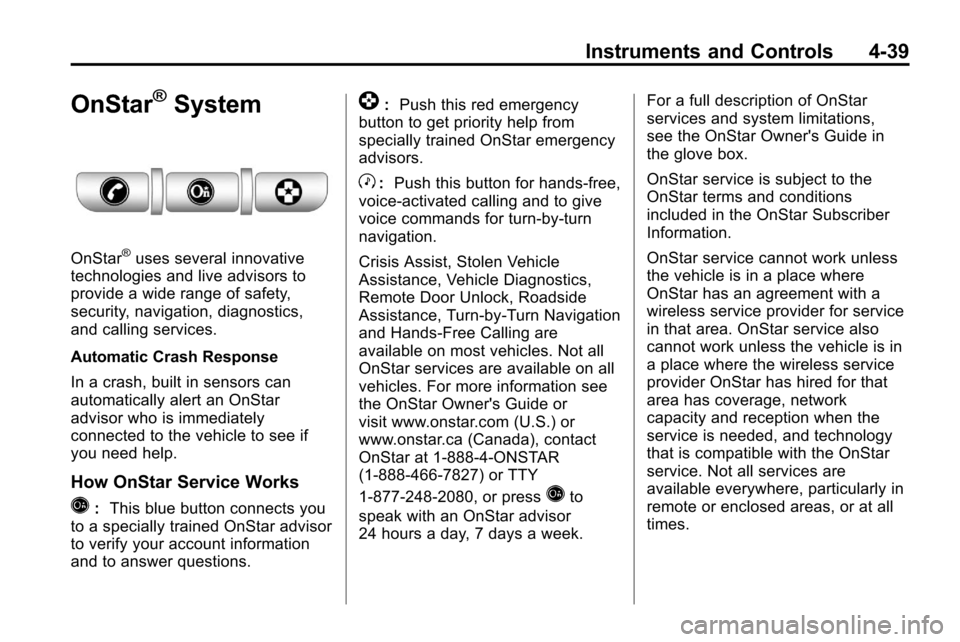
Q: This blue button connects you
to a specially trained OnStar advisor
to verify your account information
and to answer questions.
]: Push this red emergency
button to get priority help from
specially trained OnStar emergency
advisors.
X: Push this button for hands‐free,
voice‐activated calling and to give
voice commands for turn‐by‐turn
navigation.
Crisis Assist, Stolen Vehicle
Assistance, Vehicle Diagnostics,
Remote Door Unlock, Roadside
Assistance, Turn‐by‐Turn Navigation
and Hands‐Free Calling are
available on most vehicles. Not all
OnStar services are available on all
vehicles. For more information see
the OnStar Owner's Guide or
visit www.onstar.com (U.S.) or
www.onstar.ca (Canada), contact
OnStar at 1-888-4-ONSTAR
(1‐888‐466‐7827) or TTY
1‐877‐248‐2080, or press
Qto
speak with an OnStar advisor
24 hours a day, 7 days a week. For a full description of OnStar
services and system limitations,
see the OnStar Owner's Guide in
the glove box.
OnStar service is subject to the
OnStar terms and conditions
included in the OnStar Subscriber
Information.
OnStar service cannot work unless
the vehicle is in a place where
OnStar has an agreement with a
wireless service provider for service
in that area. OnStar service also
cannot work unless the vehicle is in
a place where the wireless service
provider OnStar has hired for that
area has coverage, network
capacity and reception when the
service is needed, and technology
that is compatible with the OnStar
service. Not all services are
available everywhere, particularly in
remote or enclosed areas, or at all
times.