2010 CHEVROLET CORVETTE light
[x] Cancel search: lightPage 173 of 472

Turn and Lane-Change Signals
(Auto Signal)
An arrow on the
instrument panel cluster
flashes in the direction of
the turn or lane change.
Move the the lever all the way up or down to signal
a turn.
Raise or lower the lever until the arrow starts to flash to
signal a lane change. Release the lever and the turn
signal automatically flashes three times. If more flashes
are desired, continue to hold the lever.
The lever returns to its starting position when it is
released.
If after signaling a turn or lane change the arrows flash
rapidly or do not come on, a signal bulb may be
burned out.
Have the bulbs replaced. If the bulb is not burned out,
check the fuse. See Fuses and Circuit Breakers
on
page 6‑101.
Turn Signal on Chime
A chime sounds if the turn signal has been on for more
than three‐quarters of a mile (1.2 km) of driving.
If you need to leave the turn signal on for more than
three‐quarters of a mile (1.2 km), turn off the signal and
then turn it back on.
Headlamp High/Low-Beam Changer
To change the headlamps from low beam to high, push
the turn signal lever all the way forward. To change from
high to low beam, pull the lever rearward.
While the high beams
are on, this light on the
instrument panel cluster
will also be lit.
Flash-to-Pass
To use the flash-to-pass feature, briefly pull the turn
signal lever toward you. The high-beam indicator
flashes to indicate to the other driver that you intend to
pass. If the low-beam headlamps are off and the fog
lamps are on, the fog lamps flash.
4-5
Page 178 of 472
Using Cruise Control on Hills
How well the cruise control works on hills depends upon
the vehicle's speed, load, and the steepness of the hills.
When going up steep hills, you might want to step on
the accelerator pedal to maintain the vehicle's speed.
When going downhill, you might have to brake or shift
to a lower gear to keep the vehicle's speed down. When
the brakes are applied the cruise control turns off.
Cruise Control in Sport and Manual Paddle
Shift Gear Selection
When the vehicle is in S (Sport) and the manual paddle
shift controls are not being used, cruise control
operates in the same manner as D (Drive).
When the vehicle is in S (Sport) and the manual paddle
shift controls are being used, cruise control operates as
follows:
.If cruise control is active and a gear is selected
with the manual paddle shift controls, the vehicle
speed is maintained in the driver selected gear
and will not automatically up-shift or down-shift
the transmission while the driver ’s gear selection
is active.
.If driving in hilly terrain, cruise control may not be
able to maintain vehicle speed if an up-shift or
down-shift is not selected by the driver. While
driving on hilly terrain and cruise control is active
with a manual paddle shift gear selection, the
driver must select the proper gear for the terrain or
select D (Drive) on the gear range selector for full
automatic transmission operation.
Ending Cruise Control
To end a cruise control session, step lightly on the
brake pedal. If the vehicle has a manual transmission,
lightly tapping the clutch will also end a cruise control
session.
Move the cruise control switch to
9to turn the system
completely off.
When cruise control is disengaged, the CRUISE
DISENGAGED message displays on the Driver
Information Center (DIC). See DIC Warnings and
Messages on page 4‑52.
Erasing Speed Memory
The cruise control set speed memory is erased when
the cruise control or the ignition is turned off.
4-10
Page 179 of 472
Exterior Lamps
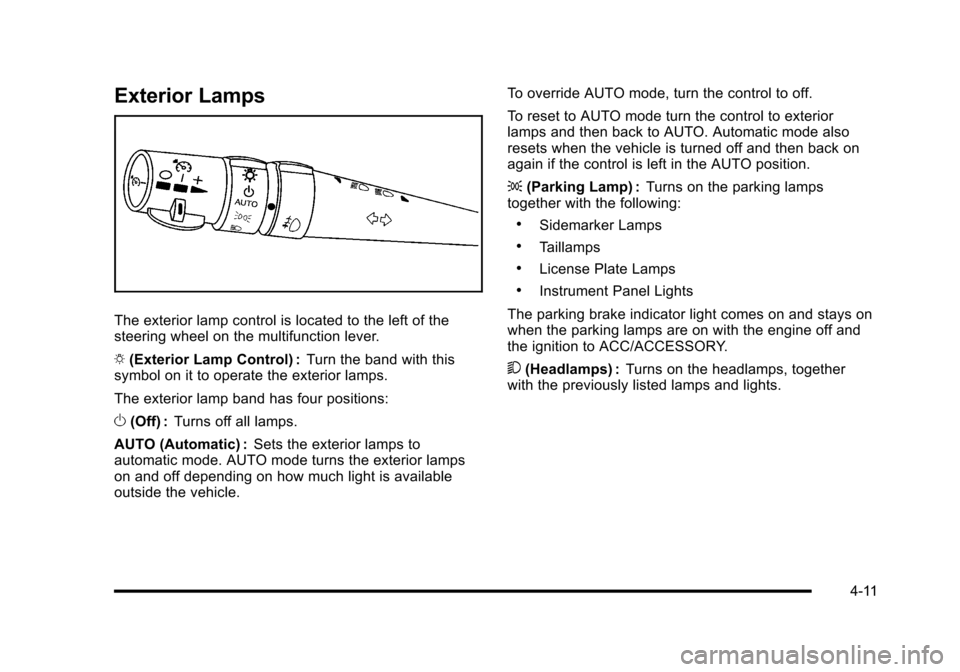
The exterior lamp control is located to the left of the
steering wheel on the multifunction lever.
O (Exterior Lamp Control) : Turn the band with this
symbol on it to operate the exterior lamps.
The exterior lamp band has four positions:
O (Off) : Turns off all lamps.
AUTO (Automatic) : Sets the exterior lamps to
automatic mode. AUTO mode turns the exterior lamps
on and off depending on how much light is available
outside the vehicle. To override AUTO mode, turn the control to off.
To reset to AUTO mode turn the control to exterior
lamps and then back to AUTO. Automatic mode also
resets when the vehicle is turned off and then back on
again if the control is left in the AUTO position.
;
(Parking Lamp) : Turns on the parking lamps
together with the following:
.Sidemarker Lamps
.Taillamps
.License Plate Lamps
.Instrument Panel Lights
The parking brake indicator light comes on and stays on
when the parking lamps are on with the engine off and
the ignition to ACC/ACCESSORY.
5 (Headlamps) : Turns on the headlamps, together
with the previously listed lamps and lights.
4-11
Page 180 of 472

Wiper Activated Headlamps
This feature activates the headlamps and parking
lamps after the windshield wipers have been in use for
approximately 15 seconds and deactivates and returns
to ambient lighting conditions 15 seconds after the
wipers are turned off.
If the exterior lamp control has been turned off or is in
the parking lamp position while the wiper control is
active in any position, the HEADLAMPS SUGGESTED
message appears on the Driver Information Center
(DIC). See DIC Warnings and Messages on page 4‑52.
When the ignition is turned off, the wiper-activated
headlamps will immediately turn off.
Headlamps on Reminder
A warning chime will sound if the exterior lamp control
is left on in either the headlamp or parking lamp position
and the driver's door is opened with the ignition off.
Daytime Running Lamps (DRL)
Daytime Running Lamps (DRL) can make it easier for
others to see the front of your vehicle during the day.
Fully functional daytime running lamps are required on
all vehicles first sold in Canada.
The DRL system makes the front turn signal lamps
come on when the following conditions are met:
.It is still daylight and the ignition is on.
.The exterior lamp control is in the AUTO position.
.The transmission is not in P (Park) or the parking
brake is off.
.The parking brake is off or the vehicle speed is
greater than 8 mph (13 km/h).
When DRL are on, only the front turn signal lamps will
be on. The parking lamps, taillamps, instrument panel
lights, or other exterior lamps will not be on when the
DRL are being used.
When it is dark enough outside, the front turn signal
lamps turn off and the normal low-beam headlamps
turn on.
4-12
Page 181 of 472

When it is bright enough outside, the regular lamps
go off, and the front turn signal lamps will take over.
If the vehicle is started in a dark garage, the automatic
headlamp system comes on immediately. Once the
vehicle leaves the garage, it takes approximately
one minute for the automatic headlamp system to
change to DRL if it is light outside. During that delay,
the instrument panel cluster may not be as bright as
usual. Make sure the instrument panel brightness knob
is in the full bright position. See Instrument Panel
Brightness
on page 4‑15for more information.
If it is dark enough outside and the exterior lamp control
is off, a HEADLAMPS SUGGESTED message will
display on the Driver's Information Center (DIC).
See DIC Warnings and Messages on page 4‑52.
Turning the exterior lamp control to off a second
time, or turning on the headlamps will remove the
HEADLAMPS SUGGESTED message in the DIC. If the
parking lamps or the fog lamps were turned on instead,
the HEADLAMPS SUGGESTED message will continue
to be displayed.
The regular headlamp system should be turned on
when needed. To turn off the DRL, turn the exterior lamp control to the
off position or shift into P (Park). The DRL will stay off
until the control is toggled again or the vehicle is shifted
out of P (Park).
This procedure applies only to vehicles first sold in the
United States.
Fog Lamps
Use fog lamps for better vision in foggy or misty
conditions.
The fog lamps control is located on the multifunction
lever next to the exterior lamp control.
#
(Fog Lamps) : Turning the band to this position will
turn the fog lamps on.
When you turn the fog lamps on, the fog lamp light will
appear on the instrument panel cluster to indicate that
the fog lamps and the parking lamps are on.
If you turn the high-beam headlamps on, the fog lamps
will turn off. They will turn on again when you switch to
low-beam headlamps.
The ignition must be on for the fog lamps to operate.
Some localities have laws that require the headlamps
to be on along with the fog lamps.
4-13
Page 182 of 472
Twilight Sentinel®
Twilight Sentinel®can turn the lamps on and off for you.
A light sensor on top of the instrument panel makes the
Twilight Sentinel
®work, so be sure it is not covered.
With Twilight Sentinel
®, the following will happen:
.When it is dark enough outside, the front turn
signal lamps (DRL) will go off, and the headlamps
and parking lamps will come on. The other lamps
that come on with headlamps will also come on.
.When it is bright enough outside, the headlamps
will go off, and the front turn signal lamps (DRL)
will come on, as long as the exterior lamp switch is
in the AUTO position.
If the vehicle is started in a dark garage, the automatic
headlamp system come on immediately. Once the
vehicle leaves the garage, it takes about one minute for
the automatic headlamp system to change to DRL if it
is light outside. During that delay, the instrument panel
cluster may not be as bright as usual. Make sure the
instrument panel brightness control is in full bright
position. See Instrument Panel Brightness
on
page 4‑15.
You can idle the vehicle with the lamps off, even when
it is dark outside. After starting the vehicle, turn the exterior lamp control
band on the multifunction lever to off and then release
it. The lamps will remain off until the control band is
turned to off again.
Twilight Sentinel
®also provides exterior illumination as
you leave the vehicle. If Twilight Sentinel®has turned
on the lamps when you turn off the ignition, the lamps
will remain on until:
.The exterior lamp switch is moved from off to the
parking lamp position, or
.A delay time that you select has elapsed.
See “Personal Options” underDIC Vehicle
Personalization
on page 4‑71to select the delay time
that you want. You can also select no delay time.
If you turn off the ignition with the exterior lamp switch
in the parking lamp or headlamp position, the Twilight
Sentinel
®delay will not occur. The lamps will turn off as
soon as the switch is turned off.
The regular headlamp system should be turned on
when needed.
4-14
Page 183 of 472
Exterior Lighting Battery Saver
If the manual parking lamps or headlamps have been
left on, the exterior lamps will turn off as soon as the
ignition is turned off or Retained Accessory Power
(RAP) is active. This protects against draining the
battery in case you have accidentally left the headlamps
or parking lamps on. The battery saver does not work if
the headlamps are turned on after the ignition switch is
turned to off.
If you need to leave the lamps on, use the exterior lamp
control to turn the lamps back on.
Instrument Panel Brightness
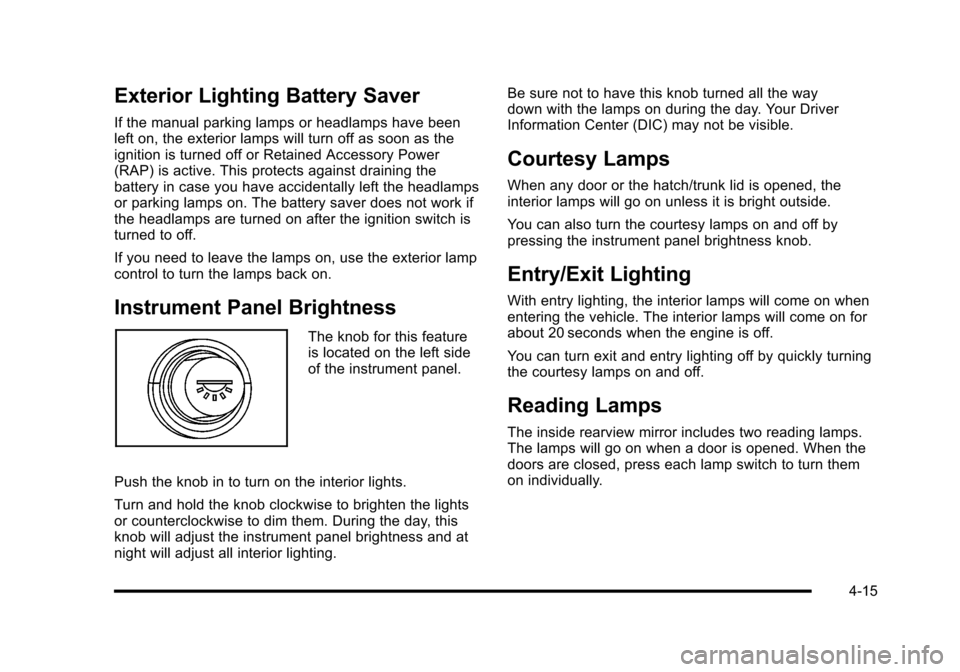
The knob for this feature
is located on the left side
of the instrument panel.
Push the knob in to turn on the interior lights.
Turn and hold the knob clockwise to brighten the lights
or counterclockwise to dim them. During the day, this
knob will adjust the instrument panel brightness and at
night will adjust all interior lighting. Be sure not to have this knob turned all the way
down with the lamps on during the day. Your Driver
Information Center (DIC) may not be visible.
Courtesy Lamps
When any door or the hatch/trunk lid is opened, the
interior lamps will go on unless it is bright outside.
You can also turn the courtesy lamps on and off by
pressing the instrument panel brightness knob.
Entry/Exit Lighting
With entry lighting, the interior lamps will come on when
entering the vehicle. The interior lamps will come on for
about 20 seconds when the engine is off.
You can turn exit and entry lighting off by quickly turning
the courtesy lamps on and off.
Reading Lamps
The inside rearview mirror includes two reading lamps.
The lamps will go on when a door is opened. When the
doors are closed, press each lamp switch to turn them
on individually.
4-15
Page 184 of 472

Battery Run-Down Protection
This vehicle has a feature to help prevent the battery
from being drained in case any of the following lamps
are left on; the underhood lamp, if your vehicle has
this feature, vanity mirror lamps, cargo lamps, reading
lamps, console or glove box lamps. If any of these
lamps are left on, they will automatically time-out after
about 10 minutes. To reset it, all of the above lamps
must be turned off or the ignition key on.
Head-Up Display (HUD)
{WARNING:
If the HUD image is too bright, or too high in your
field of view, it may take you more time to see
things you need to see when it is dark outside.
Be sure to keep the HUD image dim and placed
low in your field of view.
For vehicles with the Head-Up Display (HUD), you can
see some of the driver information that appears on the
instrument panel cluster. The information may be displayed in English or metric
units and appears as an image focused out toward the
front of the vehicle. The HUD consists of the following
information:
.Speedometer
.Turn Signal Indicators
.High-Beam Indicator Symbol
.Tachometer
.Manual Paddle Shift Gear Indicator (If Equipped)
These displays on the HUD are for use when
using the manual paddle shift controls to shift
the transmission. See
“Manual Paddle Shift”in
Automatic Transmission Operation on page 3‑26.
.Shift Light
This light is used for performance driving to
indicate that the vehicle's best performance level
has been reached to shift the transmission into the
next higher gear. An arrow pointing up will light up
on the display just prior to reaching the engine fuel
cut-off mode. This cut-off is about 6,500 RPM for
the LS3 engine, 6,600 RPM for the LS9 & ZR1
engines and 7,000 RPM for the LS7 engine.
.Check Gauges Warning
.Engine Coolant Temperature Gauge
4-16