2010 CHEVROLET CORVETTE ECO mode
[x] Cancel search: ECO modePage 243 of 472
If you choose 90 S, the twilight delay time will be set to
90 seconds.
When the mode you want is selected, press the
OPTION button to set your choice and advance to the
next personal option.
Flash at Unlock : This option activates the front and
rear turn signals for two short flashes when the unlock
or hatch/trunk button on the keyless access transmitter
is pressed. This will only occur when the vehicle is off.
Press the OPTION button until FLASH AT UNLOCK
appears on the display, then press the RESET button to
scroll through the following modes:
.YES (default)
.NO
If you choose YES, the front and rear turn signals will
flash twice when you press the unlock button or the
hatch/trunk button on the keyless access transmitter.
If you choose NO, this option will turn off.
When the mode you want is selected, press the
OPTION button to set your choice and advance to
the next personal option. Flash at Lock :
This option activates the front and rear
turn signals for one long flash when the lock button on
the keyless access transmitter is pressed. This will only
occur when the vehicle is off. If the lock button on the
keyless access transmitter is pressed again within
five seconds, the horn will sound regardless of which
setting you have selected.
Press the OPTION button until FLASH AT LOCK
appears on the display, then press the RESET button
to scroll through the following modes:
.YES (default)
.NO
If you choose YES, the front and rear turn signals will
flash once when you press the lock button on the
keyless access transmitter.
If you choose NO, this option will turn off.
When the mode you want is selected, press the
OPTION button to set your choice and advance to
the next personal option.
4-75
Page 244 of 472
FOB Reminder :This option sounds the horn three
times when the driver's door is closed and there is a
keyless access transmitter inside the interior of the
vehicle. This will only occur when the vehicle is off.
Press the OPTION button until FOB REMINDER
appears on the display, then press the RESET button to
scroll through the following modes:
.YES
.NO (default)
If you choose YES, the horn will sound three times
when a keyless access transmitter is inside of the
vehicle while the ignition is turned off and the driver's
door is closed.
If you choose NO, this option will turn off.
When the mode you want is selected, press the
OPTION button to set your choice and advance to the
next personal option.
Passive Door Locking : This option allows you to
select whether the doors automatically lock during
normal vehicle exit. When the ignition is turned off and
all doors become closed, the vehicle will determine how
many keyless access transmitters remain in the vehicle
interior. If at least one keyless access transmitter has
been removed from the interior of the vehicle, the doors
will lock after a short delay. For example, if there are two keyless access
transmitters in the vehicle and one is removed, the
other will be locked in. The keyless access transmitter
locked in the vehicle can still be used to start the
vehicle or unlock the doors, if needed. A person
approaching the outside of the locked vehicle without
an authorized keyless access transmitter, however, will
not be able to open the door, even with a transmitter in
the vehicle.
You may temporarily disable the passive door locking
feature by pressing the door unlock switch for
three seconds on an open door. Passive door locking
will then remain disabled until a door lock switch is
pressed or until the power mode transitions from the
off power mode.
Press the OPTION button until PASSIVE DOOR
LOCKING appears on the display, then press the
RESET button to scroll through the following modes:
.OFF (default)
.SILENT
.HORN
If you choose OFF, this option will turn off.
If you choose SILENT, the doors will automatically
lock a short time after you remove a keyless access
transmitter from the interior of the vehicle and close
both doors.
4-76
Page 246 of 472
When the mode you want is selected, press the
OPTION button to set your choice and advance to the
next personal option.
Language : This option allows you to select the
language the DIC, the Head-Up Display (HUD), if your
vehicle has this feature, and the radio uses to display
messages. Each language mode will be displayed in its
own language. For example, English will be displayed
as ENGLISH, Spanish as ESPANOL, etc. If your vehicle
has the navigation system, you will not have the
Japanese language mode.
Press the OPTION button until LANGUAGE appears on
the display, then press the RESET button to scroll
through the following modes:
.ENGLISH (default)
.DEUTSCH (German)
.FRANCAIS (French)
.ITALIANO (Italian)
.ESPANOL (Spanish)
If you choose a language that you do not understand,
press the OPTION and RESET buttons for
five seconds. The DIC will begin displaying all of the
various languages one by one for as long as the
buttons are pressed. When the desired language is
displayed, release the buttons and the DIC will set to
this language. When the mode you want is selected, press the
OPTION button to set your choice and advance
to the next personal option.
Personalize Name :
This option allows you to type
in a name or greeting that will appear on the DIC
display whenever the corresponding keyless access
transmitter (1 or 2) is used or one of the memory
buttons (1 or 2) located on the driver's door is pressed.
Press the OPTION button until PERSONALIZE NAME
appears on the display, then press the RESET button to
scroll through the following modes:
.YES
.NO (default)
If you choose YES, you can type in a name that will
appear on the DIC display.
To program a name, use the following procedure: 1. Enter the PERSONAL OPTIONS menu and select the driver number (1 or 2) that you would like to
program by following the instructions listed
previously under “Entering the Personal
Options Menu”.
2. Press the OPTION button until the PERSONALIZE NAME option appears on the display.
3. Select YES under PERSONALIZE NAME by pressing the RESET button.
4-78
Page 248 of 472

Audio System(s)
Determine which radio the vehicle has and read the
following pages to become familiar with its features.
{WARNING:
Taking your eyes off the road for extended periods
could cause a crash resulting in injury or death to
you or others. Do not give extended attention to
entertainment tasks while driving.
This system provides access to many audio and non
audio listings.
To minimize taking your eyes off the road while driving,
do the following while the vehicle is parked:
.Become familiar with the operation and controls of
the audio system.
.Set up the tone, speaker adjustments, and preset
radio stations.
For more information, see Defensive Driving
on
page 5‑2. Notice:
Contact your dealer/retailer before adding
any equipment.
Adding audio or communication equipment could
interfere with the operation of the vehicle's engine,
radio, or other systems, and could damage them.
Follow federal rules covering mobile radio and
telephone equipment.
The vehicle has Retained Accessory Power (RAP). With
RAP, the audio system can be played even after the
ignition is turned off. See Retained Accessory Power
(RAP)
on page 3‑24for more information.
Setting the Clock
To set the clock:
1. Press and hold H until the correct hour displays.
2. Press and hold M until the correct minute displays.
The clock mode automatically times out with the
changed display format set as the current default
setting.
4-80
Page 258 of 472
R(Song List):The Song List feature can save
20 track selections.
To save tracks:
1. If S-LIST is displayed, press
Rto turn it off.
2. Select the desired CD by pressing the numbered pushbutton and then use
uorO eknob to
select the track to be saved.
3. Press and hold
Runtil a beep sounds and
ADDED SONG displays.
4. Repeat Steps 2 and 3 to save other selections.
SONGLIST FULL displays if more than 20 selections
are stored.
To play tracks:
1. Press
R. One beep sounds and S-LIST displays.
The recorded tracks begin to play in the order they
were saved
2. Press
toruto go back or forward within the
saved tracks. To delete tracks:
1. Press
Rto turn song list on. S-LIST displays.
2. Press
toru, use theO eknob to select the
desired track to be deleted.
3. Press and hold
Runtil SONG REMOVED
displays.
After a track has been deleted, the remaining tracks are
moved up the list. When another track is added to the
song list, the track is added to the end of the list.
To delete the entire song list:
1. Press
Rto turn song list on. S-LIST displays.
2. Press and hold
Rfor more than four seconds.
One beep sounds and SONGLIST EMPTY
displays to confirm that the song list has been
deleted.
If a CD is ejected, and the song list contains saved
tracks from that CD, those tracks are automatically
deleted from the song list. Any tracks saved to the song
list again are added to the bottom of the list.
To end song list mode, press
R. One beep sounds
and S-LIST is removed from the display.
4-90
Page 279 of 472
Section 5 Driving Your Vehicle
Your Driving, the Road, and the Vehicle. . . . . . . . . . 5-2
Defensive Driving . . . . . . . . . . . . . . . . . . . . . . . . . . . . . . . 5-2
Drunk Driving . . . . . . . . . . . . . . . . . . . . . . . . . . . . . . . . . . . 5-2
Control of a Vehicle . . . . . . . . . . . . . . . . . . . . . . . . . . . . . 5-3
Braking . . . . . . . . . . . . . . . . . . . . . . . . . . . . . . . . . . . . . . . . . 5-4
Antilock Brake System (ABS) . . . . . . . . . . . . . . . . . . . 5-5
Braking in Emergencies . . . . . . . . . . . . . . . . . . . . . . . . . 5-6
Traction Control System (TCS) . . . . . . . . . . . . . . . . . . 5-6
Active Handling System . . . . . . . . . . . . . . . . . . . . . . . . . 5-8
Competitive Driving Mode . . . . . . . . . . . . . . . . . . . . . . . 5-9
Limited-Slip Rear Axle . . . . . . . . . . . . . . . . . . . . . . . . . 5-14
Selective Ride Control . . . . . . . . . . . . . . . . . . . . . . . . . 5-14
Steering . . . . . . . . . . . . . . . . . . . . . . . . . . . . . . . . . . . . . . . 5-16
Off-Road Recovery . . . . . . . . . . . . . . . . . . . . . . . . . . . . 5-17
Passing . . . . . . . . . . . . . . . . . . . . . . . . . . . . . . . . . . . . . . . . 5-18
Loss of Control . . . . . . . . . . . . . . . . . . . . . . . . . . . . . . . . 5-18 Racing or Other Competitive Driving . . . . . . . . . . . 5-19
Driving at Night . . . . . . . . . . . . . . . . . . . . . . . . . . . . . . . . 5-22
Driving in Rain and on Wet Roads . . . . . . . . . . . . . 5-22
Before Leaving on a Long Trip . . . . . . . . . . . . . . . . . 5-23
Highway Hypnosis . . . . . . . . . . . . . . . . . . . . . . . . . . . . . 5-24
Hill and Mountain Roads . . . . . . . . . . . . . . . . . . . . . . . 5-24
Winter Driving . . . . . . . . . . . . . . . . . . . . . . . . . . . . . . . . . 5-25
If Your Vehicle is Stuck in Sand, Mud, Ice,
or Snow . . . . . . . . . . . . . . . . . . . . . . . . . . . . . . . . . . . . . 5-27
Rocking Your Vehicle to Get It Out . . . . . . . . . . . . . 5-28
Loading the Vehicle . . . . . . . . . . . . . . . . . . . . . . . . . . . . 5-28
Towing . . . . . . . . . . . . . . . . . . . . . . . . . . . . . . . . . . . . . . . . . . . . 5-33
Towing Your Vehicle . . . . . . . . . . . . . . . . . . . . . . . . . . . 5-33
Recreational Vehicle Towing . . . . . . . . . . . . . . . . . . . 5-33
Towing a Trailer . . . . . . . . . . . . . . . . . . . . . . . . . . . . . . . . 5-33
5-1
Page 289 of 472
To experience the performance benefit of this
system, after entering a curve and at the point where
the driver would normally start to increase acceleration,
the accelerator pedal can be fully pressed. The
Performance Traction Management system will modify
the level of engine power for a smooth and consistent
corner exit.
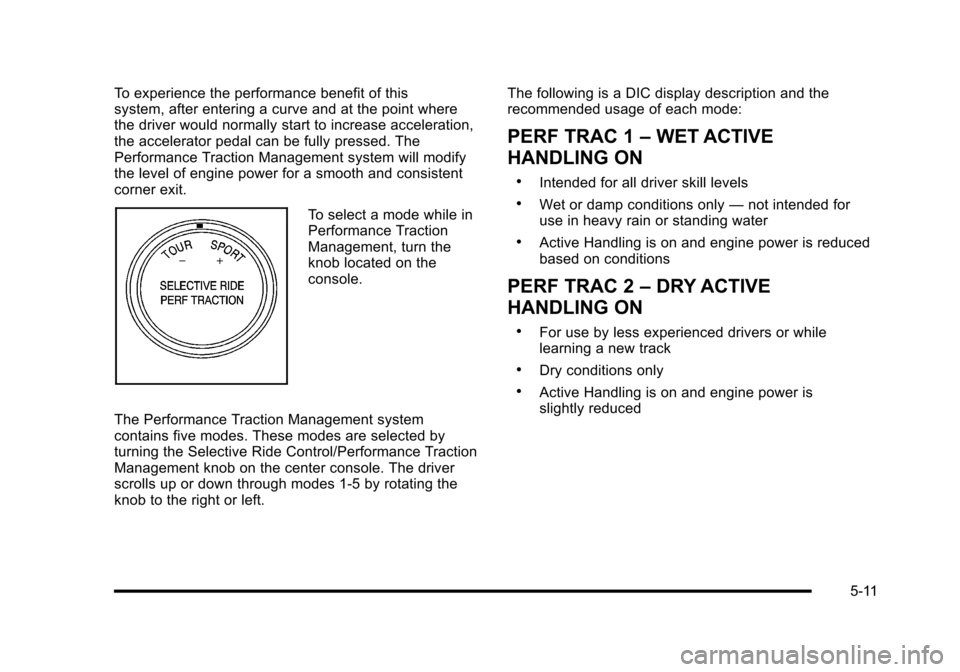
To select a mode while in
Performance Traction
Management, turn the
knob located on the
console.
The Performance Traction Management system
contains five modes. These modes are selected by
turning the Selective Ride Control/Performance Traction
Management knob on the center console. The driver
scrolls up or down through modes 1-5 by rotating the
knob to the right or left. The following is a DIC display description and the
recommended usage of each mode:
PERF TRAC 1
–WET ACTIVE
HANDLING ON
.Intended for all driver skill levels
.Wet or damp conditions only —not intended for
use in heavy rain or standing water
.Active Handling is on and engine power is reduced
based on conditions
PERF TRAC 2 –DRY ACTIVE
HANDLING ON
.For use by less experienced drivers or while
learning a new track
.Dry conditions only
.Active Handling is on and engine power is
slightly reduced
5-11
Page 298 of 472
After conversion to the high performance brake fluid,
follow the brake fluid service recommendations outlined
by the fluid manufacturer. Do not use silicone or
DOT‐5 brake fluids.
If the vehicle is a Z06, ZR1, or Grand Sport model, it
has greaseable outer ends on both of the rear toe‐links.
Under normal use, lubrication should be performed as
described in the maintenance schedule. See Scheduled
Maintenance
on page 7‑3and Recommended Fluids
and Lubricantson page 7‑10. If using the vehicle for
racing, lubrication should be performed at the end of
each racing day. See your dealer/retailer for lubrication
and make sure any needed repairs are made at once.
Proper procedures for performing these services can be
found in the service manual. See Service Publications
Ordering Information on page 8‑16.
If the vehicle is used for racing or other competitive
driving, the rear axle fluid temperatures may be higher
than would occur in normal driving. We recommend that
the rear axle fluid be drained and refilled with new fluid
after every 24 hours of racing or competitive driving.
See Recommended Fluids and Lubricants
on
page 7‑10for what fluid to use.
ZR1 Brake Burnish Procedure
Notice: These procedures are specific to the ZR1
with ceramic brake rotors. These procedures should
not be run on other Corvette models as damage
may result.
Notice: The new vehicle break‐in period should be
completed before performing the brake burnish
procedure or damage may occur to the powertrain/
engine. See New Vehicle Break-In on page 3‑21.
When performed as instructed, these procedures will
not damage the brakes. During the burnishing
procedure, the brake pads will smoke and produce an
odor. The braking force and pedal travel may increase.
After the procedure is complete, the brake pads may
appear white at the rotor contact.
5-20