Page 125 of 472
Manual Paddle Shift
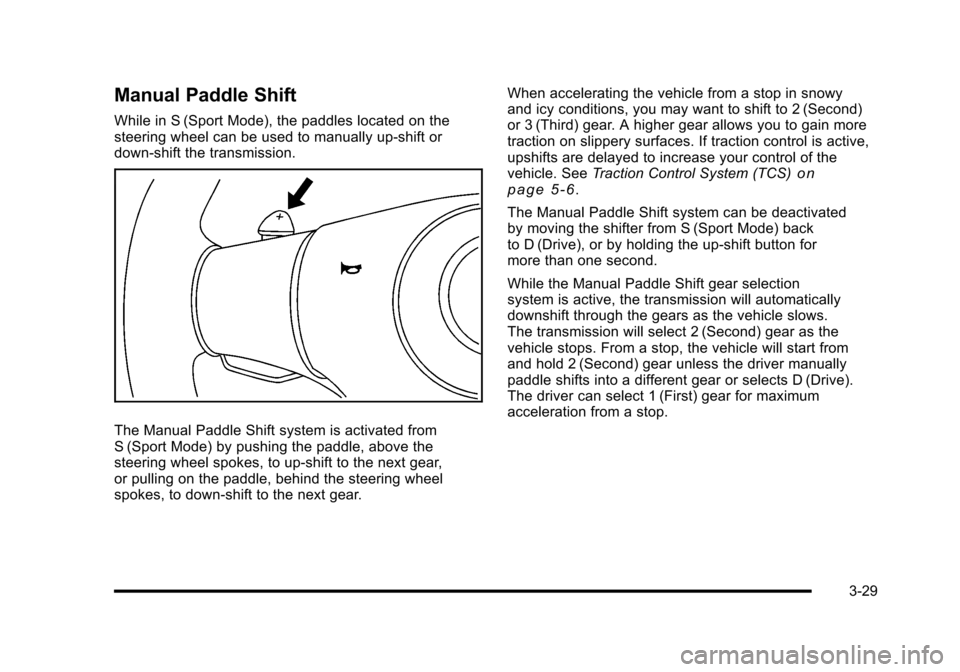
While in S (Sport Mode), the paddles located on the
steering wheel can be used to manually up-shift or
down-shift the transmission.
The Manual Paddle Shift system is activated from
S (Sport Mode) by pushing the paddle, above the
steering wheel spokes, to up-shift to the next gear,
or pulling on the paddle, behind the steering wheel
spokes, to down-shift to the next gear. When accelerating the vehicle from a stop in snowy
and icy conditions, you may want to shift to 2 (Second)
or 3 (Third) gear. A higher gear allows you to gain more
traction on slippery surfaces. If traction control is active,
upshifts are delayed to increase your control of the
vehicle. See
Traction Control System (TCS)
on
page 5‑6.
The Manual Paddle Shift system can be deactivated
by moving the shifter from S (Sport Mode) back
to D (Drive), or by holding the up‐shift button for
more than one second.
While the Manual Paddle Shift gear selection
system is active, the transmission will automatically
downshift through the gears as the vehicle slows.
The transmission will select 2 (Second) gear as the
vehicle stops. From a stop, the vehicle will start from
and hold 2 (Second) gear unless the driver manually
paddle shifts into a different gear or selects D (Drive).
The driver can select 1 (First) gear for maximum
acceleration from a stop.
3-29
Page 136 of 472
Compass Calibration
PressPonce to turn the compass display on or off.
If after several seconds the display does not show a
compass heading, there may be a strong magnetic
field interfering with the compass. Interference can be
caused by a magnetic antenna mount, note pad holder
or similar object. If the letter C or CAL appears in the
compass window, the compass needs calibration.
Depending on the mirror, in order to calibrate, CAL must
be displayed in the mirror compass windows. If CAL is
not displayed, press
Pfor several seconds or until
CAL is displayed.
If the compass has map lamps, it can be placed in
calibration mode by pressing and holding the left map
light button until a C appears on the compass display.
The mirror compass can be calibrated by driving the
vehicle in circles at 5 mph (8 km/h) or less until the
display reads a direction.
Compass Variance
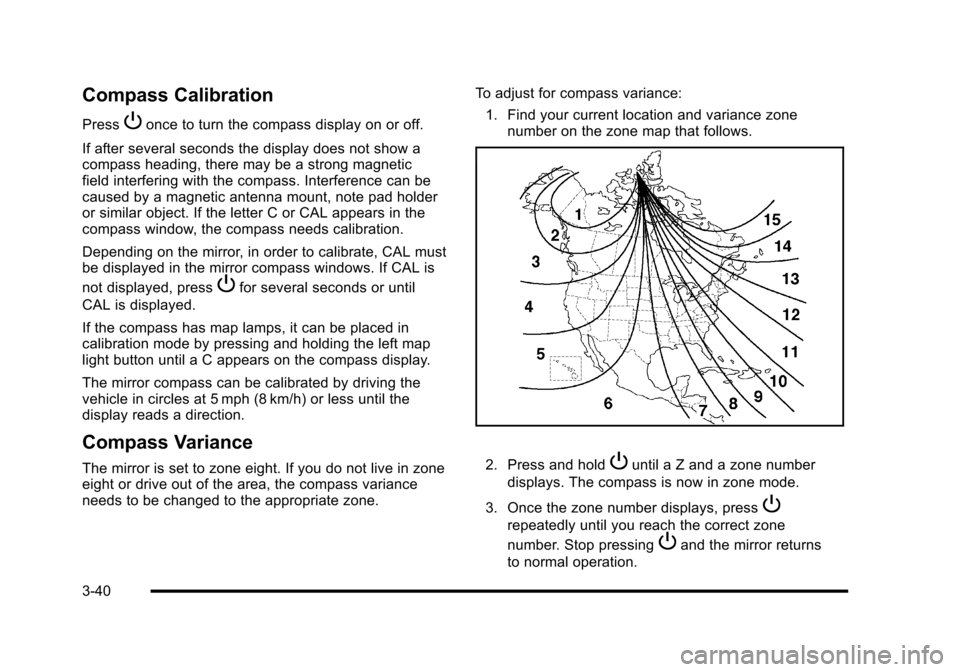
The mirror is set to zone eight. If you do not live in zone
eight or drive out of the area, the compass variance
needs to be changed to the appropriate zone. To adjust for compass variance:
1. Find your current location and variance zone number on the zone map that follows. 2. Press and holdPuntil a Z and a zone number
displays. The compass is now in zone mode.
3. Once the zone number displays, press
P
repeatedly until you reach the correct zone
number. Stop pressing
Pand the mirror returns
to normal operation.
3-40
Page 140 of 472
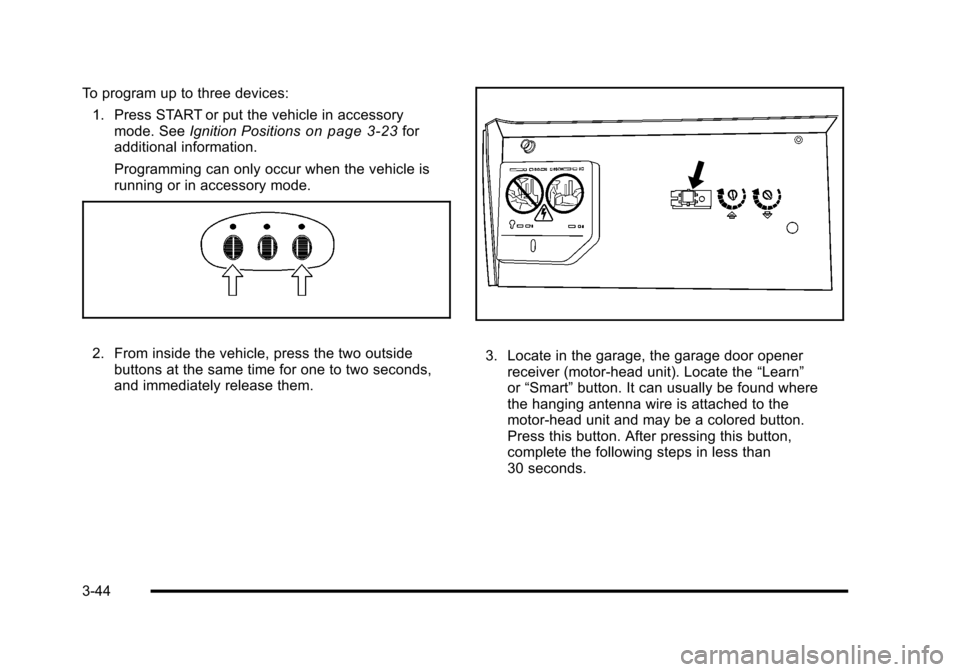
To program up to three devices: 1. Press START or put the vehicle in accessory mode. See Ignition Positions
on page 3‑23for
additional information.
Programming can only occur when the vehicle is
running or in accessory mode.
2. From inside the vehicle, press the two outside buttons at the same time for one to two seconds,
and immediately release them. 3. Locate in the garage, the garage door opener receiver (motor-head unit). Locate the “Learn”
or “Smart” button. It can usually be found where
the hanging antenna wire is attached to the
motor-head unit and may be a colored button.
Press this button. After pressing this button,
complete the following steps in less than
30 seconds.
3-44
Page 141 of 472
4. Immediately return to the vehicle. Press and hold the Universal Home Remote button that will be
used to control the garage door until the garage
door moves. The indicator light, above the selected
button, should slowly blink. This button may need
to be held for up to 20 seconds.
5. Immediately, within one second, release the button when the garage door moves. The indicator light
blinks rapidly until programming is complete.
6. Press and release the same button again. The garage door should move, confirming that
programming is successful and complete.
To program another Rolling Code device such as an
additional garage door opener, a security device,
or home automation device, repeat Steps 1-6, choosing
a different function button in Step 4 than what was used
for the garage door opener.
If these instructions do not work, the garage door
opener is probably a Fixed Code unit. Follow the
Programming instructions that follow for a Fixed Code
garage door opener.Programming Universal Home
Remote —Fixed Code
For questions or help programming the Universal
Home Remote System, call 1-866-572-2728 or go to
learcar2u.com.
Most garage door openers sold before 1996 are Fixed
Code units.
Programming a garage door opener involves
time-sensitive actions, so read the entire procedure
before starting. Otherwise, the device will time out and
the procedure will have to be repeated.
To program up to three devices:
1. Press START or put the vehicle in accessory mode. See Ignition Positions
on page 3‑23for
additional information.
Programming can only occur when the vehicle is
running or in accessory mode.
3-45
Page 143 of 472
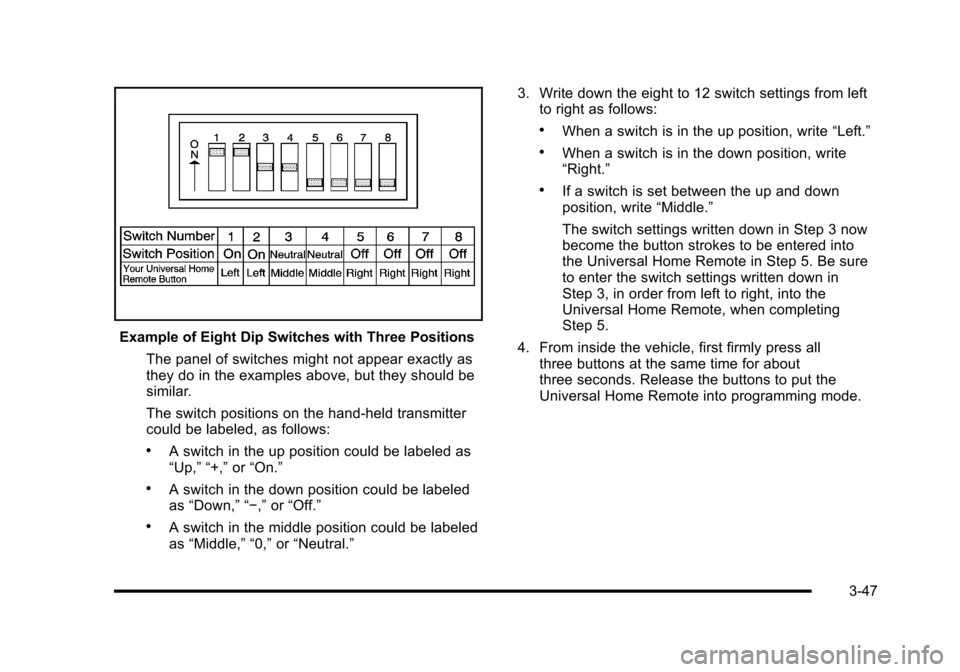
Example of Eight Dip Switches with Three Positions The panel of switches might not appear exactly as
they do in the examples above, but they should be
similar.
The switch positions on the hand-held transmitter
could be labeled, as follows:
.A switch in the up position could be labeled as
“Up,” “+,” or“On.”
.A switch in the down position could be labeled
as “Down,” “−,” or“Off.”
.A switch in the middle position could be labeled
as “Middle,” “0,” or“Neutral.” 3. Write down the eight to 12 switch settings from left
to right as follows:
.When a switch is in the up position, write “Left.”
.When a switch is in the down position, write
“Right.”
.If a switch is set between the up and down
position, write “Middle.”
The switch settings written down in Step 3 now
become the button strokes to be entered into
the Universal Home Remote in Step 5. Be sure
to enter the switch settings written down in
Step 3, in order from left to right, into the
Universal Home Remote, when completing
Step 5.
4. From inside the vehicle, first firmly press all three buttons at the same time for about
three seconds. Release the buttons to put the
Universal Home Remote into programming mode.
3-47
Page 145 of 472
Using Universal Home Remote
Press and hold the appropriate button for at least
half of a second. The indicator light comes on while
the signal is being transmitted.
Operation can occur:
.If the vehicle is in accessory mode.
.If the vehicle is in running.
.If the vehicle is in Retained Accessory Mode
(RAP). See Retained Accessory Power (RAP)on
page 3‑24for more information.
.Up to an additional 10 minutes after RAP finishes.
.Up to 10 minutes after any door is opened.
Reprogramming Universal Home
Remote Buttons
Any of the three buttons can be reprogrammed by
repeating the instructions.
Erasing Universal Home Remote
Buttons
The programmed buttons should be erased when the
vehicle is sold or the lease ends.
To erase either Rolling Code or Fixed Code on the
Universal Home Remote device:
1. Press and hold the two outside buttons at the same time for approximately 20 seconds, until the
indicator lights, located directly above the buttons,
begin to blink rapidly.
2. Once the indicator lights begin to blink, release both buttons. The codes from all buttons are
erased.
For help or information on the Universal Home Remote
System, call the customer assistance phone number
under Customer Assistance Offices on page 8‑6.
3-49
Page 190 of 472
Climate Controls
Dual Automatic Climate
Control System
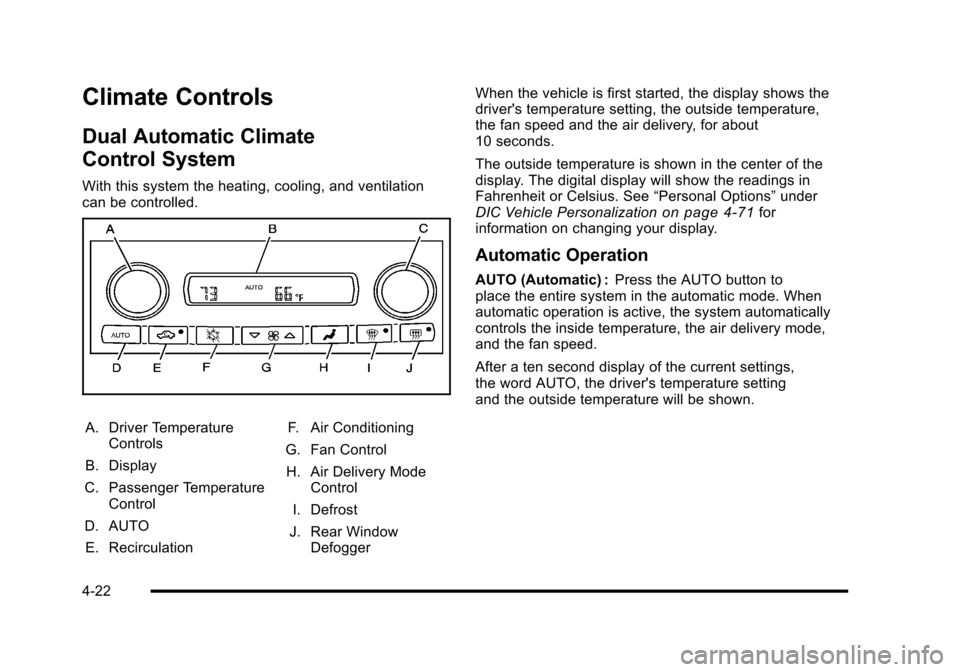
With this system the heating, cooling, and ventilation
can be controlled.
A. Driver Temperature Controls
B. Display
C. Passenger Temperature Control
D. AUTO E. Recirculation F. Air Conditioning
G. Fan Control H. Air Delivery Mode Control
I. Defrost
J. Rear Window Defogger When the vehicle is first started, the display shows the
driver's temperature setting, the outside temperature,
the fan speed and the air delivery, for about
10 seconds.
The outside temperature is shown in the center of the
display. The digital display will show the readings in
Fahrenheit or Celsius. See
“Personal Options”under
DIC Vehicle Personalization
on page 4‑71for
information on changing your display.
Automatic Operation
AUTO (Automatic) : Press the AUTO button to
place the entire system in the automatic mode. When
automatic operation is active, the system automatically
controls the inside temperature, the air delivery mode,
and the fan speed.
After a ten second display of the current settings,
the word AUTO, the driver's temperature setting
and the outside temperature will be shown.
4-22
Page 193 of 472
You may notice a slight change in engine performance
when the air-conditioning compressor shuts off and
turns on again. This is normal. The system is designed
to make adjustments to help with fuel economy while
still maintaining the selected temperature.
On hot days, open the windows to let hot inside air
escape; then close them. This helps to reduce the time
it takes for the vehicle to cool down. It also helps the
system to operate more efficiently.
For quick cool down on hot days press the AUTO
button and adjust the temperature to a cool, comfortable
setting. To achieve maximum cool down, do the
following: 1. Select
Hmode.
2. Press
?.
3. Select the a/c on.
4. Select the coolest temperature.
5. Select the highest fan speed. Using these settings together for long periods of time
may cause the air inside of your vehicle to become too
dry. To prevent this from happening, after the air in the
vehicle has cooled, turn the recirculation mode off.
The air conditioning system removes moisture from the
air, so a small amount of water might drip under the
vehicle while idling or after turning off the engine.
This is normal.
?
(Recirculation) : Press to turn the recirculation
mode on or off. An indicator light comes on to show
that recirculation is on. This mode prevents outside air
from entering your vehicle. It can be used to prevent
outside air and odors from entering your vehicle and
to help cool the air inside your vehicle more quickly.
Recirculation mode is not available in defrost or
defog mode.
4-25