2010 CHEVROLET CORVETTE bluetooth
[x] Cancel search: bluetoothPage 272 of 472
Ending a Call
Presscto end a call.
Muting a Call
During a call, all sounds from inside the vehicle can be
muted so that the person on the other end of the call
cannot hear them.
To Mute a call
1. Pressb g. The system responds with “Ready”
followed by a tone.
2. Say “Mute Call”. The system responds with
“Call muted”.
To Cancel Mute
1. Pressb g. The system responds with “Ready”
followed by a tone.
2. After the tone, say “Mute Call”. The system
responds with “Resuming call”.
Transferring a Call
Audio can be transferred between the in‐vehicle
Bluetooth system and the cell phone.
To Transfer Audio to the Cell Phone
During a call with the audio in the vehicle:
1. Press
b g. The system responds with “Ready”
followed by a tone.
2. Say “Transfer Call.” The system responds with
“Transferring call” and the audio will switch from
the vehicle to the cell phone.
To Transfer Audio to the In-Vehicle
Bluetooth System
The cellular phone must be paired and connected with
the Bluetooth system before a call can be transferred.
The connection process can take up to two minutes
after the key is turned to the ON/RUN or ACC/
ACCESSORY position.
During a call with the audio on the cell phone,
press
b gfor more than two seconds. The audio
switches from the cell phone to the vehicle.
4-104
Page 273 of 472
Voice Pass-Thru
Voice Pass‐Thru allows access to the voice recognition
commands on the cell phone. See the cell phone
manufacturers user guide to see if the cell phone
supports this feature. This feature can be used to
verbally access contacts stored in the cell phone. 1. Press and hold
b gfor two seconds. The system
responds with “Ready”followed by a tone.
2. Say “Bluetooth”. The system responds with
“Bluetooth ready” followed by a tone.
3. Say “Voice”. The system responds with
“OK, accessing
.The cell phone's normal prompt messages will
go through its cycle according to the phone's
operating instructions.
Dual Tone Multi-Frequency
(DTMF) Tones
The in‐vehicle Bluetooth system can send numbers and
numbers stored as name tags during a call. This is used
when calling a menu driven phone system. Account
numbers can be programmed into the phonebook for
retrieval during menu driven calls.
Sending a Number During a Call
1. Pressb g. The system responds with “Ready”
followed by a tone.
2. Say “Dial”. The system responds with “Say a
number to send tones” followed by a tone.
3. Say the number to send.
.If the system clearly recognizes the number it
responds with “OK, Sending Number” and the
dial tones are sent and the call continues.
.If the system is not sure it recognized the
number properly, it responds “Dial Number,
Please say yes or no?” followed by a tone.
If the number is correct, say “Yes”. The system
responds with “OK, Sending Number” and the
dial tones are sent and the call continues.
4-105
Page 274 of 472
Sending a Stored Name Tag During a Call
1. Pressbg. The system responds with “Ready”
followed by a tone.
2. Say “Send name tag.” The system responds with
“Say a name tag to send tones” followed by a tone.
3. Say the name tag to send.
.If the system clearly recognizes the name tag it
responds with “OK, Sending
the dial tones are sent and the call continues.
.If the system is not sure it recognized the name
tag properly, it responds “Dial
Please say yes or no?” followed by a tone.
If the name tag is correct, say “Yes”. The
system responds with “OK, Sending
continues.
Clearing the System
Unless information is deleted out of the in‐vehicle
Bluetooth system, it will be retained indefinitely. This
includes all saved name tags in the phonebook and
phone pairing information. For information on how to
delete this information, see the above sections on
Deleting a Paired Phone and Deleting Name Tags.
Other Information
The Bluetooth®word mark and logos are owned by the
Bluetooth®SIG, Inc. and any use of such marks by
General Motors is under license. Other trademarks and
trade names are those of their respective owners.
See Bluetooth
®on page 4‑96for FCC information.
Theft-Deterrent Feature
THEFTLOCK®is designed to discourage theft of the
vehicle's radio by learning a portion of the Vehicle
Identification Number (VIN). The radio does not operate
and LOCKED displays if the radio is stolen or moved to
a different vehicle.
When the when the ignition is in the off position, a
blinking red light on the upper left side of the radio
indicates that THEFTLOCK
®is armed.
4-106
Page 275 of 472
Audio Steering Wheel Controls
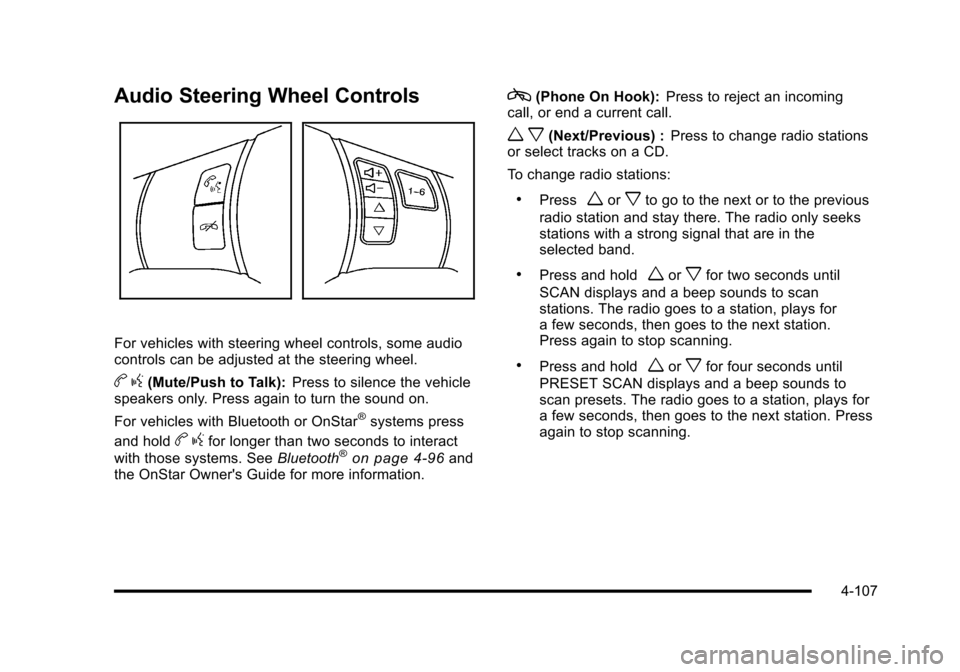
For vehicles with steering wheel controls, some audio
controls can be adjusted at the steering wheel.
b g(Mute/Push to Talk): Press to silence the vehicle
speakers only. Press again to turn the sound on.
For vehicles with Bluetooth or OnStar
®systems press
and hold
b gfor longer than two seconds to interact
with those systems. See Bluetooth®on page 4‑96and
the OnStar Owner's Guide for more information.
c(Phone On Hook): Press to reject an incoming
call, or end a current call.
w x(Next/Previous) : Press to change radio stations
or select tracks on a CD.
To change radio stations:
.Pressworxto go to the next or to the previous
radio station and stay there. The radio only seeks
stations with a strong signal that are in the
selected band.
.Press and holdworxfor two seconds until
SCAN displays and a beep sounds to scan
stations. The radio goes to a station, plays for
a few seconds, then goes to the next station.
Press again to stop scanning.
.Press and holdworxfor four seconds until
PRESET SCAN displays and a beep sounds to
scan presets. The radio goes to a station, plays for
a few seconds, then goes to the next station. Press
again to stop scanning.
4-107
Page 460 of 472

Ashtray . . . . . . . . . . . . . . . . . . . . . . . . . . . . . . . . . . . . . . . . . . . . 4-21
Assistance Program, Roadside . . . . . . . . . . . . . . . . . . . . . .8-7
Audio System . . . . . . . . . . . . . . . . . . . . . . . . . . . . . . . . . . . . . . 4-80Audio Steering Wheel Controls . . . . . . . . . . . . . . . . . .4-107
Navigation/Radio System, see NavigationManual . . . . . . . . . . . . . . . . . . . . . . . . . . . . . . . . . . . . . . . . . . 4-96
Radio Reception . . . . . . . . . . . . . . . . . . . . . . . . . . . . . . . . .4-108
Setting the Clock . . . . . . . . . . . . . . . . . . . . . . . . . . . . . . . . . 4-80
Theft-Deterrent Feature . . . . . . . . . . . . . . . . . . . . . . . . . .4-106
XM™ Satellite Radio Antenna System . . . . . . . . . . .4-109
Audio System(s) . . . . . . . . . . . . . . . . . . . . . . . . . . . . . . . . . . . 4-81
Automatic Door Lock . . . . . . . . . . . . . . . . . . . . . . . . . . . . . . 3-13
Automatic Transmission
Fluid . . . . . . . . . . . . . . . . . . . . . . . . . . . . . . . . . . . . . . . . . . . . . . 6-31
Operation . . . . . . . . . . . . . . . . . . . . . . . . . . . . . . . . . . . . . . . . . 3-26
Axle, Rear . . . . . . . . . . . . . . . . . . . . . . . . . . . . . . . . . . . . . . . . . 6-55
B
Battery . . . . . . . . . . . . . . . . . . . . . . . . . . . . . . . . . . . . . . . . . . . . 6-49
Exterior Lighting Battery Saver . . . . . . . . . . . . . . . . . . . 4-15
Run-Down Protection . . . . . . . . . . . . . . . . . . . . . . . . . . . . . 4-16
Belt Routing, Engine . . . . . . . . . . . . . . . . . . . . . . . . . . . . . . . 7-13
Bluetooth
®. . . . . . . . . . . . . . . . . . . . . . . . . . . . . . . . . . . . . . . . . 4-96
Boost Gauge . . . . . . . . . . . . . . . . . . . . . . . . . . . . . . . . . . . . . . 4-47
Brake Emergencies . . . . . . . . . . . . . . . . . . . . . . . . . . . . . . . . . . . . . . 5-6 Brakes . . . . . . . . . . . . . . . . . . . . . . . . . . . . . . . . . . . . . . . . . . . . . 6-43
Antilock . . . . . . . . . . . . . . . . . . . . . . . . . . . . . . . . . . . . . . . . . . . . 5-5
Parking . . . . . . . . . . . . . . . . . . . . . . . . . . . . . . . . . . . . . . . . . . . 3-34
System Warning Light . . . . . . . . . . . . . . . . . . . . . . . . . . . . 4-36
Braking . . . . . . . . . . . . . . . . . . . . . . . . . . . . . . . . . . . . . . . . . . . . . .5-4
Braking in Emergencies . . . . . . . . . . . . . . . . . . . . . . . . . . . . .5-6
Break-In, New Vehicle . . . . . . . . . . . . . . . . . . . . . . . . . . . . . 3-21
Bulb Replacement . . . . . . . . . . . . . . . . . . . . . . . . . . . . . . . . . 6-58 Fog Lamps . . . . . . . . . . . . . . . . . . . . . . . . . . . . . . . . . . . . . . . 4-13
Halogen Bulbs . . . . . . . . . . . . . . . . . . . . . . . . . . . . . . . . . . . . 6-56
Headlamp Aiming . . . . . . . . . . . . . . . . . . . . . . . . . . . . . . . . . 6-55
Headlamps . . . . . . . . . . . . . . . . . . . . . . . . . . . . . . . . . . . . . . . 6-56
Headlamps, Front Turn Signal, and ParkingLamps . . . . . . . . . . . . . . . . . . . . . . . . . . . . . . . . . . . . . . . . . . 6-56
High Intensity Discharge (HID) Lighting . . . . . . . . . . . 6-56
Taillamps, Turn Signal and Stoplamps . . . . . . . . . . . . 6-58
Buying New Tires . . . . . . . . . . . . . . . . . . . . . . . . . . . . . . . . . . 6-77
C
Calibration . . . . . . . . . . . . . . . . . . . . . . . . . . . . . . . . . . . . . . . . . 3-39
California Perchlorate Materials Requirements . . . . . . . . . . . . . . . 6-4
Warning . . . . . . . . . . . . . . . . . . . . . . . . . . . . . . . . . . . . . . . . . . . 6-4
California Fuel . . . . . . . . . . . . . . . . . . . . . . . . . . . . . . . . . . . . . . .6-7
Canadian Owners . . . . . . . . . . . . . . . . . . . . . . . . . . . . . . . . . . . . iii
Capacities and Specifications . . . . . . . . . . . . . . . . . . . . . 6-108
i - 2
Page 468 of 472

Passenger Airbag Status Indicator . . . . . . . . . . . . . . . . . 4-34
Passenger Compartment Air Filter . . . . . . . . . . . . . . . . . 4-28
Passenger Sensing System . . . . . . . . . . . . . . . . . . . . . . . 2-53
Passing . . . . . . . . . . . . . . . . . . . . . . . . . . . . . . . . . . . . . . . . . . . . 5-18
Perchlorate Materials Requirements, California . . . . . .6-4
Phone Bluetooth
®. . . . . . . . . . . . . . . . . . . . . . . . . . . . . . . . . . . . . . . . 4-96
Power Door Locks . . . . . . . . . . . . . . . . . . . . . . . . . . . . . . . . . . . . . . . 3-12
Electrical System . . . . . . . . . . . . . . . . . . . . . . . . . . . . . . . .6-100
Lumbar and Side Bolsters . . . . . . . . . . . . . . . . . . . . . . . . . 2-3
Retained Accessory (RAP) . . . . . . . . . . . . . . . . . . . . . . . 3-24
Seat . . . . . . . . . . . . . . . . . . . . . . . . . . . . . . . . . . . . . . . . . . . . . . . 2-3
Steering Fluid . . . . . . . . . . . . . . . . . . . . . . . . . . . . . . . . . . . . . 6-41
Windows . . . . . . . . . . . . . . . . . . . . . . . . . . . . . . . . . . . . . . . . . 3-17
Pregnancy, Using Safety Belts . . . . . . . . . . . . . . . . . . . . . 2-25
Privacy . . . . . . . . . . . . . . . . . . . . . . . . . . . . . . . . . . . . . . . . . . . . 8-18
Navigation System . . . . . . . . . . . . . . . . . . . . . . . . . . . . . . . . 8-19
OnStar . . . . . . . . . . . . . . . . . . . . . . . . . . . . . . . . . . . . . . . . . . . 8-19
Radio Frequency Identification (RFID) . . . . . . . . . . . . 8-20
Program
Courtesy Transportation . . . . . . . . . . . . . . . . . . . . . . . . . . 8-10
Programmable Automatic Door Unlock . . . . . . . . . . . . 3-13
Proposition 65 Warning, California . . . . . . . . . . . . . . . . . . .6-4
R
Racing or Other Competitive Driving . . . . . . . . . . . . . . . 5-19
Radio Frequency Identification (RFID) . . . . . . . . . . . . . . . . . . . . . . . . . . . . . . 8-20
Statement . . . . . . . . . . . . . . . . . . . . . . . . . . . . . . . . . . . . . . . . 8-20
Radio(s) . . . . . . . . . . . . . . . . . . . . . . . . . . . . . . . . . . . . . . . . . . . 4-81
Radios Navigation/Radio System, see NavigationManual . . . . . . . . . . . . . . . . . . . . . . . . . . . . . . . . . . . . . . . . . . 4-96
Reception . . . . . . . . . . . . . . . . . . . . . . . . . . . . . . . . . . . . . . .4-108
Setting the Clock . . . . . . . . . . . . . . . . . . . . . . . . . . . . . . . . . 4-80
Theft-Deterrent . . . . . . . . . . . . . . . . . . . . . . . . . . . . . . . . . .4-106
Reading Lamps . . . . . . . . . . . . . . . . . . . . . . . . . . . . . . . . . . . . 4-15
Rear Axle . . . . . . . . . . . . . . . . . . . . . . . . . . . . . . . . . . . . . . . . . . 6-55 Limited-Slip . . . . . . . . . . . . . . . . . . . . . . . . . . . . . . . . . . . . . . . 5-14
Rear Storage . . . . . . . . . . . . . . . . . . . . . . . . . . . . . . . . . . . . . . 3-51
Rearview Mirrors
Automatic Dimming . . . . . . . . . . . . . . . . . . . . . . . . . . . . . . . 3-39
Reclining Seatbacks . . . . . . . . . . . . . . . . . . . . . . . . . . . . . . . . .2-6
Recommended Fluids and Lubricants . . . . . . . . . . . . . 7-10
Recreational Vehicle Towing . . . . . . . . . . . . . . . . . . . . . . . 5-33
Reimbursement Program, GM Mobility . . . . . . . . . . . . . . .8-7
Remote, Keyless Access System . . . . . . . . . . . . . . . . . . . .3-5
Removing the Roof Panel . . . . . . . . . . . . . . . . . . . . . . . . . 3-54
i - 10