2010 CHEVROLET CAMARO radio
[x] Cancel search: radioPage 125 of 378
Black plate (43,1)Chevrolet Camaro Owner Manual - 2010
Instruments and Controls 4-43
The OnStar system can record and
transmit vehicle information. This
information is automatically sent to
an OnStar call center when
Qis
pressed,
]is pressed, or if the
airbags or ACR system deploy.
This information usually includes
the vehicle's GPS location and,
in the event of a crash, additional
information regarding the crash that
the vehicle was involved in (e.g. the
direction from which the vehicle was
hit). When the virtual advisor feature
of OnStar hands-free calling is
used, the vehicle also sends OnStar
the vehicle's GPS location so they
can provide services where it is
located.
Location information about the
vehicle is only available if the GPS
satellite signals are unobstructed
and available. The vehicle must have a working
electrical system, including
adequate battery power, for the
OnStar equipment to operate. There
are other problems OnStar cannot
control that may prevent OnStar
from providing OnStar service at
any particular time or place. Some
examples are damage to important
parts of the vehicle in a crash, hills,
tall buildings, tunnels, weather or
wireless phone network congestion.
OnStar Steering Wheel
Controls
This vehicle may have a Talk/Mute
button that can be used to interact
with OnStar hands-free calling.
See
Steering Wheel Controls
on
page 4‑6for more information.
On some vehicles, the mute button
can be used to dial numbers into
voice mail systems, or to dial phone
extensions. See the OnStar Owner's
Guide for more information.
Your Responsibility
Increase the volume of the radio if
the OnStar advisor cannot be heard.
If the light next to the OnStar
buttons is red, the system may
not be functioning properly.
Press
Qand request a vehicle
diagnostic. If the light appears clear
(no light is appearing), your OnStar
subscription has expired and all
services have been deactivated.
Press
Qto confirm that the OnStar
equipment is active.
Page 126 of 378
Black plate (44,1)Chevrolet Camaro Owner Manual - 2010
4-44 Instruments and Controls
Universal Remote
System
SeeRadio Frequency Statementon
page 12‑17for information
regarding Part 15 of the Federal
Communications Commission (FCC)
rules and Industry Canada
Standards RSS-210/220/310.
Universal Remote System
Programming
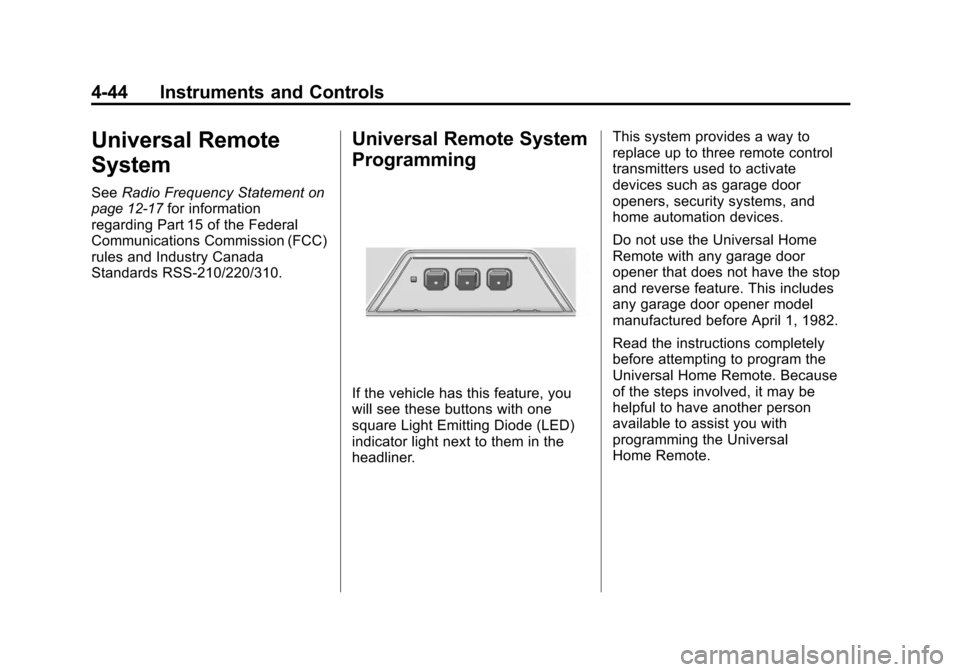
If the vehicle has this feature, you
will see these buttons with one
square Light Emitting Diode (LED)
indicator light next to them in the
headliner. This system provides a way to
replace up to three remote control
transmitters used to activate
devices such as garage door
openers, security systems, and
home automation devices.
Do not use the Universal Home
Remote with any garage door
opener that does not have the stop
and reverse feature. This includes
any garage door opener model
manufactured before April 1, 1982.
Read the instructions completely
before attempting to program the
Universal Home Remote. Because
of the steps involved, it may be
helpful to have another person
available to assist you with
programming the Universal
Home Remote.
Page 127 of 378
Black plate (45,1)Chevrolet Camaro Owner Manual - 2010
Instruments and Controls 4-45
Keep the original hand-held
transmitter for use in other vehicles
as well as for future Universal Home
Remote programming. It is also
recommended that upon the sale
of the vehicle, the programmed
Universal Home Remote buttons
should be erased for security
purposes. See“Erasing Universal
Home Remote Buttons” later in this
section.
When programming a garage door,
park outside of the garage. Park
directly in line with and facing the
garage door opener motor-head
or gate motor-head. Be sure that
people and objects are clear of the
garage door or gate that is being
programmed.
It is recommended that a new
battery be installed in your
hand-held transmitter for quicker
and more accurate transmission
of the radio-frequency signal.Programming the Universal
Home Remote System
For questions or help programming
the Universal Home Remote
System, call 1‐800‐355‐3515
or go to www.homelink.com.
Programming a garage door opener
involves time-sensitive actions, so
read the entire procedure before
starting. Otherwise, the device will
time out and the procedure will have
to be repeated.
To program up to three devices:
1. Hold the end of your hand-held transmitter about 3 to 8 cm
(1 to 3 inches) away from the
Universal Home Remote buttons
while keeping the indicator
light in view. The hand-held
transmitter was supplied by
the manufacturer of your
garage door opener receiver
(motor-head unit). 2. At the same time, press and
hold both the hand-held
transmitter button and one
of the three Universal Home
Remote buttons to be used to
operate the garage door. Do not
release the Universal Home
Remote button or the hand-held
transmitter button until the
indicator light changes from a
slow to a rapidly flashing light.
You now may release both
buttons.
Some entry gates and garage
door openers may require
substitution of Step 2 with the
procedure noted in “Gate
Operator and Canadian
Programming” later in this
section.
Page 129 of 378
Black plate (47,1)Chevrolet Camaro Owner Manual - 2010
Instruments and Controls 4-47
To program the remaining two
Universal Home Remote buttons,
begin with Step 1 of“Programming
the Universal Home Remote
System”.
Gate Operator and Canadian
Programming
If you have questions or need
help programming the Universal
Home Remote System,
call 1‐800‐355‐3515 or go
to www.homelink.com.
Canadian radio-frequency laws
require transmitter signals to time
out or quit after several seconds
of transmission. This may not be
long enough for Universal Home
Remote to pick up the signal during
programming. Similarly, some U.S.
gate operators are manufactured to
time out in the same manner. If you live in Canada, or you are
having difficulty programming a gate
operator or garage door opener by
using the
“Programming Universal
Home Remote” procedures,
regardless of where you live,
replace Step 2 under “Programming
Universal Home Remote” with the
following:
2. Continue to press and hold
the Universal Home Remote
button while you press and release
every two seconds (cycle) the
hand-held transmitter button
until the frequency signal has
been successfully accepted
by the Universal Home Remote.
The Universal Home Remote
indicator light will flash slowly at
first and then rapidly. Proceed
with Step 3 under “Programming
Universal Home Remote” to
complete.
Universal Remote System
Operation
Using Universal Home Remote
Press and hold the appropriate
Universal Home Remote button
for at least half of a second.
The indicator light will come on
while the signal is being transmitted.
Erasing Universal Home
Remote Buttons
All programmed buttons should be
erased when the vehicle is sold or
the lease ends.
To erase all programmed buttons on
the Universal Home Remote device:
1. Press and hold down the two outside buttons until the
indicator light begins to flash,
after 10 seconds.
2. Release both buttons.
Page 134 of 378

Black plate (4,1)Chevrolet Camaro Owner Manual - 2010
5-4 Lighting
Automatic Headlamp
System
When it is dark enough outside and
the headlamp switch is in AUTO,
the automatic headlamp system will
turn on the headlamps at the normal
brightness along with other lamps
such as the taillamps, sidemarker,
parking lamps, license plate lamps,
and the instrument panel lights.
The radio lights will also be dim.
To turn off the automatic headlamp
system, turn the exterior lamps
switch to the off position and then
release. For vehicles first sold in
Canada, the transmission must be
in the P (Park) position, before the
automatic headlamp system can be
turned off.The vehicle has a light sensor
located on the top of the instrument
panel. Do not cover this sensor or
the system will come on whenever
the ignition is on.
The system may also turn on the
headlamps when driving through a
parking garage, heavy overcast
weather, or a tunnel. This is normal.
There is a delay in the transition
between the daytime and nighttime
operation of the Daytime Running
Lamps (DRL) and the automatic
headlamp systems so that driving
under bridges or bright overhead
street lights does not affect the
system. The DRL and automatic
headlamp system will only be
affected when the light sensor sees
a change in lighting lasting longer
than the delay.If the vehicle is started in a dark
garage, the automatic headlamp
system comes on immediately. If it
is light outside when the vehicle
leaves the garage, there will be a
slight delay before the automatic
headlamp system changes to
the DRL. During that delay, the
instrument panel cluster may not be
as bright as usual. Make sure the
instrument panel brightness control
is in the full bright position. See
Instrument Panel Illumination
Control on page 5‑6.
Hazard Warning Flashers
|
Hazard Warning Flasher:
Press this button located on the
instrument panel near the audio
system, to make the front and rear
turn signal lamps flash on and off.
This warns others that you are
having trouble. Press again to turn
the flashers off.
Page 139 of 378

Black plate (1,1)Chevrolet Camaro Owner Manual - 2010
Infotainment System 6-1
Infotainment
System
Introduction
Introduction . . . . . . . . . . . . . . . . . . . 6-1
Theft-Deterrent Feature . . . . . . . 6-1
Overview . . . . . . . . . . . . . . . . . . . . . . 6-2
Operation . . . . . . . . . . . . . . . . . . . . . 6-3
Radio
AM-FM Radio . . . . . . . . . . . . . . . . . 6-7
Satellite Radio . . . . . . . . . . . . . . . . 6-9
Radio Reception . . . . . . . . . . . . . 6-12
Backglass Antenna . . . . . . . . . . 6-13
Satellite Radio Antenna . . . . . . 6-13
Audio Players
CD Player . . . . . . . . . . . . . . . . . . . 6-14
Auxiliary Devices . . . . . . . . . . . . 6-16
Phone
Bluetooth (Overview) . . . . . . . . 6-21
Bluetooth (InfotainmentControls) . . . . . . . . . . . . . . . . . . . 6-22
Bluetooth (Voice Recognition) . . . . . . . . . . . . . . . 6-25
Introduction
Read the following pages
to become familiar with the
infotainment system features.
{WARNING
Taking your eyes off the road
for extended periods could cause
a crash resulting in injury or
death to you or others. Do not
give extended attention to
entertainment tasks while driving.
This system provides access to
many audio and non audio listings.
To minimize taking your eyes off the
road while driving, do the following
while the vehicle is parked:
.Become familiar with the
operation and controls of the
audio system.
.Set up the tone, speaker
adjustments, and preset radio
stations. For more information, see
Defensive
Driving on page 8‑3.
Notice: Contact your dealer
before adding any equipment.
Adding audio or communication
equipment could interfere with
the operation of the vehicle's
engine, radio, or other systems,
and could damage them. Follow
federal rules covering mobile
radio and telephone equipment.
The vehicle has Retained
Accessory Power (RAP). With RAP,
the infotainment system can play
even after the ignition is turned off.
See Retained Accessory Power
(RAP)
on page 8‑19for more
information.
Theft-Deterrent Feature
The theft-deterrent feature works by
learning a portion of the Vehicle
Identification Number (VIN) to
the infotainment system. The
infotainment system does not
operate if it is stolen or moved
to a different vehicle.
Page 140 of 378
Black plate (2,1)Chevrolet Camaro Owner Manual - 2010
6-2 Infotainment System
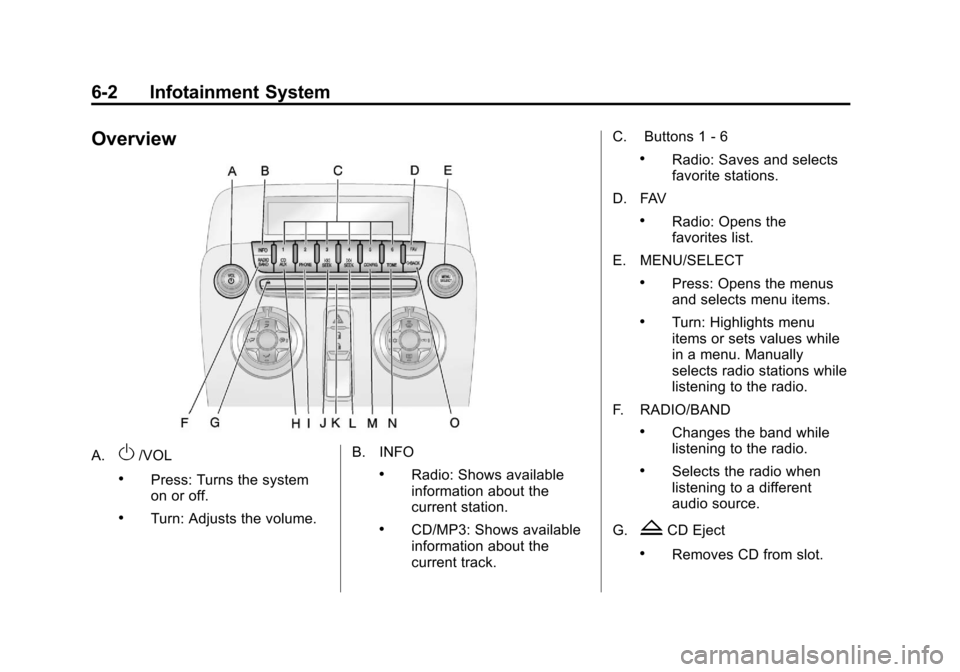
Overview
A.O/VOL
.Press: Turns the system
on or off.
.Turn: Adjusts the volume.B. INFO
.Radio: Shows available
information about the
current station.
.CD/MP3: Shows available
information about the
current track.C. Buttons 1
‐6
.Radio: Saves and selects
favorite stations.
D. FAV
.Radio: Opens the
favorites list.
E. MENU/SELECT
.Press: Opens the menus
and selects menu items.
.Turn: Highlights menu
items or sets values while
in a menu. Manually
selects radio stations while
listening to the radio.
F. RADIO/BAND
.Changes the band while
listening to the radio.
.Selects the radio when
listening to a different
audio source.
G.
ZCD Eject
.Removes CD from slot.
Page 141 of 378
Black plate (3,1)Chevrolet Camaro Owner Manual - 2010
Infotainment System 6-3
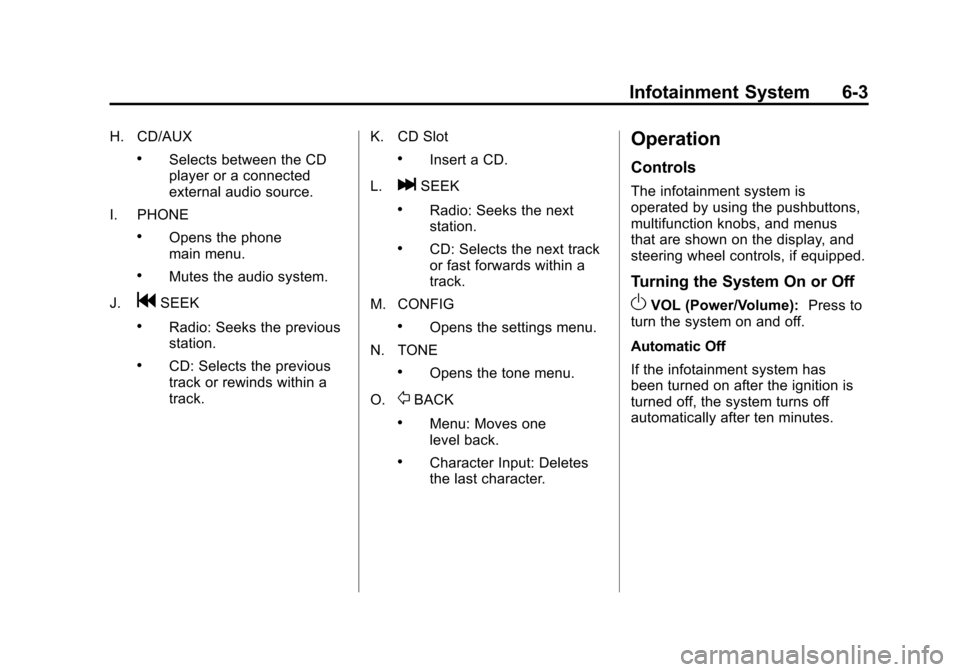
H. CD/AUX
.Selects between the CD
player or a connected
external audio source.
I. PHONE
.Opens the phone
main menu.
.Mutes the audio system.
J.
gSEEK
.Radio: Seeks the previous
station.
.CD: Selects the previous
track or rewinds within a
track. K. CD Slot
.Insert a CD.
L.
lSEEK
.Radio: Seeks the next
station.
.CD: Selects the next track
or fast forwards within a
track.
M. CONFIG
.Opens the settings menu.
N. TONE
.Opens the tone menu.
O.
0BACK
.Menu: Moves one
level back.
.Character Input: Deletes
the last character.
Operation
Controls
The infotainment system is
operated by using the pushbuttons,
multifunction knobs, and menus
that are shown on the display, and
steering wheel controls, if equipped.
Turning the System On or Off
OVOL (Power/Volume): Press to
turn the system on and off.
Automatic Off
If the infotainment system has
been turned on after the ignition is
turned off, the system turns off
automatically after ten minutes.