2010 CHEVROLET CAMARO change wheel
[x] Cancel search: change wheelPage 5 of 378
Black plate (5,1)Chevrolet Camaro Owner Manual - 2010
Introduction v
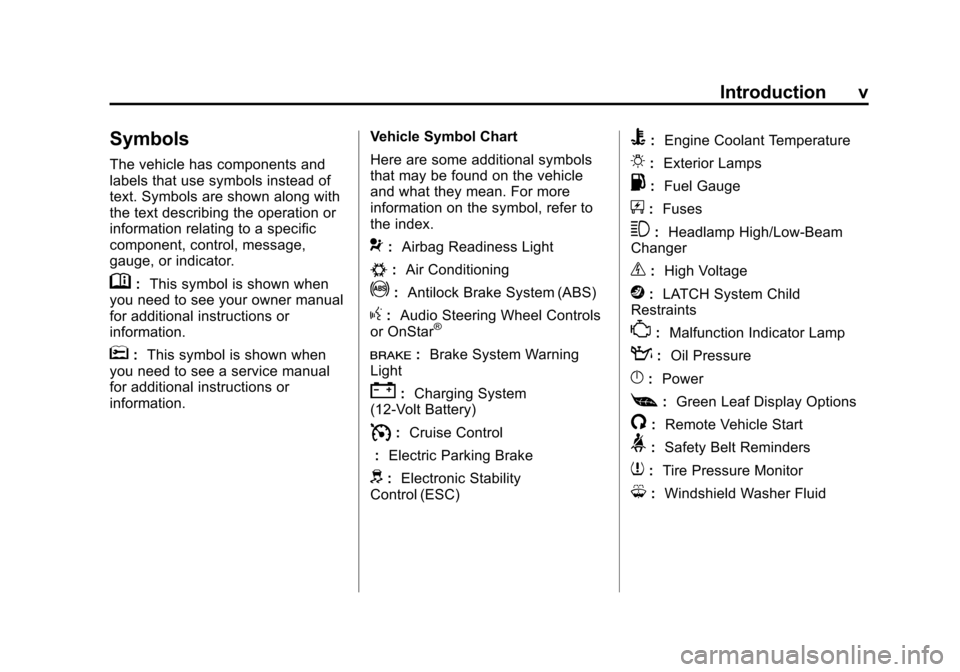
Symbols
The vehicle has components and
labels that use symbols instead of
text. Symbols are shown along with
the text describing the operation or
information relating to a specific
component, control, message,
gauge, or indicator.
M:This symbol is shown when
you need to see your owner manual
for additional instructions or
information.
*: This symbol is shown when
you need to see a service manual
for additional instructions or
information. Vehicle Symbol Chart
Here are some additional symbols
that may be found on the vehicle
and what they mean. For more
information on the symbol, refer to
the index.
9:
Airbag Readiness Light
#:Air Conditioning
!:Antilock Brake System (ABS)
g:Audio Steering Wheel Controls
or OnStar®
I: Brake System Warning
Light
": Charging System
(12‐Volt Battery)
I: Cruise Control
: Electric Parking Brake
d:Electronic Stability
Control (ESC)
B: Engine Coolant Temperature
O:Exterior Lamps
.:Fuel Gauge
+:Fuses
3: Headlamp High/Low-Beam
Changer
_: High Voltage
j:LATCH System Child
Restraints
*: Malfunction Indicator Lamp
::Oil Pressure
}:Power
[:Green Leaf Display Options
/: Remote Vehicle Start
>:Safety Belt Reminders
7:Tire Pressure Monitor
M:Windshield Washer Fluid
Page 58 of 378

Black plate (34,1)Chevrolet Camaro Owner Manual - 2010
2-34 Seats and Restraints
Servicing the
Airbag-Equipped Vehicle
Airbags affect how the vehicle
should be serviced. There are parts
of the airbag system in several
places around the vehicle. Your
dealer and the service manual have
information about servicing the
vehicle and the airbag system.
To purchase a service manual,
seeService Publications Ordering
Information on page 12‑13.
{WARNING
For up to 10 seconds after the
ignition is turned off and the
battery is disconnected, an airbag
can still inflate during improper
service. You can be injured if you
are close to an airbag when it
inflates. Avoid yellow connectors.
They are probably part of the
airbag system. Be sure to follow
proper service procedures, and
make sure the person performing
work for you is qualified to do so.
Adding Equipment to the
Airbag-Equipped Vehicle
Q: Is there anything I might add
to or change about the vehicle
that could keep the airbags
from working properly?
A: Yes. If you add things that
change the vehicle's frame,
bumper system, height, front end
or side sheet metal, they may
keep the airbag system from
working properly. Changing or
moving any parts of the front
seats, safety belts, the airbag
sensing and diagnostic module,
steering wheel, instrument
panel, roof-rail airbag modules,
ceiling headliner or pillar garnish
trim, front sensors, side impact
sensors, or airbag wiring can
affect the operation of the airbag
system.
Page 87 of 378

Black plate (5,1)Chevrolet Camaro Owner Manual - 2010
Instruments and Controls 4-5
A.Air Vents on page 7‑3.
B. Driver Shift Controls (If Equipped). See Automatic
Transmission on page 8‑26.
C. Instrument Cluster
on
page 4‑11.
D. Windshield Wiper/Washer
on
page 4‑7.
E. AM-FM Radio on page 6‑7.
F. Turn and Lane-Change Signals
on page 5‑5.Headlamp
High/Low-Beam Changeron
page 5‑3. Flash-to-Passon
page 5‑3. Driver Information
Center (DIC)on page 4‑28(If Equipped). G.
Cruise Control
on page 8‑39.
H. Exterior Lamp Controls
on
page 5‑1. Front Fog Lampson page 5‑5(If Equipped).
Instrument Panel Illumination
Control
on page 5‑6.
I. Steering Wheel Adjustment
on
page 4‑6.
J. Horn on page 4‑7.
K. Steering Wheel Controls
on
page 4‑6.
L. Climate Control Systems
on
page 7‑1. M.
Transmission Temperature
Gauge
on page 4‑16.
Voltmeter Gaugeon
page 4‑17. Engine Oil
Temperature Gaugeon
page 4‑14. Engine Oil Pressure
Gauge on page 4‑13.
N. Shift Lever. See Shifting Into
Park on page 8‑22.
O. Power Outlets on page 4‑9.
P. Hazard Warning Flashers
on
page 5‑4. Power Door Lockson page 1‑7.
Q. Glove Box on page 3‑1.
Page 112 of 378

Black plate (30,1)Chevrolet Camaro Owner Manual - 2010
4-30 Instruments and Controls
Unit
Move the thumbwheel up or down to
switch between US or Metric when
the Unit display is active. Press SET
to confirm the setting. This will
change the displays on the cluster
and DIC to either English (US) or
metric measurements.
Tire Pressure
The display will show a vehicle with
the approximate pressures of all
four tires. Tire pressure is displayed
in either pounds per square
inch (psi) or in kilopascal (kPa).
SeeTire Pressure Monitor System
on page 9‑58andTire Pressure
Monitor Operationon page 9‑60for more information.
Remaining Oil Life
This display shows an estimate
of the oil's remaining useful life.
If Remaining Oil Life 99% is
displayed, that means 99% of
the current oil life remains. When the remaining oil life is low,
the CHANGE ENGINE OIL SOON
message will appear on the display.
See
Engine Oil Messages
on
page 4‑33. The oil should changed
as soon as possible. See Engine Oil
on page 9‑10. In addition to the
engine oil life system monitoring
the oil life, additional maintenance
is recommended in the Maintenance
Schedule in this manual. See
Scheduled Maintenance
on
page 10‑2for more information.
Remember, the Oil Life display
must be reset after each oil change.
It will not reset itself. Also, be
careful not to reset the Oil Life
display accidentally at any time
other than when the oil has just
been changed. It cannot be reset
accurately until the next oil change.
To reset the engine oil life system
press the SET button while the Oil
Life display is active. See Engine
Oil Life System
on page 9‑13. Coolant Temperature
This display shows the temperature
of the engine cooling system fluid in
either degrees Fahrenheit (°F) or
degrees Celsius (°C).
Battery Voltage
This display, available on some
vehicles, shows the current battery
voltage. If the voltage is in the
normal range, the value will display.
For example, the display may
read Battery Voltage 15.0 Volts.
The vehicle's charging system
regulates voltage based on the
state of the battery. The battery
voltage can fluctuate while viewing
this information on the DIC. This is
normal. See
Charging System Light
on page 4‑20for more information.
If there is a problem with the battery
charging system, the DIC will
display a message. See Battery
Voltage and Charging Messages
on
page 4‑31.
Page 131 of 378

Black plate (1,1)Chevrolet Camaro Owner Manual - 2010
Lighting 5-1
Lighting
Exterior Lighting
Exterior Lamp Controls . . . . . . . . 5-1
Headlamp High/Low-BeamChanger . . . . . . . . . . . . . . . . . . . . . 5-3
Flash-to-Pass . . . . . . . . . . . . . . . . . 5-3
Daytime Running Lamps (DRL) . . . . . . . . . . . . . . . . 5-3
Automatic Headlamp System . . . . . . . . . . . . . . . . . . . . . . 5-4
Hazard Warning Flashers . . . . . 5-4
Turn and Lane-Change Signals . . . . . . . . . . . . . . . . . . . . . . 5-5
Front Fog Lamps . . . . . . . . . . . . . . 5-5
Interior Lighting
Instrument Panel Illumination Control . . . . . . . . . . . . . . . . . . . . . . 5-6
Dome Lamps . . . . . . . . . . . . . . . . . 5-6
Lighting Features
Entry Lighting . . . . . . . . . . . . . . . . . 5-6
Theater Dimming . . . . . . . . . . . . . . 5-6
Battery Load Management . . . . 5-6
Battery Power Protection . . . . . . 5-7
Exterior Lighting
Exterior Lamp Controls
The exterior lamps control is located
on the instrument panel, on the
outboard side of the steering wheel. It controls the following systems:
.Headlamps
.Sidemarker Lamps
.Parking Lamps
.Taillamps
.License Plate Lamps
.Instrument Panel Lights
.Fog Lamps
.Daytime Running Lamps (DRL)
The exterior lamps control has four
positions:
9(Off): Briefly turn to this position
to turn the automatic light control
off or on again. When released,
the control returns to the AUTO
position.
Page 135 of 378

Black plate (5,1)Chevrolet Camaro Owner Manual - 2010
Lighting 5-5
Turn and Lane-Change
Signals
An arrow on the instrument panel
cluster flashes in the direction of the
turn or lane change.
Move the lever all the way up or
down to signal a turn.
Raise or lower the lever until the
arrow starts to flash to signal a lane
change. Hold it there until the lane
change is completed. If the lever is
briefly pressed and released, the
turn signal flashes three times.The lever returns to its starting
position whenever it is released.
If after signaling a turn or lane
change the arrow flashes rapidly or
does not come on, a signal bulb
might be burned out.
Have the bulbs replaced. If the bulb
is not burned out, check the fuse.
See
Electrical System Overload
on
page 9‑41.
Front Fog Lamps
For vehicles with front fog lamps,
the button is located on the exterior
lamp control, on the outboard side
of the steering wheel.
The ignition must be turned to
ON/RUN to turn on the fog lamps.
#: Press to turn the fog lamps
on or off. An indicator light on the
instrument panel cluster comes on
when the fog lamps are on. The fog lamps come on together
with the parking and sidemarker
lamps.
If the high‐beam headlamps are
turned on, the fog lamps will turn off.
If the high‐beam headlamps are
turned off, the fog lamps will turn
back on again.
For vehicles with High Intensity
Discharge (HID) headlamps, the
Daytime Running Lamps (DRL)
replace the fog lamps.
Some localities have laws that
require the headlamps to be on
along with the fog lamps.
Page 136 of 378

Black plate (6,1)Chevrolet Camaro Owner Manual - 2010
5-6 Lighting
Interior Lighting
Instrument Panel
Illumination Control
This feature controls the brightness
of the instrument panel lights.
The thumbwheel is located next
to the exterior lamp control.
D(Instrument Panel
Brightness): Turn the thumbwheel
up or down to brighten or dim the
instrument panel lights.
Dome Lamps
The dome lamp buttons are located
in the overhead console.
To change the settings, press the
following:
((Off): Turns the lamp off, even
when a door is open.
1 (Door): The lamp comes on
automatically when a door is
opened.
'(On): Turns the dome lamp on.
Lighting Features
Entry Lighting
The lamps inside the vehicle
come on when any door is opened.
They stay on about 20 seconds and
when all of the doors have been
closed or the ignition is turned to
ON/RUN they gradually fade out.
They also come on when the unlock
symbol button is pressed on the
Remote Keyless Entry (RKE)
system transmitter.
The lamps inside the vehicle stay on
for about 20 seconds after the key is
removed from the ignition to provide
light as you exit.
Theater Dimming
This feature allows for a three to
five second fade out of the courtesy
lamps instead of immediately
turning off.
Battery Load
Management
The vehicle has Electric Power
Management (EPM) that estimates
the battery's temperature and state
of charge. It then adjusts the voltage
for best performance and extended
life of the battery.
When the battery's state of charge
is low, the voltage is raised slightly
to quickly bring the charge back up.
When the state of charge is high,
the voltage is lowered slightly to
prevent overcharging. If the vehicle
has a voltmeter gauge or a voltage
display on the Driver Information
Center (DIC), you may see the
voltage move up or down. This is
normal. If there is a problem, an
alert will be displayed.
Page 159 of 378

Black plate (21,1)Chevrolet Camaro Owner Manual - 2010
Infotainment System 6-21
Changing the Default PIN
To change the default PIN:
1. Select Change Default PINfrom the Bluetooth Music
Setup menu.
2. Select one of the pre‐defined PIN numbers, or select Other to
create a PIN.
To create a PIN:
1. Select the length of the PIN number.
2. Enter the character sequence.
Messages
The following messages may
appear on the infotainment screen.
Poor Bluetooth Signal Quality:
This message displays when the
Bluetooth signal strength is low.
This Feature is Unavailable While
Vehicle is Moving: This message
displays when an action is not
allowed while the vehicle is moving.Controlling a Bluetooth®
Device
Bluetooth devices that support
AVRCP (Audio/Video Remote
Control Profile) version 1.0 may
be able to be controlled by the
Infotainment System.
Press and release
gSEEK /
lSEEK to skip tracks. Press and
hold
gSEEK /lSEEK to fast
forward or fast reverse within a
track.
Other Information
The Bluetooth®word mark and
logos are owned by the Bluetooth®
SIG, Inc. and any use of such marks
by General Motors is under license.
Other trademarks and trade names
are those of their respective owners.
See Radio Frequency Statement
on
page 12‑17for FCC information.
Phone
Bluetooth (Overview)
Vehicles with a Bluetooth system
can use a Bluetooth capable cell
phone with a Hands Free Profile
to make and receive phone calls.
The infotainment system and voice
recognition are used to control
the system. The system can be
used while in ON/RUN or ACC/
ACCESSORY. The range of the
Bluetooth system can be up to
9.1 m (30 ft.). Not all phones
support all functions and not all
phones work with the Bluetooth
system. See www.gm.com/bluetooth
for more information about
compatible phones.
Bluetooth Controls
Use the buttons located on the
infotainment system and the
steering wheel to operate the
Bluetooth system.