2010 CADILLAC ESCALADE ESV wheel
[x] Cancel search: wheelPage 248 of 620

Black plate (56,1)Cadillac Escalade/Escalade ESV Owner Manual - 2010
SIDE BLIND ZONE SYSTEM
UNAVAILABLE If your vehicle has the Side Blind Zone Alert (SBZA)
system, this message displays when the SBZA system
is disabled because the sensor is blocked and cannot
detect vehicles in your blind zone. The sensor may be
blocked by mud, dirt, snow, ice, or slush. This message
may also display during heavy rain or due to road spray.
It may also come on when driving in isolated areas with
no guardrails, trees, or road signs and light traffic.
Your vehicle does not need service. For cleaning
instructions, see Washing Your Vehicle
on page 7 ‑ 103 .
See Side Blind Zone Alert (SBZA) on page 3 ‑ 48 for
more information.
STABILITRAK OFF If your vehicle has StabiliTrak, this message displays
when you turn off StabiliTrak, or when the stability
control has been automatically disabled. To limit wheel
spin and realize the full benefits of the stability
enhancement system, you should normally leave
StabiliTrak on. However, you should turn StabiliTrak off
if your vehicle gets stuck in sand, mud, ice, or snow and
you want to rock your vehicle to attempt to free it, or if you are driving in extreme off-road conditions and
require more wheel spin. See If Your Vehicle is Stuck in
Sand, Mud, Ice, or Snow
on page 6 ‑ 30 . To turn the
StabiliTrak system on or off, see StabiliTrak ®
System
on page 6 ‑ 6 .
There are several conditions that can cause this
message to appear. .
One condition is overheating, which could occur if
StabiliTrak activates continuously for an extended
period of time. .
The message also displays if the brake system
warning light is on. See Brake System Warning
Light on page 4 ‑ 33 . .
The message could display if the stability system
takes longer than usual to complete its diagnostic
checks due to driving conditions. .
The message displays if an engine or vehicle
related problem has been detected and the vehicle
needs service. See your dealer.
The message turns off as soon as the conditions that
caused the message to be displayed are no longer
present.
4-56
Page 257 of 620

Black plate (65,1)Cadillac Escalade/Escalade ESV Owner Manual - 2010
EASY EXIT RECALL If your vehicle has this feature, it allows you to select
your preference for the automatic easy exit seat feature.
See Memory Features
on page 2 ‑ 6 for more
information.
Press the customization button until EASY EXIT
RECALL appears on the DIC display. Press the set/
reset button once to access the settings for this feature.
Then press the customization button to scroll through
the following settings:
DOOR BUTTON ONLY: No automatic seat exit recall
will occur. The recall will only occur after pressing the
easy exit seat button.
BUTTON AND KEY OUT (default): If the features are
enabled through the EASY EXIT SETUP menu, the
driver's seat will move back, and if the vehicle has the
power tilt wheel feature, the power steering column will
move up when the key is removed from the ignition or
after pressing the easy exit seat button.
The automatic easy exit seat movement will only occur
one time after the key is removed from the ignition.
If the automatic movement has already occurred, and
you put the key back in the ignition and remove it again,
the seat and steering column will stay in the original exit
position, unless a memory recall took place prior to
removing the key again. NO CHANGE: No change will be made to this feature.
The current setting will remain.
To select a setting, press the set/reset button while the
desired setting is displayed on the DIC.
EASY EXIT SETUP If your vehicle has this feature, it allows you to select
which areas will recall with the automatic easy exit seat
feature. It also allows you to turn off the automatic easy
exit feature. See Memory Features
on page 2 ‑ 6 and
“ EASY EXIT RECALL ” earlier for more information.
Press the customization button until EASY EXIT SETUP
appears on the DIC display. Press the set/reset button
once to access the settings for this feature. Then press
the menu up/down button to scroll through the following
settings:
OFF: No automatic seat exit will recall.
SEAT ONLY: The driver's seat will recall.
TILT ONLY: The steering wheel tilt feature will recall.
SEAT & TILT (default): The driver's seat and the
steering wheel tilt feature will recall.
NO CHANGE: No change will be made to this feature.
The current setting will remain.
To select a setting, press the set/reset button while the
desired setting is displayed on the DIC.
4-65
Page 261 of 620

Black plate (69,1)Cadillac Escalade/Escalade ESV Owner Manual - 2010
Voice Recognition The Bluetooth system uses voice recognition to
interpret voice commands to dial phone numbers and
name tags.
Noise: Keep interior noise levels to a minimum. The
system may not recognize voice commands if there is
too much background noise.
When to Speak: A short tone sounds after the system
responds indicating when it is waiting for a voice
command. Wait until the tone and then speak.
How to Speak: Speak clearly in a calm and natural
voice.
Audio System When using the in ‐ vehicle Bluetooth system, sound
comes through the vehicle's front audio system
speakers and overrides the audio system. Use the
audio system volume knob, during a call, to change the
volume level. The adjusted volume level remains in
memory for later calls. To prevent missed calls, a
minimum volume level is used if the volume is turned
down too low. Bluetooth Controls Use the buttons located on the steering wheel to
operate the in ‐ vehicle Bluetooth system. See Audio
Steering Wheel Controls
on page 4 ‑ 106 for more
information.
b g (Push To Talk) : Press to answer incoming calls,
to confirm system information, and to start speech
recognition.
c x (Phone On Hook): Press to end a call, reject a
call, or to cancel an operation.
Pairing A Bluetooth enabled cell phone must be paired to the
in ‐ vehicle Bluetooth system first and then connected
to the vehicle before it can be used. See the cell phone
manufacturers user guide for Bluetooth functions
before pairing the cell phone. If a Bluetooth phone is
not connected, calls will be made using OnStar ®
Hands ‐ Free Calling, if available. Refer to the OnStar
owner's guide for more information.
Pairing Information: .
Up to five cell phones can be paired to the
in ‐ vehicle Bluetooth system. .
The pairing process is disabled when the vehicle is
moving.
4-69
Page 298 of 620
Black plate (106,1)Cadillac Escalade/Escalade ESV Owner Manual - 2010
PROG (Program): Press this button to go to the next
preset radio station or channel set on the main radio.
This function is inactive, with some radios, if the front
seat passengers are listening to the radio.
When a CD or DVD audio disc is playing, press this
button to go to the beginning of the CD or DVD audio.
This function is inactive, with some radios, if the front
seat passengers are listening to the disc.
When a disc is playing in the CD or DVD changer, press
this button to select the next disc, if multiple discs are
loaded. This function is inactive, with some radios, if the
front seat passengers are listening to the disc.
When a DVD video menu is being displayed, press the
PROG button to perform the menu function, enter.
Theft-Deterrent Feature THEFTLOCK ®
is designed to discourage theft of the
vehicle's radio by learning a portion of the Vehicle
Identification Number (VIN). The radio does not operate
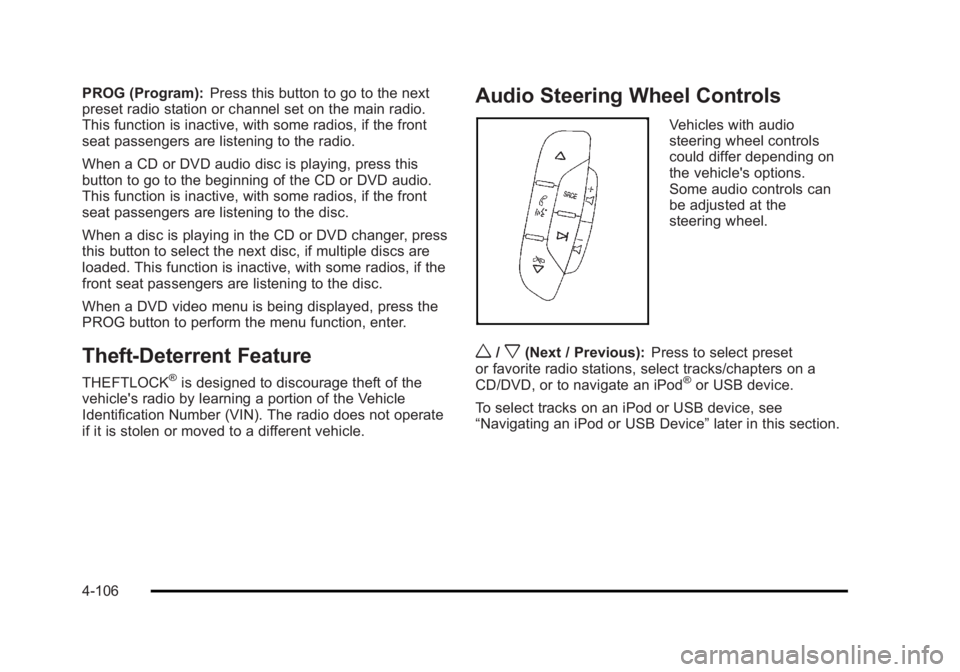
if it is stolen or moved to a different vehicle. Audio Steering Wheel Controls Vehicles with audio
steering wheel controls
could differ depending on
the vehicle's options.
Some audio controls can
be adjusted at the
steering wheel.
w /
x (Next / Previous): Press to select preset
or favorite radio stations, select tracks/chapters on a
CD/DVD, or to navigate an iPod ®
or USB device.
To select tracks on an iPod or USB device, see
“ Navigating an iPod or USB Device ” later in this section.
4-106
Page 299 of 620
Black plate (107,1)Cadillac Escalade/Escalade ESV Owner Manual - 2010
Radio To select preset or favorite radio stations:
Press and release
w or
x to go to the next or previous
radio station stored as a preset or favorite.
CD/DVD To select tracks/chapters on a CD/DVD:
Press and release
w or
x to go to the next or previous
track/chapter.
b g (Mute/Push to Talk): Press to silence the vehicle
speakers only. Press again to turn the sound on.
For vehicles with Bluetooth or OnStar ®
systems, press
and hold for longer than two seconds to interact with
those systems. See Bluetooth ®
on page 4 ‑ 68 and the
OnStar Owner's Guide for more information.
c (End): Press to reject an incoming call, or end a
current call.
SRCE (Source/Voice Recognition): Press to switch
between the radio, CD, DVD, and rear auxiliary,
if equipped.
Press and hold this button for longer than one second
to initiate voice recognition. See Voice Recognition on
page 5 ‑ 86 for more information.
¨ (Seek): Press to go to the next radio station while in
AM, FM, or XM ™ . To scan available radio stations:
1. Press and hold
¨ until a beep is heard, to place
the radio into SCAN mode, a station will play for
five seconds before moving to the next station.
2. To stop the SCAN function, press
¨ again.
While listening to a CD press and release
¨ to select
the next disc.
+
e −
e (Volume): Press to increase or to decrease
the volume.
Navigating an iPod or USB Device Audio steering wheel controls can be used to navigate
an iPod or USB device while on the main audio screen
or the music navigator screen.
Main Audio Screen Press and release
w or
x to select the next or
previous track.
Press and hold
w or
x to select the next or previous
category/folder, if available.
Press and release
¨ to enter the music navigator menu.
4-107
Page 308 of 620

Black plate (6,1)Cadillac Escalade/Escalade ESV Owner Manual - 2010
When the navigation system is turned on, a screen may
appear with the information below, and you must read
and acknowledge the information it contains.
{ WARNING: Taking your eyes off the road for extended periods
could cause a crash resulting in injury or death to
you or others.
To help avoid a crash in which you or others could be
killed: .
Always concentrate on your driving first by keeping
your eyes and mind on the road, and your hands
on the wheel. .
Follow system directions only if permitted by traffic
laws, controls, and conditions. .
Before using this system, read the owner manual
and learn how it operates. .
Some system controls cannot be used the when
vehicle is moving.
After you acknowledge the start up information you will
be able to access the NAV (navigation) and DEST
(destination) functions. Once accessed, you can enter
or delete information in the navigation system or access
other functions. See instructions later in this section. Every fifty times the vehicle is started and the
navigation system is turned on, the Caution screen
appears. After reading the caution, select OK to load
the map DVD information. If OK is not selected, all
hard keys except for NAV (Navigation) and DEST
(Destination) can be accessed. You can also press the
NAV hard key to have this Caution screen appear.
When getting started, set the navigation system to your
preference or delete information you may have entered
using various options.
5-6
Page 384 of 620

Black plate (82,1)Cadillac Escalade/Escalade ESV Owner Manual - 2010
Using the Navigation Audio System to
Control a USB Storage Device or iPod ®
The navigation audio system can control a USB storage
device or an iPod by using the radio touch screens and
steering wheel controls.
1. Touch the AUX buttton and then the USB button.
2. Press center screen button to enter the music
navigator main screen.
3. Touch or tap the left or right arrow to select desired
Category such as: Artist, Album, Genre, etc. A list
of that category will display. 4. Select an Artist, Album, or Track from that list.
5. Touch the up or down arrows located on the side of
the screen to select one item at a time, or touch
the top or bottom arrow to jump 10 percent up or
down the list.
6. Touch the Back button to go back to the previous
screen.
7. Touch the Exit button to go back to the main audio
screen.
5-82
Page 388 of 620

Black plate (86,1)Cadillac Escalade/Escalade ESV Owner Manual - 2010
3. For the second row display select the Rear AUX
screen button next to Rear Display 1 and for the
third row display select the Rear AUX screen
button next to Rear Display 2. Each screen works
independently of the other. The second row screen
can watch a DVD while the third row screen can
use the auxiliary device.
The rear seat passengers can also use the remote
control to change the functions of the RSE. See Rear
Seat Entertainment (RSE) System (Overhead)
on
page 4 ‑ 78 or Rear Seat Entertainment (RSE) System
(Headrest DVD) on page 4 ‑ 87 for more information.
Voice Recognition The navigation system's voice recognition allows for
hands-free operation of the navigation system, audio
system, and OnStar ®
features. The DVD map disc
must be installed in the navigation system for voice
recognition to work. See “ Installing the DVD Map Disc ”
under Maps
on page 5 ‑ 14 for more information.
Voice recognition can be used when the ignition is on or
when Retained Accessory Power (RAP) is active. See
“ Retained Accessory Power (RAP) ” in the Index of your
vehicle's owner manual for more information. To use voice recognition, do the following:
1. Push and hold the
SRCE button on the
steering wheel until
you hear a beep. The
audio system mutes.
2. Clearly state one of the commands listed on the
following pages.
Helpful Hints for Stating Commands .
When a multiple command is available, choose the
command that works best. .
Words that are in brackets are optional. For
example, for the command Radio [band] [select]
FM, stating Radio FM or Radio select FM are both
valid commands.
5-86