2010 CADILLAC ESCALADE ESV lock
[x] Cancel search: lockPage 358 of 620
![CADILLAC ESCALADE ESV 2010 Owners Manual Black plate (56,1)Cadillac Escalade/Escalade ESV Owner Manual - 2010
Brightness/Contrast/Mode
Touch this screen button to change the brightness,
contrast, and mode of the display.
] (Brightness): Touc](/manual-img/23/58683/w960_58683-357.png "CADILLAC ESCALADE ESV 2010 Owners Manual Black plate (56,1)Cadillac Escalade/Escalade ESV Owner Manual - 2010
Brightness/Contrast/Mode
Touch this screen button to change the brightness,
contrast, and mode of the display.
] (Brightness): Touc")
Black plate (56,1)Cadillac Escalade/Escalade ESV Owner Manual - 2010
Brightness/Contrast/Mode
Touch this screen button to change the brightness,
contrast, and mode of the display.
] (Brightness): Touch the + (plus) or − (minus) screen
buttons to increase or decrease the brightness of the
screen.
_ (Contrast): Touch the + (plus) or − (minus) screen
buttons to increase or decrease the contrast of the
screen. Auto (Automatic): Touch this screen button for the
system to automatically adjust the screen background
depending on exterior lighting conditions.
Night: Touch this screen button and the system makes
the map background darker.
Day: Touch this screen button and the system makes
the map background brighter.
Setting the Clock The navigation system time and the analog clock
operate independently. Changing the time through the
navigation system does not change the time on the
analog clock. See Analog Clock
on page 4 ‑ 20 to
change the analog clock time.
Press the CONFIG key to enter the configure menu
options, then press the CONFIG key repeatedly until the
time is selected or touch the time screen button.
Hours: Press the − (minus) or + (plus) signs to
decrease or increase the hours.
Minutes: Press the − (minus) or + (plus) signs to
decrease or increase the minutes.
12/24 Format: Select the 12 screen button for standard
time; select the 24 screen button for military time.
5-56
Page 369 of 620
Black plate (67,1)Cadillac Escalade/Escalade ESV Owner Manual - 2010
The RDS system is always on. When information is
broadcast from the FM station that is playing, the station
name or call letters displays on the audio screen.
XM ™ Satellite Radio ServiceXM ™ is a satellite radio service that is based in the
48 contiguous United States and 10 Canadian
provinces. XM Satellite Radio has a wide variety
of programming and commercial-free music,
coast-to-coast, and in digital-quality sound. During
your trial or when you subscribe, you will get unlimited
access to XM Radio Online while not in the vehicle.
A service fee is required to receive the XM service.
For more information, contact XM at xmradio.com or
call 1-800-929-2100 in the U.S. and xmradio.ca or call
1-877-438-9677 in Canada.
When XM ™ is active, the channel name and number,
song title, and artist displays on the screen. XM ™ Radio Messages XL (Explicit Language Channels): XL on the radio
display, after the channel name, indicates content
with explicit language. These channels, or any others,
can be blocked at a customer's request by calling
1 ‐ 800 ‐ 852 ‐ XMXM (9696).
XM Updating: The encryption code in the receiver is
being updated and no action is required.
No XM signal: The vehicle is in a location that is
blocking the XM ™ signal. When the vehicle is moved
into an open area, the signal should return.
Loading XM: The audio system is processing audio
and text data received. No action is needed.
Channel Off Air: This channel is not currently in
service.
Channel Unauth : This channel is blocked or cannot
be received with your XM Subscription package.
Channel Unavail: This previously assigned channel is
no longer assigned.
5-67
Page 370 of 620

Black plate (68,1)Cadillac Escalade/Escalade ESV Owner Manual - 2010
No Artist Info: No artist information is available.
The system is working properly.
No Title Info: No song title information is available.
The system is working properly.
No CAT Info: No category information is available.
The system is working properly.
CAT Not Found: There are no channels available for
the selected category. The system is working properly.
No Information: No text or informational messages are
available. The system is working properly.
XM Theftlocked: The XM ™ receiver may have
previously been in another vehicle. For security
purposes, XM ™ receivers cannot be swapped between
vehicles. If this message is received after having your
vehicle serviced, check with your dealer.
XM Radio ID: If tuned to channel 0, this message will
alternate with the XM ™ Radio eight digit radio ID label.
This label is needed to activate the service.
Unknown: If this message is received when tuned to
channel 0, there may be a receiver fault. Consult with
your dealer.
Check XM Receiver: If this message does not clear
within a short period of time, the receiver may have a
fault. Consult with your dealer. CD Player The player can be used for CD, MP3, DVD audio, and
as a DVD video player. See DVD Player on page 5 ‑ 75
for more information about DVD audio and video.
Six-Disc CD Player While playing a CD, the navigation system is available.
When you insert a CD, the CD tab displays. If a DSP
setting is selected for the CD, it activates each time you
play a CD.
If the ignition or radio is turned off with a CD in the
player, it stays in the player. When the ignition or radio
is turned on, the CD starts playing where it stopped, if it
was the last selected audio source.
As each new track starts to play, the track number
displays.
If an error appears on the display, see “ CD Messages ”
later in this section.
If viewing a map screen, touch the CD screen button.
The display will split between the audio screen and the
map screen. If you do not want to view a split screen or
you are not on a map screen, press the AUDIO key
then press the AUDIO key repeatedly until CD is
selected or touch the CD screen button.
5-68
Page 372 of 620
Black plate (70,1)Cadillac Escalade/Escalade ESV Owner Manual - 2010
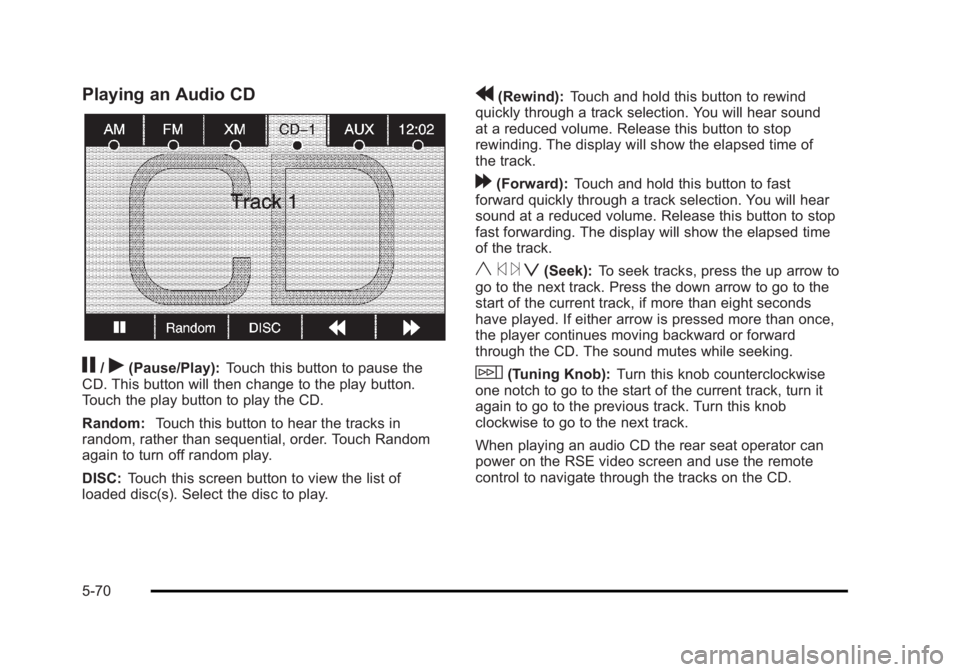
Playing an Audio CD
j /
r (Pause/Play): Touch this button to pause the
CD. This button will then change to the play button.
Touch the play button to play the CD.
Random: Touch this button to hear the tracks in
random, rather than sequential, order. Touch Random
again to turn off random play.
DISC: Touch this screen button to view the list of
loaded disc(s). Select the disc to play. r (Rewind): Touch and hold this button to rewind
quickly through a track selection. You will hear sound
at a reduced volume. Release this button to stop
rewinding. The display will show the elapsed time of
the track.
[ (Forward): Touch and hold this button to fast
forward quickly through a track selection. You will hear
sound at a reduced volume. Release this button to stop
fast forwarding. The display will show the elapsed time
of the track.
y © ¨ z (Seek): To seek tracks, press the up arrow to
go to the next track. Press the down arrow to go to the
start of the current track, if more than eight seconds
have played. If either arrow is pressed more than once,
the player continues moving backward or forward
through the CD. The sound mutes while seeking.
w (Tuning Knob): Turn this knob counterclockwise
one notch to go to the start of the current track, turn it
again to go to the previous track. Turn this knob
clockwise to go to the next track.
When playing an audio CD the rear seat operator can
power on the RSE video screen and use the remote
control to navigate through the tracks on the CD.
5-70
Page 376 of 620

Black plate (74,1)Cadillac Escalade/Escalade ESV Owner Manual - 2010
r (Rewind): Touch and hold this button to rewind
quickly through a track selection. You will hear sound
at a reduced volume. Release this button to stop
rewinding. The display will show the elapsed time
of the track.
[ (Forward): Touch and hold this button to fast
forward quickly through a track selection. You will hear
sound at a reduced volume. Release this button to stop
fast forwarding. The display will show the elapsed time
of the track.
q r (Folder/Artist/Album): Select the left or right
arrow to go to the previous or next folder, artist,
or album on the disc.
Press the middle screen button, with the folder, artist,
or album name, to sort the MP3 by folder, artist,
or album. It may take a few minutes for the system to
sort the MP3.
y © ¨ z (Seek): To seek tracks, press the up arrow to
go to the next track. Press the down arrow to go to the
start of the current track, if more than eight seconds
have played. If either arrow is pressed more than once,
the player will continue moving backward or forward
through the CD. The sound will mute while seeking.
w (Tuning Knob): Turn this knob counterclockwise
one notch to go to the start of the current track, turn it
again to go to the previous track. Turn this knob
clockwise to go to the next track. When playing an MP3 the rear seat operator can power
on the RSE video screen and use the remote control to
navigate through the MP3.
CD Messages If Disc Read Error appears on the display and/or the CD
comes out, it could be for one of the following reasons: .
If a disc was inserted with an invalid or unknown
format. .
If the map DVD disc was installed into the CD slot.
See “ Installing the Map DVD ” under Maps
on
page 5 ‑ 14 for more information. .
It is very hot. When the temperature returns to
normal, the CD should play. .
You are driving on a very rough road. When the
road becomes smoother, the CD should play. .
The CD is dirty, scratched, wet, or upside down. .
The air is very humid. If so, wait about an hour and
try again. .
There may have been a problem while burning
the CD. .
The label may be caught in the CD player.
If the CD is not playing correctly, for any other reason,
try a known good CD.
If any error occurs repeatedly or if an error cannot be
corrected, contact your dealer.
5-74
Page 382 of 620

Black plate (80,1)Cadillac Escalade/Escalade ESV Owner Manual - 2010
Menu Language: Touch English, Francais, Espanol,
Italiano, or Deutsch to change the default language of
the DVD video menus. The menu language must be
available on the disc. The menu language may vary for
each DVD.
Parental Level: Touch this button to change the rating
level to only allow the play of DVDs with a certain
rating. The rating selection is 1 through 8, with 1 Kids
Safe being a G rating. If the 1 is selected, any DVD with
a rating above G will not be able to be viewed without
entering a password.
When the parental level is first entered a keyboard will
appear on the display and a four-digit password will
need to be created. Type in a password that you will be
able to remember. Once the password is created, you
can then select a rating level.
If you would like to change the rating level, press the
Parental Level button, then press the Password button.
Type in the password and then change the rating level.
If the password has been forgotten, contact your dealer.
This may not be available on all DVDs.
Aspect: Touch this button to change the aspect ratio of
the DVD. This may not be available on all DVDs. y (Next Track/Chapter): Press this hard key to go to
the next track or chapter. This button may not work
when the DVD is playing the copyright information or
the previews.
z (Previous Track/Chapter): Press this hard key to
return to the start of the current track or chapter. Press
this button again to go to the previous track or chapter.
This button may not work when the DVD is playing the
copyright information or the previews.
w (Tuning Knob): Turn this knob counterclockwise
one notch to go to the start of the current chapter/track,
turn it again to go to the previous chapter/track. Turn
this knob clockwise to go to the next chapter/track.
DVD Messages If Disc Read Error appears on the display and/or the
DVD comes out, it could be for one of the following
reasons: .
If a disc was inserted with an invalid or unknown
format. .
If the disc is not from a correct region. .
If the map DVD disc was installed into the DVD
audio/video slot. See “ Installing the Map DVD ”
under Maps
on page 5 ‑ 14 for more information. .
It is very hot. When the temperature returns to
normal, the DVD should play.
5-80
Page 393 of 620

Black plate (1,1)Cadillac Escalade/Escalade ESV Owner Manual - 2010
Section 6 Driving Your VehicleYour Driving, the Road, and the Vehicle . . . . . . . . . . 6-2
Defensive Driving . . . . . . . . . . . . . . . . . . . . . . . . . . . . . . . 6-2
Drunk Driving . . . . . . . . . . . . . . . . . . . . . . . . . . . . . . . . . . . 6-2
Control of a Vehicle . . . . . . . . . . . . . . . . . . . . . . . . . . . . . 6-3
Braking . . . . . . . . . . . . . . . . . . . . . . . . . . . . . . . . . . . . . . . . . 6-4
Antilock Brake System (ABS) . . . . . . . . . . . . . . . . . . . 6-5
Braking in Emergencies . . . . . . . . . . . . . . . . . . . . . . . . . 6-6
StabiliTrak ®
System . . . . . . . . . . . . . . . . . . . . . . . . . . . . . 6-6
Magnetic Ride Control ™ . . . . . . . . . . . . . . . . . . . . . . . . 6-9
Road Sensing Suspension . . . . . . . . . . . . . . . . . . . . . . 6-9
Locking Rear Axle . . . . . . . . . . . . . . . . . . . . . . . . . . . . . . 6-9
All-Wheel Drive (AWD) System . . . . . . . . . . . . . . . . . 6-9
Steering . . . . . . . . . . . . . . . . . . . . . . . . . . . . . . . . . . . . . . . 6-10
Off-Road Recovery . . . . . . . . . . . . . . . . . . . . . . . . . . . . . 6-11
Passing . . . . . . . . . . . . . . . . . . . . . . . . . . . . . . . . . . . . . . . . 6-12
Loss of Control . . . . . . . . . . . . . . . . . . . . . . . . . . . . . . . . 6-12
Off-Road Driving . . . . . . . . . . . . . . . . . . . . . . . . . . . . . . . 6-13 Driving at Night . . . . . . . . . . . . . . . . . . . . . . . . . . . . . . . . 6-24
Driving in Rain and on Wet Roads . . . . . . . . . . . . . 6-25
Before Leaving on a Long Trip . . . . . . . . . . . . . . . . . 6-26
Highway Hypnosis . . . . . . . . . . . . . . . . . . . . . . . . . . . . . 6-26
Hill and Mountain Roads . . . . . . . . . . . . . . . . . . . . . . . 6-27
Winter Driving . . . . . . . . . . . . . . . . . . . . . . . . . . . . . . . . . 6-28
If Your Vehicle is Stuck in Sand, Mud, Ice,
or Snow . . . . . . . . . . . . . . . . . . . . . . . . . . . . . . . . . . . . . 6-30
Rocking Your Vehicle to Get It Out . . . . . . . . . . . . . 6-30
Recovery Hooks . . . . . . . . . . . . . . . . . . . . . . . . . . . . . . . 6-31
Loading the Vehicle . . . . . . . . . . . . . . . . . . . . . . . . . . . . 6-32
Towing . . . . . . . . . . . . . . . . . . . . . . . . . . . . . . . . . . . . . . . . . . . . 6-38
Towing Your Vehicle . . . . . . . . . . . . . . . . . . . . . . . . . . . 6-38
Recreational Vehicle Towing . . . . . . . . . . . . . . . . . . . 6-38
Level Control . . . . . . . . . . . . . . . . . . . . . . . . . . . . . . . . . . 6-41
Autoride ®
. . . . . . . . . . . . . . . . . . . . . . . . . . . . . . . . . . . . . . 6-42
Towing a Trailer . . . . . . . . . . . . . . . . . . . . . . . . . . . . . . . . 6-42
Trailer Recommendations . . . . . . . . . . . . . . . . . . . . . . 6-55
6-1
Page 397 of 620

Black plate (5,1)Cadillac Escalade/Escalade ESV Owner Manual - 2010
Antilock Brake System (ABS) This vehicle has the Antilock Brake System (ABS), an
advanced electronic braking system that helps prevent
a braking skid.
When the engine is started and the vehicle begins to
drive away, ABS checks itself. A momentary motor or
clicking noise might be heard while this test is going on.
This is normal.
If there is a problem with
ABS, this warning light
stays on. See Antilock
Brake System (ABS)
Warning Light on
page 4 ‑ 34 .
Along with ABS, the vehicle has a Dynamic Rear
Proportioning (DRP) system. If there is a DRP problem,
both the brake and ABS warning lights come on
accompanied by a 10 ‐ second chime. The lights and
chime will come on each time the ignition is turned on
until the problem is repaired. See your dealer for
service. Let us say the road is wet and you are driving safely.
Suddenly, an animal jumps out in front of you. You slam
on the brakes and continue braking. Here is what
happens with ABS:
A computer senses that the wheels are slowing down.
If one of the wheels is about to stop rolling, the
computer will separately work the brakes at each front
wheel and at both rear wheels.
ABS can change the brake pressure to each wheel, as
required, faster than any driver could. This can help the
driver steer around the obstacle while braking hard.
As the brakes are applied, the computer keeps
receiving updates on wheel speed and controls braking
pressure accordingly.
Remember: ABS does not change the time needed to
get a foot up to the brake pedal or always decrease
stopping distance. If you get too close to the vehicle in
front of you, there will not be enough time to apply the
brakes if that vehicle suddenly slows or stops. Always
leave enough room up ahead to stop, even with ABS.
6-5