2010 AUDI S8 service
[x] Cancel search: servicePage 141 of 384
![AUDI S8 2010 Owners Manual __________________________________________ A_ d_a""" p:....- t_iv _ e_ C_ r_ u _is _ e_C_ o_n_ t_ r_ o_ L_....J_
- Select: Function button I CAR]> Systems > Adaptive
Cruise Control
> Default se](/manual-img/6/57617/w960_57617-140.png "AUDI S8 2010 Owners Manual __________________________________________ A_ d_a\"\"\" p:....- t_iv _ e_ C_ r_ u _is _ e_C_ o_n_ t_ r_ o_ L_....J_
- Select: Function button I CAR]> Systems > Adaptive
Cruise Control
> Default se")
__________________________________________ A_ d_a""" p:....- t_iv _ e_ C_ r_ u _is _ e_C_ o_n_ t_ r_ o_ L_....J_
- Select: Function button I CAR]> Systems > Adaptive
Cruise Control
> Default setting > distance.
Setting Distance
In the Basic setting menu you can set the distance (time interval)
using
distance 1 , distance 2 , distance 3 or distance 4 that Adap tive
Cruise Control is to maintain to a preceding vehicle when in manage
ment mode .
Storing settings
Your individua l settings are automatically stored and allocated to the
remote control key being used (remote key perso nalizat io n). •
System Limitations
Applies to veh icles: with Adaptive C ruise Cont ro l
General information
The radar sensor has limits that the driver must know to
be able to use ACC properly.
The Adaptive Cruise Control works within limits that are also related
to radar sensor range and sight distance. In some situations ACC may
react unusually or late from the driver's point of v iew. Therefore,
always be attentive to what is happe ning around you and always be
ready to intervene, if necessary:
• when driving around curves=>
page 139.
• when vehicles up front are not in line with your vehicle
=>
page 140 .
• when other vehicles are changing lanes=> page 140.
• when other vehicles are difficult to detect=> page 140 .
• when vehicles up ahead are no t moving or obstacles are in your
travel lane=>
page 141.
Con tro ls a nd e quip
m en t Vehicle
OP-eration
& WARNING
The radar sensor's function and range can be reduced by rain, snow
and heavy spray. Moving vehicles up ahead may not be promptly
detected or may not be detected at all .
• Alway s pay careful attention to the traffic situation and be
ready to intervene and be ready to take complete control when
ever necessary .•
A pp lies to ve hicle s: with Ad aptive Cru is e Con tro l
When driving around curves
k::==;:;;:.::: ======== =,~
~
Fig. 149 Vehicle
entering a curve
Fig. 150 Vehicle
leaving a curve
Vehicle care Do-it-yourselt service iTechnical data
Page 143 of 384

__________________________________________ A_ d_a""" p:....- t_iv _ e_ C_ r_ u _is _ e_C_ o_n_ t_ r_ o_ L_....J_
A pp lies to vehicles : with Adaptive Cruise C ont rol
Stationary vehicles
\,__.,,,.---~~ ~i'"lla
=Jt"~-~ ;;;d.i.'..Jt~
Fig . 154 T urning and
stationary vehicle
Fig . 155 Sheering out
and stationary vehicle
If a vehicle that has been detected by ACC exits the highway or sheers
out into the neighboring travel lane, and there is a stationary vehicle
ahead of that vehicle, ACC will not detect o r react to that stationary
vehicle => fig . 154 and=> fig. 155. •
Contro ls a nd e quip
m en t Vehicle
OP-eration Vehicle care Do-it-yourselt service iTechnical data
Page 147 of 384
_________________________________________________ A_ u _ d_ i_ s_ id_ e_ a _ s_s _ i_s _t _ __.fflll
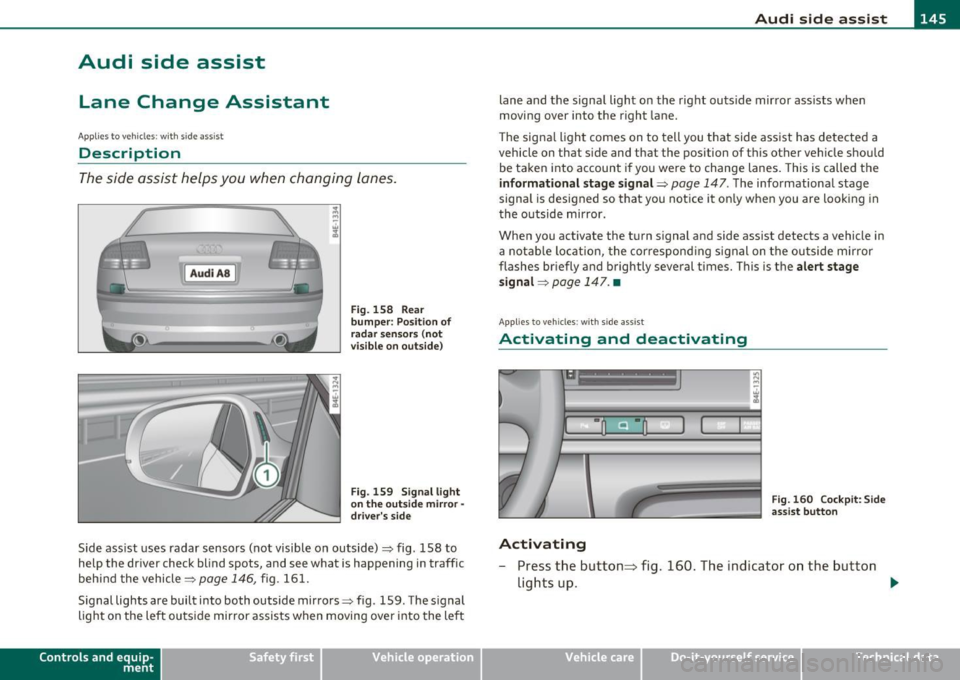
Audi side assist
Lane Change Assistant
Applies to veh icles : with s ide ass ist
Descr iption
The side assist helps you when changing lanes.
l Audi AS J
Fig. 158 Rear
bumper: Position of
radar sensors (not
visible on outside)
Fig. 159 Signal light
on the outside mirror·
driver's side
Side ass ist uses radar sensors (not visible on outside)~ fig. 158 to
help the driver check blind spots, and see what is happening in traffic
behind the vehicle~
page 146, fig. 161.
Signal lights are built into both outside mirrors~ fig. 159. The signal
light on the left outs ide mirror assists when moving over into the left
Contro ls a nd e quip
m en t Vehicle
OP-eration
lane and the signal light on the right outside mirror assists when
moving over into the right lane.
Th e signal light comes on to tell you that side assist has detected a
vehicle on that side and that the position of this other vehicle should be taken into account if you were to change lanes. This is called the
informational stage signal~ page 147. The informational stage
signal is designed so that you notice it only when you are looking in
the outside mirror .
When you activate the turn s ignal and side assist detects a vehicle in
a notab le location, the corresponding signal on the outside mirror
flashes briefly and brightly several times. This is the
alert stage
signal ~
page 147. •
App lie s to ve hicle s: with sid e ass ist
Activating and deactivating
Activating
Fig. 160 Cockpit : Side
assist button
- Press the button~ fig. 160. The indicator on the button
lights up. ..,
Vehicle care Do-it-yourselt service iTechnical data
Page 151 of 384

_________________________________________________ A ___ u...:d _ i_ s ---- id ___ e_.:.; a..::s ...:s...: i..::s ...:t _ ___,J_
CD S ignal on out sid e mirror do es n ot light up
A vehicle approach ing slow ly- in the left -hand lane for example -was
detected by the sensors . Because of the small difference in speed and
the conside rable d istance from your vehicle, the signal on the outside
mirror will not light up=>
& in "Safety tips" on page 152.
@ Informational stage signal light s up
The distance between your veh icle and that of the slowly approach ing
vehicle has narrowed. The informational stage signal on the outside
m irror lig hts up.
As soon as the difference in speed and distance is registered as
notable if you we re to change la nes, a sig nal on the m irror lights up.
Side ass ist wi ll signal at the latest when a detected vehicle enters
your "b lind spot" .
@ Alert stage signal flashes
If you activate your tur n sign al in drivi ng situa tion @, the signa l light
briefly flashes repeatedly. Side assist is alerting you of a veh icle t hat
you may not have no tic ed.
[ i ] Tips
• T he faste r a veh icle approaches from the rear, the soone r the
signal on the outs ide mirror lights up. Side assist will signal, at the
latest, when a detected vehicle enters your "blind spot".
• When veh icles approach very quickly, chang ing lanes can be
dangerous even if the s ignal on the outside mi rror does not light up. •
Con tro ls a nd e quip
m en t Vehicle
OP-eration
Applies to vehicles : w ith side assist
Driving situation: Vehicles dropping back
slowly
Fi g. 16 4 Side as sis t : V ehi cle s dro ppi ng b ack slowly
CD S ignal on outside m irror does not light up
T he vehicle that you passed has not yet been detected by s ide assist .
T he signa l on the outside mirror does not light up=>
& in "Safety
tips" on
page 152.
@ Informational stage signal lights up
A veh icle dropping back slow ly on the r ight (d if f erence in speed of
less than 9 mph, or 15 km/h) has been detected by side ass ist . The
informational stage signa l on the outside mirror lights up .
@ Alert stage signal flashes
If you activate your tur n signa l in dr iv ing si tua tion @, the signa l
briefly flashes repeatedly. Side assist is alerting you of a vehicle that
you may not have not iced .•
Vehicle care Do-it-yourselt service iTechnical data
Page 153 of 384
![AUDI S8 2010 Owners Manual Audi side assist -_______________ ____.
(]] Tips
• Side assist is not active when the basic brightness is adjusted. The
signal light comes on br iefly to help you make the adju](/manual-img/6/57617/w960_57617-152.png "AUDI S8 2010 Owners Manual Audi side assist -_______________ ____.
(]] Tips
• Side assist is not active when the basic brightness is adjusted. The
signal light comes on br iefly to help you make the adju")
Audi side assist -_______________ ____.
(]] Tips
• Side assist is not active when the basic brightness is adjusted. The
signal light comes on br iefly to help you make the adjustment.
• Your settings are automat ically stored and assigned to the remote
control key being used .•
A ppli es to ve hicles : w it h s ide ass ist
General information
Side assist has limits and cannot detect vehicles under all road and
weather conditions . Please remember system limitations and n ever
re ly on the system, especially when :
• driving through curves=>
page 151,
• lanes are of different widths=> page 151. •
Ap plies to vehicles: w ith sid e assist
When driving through curves
Side assist cannot detect vehicles in curves with a turning radius of
less than 328 feet (100 m).
When driving through a curve, it is possible that side assist may
register a vehicle two lanes over, and the signal on the outside mirror
will light up.•
Con tro ls a nd e quip
m en t Vehicle
OP-eration
Applies to vehicles : with side assist
Lane width
Fig. 166 Lanes of a
n orma l width are in
detection area
Fig . 167 Narrow
lanes: Side assist may
detect vehicles two
lanes away
Side assist's detection area is designed to cover lanes of standard
w idth to the left and rig ht of your travel lane, depending on whether
you drive in the center of your lane or closer to the edge.
If you drive in narrow lanes, side assist's detectio n area may also
include other lanes -especially if you tend to drive on t he edge of your
lane => fig. 167. Under these conditions, vehicl es can also be
detected that are two lanes away, and side assist then could switch
between the informationa l and warning stage signals .
When driving in very wide lanes, vehicles in the adjacent lane may not
be detected because they are not inside the detection area .•
Vehicle care Do-it-yourselt service iTechnical data
Page 161 of 384

______________________________________________ A_ u_ t_ o_ m_ a_ t_ ic_ t_r _a _n_ s_m _ i_s _s_ i_o _n _ ___._
Appli es to ve hic les : wi th tip tro nic -st ee rin g w he el
Steering wheel with tiptronic ®
The shift buttons on the steering wheel allow the driver to
shift gears manually.
Fig. 173 Steering
wheel: S hift buttons
-To downshift, touch the button on the left 0-
- To upshift, touch the button on the right G).
The shift b uttons are activated when the selector lever is in D, Sor in
the manual shi ft program (tiptronic) .
Of course, you can continue to use the manual shift program with the
selector lever on the center console .•
Fail-safe mode
If tiptronic® suffers a malfunction, the foil-safe mode
maintains minimum driveobility .
In the event of particular system malfunctions, the automatic trans
mission switches to the fail-safe mode. This is signalled by all the
segments in the display illuminating or going out.
You can continue to move the selector lever to all positions . The
man ual shift prog ram (tiptronic) is switched off in the fail-safe mode.
Con tro ls a nd e quip
m en t Vehicle
OP-eration
In selector lever positions D and Sand in the manual shift program,
the t ransm ission remains in 3rd gea r if 1st, 2nd or 3rd gear was
engaged previously. The transm ission remains in 5th gear, if 4th, 5th
or 6th gear was engaged previously.
T he next time you dr ive off or start the engine, 3rd gear is engaged.
You can cont inue to use reverse gear . But the electronic lockout for
reve rse gear is turned off.
0 Note
If the transmission switches to fail -safe mode, you should take the
vehicle to an authorized Audi dealership as soon as possible to have
the cond ition corrected .•
Emergency release for selecto r Lever
If the vehicle's power supply foils, the selector lever con
be released in on emergency .
Fig. 174 Remo ve the
as htray inse rt
~
Vehicle care Do-it-yourselt service iTechnical data
Page 163 of 384

_________________________________________ A_ d_v _a_ n_ c_e _d _ P_ a_ r _k_ , _·n _g=- S-=- y_s _t _e _m __ ....J_
Advanced Parking System
Advanced Parking System with rear
view camera
Ap plies to veh icles : wit h Adv anced Par kin g S yste m wit h rear view camera
General information
Fig. 176 Trunk l id:
location of the rear·
view camera
In the case of Advan ced Parking Sys tem with rear view camera, the
visual display is installed in combination with the front and back
acoustic parking assist and the re ar-view camera .
The rear-vi ew camera is located in the rear lid=> fig. 176 and assists
the driver when parking in reverse . The picture from the rear-view
camera on the MMI display shows a m irror v iew of a sect ion of the
area behind the vehicle=>
page 165, fig . 182.
(I) Tips
The visual image or rear-view camera picture is available as soon as
the MM I display o r the MMI is switched on or the start-up phase is
completed .•
Con tro ls a nd e quip
m en t Vehicle
OP-eration
Applies to ve hicles : w ith A dva nced Pa rk in g Syste m with rea r vie w c am era
Front and rear acoustic parking assist with
visual display and rear-view camera
The acoustic parking assist gives an acoustic and visual
signal when obstacles are detected, and the rear-view camera provides further aid when parking .
•
Activation
Fig. 177 Section from
center console: switch
for acoustic parking
assist
Fig.178 MMidisplay:
visual display of
distance to a detected
obstacle
- When you engage reverse gear , the Audi parking system is
activated automatically, or .,.
Vehicle care Do-it-yourselt service iTechnical data
Page 167 of 384

_________________________________________ A_ d_v _a_ n_ c_e _d _ P_ a_ r _k_ , _· n_ g=- S-=- y_s _t _e _m __ ....JIJII
& WARNING
• The rear-view cam era has blind spots, in which objects cannot
be detected. Be especiall y carefu l to check for small children and
animal s before backing up . Small childr en and animals will not
always be detected by the sensor s.
• The Audi parking system is not a subst itute for being careful
and alert when ba cking up. Be e specially careful dur ing parking
and similar maneuvers . Always watch where you are driving and
make sure that nothing is in the way.
• Remember that low obstacles which have already been
s ignaled may pass below the system 's sensing zone when the
vehicle is back ing up . Th e fact that the signal stop s does not mean
that you have cleared the obstacle . When the signal stops , impact
is imminent . Objects su ch as trailer hitches, chains, narrow posts
or fences covered by a thin la yer of paint may not always be
detected by the system. They c an still damage your vehicle
without warning.
• Alway s make sure that the volume and frequency of the chimes
is adjusted so th at you can eas ily hear the acoustic distance s ignal
even if the radio is playing, the air-conditioner blower is on High
or there is a high level of outside noise .
- Che ck the setting s whenever someone el se has driven the
vehicle befo re you.
• Improper reliance on the Aud i parking system can caus e colli
sions and seriou s per sonal injury.
- Never rely only on parking assist when changing ba cking up.
- Alway s check re ar view mirrors to make sure it is safe to back
up.
[ i ) Tips
• Before parking with the rear-view camera, the Adaptive A ir
S uspension stan dard or au tomatic mo de must be swit ched on
=> page 18.
Cont rols a nd e quip
m en t
Vehicle OP-eration
• The rear-view camera pict ure is avai lab le as soon as the MMI
Display or the MMI is sw itched on , or the sta rt-u p ph ase is completed .
• In or der for the rear-view camera to function p roper ly, the came ra
lens =>
page 16 1, fig. 176 mus t be kept clean , a nd free o f snow and
ice . Please follow t he addit ional notes on =>
page 174 .
• The c ame ra cover age angle change s when the t runk lid is o pen.
The refore, the rear-v iew camera pict ure is displayed without orienta
t ion lines and w ithout blu e surfaces.
• Obse rve and fo llow the notes on towing mode on=>
page 171. •
Applies to ve hicles: w it h Advanced Pa rking System w ith rear view camera
Rear -view camera coverage area
0
Vehicle care
I)
Fig. 18 1 Top vie w:
R ear-v iew came ra
c o ve rage a re a
Fi g. 182 Side view :
Cov ered ar ea @ and
u nc overed are a@ of
th e re ar -vi ew c am era ..
Do-it-yourselt service iTechnical data