2010 AUDI S8 key battery
[x] Cancel search: key batteryPage 99 of 384
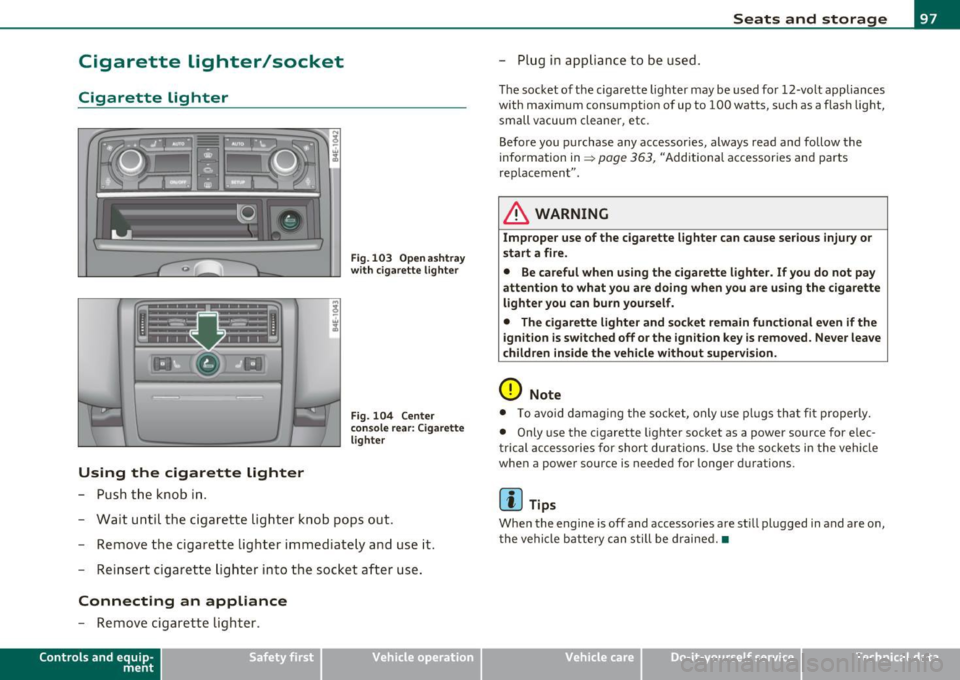
Cigarette lighter/socket
Cigarette lighter
Using the cigarette lighter
-Push the knob in .
Fig. 103 Open ashtray
with cigarette lighter
Fig . 104 Center
console rear: Cigarette
lighter
- Wait until the cigarette lighter knob pops out.
- Remove the cigarette lighter immediately and use it.
- Reinsert cigarette lighter into the socket after use.
Connecting an appliance
-Remove cigarette lighter.
Contro ls a nd e quip
m en t Vehicle
OP-eration
Seats and storage
-Plug in app liance to be used.
The socket of the cigarette lighter may be used for 12-volt appliances
with maximum consumption of up to 100 watts, such as a flash light,
small vacuum cleaner, etc.
Before you purchase any accessories, always read and follow the
information in~
page 363 , "Additional accessories and parts
rep lacement" .
& WARNING
Improper use of the cigarette lighter can cause serious injury or
start a fire.
• Be careful when using the cigarette lighter. If you do not pay
attention to what you are doing when you are using the cigarette
lighter you can burn yourself.
• The cigarette lighter and socket remain functional even if the
ignition is switched off or the ignition key is removed . Never leave
children inside the vehicle without supervision.
0 Note
• To avoid damag ing the socket, only use plugs that fi t properly.
• Only use the cigarette lighter socket as a power source for e lec
trical accessories for short durations. Use the sockets in the vehicle
when a power source is needed for longer durations .
[ i ] Tips
Whe n the engine is off and accessories are still plugged in and are on,
the vehicle battery can still be drained.•
Vehicle care Do-it-yourselt service iTechnical data
Page 105 of 384

_________________________________________________ W_.;,. a_r _m __ a_n .;,. d:.;__ c::.. o.::..:. ld.:.:..._fflll
Warm and cold
Climate controls
Description
The air conditioner is fully automatic and is designed to
maintain a comfortable and uniform climate inside the
vehicle.
We recommend the following settings:
- Set the temperature to 75
°F (+23 °C).
- Press the
[AUTO] button.
With this setting, you attain maximum comfort in the least amount
of time. Change this setting , as desired , to meet your personal needs.
The climate controls are a combination of heating, ventilation and cooling systems, which automatically reduce humidity and cool the
air inside your vehicle .
The air temperature, air flow and air distribution are automatically regulated to achieve and maintain the desired passenger compart
ment temperature as quickly as possible.
The system automatically compensates for changes in outside
temperature and for the intensity of the sunlight entering the
vehicle. We recommend you use the
Automatic mode ~ page 106
for year-round comfort .
Please note the following:
Turn on the air conditioner to reduce humidity in the vehicle. This also
prevents the windows from fogging up.
When the outside temperature is high and the air is very humid,
condensation from the evaporator may drip under the vehicle . This is
normal and does not indicate a leak.
Controls and equip
ment Safety first
If the outside temperature is
low, the fan normally only switches to a
higher speed once the engine coolant has warmed up sufficiently .
The air conditioner temporarily switches off when you drive off from
a standstill using full throttle to save engine power.
The compressor also switches off if the coolant temperature is too
high, so that the engine can be adequately cooled under extreme
loads.
Air pollutants filter
The air pollutants filter (a combined particle filter and activated char
coal filter) reduces or prevents outside air pollution (dust, or pollen)
from entering the vehicle.
The air pollutants filter must be changed at the intervals specified in
your Warranty
& Maintenance booklet, so that the air conditioner can
properly work.
If you drive your vehicle in an area with high air pollution , the filter
may need to be changed more frequently than specified in your Audi
Warranty
& Maintenance booklet. If in doubt, ask your authorized
Audi Service Advisor for advice.
Key coded settings
The air conditioner settings selected are automatically stored and
assigned to the key being used. When the vehicle is started, the air
conditioner automatically selects the settings assigned to that key.
This way every driver will maintain his/her own personal settings and
does not have to reset them manually.
If a different driver uses your key and changes the air conditioner
settings, the latest adjustments will erase and replace the settings
you have stored.
Energy management
To prevent the battery from being discharged and to restore the
balance of energy, components which require large amounts of
Vehicle care Technical data
Page 162 of 384

ffl..__A_ u_t_ o_ m_ a_t _i _c _t_ r_ a_ n_s _m _ i_ s _s _ i_o _n ___________________________________________ _
Fig. 175 Emergency
release for selector
lever
The emergency release is located under the insert for the
ashtray.
- Press the button next to the cigarette lighter~
page 159,
fig. 174. The insert rises from its holder and you can
remove it.
- Press the white switch down with a pen and hold it down
~ fig. 175.
- Now press the interlock and move the selector lever to the
N position.
The selec tor lever can only be moved from the P position if the igni
tion key is in the lock and the ignition is turned on. If the vehicle has
to be pushed or towed if the power supply fails (e .g . battery is
discharged), the selector lever must be moved to the N position using
the emergency locking device.•
Page 261 of 384

_________________________________________ I_ n_ t_ e_ ll_,igent technology ,__E~-
vidual components. It regulates consumption, so that more electrical
ene rgy is not being used than is being generated and ensures an
optimal state of charge for the battery.
[I] Tips
• But even energy management cannot negate the limits of physics.
Consider that the power and life of a battery are limited.
• If starting ability is threatened, you are informed by a warning
~ page 259, "Driver notification in the instrument cluster display" .•
What you should know
The highest priority is given to maintaining starting capa
bility.
Th e battery is severely taxed in short-distance driving, in city tra ffic
and during the cold time of year. Abundant electrical energy is
required, bu t on ly a little is generated .
It is also critical if the engine
is not running and electrical components are turned on. In this
instance energy is being consumed but none is being generated.
It is in prec isely these situations that you will notice energy manage
ment actively regulating the distribution of energy.
Vehicle stands for an extended period
If you do not drive your vehicle over a period of several days or weeks,
electrical components are gradually cut back or switched off. This
reduces energy consumption and maintains starting capability over a
longer period.
Be aware that when you unlock your vehicle, some of the convenience
functions may not operate, such as the Convenience key, the remote
control or the power seat adjustment. The convenience functions will
be available aga in when you turn on the ignition and start the eng ine.
Controls and equip
ment Safety first Vehicle operation
With the
engine turned off
If you listen to the radio, for example, with the engine turned off or
use other MMI functions, the battery is being discharged .
If starting capab ility is jeopardized due to energy consumption, the
following warning appears in the MMI display:
Please start engine, otherwise system will switch off in 3
minutes.
The warning indicates that the system will be turned off automati
cally after 3 minutes. If you wish to continue using the functions, you
have to start the engine.
With the engine running
Although electrical energy is generated when the vehicle is being
driven, the battery can become discharged . This happens mostly
when little energy is being generated and a great dea l consumed and
the battery's state of charge is not optimal.
T o bring the energy balance back into equilibrium, consumers which
require especially large amounts of energy are temporarily cut back
or switched off. Heating systems in particular require a great deal of
energy . If you notice, for example, that the heated seats* or the
heated rear window are not heating, they have been temporarily cut
back or switched off . These systems w ill be ava ilable again as soon as
the energy balance has been restored.
You will also notice that engine idle speed has been increased
slightly. This is normal and not a cause for concern . By increasing
engine idle speed the additional energy required is generated and the
battery is charged. •
Driver notification in the instrument
cluster display
If the battery's state of charge is not in the optimal range, this driver
no tifi cation appears in the instrument cluster display:
Low battery charge: battery will be charged while driving ~
Vehicle care Do-it-yourself service Technical data
Page 291 of 384

___________________________________________ C..:...._ h:....:e :....:c:..:. k.::..: i..:.. n .:..:g:!:....:: a....:. n..:.. d~ f:....:. i.:..ll :.:.i:....:n :.:g !....- __
Closing the engine hood
- Pull the hood down until the pressure from the struts is
reduced.
- Let the hood
drop down and latch in place. Do not try to
push it shut;
it may fail to engage=:> &.
& WARNING
A hood that is not completely latched could fly up and block your
view while driving.
• When you close the engine hood, check it to make sure the
safety catch has properly engaged. The hood should be flush with
the surrounding vehicle body parts.
• If you notice while driving that the hood is not secured prop
erly, stop at once and close it. •
Working in the engine compartment
Be especially careful whenever you work in the engine
compartment.
Whenever you must perform any work in the engine compartment,
for example checking and filling different fluids, there is a risk of injury, burns and accidents. To prevent personal injury always
observe the following WARNINGS. The engine compartment of any
vehicle is a hazardous area=>& .
& WARNING
To help avoid injury, before you check anything under the hood:
• Turn off the engine.
• Remove the ignition key.
• Apply the parking brake.
Safety first
& WARNING (continued)
• Move selector lever to "P" (Park).
• Always let the engine cool down. Hot components will burn
skin on contact.
• To reduce the risk of being burned, never open the hood if you
see or hear steam or coolant escaping from the engine compart
ment. Wait until no steam or coolant can be seen or heard before
carefully opening the hood.
• Keep children away from the engine compartment.
• Never spill fluids on hot engine components. They can cause a
fire. • Never touch the radiator fan. The auxiliary electric fan is
temperature controlled and can switch on suddenly.
• Never open the coolant reservoir cap when the engine is still
warm. The coolant system is pressurized and hot coolant could
spray out.
• Protect your face, hands and arm from steam or hot engine
coolant by placing a thick rag over the cap when you open the
coolant reservoir.
• If work on the fuel system or the electrical system is necessary:
- Always disconnect the battery.
- Never smoke or work near heaters or open flames. Fluids in
the engine compartment could start a fire.
- Keep an approved fire extinguisher immediately available.
• To avoid electrical shock and personal injury while the engine is
running or being started, never touch:
-Ignition cables
- Other components of the high voltage electronic ignition
system.
• If you must perform a check or repair with the engine running:
- First, fully apply the parking brake, move selector lever to
"P" (Park). .,
Vehicle care Technical data
Page 303 of 384

_____________________________________________ C_h _ e_ c_ k_in --= g'-- a_n _d_ f_i _ll _i_n -=g ::;__ ____.fflll
a service facility . The electrolyte level should also be checked each
time the battery is charged =>
page 303.
Have the batte ry checked when you take your vehicle in for serv ice .
You are well advised to rep lace a battery that is older than 5 years.
With certa in types of a irbag deployment, the ba ttery is disconnected
from the vehicle electrical system for safety reasons=>
& in "Repair,
care and disposal of the airbags" on
page 220.
Di sconne cting th e bat tery t ermina ls
Some vehicle f unct ions (power window regulators, fo r example) are
lost if the battery termina ls are disconnected . These functions have
to be re learned after the battery termina ls are connected aga in. To
prevent this, t he battery should only be disconnected from the
vehicle e lectr ica l system when absol ute ly necessary for repairs.
Vehicles not driven for long periods
If you do no t dr ive your veh icle over a period of severa l days or weeks,
electrical components are gradually cut back or switched off. Th is
red uces e nergy consumption and main tains sta rt ing capabili ty ove r a
longer period=>
page 258.
Be aware that when you unlock your vehicle, some of the convenience
functions may not operate, such as the Convenience key*, the remote
control or the power seat adjustment. The convenience functions will
be availab le aga in whe n you tur n on th e ignition and start the eng ine.
Winter operation
Dur ing the winter months, battery capac ity tends to decrease as
temperatures drop. This is because more power is also consumed
while starting, and the headlights, rear w indow defogger, etc., a re
used more often.
Avoid unnecessa ry power consum ption, part ic ula rly i n city traffic o r
when traveling only short distances. Let your authorized Audi dealer check the capacity of the vehicle battery before w inter sets in
=>
page 303 . A well charged battery will not only prevent start ing
prob lems when the wea ther is cold, but will also las t longe r.
Vehicle OP-eration
(I) Tips
If your vehicle is left standing fo r seve ral weeks at extremely low
temperatures, the vehicle battery should be removed and stored
w here it will not free ze. This will preven t it from being damaged and
having to be replaced. •
Working on the battery
Be especially careful when working on or near the
battery.
Vehicle care
Fi g. 2 49 Lugga ge
co mp artme nt: Righ t·
s ide stor age co mpar t·
me nt
Fig. 25 0 Lug gage
comp art me nt: Batt ery ~
Do-it-yourselt service iTechnical data
Page 369 of 384

___________________________________________ A_ l::.. p _h _a_ b_ e_t _ic _a_ l_ in_ d _ e_x __ nn
We ight-sensing mat .... .. .. .. . ... 232
When must the system be inspected? 217
Aircraft Transporting your vehicle .......... 353
All Wheel Drive ............ .. ...... . 257
Alloy wheels . .... .. .. .. .. .. .. ... ... 275
All-wheel drive
Winter tires ....... .. ............ 323
Alternator See Generator .................... 16
Anti-freeze See Engine coolant ...... .. .. .. ... 296
Anti -lock brake system
How the ABS system works ......... 256
Warning/indicator lights ... .. ..... . 19
Anti-Sl ip Regulation System (ASR)
How the system works . .. .. .. .. .. . 254
Anti-theft systems Anti-theft alarm system ....... ... .. 52
Electronic immobilizer ............. 41
Ashtray Front .............. ...... ........ 96
Rear ........ .. .... .. ... . .. .... .. 96
ASR How the Anti-Slip Regulation System
works ..... .. ... .. ... ... ....... 254
Audi Service Repair Manuals and Literature
361
AUTO mode AC climate control ....... .... .. .. . 106
Auto Safety Hotline ... ... ... . .. ..... 195
Auto-Check Contro l .............. .... . 26 Automatic car wash
See Washing ............... ... .. 271
Automatic Shift Lock (ASL) ... .. .. .. ... 156
Automatic transmission 6-speed automatic transm iss ion .. .. 154
Automatic Sh ift Lock (ASL) ....... .. 156
Dr iv ing ................. ...... .. 154
Dynamic shift program ......... ... 157
Emergency release for selector lever . 159
Fail-safe mode ................ ... 159
lg nition key safety lock .... ..... ... 119
Kick-down . ............ .. ....... 157
Manual shift program .. .. .. .. .. .. . 158
Selector lever ............ ........ 155
Shift buttons ... ...... .. .. .. ..... 159
Steering wheel with tiptronic ...... . 159
Average speed ........... .. .......... 36
Avoid damaging the vehicle .. ....... .. 263
B
Background lighting ... . .. .. .......... 67
Battery . .. .. .. .. .... ............... 300
Battery location inside the luggage
compartment .................. 301
Charging ........................ 303
Important warnings when working on the battery ..... ........... ...... .. 301
low . .. .. .. .. .. ...... .. ......... 258
Rep lacing the battery . ... ......... 304
State of charge ..... .. ........... 258
Winter operation . .... ... ..... .... 300
Working on the battery .... ... .. .. . 301 Before driving
.. .. ... ... ... .... ... .. 187
Blended gasoline ................. .. 283
Body cavity sealing .............. . ... 276
Booster seats ......... ............ . 239
Brake fluid
Changing the brake fluid .......... . 300
Checking the brake fluid level ....... 299
What is the correct brake fluid level?. 299
What should I do if the brake fluid warning
light comes on? . .. .. .. .......... 299
Brake system Anti-lock brake system .. ........... 19
Brake assistant .. .. .. .. .. ...... .. 256
Brake booster ........... ... ..... 256
Brake fluid .. .. .. ................ 299
Brake fluid specificat ions for refill and
repla cemen t .................. . 300
Brake light defective . .... .. .. .. .. .. 24
Brake pads ..................... . 262
Electromechanical parking brake .... 123
Fluid reservoir . .......... ... .. ... 299
How does moisture or road salt affect the
brakes? ... .. ................ .. 254
Malfunction ...................... 28
Warning/indicator lights ... .... .. .. 20
Worn brake pads symbol ........... 32
Break-in period .... . .. .............. 261
Brake pads . ... ................ .. 262
Tires ..... .................... .. 261
Bulbs ............ .... .. .... .... .. . 346
Bumper cover Caution when parking near a parking barri-er or curb . ... ................ .. 124
Automatic belt retractor .......... .. . 201 Battery voltage .. ........... ........ . 34
Controls and equip
ment Safety first Vehicle operation
Vehicle care Do-it-yourself service Technical data
Page 372 of 384

__ _::_A:!: l~ p::_ h :....:..:: a:.:b::: e::..::. t:.:ic ::a::.: l:....:..: i n~ d:.:e ~ x::.._ ___________________________________________ _
Outside temperature display .... .... 23 Electronic speed limiter .. ...... .... ... 26 Malf u nction symbo l ....... ... . ... . 29
Sound system d isplay .............. 23
Electronic stabili zation prog ram ( ES P) Radiator fan
.................... 299
Dr iver Information System How the system works ...... .... .. 252 T
emperatu re gauge .......... ..... 10
Digita l speedometer .... ... ... .. ... 23 Wa rning/indicator l ights .. . .. .... .. 16 Engine data .. .. .. ...... ... .. .. .. .. 360
Dr ive r's seat .. .. .. .. .. .. .. ... ....... 77 Eme rgency braking . ............... . 12 5 Engine hood
Dr iver 's sea t memory ................. 84 Emergency closing Clos
ing ......................... 289
Act ivat ing remote control key ....... 85 Power su nroof ................. 58, 59 How to release the
hood ........ .. 288
Recalling a seat position ............ 84
Emergency flasher .. ..... ..... .. ... .. 63 Engine oil
.......... .......... ..... 291
Storing a seat position ... .. .. .. .... 84
Warning/indicator l ights .. . .. .... .. 17 Add
ing .... .... .... .. . .. .. .. .. .. 29 4
Dr iv ing messages .................... 27
Eme rgency locking ................. .. 46 Add
itives .... ....... ...... .... .. 294
Dr iv ing safely ... .. .. ............. .. 186
Driving through water . .......... ... . 263
Dr iv ing time . ... .. .. .. .. .. ..... ..... 36
Duplicate key ....................... 39
DVD playe r for navigat ion system ...... 102 Emergency
locking of doors ... .. ...... 46
Emergency st arting .... ..... ... .. .. . 3 48
Emergency towing .................. 350
E me rgency warning triang le ... .. .. .. . 332
E nergy managemen t .. ............. . 258 Cha
nging .... ....... .... .. .. .. .. 295
C hecking the engine oil leve l ... .. .. 293
I n dicat io ns and condi tions requiring ex tra
check ing . .. .. .. .. ............. 293
Oi l co nsumpt ion .. .. ... ... ..... .. 293
Oil grades ...................... 291
E
Battery power ................... 259
Dr ive r no tifica tion . .... ..... ... .. . 259 Oi
l level symbo l ................... 33
Pressu re malfunction .............. 30
Eas y entry feature
118 Engine
4.2 l, 8-cylinder (350 hp) ........ .. 290 Recommended oil check
inte rv a ls . .. 293
Sen sor defective .. .. .. .. .......... 33
Electrome chanical pa rking bra ke
Emergency br aki ng .. .. .. .. .... .. . 12 5
Ma lf u nct ion . .... .... ..... ... . .. . 12 5
Operation ... .. .. .. ... ... .... ... 1 23
Parking ... .. ..... ....... ... . ... 1 24
Releasing and app ly ing . .. .... ..... 123
Sta rting off w ith a trailer .. .. .. .... 125
Warning/ind icator lights . .......... 20
Electroni c dif feren tial loc k (EDL) 6
.0 l , 12-cylinde r (450 hp) ... ... .. . 291
Compa rtme nt .. .. .. .. .. .... . 2 9 0, 29 1
Coolan t ........................ 296
Hood .. ................. .. .. .. . 288
St art ing .. . .. .... .. .. .... .. . 1 18 , 119
Sta rting with jumpeir cab les ... .. .. . 3 48
Stopp ing . .. .. ... .. .. .... .. .. .. . 120
E ngine comp artment ................ 290
Safety ins truct ions .... .. .. .. .. ... 289 Spe
cifica tion and vis cosi ty .. ... .. .. 2 91
Engine speed lim itation ....... ... ... .. 33
Environment Break-in pe riod . ...... ......... .. 261
Catalytic converter .. .... ......... 262
Disposing of your veh icle battery .. .. 304
Dr iv ing at hig h speeds ............ 264
Dr iv ing to mi nimize pollution and noise ..
263
How the system wor ks ... ..... .... 253
Wa rning/indicator lights ... .. ... ... 19
Electron ic immobili ze r ... .. .... .. .. 12, 41 Wor
king the e ng ine compar tment .. 289
Engine coolant ... ... ... ...... .... .. 296
Add ing coolant .................. 298 Fuel
.... ...... ........... .... .. 285
Fuel economy .. .... ....... .... .. 263
Leaks under your vehicle . ......... 289
Electronic power contro l
Checking the engine coo la nt level ... 297
Letting the vehicle stand and warm up
(EPC) warning/ indicator light ........ 16
Expa nsio n tank .................. 297 264