2010 AUDI S8 air condition
[x] Cancel search: air conditionPage 108 of 384
![AUDI S8 2010 Owners Manual 1111....__w __ a _r_ m __ a_n_ d_ c_ o _ l_d _______________________________________________ _
Turning on and off
I ON/OFF]
Turning the air conditioning on
- Press!ON/OFF],or
- Press !](/manual-img/6/57617/w960_57617-107.png "AUDI S8 2010 Owners Manual 1111....__w __ a _r_ m __ a_n_ d_ c_ o _ l_d _______________________________________________ _
Turning on and off
I ON/OFF]
Turning the air conditioning on
- Press!ON/OFF],or
- Press !")
1111....__w __ a _r_ m __ a_n_ d_ c_ o _ l_d _______________________________________________ _
Turning on and off
I ON/OFF]
Turning the air conditioning on
- Press!ON/OFF],or
- Press !AUTO
J .
Turning th e air conditioning off
- Press I ON/OFF] to turn the air conditioner off and block
outside air from entering the vehicle.
T he air cond itioner turns back on if you press one of the control
buttons or the contro l knob.
[ i J Tips
Residu al h eat: With the ignition turned off, you can activate the
res idual heat function by p ressing the [
ON/OFF) button. The res idual
heat from the coolant can be used to heat the vehicle interior. The
resid ual heat funct ion is t urned off automatically after 30 m inutes. •
Automatic mode [AUTO I
The automatic mode is the standard setting for all
seasons.
Turning on AUTO
- Select temperatur e between 60 °F (+16 °() and 84 °F
(+28
°().
- Press!AUTO]=>page 105, fig. 118.
Automatic operation ensures constant temperatures in the interior
and dehumidifies the air inside the veh icle . Air temperature, volume
and distribution are controlled automatica lly to reach or maintain the
desired interior temperature as q uickly as possible . Fl uctuations in exterior temperature and the effects of temperature from the pos
i
t ion of the s un a re compensa ted for automatically.
T hi s operating mode works only in the adj ustab le temperature range,
from 60 °F ( +16 °C) to 84 °F ( +28 °C) . If a temperature below 60 °F
(+ 16 °C) is se lec ted, LO appea rs in the disp lay. At temperatu res above
84 °F (+28 °C),
HI is displayed. At both extreme settings, climate
cont rol r uns continuously at max imum coo ling o r heat ing power.
There is no temperature regulation. •
Setting the temperature
Separate temperatures can be selected for the driver's
and front passenger's side.
- Rotate the contro l knob to t he left to reduce the temper-
ature, or to the right to inc rease the temperature.
[ i J Tips
• When you press the contro l knob fo r choosing the tempera ture,
the temperature you choose will also appear in the MMI display.
• Synchr onizing clim ate control : By pressing and ho ld ing the
control knob on the driver's side, the temperature setting on the
dr iver's side can be switched to the passenger's side, and vice ve rsa.
In the case of vehicles with rear a ir condit ion ing*, the selected
t empe ra ture se tt ing is also applied to the outer rear seats . The new
temperature is shown in the display .•
Page 112 of 384

lffl!l.___w __ a _r_ m __ a_n_ d_ c_ o _ l_d _______________________________________________ _
In the air recirculat ion mode, the air in the passenger compartment
is re ci rcula ted to preven t exhaus t fu mes and othe r po llution from
enter ing the veh icle. We recommend that you use the manual air
recirc ulation under the following conditions:
• when d riving throug h tunnels
• in a traffic jam .
& WARNING
Do not use this setting for extended period s of time . The window s
c ould fog up sin ce no fr esh air can enter the vehicle.
If the
windows fog up, pre ss the air recir culation button again immedi
ately to switch off the air recirculation function or sel ec t d efrost .•
Page 114 of 384

-Warm and cold .,.,..__ ______________ _
(I) Tips
If the climate control system is operating in cooling mode , air flows
p rima rily from th e outlets in the center console and in the door
pillars . T o ach ieve adequa te cooling, you should never close the
ou tle ts completely. •
Using climate controls economically
Using the climate controls prudently can help save fuel.
When you use the a ir conditioner, e ngine power is reduced
and fuel consumption increa ses. To save fu el, you should use
the air co nditioner o nly when necessary. Also please note the
following points :
If you want to save fuel , activate ECON .
If you are going to drive with the wi ndows open, use ECO N.
~ For the sake of the environment
By reducing t he amount of fuel you use, you also reduce the amou nt
of pollutants emitted into the air .•
A ppli es to vehicl es : w ith sola r sliding /til tin g sunroof
Solar blower fan /solar roof
With sufficient sunlight, the blower fan continues to
operate with solar energy to bring in fresh air after the
ignition has been switched off
The fan motor is operated by solar energy throug h the solar roof after
t he ignition is tur ned off . P lease make certai n that vents @ and ©
are ope n to ach ieve op timal ventilation =:,
page 111, fig. 124.
The venti lation operates on ly with the sunroof closed or in the ti lted
position. If the veh
icle was switched off in the rec irculat ion mode, the air
condi tioning au tomatically sw itches to fresh a ir operation .
Solar operation is not activated at low outside temperatures .•
Windshield defogging/defrosting
A pp lie s t o v eh icles: w it h win dshie ld defo gger/ defrost er
Windshield defogger/defroster ®
The windshield defogger removes humidity from the
windshield .
Fig. 12 5 Wi ndshie ld
def ogger switch
- Press the~ button to turn the wi ndsh ield defogger on
and off=> fig. 125.
T he windsh ield defogger works only when the engine is runn ing . T he
ind icator light in the button illum inates when the windshield
defogger is turned on.
With a cold engine at outside temperatures below 41 °F (+5 °C) and i n
( AU TO] operation, the windshield defogger turns on automati
cally . Depend ing o n outside temperat ure, the w indshie ld is heated
for a maximum of 4 m inutes. The temperature for the climate control
must be selected so tha t it is ope ra ting in the heat ing mode . .,_
Page 116 of 384

llffl..__w __ a _r _m __ a_n _ d_ c_ o_ ld ________________________________________________ _
Rear climate controls
Applies to vehicle s: with rear a ir conditioning
Controls
This overview is to assist you in familiarizing yourself with
the air conditioning controls.
F ig . 127 Air condi
t io nin g cont rols
The left side of the display shows the temperature selected for the
rear passenger on the left, the right side shows the temperature
selected for the rear passenger on the right .
If the air conditioning
sett ings are changed, th is appea rs briefly in the cor respond ing a rea
of the display.
Functions a re t urned on and off by touching the buttons. The LED in
the switch illuminates when the function is turned on .
By pressing the
safety s wit ch ® in the driver's door~ page 54 the
climate contro ls in the rear are deactivated. The message
PASSIVE
appears in the display. In this mode the rear climate control can only
be operated by the driver th rough the controls in the front compa rt
ment.
ION/OFF I Tu rning on and off
The air conditioning can be turned on and off by pressing the
I ON/OFF I button. W it h the ignition Off, the residua l heat funct ion
can be activated by pressing the button. The residual heat from the coolant can
be used to heat the vehicle interior. The residual heat
function is turned off a utomatically after 30 minu tes.
Set ting the temperature
Temperat ure c an be adjusted over a range from 64 ° F (+18 °C) to 80
Of (+ 26 °()
® Air distribution
You can adjust the air circulation so that air flows from specific vents.
• In the
I !setting, all the air flows from the vents in the center
conso le and the out lets in the door pillars.
• In the
-0 setti ng, a ir f lows from the ou tlets u nder the front seats.
• In the~ setting, air flows from outlets in the center console and
t he door pilla rs as we ll as from the outlets under the front seats.
To regulate air distribution automatically, switc h to
[AUTO] .
~ Heated se a ts *
In position O the heating for the seats is turned off. The range of
adjustment is from 1 to 6.
The seats can be pre-heated for about 10 minutes using the heat ing .
However, the heating is turned off if the seat sensors do not detect
the weight of an occupant during th is period .
l'tJ] Ventilated sea ts*
The seat cushion and the seat back surfaces of the front seats can be
ventila ted. In pos it ion O the sea t ventilation is t urned off . The range
of adjustment is from 1 to 6.
!AU TO I Automatic operation
Air temperature, volume of air and air distribution are automatically
reg ulated to ach ieve or ma inta in t he desired temperatures as qu ickly
as possible . •
Page 117 of 384
Warm and cold Ill
----------------
0 Note
To avoid damage to the heating elements in the seats, do not kneel
on the seats or place heavy loads on a small area of the seat. •
Basic settings [SETUP ]
General
The basic settings for the climate control are performed
in the
[SETUP] menu.
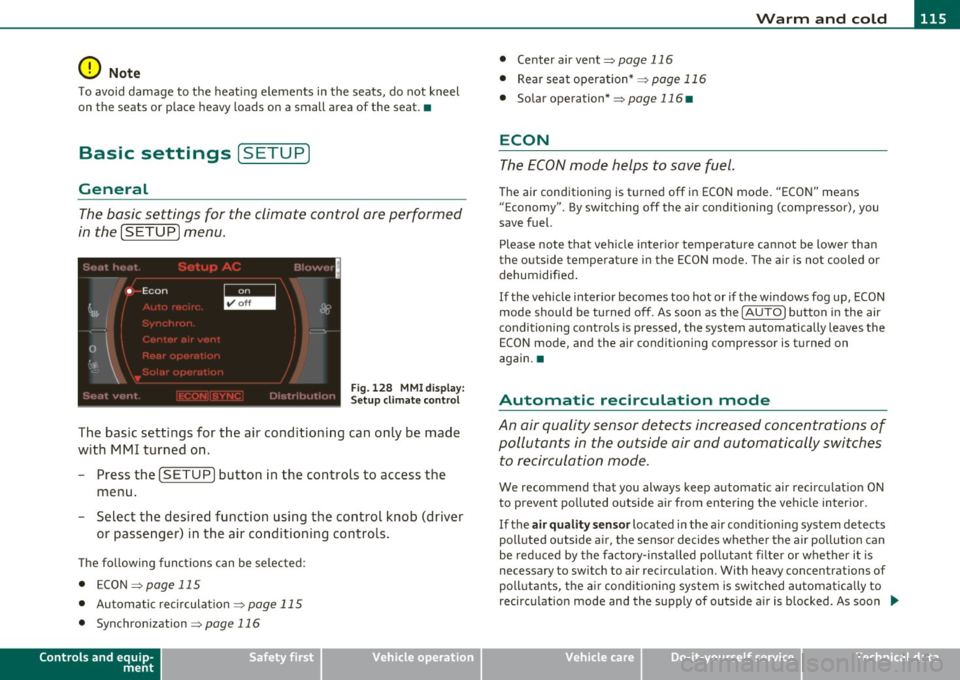
Fig . 128 MMI display:
Setup climate control
The bas ic sett ings for the air conditioning can only be made
with MMI turned on.
- Press the [SETUP] button in the controls to access the
menu .
- Select the desired function using the control knob (driver
or passenger) in the air conditioning controls.
Th e fo llowing funct ions can be se lec ted :
• ECON~
page 115
• Automatic rec irculat ion
~ page 115
• Synchronization ~
page 116
Controls and equip
ment Safety first
•
Center air vent~ page 116
• Rear seat operation* ~
page 116
• Solar operation*
~ page 116 •
ECON
The ECON mode helps to save fuel .
The air conditioning is turned off in ECON mode. "ECON" means
" E conomy". By switching off the air conditioning (compressor), you
save fuel.
Please note that vehicle interior temperature cannot be lower than
the outside temperature in the ECON mode. The air is not cooled or dehumidified .
If the vehicle inter ior becomes too hot or if the windows fog up, ECON
mode should be turned off. As soon as the
( AUTO] button in the air
conditioning controls is pressed, the system automatically leaves the
ECON mode, and the air conditioning compressor is turned on
again. •
Automatic recirculation mode
An air quality sensor detects increased concentrations of
pollutants in the outside air and automatically switches
to recirculation mode .
We recommend that you always keep automat ic air recirculat ion ON
to prevent polluted outside air from entering the vehicle interior.
If the
air quality sensor located in the air conditioning system detects
polluted outside air, the sensor decides whether the air pollution can
be reduced by the facto ry-insta lled pollutant fi lter or whe ther it is
necessary to switch to air recirculation. With heavy concentrations of
pollutants, the air conditioning system is switched a utomat ically to
recirculation mode and the supply of outside air is blocked . As soon .,.
Vehicle care Technical data
Page 118 of 384

lffll.___w __ a _r_ m __ a_n_ d_ c_ o _ l_d _______________________________________________ _
as the concentration of pollutants in the outside air drops, fresh air is
supplied to the vehicle interior again.
In the event that the windows fog up during automatic air recircula
tion, you must press th e@ button immediately.
Under certain operating conditions, automatic air recirculation is
switched off automatically. With outside temperatures below about
-8 °C and in the ECON mode, automatic air recirculation is limited to
15 seconds. •
Synchronization
One climate control setting for all seats.
With synchronization active, the driver's or the passenger's settings
are adopted for the other seats. All the other settings that were made
are transferred to the other seats. This includes all the climate
control settings right down to the heated seats.
If a different setting is selected at a "synchronized seat", synchroni
zation is cancelled. •
Center air vent
The temperature of the air leaving the center vents can be
changed to differ from the temperature setting.
Fig. 129 MMI display:
Center air vent
The air flow coming from the center vents can be adjusted to be
colder or warmer than the selected set temperature.
In this way you have the opportunity to have the air flow from the
center vents a little warmer or cooler, depending on the time of year.
A little cooler in the summer and a little warmer in the winter. •
Applies to veh icles: w ith rear air conditioning
Rear seat operation
The rear climate controls can be operated from the
driver's area.
With active rear seat operation, the driver or the passenger can
operate the rear climate control system from
his/her controls. •
Applies to veh icles: with solar roof
Solar operation
Depending on the solar irradiation in the vehicle, the fan
will run using solar power to keep fresh air circulating
inside the vehicle, even a~er you switch off the ignition.
-Switch the solar operation to on.
After you switch off the ignition, the fan is operated using so lar
power from the solar roof. Make sure outlets ® and © are open for
maximum ventilation=::;,
page 111, fig. 124.
The ventilation works only if the sunroof is closed or tilted up.
If you turn off the engine while the air recircu lation is on, the air
conditioning automatically switches to fresh air mode.
Solar operation is not activated at low outside temperatures. •
Page 128 of 384

1111..__0_ n_ t_h _e_ r_o _ a_ d _________________________________________________ _
0 Note
If the warn in g/i nd icator lig ht ( U.S . models: BRAKE , Canadia n mode ls:
«D> ) flashes in the instrument cluster, t here is a b rake system
ma lf u nct ion. By p ress ing t he [
C H E CK i button, yo u can br ing up a
dr iver message which explains the ma lfunction in more detail. If the
mes sage
Parking brake ! Please conta ct work shop appe ars, there is
a park ing brake ma lfunction which you s hou ld have repaired immedi
a tely by an au thor ized deale rship =>
page 28. •
Cruise control
Switching the system on
The cruise contr ol syst em makes it possib le to drive at a
constant speed starting at 2 0 m ph ( 30 km/h).
Fig. 136 Co ntrol lever
w ith set button Fig. 137 D
ispl ay:
Se lec ted speed
- Pull the lev er to positio n (D ~ fig. 136 to switc h th e
syst em on.
- Drive at th e speed you wis h to s et.
- Press button
© to set t hat speed .
The display => fig. 137 will show the set speed. The d isp lay may vary
depe nding on the ty p e of displa y in yo ur vehicle. The indica to r li gh t
CRUISE (US mode l)/ 0 (Canadian mode l) wi ll also light up in the
in st rumen t clu ste r.
T he speed is kept constant via an eng ine output adjustment or act ive
brake intervention.
& WARNING
• Alway s pay attention to traffic even when the cruise control i s
switched on. You are always responsible for your speed and the
di stan ce between your vehicle and other vehicles.
• For safety r easons , the cruise control should not be used in the
city, in stop-and-go traffic , on twisting roads and when road
conditions are poor ( such as ice , fog, gravel, heavy rain and hydro
planing ) -risk of accident .
• Turn off the cruise control temporarily when enter ing turn
lanes , highway exit lane s or in construction zone s.
Page 165 of 384

_________________________________________ A_ d_v _ a_ n_ c_e _d _ P_ a_ rk_ in_ g =- S -.:.y_s _t _e _ m ___ _
If you press a fu nction bu tto n on t he M MI termina l, the v is u a l display
dis appea rs. Manu ally sw itchin g th e par king assist on ag ain via the
p,qA
switch s hows th e visual image on the MMI display again . Further
info rmation regarding the MMI term inal is in cl uded in the MMI user's
ma nual.
Rear-view camera (rear view)
The rear-view camera picture~ page 166, fig . 183 appears on the
MM I d is play as a mir ror im age. The re ar-view came ra pic ture has
or ientat ion lines and mar ked surfaces projected into i t as an a id to
the par king process ~
page 164. The red line in the picture
~ pag e 164, fig. 179 or~ page 164, fig. 1 80 indicates the coll is ion
area . You s houl d sto p bac kin g up, prefera bly befo re yo u reac h this
poin t~ & -
lf your vehicle is close to an obstacle , th e visual d istance d isplay also
appe ars in th e pic t ur e fr om t he re ar -view camera. This s uperim posed
display is intended to help d isplay the re levant cr itical ve hicle area .
If the visual dis play is shown on the MMI display and you press the
co ntr ol bu tton wi th the
Rear view funct ion ~ page 161 , fig. 178, the
pict ure from t he rear -view came ra is disp laye d.
If the pic ture from t he re ar-view camera is sh own and yo u pre ss the
cont rol button with the
Graphic f unction~ page 166 , fig. 183, t he
visual displ ay is s hown.
Th e p icture from th e re ar-v iew ca mera can b e sw itche d off o n the
MM I dis play ~
page 173 . The acoust ic distance warning remains
a cti ve.
If you press a function b utton on the MMI term ina l, the rear-v iew
c amera picture d is app ears. The rear -view came ra pictur e re a ppears
the next time you pa rk . But the picture from the rear-view camera can
also be show n ag a in on the MMI display by manua lly switc hing off
and on wi th t he
p,,1 A swi tch. Fu rther in fo rm ation r egard ing the M MI
terminal is incl uded i n th e MM I user 's manual.
Controls and equip
ment Safety first
& WARNING
•
Sensors have dead spaces in which objects cannot be detected .
Be especially careful to check for small children and animals
before backing up. Small children and animals will not always be
detected by the sensors .
• The Audi parking system is not a substitute for being careful
and alert when backing up. Be especially careful during parking
and similar maneuvers . Always watch where you are driving and
make sure that nothing is in the way.
• Remember that low obstacles which have already been
signaled may pass below the system's sensing zone when the
vehicle is backing up. The fact that the signal stops does not mean
that you have cleared the obstacle. When the signal stops, impact is imminent . Objects such as trailer hitches, chains, narrow posts
or fences covered by a thin layer of paint may not always be
detected by the sy stem. They can still damage your vehicle
without warning.
• Always make sure that the volume and frequency of the chimes
is adjusted so that you can easily hear the acoustic distance signal
even if the radio is playing, the air-conditioner blower is on High
or there is a high level of outside no ise.
- Check the settings whenever someone else has driven the
vehicle before you.
• Improper reliance on the Audi parking system can cause colli
sions and serious personal injury.
-Never rely only on parking assist when backing up.
- Always che ck rear view mirrors to make sure it i s safe to back
up.
[ i ] Tips
• The rear -view came ra pict ure is avai lab le as soon as the M MI
D ispl ay or the MMI i s swi tched o n, or the s tart -up ph ase is comple ted. _,.
Vehicle care Technical data