2009 VOLVO XC60 tow
[x] Cancel search: towPage 77 of 297

03 Your driving environment
Instruments and controls03
}}
* Option/accessory, for more information, see Introduction. 75Symbol Description
Left turn signal indicator
Right turn signal indicator
Trailer turn signal indicator
If you are towing a trailer, this light will flash
simultaneously with the trailer\fs turn signals. If
the light does not flash, or if they flash faster
than usual when signaling a turn, the turn sig-
nals on the trailer or on the vehicle are not
functioning properly.
Malfunction Indicator Light
As you drive, a computer called On-Board
Diagnostics II (OBDII) monitors your vehicle\fs
engine, transmission, electrical and emission
systems.
The malfunction indicator (CHECK ENGINE)
light will illuminate if the computer senses a
condition that potentially may need correcting.
When this happens, please have your vehicle
checked by a trained and qualified Volvo serv-
ice technician as soon as possible.
A malfunction indicator (CHECK ENGINE) light
may have many causes. Sometimes, you may
not notice a change in your car\fs behavior.
Even so, an uncorrected condition could hurt
fuel economy, emission controls, and drivabil-
ity. Extended driving without correcting the
cause could even damage other components
in your vehicle.
This light may illuminate if the fuel filler cap is
not closed tightly or if the engine was running
while the vehicle was refueled.
Canadian models are equipped with this sym-
bol:
Anti-lock Brake System (ABS)
warning light
If the warning light comes on, there may be a
malfunction in the ABS system (the standard
braking system will still function). Check the
system by:
1. Stopping in a safe place and switching off the ignition.
2. Restart the engine.
3. If the warning light goes off, no further action is required.
If the warning light remains on, the vehicle
should be driven to a trained and qualified
Volvo service technician for inspection,
See
page 112 for additional information.
Canadian models are equipped with this sym-
bol:
Rear fog light
This symbol indicates that the rear fog light
(located in the driver\fs side tail light cluster) is
on.
Stability system
This indicator symbol flashes when the DSTC
(Dynamic Stability and Traction Control sys-
tem) is actively working to stabilize the vehicle,
155 for more detailed information.
Tire pressure monitoring system
(TPMS)*
This symbol illuminates to indicate that tire
pressure in one or more tires is low, see
page 271 for detailed information.
Low fuel level
When this light comes on, the vehicle should
be refueled as soon as possible.
Information symbol
The information symbol illuminates and a text
message is displayed if a fault is detected in
one of the vehicle\fs systems. The message can
be erased and the symbol can be turned off by
pressing the READ button (see page 123 for
information) or this will take place automati-
cally after a short time (the length of time varies,
depending on the function affected).
Page 78 of 297

03 Your driving environmentInstruments and controls 03
76 The information symbol may also illuminate
together with other symbols.
High beam indicator
This symbol illuminates when the high beam
headlights are on, or if the high beam flash
function is used.
Left turn signal indicator
Right turn signal indicator
NOTE
\b
Both turn signal indicators will flash
when the hazard warning flashers are
used.
\b If either of these indicators flash faster
than normal, the direction indicators are
not functioning properly.
Indicator and warning symbols Symbol Description
Low oil pressure
Parking brake applied
SRS airbags Symbol Description
Seat belt reminder
Generator not charging
Fault in the brake system
Warning symbol
Low oil pressure
If the light comes on while driving, stop the
vehicle, stop the engine immediately, and
check the engine oil level. If the oil level is nor-
mal and the light stays on after restart, have the
vehicle towed to the nearest trained and quali-
fied Volvo service technician. This is normal,
provided it goes off when the engine speed is
increased.
Parking brake applied
This symbol illuminates when the parking
brake is applied. On models equipped with the
electric parking brake, this symbol flashes
while the brake is being applied and then glows
steadily.A flashing symbol means that a fault has been
detected. See the message in the information
display.
Canadian models are equipped with this sym-
bol:
NOTE
This symbol also comes on when the
mechanical parking brake is only slightly
applied.
Airbags – SRS
If this light comes on while the vehicle is being
driven, or remains on for longer than approxi-
mately 10 seconds after the vehicle has been
started, the SRS system\fs diagnostic functions
have detected a fault in a seat belt lock or pre-
tensioner, a front airbag, side impact airbag,
and/or an inflatable curtain. Have the system(s)
inspected by a trained and qualified Volvo
service technician as soon as possible.
Seat belt reminder
This symbol comes on for approximately 6 sec-
onds if the driver has not fastened his or her
seat belt.
Page 79 of 297

03 Your driving environment
Instruments and controls03
}}
77
Generator not charging
This symbol comes on during driving if a fault
has occurred in the electrical system. Contact
an authorized Volvo workshop.
Engine temperatureEngine overheating can result from low oil or
coolant levels, towing or hard driving at high
heat and altitude, or mechanical malfunction.
Engine overheating will be signaled with text
and a red warning triangle in the middle of the
instrument display. The exact text will depend
on the degree of overheating. It may range
from "HIGH ENGINE TEMP – SLOW
DOWN" to "
HIGH ENGINE TEMP – STOP
ENGINE." If appropriate, other messages,
such as "COOLANT LEVEL LOW" will also be
displayed. If your engine does overheat so that
you must stop the engine, always allow the
engine to cool before attempting to check oil
and coolant levels.
Fault in brake system
If this symbol lights, the brake fluid level may
be too low. Stop the vehicle in a safe place and
check the level in the brake fluid reservoir, see
page 112. If the level in the reservoir is below
MIN, the vehicle should be transported to an
authorized Volvo workshop to have the brake
system checked. Canadian models are equipped with this sym-
bol: If the and symbols come on
at the same time, there may be a fault in the
brake force distribution system.
1. Stop the vehicle in a safe place and turn off
the engine.
2. Restart the engine.
\b If both symbols extinguish, continue driv-
ing.
\b If the symbols remain on, check the level in
the brake fluid reservoir, see page 227. If
the brake fluid level is normal but the sym-
bols are still lit, the vehicle can be driven,
with great care, to an authorized Volvo
workshop to have the brake system
checked.
\b If the level in the reservoir is below
MIN, the
vehicle should be transported to an author-
ized Volvo workshop to have the brake
system checked.
WARNING \b
If the fluid level is below the MIN mark
in the reservoir or if a warning message
is displayed in the text window:
DO
NOT DRIVE. Have the vehicle towed to
a trained and qualified Volvo service
technician and have the brake system
inspected.
\b If the ABS and Brake system lights are
on at the same time, there is a risk of
reduced vehicle stability.
Warning symbol
The red warning symbol comes on when a fault
has been indicated which could affect the
safety and/or drivability of the vehicle. An
explanatory text is shown on the information
display at the same time. The symbol remains
visible until the fault has been rectified but the
text message can be cleared with the READ
button, see page 123. The warning symbol can
also come on in conjunction with other sym-
bols.
Action:
1.
Stop in a safe place. Do not drive the vehi-
cle further.
2. Read the information on the information display. Implement the action in accord-
Page 88 of 297

03 Your driving environmentSteering wheel 03
86
* Option/accessory, for more information, see Introduction.
Adjusting
Adjusting the steering wheel
Lever for releasing/locking the steering
wheel
Possible positions
The steering wheel can be adjusted for both
height and reach:
1. Pull the lever toward you to release the steering wheel.
2. Adjust the steering wheel to the position that suits you.
3. Push back the lever to lock the steering wheel in place. If the lever is difficult to
push into place, press the steering wheel
lightly at the same time as you push the
lever.
WARNING Never adjust the steering wheel while driv-
ing.
With speed-dependent power steering* the
level of steering force can be adjusted, see
page 157.
Keypads
Keypads in the steering wheel
Cruise control, see page 158. Adaptive
cruise control*, see page 172.
Audio controls, see page 133.Horn
Horn
–
Press the steering wheel hub to sound the
horn. G02113
8 G031397 G031398
Page 89 of 297

03 Your driving environment
Lighting03
}}
87
Lighting panel
Overview, light switches
Thumb wheel for adjusting display and
instrument lighting
Rear fog light
Front fog lights
Headlights/parking lights
Instrument lightingIllumination of the display and instrument lights
will vary, depending on ignition mode.
The display lighting is automatically subdued
in darkness and the sensitivity is set with the
thumb wheel.
The intensity of the instrument lighting is
adjusted with the thumb wheel. High/low beam headlights
Headlight switch and lever
Daytime running lights/no
high beams
Parking lights
Low beamsLow beamsWhen the engine is started, the low beams are
activated automatically (daytime running lights)
if the headlight control is in position
0 or .Daytime running lights can be deactivated by
a trained and qualified Volvo service techni-
cian.
NOTE \b
The use of daytime running lights is
mandatory in Canada.
\b Continuous high beams cannot be acti-
vated when the headlight switch is in
position or 0. High beam flash will
function in these positions.
High beam flash– Move the lever toward the steering wheel
to position . The high beams come on
until the lever is released.
High/low beam headlights
Continuous high beams
1. Set the ignition to mode II.
2. With the light switch in position ,
pull the turn signal lever toward the steer-
ing wheel to position to toggle between
high and low beams (this also applies on
models equipped with the optional Dual
Xenon headlights).
Page 93 of 297

03 Your driving environment
Lighting03
}}
* Option/accessory, for more information, see Introduction. 91
Interior lighting, rear
Rear reading lights (models with the optional pan-
orama moonroof)
Rear reading lights (models without the panorama
moonroof) The lights are switched on or off by pressing
each respective button.
Courtesy lights/door step lighting*The courtesy lights/door step lighting switch
on/off automatically when one of the front
doors is opened/closed.
Glove compartment lightingThe glove compartment lighting switches on/
off automatically when the lid is opened/
closed.
Overhead courtesy lightingThe passenger compartment lighting is
switched on and off automatically when button
(3) is in the neutral position.
The lighting comes on and remains on for
30 seconds if:
\b
the vehicle is unlocked from the outside
with the key or remote control
\b the engine is switched off and the ignition
is in mode 0.
The lighting switches off when:
\b the engine is started
\b the vehicle is locked from the outside.
The lighting comes on and remains on for two
minutes if one of the doors is open. The passenger compartment lighting can be
switched on and off manually within 30 minutes
after the vehicle has been unlocked.
If the lighting is switched on manually and the
vehicle is locked, the courtesy lighting will
switch off automatically after one minute.
Home safe lighting
When you leave your vehicle at night, you can
make use of the home safe lighting function to
illuminate the area in front of the vehicle.
1. Remove the key from the ignition slot.
2. Pull the direction indicator lever as far as
possible towards the steering wheel and
release it.
3. Exit the vehicle and lock the doors.
The headlights, parking lights, turn signals,
lights in the door mirrors, license plate lights,
and footwell lighting will illuminate and remain
on for 30 1
, 60 or 90 seconds. The time interval
can be set under Car settings Light
settings Home safe lighting. For a
description of the menu system, see
page 122. 1
Factory setting G031416 G021150
Page 96 of 297

03 Your driving environmentWipers and washers 03
94
* Option/accessory, for more information, see Introduction.
CAUTION The rain sensor should be deactivated when
washing the car in an automatic car wash,
etc. If the rain sensor function is left on, the
wipers will start inadvertently in the car
wash and could be damaged.
Windshield washing
Washing function
Move the lever toward the steering wheel to
start the windshield and headlight washers.
After the lever is released the wipers make sev-
eral extra sweeps.
Heated washer nozzles*The washer nozzles are heated automatically
in cold weather to help prevent the washer fluid
from freezing.
High-pressure headlight washing*High-pressure headlight washing consumes a
large quantity of washer fluid. To save fluid, the
headlights are washed using two alternatives:
\b
Low/high beam headlights on. The head-
lights will be washed the first time the wind-
shield is washed. Thereafter, the head-
lights will only be washed once for every
five times the windshield is washed within
a 10-minute period.
\b Parking lights on. Optional Active Dual
Xenon headlights will be washed once for
every five times the windshield is washed.
Normal halogen headlights will not be
washed.
CAUTION Use ample washer fluid when washing the
windshield. The windshield should be thor-
oughly wet when the wipers are in opera-
tion.
NOTE One headlight is washed at a time.
Tailgate wiper/washer
1. Intermittent wiping
2. Normal (continuous) wiping
Move the lever forward (see the arrow in the
illustration) to start the tailgate washer.
Tailgate wiper and reverse gearIf the windshield wipers are on and the trans-
mission is put into reverse gear, the tailgate
wiper will go into intermittent wiping function
1
. 1
Consult your Volvo retailer if you would like to have this function deac\
tivated. G031420G031421 G031420G031422
Page 102 of 297
03 Your driving environmentPower panorama moonroof* 03
100
* Option/accessory, for more information, see Introduction.
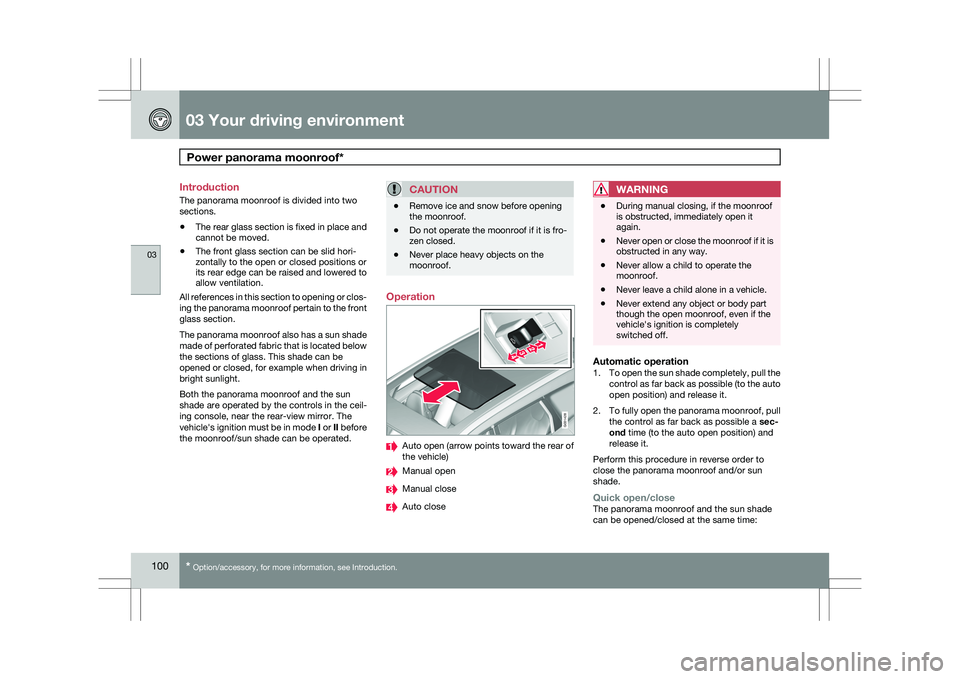
Introduction
The panorama moonroof is divided into two
sections.
\b
The rear glass section is fixed in place and
cannot be moved.
\b The front glass section can be slid hori-
zontally to the open or closed positions or
its rear edge can be raised and lowered to
allow ventilation.
All references in this section to opening or clos-
ing the panorama moonroof pertain to the front
glass section.
The panorama moonroof also has a sun shade
made of perforated fabric that is located below
the sections of glass. This shade can be
opened or closed, for example when driving in
bright sunlight.
Both the panorama moonroof and the sun
shade are operated by the controls in the ceil-
ing console, near the rear-view mirror. The
vehicle\fs ignition must be in mode I or II before
the moonroof/sun shade can be operated.
CAUTION \b
Remove ice and snow before opening
the moonroof.
\b Do not operate the moonroof if it is fro-
zen closed.
\b Never place heavy objects on the
moonroof. Operation
Auto open (arrow points toward the rear of
the vehicle)
Manual open
Manual close
Auto closeWARNING \b
During manual closing, if the moonroof
is obstructed, immediately open it
again.
\b Never open or close the moonroof if it is
obstructed in any way.
\b Never allow a child to operate the
moonroof.
\b Never leave a child alone in a vehicle.
\b Never extend any object or body part
though the open moonroof, even if the
vehicle\fs ignition is completely
switched off.
Automatic operation1.
To open the sun shade completely, pull the
control as far back as possible (to the auto
open position) and release it.
2. To fully open the panorama moonroof, pull
the control as far back as possible a sec-
ond time (to the auto open position) and
release it.
Perform this procedure in reverse order to
close the panorama moonroof and/or sun
shade.
Quick open/closeThe panorama moonroof and the sun shade
can be opened/closed at the same time: G031428