Page 256 of 608
256
3-1. Using the air conditioning system and defogger
Front manual air conditioning system∗
Adjusting the settings■ Adjusting the temperature setting
Turn the temperature control dial clockwise (warm) or counter-
clockwise (cool).
If is not pressed, the system will blow ambient temperature air or
heated air.
For quick cooling, turn the temperature selector knob to the “MAX A/C”
position. The air conditioning will automatically turn on in (recir-
culated air) mode.
Fan speed control dial
Air outlet selection dial
Air conditioning on/off switch
Temperature control dial
Outside air or recirculated air mode
Rear air conditioning
on/off switch∗
∗: If equipped
Page 257 of 608
257
3-1. Using the air conditioning system
and defogger
3
Interior features
■Adjusting the fan speed
Turn the fan speed control dial clockwise (increase) or counter-
clockwise (decrease).
Turn the dial to “OFF” to turn the fan off.
■ Changing the air outlets
Set the air outlet selection di al to an appropriate position.
The positions between the air outlet selections shown below can be also
selected for more detailed adjustment.
Upper body
: Vehicles without rear air conditioning system Upper body and feet
: Vehicles without rear air conditioning system
Page 261 of 608

261
3-1. Using the air conditioning system
and defogger
3
Interior features
■Using the system in recirculated air mode
The windows will fog up more easily if the recirculated air mode is used for
an extended period.
■ Window defogger feature
In order to prevent the windows from fogging up, recirculated air mode may
automatically switch to outside air mode if the ambient temperature drops.
This feature can be cancelled by pushing and holding the air intake mode
switch for longer than 2 seconds. The feature will be reactivated when the
engine switch is turned to the “ACC” or “LOCK” position.
■ When outside air temperat ure approaches 32°F (0°C)
The air conditioning system may not operate even when is pressed.
■ When the indicator light on
flashes (2.7 L 4-cylinder (1AR-FE)
engine only)
Press
and turn off the air conditioning system before turning it on
once more. There may be a problem in the air conditioning system if the indi-
cator light continues to flash. Turn the air conditioning system off and have it
inspected by your Toyota dealer.
■ When
is selected for the air outlets used
For your driving comfort, air flowing to the feet may be warmer than air flow-
ing to the upper body depending on the position of the temperature adjust-
ment dial.
Page 262 of 608
262 3-1. Using the air conditioning system and defogger
CAUTION
■To prevent the windshield from fogging up
Do not set the air outlet selection dial to during cool air operation in
extremely humid weather. The difference between the temperature of the
outside air and that of the windshield can cause the outer surface of the
windshield to fog up, blocking your vision.
NOTICE
■To prevent battery discharge
Do not leave the air conditioning system on longer than necessary when the
engine is off.
Page 264 of 608
264 3-1. Using the air conditioning system and defogger
Using the automatic mode
Press .The air conditioning system be gins to operate. Air outlets
and fan speed are automatically adjusted according to the
temperature setting.
“AUTO” will be displayed on the multi-information display.
Turn the temperature control dial clockwise (warm) or coun-
terclockwise (cool).
Air outlets and fan speed for the right-hand and left-hand seats may
be set separately depending on the temperature setting.
Multi-informat ion display
Front passenger’s side tem-
perature setting display Fan speed
display
Airflow display
Driver’s side
temperature
setting dis-
play Temperature setting dis-
play for rear passengers
STEP1
STEP2
Page 265 of 608

265
3-1. Using the air conditioning system
and defogger
3
Interior features
Adjusting the settings
■ Adjusting the temperature setting
Turn the temperature control dial clockwise (warm) or counter-
clockwise (cool).
The air conditioning system sw itches between individual and
simultaneous modes each time (w ithout rear air conditioning
system) or (with rear air condi tioning system) is pressed.
Simultaneous mode: Only the driver ’s side temperature control dial
can be used to adjust the temperature for all seats.
The indicator status will be as follows:
Without rear air conditioning system: (off)
With rear air conditioning system: (on)
Individual mode: The temperature for the driver’s, front passen-
ger’s and rear seats ( →P. 274) can be adjusted separately. Operat-
ing the passenger's side or rear (with rear air conditioning system)
temperature control will enter individual mode.
The indicator status will be as follows:
Without rear air conditioning system: (on)
With rear air conditioning system: (off)
■ Adjusting the fan speed
Press “ ∧” (increase) or “ ∨” (decrease) on or .
The fan speed is shown on the multi-information display. (7 levels)
Press to turn the fan off.
Page 270 of 608
270 3-1. Using the air conditioning system and defogger
■Window defogger feature
Recirculated air mode may automatically switch to (outside air) mode
in situations where the windows need to be defogged.
■ When outside temperature approaches 32 °F (0 °C)
The air conditioning system may not operate even when is pressed.
CAUTION
■ To prevent the windshield from fogging up
Do not use during cool air operation in extremely humid weather. The
difference between the temperature of the outside air and that of the wind-
shield can cause the outer surface of the windshield to fog up, blocking your
vision.
NOTICE
■To prevent battery discharge
Do not leave the air conditioning system on longer than necessary when the
engine is off.
Page 272 of 608
272 3-1. Using the air conditioning system and defogger
Adjusting the settings
■ Adjusting the temperature setting
Turn the temperature control dial clockwise (warm) or counter-
clockwise (cool).
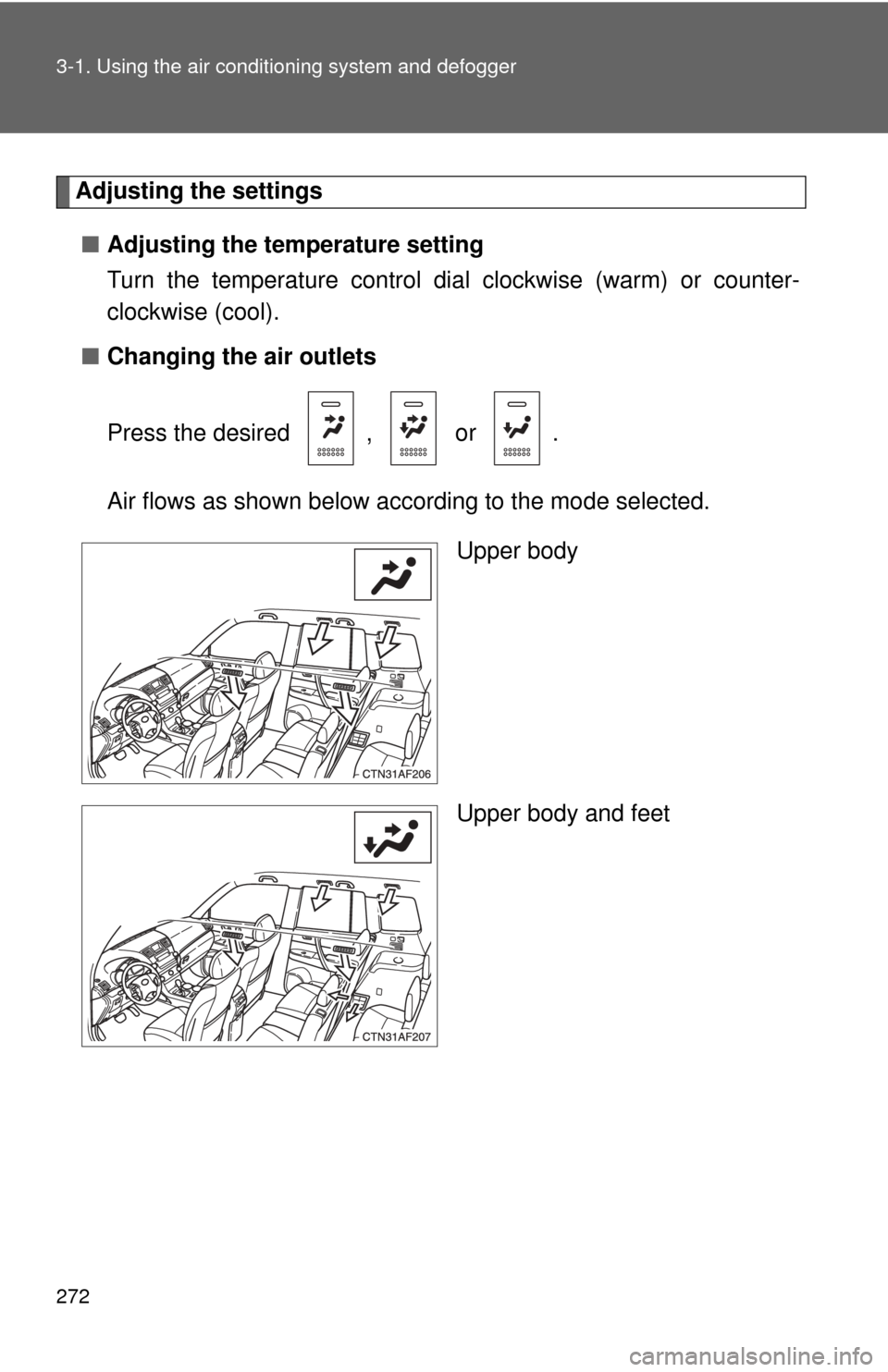
■ Changing the air outlets
Press the desired , or .
Air flows as shown below according to the mode selected.
Upper body
Upper body and feet