Page 106 of 608
106
1-4. Opening and closing the windows and moon roof
Power windows
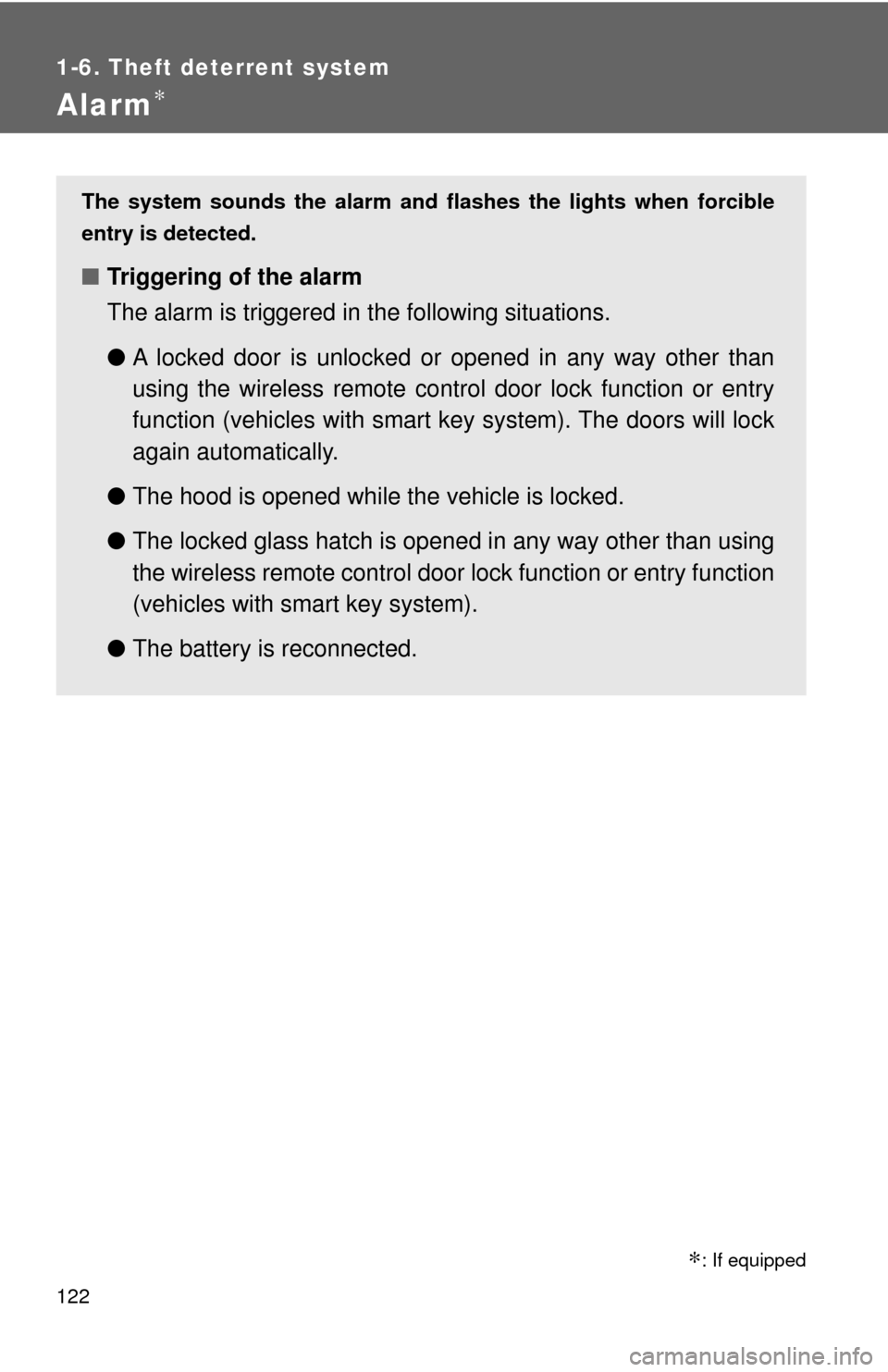
Lock switchPress the switch down to lock
the passenger window switches.
Use this switch to prevent chil-
dren from accidentally opening or
closing a passenger window.
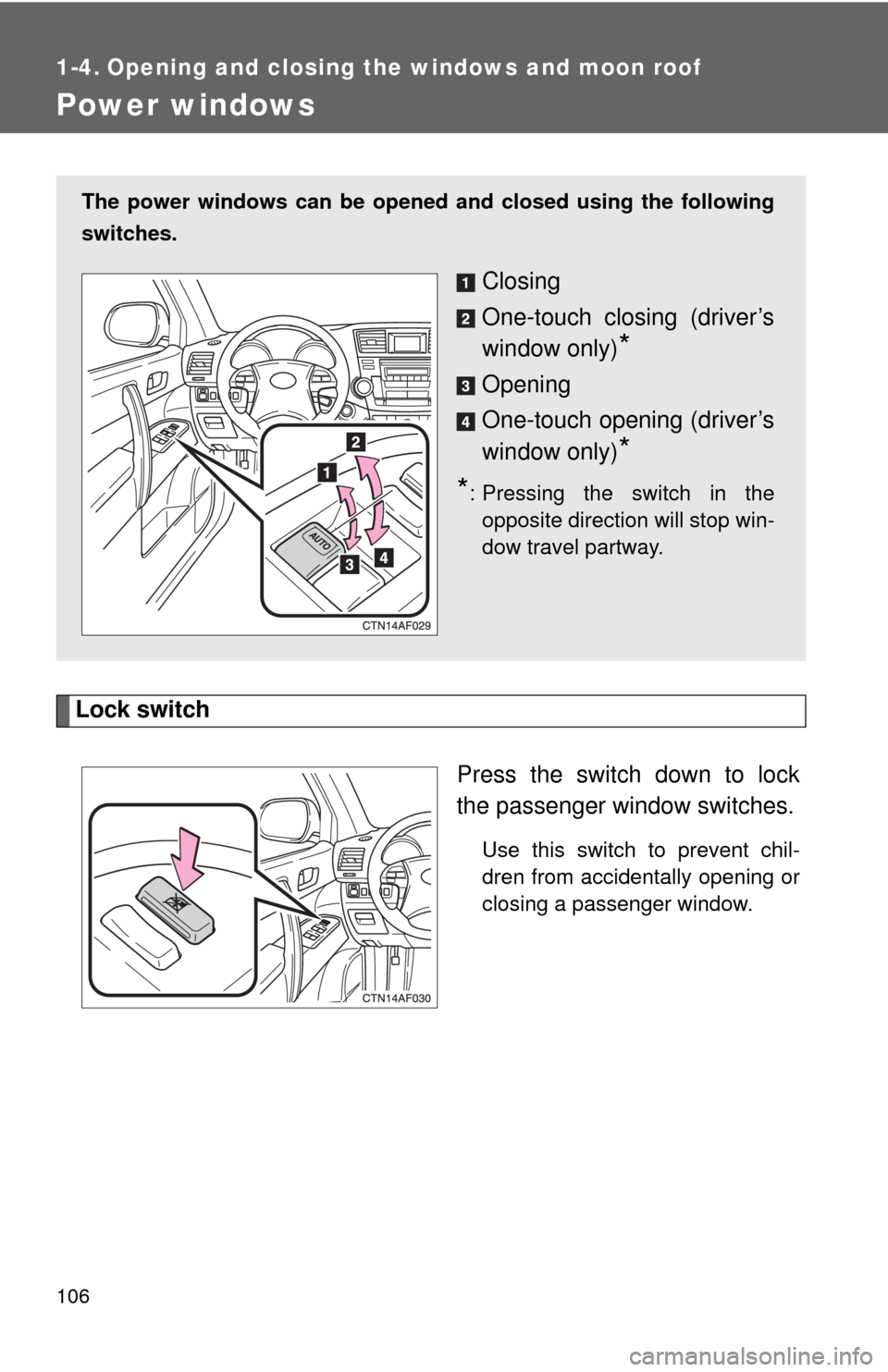
The power windows can be opened and closed using the following
switches.
Closing
One-touch closing (driver’s
window only)
*
Opening
One-touch opening (driver’s
window only)
*
*
: Pressing the switch in the opposite direction will stop win-
dow travel partway.
Page 107 of 608

107
1-4. Opening and closing the windows and moon roof
1
Before driving
■
The power windows can be operated when
Vehicles without smart key system
The engine switch is in the “ON” position.
Vehicles with smart key system
The “ENGINE START STOP” switch is in IGNITION ON mode.
■ Operating the power windows after turning the engine off (driver’s win-
dow only)
Vehicles without smart key system
The power windows can be operated for approximately 45 seconds after the
engine switch is turned to the “ACC” or “LOCK” position. They cannot, how-
ever, be operated once either front door is opened.
Vehicles with smart key system
The power windows can be operated for approximately 45 seconds after the
“ENGINE START STOP” switch is turned to ACCESSORY mode or turned
OFF. They cannot, however, be operated once either front door is opened.
■ Jam protection function (driver’s window only)
If an object becomes caught between the window and the window frame,
window travel is stopped and the window is opened slightly.
CAUTION
■Closing the windows
Observe the following precautions.
Failing to do so may result in death or serious injury.
●Check to make sure that all passengers do not have any part of their body
in a position where it could be caught when a window is being operated.
● Do not allow children to operate the power windows.
Closing a power window on someone can cause serious injury, and in
some instances, even death.
■ Jam protection function (driver’s window only)
●Never try jamming any part of your body to activate the jam protection
function intentionally.
● The jam protection function may not work if something gets caught just
before the window fully closes.
Page 109 of 608

109
1-4. Opening and closing the windows and moon roof
1
Before driving
■
The moon roof can be operated when
Vehicles without smart key system
The engine switch is in the “ON” position.
Vehicles with smart key system
The “ENGINE START STOP” switch is in IGNITION ON mode.
■ Operating the moon roof a fter turning the engine off
Vehicles without smart key system
The moon roof can be operated for approximately 45 seconds after the
engine switch is turned to the “ACC” or “LOCK” position. It cannot, however,
be operated once either front door is opened.
Vehicles with smart key system
The moon roof can be operated for approximately 45 seconds after the
“ENGINE START STOP” switch is turned to ACCESSORY mode or turned
OFF. They cannot, however, be operated once either front door is opened.
■ Jam protection function
If an object is detected between the moon roof and the frame while closing
or tilting down, travel is stopped and the moon roof opens slightly.
■ If the moon roof cannot be closed
If the moon roof cannot be closed automatically, such as when the jam pro-
tection function activates accidentally due to a malfunction, pressing and
holding the switch closes the moon roof.
■ To reduce wind noise
Drive with the moon roof opened to slightly before the fully open position as
driving with the moon roof opened fully will cause wind noise.
■ Sunshade
The sunshade can be opened and closed manually. However, the sunshade
will open automatically when the moon roof is opened.
Page 122 of 608
122
1-6. Theft deterrent system
Alarm∗
The system sounds the alarm and flashes the lights when forcible
entry is detected.
■ Triggering of the alarm
The alarm is triggered in the following situations.
●A locked door is unlocked or opened in any way other than
using the wireless remote control door lock function or entry
function (vehicles with smart key system). The doors will lock
again automatically.
● The hood is opened while t he vehicle is locked.
● The locked glass hatch is opened in any way other than using
the wireless remote control door lock function or entry function
(vehicles with smart key system).
● The battery is reconnected.
�: If equipped
Page 123 of 608
123
1-6. Theft deterrent system
1
Before driving
■
Setting the alarm system
Vehicles without navigation system
Close the doors and hood,
and lock all doors using the
wireless remote control door
lock function or entry function
(vehicles with smart key sys-
tem). The system will be set
automatically after 30 sec-
onds.
The indicator light changes
from being on to flashing when
the system is set.
Vehicles with navigation system
Close the doors and hood,
and lock all doors using the
wireless remote control door
lock function or entry function
(vehicles with smart key sys-
tem). The system will be set
automatically after 30 sec-
onds.
The indicator light changes
from being on to flashing when
the system is set.
Page 124 of 608
124 1-6. Theft deterrent system
■Items to check before locking the vehicle
To prevent unexpected triggering of the alarm and vehicle theft, make sure
of the following.
●Nobody is in the vehicle.
● The windows and moon roof are closed before the alarm is set.
● No valuables or other personal items are left in the vehicle.
■ Panic mode
→P. 5 6
■ When the battery is disconnected
Be sure to cancel the alarm system.
If the battery is disconnected before canceling the alarm, the system may be
triggered when the battery is reconnected.
■ When using the key to unlock the doors
Deactivate the alarm.
■ Deactivating or stopping the alarm
Unlock the doors using the wireless remote control door lock
function or the entry function (v ehicles with smart key system).
Page 126 of 608
126
1-7. Safety information
Correct driving posture
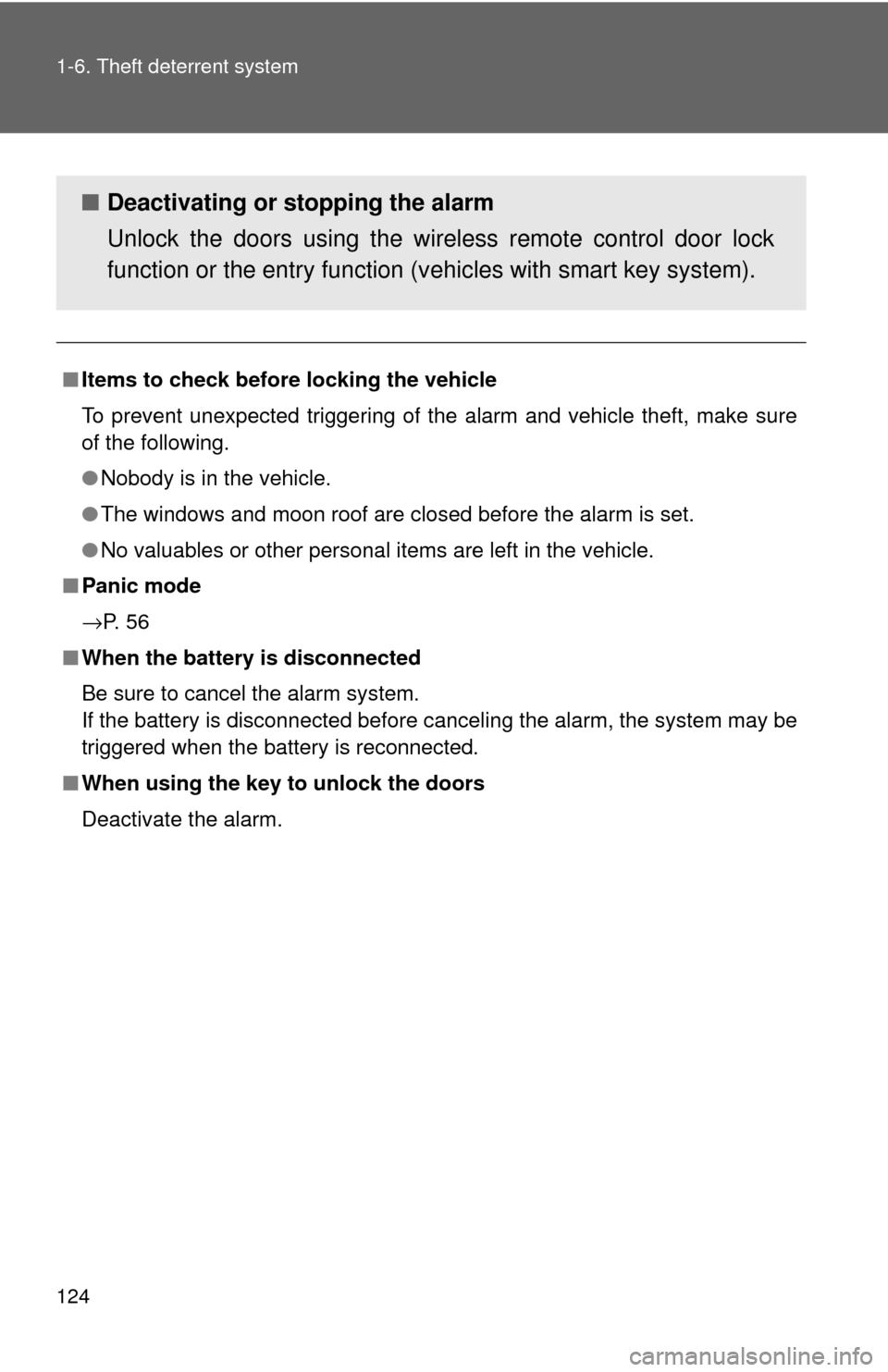
Drive in a good posture as follows:
Sit upright and well back in
the seat. (→P. 7 9 )
Adjust the position of the
seat forward or backward to
ensure the pedals can be
reached and easily
depressed to the extent
required. ( →P. 79)
Adjust the seatback so that
the controls are easily oper-
able.
Adjust the tilt and telescopic
positions of the steering
wheel downward so the air-
bag is facing your chest.
( → P. 100)
Lock the head restraint in
place with the center of the
head restraint closest to the
top of your ears. ( →P. 91)
Wear the seat belt correctly.
( → P. 94)
Page 127 of 608

127
1-7. Safety information
1
Before driving
CAUTION
■
While driving
●Do not adjust the position of the driver's seat while driving.
Doing so could cause the driver to lose control of the vehicle.
● Do not place a cushion between the driver or passenger and the seatback.
A cushion may prevent correct posture from being achieved, and reduce
the effectiveness of the seat belt and head restraint, increasing the risk of
death or serious injury to the driver or passenger.
● Do not place anything under the front seats.
Objects placed under the front seats may become jammed in the seat
tracks and stop the seat from locking in place. This may lead to an acci-
dent. The adjustment mechanism may also be damaged.
■ Adjusting the seat position
●Take care when adjusting the seat position to ensure that other passen-
gers are not injured by the moving seat.
● Do not put your hands under the seat or near the moving parts to avoid
injury.
Fingers or hands may become jammed in the seat mechanism.