Page 4 of 608

TABLE OF CONTENTSIndex
4
3-3. Using the rear audio systemRear seat entertainment system features ................ 311
Using the DVD player (DVD video)...................... 318
Using the DVD player (video CD) ........................ 327
Using the DVD player (audio CD/CD text) ........... 330
Using the DVD player (MP3 discs) ...................... 331
Using the video mode ........ 333
Changing the initial setting .............................. 335
3-4. Using the hands-free phone system (for cellular phone)
Hands-free phone system (for cellular phone)
features ............................ 342
Using the hands-free phone system ................... 346
Making a phone call ........... 353
Setting a cellular phone...... 357
Security and system setup ................................ 362
Using the phone book ........ 365 3-5. Using the interior lights
Interior lights list.................. 372
• Personal/interior light main switch ....................... 373
• Personal/interior lights ...... 373
• Interior light ....................... 374
3-6. Using the storage features List of storage features ....... 375
• Glove box ......................... 376
• Console box ..................... 377
• Overhead console ............ 378
• Cup holders ...................... 379
• Bottle holders ................... 383
• Auxiliary boxes ................. 384
• Side table ......................... 386
3-7. Other interior features Sun visors ........................... 388
Vanity mirrors ..................... 389
Clock (vehicles without multi-information
display) ............................. 390
Conversation mirror ............ 391
Power outlets ...................... 392
Seat heaters ....................... 396
Armrests ............................. 398
Floor mat ............................ 399
Luggage compartment features ............................ 400
Garage door opener ........... 406
Compass ............................ 411
Page 19 of 608
19
Vehicles without navigation system
Vehicles with navigation system
C
Audio system
P. 281
Security indicator ∗ P. 115, 122
Emergency flasher switch P. 498
Security indicator P. 115, 122
Emergency flasher switch P. 498
Rear view
monitor/navigation
system
*
∗: If equipped
*: Refer to “Navigation System Owner's Manual”.
Page 41 of 608

41
1-2. Opening, closing and locking the doors
1
Before driving
●
The doors may unlock if a large amount of water splashes on the door
handle, such as in the rain or in a car wash. (The doors will automatically
be locked after approximately 60 seconds if the doors are not opened
and closed.)
● Gripping the door handle when wearing a glove may not unlock the door.
● If the wireless remote control is used to lock the doors when the elec-
tronic key is near the vehicle, there is a possibility that the door may not
be unlocked by the entry function. (Use the wireless remote control to
unlock the doors.)
■ When the vehicle is not dr iven for extended periods
To prevent theft of the vehicle, do not leave the electronic key within 6 ft. (2
m) of the vehicle.
■ Security feature
If a door is not opened within approximately 60 seconds after the vehicle is
unlocked, the security feature automatically locks the vehicle again.
■ Alarms and warning indicators
A combination of exterior and interior alarms as well as warning lights and
warning messages shown on the multi-information display are used to
reduce the chance of vehicle theft and accidents resulting from erroneous
operation.
●When any warning lights come on:
Take appropriate measures according to which warning light comes on.
(→ P. 510)
● When a warning message is shown on the multi-information display:
Take appropriate measures according to the warning message on the
multi-information display. ( →P. 521)
Page 57 of 608
57
1-2. Opening, closing and locking the doors
1
Before driving
■
Key battery depletion
Vehicles without smart key system
The standard battery life is 1 to 2 years. (The battery becomes depleted
even if the key is not used.) If the wireless remote control function does not
operate, the battery may be depleted. Replace the battery when necessary.
( →P. 472)
Vehicles with smart key system
→P. 473
■ If the wireless remote control does not operate properly
Vehicles without smart key system
Locking and unlocking the doors: Use the key. ( →P. 66)
Vehicles with smart key system
● Locking and unlocking the doors: Use the mechanical key. ( →P. 539)
● Starting the engine. ( →P. 173)
■ Security feature
If a door is not opened within approximately 60 seconds after the vehicle is
unlocked, the security feature automatically locks the vehicle again.
■ Alarm
Using the wireless remote control to lock the doors will set the alarm system.
(→P. 122)
Page 84 of 608
84 1-3. Adjustable components (seats, mirrors, steering wheel)
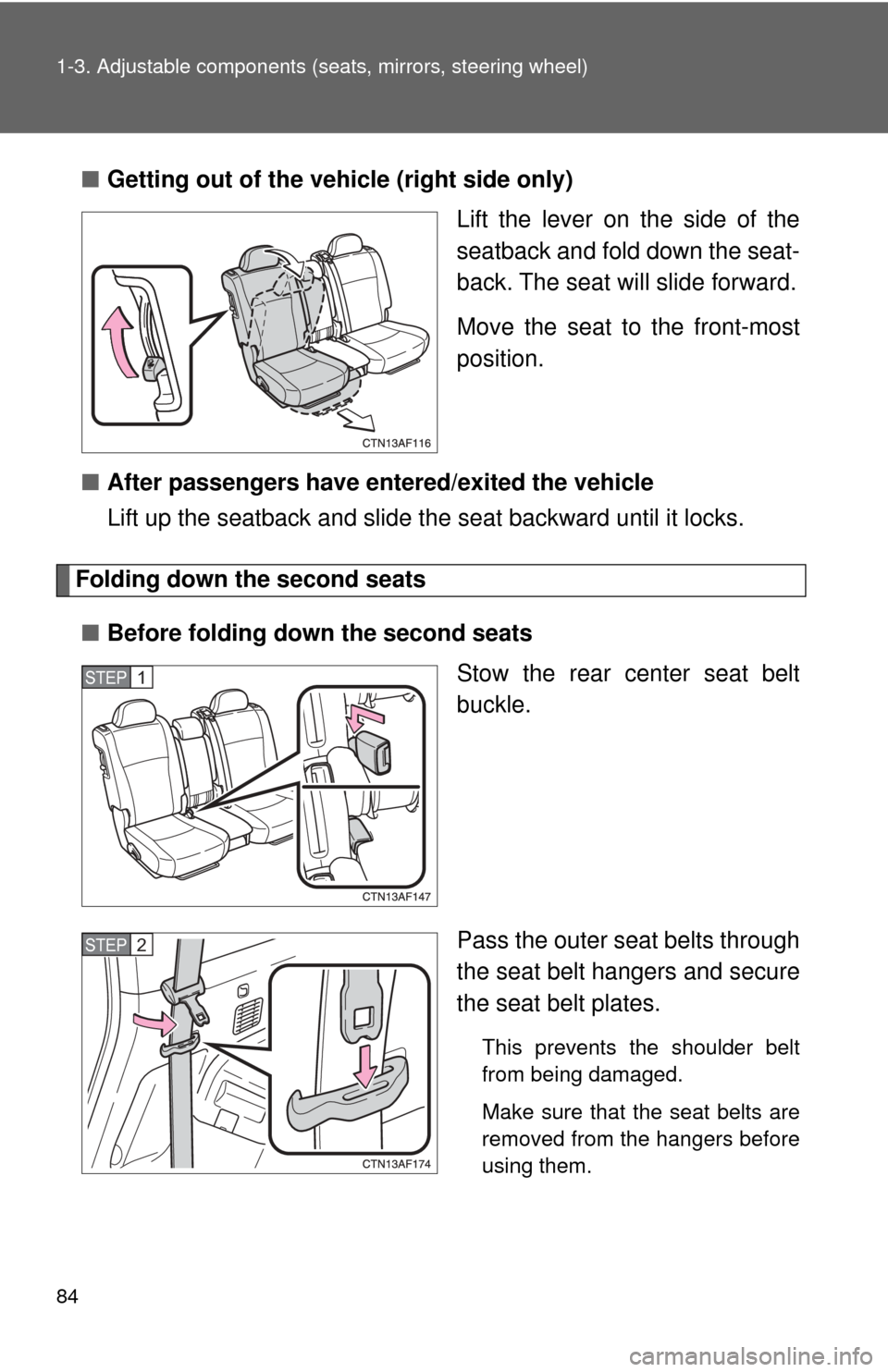
■Getting out of the vehicle (right side only)
Lift the lever on the side of the
seatback and fold down the seat-
back. The seat will slide forward.
Move the seat to the front-most
position.
■ After passengers have entered/exited the vehicle
Lift up the seatback an d slide the seat backward until it locks.
Folding down the second seats
■ Before folding down the second seats
Stow the rear center seat belt
buckle.
Pass the outer seat belts through
the seat belt hangers and secure
the seat belt plates.
This prevents the shoulder belt
from being damaged.
Make sure that the seat belts are
removed from the hangers before
using them.
STEP1
STEP2
Page 88 of 608
88 1-3. Adjustable components (seats, mirrors, steering wheel)
Pull the lock release lever to
remove the second center seat.
Stow the second center seat in
the console box.
Make sure that the seat is securely locked in position and
close the console box door.STEP2
STEP3
STEP4
Page 90 of 608

90 1-3. Adjustable components (seats, mirrors, steering wheel)
CAUTION
■When adjusting a rear seat or removing the second center seat
●Be careful that the seat does not hit passengers or luggage.
● Do not recline the seat more than necessary when the vehicle is in motion
to reduce the risk of sliding under the lap belt. If the seat is too reclined,
the lap belt may slide past the hips and apply restraint forces directly to the
abdomen or your neck may contact the shoulder belt, increasing the risk of
death or serious injury in the event of an accident.
● Be careful not to get your hands or feet caught in the seat.
■ Before folding do wn the rear seats
Do not fold down a rear seat when there are passengers sitting in the rear
seats or when there is luggage placed on the rear seats.
■ After adjusting the seats
Observe the following precautions. Failure to do so may result in death or
serious injury.
●Make sure that the seat and seatback are securely locked in position by
lightly rocking them back and forth.
● Second center seat: Make sure the seat is locked in place by trying to
shake the seatback and lift up the rear part of the seat cushion.
● Check that the seat belts are not twisted or caught under the seat.
■ Caution while driving
Keep the console box closed.
Injuries may result in the event of an accident or sudden braking.
NOTICE
■When folding down the second seats
Do not fold the seatback forward with the luggage cover hooks attached.
■ Removed second center seat
Avoid putting heavy loads on the seat. The metallic seat pins may be dam-
aged, and you may be unable to correctly reinstall the seat.
Page 96 of 608

96 1-3. Adjustable components (seats, mirrors, steering wheel)
■Pregnant women
■ People suffering illness
Obtain medical advice and wear the seat belt in the proper way.
■ When not using the rear seat belts
Second seat belts
Third seat belts (vehicles with third seat)
Obtain medical advice and wear the seat
belt in the proper way. ( →P. 94)
Women who are pregnant should position
the lap belt as low as possible over the
hips in the same manner as other occu-
pants. Extend the shoulder belt com-
pletely over the shoulder and position the
belt across the chest. Avoid belt contact
over the rounding of the abdominal area.
If the seat belt is not worn properly, not
only a pregnant woman, but also the fetus
could suffer death or serious injury as a
result of sudden braking or a collision.
Pass the outer seat belts through the seat
belt hangers and secure the seat belt
plates to prevent the shoulder belts from
being damaged.
Pass the outer seat belts through the seat
belt hangers to prevent the shoulder belts
from being damaged.