Page 169 of 608

169
2-1. Driving procedures
2
When driving
CAUTION
■
When the vehicle is parked
●Do not leave glasses, cigarette lighters, spray cans, or soft drink cans in
the vehicle when it is in the sun.
Doing so may result in the following.
• Gas may leak from a cigarette lighter or spray can, and may lead to a
fire.
• The temperature inside the vehicle may cause the plastic lenses and plastic material of eye glasses to deform or crack.
• Soft drink cans may fracture, causing the contents to spray over the interior of the vehicle, and may also cause a short circuit in the vehi-
cle's electrical components.
● Always apply the parking brake, shift the shift lever to P, stop the engine
and lock the vehicle.
Do not leave the vehicle unattended while the engine is running.
● Do not touch the exhaust pipe while the engine is running or immediately
after turning the engine off.
Doing so may cause burns.
● Do not leave the engine running in an area with snow build-up, or where it
is snowing. If snowbanks build up around the vehicle while the engine is
running, exhaust gases may collect and enter the vehicle. This may lead
to death or a serious health hazard.
■ Exhaust gases
Exhaust gases include harmful carbon monoxide (CO) that is colorless and
odorless. Inhaling exhaust gases may lead to death or a serious health haz-
ard.
●If the vehicle is in a poorly ventilated area, stop the engine. In a closed
area, such as a garage, exhaust gases may collect and enter the vehicle.
This may lead to death or a serious health hazard.
● The exhaust should be checked occasionally. If there is a hole or crack
caused by corrosion, damage to a joint or abnormal exhaust noise, be
sure to have the vehicle inspected and repaired by your Toyota dealer.
Failure to do so may allow exhaust gases to enter the vehicle, resulting in
death or a serious health hazard.
Page 175 of 608
175
2-1. Driving procedures
2
When driving
■
Steering lock release
■ If the engine does not start
The engine immobilizer system may not have been deactivated. ( →P. 115)
■ When the “ENGINE START STOP” sw itch indicator flashes in amber
The system may be malfunctioning. Have the vehicle inspected by your
Toyota dealer immediately.
■ Auto power off function
If the vehicle is left in ACCESSORY mode for more than an hour with the
shift lever in P, the “ENGINE START STOP” switch will automatically turn off.
■ Key battery depletion
→P. 4 0
■ When the electronic key battery is discharged
→P. 473
■ Conditions affecting operation
→P. 3 8
■ Note for the entry function
→P. 4 0
Make sure that the steering wheel lock is
released.
To release the steering wheel lock, gently
turn the wheel left or right while pressing
the “ENGINE START STOP” switch.
When the steering wheel lock is not
released, the “ENGINE START STOP”
switch indicator will flash in green.
Page 177 of 608
177
2-1. Driving procedures
2
When driving
Engine (ignition) switch (vehicles without smart key system)
■Starting the engine
Check that the parking brake is set.
Check that the shift lever is set in P.
Sit in the driver’s seat and firmly depress the brake pedal.
Turn the engine switch to the “START” position and start
the engine.
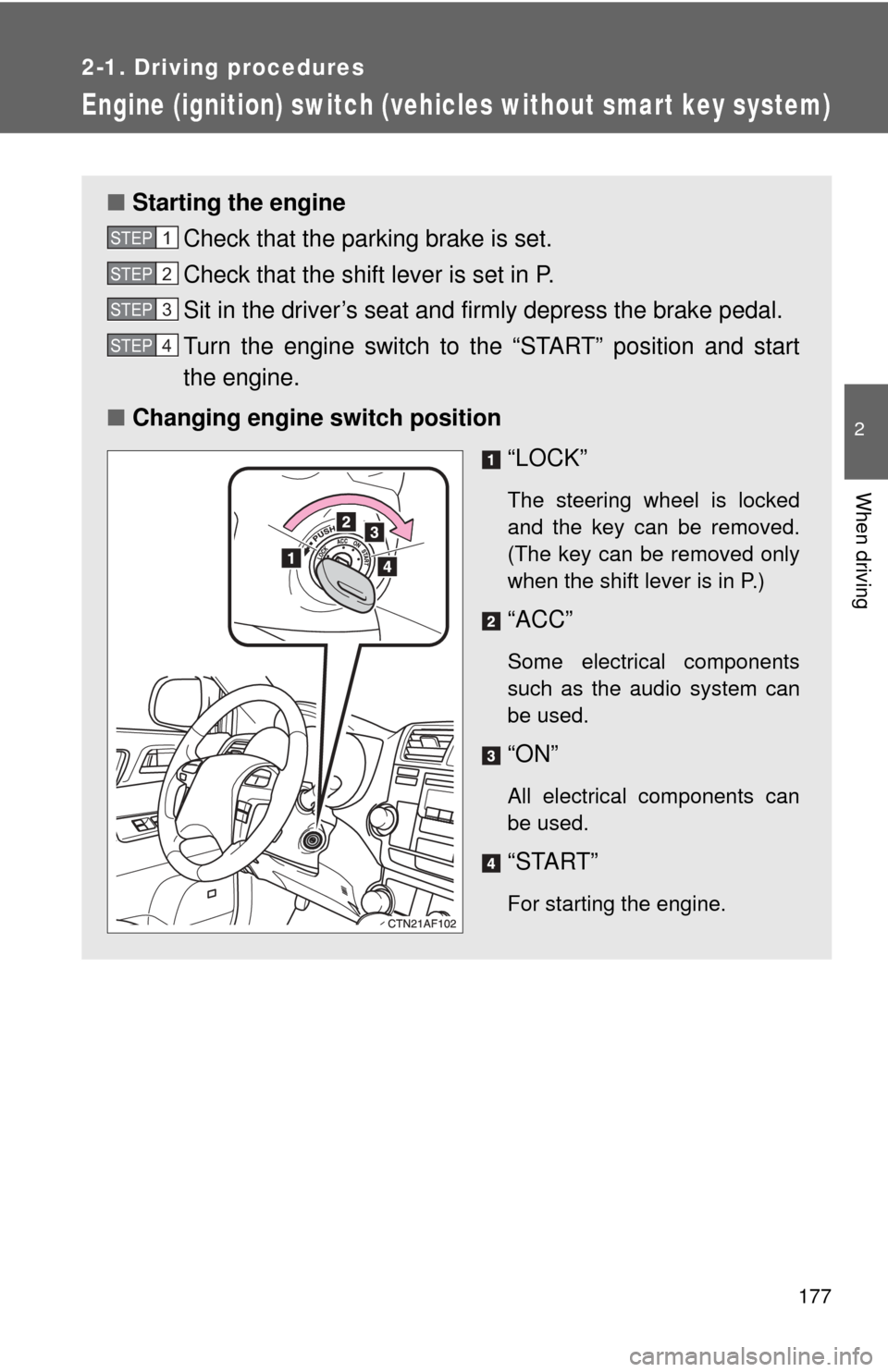
■ Changing engine switch position
“LOCK”
The steering wheel is locked
and the key can be removed.
(The key can be removed only
when the shift lever is in P.)
“ACC”
Some electrical components
such as the audio system can
be used.
“ON”
All electrical components can
be used.
“START”
For starting the engine.
STEP1
STEP2
STEP3
STEP4
Page 178 of 608

178 2-1. Driving procedures
■Turning the key from “ACC” to “LOCK”
■ Steering lock release
■ If the engine does not start (vehicles with engine immobilizer system)
The engine immobilizer system may not have been deactivated. ( →P. 115)
■ Key reminder function
A buzzer sounds if the driver’s door is opened, while the key is in the “LOCK”
or “ACC” position to remind you to remove the key.
CAUTION
■When starting the engine
Always start the engine while sitting in the driver's seat. Do not depress the
accelerator while starting the engine under any circumstances.
Doing so may cause an accident resulting in death or serious injury.
■ Caution when driving
Do not turn the engine switch to the “LOCK” position while driving. If, in an
emergency, you must turn the engine off while the vehicle is moving, turn the
key only to the “ACC” position.
Shift the shift lever to P.
(→P. 180)
Push in the key and turn to the
“LOCK” position.
STEP1
STEP2
When starting the engine, the engine
switch may seem stuck in the “LOCK”
position. To free it, turn the key while turn-
ing the steering wheel slightly in either
direction.
Page 187 of 608
187
2-1. Driving procedures
2
When driving
Horn
■After adjusting the steering wheel
Make sure that the steering wheel is securely locked.
The horn may not sound if the steering wheel is not securely locked.
( →P. 100)
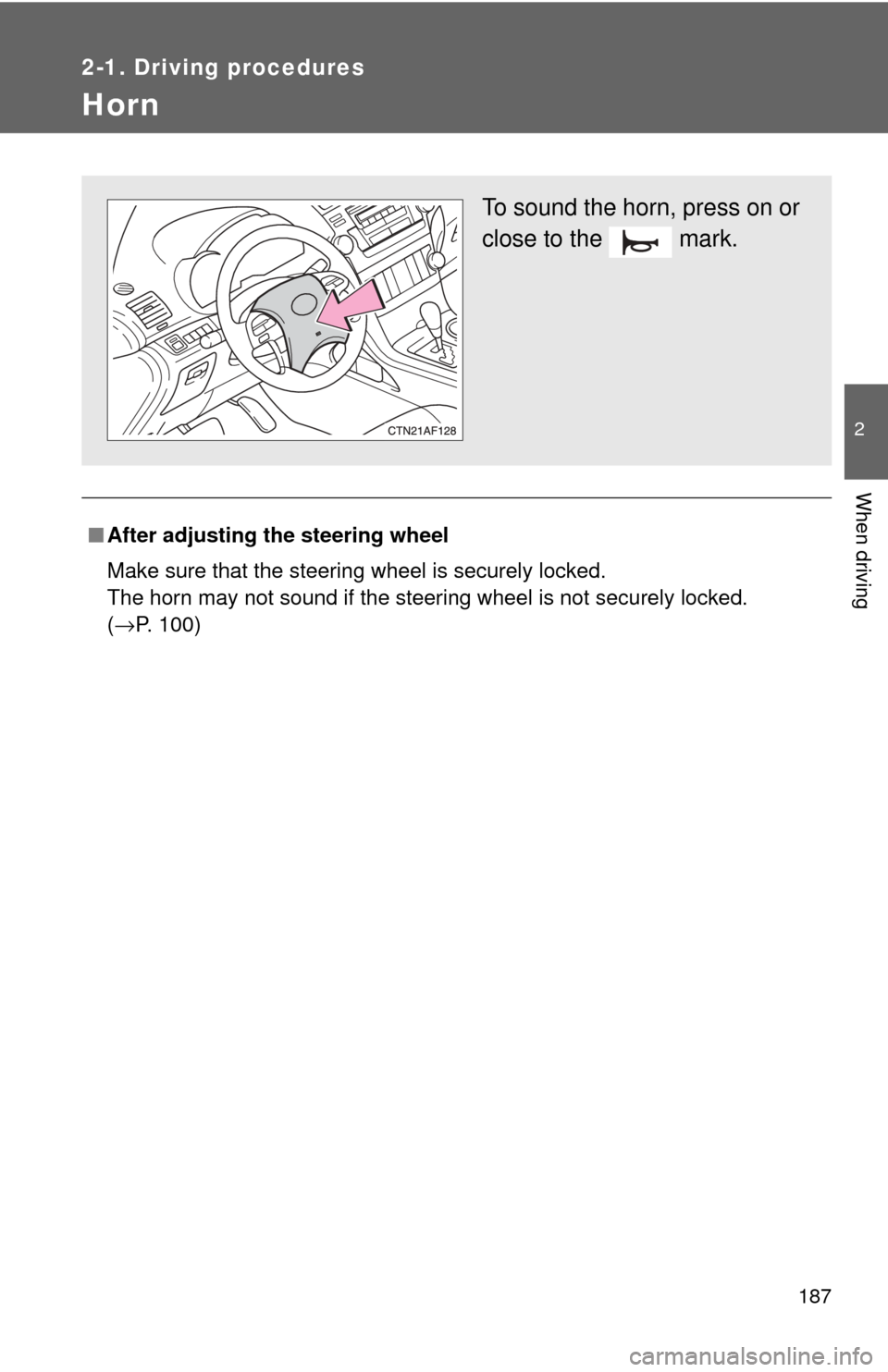
To sound the horn, press on or
close to the mark.
Page 194 of 608
194
2-2. Instrument cluster
Multi-information display∗
The multi-information display presents the driver with a variety of
driving-related data, including th e current outside temperature and
clock.
● Outside temperature
Indicates the outside tempera-
ture.
The temperature range that
can be displayed is from -40°F
(-40°C) to 122°F (50°C).
●Clock ( → P. 197)
Indicates and sets the time.
● Trip information ( →P. 195)
Displays cruising range, fuel
consumption and other cruis-
ing-related information.
● Automatic air conditioning
system display (if equipped)
(→ P. 263)
Automatically displayed when
the automatic air conditioning
is turned on.
● Rear view monitor
(if equipped) ( →P. 214)
Automatically displayed when
the shift lever is moved into the
R position.
�: If equipped
Page 197 of 608
197
2-2. Instrument cluster
2
When driving
■
Setting the clock
Select “CLOCK” on the menu screen. Press and hold the
“DISP” button until the display changes.
Press the “DISP” button to adjust
the hours.
After adjusting the hours, wait 5
seconds to allow the hours to be
automatically input.
Press the “DISP” button to adjust
the minutes.
After adjusting the minutes, wait 5
seconds to allow the minutes to
be automatically input.
STEP1
STEP2
STEP3
Page 205 of 608

205
2-3. Operating the lights and wipers
2
When driving
Turning on the high beam headlights
With the headlights on, push
the lever forward to turn on the
high beams.
Pull the lever back to the center
position to turn the high beams
off.
Pull the lever toward you to
turn on the high beams.
Release the lever to turn them off.
You can flash the high beams
with the headlights on or off.
■Daytime running light system (if equipped)
To make your vehicle more visible to other drivers, the headlights turn on
automatically (at a reduced intensity) whenever the engine is started and the
parking brake is released. Daytime running lights are not designed for use at
night.
U.S.A.: Daytime running lights can be turned off by operating the switch.
■ Headlight control sensor (if equipped)
The sensor may not function properly if
an object is placed on the sensor, or any-
thing that blocks the sensor is affixed to
the windshield.
Doing so interferes with the sensor
detecting the level of ambient light and
may cause the automatic headlight sys-
tem to malfunction.