2009 SUBARU TRIBECA battery
[x] Cancel search: batteryPage 450 of 2453

IDI-11
Combination Meter
INSTRUMENTATION/DRIVER INFO
3. Combination Meter
A: REMOVAL
1) Disconnect the ground cable from battery.
2) Set the tilt steering at the lowest position.
3) Remove the console box.
4) Remove the control panel.
5) Remove the instrument panel lower cover.
er.>
6) Remove the console side panel.
7) Remove the meter hood.
8) Remove the screws of combination meter (two
for upper side, two for lower side) and pull the com-
bination meter.
9) Disconnect the connector in the rear side of
combination meter to remove meter.
CAUTION:
•Be careful not to damage the meter or instru-
ment panel.
•Pay particular attention to avoid damaging
the meter glass.
B: INSTALLATION
Install in the reverse order of removal.
CAUTION:
•Make sure the electrical connector is con-
nected securely.
•Make sure that each meter operates normally.
•When the combination meter of model with
immobilizer has been replaced, be sure to per-
form the registration of immobilizer.
ID-00189
Page 456 of 2453
IDI-17
Warning Box
INSTRUMENTATION/DRIVER INFO
8. Warning Box
A: REMOVAL
1) Disconnect the ground cable from battery.
2) Remove the upper grille.
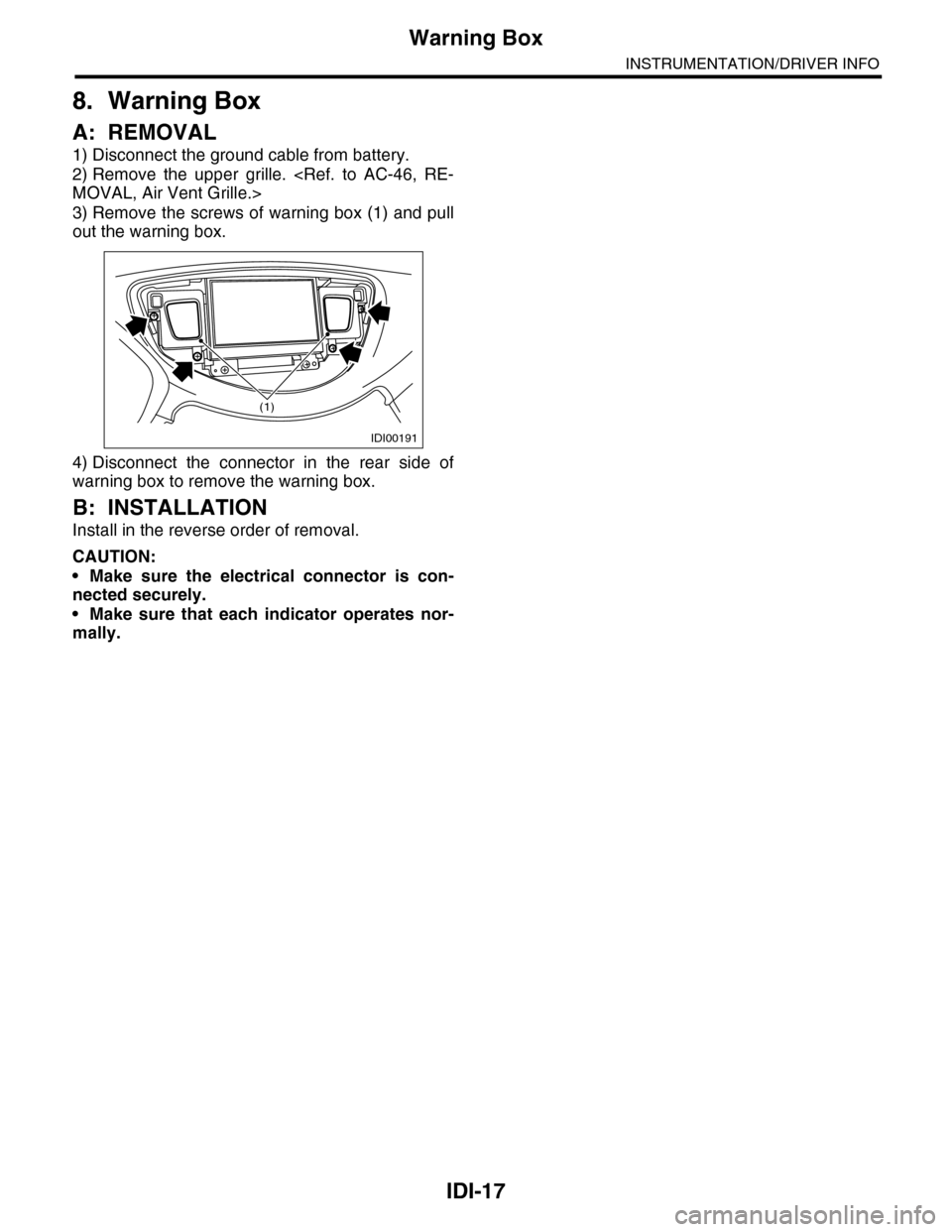
3) Remove the screws of warning box (1) and pull
out the warning box.
4) Disconnect the connector in the rear side of
warning box to remove the warning box.
B: INSTALLATION
Install in the reverse order of removal.
CAUTION:
•Make sure the electrical connector is con-
nected securely.
•Make sure that each indicator operates nor-
mally.
IDI00191
(1)
Page 461 of 2453
LAN(diag)-5
General Description
LAN SYSTEM (DIAGNOSTICS)
3. General Description
A: CAUTION
1. SRS AIRBAG SYSTEM
Airbag system wiring harness is routed near the
body integrated unit and twisted pair line.
CAUTION:
•All airbag system wiring harness and con-
nectors are colored yellow. Do not use the elec-
trical test equipment on these circuits.
•Be careful not to damage the airbag system
wiring harness when servicing the body inte-
grated unit and LAN system.
•Refer to “Airbag System” when disconnect-
ing the air bag system connector.
2. LAN SYSTEM
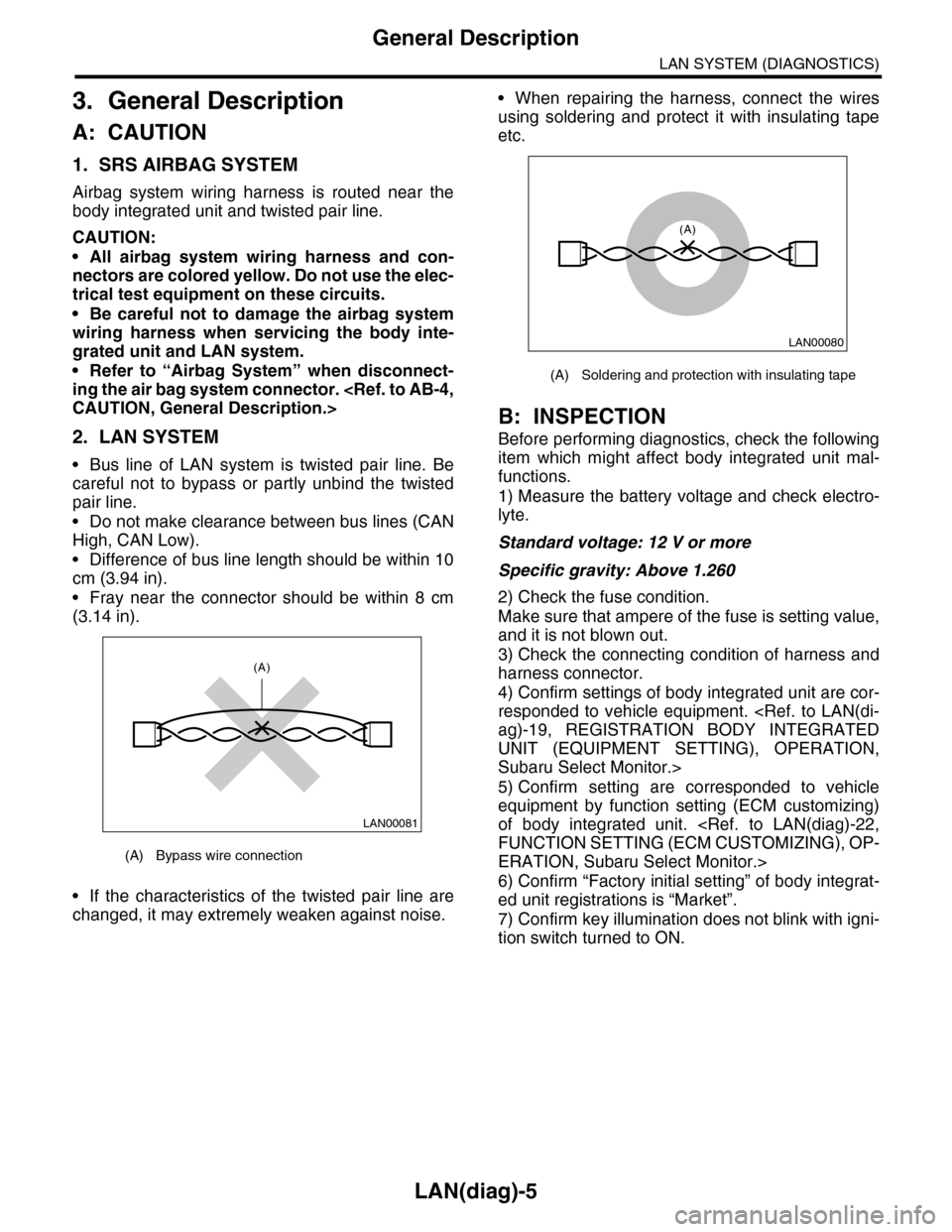
•Bus line of LAN system is twisted pair line. Be
careful not to bypass or partly unbind the twisted
pair line.
•Do not make clearance between bus lines (CAN
High, CAN Low).
•Difference of bus line length should be within 10
cm (3.94 in).
•Fray near the connector should be within 8 cm
(3.14 in).
•If the characteristics of the twisted pair line are
changed, it may extremely weaken against noise.
•When repairing the harness, connect the wires
using soldering and protect it with insulating tape
etc.
B: INSPECTION
Before performing diagnostics, check the following
item which might affect body integrated unit mal-
functions.
1) Measure the battery voltage and check electro-
lyte.
Standard voltage: 12 V or more
Specific gravity: Above 1.260
2) Check the fuse condition.
Make sure that ampere of the fuse is setting value,
and it is not blown out.
3) Check the connecting condition of harness and
harness connector.
4) Confirm settings of body integrated unit are cor-
responded to vehicle equipment.
UNIT (EQUIPMENT SETTING), OPERATION,
Subaru Select Monitor.>
5) Confirm setting are corresponded to vehicle
equipment by function setting (ECM customizing)
of body integrated unit.
ERATION, Subaru Select Monitor.>
6) Confirm “Factory initial setting” of body integrat-
ed unit registrations is “Market”.
7) Confirm key illumination does not blink with igni-
tion switch turned to ON.
(A) Bypass wire connection
LAN00081
(A)
(A) Soldering and protection with insulating tape
LAN00080
(A)
Page 479 of 2453

LAN(diag)-23
Subaru Select Monitor
LAN SYSTEM (DIAGNOSTICS)
5) After setting, make sure that vehicle equipment is same as the setting changed in the {Current Data Dis-
play & Save}.
CAUTION:
•It is possible to control the original functions of vehicle when settings above are corresponded to
vehicle equipment.
•Do not change the settings except for setting above during operation of equipment setting.
•Be sure not to change Factory initial setting except installation of new body integrated unit.
NOTE:
For details concerning operation procedure, refer to the “SUBARU SELECT MONITOR OPERATION MANUAL”.
Hazard answer-
back setupON
ON
Workable when hazard answer-back setup is set to “ON.”
When lock/unlock is selected by keyless entry system
operated, hazard answer-back buzzer operates.
OFFWhen lock/unlock is selected by keyless entry system
operated, hazard answer-back does not operate.
Automatic lock-
ing setupONONWorkable when Automatic locking setup is set to “ON”
Automatic locking operates.Not supported by North
American specificationsOFF Automatic locking does not operate.
Ans.-back
BuzzerON
ONVe h i c l e i s c o n t r o l l e d i n a n sw e r - b a c k b u z z e r e q u i p p e d
mode.Not supported by North
American specificationsOFF
Ve h i c l e i s c o n t r o l l e d i n a n sw e r - b a c k b u z z e r n o n - e q u i p p e d
mode. (Set Ans.-back Buzzer to “OFF” in model without
answer back buzzer.)
Auto locking ON
ON Vehicle is controlled in auto locking equipped mode.Not supported by North
American specificationsOFFVe h i c l e i s c o n t r o l l e d i n a u t o l o c k i n g n o n - e q u i p p e d m o d e .
(Set Auto locking to “OFF” in model without auto locking.)
Initial Keyless
Setting—
——
Execution
Settings of keyless entry system are initialized. (Auto-lock
time: 30 sec., Answer-back buzzer setup: ON, Hazard
answer-back setup: ON, Automatic locking setup: ON,
Ans.-back Buzzer: ON)
Initial button set-
ting—
——
Execution
Settings of each function are initialized. (Off delay time:
Normal, Rr defogger op. mode: 15 min., Wiper deicer op.
mode: 15 min., Lockout prevention: ON)
Initial Security
setting—
——
Not supported by North
American specificationsExecution
Settings of security system are initialized. (Security Alarm
Setup: OFF, Impact Sensor Setup: OFF, Alarm monitor
delay setting: ON, Siren setting: OFF)
Passive Alar m
(Not used)OFFONWorkable when passive ar ming is set to “ON.”
OFF
Door open
warning (pre-
vention of bat-
tery run-out)
OFF
ON
If detecting door open for 30 minutes, room light, key illu-
mination and door warning light are turned off to prevent
battery run-out.
OFFRoom light, key illumination and door warning light is not
turned off.
Alarm inter-
locked room
light switch
OFF
ONThe room light lights by being interlocked with the activa-
tion of the alarm.
OFFRoom light does not illuminate even if the alarm is acti-
vated.
DataInitial set-
ting value
Customize
settingRemarksDestination
Specifications
Page 485 of 2453

LAN(diag)-29
List of Diagnostic Trouble Code (DTC)
LAN SYSTEM (DIAGNOSTICS)
11.List of Diagnostic Trouble Code (DTC)
A: LIST
DTC Item Content of diagnosis Note
None Communication for initializing
impossible
Open or short in Subaru
Select Monitor communi-
cation line
dure with Diagnostic Trouble Code (DTC).>
None Diagnostic trouble code (DTC) is
not stored
Internal error of combina-
tion meter
dure with Diagnostic Trouble Code (DTC).>
B0100 Integ. unit system error Body integrated unit inter-
nal error
Diagnostic Trouble Code (DTC).>
B0101 BATT power supply (Control)
error
Open or short in battery
power supply control cir-
cuit
dure with Diagnostic Trouble Code (DTC).>
B0102 BATT p/supply malfunction cont. Open or short of battery
power supply backup cir-
cuit
dure with Diagnostic Trouble Code (DTC).>
B0103 Ignition power failure Open or short in IGN
power supply circuit
Diagnostic Trouble Code (DTC).>
B0104 ACC power failure Open or short in ACC
power supply circuit
Tr o u b l e C o d e ( D T C ) . >
B0106 Shift lock circuit failure Ground short of shift lock
circuit
Diagnostic Trouble Code (DTC).>
B0201 CAN-HS counter abnormal Malfunction of high-speed
CAN communication
with Diagnostic Trouble Code (DTC).>
B0202 CAN-HS bus off Any unit is cut communi-
cation.
ble Code (DTC).>
B0211 CAN-HS ECM data abnormal Received error data from
ECM.
Diagnostic Trouble Code (DTC).>
B0212 CAN-HS TCM data abnormal Received error data from
TCM.
Diagnostic Trouble Code (DTC).>
B0213 CAN-HS VDC/ABS data abnor-
mal
Received error data from
VDC/ABS unit.
with Diagnostic Trouble Code (DTC).>
B0221 CAN-HS ECM no-receive data Not received error data
from ECM.
Diagnostic Trouble Code (DTC).>
B0222 CAN-HS TCM no-receive data Not received error data
from TCM.
Diagnostic Trouble Code (DTC).>
B0223 CAN-HS VDC/ABS no-receive
data
Not received error data
from VDC/ABS unit.
with Diagnostic Trouble Code (DTC).>
B0300 CAN-LS malfunction Open or short in CAN-LS
circuit, on each side or
both sides.
tic Trouble Code (DTC).>
B0301 CAN-LS counter abnormal Malfunction of CAN-LS
communication
with Diagnostic Trouble Code (DTC).>
Page 489 of 2453
LAN(diag)-33
Diagnostic Procedure with Diagnostic Trouble Code (DTC)
LAN SYSTEM (DIAGNOSTICS)
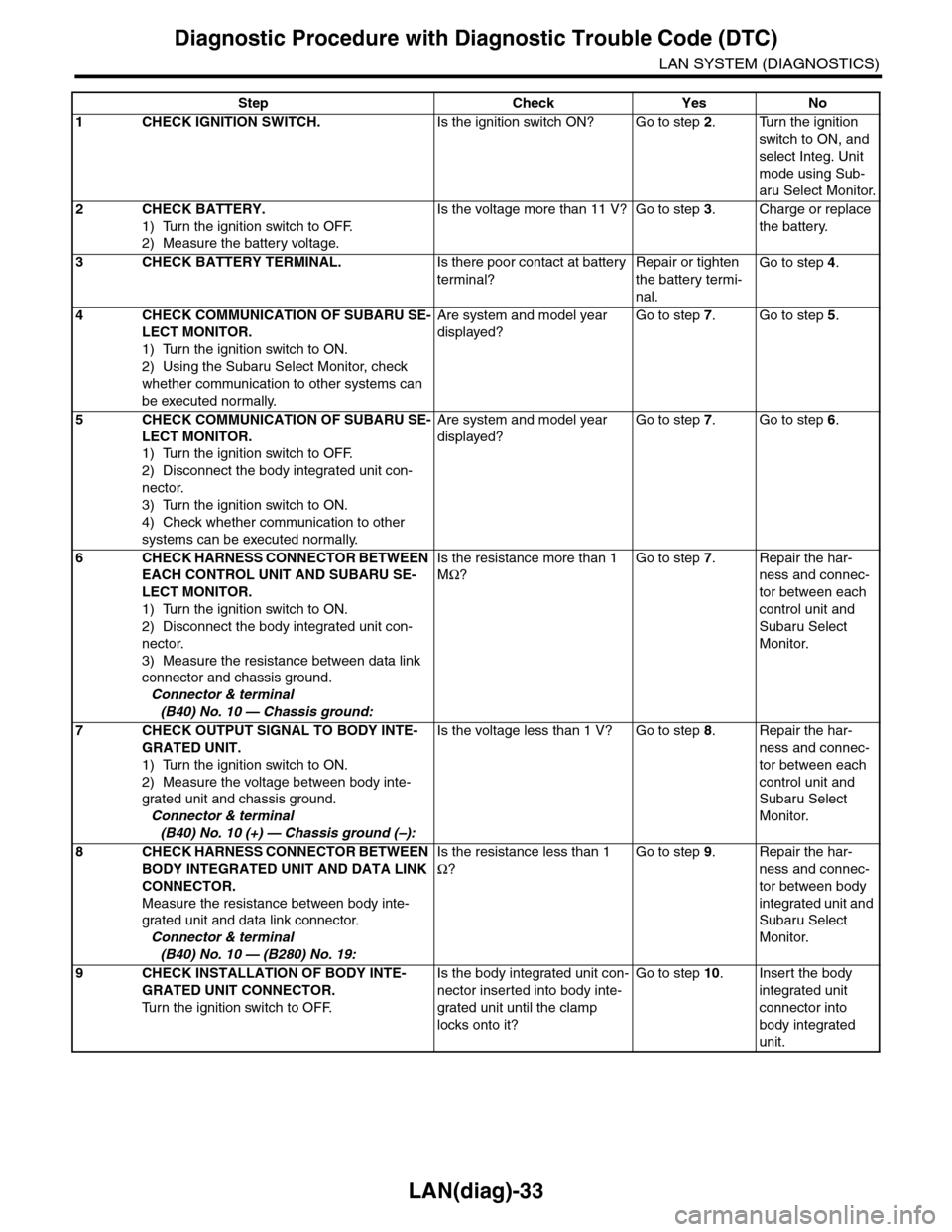
Step Check Yes No
1CHECK IGNITION SWITCH.Is the ignition switch ON? Go to step 2.Turn the ignition
switch to ON, and
select Integ. Unit
mode using Sub-
aru Select Monitor.
2CHECK BATTERY.
1) Turn the ignition switch to OFF.
2) Measure the battery voltage.
Is the voltage more than 11 V? Go to step 3.Charge or replace
the battery.
3CHECK BATTERY TERMINAL.Is there poor contact at battery
terminal?
Repair or tighten
the battery termi-
nal.
Go to step 4.
4CHECK COMMUNICATION OF SUBARU SE-
LECT MONITOR.
1) Turn the ignition switch to ON.
2) Using the Subaru Select Monitor, check
whether communication to other systems can
be executed normally.
Are system and model year
displayed?
Go to step 7.Go to step 5.
5CHECK COMMUNICATION OF SUBARU SE-
LECT MONITOR.
1) Turn the ignition switch to OFF.
2) Disconnect the body integrated unit con-
nector.
3) Turn the ignition switch to ON.
4) Check whether communication to other
systems can be executed normally.
Are system and model year
displayed?
Go to step 7.Go to step 6.
6CHECK HARNESS CONNECTOR BETWEEN
EACH CONTROL UNIT AND SUBARU SE-
LECT MONITOR.
1) Turn the ignition switch to ON.
2) Disconnect the body integrated unit con-
nector.
3) Measure the resistance between data link
connector and chassis ground.
Connector & terminal
(B40) No. 10 — Chassis ground:
Is the resistance more than 1
MΩ?
Go to step 7.Repair the har-
ness and connec-
tor between each
control unit and
Subaru Select
Monitor.
7CHECK OUTPUT SIGNAL TO BODY INTE-
GRATED UNIT.
1) Turn the ignition switch to ON.
2) Measure the voltage between body inte-
grated unit and chassis ground.
Connector & terminal
(B40) No. 10 (+) — Chassis ground (–):
Is the voltage less than 1 V? Go to step 8.Repair the har-
ness and connec-
tor between each
control unit and
Subaru Select
Monitor.
8CHECK HARNESS CONNECTOR BETWEEN
BODY INTEGRATED UNIT AND DATA LINK
CONNECTOR.
Measure the resistance between body inte-
grated unit and data link connector.
Connector & terminal
(B40) No. 10 — (B280) No. 19:
Is the resistance less than 1
Ω?
Go to step 9.Repair the har-
ness and connec-
tor between body
integrated unit and
Subaru Select
Monitor.
9CHECK INSTALLATION OF BODY INTE-
GRATED UNIT CONNECTOR.
Tu r n t h e i g n i t i o n s w i t c h t o O F F.
Is the body integrated unit con-
nector inserted into body inte-
grated unit until the clamp
locks onto it?
Go to step 10.Insert the body
integrated unit
connector into
body integrated
unit.
Page 490 of 2453

LAN(diag)-34
Diagnostic Procedure with Diagnostic Trouble Code (DTC)
LAN SYSTEM (DIAGNOSTICS)
CAUTION:
When replacing body integrated unit on the model with immobilizer system, refer to the “REGISTRA-
TION MANUAL FOR IMMOBILIZER”.
10 CHECK POWER SUPPLY CIRCUIT.
1) Turn the ignition switch to ON (engine
OFF).
2) Measure the ignition voltage between body
integrated unit connector and chassis ground.
Connector & terminal
(i84) No. 1 (+) — Chassis ground (–):
Is the voltage more than 10 V? Go to step 11.Repair the open
circuit of harness
between body inte-
grated unit and
battery.
11 CHECK HARNESS CONNECTOR BETWEEN
BODY INTEGRATED UNIT AND CHASSIS
GROUND.
1) Turn the ignition switch to OFF.
2) Disconnect the connector from body inte-
grated unit.
3) Measure the resistance of harness
between the body integrated unit and chassis
ground.
Connector & terminal
(B280) No. 19 — Chassis ground:
Is the resistance more than 1
MΩ?
Go to step 12.Repair the poor
contact of har-
ness between
body integrated
unit and ground.
12 CHECK POOR CONTACT OF CONNEC-
TORS.
Is there poor contact at control
unit ground and Subaru Select
Monitor?
Repair the poor
contact of connec-
tor.
Replace the body
integrated unit.
Unit.>
Step Check Yes No
Page 492 of 2453

LAN(diag)-36
Diagnostic Procedure with Diagnostic Trouble Code (DTC)
LAN SYSTEM (DIAGNOSTICS)
D: DTC B0101 BATT P/SUPPLY MALFUNCTION CONT.
DTC DETECTING CONDITION:
Battery power supply control circuit is open or shorted.
TROUBLE SYMPTOM:
No malfunction occurs because the back-up power supply is activated.
NOTE:
When B0102 BATT p/supply (backup) malfunction is output at the same time, all the function of body inte-
grated unit may not operate.
WIRING DIAGRAM:
LAN00149
SYSTEM CONTROL POWER SUPPLYBACK-UP POWER
SUPPLY
BODY INTEGRATED UNIT
B7C2
A21C9B22C8
MICRO COMPUTER
C24B13
i84
B52
B280
R168C:B:
B:
A:
12345678910 11 12 19 2013 14 15 16 17 18
R168C:
B52B:
34128910 1112 13 14 15 16 17 18 19 20 21 22 23 24567
E
MAIN SBF-11BATTERY
B281C:
EE
B280B:
B281C:
567821943102422 2325111213141526 27281617181920 21
5467821931022 23111213141524 25 26 2716171828 29192021 30
i84A:
1234567891011121314151617181920212223242526272829303132333435
FB-18 NO.7MB-29 NO.8