Page 838 of 2453

DS-21
Rear Hub Unit Bearing
DRIVE SHAFT SYSTEM
6. Rear Hub Unit Bearing
A: REMOVAL
1) Disconnect the ground cable from the battery.
2) Lift-up the vehicle, and then remove the rear
wheels.
3) Lift the crimped section of axle nut.
4) Remove the axle nut using a socket wrench
while depressing the brake pedal.
CAUTION:
Remove the wheel before loosening the axle
nut. Failure to follow this rule may damage the
wheel bearings.
5) Release the parking brake.
6) Remove the disc brake caliper from the rear
housing, and suspend it from the vehicle using a
piece of rope.
7) Remove the disc rotor from the hub.
NOTE:
•Mark the mating surface of hub and disc rotor be-
fore removing the disc rotor to avoid confusing
when installing.
•If it is difficult to remove the disc rotor from the
hub, drive the 8 mm of bolt into the threaded end of
rotor, then remove the rotor.
8) Remove the four bolts from rear arm.
9) Remove the hub unit bearing.
CAUTION:
•Be careful not to damage the magnetic en-
coder.
•Do not get closer the tool which charged
magnetism to magnetic encoder.DS-00038
DS-00358
(1) Magnetic encoder
(2) Rear hub unit bearing
DS-00359
DS-00251
(2)
(1)
DS-00360
Page 839 of 2453
DS-22
Rear Hub Unit Bearing
DRIVE SHAFT SYSTEM
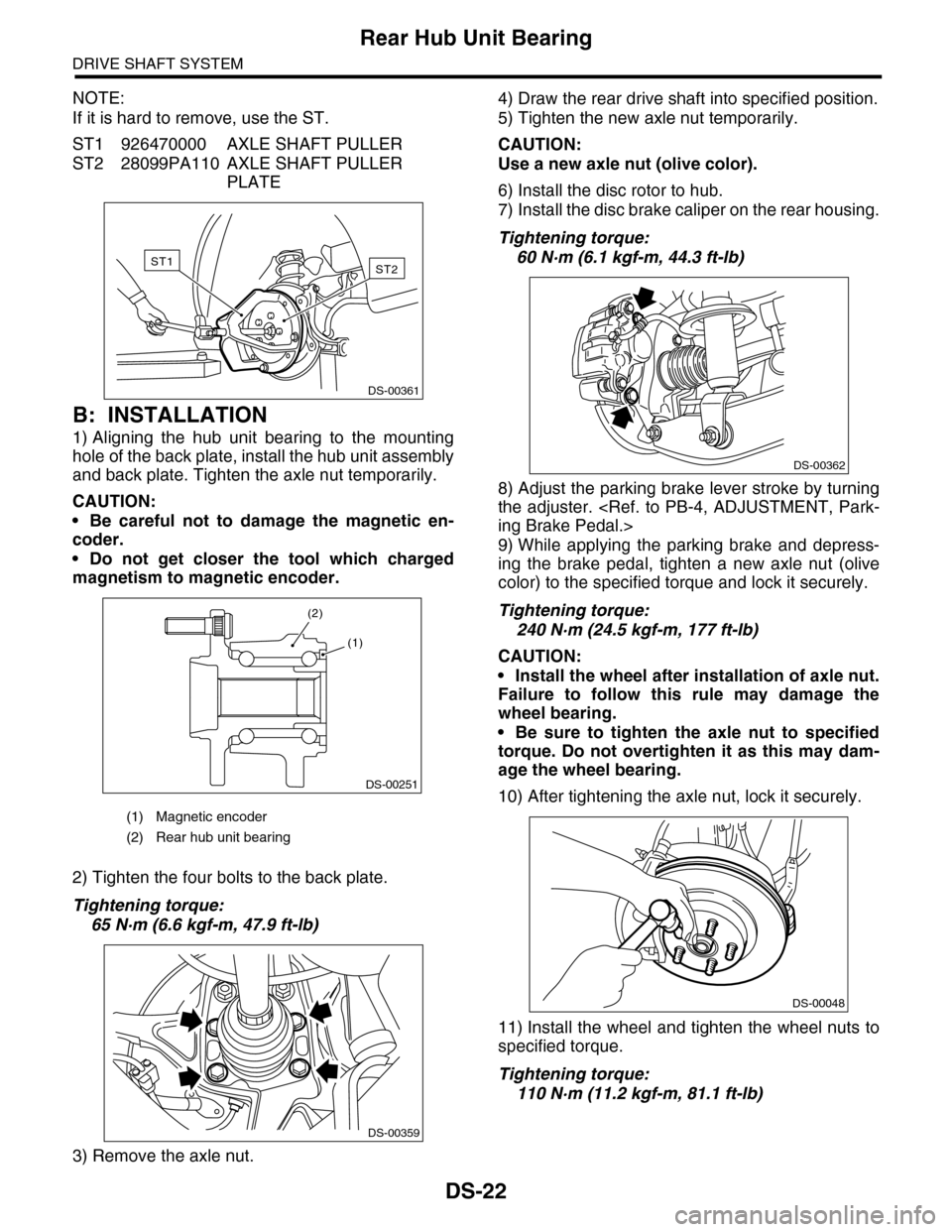
NOTE:
If it is hard to remove, use the ST.
ST1 926470000 AXLE SHAFT PULLER
ST2 28099PA110 AXLE SHAFT PULLER
PLATE
B: INSTALLATION
1) Aligning the hub unit bearing to the mounting
hole of the back plate, install the hub unit assembly
and back plate. Tighten the axle nut temporarily.
CAUTION:
•Be careful not to damage the magnetic en-
coder.
•Do not get closer the tool which charged
magnetism to magnetic encoder.
2) Tighten the four bolts to the back plate.
Tightening torque:
65 N·m (6.6 kgf-m, 47.9 ft-lb)
3) Remove the axle nut.
4) Draw the rear drive shaft into specified position.
5) Tighten the new axle nut temporarily.
CAUTION:
Use a new axle nut (olive color).
6) Install the disc rotor to hub.
7) Install the disc brake caliper on the rear housing.
Tightening torque:
60 N·m (6.1 kgf-m, 44.3 ft-lb)
8) Adjust the parking brake lever stroke by turning
the adjuster.
ing Brake Pedal.>
9) While applying the parking brake and depress-
ing the brake pedal, tighten a new axle nut (olive
color) to the specified torque and lock it securely.
Tightening torque:
240 N·m (24.5 kgf-m, 177 ft-lb)
CAUTION:
•Install the wheel after installation of axle nut.
Failure to follow this rule may damage the
wheel bearing.
•Be sure to tighten the axle nut to specified
torque. Do not overtighten it as this may dam-
age the wheel bearing.
10) After tightening the axle nut, lock it securely.
11) Install the wheel and tighten the wheel nuts to
specified torque.
Tightening torque:
110 N·m (11.2 kgf-m, 81.1 ft-lb)
(1) Magnetic encoder
(2) Rear hub unit bearing
ST2ST1
DS-00361
DS-00251
(2)
(1)
DS-00359
DS-00362
DS-00048
Page 978 of 2453

TPM(diag)-28
Diagnostic Procedure with Diagnostic Trouble Code (DTC)
TIRE PRESSURE MONITORING SYSTEM (DIAGNOSTICS)
11.Diagnostic Procedure with Diagnostic Trouble Code (DTC)
A: DTC 11 FL AIR PRESSURE DECREASE
NOTE:
Refer to DTC 14 for diagnostic procedure.
Diagnostic Procedure with Diagnostic Trouble Code (DTC).>
B: DTC 12 FR AIR PRESSURE DECREASE
NOTE:
Refer to DTC 14 for diagnostic procedure.
Diagnostic Procedure with Diagnostic Trouble Code (DTC).>
C: DTC 13 RR AIR PRESSURE DECREASE
NOTE:
Refer to DTC 14 for diagnostic procedure.
Diagnostic Procedure with Diagnostic Trouble Code (DTC).>
D: DTC 14 RL AIR PRESSURE DECREASE
DTC DETECTING CONDITION:
Inflation pressure of each tire reduces under specifications (188 kPs (1.9 kgf/cm2, 27.3 psi) or less).
TROUBLE SYMPTOM:
Tire pressure warning light illuminates.
CAUTION:
When driving vehicle to perform driving test, there should be always 2 persons (driver and checker)
to check.
Step Check Yes No
1CHECK THE TIRES.
Lift-up the vehicle and check for damage in the
tires.
Are there cracks or damage? Replace the tire.
Tire.>
Go to step 2.
2CHECK THE TIRES.
Check the tire air pressure.
Is the tire pressure in the spec-
ifications?
Go to step 3.Adjust the air pres-
sure.
3CHECK THE TRANSMITTER
Drive the vehicle at a speed more than 40 km/h
(25 MPH) and compare the data from the
transmitter on the four wheels.
Is there a transmitter with dif-
ferent data?
Replace the trans-
mitter (tire pres-
sure sensor)
to WT-11, Tire
Pressure Monitor-
ing System.>.
Go to step 4.
4PERFORM DRIVING TEST.
1) Perform the clear memory mode.
TPM(diag)-9, CLEAR MEMORY, OPERATION,
Subaru Select Monitor.>
2) Perform the driving test.
TPM(diag)-17, PROCEDURE, Inspection
Mode.>
3) Read the DTC.
READ DIAGNOSTIC TROUBLE CODE (DTC),
OPERATION, Subaru Select Monitor.>
Is DTC displayed? Record the DTC.
Pe r for m t h e r e pa i r
according to DTC.
TPM(diag)-26, List
of Diagnostic Trou-
ble Code (DTC).>
Finish the diagno-
sis.