2009 SKODA SUPERB lock
[x] Cancel search: lockPage 84 of 294

Seats and Stowage
83
Using the system
Safety
Driving Tips
General Maintenance
Breakdown assistance
Technical Data
Removing and installing a head restraint – Pull the head restraint up out of the seat backrest as far as the stop (on
the rear head restraints fold forward the seat backrest).
– Press the locking button in the direction of arrow
⇒
page 82, fig. 82
and pull the head restraint out.
– To re-insert the head restraint, push it down into the seat backrest far
enough until you hear the locking button engage.
The position of the front and rear outer head
restraints is adjustable in height. The
middle rear head restraint is adjustable in two positions. The head restraints must be adjusted to
match the size of the seat occupant.
Correctly adjusted head restraints together with the seat belts offer effective protection for the occupants
⇒page 164, “Correct seated position”.
WARNING
•
The head restraints must be correctly
adjusted in order to offer effective
protection for the occupants in the event of an accident.•
Do not drive under any circumstance with removed head restraints - risk
of injury!•
If the rear seats are occupied, the rear head restraint must not be in the
lower position.
Middle rear head restraintIIn certain countries national legal pr
ovisions also require the equipment
of the rear seat with fixing eyes for child seat using the “Top Tether” system ⇒
page 192, “Attaching child seat using the “Top Tether” system”. For
vehicles, which are equipped with such fixing eyes, a deviating sequence for removing the middle head restraint must be observed. Removing and installing the rear middle head restraint – Pull the head restraint out of the seat backrest as far as the stop. – Press the locking button in the direction of arrow
⇒
fig. 83
, press
simultaneously the locking button into the opening using a flat screwdriver with a width of maximum 5 mm and pull out the head restraint.
– To re-insert the head restraint, push it down into the seat backrest far
enough until you hear the locking button engage.
WARNING
•
The head restraints must be correctly adjusted in order to offer effective
protection for the occupants in the event of an accident.
Fig. 83 Rear seats: middle head restraint
AAAB
s2dk.1.book Page 83 Wednesday, April 8, 2009 12:23 PM
Page 85 of 294

Seats and Stowage
84
•
Do not drive under any circumstance with removed head restraints - risk
of injury!•
If the rear seats are occupied, the rear head restraint must not be in the
lower position.Rear seatsFolding the seat backrest forwards
The luggage compartment can be increased in size by folding the seat backrests forward. Folding the seat backrests forward – Before folding the seat backrests forwards, you must adapt the posi-
tion of the front seats in such a way that they are not damaged by the folded seat backrests.
9)
– Unlock the seat backrest by pressing the unlocking handle
⇒
fig. 84
and fold it completely forwards.
Put the seat backrests into the original position – Install the head restraint in th
e slightly lifted seat backrest.
– Place the rear lateral seat belt
behind the edge of the side trim
panel
⇒
fig. 85
.
– Then push the seat backrest back into the upright position until the
securing knob clicks into place - check by pulling on the seat backrest.
– Make sure that the red pin is covered
⇒
fig. 84
.
WARNING
•
The belts and the belt locks must be in their original position after folding
back the seat backrests - they must be ready to use.•
The seat backrests must be securely interlocked in position so that no
objects in the luggage compartment ca
n slide into the passenger compart-
ment if there is sudden braking - risk of injury!•
Pay attention that the seat backrests are correctly interlocked. It is only
then that the three-point seat belt for the middle seat can reliably fulfil its function.
WARNING (continued)
Fig. 84 Unlock the seat back- restFig. 85 Lock the seat back-rest
9)If the front seats are too far back, we recommend that you have the rear head restraints re-moved before the seat backrests are folded forward. Store the removed head restraints insuch a way that they cannot be damaged or soiled. Please refer to the guidelines
⇒page 86.
AA
AC
AB
s2dk.1.book Page 84 Wednesday, April 8, 2009 12:23 PM
Page 91 of 294

Seats and Stowage
90
Caution
Please ensure that the heating elements of the rear window heater are not damaged as a result of objects placed in this area.
Note
Opening the tailgate also lifts up the luggage compartment cover.Remove variable* loading floor
The variable loading floor makes handling of bulky items of luggage easier. You can remove the variable loading floor if necessary. – Unlock the loading floor by turning the safety eyes to the left by
approx. 90°
⇒
fig. 96
.
– Fold together the loading floor and take it out by moving in direction
of arrow.
– Unlock the carrier rail by turning the arbor-mounted fixing eyes
to the right by approx. 90°
⇒
fig. 97
.
WARNING
Pay attention when installing the variable loading floor that the carrier rail and the variable loading floor are correc
tly fastened. If this is not the case,
there is risk of injury for the occupants.
Note
The maximum load of the variable loading floor is 75°kg.Divide the luggage compartmen
t with variable loading floor*
The luggage compartment can be divided with the variable loading floor.
Fig. 96 Luggage compart- ment: remove variable loading floorFig. 97 Luggage compart-ment: Install carrier rails
AA
AB
AC
Fig. 98 Luggage compart-ment: Separation of the luggage compartment
s2dk.1.book Page 90 Wednesday, April 8, 2009 12:23 PM
Page 100 of 294

Seats and Stowage
99
Using the system
Safety
Driving Tips
General Maintenance
Breakdown assistance
Technical Data
The storage compartment is foreseen fo
r storing small objects of up to 1.5
kg. in weight. – Tilt the lock to open the flap and pull out the flap
⇒
page 98, fig. 114
.
– Tilt the lock to close the flap and press flap close.Front seat armrest with storage compartmentThe armrest is adjustable for height and length. Opening storage compartment – Open the lid of the armrest in the direction of arrow
⇒
fig. 115
.
Closing storage compartment – Open the lid up to the stop, then you can fold it downwards. Setting height – First of all fold the lid to the bottom and lift it in the direction of arrow
into one of the 4 fixed positions.
Adjusting in forward/back direction – Push the lid into the desired position.
Note
Push the lid of the armrest up to stop to the rear before operating the handbrake.Rear seat armrest with storage compartment*You can fold down the armrest
to enhance occupant comfort.
The armrest includes a storage compartment. You open the compartment by pressing the button on the front side and raising the cover
⇒fig. 116
.
Storage compartment in rear centre console
Fig. 115 Armrest: Storage compartment
Fig. 116 Armrest of rear seats:Fig. 117 Centre console at rear: Storage compartment
s2dk.1.book Page 99 Wednesday, April 8, 2009 12:23 PM
Page 102 of 294

Seats and Stowage
101
Using the system
Safety
Driving Tips
General Maintenance
Breakdown assistance
Technical Data
After folding open the armrest and the lid, an opening in the seat backrest becomes visible through which you can
push long objects e.g. skis etc.
You can fold open the armrest and the lid from the passenger or luggage compartment. Opening from passenger compartment – Fold the rear armrest downwards
⇒
page 85, fig. 86
.
– Pull the handle up to the stop in upward direction and fold open the
lid downwards
⇒
page 100, fig. 120
.
Opening from luggage compartment – Push the unlock button downwards
⇒
fig. 121
and fold the lid
(with armrest) to the front.
Closing – Fold the lid and the armrest up to the stop in upward direction - the lid
must click into place audibly.
Ensure that the armrest is always locked
into place after closin
g. You can recognize
this on the fact that the red field above the unlocking button of the luggage compartment is not visible.
Through-loading bag (Unibag)*Loading – Open the boot lid/luggage compartment door. – Push the unlock button downwards
⇒
fig. 121
and fold the lid
(with armrest) to the front.
– Place the empty through-loading bag in such a way that the end of the
bag with the zip lies in the boot.
– Push the objects into the through-loading bag from the boot
⇒
.
Securing – Insert the securing belt of the through-loading bag into the middle
seat belt buckle
⇒
fig. 122
.
– Place the securing belt on ski sport articles in the middle between the
bindings
⇒
.
– Pull the securing belt tight at the free end of the belt .
Fig. 121 Luggage compart- ment: Unlock button
AA
AA
Fig. 122 Attaching through-loading bag to middle seat belt buckle of rear seats
AA
AA
AC
AB
s2dk.1.book Page 101 Wednesday, April 8, 2009 12:23 PM
Page 103 of 294

Seats and Stowage
102
Stowing – Fold the lid and the armrest up to the stop in upward direction - the lid
must click into place audibly. You can recognize this on the fact that the red field above the unlocking button of the luggage compart-ment is not visible
⇒
page 101, fig. 121
.
– Carefully fold the empty (dry) through-loading bag together, place it in
the luggage compartment and secure it to prevent it slipping.
WARNING
•
After placing items into the through-
loading bag, you must secure the
bag with the securing belt .•
The securing belt must hold the items tight.
•
Ensure that the securing belt on ski sport articles lies in the middle
between the bindings (see imprint on the through-loading bag).
Note
•
Place the skis with the tips facing the front, snowboards and ski sticks with the
tips facing the rear into the through-loading bag.•
If there are several pairs of skis in the through-loading bag, ensure that the bind-
ings are positioned at the same height.•
The through-loading bag must never be
folded together or stowed when
moist.
Side compartments*– You can open the compartment by turning the locks in the direction of
arrow
⇒
fig. 123
⇒
fig. 124
.
On some vehicles the battery is
located in the left compartment
⇒page 229. This
compartment is marked by the symbol
and can be opened by turning the locks
e.g with a coin or using a flat screwdriver. In the right compartment
⇒fig. 124
is located the CD changer*, the TV tuner* and
the first-aid box.
AA
AA
Fig. 123 Luggage compart- ment: Left side compartmentFig. 124 Luggage compart-ment: Right side compart-ment
s2dk.1.book Page 102 Wednesday, April 8, 2009 12:23 PM
Page 114 of 294
Air conditioning system
113
Using the system
Safety
Driving Tips
General Maintenance
Breakdown assistance
Technical Data
Note
•
If the auxiliary heating runs, the fuel
consumption comes from
the vehicle tank.
Therefore the auxiliary heating should not be operated, if there is very little fuel in the tank.•
The exhaust pipe of the auxiliary heating,
which is located on the underside of
the vehicle, must not be clogged and the exhaust flow must not be blocked.•
If the auxiliary heating and ventilation is
running, the vehicle battery discharges.
If the auxiliary heating and ventilation
has been operated several times over a
longer period, the vehicle must be driven
a few kilometers in order to recharge the
vehicle battery.•
The auxiliary heating only sw
itches the blower on, if
it has achieved a coolant
temperature of approx. 50 °C.•
At low outside temperatures, this can resu
lt in a formation of water vapour in
the area of the engine compartment.This
is quite normal and is not an operating
problem.•
After switching off the auxiliary heating, the coolant pump runs for a short
period.•
The auxiliary heating and ventilation does not switch on or comes on, if the
vehicle battery indicate
s a low loading state.
•
The auxiliary heating (auxiliary heating) does not switch on, if the following was
shown in the information display or before switching off the ignition:
Please refuel!
(Please refuel!)
.
•
The air inlet in front of the windscreen must be free of ice, snow or leaves in
order to ensure that the auxiliary heating operates properly.•
So that warm air can flow into the vehi
cle interior after switching on the auxil-
iary heating, you must maintain the te
mperature normally selected by you (we
recommend 22°C). It is recommended to
put the air flow
in the position
.
•
On vehicles with DPF (diesel particle filter) the warm coolant heats up the
engine.
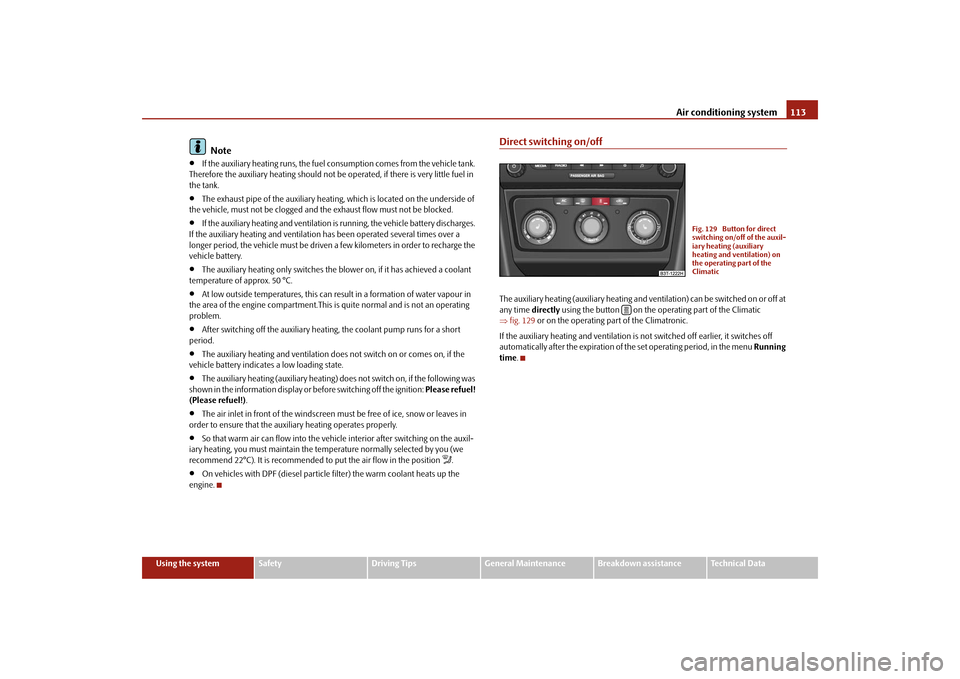
Direct switching on/offThe auxiliary heating (auxiliary heating and ve
ntilation) can be switched on or off at
any time
directly
using the button on the op
erating part of the Climatic
⇒ fig. 129
or on the operating part of the Climatronic.
If the auxiliary heating and ventilation is not switched off earlier, it switches off automatically after the expiration of
the set operating period, in the menu
Running
time
.
Fig. 129 Button for direct switching on/off of the auxil-iary heating (auxiliary heating and ventilation) on the operating part of the Climatic
s2dk.1.book Page 113 Wednesday, April 8, 2009 12:23 PM
Page 116 of 294

Air conditioning system
115
Using the system
Safety
Driving Tips
General Maintenance
Breakdown assistance
Technical Data
If the system is running, a warning light in
the button for direct switching on/off of
the auxiliary heating lights up. The running system deactivates after expiration of the operating period or is deac- tivated earlier by pressing the button for di
rect switching on/off of the auxiliary
heating
⇒page 113.
The random pre-set time can be deactivated by selecting the menu point
Deactive
in the menu
Activate
.
After selecting the menu point
Fac to r y s e tt ing
in the menu
Aux. heating
(auxiliary heating)
, it is possible to change to the factory setting.
Radio remote control The auxiliary heating (auxiliary heating and ventilation) can be switched on or off with the remote control.– For switching on, press the button . – For switching off, press the button .The transmitter and the battery are housed in the housing of the remote control. The receiver is located in
the interior of the car.
If the battery is properly charged, the ef
fective range is up to 600 m. For switching
on or off the auxiliary heating, hold the
remote control vertically with the antenna
⇒fig. 131
towards the top. You must not cover over the antenna with the
fingers or the palm of th
e hand. Obstacles between the radio remote control and
the vehicle, bad weather co
nditions and a weaker batt
ery can clearly reduce the
range. The auxiliary heating can only be switched
on or off with the radio remote control,
if the distance between the radio remote
control and the vehicle is at least 2 m.
Warning light in the radio remote control The warning light in the radio remote control
⇒fig. 131
indicates after a keystroke
if the remote control signal was received
by the auxiliary heating and if the battery
is adequately charged.
Caution
There are electronic components in the radio remote control, protect the remote control against water, severe
shocks and direct sun rays.
Fig. 131 Auxiliary heating: Radio remote control
ONOFF
AA
Display warning light
Importance
Lights up green for 2 seconds.
The auxiliary heating was switched on.
Lights up red for 2 seconds.
The auxiliary heating was switched off.
Slowly flashes green for 2 seconds.
The ignition signal was not received.
Quickly flashes green for 2 seconds.
The auxiliary heating is blocked, e. g because the tank is nearly empty or there is a fault in the auxiliary heating.
Flashes red for 2 seconds.
The switch off signal was not received.
Lights up orange for 2 seconds, then green or red.
The battery is weak, however the switching on or off signal was received.
Lights up orange for 2 seconds, then flashes green or red.
The battery is weak, however the switching on or off signal was not received.
Flashes orange for 5 seconds.
The battery is discharged, however the switching on or off signal was not received.
s2dk.1.book Page 115 Wednesday, April 8, 2009 12:23 PM