2009 SKODA OCTAVIA light
[x] Cancel search: lightPage 129 of 304

Starting-off and Driving
128
Front and rear parking aid*The parking aid provides a warning of obstacles in front and behind the vehicle.The audible parking aid determines the distance between the front or rear bumper and an obstacle with the aid of ultrasound sensors. The sensors are integrated in the front and rear bumper. The signal tones for the front parking aid sound higher as standard than for the rear parking aid. The tones of the parking aid can be adapted in the menu of the information display*
⇒page 29.
Range of sensors The distance warning begins at a distance
of about 120°cm from the obstacle in
front of the vehicle (area
⇒fig. 151
) and about 160 cm from the obstacle
behind the vehicle (area ). The interv
al between the warning signals becomes
shorter as the clearance is reduced. A continuous tone sounds from a distance
of approx. 30 cm (area ) - danger area.
From this moment on do not continue driving!
If the vehicle is equipped with a
factory-fitted towing device*, the border
of the danger area
starts - continuous
tone - 5 cm further behind
the vehicle. The vehicle ca
n be extended through an
installed detachable towing device. On vehicles equipped with a factory-fitted radio* or navigation*, the distance to the obstruction is shown graphically on the di
splay. On vehicles with a factory-fitted
towing device, the rear sensors are deactivated when towing a trailer. The driver is also informed of the radio* or the navigation* by a graphic display (vehicle towing a trailer) on the display. The radio* or navi
gation*, which is factory-fitted, can be set
so that the play function volume decreases when activating the parking aid, see Owner's Manual radio* or navigation*. This
improves the audibili
ty of the parking
aid. Activating The parking aid is activated when the
reverse gear
is engaged and the ignition is
turned on or by pressing the button
⇒fig. 150
- the symbol lights up in the
button. The activation is confirmed
by a brief acknowledgement signal.
Deactivating The parking aid is deactivate
d after pressing the button°
⇒fig. 150
or at a speed
of more than 10 km/h - the symbol
in the button is no longer illuminated.
WARNING
•
The parking aid is not a substitute fo
r the driver paying proper attention
and it is always the driver's responsibility to take care when reversing the vehicle or carrying out similar manoeuvres.•
You should therefore satisfy yourself, before reversing, that there is no
small obstacle, such as a rock, thin post, trailer drawbar etc., in front or behind your vehicle. Such an obstacle might not be within the range detected by the sensors.•
Under certain circumstances, surfaces of certain objects and types of
clothing cannot reflect the signal of the parking aid. Thus, these objects or
Fig. 150 Activating the parking aidFig. 151 Parking aid: Detec-tion range of the front sensors
AA
AA
AB
se0.1.book Page 128 Frida
y, April 10, 2009 3:19 PM
Page 133 of 304

Automatic gearbox
132
Automatic gearboxAutomatic gearbox*Information for driving with the 6-speed automatic gearbox* Your car is equipped with a
conventional 6-
speed automatic
gearbox.The maximum speed is reached in the 5th gear. The 6th gear serves as an economic driving programme, which is intended to reduce the fuel consumption. Shifting up and down
through the gears is performed auto-
matically. You can also, however, switch the gearbox over into the Tiptronic mode
. This mode makes it possible for you to also shift gears
manually
⇒
page 136.
Starting-off and Driving – Depress the brake pedal fully and keep it depressed. – Press the Shiftlock button (button in
handle of the selector lever),
move the selector lever into the desired position, e.g.
D ⇒
page 134,
and then release the Shiftlock button.
– Wait a moment until the gearbox has shifted (a slight engagement
nudge can be felt).
– Release the brake pedal and depress the accelerator
⇒
.
Stopping for a short time – The selector lever position
N does not have to be selected when stop-
ping just for a short time, such as at
a cross roads. It is absolutely suffi-
cient to hold the stopped vehicle st
ationary by depressing the foot
brake. The engine can, howeve
r, be allowed just to idle.
Parking – Depress the brake pedal and hold it depressed. – Apply the handbrake firmly. – Press and Shiftlock button in the
selector lever, mo
ve the selector
lever to
P and then release the Shiftlock button.
The engine can only be
started
when the selector lever is in position
P or N
⇒ page 124. It is sufficient to engage selector lever position
P when parking on a flat surface.
When parking on a slope you should first apply the handbrake firmly and then move the selector lever into position
P. This is to ensure that there is no excessive
pressure acting on the lock mechanism and
that it is easier to subsequently move
the selector lever out of position
P.
If the selector lever position
N is selected by accident wh
ile driving it is first neces-
sary to release pressure on the accelerato
r pedal and wait for idling speed of the
engine to be reached before engaging a drive position in the selector lever.
WARNING
•
Do not depress the accelerator when changing the position of the
selector lever if the car is stationary and the engine is running - risk of acci- dent!•
Never move the selector lever into position R or P when driving - risk of
an accident!•
When the engine is running and the vehicle is stationary, it is necessary
to hold the car with the brake pedal in all the positions of the selector lever (except P and N) since the power transmission is never completely inter- rupted, also not when the engine
is idling - the vehicle "creeps".
se0.1.book Page 132 Frida
y, April 10, 2009 3:19 PM
Page 135 of 304

Automatic gearbox
134
result of this the vehicle can no longer be
driven. If the clutch opens automatically,
depress the brake pedal, wait a few se
conds and only then continue driving.
Selector lever positionsThe current selector lever position is in
dicated in the information display of the
instrument cluster
⇒fig. 154
. In the positions
D and
S the gear you have already
engaged will be additionally displayed on the display. P - Parklock The driven wheels are locked mechanically in this position. The Parklock must only be engaged when the vehicle is stationary
⇒
.
I f y o u w i s h t o m o v e t h e s e l e c t o r l e v e r i n to
or out of this position, you must press the
Shiftlock button in the handle of the selector lever and at the same time depress the brake pedal. If the battery is used, the selector leve
r cannot be moved out of the position
P.
R - Reverse Reverse gear must only be engaged when
the vehicle is stationary and the engine
idling
⇒
.
The brake pedal must be depressed and at the same time the Shiftlock must be pressed, if you wish to obtain the selector lever positions
R, P or N.
When the ignition is switched on and the selector lever is in position
R, the reverse
lights will come on. N - Neutral The transmission is in Neutral in this position. The brake pedal must be depressed (if the lever is in its position for longer than 2 seconds) in order to move the selector lever out of the position
N into the position
D or R, with the ignition switched on, on a vehicle travelling at less than 5 km/hour
or on a stationary vehicle. D - Drive, position for driving forward When the selector lever is in this position, the forward gears are shifted up and down automatically in line with engine load, vehicle speed and the dynamic shift programme. You must depress the brake pedal if you wish to move into position
D from
N when
the vehicle is travelling
at less than 5 km/hour or is stationary
⇒
.
In certain circumstances (e.g. when driving in mountainous regions or when towing a trailer) it may be beneficial to
select the manual shift programme
⇒page 136 for
a short time in order to adapt the gearbox ratios manually to the driving situations. S - Position for sporty style of driving Shifting up later into a higher gear make
s it possible to fully exploit the power
potential of the engine. The gearbox also then shifts down at higher engine speeds as in the position
D.
Fig. 153 Selector leverFig. 154 Information display: Selector lever posi-tions
se0.1.book Page 134 Frida
y, April 10, 2009 3:19 PM
Page 136 of 304

Automatic gearbox
135
Using the system
Safety
Driving Tips
General Maintenance
Breakdown assistance
Technical Data
The gearbox does not shift into the 6th gear in the position
S, because the
maximum speed is reached with the 5th gear
12).
The Shiftlock on the selector lever grip must be pressed when moving the selector lever out of the position
D into the position
S.
WARNING
•
Never move the selector lever into position R or P when driving - risk of
an accident!•
When the engine is running and the vehicle is stationary, it is necessary
to hold the car with the brake pedal in all the positions of the selector lever (except P and N) since the power transmission is never completely inter- rupted, also not when the engine
is idling - the vehicle "creeps".
•
You must on no account unintentionally operate the throttle (e.g. by
hand from the engine compartment) if
a drive position is engaged when the
car is stationary. The vehicle would ot
herwise immediately
start off - also
when the handbrake is firmly applied - risk of an accident!•
You must move the selector lever into position P and firmly apply the
handbrake first before you or any other person opens the bonnet and starts working on the engine when it is running
- risk of accident! It is also essential
to observe all warnings
⇒page 225, “Working in the engine
compartment”.Selector lever lockAutomatic selector lever lock
With the ignition on, the selector lever is locked when it is in the positions
P and
N.
You must first of all depress the brake peda
l in order to move the selector lever out
of this position. The warning light
⇒page 37 lights up in the instrument cluster
as a reminder for the driver when
the selector lever is in position
P and
N.
A time delay element ensures that the selector lever is not blocked when rapidly switching over the position
N (e.g. from
R to D). This does, for example, allow one
to seesaw out a stuck vehicle. The selector
lever lock will click into place if the lever
is in the
N position for more than 2 seconds
without the brake pedal being pressed.
The selector lever lock is only active if th
e vehicle is stationary
or moving at speed
of less than 5 km/hour. The lock is switched off automatically into position
N when
the car is travelling at a higher speed. Shiftlock button The Shiftlock button in the handle of select
or lever prevents certain selector lever
positions being engaged inadvertently. The
selector lever lock is cancelled when
you press the Shiftlock button. Keylock - Ignition key withdrawal lock You can only withdraw the ignition key after switching off the ignition if the selector lever is in position
P. If the ignition key is withdrawn, the selector lever is blocked in
position
P.
Kickdown function The kickdown function provides you with maximum acceleration power.Depressing the accelerator pedal allows th
e kickdown function to be activated in
the desired driving program. This function has precedence over the driving programme and serves for maximum accelera
tion of the vehicle when exploiting
the maximum power potential of the engine without taking into account the current selector lever position (
D, S or Tiptronic
). The gearbox shifts down to one
or several gears in line with the driving state and the vehicle accelerates. The gearbox does not shift up into the highes
t gear until the engine has reached its
maximum revolutions for this gear range.
WARNING
Please note that using the kickdown f
unction can result in
the driven wheels
spinning on a smooth or slippery road surface - risk of skidding!
12)Not valid for vehicles with automatic gearbox DSG.
se0.1.book Page 135 Frida
y, April 10, 2009 3:19 PM
Page 138 of 304

Automatic gearbox
137
Using the system
Safety
Driving Tips
General Maintenance
Breakdown assistance
Technical Data
Shifting up gears – One-touch forward of the selector lever (in the Tiptronic position)
⇒
page 136, fig. 155
.
Shifting down gears – One-touch back of the selector
lever (in the Tiptronic position) .
It is possible to switch over to manual both
when the car is stationary and also when
driving. When you accelerate, the gearbox shifts up
automatically into the higher gear just
before the maximum permissible engine speed is reached. If you select a lower gear, the automatic ge
arbox does not shift down until there is
no risk of the engine overrevving. If you operate the kickdown function, the ge
arbox shifts into a lower gear in line
with the vehicle speed and engine speed.Manual shifting on the multifunction steering wheel*Switching over to manual shifting – Push the selector lever to the right out of position
D. After switching
over, the current engaged gear
is indicated in the display.
Shifting up gears – Press the right rocker switch
⇒
fig. 157
for the multifunction
steering wheel.
Shifting down gears – Press the left rocker switch
⇒
fig. 157
for the multifunction
steering wheel.
Temporarily switching over to manual shifting – If the selector lever is in position
D or
S, press the left rocker switch
or the right rocker switch fo
r the multifunction steering wheel.
– If the rocker switches or are not pressed for some time, the
manual shifting switches off. You can also switch off the temporary switch over to manual shifting by pressing the right rocker switch for more than 1 second.
Emergency programme An emergency programme exists in th
e event of a fault in the system.
The gearbox operates in a corresponding emergency programme if there are func- tional faults in the gearbox electronics. This is indicated by all of the segments in the display lighting up or going out. A functional fault can ha
ve the following effect:
•
The gearbox only shifts into certain gears.
•
The reverse gear
R cannot be used.
•
The manual shift programme (Tiptronic) is switched off in the emergency mode.
If the gearbox has switched over to
emergency mode, drive to the nearest
specialist garage in order to
have the fault rectified.
A+
A-
Fig. 157 Multifunction steering wheel: Manual shifting of gears
++
-
+
-
+
+
se0.1.book Page 137 Frida
y, April 10, 2009 3:19 PM
Page 140 of 304
Communication
139
Using the system
Safety
Driving Tips
General Maintenance
Breakdown assistance
Technical Data
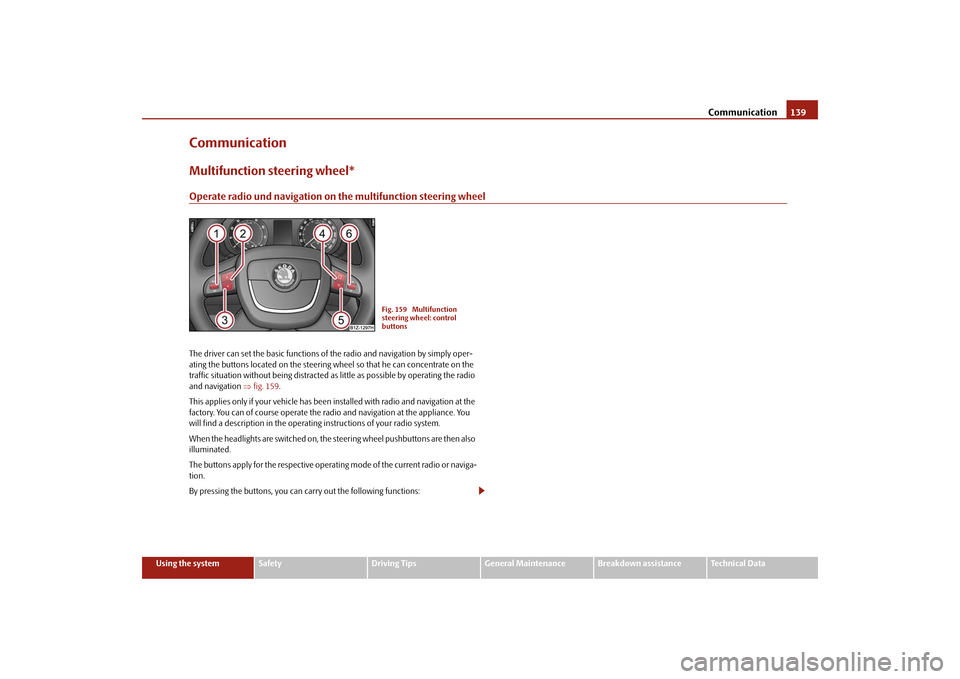
CommunicationMultifunction steering wheel*Operate radio und navigation on the multifunction steering wheelThe driver can set the basic functions of
the radio and navigation by simply oper-
ating the buttons located on the steering wheel so that he can concentrate on the traffic situation without being distracted as little as possible by operating the radio and navigation
⇒fig. 159
.
This applies only if your vehicle has been installed with radio and navigation at the factory. You can of course operate the radio and navigation at the appliance. You will find a description in the operating instructions of your radio system. When the headlights are switched on, the
steering wheel pushbuttons are then also
illuminated. The buttons apply for the respective operating mode of the current radio or naviga- tion. By pressing the buttons, you can
carry out the following functions:
Fig. 159 Multifunction steering wheel: control buttons
se0.1.book Page 139 Frida
y, April 10, 2009 3:19 PM
Page 145 of 304

Communication
144
While connecting the mobile phone with the hands-free system by means of Blue- tooth
®, no other phone can be connected wi
th the hands-free system via Blue-
tooth
®.
Up to three mobile phones can be connect
ed to the hands-free system by means
of Bluetooth
®, whereby only one mobile phone can communicate via Bluetooth
®
with the hands-free system. If a fourth
mobile phone is connected to the hands-
free-system, then the telephone, which ha
s not been used together with the hands-
free-system for the longest period, is
disconnected by means of Bluetooth
®.
Establish Bluetooth
® connection
After switching on the ignition, the Blue
tooth connection is automatically estab-
lished for the already adapted mobile phone
16). Check on the mobile unit if the
automatic connection was established. Disconnect Bluetooth
® connection
After withdrawing the ignition key, the Bluetooth
® connection is disconnected.
WARNING
•
Pay attention primarily to the traffic situation! As the driver you are fully
responsible for road safety. Use the tele
phone system only to such an extent,
so that you are in full control of your vehicle at any time - risk of accident!•
In the event of air transport, the Bluetooth
® function of the handsfree-
system must be switched off by a specialist garage!
Caution
Taking the mobile phone out of the adapter
during the call can lead to interruption
of the connection. When taking out th
e mobile phone, the connection to the
factory-fitted antenna is interrupted, this reduces the quality of the transmitting and receiving signal. The charging of the
mobile phone battery is also interrupted.
Note
•
Not valid for all mobile phones which
enable a communication via Bluetooth
®.
You can ask at an authorised Škoda Service
Partner if your telephone is compatible
with the universal teleph
one preinstallation GSM II.
•
Please operate your mobile phone exclus
ively with a suitable adapter in order
to keep a low radiation in the vehicle.•
Inserting the mobile phone into the adapter ensures an optimal sending and
receiving power and offers at the same time the advantage of the battery charging.•
Note that the range of the Bluetooth
® connection to the handsfree-system is
limited to the vehicle interior. The range is dependent on local factors, e.g. obstacles between the devices and interferences with
other devices. If yo
ur mobile phone is
e.g. in a jacket pocket, this can lead to
difficulties when establishing the Bluetooth
®
connection with the handsfree-sy
stem or the data transfer.
Inserting the mobile phone with the adapter*Only one telephone mount* is factory-fitted. An adapter for the phone can be purchased from the Škoda original accessories. Inserting the mobile phone with the adapter – First of all push the adapter in the direction of arrow
⇒
fig. 160
up
to the stop into the mount. Press the adapter slightly downwards, until it locks securely into position.
– Insert the mobile phone into the adapter (as specified in manufac-
turer's instructions).
Fig. 160 Universal prepara- tion for the phone
AA
AA
se0.1.book Page 144 Frida
y, April 10, 2009 3:19 PM
Page 147 of 304

Communication
146
Operation of the telephone on the multifunction steering wheel*
The driver can set the basic functions of
the telephone by simply operating the
buttons located on the steering wheel so that he can concentrate on the traffic situ- ation without being distracted as little
as possible by operating the telephone
⇒ fig. 163
.
This applies only if your vehicle has be
en equipped with the telephone preinstalla-
tion at the factory. If the side lights are switched on, the bu
ttons on the multifunc
tion steering wheel
are illuminated. Overview of the different functions in contrast to the multifunction steering wheel without mobile phone operation
⇒page 139.
Fig. 163 Multifunction steering wheel: Control buttons for the telephone
Button
Action
Operation
press briefly
Activation and deactivation of the voice control°
(Button PTT - Push to talk)
turn upwards
Increase volume
turn downwards
Decrease volume
press briefly
Accept call, terminate call, entry in the main
menu of the telephone, list of selected numbers
press button for a long
time
Reject call, entry in the main menu of
the telephone, list of selected numbers
press briefly
Reach one level higher in the menu (accordi
ng to the current position in the menu)
press button for a long
time
Return in the main menu of the information display
press briefly
Confirm menu selection
press button for a long
period of time
Confirming the selected menu point, the fo
llowing initial letters in the telephone book
turn upwards
The last chosen me
nu selection, name
turn downwards
The next menu selection, name
A1A1A1A2A2A3A3A4A4A4A4
se0.1.book Page 146 Frida
y, April 10, 2009 3:19 PM