2009 PORSCHE PANAMERA lock
[x] Cancel search: lockPage 147 of 343
Instrument Panel and Multi-Function Display
145
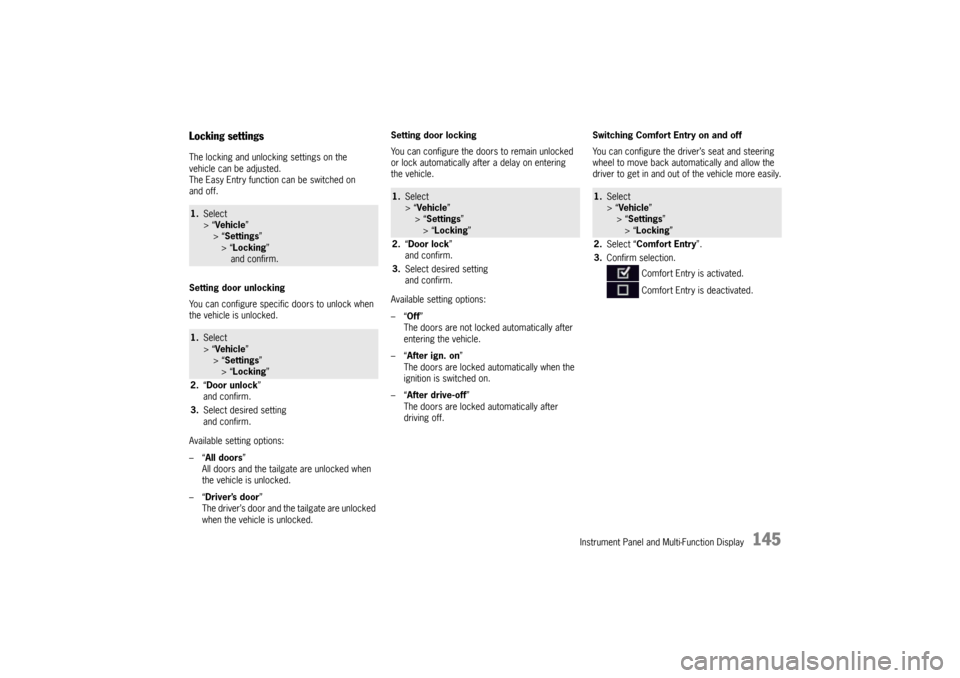
Locking settingsThe locking and unlocking settings on the
vehicle can be adjusted.
The Easy Entry function can be switched on
and off.
Setting door unlocking
You can configure specific doors to unlock when
the vehicle is unlocked.
Available setting options:
–“All doors”
All doors and the tailgate are unlocked when
the vehicle is unlocked.
–“ Driver’s door ”
The driver’s door and the tailgate are unlocked
when the vehicle is unlocked. Setting door locking
You can configure the doors to remain unlocked
or lock automatically after a delay on entering
the vehicle.
Available setting options:
–“
Off”
The doors are not locked automatically after
entering the vehicle.
–“ After ign. on ”
The doors are locked automatically when the
ignition is switched on.
–“ After drive-off ”
The doors are locked automatically after
driving off. Switching Comfort Entry on and off
You can configure the driver’s seat and steering
wheel to move back auto
matically and allow the
driver to get in and out of the vehicle more easily.1. Select
> “Vehicle ”
> “ Settings ”
> “Locking ”
and confirm.1. Select
> “Vehicle ”
> “ Settings ”
> “Locking ”
2. “Door unlock ”
and confirm.
3. Select desired setting
and confirm.
1.Select
> “Vehicle ”
> “Settings ”
> “ Locking ”
2. “Door lock ”
and confirm.
3. Select desired setting
and confirm.
1.Select
> “Vehicle ”
> “ Settings ”
> “Locking ”
2. Select “Comfort Entry ”.
3. Confirm selection.
Comfort Entry is activated.
Comfort Entry is deactivated.
Page 150 of 343
148
Instrument Panel and Multi-Function Display
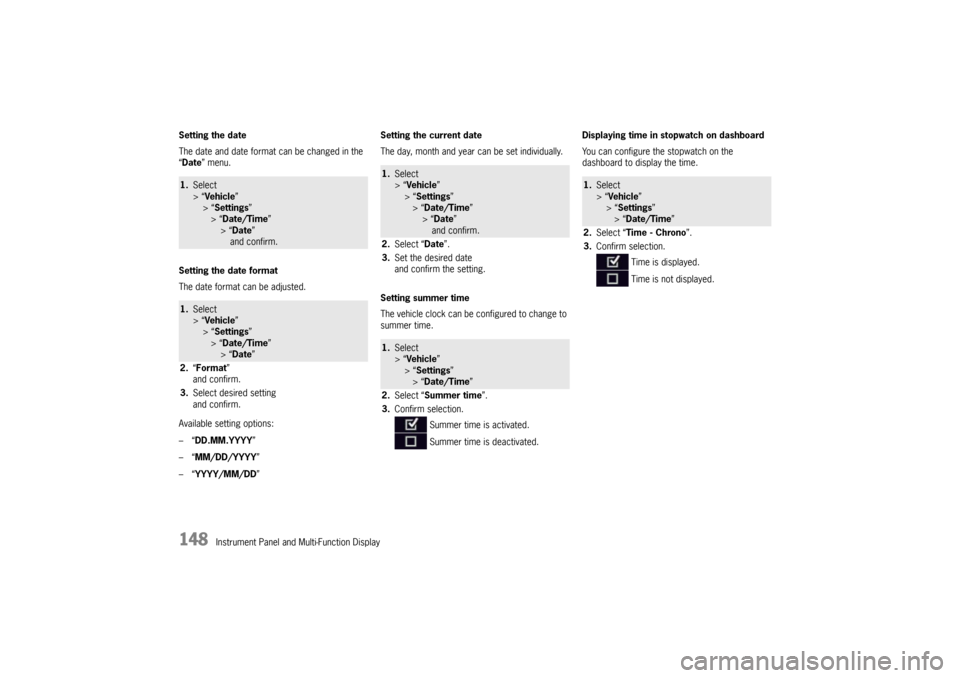
Setting the date
The date and date format
can be changed in the
“ Date ” menu.
Setting the date format
The date format can be adjusted.
Available setting options:
–“ DD.MM.YYYY”
–“ MM/DD/YYYY”
–“ YYYY/MM/DD ” Setting the current date
The day, month and year can be set individually.
Setting summer time
The vehicle clock can be configured to change to
summer time.
Displaying time in
stopwatch on dashboard
You can configure the stopwatch on the
dashboard to display the time.
1. Select
> “Vehicle ”
> “ Settings ”
> “Date/Time ”
> “Date ”
and confirm.1. Select
> “Vehicle ”
> “ Settings ”
> “Date/Time ”
> “Date ”
2. “Format”
and confirm.
3. Select desired setting
and confirm.
1.Select
> “Vehicle ”
> “ Settings ”
> “Date/Time ”
> “ Date ”
and confirm.
2. Select “ Date”.
3. Set the desired date
and confirm the setting.1.Select
> “Vehicle ”
> “ Settings ”
> “Date/Time ”
2. Select “ Summer time ”.
3. Confirm selection.
Summer time is activated.
Summer time is deactivated.
1.Select
> “Vehicle ”
> “Settings ”
> “Date/Time ”
2. Select “Time - Chrono”.
3. Confirm selection.
Time is displayed.
Time is not displayed.
Page 156 of 343
154
Instrument Panel and Multi-Function Display
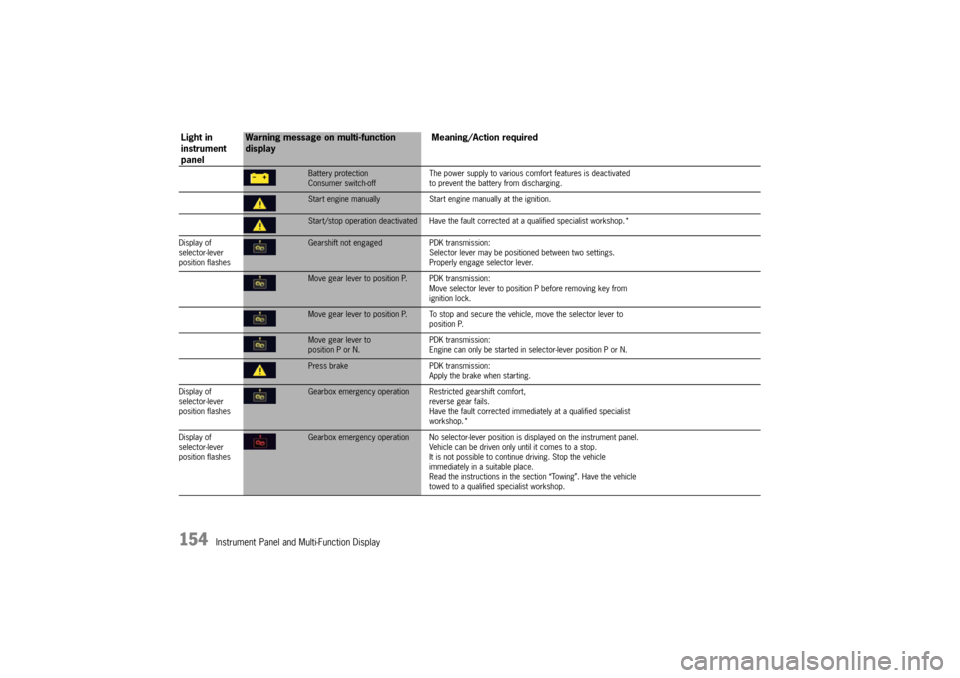
Battery protection
Consumer switch-offThe power supply to various comf
ort features is deactivated
to prevent the battery from discharging.Start engine manually Start engine manually at the ignition.Start/stop operation deactivated Have the faul t corrected at a qualified specialist workshop.*
Display of
selector-lever
position flashesGearshift not engaged PDK transmission:
Selector lever may be positi oned between two settings.
Properly engage selector lever.Move gear lever to position P. PDK transmission:
Move selector lever to position P before removing key from
ignition lock.Move gear lever to position P. To stop and se cure the vehicle, move the selector lever to
position P.Move gear lever to
position P or N. PDK transmission:
Engine can only be started in selector-lever position P or N.Press brake
PDK transmission:
Apply the brake when starting.
Display of
selector-lever
position flashesGearbox emergency operation R estricted gearshift comfort,
reverse gear fails.
Have the fault corrected immediately at a qualified specialist
workshop.*
Display of
selector-lever
position flashesGearbox emergency operation No selector-lever po sition is displayed on the instrument panel.
Vehicle can be driven only until it comes to a stop.
It is not possible to contin ue driving. Stop the vehicle
immediately in a suitable place.
Read the instructions in the se ction “Towing”. Have the vehicle
towed to a qualified specialist workshop.
Light in
instrument
panel
Warning message on multi-function
display Meaning/Action required
Page 159 of 343

Instrument Panel and Multi-Function Display
157
Fault Fuel indicatorHave the fault corrected at a qualified specialist workshop.*Check fuel tank cap Position tank cap correctly and screw on until it locks securely.Refill washer fluidFasten seat belt All vehicle occupants must fasten their seat belts.Air bag warning light failure Have the fault co rrected at a qualified specialist workshop.*Steering locked The steering wheel lock is faulty.
Have the fault corrected at a q ualified specialist workshop.*Relieve steering Relieve the steering lock by turning the steering wheel to the left
or right.Heated steering wheel on Steering wheel heating is switched onHeated steering wheel off Steering wheel heating is switched offCheck steering oil level For vehicles with PDCC:
Power steering fluid level too low.
Please visit a qualified specialist workshop.*Ignition key not removedIgnition lock fault Have the fault corrected at a qualified specialist workshop.*Key not recognized Make sure that you have the car key with you.Ignition lock faulty Have the fault corrected at a qua lified specialist workshop.*Replace ignition key battery Repla ce the battery in the car key.
Light in
instrument
panel
Warning message on multi-function
display Meaning/Action required
Page 160 of 343

158
Instrument Panel and Multi-Function Display
Fault Porsche Entry & Drive Have the fault corrected at a qualified specialist workshop.*Multiple keys recognized
in vehicleInformation message:
Several vehicle keys in the vehicle, e.g. in the possession of
a passenger.Close doors to lock vehicle Close all doors
and the tailgate before locking the vehicle.Chassis system faultVehicle handling may be affected. Adapt your speed to the
changed conditions.
Have the fault corrected at a qualified specialist workshop.*Chassis system failure Stop immediately in a suitable place. Do not continue driving.
Have the fault corrected at a qualified specialist workshop.*Control on PASM level control is active.Control offPASM level control was switched off, e.g. before driving onto
a lifting platform or raising one wheel. not allowed Level adjustment is not permitted, e.g. at speeds above approx.
20 mph (30 km/h) or if the door/tailgate is open.not possible Level adjustment not available, e.g. when the engine is switched
off, if the vehicle is overloaded or the battery voltage is too low.Vehicle extremely low The vehicle ground clearance is insufficient to continue driving.
The system regulates the vehi cle level again automatically.
This can take several minutes. Have any persistent faults
checked/corrected at a qualif ied specialist workshop.*Vehicle extremely high The vehicle ground clearance is too high to continue driving.
The system regulates the vehicl e level again automatically.
Have any persistent faults ch ecked/corrected at a qualified
specialist workshop.*
Light in
instrument
panel
Warning message on multi-function
display Meaning/Action required
Page 161 of 343

Instrument Panel and Multi-Function Display
159
Fault PDCCVehicle handling may be affected. Adapt your speed to the
changed conditions.
Have the fault corrected at a q ualified specialist workshop.*PDCC failure The lateral inclination of the vehicle is significantly greater when
cornering. Drive carefully at an appropriate speed to the nearest
qualified specialist workshop.*PDCC fault
PSM activated Vehicle handling may be affect
ed. Adapt your speed to the
changed conditions.
Have the fault corrected at a q ualified specialist workshop.*Fault Differential lock Have the fault corrected at a qualified sp ecialist workshop.*Tire pressure Tire Pressure Monitoring detects a pressure loss of more
than 7 psi (0.5 bar) below 100 mph (160 km/h) and more
than 6 psi (0.4 bar) above 100 mph (160 km/h).
Stop in a suitable place and check the tires indicated for
damage. If necessary, fill in ti re sealant and set the correct
tire pressure.Inflate! Tire Pressure Monitoring detects a pressure loss of more
than 4 psi (0.3 bar).
Correct the tire pressure at the next opportunity.Restricted monitoring Fault on one or both wheel transmitters.
Have the fault corrected at a q ualified specialist workshop.*No monitoring System is learning Tire Pressure Mo nitoring requires a certain amount of time to
learn the wheels. During this time , the current tire pressures are
not available on the on-board computer.System not active Fault in Tire Pressure Monitoring system. Tire pressure is not
monitored. Have the fault corrected at a qualified specialist
workshop.*
Light in
instrument
panel
Warning message on multi-function
display Meaning/Action required
Page 165 of 343
Driving and Driving Safety
163
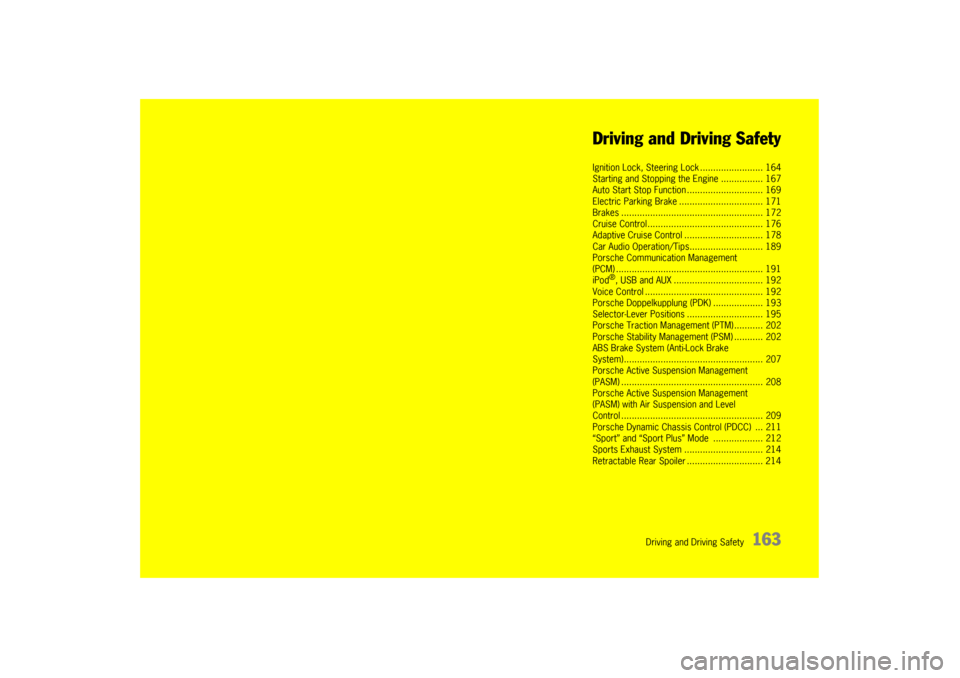
Driving and Driving Safety
Ignition Lock, Steering
Lock ........................ 164
Starting and Stopping the Engine ................ 167
Auto Start Stop Func tion ............................. 169
Electric Parking Brak e ................................ 171
Brakes ........................ .............................. 172
Cruise Control......... ................................... 176
Adaptive Cruise Contr ol .............................. 178
Car Audio Operation/Ti ps............................ 189
Porsche Communication Management
(PCM) .......................... .............................. 191
iPod
®, USB and AUX ........ .......................... 192
Voice Control ............... .............................. 192
Porsche Doppelkupplung (PDK) ................... 193
Selector-Lever Positi ons ............................. 195
Porsche Traction Management (PTM) ........... 202
Porsche Stability Management (PSM) ........... 202
ABS Brake System (Anti-Lock Brake
System)....................... .............................. 207
Porsche Active Suspension Management
(PASM) ............................................ .......... 208
Porsche Active Suspension Management
(PASM) with Air Suspension and Level
Control ............................................ .......... 209
Porsche Dynamic Chassis Control (PDCC) ... 211
“Sport” and “Sport Plus ” Mode ................... 212
Sports Exhaust Syst em .............................. 214
Retractable Rear Spoiler ............................. 214
Page 166 of 343
164
Driving and Driving Safety
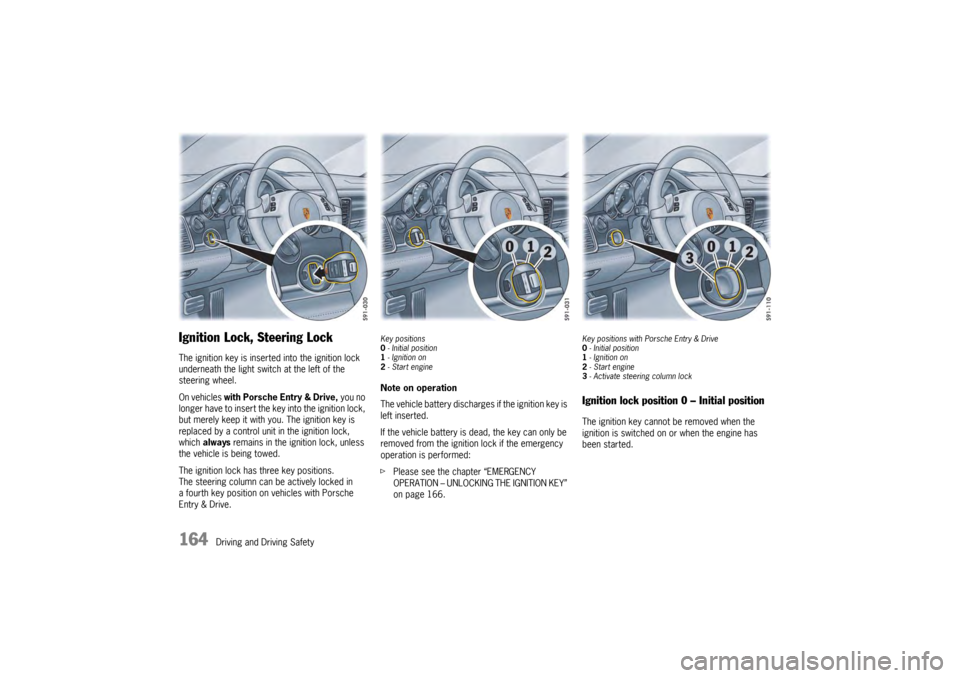
Ignition Lock, Steering LockThe ignition key is inserted into the ignition lock
underneath the light swit ch at the left of the
steering wheel.
On vehicles with Porsche Entry & Drive, you no
longer have to insert the key into the ignition lock,
but merely keep it with yo u. The ignition key is
replaced by a control unit in the ignition lock,
which always remains in the ignition lock, unless
the vehicle is being towed.
The ignition lock has three key positions.
The steering column can be actively locked in
a fourth key position on vehicles with Porsche
Entry & Drive.
Key positions
0 - Initial position
1 - Ignition on
2 -Start engineNote on operation
The vehicle battery discharges if the ignition key is
left inserted.
If the vehicle battery is dead, the key can only be
removed from the ignition lock if the emergency
operation is performed:
f Please see the chapter “EMERGENCY
OPERATION – UNLOCKING THE IGNITION KEY”
on page 166.
Key positions with Porsche Entry & Drive
0-Initial position
1 - Ignition on
2 -Start engine
3 -Activate steeri ng column lockIgnition lock position 0 – Initial positionThe ignition key cannot be removed when the
ignition is switched on or when the engine has
been started.