2009 PORSCHE PANAMERA warning
[x] Cancel search: warningPage 62 of 343

60
Seats, Mirrors and Steering Wheel
Automatic anti-dazzle exterior mirrorThe exterior mirrors change to anti-dazzle
position automatically in synchronisation with
the interior mirror.
For information on the automatic anti-dazzle
function of the interior mirror:
fPlease see the chapter “AUTOMATIC ANTI-
DAZZLE INTERIOR MIRROR” on page 60.Swivelling down mirror glass as
parking aid When reverse gear is engaged, the mirror on the
passenger’s side swivels down slightly to show
the curb area.
f Please see the chapter “SWIVELLING DOWN
MIRROR GLASS AS PARKING AID” on
page 242.
Automatic anti-dazzle interior mirrorSensors on the front and rear sides of the interior
mirror measure the incident light. The mirrors
automatically change to anti-dazzle position or
revert to their normal state, depending on the light
intensity.
Note on operation
The incidental light within the detection area
of the light sensor C must not be restricted
(e.g. by stickers on the rear window or items
of luggage in the luggage compartment). Switching off automatic anti-dazzle function
f
Press button B.
The indicator light A goes out.
Note on operation
The anti-dazzle function switches off
automatically if:
– Reverse gear is engaged or
– Interior lighting is switched on.
Switching on automatic anti-dazzle function
f Press button B.
Indicator light A lights up.
Warning!
Risk of injury. Electrolyte fluid may escape
from broken mirror glass. This fluid irritates
the skin and eyes.
f If the electrolyte fluid sh ould come into contact
with the skin or eyes, rinse it off immediately
with clean water.
Seek medical attention if necessary.
Risk of damage to paintwork, leather, plastic
parts and clothing. Electrolyte fluid can be
removed only while it is still wet.
f Clean the affected parts with water.
Page 64 of 343
62
Seats, Mirrors and Steering Wheel
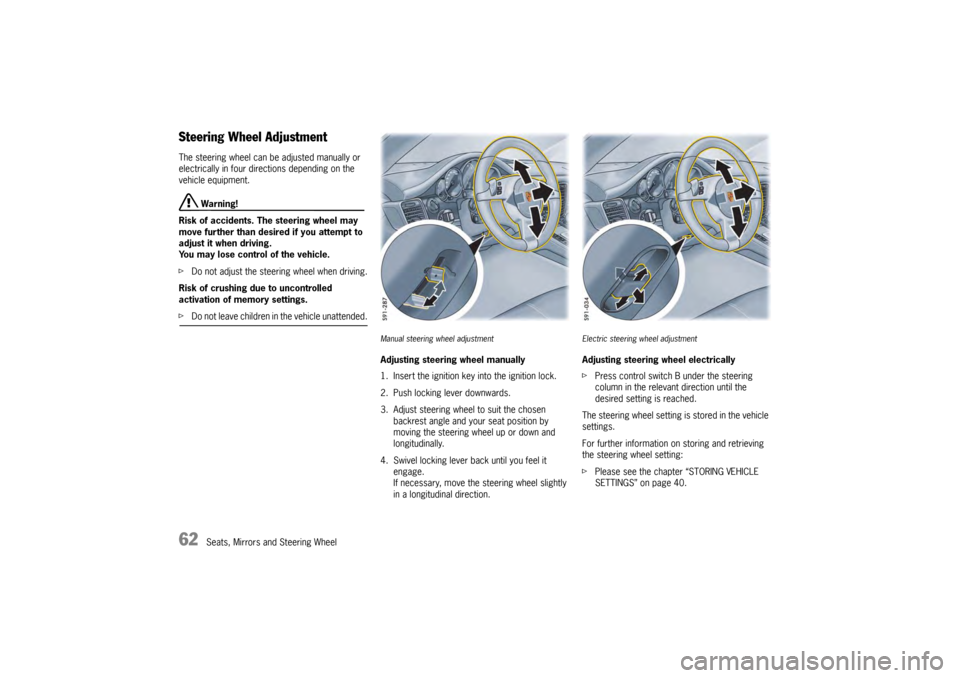
Steering Wheel AdjustmentThe steering wheel can be adjusted manually or
electrically in four directions depending on the
vehicle equipment.
Warning!
Risk of accidents. The steering wheel may
move further than desired if you attempt to
adjust it when driving.
You may lose control of the vehicle.
f Do not adjust the steeri ng wheel when driving.
Risk of crushing due to uncontrolled
activation of memory settings.
f Do not leave children in the vehicle unattended.
Manual steering wheel adjustmentAdjusting steering wheel manually
1. Insert the ignition key into the ignition lock.
2. Push locking lever downwards.
3. Adjust steering wheel to suit the chosen
backrest angle and your seat position by
moving the steering wheel up or down and
longitudinally.
4. Swivel locking lever back until you feel it engage.
If necessary, move the steering wheel slightly
in a longitudinal direction.
Electric steering wheel adjustmentAdjusting steering wheel electrically
fPress control switch B under the steering
column in the relevant direction until the
desired setting is reached.
The steering wheel setting is stored in the vehicle
settings.
For further information on storing and retrieving
the steering wheel setting:
f Please see the chapter “STORING VEHICLE
SETTINGS” on page 40.
Page 65 of 343

Seats, Mirrors and Steering Wheel
63
Multi-Function Steering Wheel
Warning!
There is a risk of accident if you set or
operate the multi-funct ion display, radio,
navigation system, telephone or other
equipment while driving.
Operating these devices while driving could
distract you from traffic and cause you to
lose control of the vehicle.
f Operate the equipment while driving only if the
traffic situation allows you to do so safely.
f Carry out any complicated operating or setting procedures only when the vehicle is stationary.
Depending on the equipment in your vehicle, you
can use the function keys of the multi-function
steering wheel to operate the following Porsche
communication systems:
– Telephone
–PCM
– Multi-function display in the instrument panel
Readiness for operation of the
multi-function steering wheel– With ignition switched on
f Please observe the operating instructions
supplied for the Porsche communication
systems before operating the function keys.
Note on operation
The Porsche communication systems cannot be
switched on and off using the multi-function
steering wheel.
Function buttons on the multi-function
steering wheelThe rotary buttons at the top left and right of the
steering wheel can also be pressed.
Turn volume control
Upwards – increase volume
Downwards – decrease volume
Press volume control
Switch volume/mute on and off.
Turn rotary knob
Select/highlight the main menu or menu
item on the multi-function display by
turning the rotary knob upward or
downward.
Press rotary knob
Go to submenu or activate selected
function.
Press MFS button
Call up the stored function.
The button can be assigned the desired
function in the multi-fu nction display on the
instrument panel.
Press Back button
Return to the menu.
Press Handset Pickup button
Accept a telephone call.
Press Handset Hangup button
End or refuse a telephone call.
Page 70 of 343
68
Air Conditioning
Brief Overview –
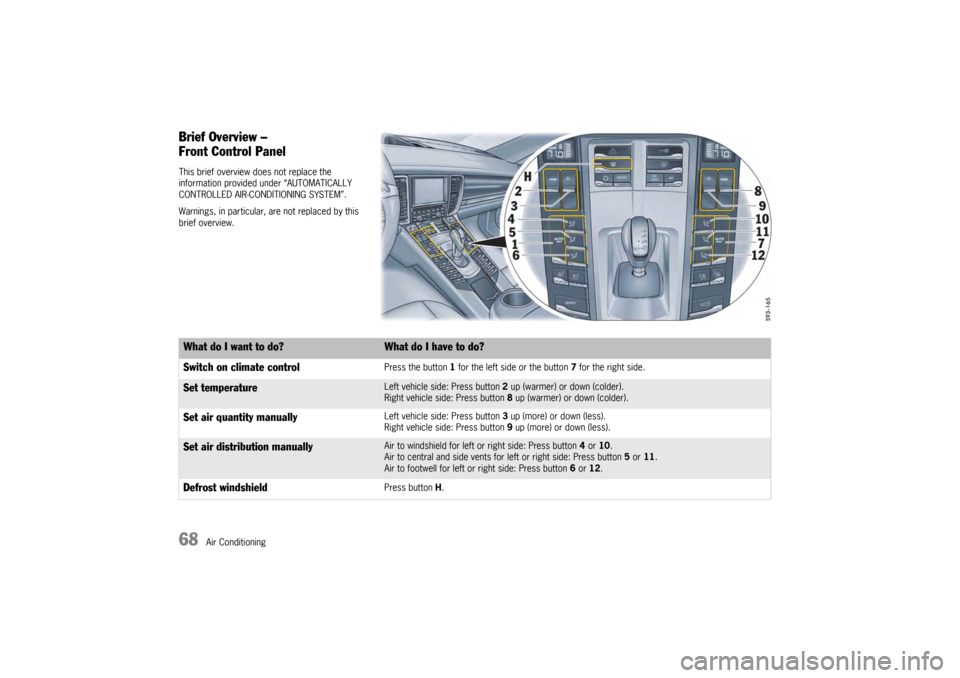
Front Control PanelThis brief overview does not replace the
information provided under “AUTOMATICALLY
CONTROLLED AIR-CONDITIONING SYSTEM”.
Warnings, in particular, are not replaced by this
brief overview.What do I want to do?
What do I have to do?
Switch on climate controlPress the button 1 for the left side or the button 7 for the right side.
Set temperature
Left vehicle side: Press button 2 up (warmer) or down (colder).
Right vehicle side: Press button 8 up (warmer) or down (colder).
Set air quantity manually
Left vehicle side: Press button 3 up (more) or down (less).
Right vehicle side: Press button 9 up (more) or down (less).
Set air distribution manually
Air to windshield for left or right side: Press button 4 or 10 .
Air to central and side vents for left or right side: Press button 5 or 11 .
Air to footwell for left or right side: Press button 6 or 12.
Defrost windshield
Press button H.
Page 71 of 343
Air Conditioning
69
Brief Overview –
Rear Control Panel
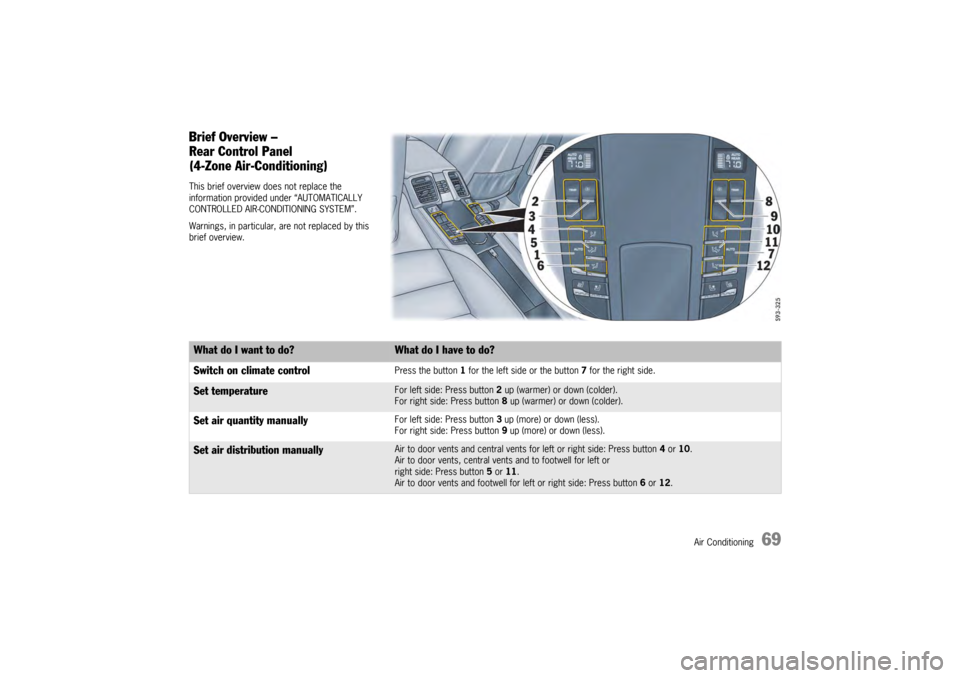
(4-Zone Air-Conditioning)This brief overview does not replace the
information provided under “AUTOMATICALLY
CONTROLLED AIR-CONDITIONING SYSTEM”.
Warnings, in particular, are not replaced by this
brief overview.What do I want to do?
What do I have to do?
Switch on climate controlPress the button 1 for the left side or the button 7 for the right side.
Set temperature
For left side: Press button 2 up (warmer) or down (colder).
For right side: Press button 8 up (warmer) or down (colder).
Set air quantity manually
For left side: Press button 3 up (more) or down (less).
For right side: Press button 9 up (more) or down (less).
Set air distribution manually
Air to door vents and central vents for left or right side: Press button 4 or 10.
Air to door vents, central vents and to footwell for left or
right side: Press button 5 or 11.
Air to door vents and footwell for left or right side: Press button 6 or 12.
Page 81 of 343
Air Conditioning
79
Setting air quantityThe selected air quantity is shown in a bar display
above the button . The more bars that are
displayed, the more air flows into the passenger
compartment.
Increasing air quantity
fPress button for the air quantity to the
relevant air-conditioned area upwards.
Reducing air quantity
f Press button for the air quantity to the
relevant air-conditioned area downwards.
Press button for the relevant air-conditioned
area to switch back to automatic mode.
If the air quantity was reduced so much that OFF
appears on the air-conditioning system display,
the supply of air from the outside is interrupted.
Warning!
Risk of accidents due to impaired vision.
The windows can mist up if the air quantity
setting is OFF.
f Only select air quantity setting OFF for short
periods.
f If windows mist up, press for the left and
right vehicle side on the front control panel upwards (increase air quantity).
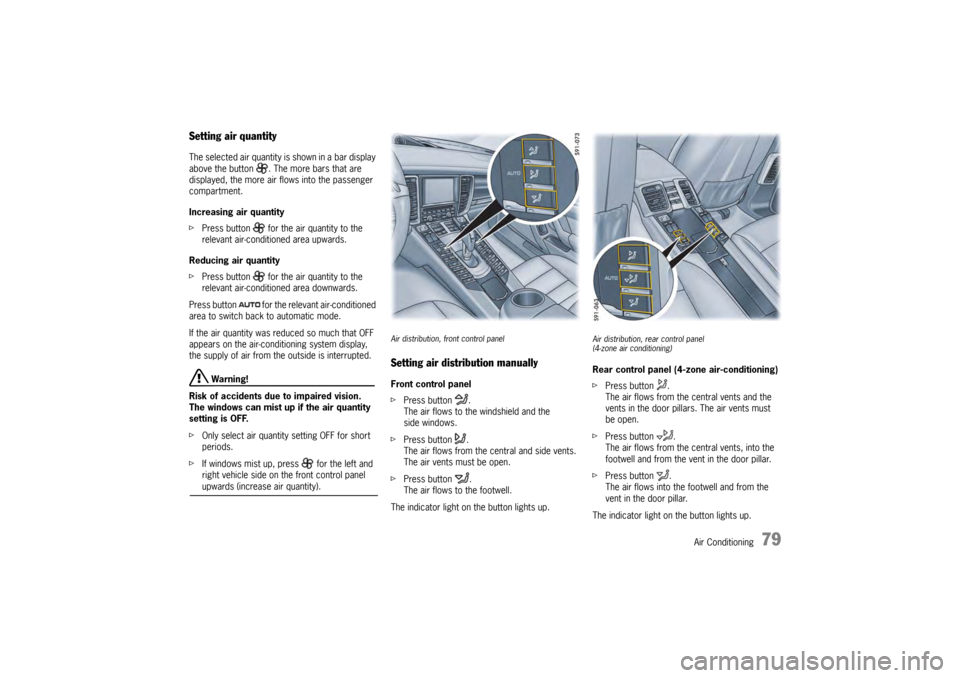
Air distribution, front control panelSetting air distribution manuallyFront control panel
f Press button .
The air flows to the windshield and the
side windows.
f Press button .
The air flows from the central and side vents.
The air vents must be open.
f Press button .
The air flows to the footwell.
The indicator light on the button lights up.
Air distribution, rear control panel
(4-zone air conditioning)Rear control panel (4-zone air-conditioning)
f Press button .
The air flows from the central vents and the
vents in the door pillars. The air vents must
be open.
f Press button .
The air flows from the ce ntral vents, into the
footwell and from the vent in the door pillar.
f Press button .
The air flows into the footwell and from the
vent in the door pillar.
The indicator light on the button lights up.
Page 88 of 343
86
Windows and Slide/Tilt Roof
Power Windows
Warning!
Risk of injury when closing the windows,
especially when windows close
automatically.
f Take care to ensure that nobody can be injured
when the windows close.
f Always remove ignition key when leaving the
vehicle or switch ignition off on vehicles with
Porsche Entry & Drive. Always take the ignition
key with you when leaving the vehicle.
Uninformed persons could injure themselves
by operating the power windows.
f In case of danger, immediately release the
button on the ignition key or the button in
the door handle on vehicles with Porsche
Entry & Drive.
f Do not leave children in the vehicle unattended.
Risk of an accident.
f Do not put anything on or near the windows that may interfere with the driver’s vision.
Readiness for operation of power windows– With ignition switched on.
– A maximum of 10 minutes after the ignition is
switched off, but only until driver’s or
passenger door is first opened.
– The one-touch operation for closing the door windows is available only when the ignition is
switched on.
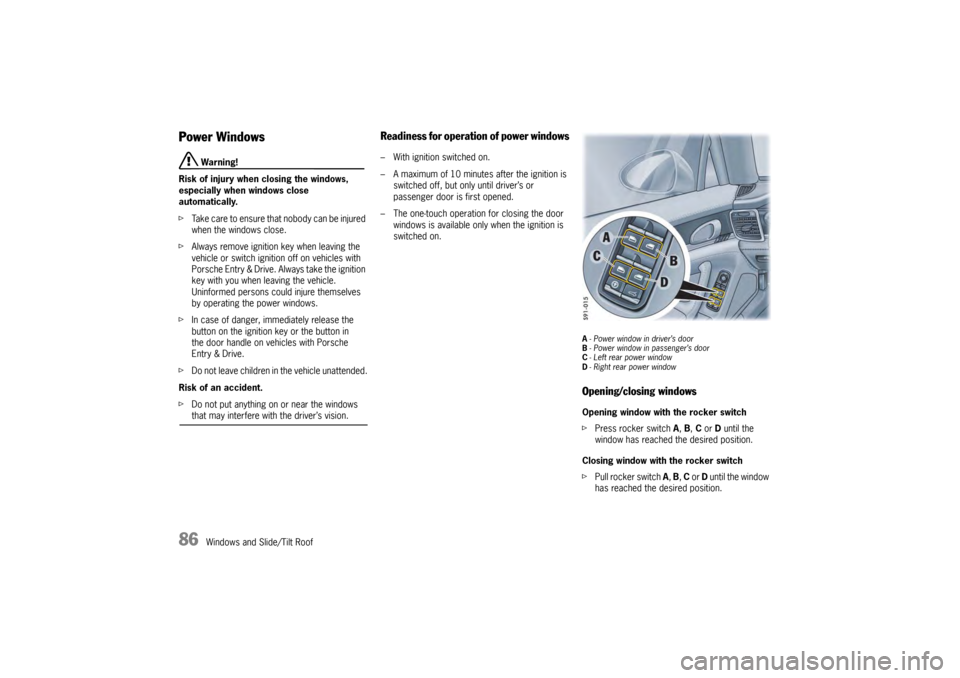
A- Power window in driver’s door
B - Power window in passenger’s door
C -Left rear power window
D - Right rear power windowOpening/closing windowsOpening window with the rocker switch
f Press rocker switch A, B, C or D until the
window has reached the desired position.
Closing window with the rocker switch
f Pull rocker switch A, B, C or D until the window
has reached the desired position.
Page 89 of 343
Windows and Slide/Tilt Roof
87
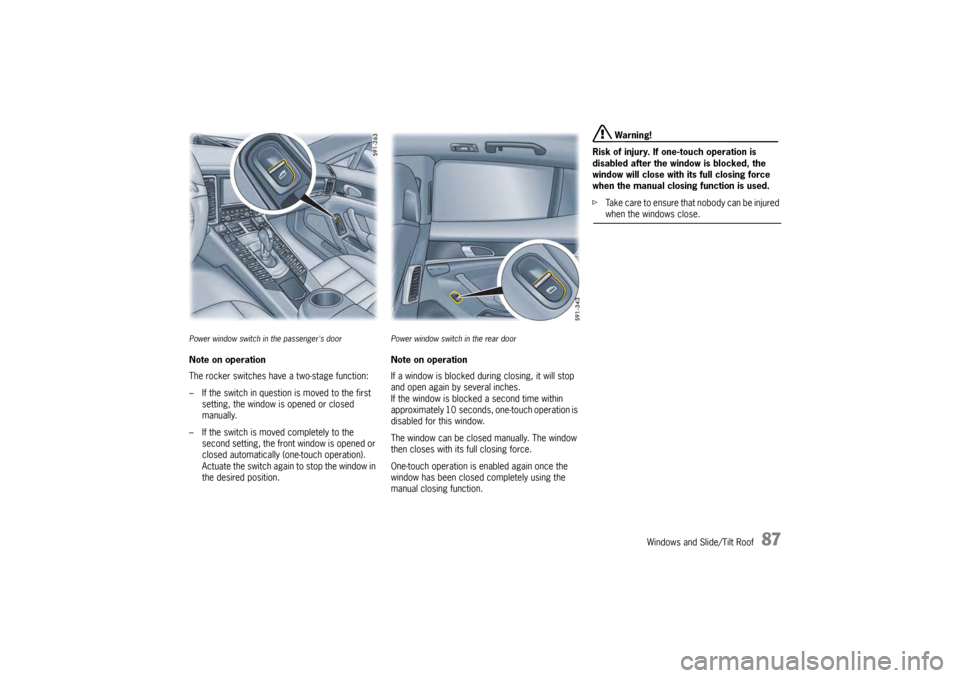
Power window switch in the passenger's doorNote on operation
The rocker switches have a two-stage function:
– If the switch in question is moved to the first
setting, the window is opened or closed
manually.
– If the switch is moved completely to the second setting, the front window is opened or
closed automatically (one-touch operation).
Actuate the switch again to stop the window in
the desired position.
Power window switch in the rear doorNote on operation
If a window is blocked during closing, it will stop
and open again by several inches.
If the window is blocked a second time within
approximately 10 seconds, one-touch operation is
disabled for this window.
The window can be closed manually. The window
then closes with its full closing force.
One-touch operation is enabled again once the
window has been closed completely using the
manual closing function.
Warning!
Risk of injury. If one-touch operation is
disabled after the wind ow is blocked, the
window will close with its full closing force
when the manual closing function is used.
f Take care to ensure that nobody can be injured when the windows close.