2009 PORSCHE PANAMERA warning
[x] Cancel search: warningPage 116 of 343

114
Instrument Panel and Multi-Function Display
Warning!
Risk of accidents and ri sk of engine damage.
A broken drive belt means there is no power
assistance to the steering (more effort is
required to steer) and engine cooling fails.
f Do not continue driving.
f Have the fault corrected.
f Please contact a qualif ied specialist workshop.
We recommend that you have an authorized
Porsche dealer to do this work as they have
trained workshop personnel and the necessary
parts and tools.
Danger of steering assistance failing during
a long journey in water if the drive belt slips.
f If steering assistance fails, more effort will be required to steer.
Check Engine
(Emission Control)The emission control system detects malfunctions
that could cause increased pollutant emissions or
consequential damage etc. well in advance.
Faults are indicated by the warning light on the
instrument panel which then either lights up
continuously or flashes.
The faults are recorded in the control unit’s
fault memory.
The warning light on the instrument panel lights up
when the ignition is switched on as a lamp check
and goes out approx. 1 second after the engine
starts.
The warning light on the instrument panel flashes
to indicate operating states (e.g. engine misfiring)
which may cause damage to certain parts of the
emission control system.
f In this case, immediately reduce the engine
load by easing off the accelerator pedal.
In order to avoid consequential damage to the
engine or the exhaust-gas cleaning system
(e.g. catalytic converter):
f Please contact a qualified specialist workshop.
We recommend that you have an authorized
Porsche dealer to do this work as they have
trained workshop personnel and the necessary
parts and tools.
Caution!
Risk of damage. If the warning light on the
instrument panel continues flashing even
when you have eased off the accelerator
pedal, the emission control system may
overheat.
f Stop as soon as possible in a safe place.
Make sure that combustible materials, such as
dry grass or leaves, cannot come into contact
with the hot exhaust system.
f Switch off the engine.
fHave the fault corrected.Acoustic SignalsA speaker in the instrument panel generates
acoustic signals.
If the speaker is faulty, a warning will appear and
the speaker will no longer make an acoustic signal
(i. e. sound).
f Please see the chapter “OVERVIEW OF
WARNING MESSAGES” on page 152.
Warning light
Page 117 of 343

Instrument Panel and Multi-Function Display
115
Operating the Multi-Function
Display in the Instrument PanelOn the multi-function display, you can view
information relating to the relevant vehicle
equipment, operate the audio source (radio, CD,
iPod, etc.), check the oil level, check the tire
pressure, use the stopwatch or operate the
navigation system.
You can also modify different vehicle settings in
the Vehicle menu.
It is not possible to desc ribe all details of the
functions in this Owner’s Manual. The examples
clearly demonstrate the functional principle and
clarify the menu structure.
Warning!
There is a risk of accident if you set or
operate the multi-funct ion display, radio,
navigation system, telephone or other
equipment while driving. Operating these
devices while driving could distract you from
traffic and cause you to lose control of the
vehicle.
f Operate the equipment while driving only if the
traffic situation allows you to do so safely.
f Carry out any complicated operating or setting procedures only when the vehicle is stationary.
Multi-function displayNote on operation
The multi-function display is only active when the
ignition is on.
Certain menus are only available when the vehicle
has stopped e.g. the adjustment menu for tire
pressure monitoring.
Operating principle on vehicles with
multi-function steering wheelThe multi-function display is operated using the
rotary knob A , the Back button B and the MFS
button C, which can be assigned as required.
Selecting menu, function, setting option
f Turn rotary knob A upwards or downwards.
Confirming selection (Enter)
f Press rotary knob A .
Moving back one or several selection levels
f Press button B (Back button).
Page 121 of 343
Instrument Panel and Multi-Function Display
119
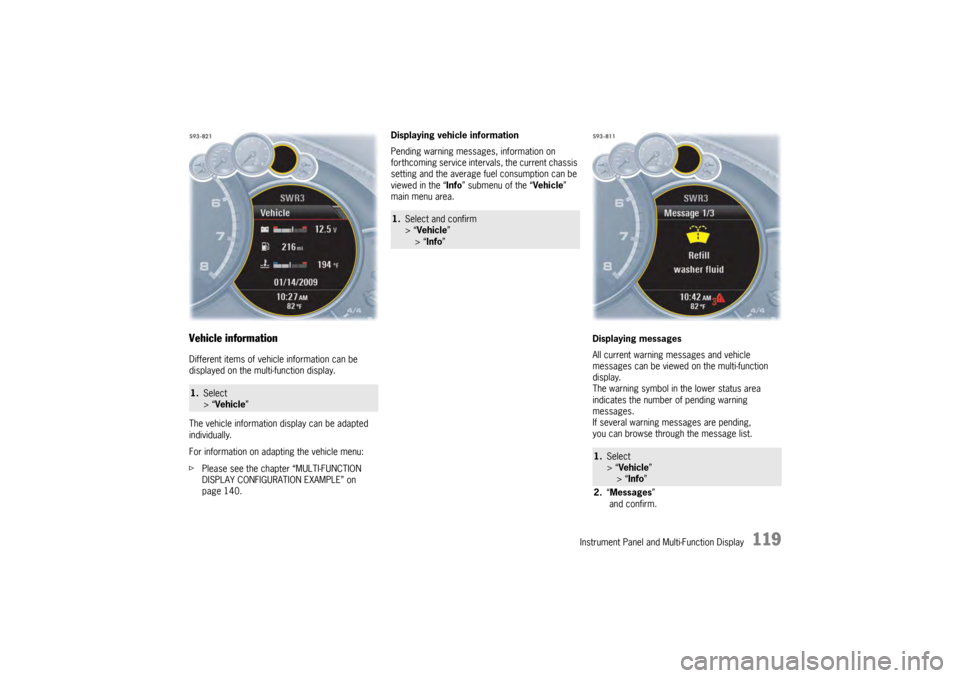
Vehicle informationDifferent items of vehicle information can be
displayed on the multi-function display.
The vehicle information display can be adapted
individually.
For information on adapting the vehicle menu:
fPlease see the chapter “MULTI-FUNCTION
DISPLAY CONFIGURATION EXAMPLE” on
page 140. Displaying vehicle information
Pending warning messages, information on
forthcoming service intervals, the current chassis
setting and the average fu
el consumption can be
viewed in the “ Info” submenu of the “ Vehicle”
main menu area.
Displaying messages
All current warning messages and vehicle
messages can be viewed on the multi-function
display.
The warning symbol in the lower status area
indicates the number of pending warning
messages.
If several warning messages are pending,
you can browse through the message list.1.Select
> “Vehicle ”
1.Select and confirm
> “Vehicle ”
> “Info ”
1.Select
> “Vehicle ”
> “ Info ”
2. “Messages ”
and confirm.
Page 123 of 343

Instrument Panel and Multi-Function Display
121
Oil level
Display and measurement of the engine oil
level
Caution!
Risk of engine damage.
f Regularly check the oil level each time before
refuelling.
f Do not allow the oil level to fall below the minimum mark.
Prerequisites for the oil-level gauge:
– Ignition is switched on or
Engine is running while the vehicle is stationary
or in motion.
– After opening the hood, the oil level can only be measured after driving for at least 6 miles
(10 km).
Activate the “Oil level” function on the
multi-function display
f Please see the chapter “OVERVIEW OF
WARNING MESSAGES” on page 152. Measured oil level
The oil level reading is
shown on the segment
display in the oil level menu.
If the segments are filled in up to the top line,
the oil level has reached the maximum mark.
f Under no circumstances add engine oil.
If the bottom segment is filled in, the oil level has
reached the minimum mark.
The message “Check Minimum reached” appears
on the multi-function display.
f Add engine oil immediately. If the bottom segment is red, the oil level has
dropped below the minimum mark.
The message “Oil level below minimum” appears
on the multi-function display.
f
Add engine oil immediately.
Top-up quantity
The difference between the minimum and
maximum marks on the segment display is
approx. 1 litre.
One segment of the display corresponds to
a top-up quantity of approx. 0.26 US quarts
(0.25 liters).
f Never add more engine oil than required to
reach the maximum mark.
1.Select
> “Vehicle ”
> “Oil level” and confirm.
Page 129 of 343

Instrument Panel and Multi-Function Display
127
Tire Pressure Monitoring (TPM)Each tire should be checked monthly when cold
and inflated to the inflation pressure
recommended by Porsche on the tire inflation
pressure label.
For information on the tire inflation pressure label:
fPlease see the chapter “TIRES AND WHEELS”
on page 280.
As an added safety feature, your vehicle has been
equipped with a tire pressure monitoring system
(TPM) that illuminates a low tire pressure telltale
(warning light) when one or more of your tires is
significantly under-inflated.
Accordingly, when the low tire pressure telltale
illuminates, you should stop and check your tires
as soon as possible, an d inflate them to the
proper pressure. Driving on a significantly under-
inflated tire causes the tire to overheat and can
lead to tire failure. Under-inflation also reduces
fuel efficiency and tire tread life, and may affect
the vehicle’s handling and stopping ability.
However, the tire pressure must still be set
manually on the wheel.
f Please see the chapter “TIRE PRESSURE FOR
COLD TIRES (68 °F/20 °C)” on page 326.
Danger!
Risk of serious personal injury or death.
Driving the vehicle with low tire pressure
increases the risk of a tire failure and
resulting loss of control. Furthermore, low
tire pressure increases rate of wear of the
affected tires.
Please note that the Tire Pressure Monitoring
is not a substitute for proper tire
maintenance, and it is the driver's
responsibility to maintain correct tire
pressure, even if under-inflation has not
reached the level to trigger illumination of
Tire Pressure Monitoring low tire pressure
telltale. Low tire pressure reduces the road
safety of the vehicle and destroys the tire and
wheel.
Tire Pressure Monitoring gives a warning
about tire damage caused by a natural loss
in pressure as well as about a gradual loss of
pressure caused by foreign objects.
Tire Pressure Monitoring cannot warn you
about tire damage that occurs suddenly (e.g.
flat tire due to abrupt external effects).
f When a red tire pressure warning appears,
stop immediately in a suitable place and check
the tires for damage. If necessary, remedy the
damage with a tire sealant.
f Do not by any means continue to drive with
defective tires. f
Sealing the tire with tire sealant is only an
emergency repair so you can drive to the
nearest specialist workshop.
The permitted top speed is 50 mph
(80 km/h) .
f Do not drive with tires in which the tire
pressure drops again very quickly. In case of
doubt, have tires checked by a specialist
workshop.
f Defective tires must be replaced immediately
at an authorized Porsche dealer.
Tires must never be repaired under any
circumstances.
f If Tire Pressure Monitoring is defective
(e.g. defective wheel transmitter), contact an
authorized Porsche dealer immediately and
have the damage repaired.
The tire pressure will not be monitored at all
or will be monitored only partially when Tire
Pressure Monitoring is defective.
For information on warning messages on the multi-
function display:
f Please see the chapter “OVERVIEW OF
WARNING MESSAGES” on page 152.
f Incomplete entries or selection of the wrong
tires on the multi-function display affect the
accuracy of warnings and messages.
The settings in the tire pressure menu must be
updated following a wheel change or changes
in vehicle loading.
Page 130 of 343

128
Instrument Panel and Multi-Function Display
f
Use only the pressure differences shown in the
“Fill info” display in the tire pressure menu or
from the corresponding tire pressure warning
when correcting the tire pressure.
f Tires can lose air over time without a tire
defect being present. A tire pressure warning
will then appear on the multi-function display.
Check the tire pressure at the next opportunity.
Warning!
Your vehicle has also been equipped with a TPM
malfunction indicator to in dicate when the system
is not operating properly.
The TPM malfunction indicator is combined with
the low tire pressure telltale.
When the system detects a malfunction, the
telltale will flash for approximately one minute and
then remain continuously illuminated. This
sequence will continue upon subsequent vehicle
start-ups as long as the malfunction exists.
When the malfunction indicator is illuminated, the
system may not be able to detect or signal low tire
pressure as intended.
TPM malfunctions may occur for a variety of
reasons, including the installation of replacement
or alternate tires or wheels on the vehicle that
prevent the TPM from functioning properly.
f Always check the TPM malfunction telltale after
replacing one or more tires or wheels on your
vehicle to ensure that the replacement or
alternate tires and wheels allow the TPM to continue to function properly. The warning light in the instrument panel lights up:
– When a loss in pressure has been detected.
– In the event of a defect in Tire Pressure
Monitoring or a temporary fault.
– When learning new fitted wheels/wheel transmitters, as long as the vehicle’s own
wheels have not ye t been recognized.
The tire pressure warning light on the instrument
panel goes out only when the cause of the fault
has been rectified.Warning light
Page 131 of 343
Instrument Panel and Multi-Function Display
129
Functional description of Tire Pressure
Monitoring
Tire Pressure Monitoring offers the following
functions:
– Display of the actual tire pressure while the vehicle is in motion.
–“ Fill info ” display:
Display of the deviation from the required
pressure (refilling pressure) at standstill.
–“ Tire info ” display:
Display of current settings (when the vehicle is
stationary).
– Tire pressure warnings in two stages (yellow and red warning).
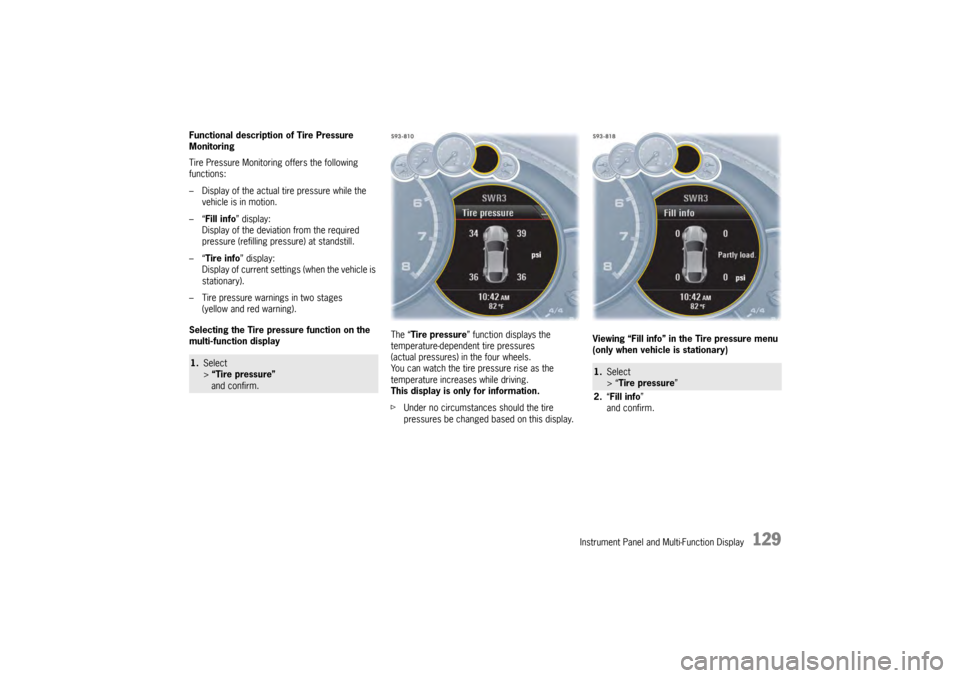
Selecting the Tire pressure function on the
multi-function display The “
Tire pressure ” function displays the
temperature-dependent tire pressures
(actual pressures) in the four wheels.
You can watch the tire pressure rise as the
temperature increases while driving.
This display is only for information.
f Under no circumstances should the tire
pressures be changed based on this display. Viewing “Fill info” in the Tire pressure menu
(only when vehicle is stationary)1.
Select
> “Tire pressure”
and confirm.
1. Select
> “Tire pressure ”
2. “Fill info ”
and confirm.
Page 132 of 343
130
Instrument Panel and Multi-Function Display
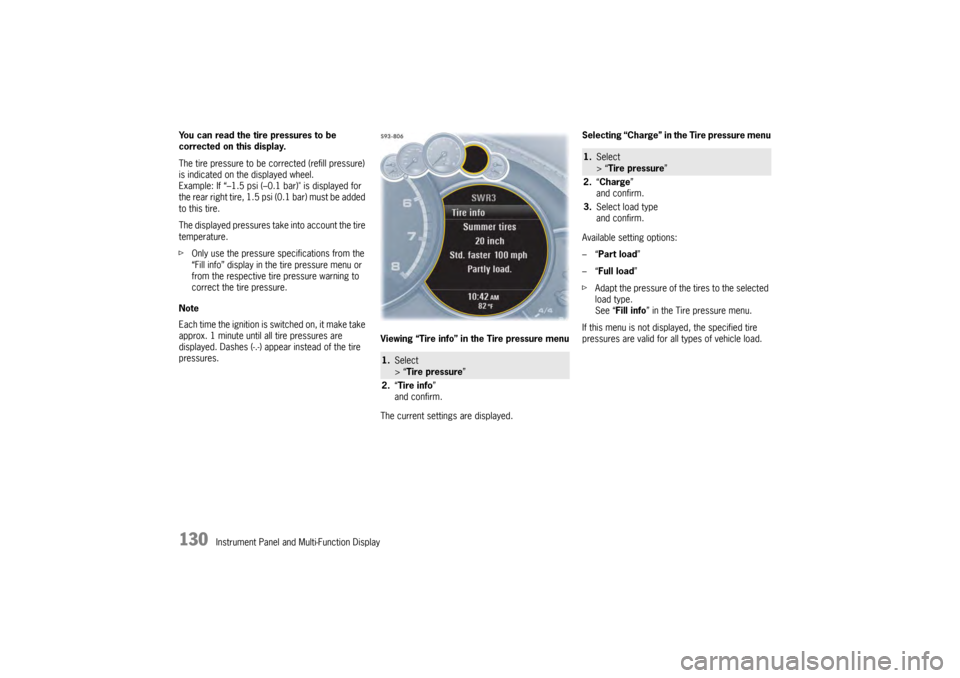
You can read the tire pressures to be
corrected on this display.
The tire pressure to be corrected (refill pressure)
is indicated on the displayed wheel.
Example: If “–1.5 psi (–0.
1 bar)" is displayed for
the rear right tire, 1.5 psi (0.1 bar) must be added
to this tire.
The displayed pressures take into account the tire
temperature.
f Only use the pressure specifications from the
“Fill info” display in the tire pressure menu or
from the respective tire pressure warning to
correct the tire pressure.
Note
Each time the ignition is switched on, it make take
approx. 1 minute until all tire pressures are
displayed. Dashes (-.-) appear instead of the tire
pressures. Viewing “Tire info” in the Tire pressure menu
The current settings are displayed.Selecting “Charge” in the Tire pressure menu
Available setting options:
–“
Part load ”
–“ Full load ”
f Adapt the pressure of the tires to the selected
load type.
See “ Fill info ” in the Tire pressure menu.
If this menu is not displayed, the specified tire
pressures are valid for al l types of vehicle load.
1.Select
> “Tire pressure ”
2. “Tire info ”
and confirm.
1. Select
> “Tire pressure ”
2. “Charge”
and confirm.
3. Select load type
and confirm.