2009 PORSCHE PANAMERA display
[x] Cancel search: displayPage 172 of 343

170
Driving and Driving Safety
Switching Auto Start Stop function off
f
Press button .
The indicator light on the button lights up.
The engine’s Auto Stop function is disabled.
Switching Auto Start Stop function on
f Press button .
The indicator light on the button goes out.
The engine stops automatically when the
vehicle stops.
Auto Start Stop function displayIf the engine was stoppe d automatically by the
Auto Start Stop function and if the driver is
detected in the vehicle (driver’s seat belt fastened
and driver’s door closed), the indicator light on the
multi-function display in the instrument panel will
light up green.
If the Auto Stop function is not available or if no
driver is detected in the vehicle after the engine
has stopped automatically (driver’s seat belt open
or driver’s door open), the indicator light on the
multi-function display in the instrument panel will
light up yellow when the vehicle is stationary.
The Auto Start Stop system has detected that:
– At least one precondition for stopping the engine automatically is not met.
or
– There is at least one exception for the Auto Start Stop function.
For information on preconditions for stopping the
engine automatically:
f Please see the chapter “PRECONDITIONS FOR
STOPPING THE ENGINE” on page 169. For information on exceptions for the Auto Start
Stop function:
f
Please see the chapter “EXCEPTIONS FOR
THE AUTO START STOP FUNCTION” on
page 169.
Note
If the indicator light in the multi-function display
continuously lights up yellow when the vehicle is
stopped and if the engine does not stop regularly
when the vehicle is stoppe d despite the fact that
the preconditions for stopping the engine
automatically are met, this may be an indication
that the battery is weak.
f Have the Auto Start Stop system checked the
next time you visit an authorized Porsche
dealer.
Fault reporting
If there is a fault, the warning message “Start/
Stop mode deactivated” will appear on the
multi-function display in the instrument panel.
f Have the fault corrected at an authorized
Porsche dealer.
Switching Auto Start Stop function on
and off
Stopping the engine automatically
and restart readiness
Engine does not stop or is not ready
to restart
Page 173 of 343
Driving and Driving Safety
171
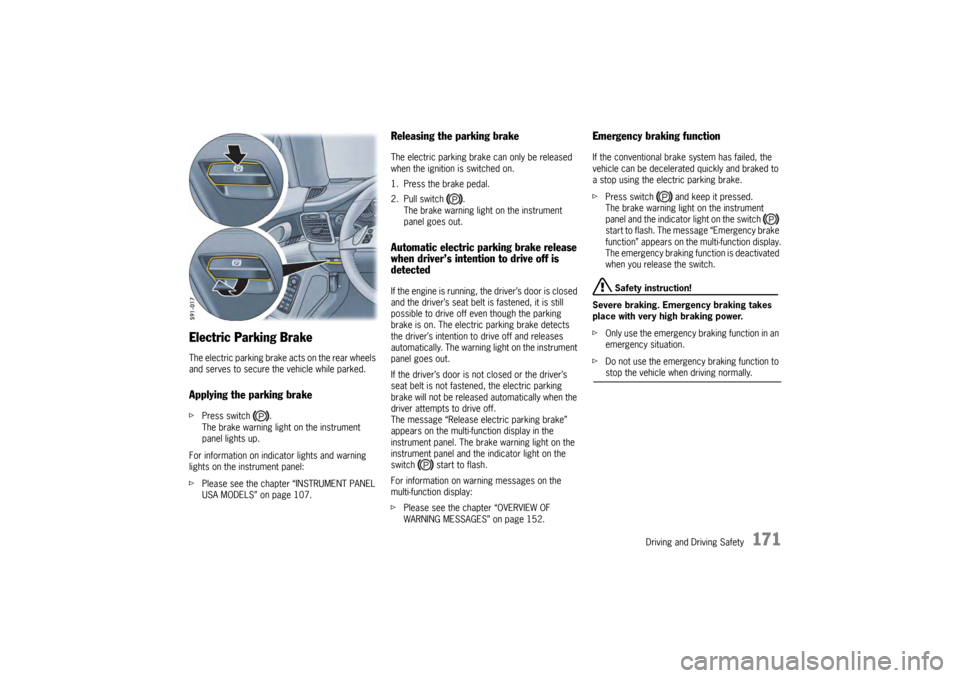
Electric Parking BrakeThe electric parking brake acts on the rear wheels
and serves to secure the vehicle while parked.Applying the parking brakefPress switch .
The brake warning light on the instrument
panel lights up.
For information on indi cator lights and warning
lights on the instrument panel:
f Please see the chapter “INSTRUMENT PANEL
USA MODELS” on page 107.
Releasing the parking brakeThe electric parking brake can only be released
when the ignition is switched on.
1. Press the brake pedal.
2. Pull switch .
The brake warning light on the instrument
panel goes out.Automatic electric parking brake release
when driver’s intention to drive off is
detectedIf the engine is running, the driver’s door is closed
and the driver’s seat belt is fastened, it is still
possible to drive off even though the parking
brake is on. The electric parking brake detects
the driver’s intention to drive off and releases
automatically. The warning light on the instrument
panel goes out.
If the driver’s door is not closed or the driver’s
seat belt is not fastened, the electric parking
brake will not be released automatically when the
driver attempts to drive off.
The message “Release electric parking brake”
appears on the multi-function display in the
instrument panel. The brake warning light on the
instrument panel and the indicator light on the
switch start to flash.
For information on warning messages on the
multi-function display:
fPlease see the chapter “OVERVIEW OF
WARNING MESSAGES” on page 152.
Emergency braking functionIf the conventional brak e system has failed, the
vehicle can be decelerated quickly and braked to
a stop using the electric parking brake.
f Press switch and keep it pressed.
The brake warning light on the instrument
panel and the indicator light on the switch
start to flash. The messa ge “Emergency brake
function” appears on the multi-function display.
The emergency braking function is deactivated
when you release the switch.
Safety instruction!
Severe braking. Emergency braking takes
place with very high braking power.
f Only use the emergency braking function in an
emergency situation.
f Do not use the emergency braking function to stop the vehicle when driving normally.
Page 174 of 343

172
Driving and Driving Safety
If the electric parking brake could not be applied
fully when the vehicle is stopped, the brake
warning light on the instrument panel starts to
flash.
For information on warning messages on the
multi-function display:
f
Please see the chapter “OVERVIEW OF
WARNING MESSAGES” on page 152.
BrakesfMake it a habit to chec k the operation of your
brakes before driving.
Keep in mind that the braking distance increases
very rapidly as the speed increases. At 60 mph
(100 km/h), for example, it is not twice but four
times longer than 30 mph (50 km/h). Tire traction
is also less effective when the roads are wet or
slippery.
f Therefore, always maintain a safe distance
from the car in front of you.Vehicles without Porsche Ceramic
Composite Brake (PCCB)Even though the brake discs consist of alloyed
grey cast iron, they will unavoidably start to
corrode if your car is parked for an extended
period. The brakes will tend to “rub” as a result.
The nature, extent and effects of corrosion
depend on the amount of time the vehicle was
parked, whether road salt or grit was spread and
whether grease-dissolving agents were used in
car washes.
If the braking comfort is noticeably impaired, we
recommend having the brake system checked by
experts at an authorized Porsche dealer.
Brake system functionYour Porsche is equipped with a power assisted
hydraulic dual circuit brake system with disc
brakes at the front and rear.
Both circuits function independently. One brake
circuit operates the front left and rear right wheel
and the other operates the front right and rear left
wheel.
If one brake circuit has failed, the other will still
operate. However, you will notice an increased
pedal travel when you apply the brakes. Failure of
one brake circuit will cause the stopping distance
to increase.
Warning!
Risk of an accident, resulting in serious
personal injury or death.
In the unlikely event of hydraulic failure of
one brake circuit:
f Push the brake pedal down firmly and hold it in
that position. A mechanical linkage activates
the second circuit, and you will be able to bring
the vehicle to a stop.
f After bringing your vehicle to a complete stop,
avoid driving the vehicle and instead have it
towed to the nearest authorized Porsche dealer for repair.
Brake warning light USA
Brake warning light Canada
Page 175 of 343
Driving and Driving Safety
173
Brake system warning light
You can check the functionality of the brake
system warning light by switching the ignition to
the “On” position (position 1) and verifying that the
warning light illuminates.
The warning light in the instrument panel lights up.
A message will be displayed on the multi-function
display of the instrument panel if the brake fluid
level is too low, or (if the brake pedal travel has
increased) one of the two brake circuits has failed.
A greater braking pressure will be required,
stopping distances will be longer and the braking
behavior will change, particularly in curves.
With correctly adjusted brakes and a correctly
working brake system, the pedal travel to the
point of brake application should be 1-3/16 in. to
1-9/16 in. (30 to 40 mm). Whenever the brake
pedal travel exceeds this value, have the brake
system checked.
Brake pedal
Warning!
Risk of an accident, resulting in serious
personal injury or death.
Any obstruction of the brake pedal could
increase the stopping distance.
f Always check the movement of the brake pedal
before driving and make sure that it is not
obstructed by a floor mat or any other object.
f Secure the floor mat to prevent it from sliding
into positions that could interfere with the safe
operation of your vehicle.
Your Porsche dealer will be glad to offer you
floor mats of the correct size including a securing possibility.
Note
In case one of the two brake circuits fails,
increased pedal travel is required to bring your
vehicle to a full stop.
Warning!
To avoid overheating and premature wear of
the brakes:
f Before descending a steep grade, reduce
speed and shift the tran smission into a lower
gear to control speed.
f Do not “ride the brakes” by resting your foot on
the pedal when not intending to apply brake
pressure.
f Do not hold the pedal down too long or too
often. This could cause the brakes to overheat and not function properly.
Brake warning light USA
Brake warning light Canada
Page 176 of 343

174
Driving and Driving Safety
Brake boosterThe brake booster assists braking only when
the engine is running.
When the car is moving while the engine is not
running, or if the brake booster is defective, more
pressure on the brake pedal is required to bring
the car to a stop.
Moisture, road salt or grit on brakes affects
braking.
Brakes will dry after a few cautious brake
applications.
Warning!
Risk of an accident, resulting in serious
personal injury or death.
Driving through water may reduce the
traction. Moisture on brakes from road
water, car wash, or a coating of road salt or
grit may affect braking efficiency.
f Cautiously apply brakes to test brakes after exposure to road water, etc.
Brake wearYour car has excellent brakes, but they are still
subject to wear. The rate at which they wear
depends on how the brakes are used.
f Have the brake system inspected at the
intervals recommended in your Maintenance
Booklet.
Brake system warning light
You can check the functionality of the brake
system warning light by switching the ignition to
the “On” position (position 1) and verifying that the
warning light illuminates.
A warning message will be displayed on the multi-
function display of the instrument panel if the
brake pads are worn, excessively.
f Do not continue to operate the vehicle.
Have your authorized Porsche dealer inspect
or replace the brake pads.
For information on warning messages on the
multi-function display:
f Please see the chapter “OVERVIEW OF
WARNING MESSAGES” on page 152.
Brake pads and brake discsWear on the brake pads and brake discs depends
to a great extent on the driving style and the
conditions of use and therefore cannot be
expressed in actual miles on the road.
The high-performance brake system is designed
for optimal braking effect at all speeds and
temperatures.
Certain speeds, braking forces and ambient
conditions (e.g. temperature and humidity) can
therefore cause the brakes to “squeal”.
New brake pads or linings
New brake pads have to be “broken in”, and
therefore only attain optimal friction when the car
has covered several hundred miles or km.
The slightly reduced braking ability must be
compensated for by pressing the brake pedal
harder. This applies whenever the brake pads
and/or brake discs are replaced.
Brake wear warning message
Page 178 of 343
176
Driving and Driving Safety
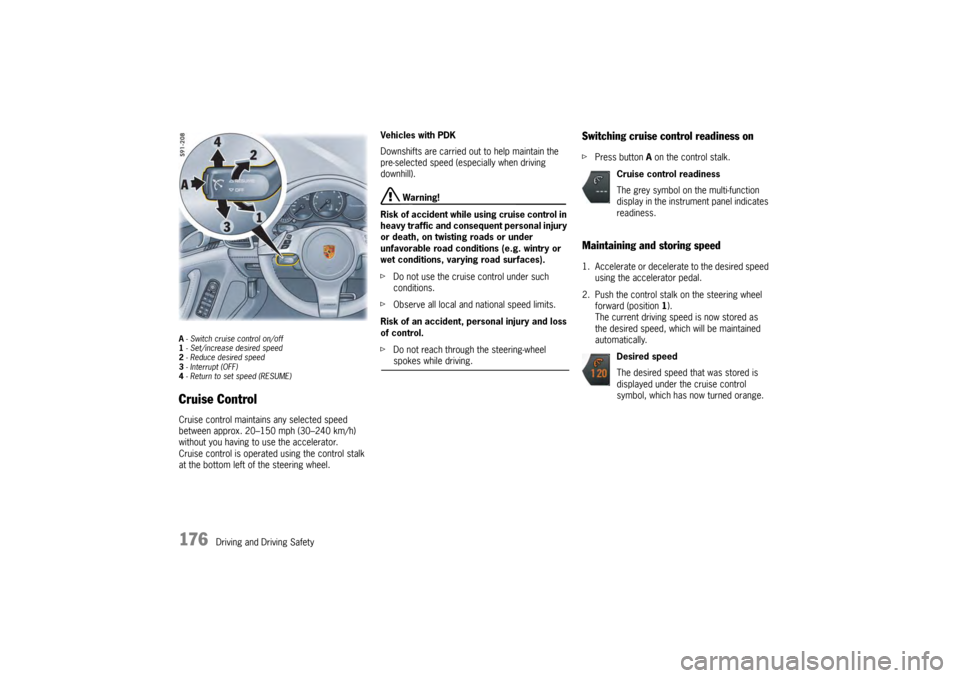
A- Switch cruise control on/off
1 - Set/increase desired speed
2 - Reduce desired speed
3 - Interrupt (OFF)
4 - Return to set speed (RESUME)Cruise ControlCruise control maintains any selected speed
between approx. 20–150 mph (30–240 km/h)
without you having to use the accelerator.
Cruise control is operated using the control stalk
at the bottom left of the steering wheel. Vehicles with PDK
Downshifts are carried out to help maintain the
pre-selected speed (especially when driving
downhill).
Warning!
Risk of accident while using cruise control in
heavy traffic and consequent personal injury
or death, on twisting roads or under
unfavorable road conditions (e.g. wintry or
wet conditions, varying road surfaces).
f Do not use the cruise control under such
conditions.
f Observe all local and national speed limits.
Risk of an accident, personal injury and loss
of control.
f Do not reach through the steering-wheel spokes while driving.
Switching cruise control readiness onfPress button A on the control stalk.Maintaining and storing speed1. Accelerate or decelera te to the desired speed
using the accelerator pedal.
2. Push the control stalk on the steering wheel forward (position 1).
The current driving speed is now stored as
the desired speed, which will be maintained
automatically.
Cruise control readiness
The grey symbol on the multi-function
display in the instrument panel indicates
readiness.
Desired speed
The desired speed that was stored is
displayed under the cruise control
symbol, which has now turned orange.
Page 179 of 343

Driving and Driving Safety
177
Accelerating (e.g. to overtake)Variant 1
fIncrease the speed as usual with the
accelerator pedal.
When you ease off the accelerator, the
previously stored value is set again.
Variant 2
f Push the control stalk on the steering wheel
forward (position 1).
The desired speed is increased in steps of
1mph (1km/h).
or
Press the control stalk on the steering wheel
forward and keep it pressed (position 1).
The desired speed is increased in steps of
5 mph (10 km/h).
The new desired speed is displayed on the
multi-function display in the instrument panel.
Deceleratingf Briefly pull the control stalk on the steering
wheel towards the steering wheel (position 2).
The desired speed is decreased in steps of
1 mph (1 km/h).
or
Pull the control stalk on the steering wheel
towards the steering whee l and keep it pulled
(position 2).
The desired speed is decreased in steps of
5 mph (10 km/h).
The new desired speed is displayed on the
multi-function display in the instrument panel.
Vehicles with PDK
Downshifts are carried out to help maintain the
pre-selected speed (especially when driving
downhill).
Interrupting cruise control
operation–OFFThe speed driven before the interruption remains
stored in the memory and can be reactivated by
pressing the control stalk.
f Please see the chapter “RESUMING THE
STORED SPEED – RESUME” on page 178.
f Press the control stalk down (position 3).
or
Press the brake or clutch pedal or move
the PDK selector lever to position N.
For more information on driving with Porsche
Doppelkupplung:
f Please see the chapter “PORSCHE
DOPPELKUPPLUNG (PDK)” on page 193.
Cruise control operation is interrupted
automatically:
– If the set vehicle speed is exceeded by more than approx. 16 mph (25 km/h) for longer
than 20 seconds.
– If the actual vehicle speed falls below the set vehicle speed by approx. 37 mph (60 km/h)
for longer than 60 seconds (e.g. gradients).
– If Porsche Stability Management (PSM) intervenes for longer than 0.5 seconds.
Page 181 of 343

Driving and Driving Safety
179
Radiofrequency radiation exposure
Information
This equipment complies with FCC radiation
exposure limits set forth for an uncontrolled
environment. This equipment should be installed
and operated with minimum distance of 8 in.
(20 cm) between the radiator and your body.
This transmitter must not be co-located or
operating in conjunction wi th any other antenna or
transmitter
Warning!
Risk of accidents. Rada r sensor vision can be
impaired by rain, snow, ice or heavy spray.
Vehicles in front will not be detected properly
or may not be detected at all.
f Do not use adaptive cruise control under these conditions.
Warning message
Adaptive cruise control can be deactivated
automatically if the radar sensor is very dirty or
iced up, obstructed , in unfavorable weather
conditions (heavy rain) or when driving through
tunnels.
The message “Fault ACC sensor” will appear on
the multi-function display in the instrument panel.
For information on warning messages on the
multi-function display:
f Please see the chapter “OVERVIEW OF
WARNING MESSAGES” on page 152. Notes
This device complies with Part 15 of the FCC
Rules and with RSS-210 of Industry Canada.
Operation is subject to the following two
conditions:
1. This device may not cause harmful
interference, and
2. this device must accept any interference received, including interference that may
cause undesired operation.
Changes or modifications made to this equipment
not expressly approved by Porsche may void the
FCC authorization to operate this equipment.
This equipment has been tested and found to
comply with the limits for a Class A digital device,
pursuant to Part 15 of the FCC Rules. These limits
are designed to provide reasonable protection
against harmful interference when the equipment
is operated in a commercial environment. This
equipment generates, uses, and can radiate radio
frequency energy and, if not installed and used in
accordance with the instruction manual, may
cause harmful interference to radio
communications. Operation of this equipment in a
residential area is likely to cause harmful
interference in which case the user will be required
to correct the interferen ce at his own expense.
This Class A digital apparatus complies with
Canadian ICES-003.
Cet appareil numérique de la classe A est
conforme à la norme NMB-003 du Canada.
Operating principle of adaptive cruise
controlNo vehicle detected in front – open road
driving
Adaptive cruise control operates like a cruise
control system. The desired speed that was set is
maintained constantly.
Vehicle detected in front – driving in traffic
If a vehicle travelling ahead of you in the same lane
is detected as driving slower than the selected
desired speed, adaptive cruise control will
automatically maintain a set distance from the
vehicle in front.
If the vehicle in front stop s, adaptive cruise control
will slow your vehicle down to a stop provided this
is possible within the cont rol limits of the system.
Adaptive cruise control actively keeps your vehicle
at a standstill.
If the vehicle in front drives off, automatic speed
control and distance control can be resumed.