2009 PORSCHE PANAMERA warning
[x] Cancel search: warningPage 183 of 343
Driving and Driving Safety
181
Adaptive cruise control displayAll important information, messages and warnings
are displayed on the multi-function display in the
instrument panel.
“ACC” main menu
The adaptive cruise control display on the multi-
function display can be selected permanently
using the buttons on the multifunction steering
wheel or the control stalk at the bottom right of
the steering wheel.
For information on using the multi-function display:
f Please see the chapter “OPERATING THE
MULTI-FUNCTION DISPLAY IN THE
INSTRUMENT PANEL” on page 115. Status display
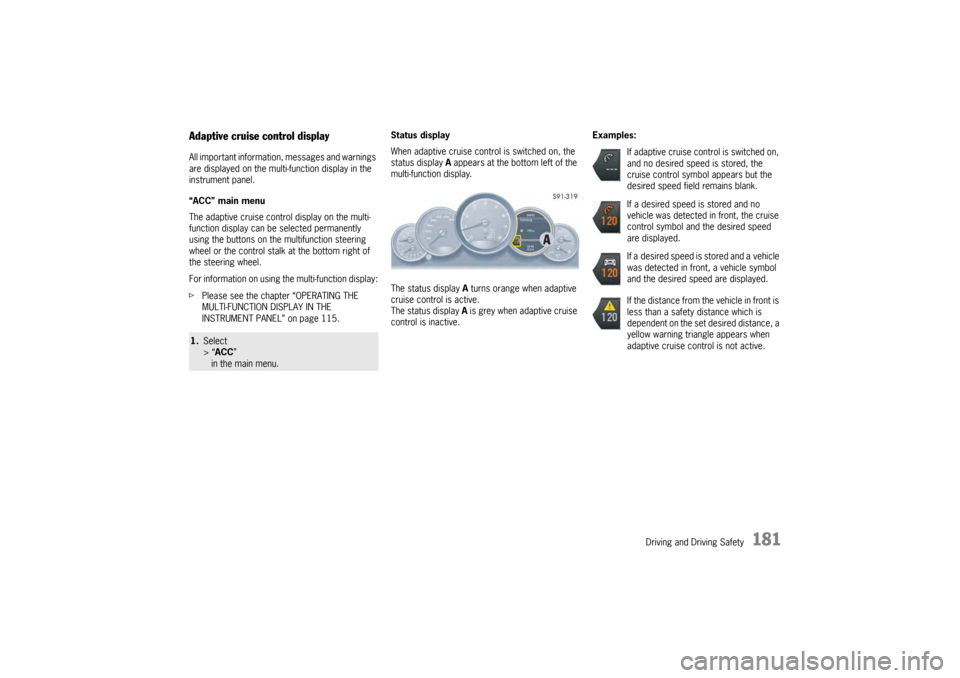
When adaptive cruise control is switched on, the
status display
A appears at the bottom left of the
multi-function display.
The status display A turns orange when adaptive
cruise control is active.
The status display A is grey when adaptive cruise
control is inactive. Examples:1.
Select
> “ACC ”
in the main menu.
If adaptive cruise control is switched on,
and no desired speed is stored, the
cruise control symbol appears but the
desired speed field remains blank.
If a desired speed is stored and no
vehicle was detected in front, the cruise
control symbol and the desired speed
are displayed.
If a desired speed is stored and a vehicle
was detected in front, a vehicle symbol
and the desired speed are displayed.
If the distance from the vehicle in front is
less than a safety distance which is
dependent on the set desired distance, a
yellow warning triangle appears when
adaptive cruise control is not active.
Page 187 of 343
Driving and Driving Safety
185
Interrupting and resuming cruise control
and distance controlInterrupting cruise control and distance
control – OFF
fPress the brake pedal.
or
Press the control stalk on the steering wheel
down (position 3, OFF ).
Adaptive cruise control is inactive.
The desired speed that was stored and the
desired distance are retained.
Resuming cruise control and distance
control – RESUME
f Push the control stalk on the steering wheel up
(position 4, RESUME).
The vehicle accelerates to the desired speed
that was stored unless a vehicle travelling in
front is detected as driving slower than the
desired speed and the distance from this
vehicle is less than the desired distance that
was set.
The status display A changes from grey to
orange.
or
Press the control stalk on the steering wheel
up and keep it pressed (position 4, RESUME).
The vehicle accelerates in a more sporty
driving style to the desired speed that was
stored. Note on operation
If speed and distance control was interrupted
using the control stalk
3 (OFF ), it can only be
resumed again when the vehicle is moving and no
stationary objects are detected in front.
Warning messagesIf adaptive cruise control is not active, the control
system still monitors the distance from the vehicle
in front.
If the distance from the ve hicle in front is less than
the desired distance that was set last, a yellow
warning triangle appears on the multi-function
display.
Warning!
Risk of accidents. Danger of collision with the
vehicle in front.
f Drive with extreme care.
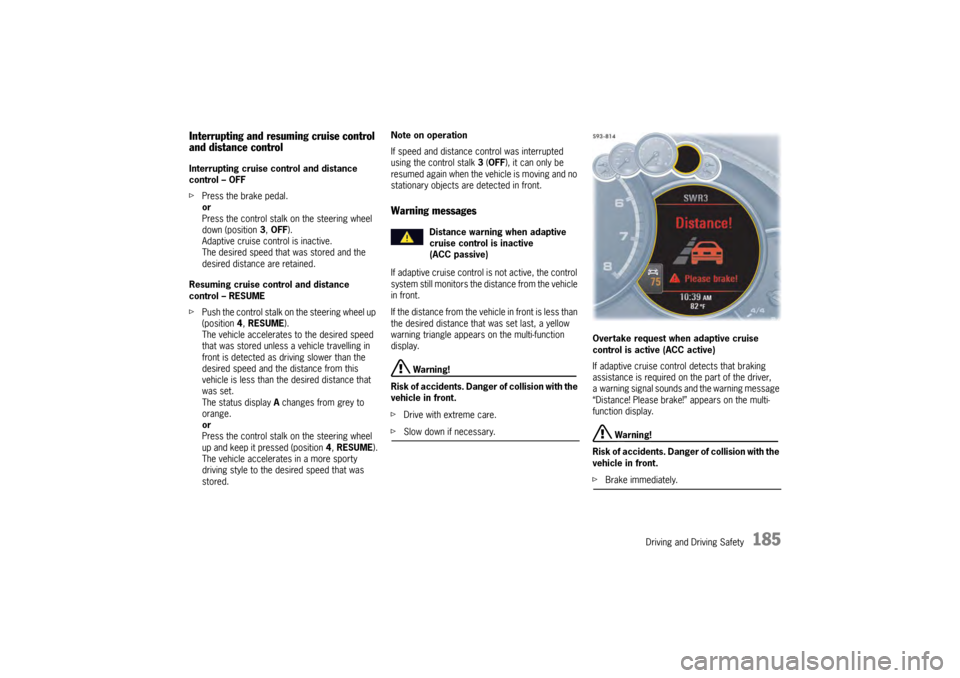
fSlow down if necessary. Overtake request when adaptive cruise
control is active (ACC active)
If adaptive cruise control detects that braking
assistance is required on the part of the driver,
a warning signal sounds and the warning message
“Distance! Please brake!” appears on the multi-
function display.
Warning!
Risk of accidents. Danger of collision with the
vehicle in front.
f Brake immediately.
Distance warning when adaptive
cruise control is inactive
(ACC passive)
Page 190 of 343

188
Driving and Driving Safety
D – Vehicles with large overhangs
The tail of the vehicle will not be detected
correctly on vehicles with large overhangs,
e.g. lumber trucks.
Warning!
Risk of accidents. Danger of collision with the
vehicle in front.
f Drive with extreme care.
fSlow down if necessary.
E – Stationary vehicles
A stationary vehicle that appears suddenly in the
detection field of the radar sensor, e.g. after a
vehicle in front changes lanes, will not be detected
by the ACC.
Warning!
Risk of accidents. Danger of collision with the
stationary vehicle.
f Drive with extreme care.
fSlow down if necessary.
Page 192 of 343

190
Driving and Driving Safety
Compact disc player
Caution!
To avoid damage to compact disc player and
discs.
f Use only compact discs labeled as shown,
having no dirt, damage or warpage.
f Never attempt to disassemble or oil any part
of the player unit. Do not insert any object
other than a disc into the slot.Remember there
are no user-serviceable parts inside the
compact disc player.
f Do not allow the disc to sustain any
fingerprints, scrapes or stickers on the
surfaces. This may cause poor sound quality.
Hold the disc only on the edge or center hole.
f When not in use, take the disc out of the player,
put the disc back into its case and store it
away from dust, heat, damp and direct
sunlight.
Leaving the disc on the dashboard in the sun
can damage the disc. f
If the disc gets dirty, clean the disc by wiping
the surfaces from the center to the outside in
a radial direction with a soft cloth.
Do not use a conventional record cleaner or
anti-static record preservative.
Disc cleaners are available in audio stores.
Car Telephone and Aftermarket Alarms Important legal and safety information
regarding the use of cellular telephones
Some states may prohibit the use of cellular
telephones while driving a vehicle. Check the laws
and regulations on the use of cellular telephones
in the areas where you drive.
Danger!
Risk of an accident.
Severe personal injury or death can result in
the event of an accident.
Looking away from the road or turning your
attention away from your driving can cause
an accident and lead to serious personal
injury or death.
When using your cellular telephone, you should
always:
f Give full attention to your driving – pull off the
road and park before making or answering a
call if traffic conditions so require, and f
Keep both hands on the steering wheel – use
hands-free operation (if available) – pull off the
road and park before using a hand-held
telephone.
It is essential to observe the telephone
manufacturer’s instructions before operating
the telephone.
Any portable telephone or radio transmitter which
is used in a Porsche must be properly installed in
accordance with the technical requirements of
Porsche.
The transmission power must not exceed
10 W.
The devices must possess a type approval for
your vehicle and have an “e” symbol.
If you should require equipment with transmission
power values greater than 10 W, please consult
your authorized Porsche dealer for this purpose.
They are familiar with the technical requirements
for installing devices of this kind.
The antennas for all radios and telephones with a
transmitting antenna must be externally mounted.
The improper installation of radios or telephones
or use of a radio or tele phone with a transmitting
antenna inside the car may cause the warning
lights to come on.
Improper installation of such equipment can
create a discharged battery or excessive current
draw from added equipment.
Page 193 of 343

Driving and Driving Safety
191
If aftermarket systems are installed by non-
dealership technicians or outside the selling
dealer, problems may result. Installation of
aftermarket equipment is not covered under the
New Car Warranty.
fConsult your authorized Porsche dealer about
the installation of non-Porsche approved
equipment.
Reception quality
The reception quality of your car telephone will
change constantly when you are driving.
Interference caused by buildings, landscape and
weather is unavoidable. It may become particu-
larly difficult to hear when using the hands-free
function due to external noise such as engine and
wind noise.
Automatic car-wash
f Unscrew external antennas before using an
automatic car-wash.
Porsche Communication
Management (PCM)
Warning!
There is danger of accident if you set or
operate the on-board computer, radio,
navigation system, telephone or other
equipment when driving.
This could distract you from traffic and
cause you to lose control of the vehicle
resulting in serious personal injury or death.
f Operate the components while driving only if
the traffic situation allows you to do so safely.
f Carry out any complicated operating or setting
procedures only with the vehicle stationary.
f If it is necessary to operate these components
while the vehicle is in motion, use the function keys on the multi-functional steering wheel.
f Refer to the separate operating instructions
before putting the PCM into operation.
When put into operation for the first time, a
distance of approx. 3 miles (5 km) must be driven
in order for the navigation system to complete the
process of fine calibration. The same applies
when the tires are changed (e.g. summer/winter
tires) or new tires fitted. Full location accuracy is
not yet achieved during the fine-calibration
process. If the vehicle has been tr
ansported (e.g. ferry, car
train), the system may ta ke a few minutes after
being switched on before it determines the current
location.
Serious tire slip (e.g. spinning wheels on snow)
may result in temporarily inaccurate navigation.
When the battery has been disconnected, it may
take up to 15 minutes before the navigation
system is operational once more.
Satellite radioYou must have the satellit e radio activated before
you can put it into operation. You will need a
contract with a provider in order to use this radio.
f Refer to the separate radio operating
instructions before putting into operation.
Page 196 of 343
194
Driving and Driving Safety
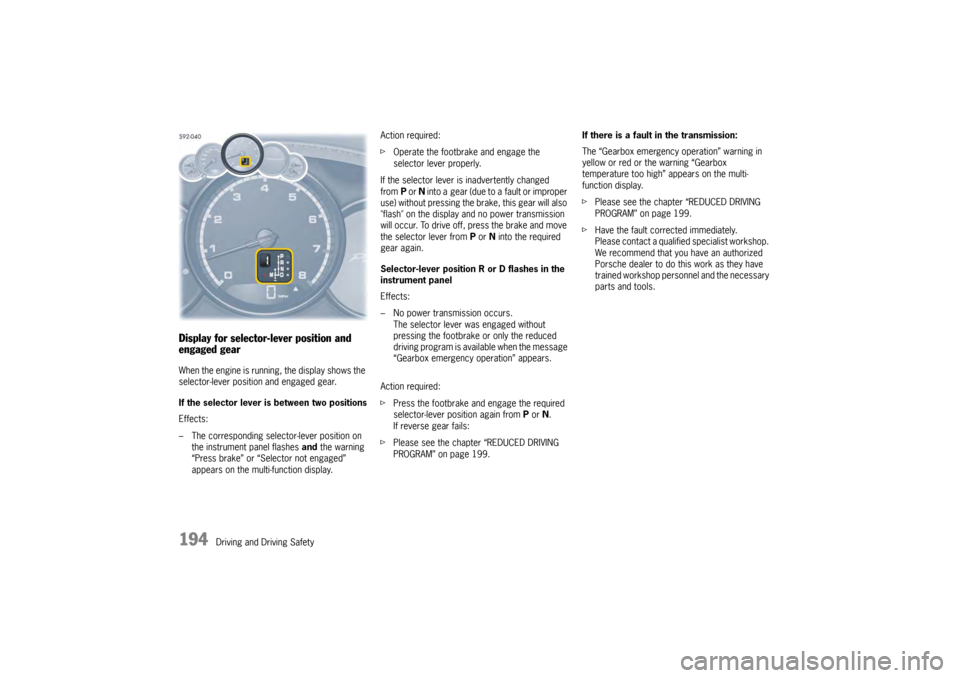
Display for selector-lever position and
engaged gearWhen the engine is running, the display shows the
selector-lever position and engaged gear.
If the selector lever is between two positions
Effects:
– The corresponding selector-lever position on the instrument panel flashes and the warning
“Press brake” or “Selector not engaged”
appears on the multi-function display. Action required:
f
Operate the footbrake and engage the
selector lever properly.
If the selector lever is inadvertently changed
from P or N into a gear (due to a fault or improper
use) without pressing the brake, this gear will also
"flash" on the display and no power transmission
will occur. To drive off, press the brake and move
the selector lever from P or N into the required
gear again.
Selector-lever position R or D flashes in the
instrument panel
Effects:
– No power transmission occurs. The selector lever was engaged without
pressing the footbrake or only the reduced
driving program is available when the message
“Gearbox emergency operation” appears.
Action required:
f Press the footbrake and engage the required
selector-lever position again from P or N.
If reverse gear fails:
f Please see the chapter “REDUCED DRIVING
PROGRAM” on page 199. If there is a fault in the transmission:
The “Gearbox emergency operation” warning in
yellow or red or the warning “Gearbox
temperature too high” appears on the multi-
function display.
f
Please see the chapter “REDUCED DRIVING
PROGRAM” on page 199.
f Have the fault corrected immediately.
Please contact a qualified specialist workshop.
We recommend that you have an authorized
Porsche dealer to do this work as they have
trained workshop personnel and the necessary
parts and tools.
Page 198 of 343

196
Driving and Driving Safety
Driving off with Launch Control
Launch Control allows you to achieve maximum
acceleration from standstill.
Warning!
There is a risk of endangering other road
users if you use this Control in an improper
location or in a situation where other persons
might need to take evas ive action due to the
rapid acceleration that this technology
permits.
Launch Control is designed to be used in a
controlled environment on closed circuit driving
courses where no vehicle cross traffic or
pedestrian traffic is present.
f Use Launch Control only if conditions permit it
to be applied in a safe manner.
f Do not use Launch Control if there is a
possibility it could endanger other persons.
Such a possibility exists if you cannot see that
you have a clear road with no possibility of
cross traffic in your intended direction of driving.
Caution!
Stress on components increases
dramatically when starting with maximum
acceleration in comparison with “normal”
driving off. Use of Launch Control will
inevitably reduce the life of the engaged
engine and transmission components.
Preconditions:
– Launch Control should on ly be used when the
engine has reached operating temperature.
– “Sport Plus” mode must be switched on (indicator light on the button comes on and
“SPORT PLUS” appears on the multi-function
display).
1. Press the brake with your left foot.
2. Quickly press the accelerator down fully (kickdown activated) and hold it.
The engine speed will level off at
around 5,000 rpm on the Panamera S,
around 5,500 rpm on the Panamera 4S,
around 4,550 rpm on the Panamera Turbo.
“Launch Control active” appears on the
multi-function display.
3. Release the brake within a few seconds. Remaining stationary for a long time with
“Launch Control active” can lead to
overloading of the transmission.
To protect the transmi ssion, the engine power
is then reduced and the “Launch Control
active” process is cancelled. Shifting gears on the steering wheel
With the shift buttons on the steering wheel, you
can change temporarily from automatic selection
mode D to manual mode
M.
For example:
– Shifting down before bends and on entering built-up areas.
– Shifting down on downward slopes (engine braking).
– Shifting down for brief spurts of acceleration.
The manual selection mode remains engaged:
– For cornering (depending on the lateral acceleration) and overrunning.
– When the vehicle is stationary (e.g. at a junction).
The system leaves manual selection mode:
– automatically after around 8 seconds (unless cornering or overrunning),
– after driving off.
Page 200 of 343

198
Driving and Driving Safety
Upshift prompt for fuel-economy-optimised
driving
The consumption-oriente
d upshift indicator A in
the tachometer at the ri ght beside the digital
speed display helps you to develop a fuel-saving
driving style.
The upshift indicator lights up - prompting you to
shift up to the next-higher gear - depending on the
selected gear, engine speed and accelerator
pedal position.
The upshift indicator is only active when “Sport” or
“Sport Plus” mode is switched off.
f Change to the next-higher gear when the
upshift indicator lights up. Shifting down –
f
Pull the PDK selector lever or shift button on
the steering wheel back.
You can shift up or down by the corresponding
number of gears by quickly pressing or pulling the
shift buttons or selector lever several times in
succession.
The transmission can be shifted up or down by
several gears in succession by continuously
operating the selector lever or shift buttons.
You can shift up or down at any time depending
on driving speed and engine speed.
Gear changes that would exceed the upper or
lower engine-speed limit are not executed by the
control unit.
There is no automatic upshift at the upper engine-
speed limit in selector-lever position M. Upshift
suppression can be cancelled by kickdown
operation. If, for example, the engine-speed limit
is reached during overtaking and an automatic
upshift does not occur, the transmission shifts up
in this case as a result of kickdown operation.
f Select an appropriately low gear on upward
and downward slopes.
This will ensure optimum use of engine power
and engine braking. To shift up automatically
at the upper engine-
speed limit:
f Press the accelerator pedal beyond the full-
throttle point (kickdown).
Failure of the selector lever display on the
instrument panel
The warning “Gearbox emergency operation”
appears in red on the multi-function display.
Effect:
– No selector-lever position is displayed on the instrument panel.
Vehicle can be driven only until it comes to
astop.
Action required:
f It is not possible to continue driving. Stop the
vehicle immediately in a suitable place. Have
the vehicle towed to a qualified specialist
workshop.
f Please see the chapter “TOWING” on
page 316.