Page 158 of 313
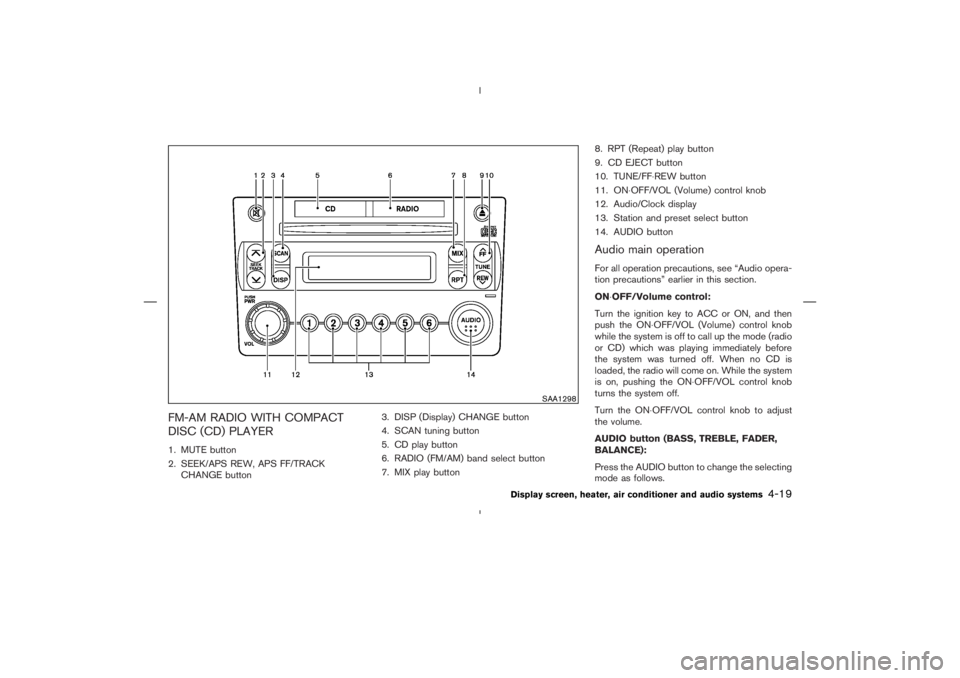
SAA1298
Display screen, heater, air conditioner and audio systems
4-19
Page 159 of 313
,
) or SEEK (
,
) button
to adjust Bass and Treble to the desired level.
Use the TUNE or SEEK button also to adjust
Fader or Balance modes. Fader adjusts the
sound level between the front and rear speakers
and Balance adjusts the sound between the
right and left speakers.
After 10 seconds, the radio or CD display
reappears. Once the sound quality is set to the
desired level, push the AUDIO button repeatedly
until the radio or CD display appears.
or
for manual
tuning. To move quickly through the channels,
push and hold either side of the TUNE button
down for more than 0.5 second.
or
to tune
from high to low or low to high frequencies and
stops at the next broadcasting station.
Page 162 of 313
satellite
radio provider. After receiving the activation
signal, an available channel list will be auto-
matically updated in the radio. Turn the ignition
switch from the LOCK to ACC position to
update the channel list.
Satellite radio is not available in Alaska and
Hawaii.
Audio main operationFor all operation precautions, see “Audio opera-
tion precautions” earlier in this section.
Head unit:
The auto loudness circuit enhances the low
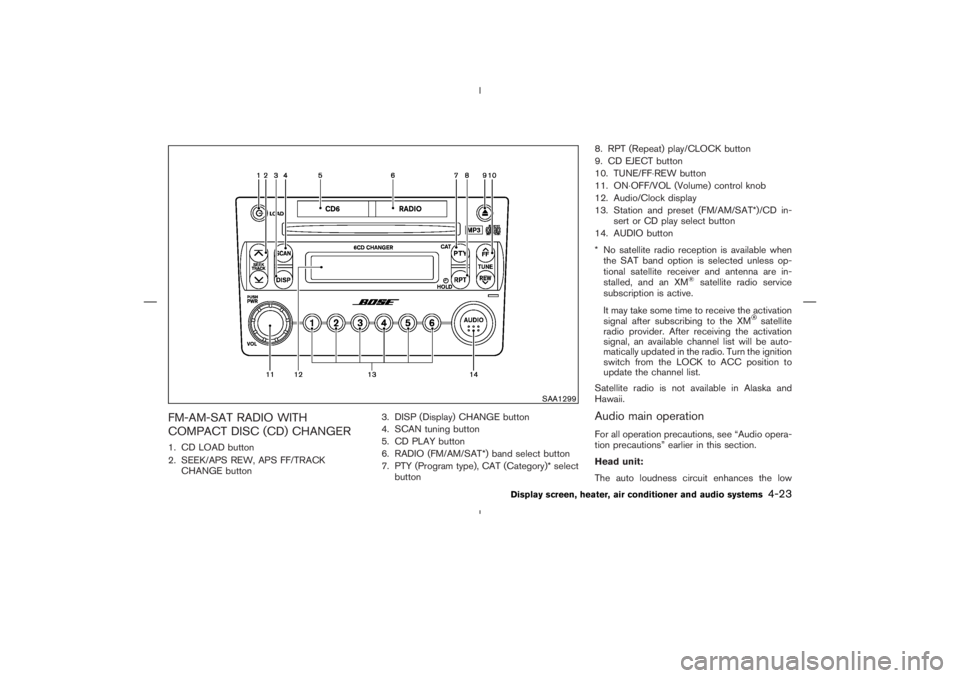
SAA1299
Display screen, heater, air conditioner and audio systems
4-23
Page 163 of 313

,
) or SEEK (
,
) button
to adjust Bass and Treble to the desired level.
Use the TUNE or SEEK button also to adjust
Fader or Balance modes. Fader adjusts the
sound level between the front and rear speakers
and Balance adjusts the sound between the
right and left speakers.
To change the AUDIOP (Audio Pilot) mode to
OFF or ON, push the TUNE or SEEK button.
Once you have adjusted the sound quality to the
desired level, push the AUDIO button repeatedly
until the radio or CD display reappears. Other-
wise, the radio or CD display will automatically
reappear after about 10 seconds.
satellite radio
service subscription is active.
When RADIO band select button is pushed
while the ignition switch is in the ACC or ON, the
radio will come on at the station last played.
The last station/channel played will also come on
when the ON⋅OFF/VOL control knob is pushed
to ON.
If a compact disc is playing when the RADIO
band select button is turned to ON, the compact
disc will automatically be turned off and the last
radio station/channel played will come on.
The FM stereo indicator ST will glow during FM
stereo reception. When the stereo broadcast
signal is weak, the radio will automatically
4-24
Display screen, heater, air conditioner and audio systems
Page 165 of 313
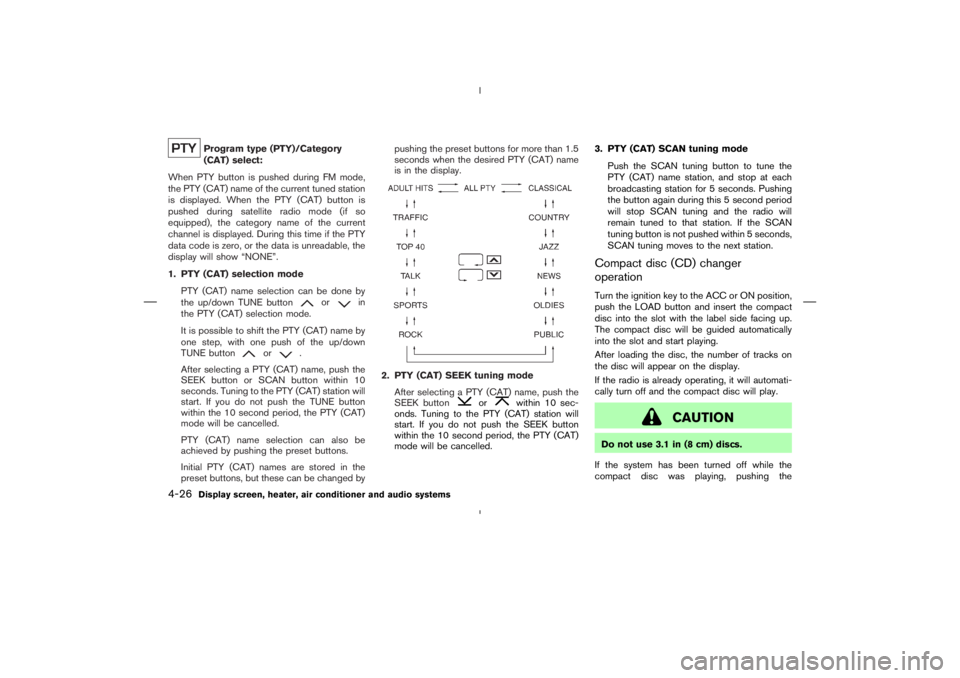
or
in
the PTY (CAT) selection mode.
It is possible to shift the PTY (CAT) name by
one step, with one push of the up/down
TUNE button
or
.
After selecting a PTY (CAT) name, push the
SEEK button or SCAN button within 10
seconds. Tuning to the PTY (CAT) station will
start. If you do not push the TUNE button
within the 10 second period, the PTY (CAT)
mode will be cancelled.
PTY (CAT) name selection can also be
achieved by pushing the preset buttons.
Initial PTY (CAT) names are stored in the
preset buttons, but these can be changed bypushing the preset buttons for more than 1.5
seconds when the desired PTY (CAT) name
is in the display.
or
within 10 sec-
onds. Tuning to the PTY (CAT) station will
start. If you do not push the SEEK button
within the 10 second period, the PTY (CAT)
mode will be cancelled.3. PTY (CAT) SCAN tuning mode
Push the SCAN tuning button to tune the
PTY (CAT) name station, and stop at each
broadcasting station for 5 seconds. Pushing
the button again during this 5 second period
will stop SCAN tuning and the radio will
remain tuned to that station. If the SCAN
tuning button is not pushed within 5 seconds,
SCAN tuning moves to the next station.
Compact disc (CD) changer
operationTurn the ignition key to the ACC or ON position,
push the LOAD button and insert the compact
disc into the slot with the label side facing up.
The compact disc will be guided automatically
into the slot and start playing.
After loading the disc, the number of tracks on
the disc will appear on the display.
If the radio is already operating, it will automati-
cally turn off and the compact disc will play.
Page 167 of 313
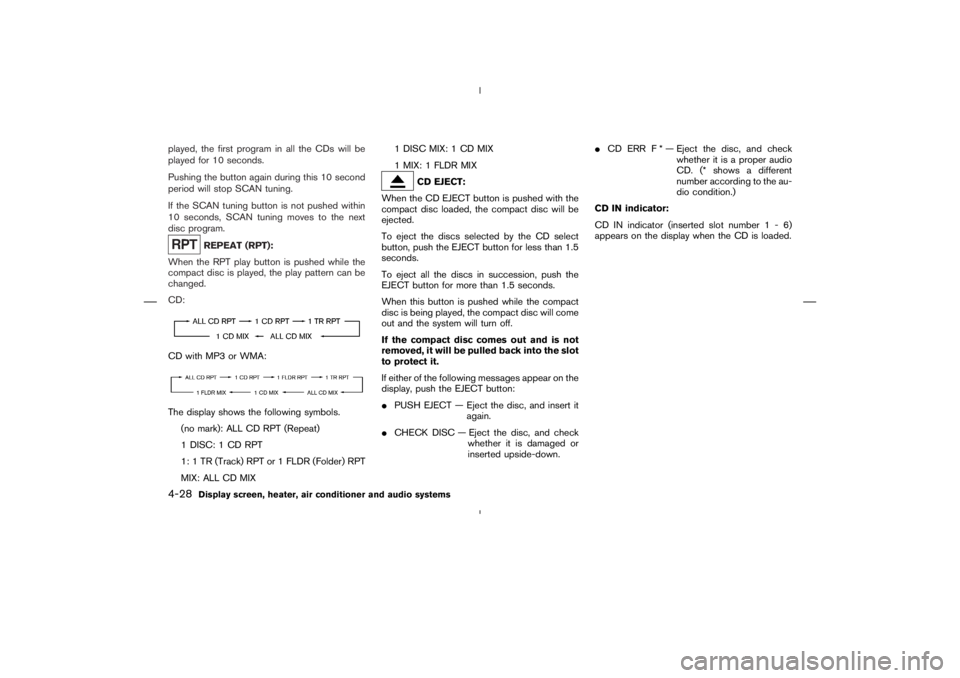
CD with MP3 or WMA:The display shows the following symbols.
(no mark): ALL CD RPT (Repeat)
1 DISC: 1 CD RPT
1: 1 TR (Track) RPT or 1 FLDR (Folder) RPT
MIX: ALL CD MIX1 DISC MIX: 1 CD MIX
1 MIX: 1 FLDR MIX
Page 170 of 313
CAUTION
�Keep the antenna as far away as
possible from the electronic control
modules.
�Keep the antenna wire more than 8 in
(20 cm) away from the electronic con-
trol system harnesses. Do not route
the antenna wire next to any harness.
�Adjust the antenna standing-wave
ratio as recommended by the manu-
facturer.
�Connect the ground wire from the CB
radio chassis to the body.
�For details, consult a NISSAN dealer.
WARNING
�Use a phone after stopping your ve-
hicle in a safe location. If you have to
use a phone while driving, exercise
extreme caution at all times so full
attention may be given to vehicle
operation.
�If you find yourself unable to devote
full attention to vehicle operation
while talking on the phone, pull off
the road to a safe location and stop
your vehicle before doing so.
CAUTION
To avoid draining the vehicle battery,
use a phone after starting the engine.
CAR PHONE OR CB RADIOBLUETOOTH
HANDS-FREE
PHONE SYSTEM WITH NISSAN
VOICE RECOGNITION (if so
equipped)
Display screen, heater, air conditioner and audio systems
4-31
Page 171 of 313

button
3. PHONE ENDbutton
4. Indicator light
5. Microphone
Your vehicle is equipped with the Bluetooth
Hands-Free Phone System. If you are an owner
of a Bluetooth
enabled cellular phone, you can
set up the wireless connection between your
cellular phone and the in-vehicle phone module.
With Bluetoothwireless technology, you can
make or receive a hands-free telephone call with
your cellular phone in the vehicle.Once your cellular phone is paired to the in-
vehicle phone module, no other phone connect-
ing procedure is required. Your phone is auto-
matically connected with the in-vehicle phone
module when the ignition switch is turned to the
ON position with the paired cellular phone
turned on and carried in the vehicle.
You can register up to 5 different Bluetooth
cellular phones to the in-vehicle phone module.
However, you can talk on only one cellular phone
at a time.
Before using the Bluetooth
Hands-Free Phone
System, refer to the following notes.
�Set up the wireless connection between acellular phone and the in-vehicle phone mod-
ule before using the Bluetooth
Hands-Free
Phone System.
�Some Bluetooth
enabled cellular phones
may not be recognized by the in-vehicle
phone module. Please visit
www.nissanusa.com/bluetooth for a recom-
mended phone list.
�You will not be able to use a hands-free
phone under the following conditions:
— Your vehicle is outside of the telephone
service area.
— Your vehicle is in an area where it is
difficult to receive radio waves; such as in
a tunnel, in an underground parking ga-
rage, near a tall building or in a mountain-
ous area.
— Your cellular phone is locked to prevent it
from being dialed.
When the radio wave condition is not ideal or
ambient sound is too loud, it may be difficult to
hear the other person’s voice during a call.
Do not place the cellular phone in an area
surrounded by metal or far away from the in-
vehicle phone module to prevent tone quality
degradation and wireless connection disruption.
While a cellular phone is connected through the
SAA1699
4-32
Display screen, heater, air conditioner and audio systems