2009 MITSUBISHI ASX lock
[x] Cancel search: lockPage 102 of 368
Information screen (when the ignition
switch is turned from the “LOCK” po-
sition
to the “ON” position or the oper-
ation mode is changed from OFF to
ON) E00520700621
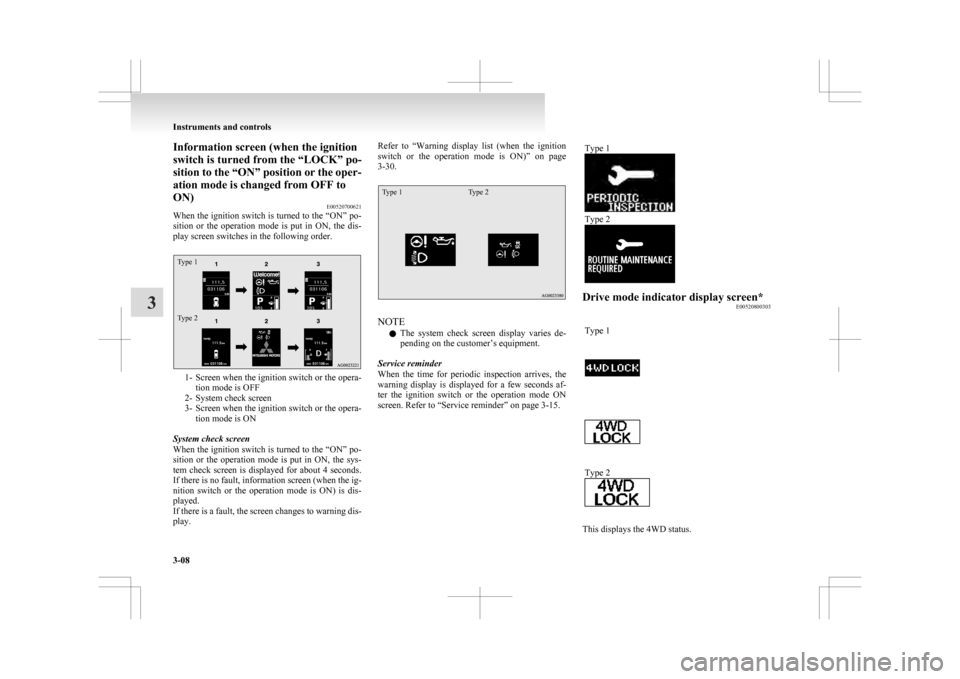
When the ignition switch is turned to the “ON” po-
sition or the operation mode is put in ON, the dis-
play screen switches in the following order.
Type 1
Type 2 1- Screen when the ignition switch or the opera-
tion mode is OFF
2-
System check screen
3- Screen when the ignition switch or the opera- tion mode is ON
System check screen
When the ignition switch is turned to the “ON” po-
sition or the operation mode is put in ON, the sys-
tem check screen is displayed for about 4 seconds.
If there is no fault, information screen (when the ig-
nition switch or the operation mode is ON) is dis-
played.
If there is a fault, the screen changes to warning dis-
play. Refer to “Warning
display list (when the ignition
switch or the operation mode is ON)” on page
3-30.
Type 1 Type 2 NOTE
l The
system check screen display varies de-
pending on the customer’s equipment.
Service reminder
When the time for periodic inspection arrives, the
warning display is displayed for a few seconds af-
ter the ignition switch or the operation mode ON
screen. Refer to “Service reminder” on page 3-15. Type 1 Type 2
Drive mode indicator display screen*
E00520800303
Type 1 Type 2
This displays the 4WD status.Instruments and controls
3-08
3
Page 103 of 368
If you select “4WD LOCK” mode with the drive
mode
selector, “4WD LOCK” is displayed; if you
select “4WD AUTO” mode, “4WD” is displayed.
Nothing is displayed when 2WD mode is selected.
Refer to “Drive mode selector” on page 4-29. mark display screen (when
the ignition switch or the oper-
ation mode is ON) E00520900333
This
is displayed when you press the mul-
ti-information meter switch and switch
the warning display screen.
This mark is also displayed if there is an-
other warning other than the one dis-
played.
When the cause of the warning display
is eliminated, the mark goes out auto-
matically.
NOTE
l When
the mark is displayed,
the
warning display screen can be
redisplayed on the information
screen.
Refer to “Information screen
(when the ignition switch or the op-
eration mode is OFF)” on page
3-05.
Refer to “Information screen
(when the ignition switch or the op-
eration mode is ON)” on page
3-09. Active Stability Control (ASC)
OFF display screen*
E00521000373
This
is displayed when the Active Stabil-
ity Control (ASC) is turned off with the
ASC OFF switch.
If there is a fault with the ASC, the ASC
OFF display is shown.
Refer to ““ASC OFF” switch” on page
4-41. Information screen (when the ignition
switch or the operation mode is ON)
E00521100576
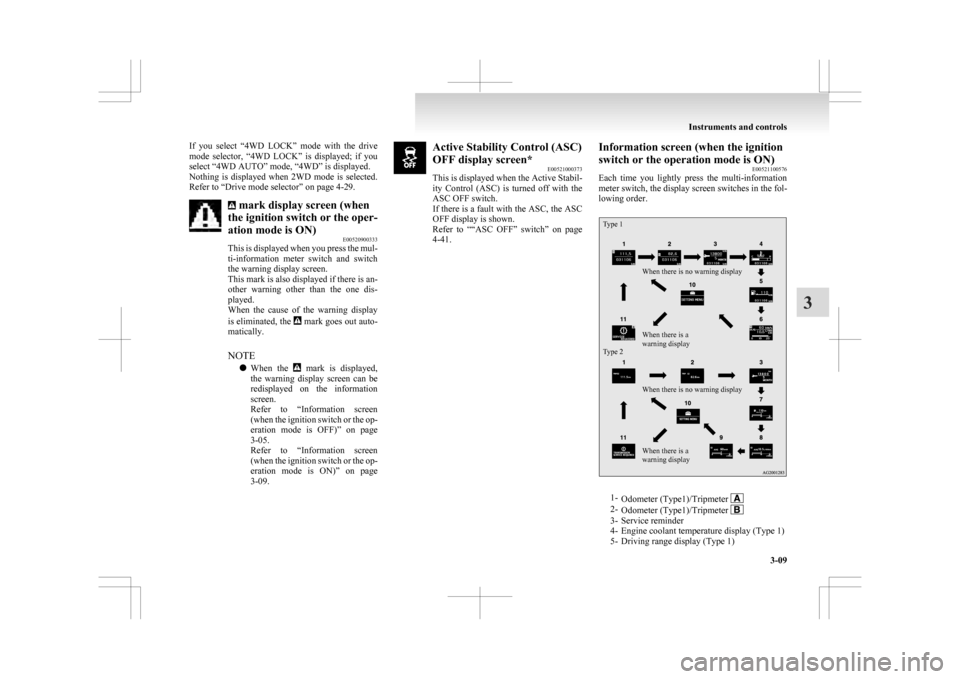
Each
time you lightly press the multi-information
meter switch, the display screen switches in the fol-
lowing order.
Type 1
Type 2 When there is no warning display
When there is no warning display
When there is a
warning display When there is a
warning display
1-
Odometer (Type1)/Tripmeter 2-
Odometer (Type1)/Tripmeter 3- Service reminder
4-
Engine coolant temperature display (Type 1)
5- Driving range display (Type 1) Instruments and controls
3-09 3
Page 105 of 368

Refuel as soon as possible.Type 1
Type 2NOTE
l The
driving range is determined based on the
fuel consumption data. This may vary depend-
ing on the driving conditions and habits.
Treat the distance displayed as just a rough
guideline.
l When you refuel, the driving range display is
updated.
However, if you only add a small amount of
fuel, the correct value will not be displayed.
Fill with a full tank whenever possible.
l On rare occasions, the value displayed for
the driving range may change if you are
parked on an extremely steep incline. This is
due to the movement of fuel in the tank and
does not indicate a malfunction. l
The
display setting can be changed to the pre-
ferred units (km or miles). Refer to “Chang-
ing the function settings (when the ignition
switch or the operation mode is ON)” on
page 3-17.
Average speed display E00521600656
This displays the average speed from the last reset
to the present time.
There are the following 2 mode settings.
For
the method for changing the average speed dis-
play setting, refer to “Changing the function set-
tings (when the ignition switch or the operation
mode is ON)” on page 3-17.
Type 1 Type 2 Manual reset mode
l When
the average speed is being displayed,
if you hold down the multi-information me-
ter switch, the average speed displayed at
that time is reset. l
When
the following operation is performed,
the mode setting is automatically switched
from manual to auto.
[Except for vehicles equipped with keyless
operation system]
Turn the ignition switch from the “ACC” or
“LOCK” position to the “ON” position.
[For vehicles equipped with keyless opera-
tion system]
Change the operation mode from ACC or
OFF to ON.
Switching to auto occurs automatically. If
switching to manual mode is done, however,
the data from the last reset is displayed.
Auto reset mode l When the average speed is being displayed,
if you hold down the multi-information me-
ter switch, the average speed displayed at
that time is reset.
l When the engine switch or the operation
mode is in the following conditions, the aver-
age speed display is automatically reset.
[Except for vehicles equipped with keyless
operation system]
The ignition switch is in the “ACC” or
“LOCK” position for about 4 hours or longer.
[For vehicles equipped with keyless opera-
tion system]
The operation mode is in ACC or OFF for
about 4 hours or longer. Instruments and controls
3-11 3
Page 106 of 368

NOTE
l The
average speed display and the average
fuel consumption display can be reset individ-
ually for the auto reset mode and manual re-
set mode.
l “---” is displayed when the average speed can-
not be measured.
l The initial (default) setting is “Auto reset
mode”.
l The display setting can be changed to the pre-
ferred units (km/h or mph).
Refer to “Changing the function settings
(when the ignition switch or the operation
mode is ON)” on page 3-17.
l The memory of the auto reset mode or man-
ual reset mode for the average speed display
is erased if the battery is disconnected.
Average fuel consumption display E00521700628
This displays the average fuel consumption from
the last reset to the present time.
There are the following 2 mode settings. For information on how to change the average fuel
consumption
display setting, refer to “Changing
the function settings (when the ignition switch or
the operation mode is ON)” on page 3-17.
Type 1 Type 2 The “ ”
mark (A) in the momentary fuel gauge
shows the average fuel consumption. (Type 2)
Manual reset mode
l When the average fuel consumption is being
displayed, if you hold down the multi-infor-
mation meter switch, the average fuel con-
sumption displayed at that time is reset. l
When
the following operation is performed,
the mode setting is automatically switched
from manual to auto.
[Except for vehicles equipped with keyless
operation system]
Turn the ignition switch from the “ACC” or
“LOCK” position to the “ON” position.
[For vehicles equipped with keyless opera-
tion system]
Change the operation mode from ACC or
OFF to ON.
Switching to auto occurs automatically. If
switching to manual mode is done, however,
the data from the last reset is displayed.
Auto reset mode l When the average fuel consumption is being
displayed, if you hold down the multi-infor-
mation meter switch, the average fuel con-
sumption displayed at that time is reset.
l When the engine switch or the operation
mode is in the following conditions, the aver-
age fuel consumption display is automatical-
ly reset.
[Except for vehicles equipped with keyless
operation system]
The ignition switch is in the “ACC” or
“LOCK” position for about 4 hours or longer.
[For vehicles equipped with keyless opera-
tion system]
The operation mode is in ACC or OFF for
about 4 hours or longer. Instruments and controls
3-12
3
Page 110 of 368

2. This informs you that a periodic inspection is
due. We recommend you to consult a
MITSUBISHI MOTORS Authorized Service
Point.
At that time, when the ignition switch is
switched from the “LOCK” position to the
“ON” position or the operation mode is
changed from OFF to ON, the warning dis-
play is displayed for a few seconds on the in-
formation screen.
Type 1 Type 2
3. After
your vehicle is inspected at a
MITSUBISHI MOTORS Authorized Service
Point, it displays the time until the next peri-
odic inspection.
To reset
The “---” display can be reset while the ignition
switch or the opertion mode is in OFF. When the
display is reset, the time until the next periodic in-
spection is displayed and the warning display is no
longer displayed when the ignition switch is turned
from the “LOCK” position to the “ON” position or
the operation mode is changed from OFF to ON. 1. When
you lightly press the multi-informa-
tion meter switch a few times, the informa-
tion screen switches to the service reminder
display screen.
Type 1
Type 2 2. Press
and hold the multi-information meter
switch for about 2 seconds or more to dis-
play “ ”
and make it flash. (If there is no op-
eration for about 10 seconds with flashing,
the display returns to the previous screen.) 3. Lightly
press the multi-information meter
switch while the icon is flashing to change
the display from “---” to “CLEAR”. After
this, the time until the next periodic inspec-
tion will be displayed.
Type 1
Type 2 CAUTION
l
The
customer is responsible for making
sure that periodic inspection and mainte-
nance are performed. Inspections and
maintenance must be performed to pre-
vent accidents and malfunctions.
NOTE l “---”display
cannot be reset when the igni-
tion switch or the operation mode is in ON. Instruments and controls
3-16
3
Page 112 of 368

4. Select the item to change on the menu screen
and change to the desired setting. Refer to
the following items for further details on the
operation methods.
Refer to “Changing the reset mode for aver-
age fuel consumption and average speed” on
page 3-18.
Refer to “Changing the fuel consumption dis-
play unit” on page 3-19.
Refer to “Changing the temperature unit” on
page 3-20.
Refer to “Changing the display language” on
page 3-20.
Refer to “Changing the language cooperative
control” on page 3-21.
Refer to “Operation sound setting” on page
3-21.
Refer to “Changing the time until “REST RE-
MINDER” is displayed” on page 3-22.
Refer to “Changing the turn-signal sound”
on page 3-23.
Refer to “Changing the momentary fuel con-
sumption display” on page 3-23.
Refer to “Returning to the factory settings”
on page 3-23.
Changing the reset mode for average fuel con-
sumption and average speed E00522900601
The mode conditions for the average fuel consump-
tion
and average speed display can be switched be-
tween “Auto reset” and “Manual reset”. 1. Press
and hold the multi-information meter
switch for about 2 seconds or more to switch
from the setting mode screen to the menu
screen.
Refer to “Changing the function settings
(when the ignition switch or the operation
mode is ON)” on page 3-17.
2. Lightly press the multi-information meter switch to select “AVG” (average fuel con-
sumption and average speed setting).
Type 1
Type 2 3. Press
and hold the multi-information meter
switch for about 2 seconds or more to switch
in sequence from A (Auto reset mode) → M
(Manual reset mode) → A (Auto reset mode).
The setting is changed to the selected mode
condition. Manual reset mode
• When
the average fuel consumption and
average speed are being displayed, if you
hold down the multi-information meter
switch, the average fuel consumption and
average speed displayed at that time are
reset.
• When the following operation is per- formed, the mode setting is automatically
switched from manual to auto.
[Except for vehicles equipped with key-
less operation system]
Turn the ignition switch from the “ACC”
or “LOCK” position to the “ON” position.
[For vehicles equipped with the keyless
operation system] Change the operation
mode from ACC or OFF to ON.
Switching to auto occurs automatically.
If switching to manual mode is done, how-
ever, the data from the last reset is dis-
played.
Auto reset mode l When the average fuel consumption and aver-
age speed are being displayed, if you hold
down the multi-information meter switch,
the average fuel consumption and average
speed displayed at that time are reset. Instruments and controls
3-18
3
Page 113 of 368
l
When the engine switch or the operation
mode is in the following conditions, the aver-
age fuel consumption display and average
speed display are automatically reset.
[Except for vehicles equipped with keyless
operation system]
The ignition switch is in the “ACC” or
“LOCK” position for about 4 hours or longer.
[For vehicles equipped with keyless opera-
tion system]
The operation mode is in ACC or OFF for
about 4 hours or longer.
NOTE l The average fuel consumption display and
average speed display can be reset individual-
ly for the auto reset mode and manual reset
mode.
l The memory of the auto reset mode or man-
ual reset mode for the average fuel consump-
tion display and average speed display is
erased if the battery is disconnected.
l The initial (default) setting is “Auto reset
mode”.
Changing the fuel consumption display unit E00523000579
The display unit for fuel consumption can be switch-
ed.
The distance, speed, and amount units are also
switched to match the selected fuel consumption
unit. 1. Press and hold the multi-information meterswitch for about 2 seconds or more to switch
from the setting mode screen to the menu
screen.
Refer to “Changing the function settings
(when the ignition switch or the operation
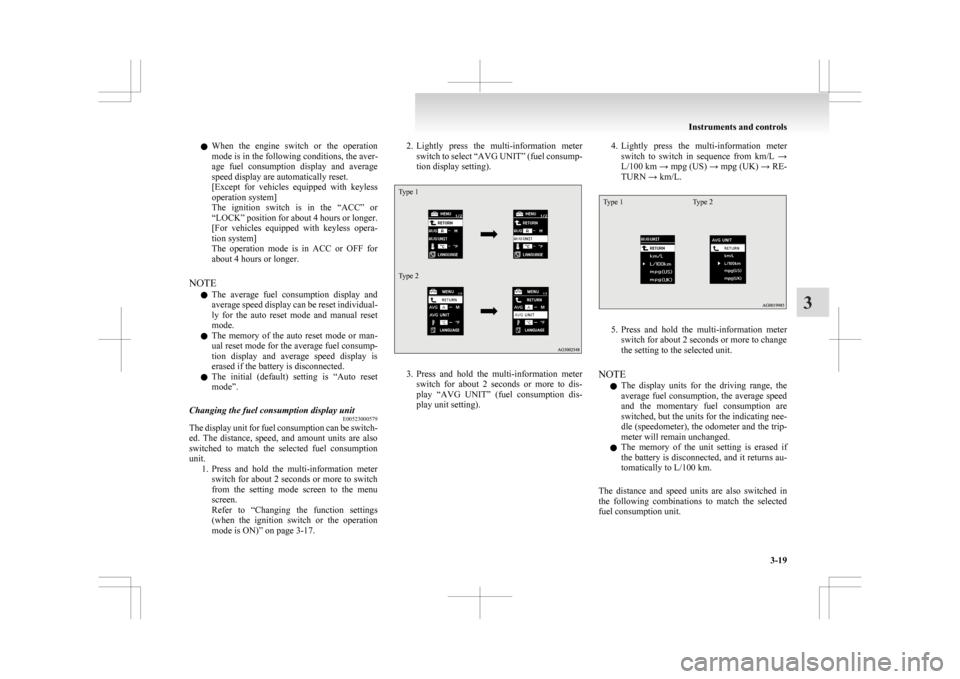
mode is ON)” on page 3-17. 2. Lightly
press the multi-information meter
switch to select “AVG UNIT” (fuel consump-
tion display setting).
Type 1
Type 2 3. Press
and hold the multi-information meter
switch for about 2 seconds or more to dis-
play “AVG UNIT” (fuel consumption dis-
play unit setting). 4. Lightly
press the multi-information meter
switch to switch in sequence from km/L →
L/100 km → mpg (US) → mpg (UK) → RE-
TURN → km/L.
Type 1 Type 2 5. Press
and hold the multi-information meter
switch for about 2 seconds or more to change
the setting to the selected unit.
NOTE l The display units for the driving range, the
average fuel consumption, the average speed
and the momentary fuel consumption are
switched, but the units for the indicating nee-
dle (speedometer), the odometer and the trip-
meter will remain unchanged.
l The memory of the unit setting is erased if
the battery is disconnected, and it returns au-
tomatically to L/100 km.
The distance and speed units are also switched in
the following combinations to match the selected
fuel consumption unit. Instruments and controls
3-19 3
Page 119 of 368

Indication lamp, warning lamp, and information screen display list
E00523700013
Indication and warning lamp list E005238006101-
Position lamp indication lamp ® p. 3-40
2- High-beam indication lamp ® p. 3-40
3- Charge warning lamp ® p. 3-42
4- Turn-signal indication lamps/Hazard warning indication lamps ® p. 3-40
5- Front fog lamp indication lamp* ® p. 3-40
6- Rear fog lamp indication lamp ® p. 3-40
7- Anti-lock brake system (ABS) warning lamp ® p. 4-38
8- Brake warning lamp ® p. 3-41
9- Cruise control indication lamp* ® p. 4-43 10-
Seat belt warning lamp ® p. 2-11
11- Supplement Restraint System (SRS) warning lamp ® p. 2-34
12- Check engine warning lamp ® p. 3-41
13- Active Stability Control (ASC) OFF indicator* ® p. 4-41
14- Active Stability Control (ASC) indicator* ® p. 4-41
15- Auto Stop & Go (AS&G) OFF indication lamp* ® p. 4-20
16- Auto Stop & Go (AS&G) indication lamp* ® p. 4-17
17- Diesel preheat indication lamp (diesel-powered vehicles) ® p. 3-40
18- Information screen display list ® p. 3-26 Instruments and controls
3-25 3