2009 MERCEDES-BENZ E-CLASS COUPE mirror controls
[x] Cancel search: mirror controlsPage 64 of 313
Opening and closing
...........................62
Boot ...................................................... 64
Key positions ....................................... 65
Seats .................................................... 66
Steering wheel .................................... 71
Mirrors ................................................. 73
Memor yfunctions* ............................. 75
Seat belts ............................................. 76
Lights ................................................... 80
Windscreen wipers .............................94
Side windows ...................................... 94
Driving and parking ............................98
Transmission ..................................... 101
Instrument cluster ............................106
On-boar dcomputer .......................... 107
Driving systems ................................ 122
Air conditioning ................................. 147
Sliding sunroof (Coupé) ....................158
Soft top (Cabriolet) ...........................160
Loading and stowing ........................165
Features ............................................. 172 61Controls
207_AKB
;2;3,en-GB
mkalafa, Version:2.11.8.1
2009-07-23T10:23:49+02:0
0-Seite 61
Page 76 of 313

R
move the steering column adjustment
switch in the opposite directio ntothat in
which the steering whee lismoving
R press one of the memory function position
buttons
Never leave children unsupervise dinthe vehi-
cle. They could open the driver' sdoor and,
thereby ,unintentionally activate the EASY-
ENTRY feature and become trapped.
The lastp osition of the steering whee lis
stored after you manually adjust it or when
you store amemory position (Y page75).
You can activate and deactivate the EASY-
ENTRY/EXIT feature via the on-board com-
puter (Y page121).
i The crash-responsive EASY-EXIT fea-
ture* can only be activated after an acci-
dent if the EASY-ENTRY/EXIT feature is
activated in the on-board computer.
If the crash-responsive EASY-EXIT feature
is triggere dinanaccident, the steering
whee lcolumn willm ove upwards when the
driver' sdoor is opened ,irrespective of the
position of the key in the ignitio nlock. This
makes it easier to exit the vehicl eand res-
cue the occupants. Mirrors
Rear-view mirror
X Adjust the rear-vie wmirror by hand so you
have agood overvie wofthe traffic condi-
tions. Rear-view mirror (manual anti-dazzle) X
Anti-dazzle mode: flick anti-dazzle
switch 0046forwards or back. Exterio
rmirrors G
Risk of accident
The exterior mirrors reduce the size of the
image. Objects are actually closer than they
appear. You could misjudge the distance from
vehicles driving behind and cause an acci-
dent, e.g. when changing lane. For this rea-
son, make sure of the actua ldistance from the
vehicl edriving behind by glancing over your
shoulder.
The convex exterior mirrors provid ealarger
fiel dofv ision.
The exterior mirrors are automatically heated
if the rear windo wheating is switched on and
the outsid etemperature is low.
Adjusting the exterio rmirrors Mirrors
73Controls
*optional
207_AKB; 2; 3, en-GB
mkalafa
,V ersion: 2.11.8.1
2009-07-23T10:23:49+02:00
-Seite 73 Z
Page 77 of 313

X
Make sure that the key is in position 1or
2 in the ignition lock.
X Press button 0046for the left-hand exterior
mirror or button 0047for the right-hand exte-
rior mirror.
The indicator lamp in the corresponding
button lights up in red.
The indicator lamp goes out again after
some time. You can adjust the selected
mirror using adjustment button 008Aas long
as the indicator lamp is lit.
X Press adjustment button 008Aup, down, to
the right or to the left until the exterior mir-
ror is set to aposition which provides you
with agood overview of traffic conditions.
Folding the exterior mirrors in or out
electrically* X
Make sure that the key is in position 1or
2 in the ignition lock.
X Briefly press button 0046.
Both exterior mirrors fold in or out.
i Make sure that the exterior mirrors are
always folded out fully while the vehicle is
in motion; otherwise, they may vibrate.
Resetting the exterior mirrors If the battery has been disconnected or has
become discharged, the exterior mirrors
must be reset. Otherwise, the exterior mirrors
will not fold in when you select the "Fold in
mirrors when locking" function in the on-
board computer (Y
page 122). X
Make sure that the key is in position 1in
the ignition lock.
X Briefly press button 0046.
Automatically folding exterior mirrors
in or out* If the "Fold in mirrors when locking" function
is activated in the on-board computer
(Y
page 122):
R the exterior mirrors fold in automatically as
soon as you lock the vehicle from the out-
side.
R the exterior mirrors fold out again automat-
ically as soon as you unlock the vehicle and
then open the driver's or front-passenger
door.
i If you have activated this function and fold
in the exterior mirrors using button 0046,they
will not be folded out automatically .You
can only fold out the exterior mirrors again
using button 0046. Automatic anti-dazzle mirrors*
The rear-view mirror and the exterior mirror
on the driver's side automatically go into anti-
dazzle mode if the ignition is switched on and
incident light from headlamps strikes the sen-
sor in the rear-view mirror.
The mirrors do not go into anti-dazzle mode if
reverse gear is engaged or the interior lighting
is switched on. G
Risk of accident
If the incident light from headlamps cannot
strike the sensor in the rear-view mirror, for
instance, when the rear window roller sun-
blind* is extended, the mirror's automatic
anti-dazzle function will not operate.
Incident light could then dazzle you. This may
prevent you from observing the traffic condi-
tions, thereby causing an accident. In this
case, adjust the rear-view mirror manually. 74
MirrorsControls
*o
ptional
207_AKB; 2; 3, en-GB
mkalafa,
Version: 2.11.8.1 2009-07-23T10:23:49+02:00-Seite 74
Page 78 of 313

Memory functions*
Storing settings
Using the memory button you can store up to
three different settings, e. g. for three differ-
ent people.
The following settings are stored as asingle
memory preset:
R position of the seat, backrest and head
restraint
R driver's side :steering whee lposition
R driver's side :position of the exterior mir-
rors on the driver's and front-passenger
sides G
Risk of injury
The memory function can still be use dwhen
the key has been removed .For this reason,
children should never be left unsupervised in
the vehicle. Otherwise, they coul dbecome
trappe dwhen moving the seat or the steering
wheel. G
Risk of accident
Only use the memory function on the driver's
side when the vehicl eisstationary. Other-
wise, you coul dbedistracted from the traffic
conditions by the steering whee land seat
moving of their own accord, and as aresult
caus eana ccident. X
Adjust the seat( Ypage6 6).
X On the driver's side ,alsoa djust the steer-
ing whee l(Y page7 1) and the mirrors
(Y page7 3).
X Press memory button Mand press storage
position switch 1,2or 3withi nthree sec-
onds.
The settings are stored in the selected pre-
set position. Atone sound swhen the set-
tings have been completed. Calling up
astored setting
X Press the corresponding storage position
button 1,2or 3.
The seat, steering whee land exterior mirror
are set in the stored position.
i The setting procedure is interrupted as
soon as you release the storage position
switch. Parking position for the exterior mir-
ror on the front-passengers
ide*
To make it easier to park, you can set and
store the front-passenge rside exterior mirror
position in such awaythat you can see the
rear whee lonthat side as soon as you engage
reverse gear.
Setting and storing the parking position Memory functions*
75Controls
*o
ptional
207_AKB; 2; 3, en-GB
mkalafa,
Version: 2.11.8.1 2009-07-23T10:23:49+02:00-Seite 75 Z
Page 79 of 313

X
Make sure that the vehicle is stationary and
that the key is in position 2in the ignition
lock.
X Press button 0047for the exterior mirror on
the front-passenger side.
X Engage reverse gear.
The exterior mirror on the front-passenger
side moves to the preset parking position.
X Use adjustment button 008Ato adjust the
exterior mirror to aposition which allows
you to see the rear wheel and the kerb.
The parking position is stored.
i If you shift the automatic transmission
into another gear, the exterior mirror on the
front-passenger side returns to the driving
position.
i You can also store the parking position
using the memory button M0088:
X With the key in position 2in the igni-
tion lock and with the exterior mirror
on the front-passenger side activated,
use adjustment button 008Ato set the
exterior mirror such that the rear
wheel and kerb are visible.
X Press memory button M0088 and one of
the arrows on adjustment button 008A
within three seconds.
The parking position is stored if the
exterior mirror does not move.
If the mirror moves out of position, repeat
the steps.
Calling up the parking position X
When the key is in position 2in the ignition
lock and the exterior mirror on the front-
passenger side is activated, engage
reverse gear.
The exterior mirror on the front-passenger
side moves to the stored parking position.
The exterior mirror on the front-passenger
side moves back to its original position: R
as soon as you exceed aspeed of
10 km/h
R about ten seconds after you have disen-
gaged reverse gear
R if you press button 0046for the exterior mir-
ror on the driver's side Seat belts
Wearing seat belts
Seat belts are the most effective means of
restraining the movement of vehicle occu-
pants in the event of an accident. This
reduces the risk of vehicle occupants coming
into contact with the vehicle interior. G
Risk of injury
As eat belt which is not worn correctly, or
which has not been engaged in the seat belt
buckle correctly, cannot perform its intended
protective function. Under certain circum-
stances, this could result in severe or even
fatal injuries.
Make sure that all occupants –inparticular,
pregnant women –wear their seat belt cor-
rectly at all times.
R The seat belt must fit snugly on your body
and must not be twisted. Therefore, you
should avoid wearing bulky clothing (e.g. a
winter coat). The shoulder belt section
must be routed across the centre of your
shoulder –onnoaccount across your neck
or under your arm –and pulled tight against
your upper body. The lap belt must always
pass across your lap as low down as possi-
ble, i.e. over your hip joints–n ot across
your abdomen. If necessary, push down the
belt strap slightly and then retighten it in
the roll-up direction.
R Do not route the belt strap across sharp
edges or fragile objects, especially if these
are located on or in your clothing, e.g. spec-
tacles, pens, keys, etc. The seat belt strap
could be damaged and tear in an accident, 76
Seat beltsControls
207_AKB; 2; 3, en-GB
mkalafa,
Version: 2.11.8.1 2009-07-23T10:23:49+02:00-Seite 76
Page 125 of 313
Switching the fold in mirrors when lock-
ing* function on/off
If you switch on the Fold mirrors in when
locking: function, the exterior mirrors fold
in when you lock the vehicle. When you
unlock the vehicle and then open the driver's
or front-passenger door, the exterior mirrors
fold out again.
If you have switched the function on and you
fold the exterior mirrors in using the button
on the door (Y page 74), they will not fold out
automatically. The exterior mirrors can then
only be folded out using the button on the
door.
X Press the 0040or003E button on the steer-
ing wheel to select the Settingsmenu.
X Press the 003Dor003C button to select the
Convenience submenu.
X Press the 0064button to confirm.
X Press the 003Dor003C button to select the
Fold in mirrors when locking: func-
tion.
You will see the selected setting: onor
off.
X Press the 0064button to save the setting.
Restoring the factory settings For safety reasons, not all functions are reset:
the
Limit speed (winter tyres): func-
tion in permanent SPEEDTRONIC can only be
set in the Vehiclesubmenu. If you want to
reset the Daytime driving lamps: in the
Light submenu, you must turn the key in the
ignition lock to position 1.
X Press the 0040or003E button on the steer-
ing wheel to select the Settingsmenu.
X Press the 003Dor003C button to select the
Factory setting submenu.
X Press the 0064button to confirm.
The Reset all settings? message
appears. X
Press the 003Dor003C button to select
Yes orNo.
X Press the 0064button to confirm the selec-
tion.
If you have selected Yes,the multifunction
display shows aconfirmation message. Driving systems
Overview of driving systems
The vehicle's driving systems are described
on the following pages:
R cruise control, Distronic Plus* and Speed-
tronic, which are used to control the speed
of the vehicle
R HOLD function, which makes pulling away
easier, particularly on steep uphill gradi-
ents
R dynamic handling package with sports
mode*, which is used to adjust the vehi-
cle's suspension system
R PARKTRONIC* and Parking Guidance*,
which assist you in finding aparking space,
as well as when manoeuvring and parking
R reversing camera*, which assists you when
parking and manoeuvring
R ATTENTION ASSIST, which helps you
detect tiredness or increasing lapses in
concentration
R Speed Limit Assist*, which shows you
speed limits that are detected in the multi-
function display
The ABS,B AS,BAS PLUS* ,adaptive brake
lights, ESP ®
,E BV and ADAPTIVE BRAKE driv-
ing safety systems and the PRE-SAFE ®
Brake* are described in the "Driving safety
systems" section (Y page 52). Cruise control
Cruise control maintains aconstant road
speed for you. It brakes automatically in order 122
Driving systemsControls
*o
ptional
207_AKB; 2; 3, en-GB
mkalafa,
Version: 2.11.8.1 2009-07-23T10:23:49+02:00-Seite 122
Page 146 of 313

in the multi-function display will direc
tyou
to the final position.
X Manoeuvre, if necessary.
X Always observe the warnin gmessages dis-
played by PARKTRONI C(Ypage 138).
Cancelling Parking Guidance X
Press the PARKTRONI Cbutton on the
centr econsole (Y page 138).
Parking Guidanc eiscancelled immediately
and PARKTRONI Cisdeactivated.
Parking Guidanc eiscancelled automatically
if it is no longer possible to guide you int othe
parking space, or if amalfunction occurs.
The parking space symbol disappears and the
Parking Guidance cancelled message
appears in the multi-function display.
Trailer towing* For vehicles with
atrailer coupling, the mini-
mum length for parking spaces is slightly
increased.
If you have attached atrailer to your vehicle,
you should not use Parking Guidance. When
the electrical connection is established
between your vehicle and the trailer, Parking
Guidanc ecease stobea vailable. PARK-
TRONI Cisdeactivated for the rear area. Reversing camera*
The reversin gcamera is an optical aid. It
shows the area behin dyour vehicle in the
COMAND APS display. G
Risk of injury
Make sure that no persons or animals are in
the manoeuvrin grange. Otherwise, they
could be injured. The reversin
gcamera is located in the handle
strip of the boot lid. Example: Coupé
0046
Reversing camera
View through th ecamera The area behin
dthe vehicle is displayed in a
mirrored fashion, as in the rear-view mirror. G
Risk of accident
The reversin gcamera is only an aid and may
display obstacles in adistorted or incorrect
manner, or may not even display the matall.
The reversin gcamera does not reliev eyou of
the responsibility to pay attention. The cam-
era cannot show objects:
R very near to the rear bumper
R below the rear bumper
R in the area immediately above the boot lid
handle
You are always responsible for safet yand
must continue to pay attention to your imme-
diate surroundings when parking and
manoeuvring. This applies to the areas
behind, in front of and nex ttothe vehicle. You
could otherwise endanger yourself and oth-
ers. G
Risk of accident
Under the followin gcircumstances, the
reversin gcamera will not function ,orfunction
in alimited manner:
R if the boot lid is open
R in heavy rain, sno worfog Driving systems
143Controls
*optional
207_AKB; 2; 3, en-GB
mkalafa,
Version: 2.11.8.1
2009-07-23T10:23:49+02:0
0-Seite1 43 Z
Page 175 of 313
Benz vehicles. Thi
shelps to prevent dam-
ag etot he vehicle.
Position the loa donthe roof rack in such a
wa ythat the vehicle will not sustai ndam-
ag ee venw henitisinm otion.
Depending on the vehicle's equipment,
make sure that yo ucan:
R ope nthe panorama sliding sunroof* fully
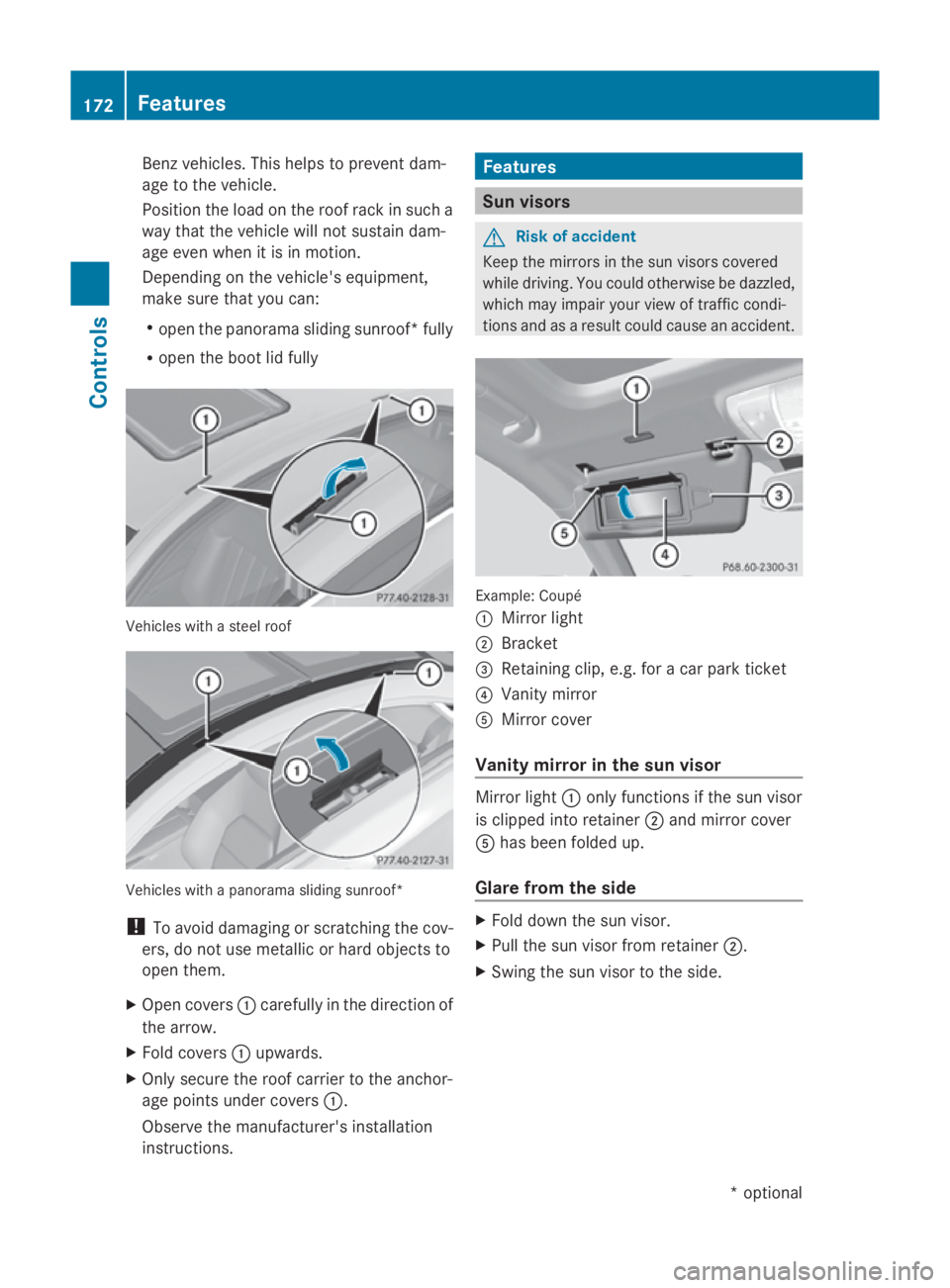
R ope nthe boo tlid fully Vehicles with
astee lroof Vehicles with
apanorama sliding sunroof*
! To avoid damaging or scratching the cov-
ers, do not us emetallic or hard objects to
ope nthem.
X Ope ncovers 0046carefully in the direction of
the arrow.
X Fold covers 0046upwards.
X Only secure the roof carrie rtothe anchor-
ag ep oints under covers 0046.
Observe the manufacturer' sinstallation
instructions. Features
Sun visors
G
Risk of accident
Kee pthe mirrors in the su nvisors covered
while driving .You could otherwise be dazzled,
which may impai ryourv iewoft rafficcondi-
tions and as aresult could cause an accident. Example: Coupé
0046
Mirror light
0047 Bracket
008A Retaining clip, e.g. for acar park ticket
0088 Vanity mirror
0086 Mirror cover
Vanity mirror in the sun visor Mirror light
0046only functions if the su nvisor
is clippe dinto retainer 0047and mirror cover
0086 hasb eenf olded up.
Glare from the side X
Fold dow nthe su nvisor.
X Pull the su nvisor from retainer 0047.
X Swing the su nvisor to the side. 172
FeaturesControls
*o
ptional
207_AKB; 2; 3, en-GB
mkalafa
,V ersion: 2.11.8.1
2009-07-23T10:23:49+02:00
-Seite 172