2009 MERCEDES-BENZ E-CLASS COUPE phone
[x] Cancel search: phonePage 117 of 313
play. The curren
ttrac kdoes not appear in
audio AUX mode ( Auxiliary audio mode: exter-
nal audio source connected).
Operating the TV* i
Depending on the digital TV broadcaster,
radio stations can also be received. The
multi-function display shows TV (Radio).
Selecting aradio station (Y page 113).
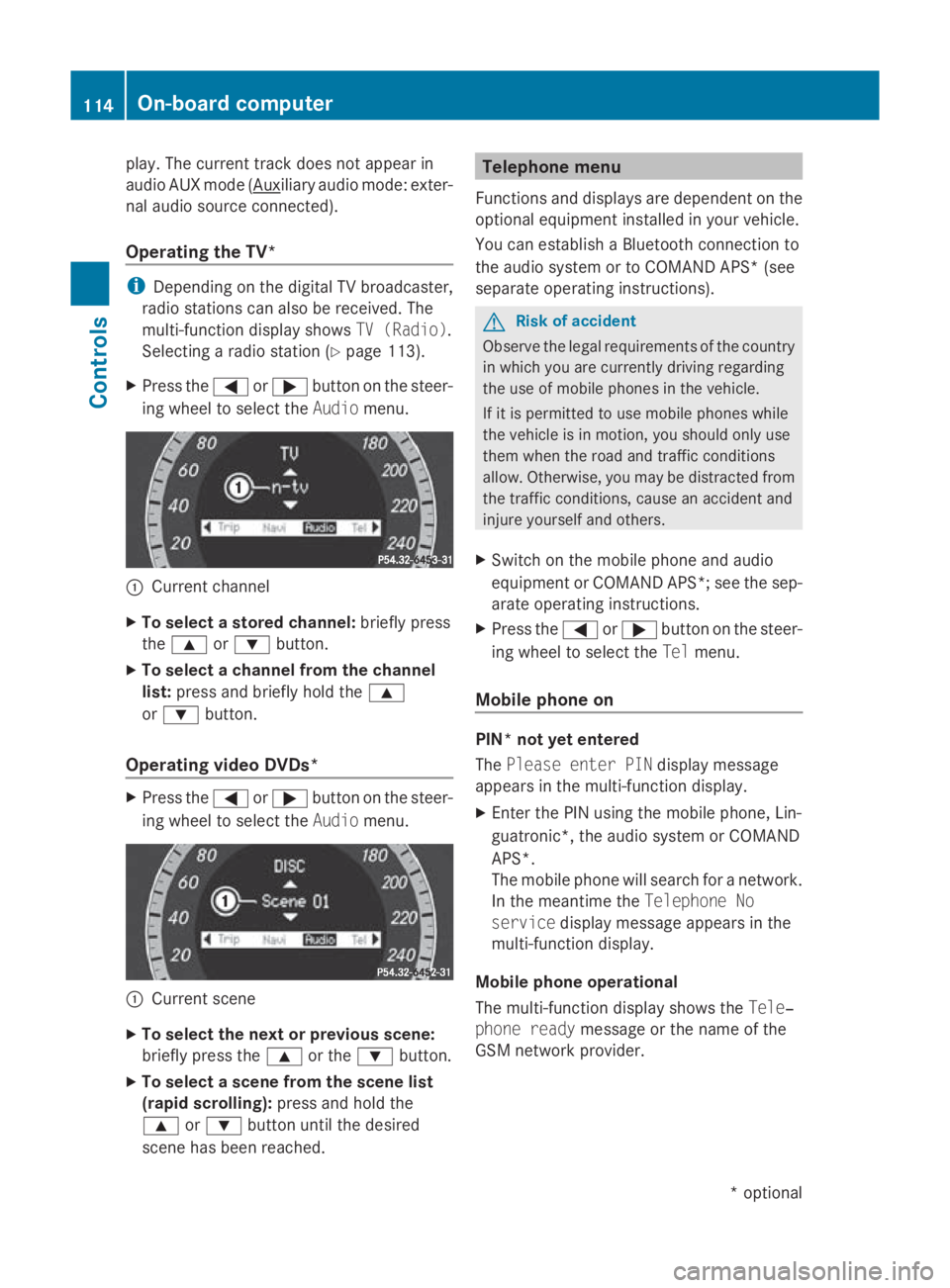
X Press the 0040or003E button on the steer-
ing wheel to select the Audiomenu. 0046
Current channel
X To select astored channel: briefly press
the 003C or003D button.
X To select achannel from the channel
list: press and briefly hold the 003C
or 003D button.
Operating video DVDs* X
Press the 0040or003E button on the steer-
ing wheel to select the Audiomenu. 0046
Current scene
X To select the next or previous scene:
briefly press the 003Cor the 003Dbutton.
X To select ascene from the scene list
(rapid scrolling): press and hold the
003C or003D button until the desired
scen ehas been reached. Telephone menu
Function sand displays are dependen tonthe
optional equipment installed in your vehicle.
You can establish aBluetoot hconnection to
the audio system or to COMAND APS *(see
separate operatin ginstructions). G
Risk of accident
Observ ethe legal requirements of the country
in which you are currently drivin gregarding
the use of mobile phones in the vehicle.
If it is permitted to use mobile phones while
the vehicle is in motion ,you should only use
them when the road and traffic conditions
allow. Otherwise, you may be distracted from
the traffic conditions, cause an acciden tand
injure yourself and others.
X Switc hont he mobile phone and audio
equipment or COMAND APS*; see the sep-
arate operatin ginstructions.
X Press the 0040or003E button on the steer-
ing wheel to select the Telmenu.
Mobile phone on PIN* not yet entered
The
Please enter PIN display message
appears in the multi-function display.
X Enter the PIN using the mobile phone, Lin-
guatronic*, the audio system or COMAND
APS*.
The mobile phone will search for anetwork.
In the meantime the Telephone No
service display message appears in the
multi-function display.
Mobile phone operational
The multi-function display shows the Tele‐
phone ready message or the name of the
GSM network provider. 114
On-boar
dcomputerControls
*optional
207_AKB
;2;3,en-GB
mkalafa, Version:2.11.8.1
2009-07-23T10:23:49+02:0
0-Seite 114
Page 118 of 313
Accepting
acall If someon
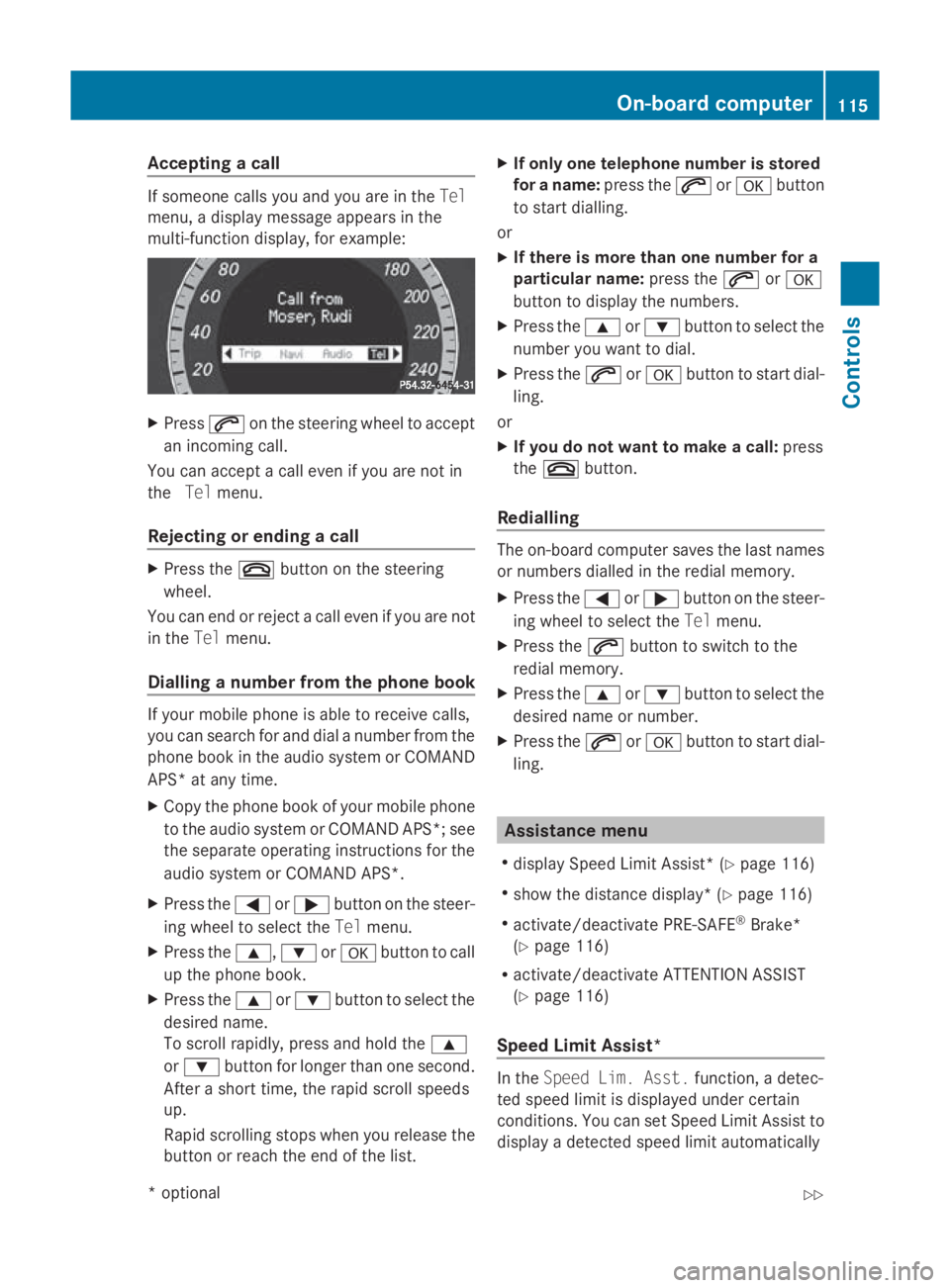
ecallsy ou and you are in the Tel
menu, adisplay message appear sinthe
multi-function display, for example: X
Press 006Aon thesteering whee ltoa ccept
an incoming call.
You can accept acall eve nifyou are no tin
the Telmenu.
Rejecting or ending acall X
Press the 007Fbuttonont hesteering
wheel.
You can en dorrejectacall eve nifyou are not
in the Telmenu.
Dialling anumber from th ephone book If your mobile phone is able to receiv
ecalls,
you can search for and dial anumber from the
phone book in th eaudio system or COMAND
APS* at any time.
X Copy th ephone book of your mobile phone
to th eaudio system or COMAND APS* ;see
th es eparat eoperating instruction sfor the
audio system or COMAND APS*.
X Press the 0040or003E buttononthesteer-
ing whee ltos elect the Telmenu.
X Press the 003C,003Dor0064 buttontocall
up th ephone book.
X Press the 003Cor003D buttontoselect the
desired name.
To scrol lrapidly, press and hold the 003C
or 003D buttonfor longer than on esecond.
Afte ras hort time, th erapi dscrolls peeds
up.
Rapid scrollin gstops when you release the
butto norr eachthe endoft helist. X
If only one telephone number is stored
for aname: press the 006Aor0064 button
to start dialling.
or
X If there is mor ethano ne number for a
particular name: press the006Aor0064
butto ntod isplay th enumbers.
X Press the 003Cor003D buttontoselect the
number you want to dial.
X Press the 006Aor0064 buttontostart dial-
ling.
or
X If you do not want to make acall: press
the 007F button.
Redialling The on-board computer saves th
elast names
or number sdialle dint heredial memory.
X Press the 0040or003E buttononthesteer-
ing whee ltos elect the Telmenu.
X Press the 006Abuttontos witch to the
redial memory.
X Press the 003Cor003D buttontoselect the
desired nam eornumber.
X Press the 006Aor0064 buttontostart dial-
ling. Assistance menu
R display Speed Limit Assist* (Y page 116)
R sho wthe distanc edisplay* ( Ypage 116)
R activate/deactivat ePRE-SAFE ®
Brake*
(Y page 116)
R activate/deactivat eATTEN TION ASSIST
(Y page 116)
Speed Limit Assist* In the
Speed Lim .Asst. function ,adetec-
te ds pee dlimi tisd isplayed under certain
conditions. You can set Speed Limit Assis tto
display adetecte dspee dlimi tautomatically On-boar
dcomputer
115Controls
*optio nal
207_AKB; 2; 3, en-GB
mkalafa
,V ersion: 2.11.8.1
2009-07-23T10:23:49+02:00
-Seite 115 Z
Page 170 of 313
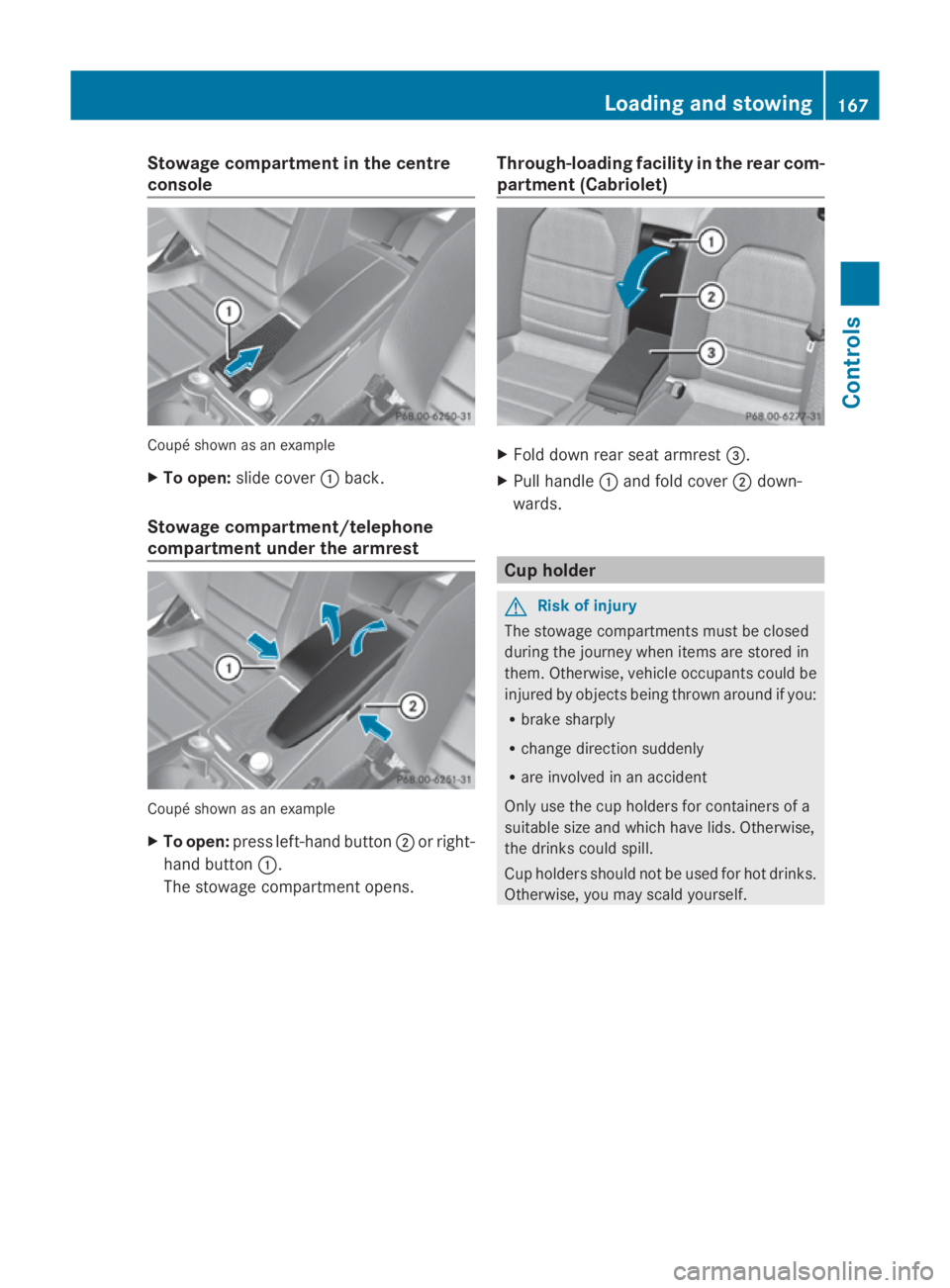
Stowage compartment in the centre
console Coupé shown as an example
X
To open: slide cover 0046back.
Stowage compartment/telephone
compartment under the armrest Coupé shown as an example
X
To open: press left-handb utton0047or right-
hand button 0046.
The stowage compartmen topens. Through-loading facility in the rear com-
partment (Cabriolet) X
Fold down rear seat armrest 008A.
X Pull handle 0046and fold cover 0047down-
wards. Cup holder
G
Risk of injury
The stowage compartments must be closed
during the journey when items are stored in
them. Otherwise, vehicle occupants could be
injured by objectsb eing thrown around if you:
R brake sharply
R change direction suddenly
R are involved in an accident
Only use the cup holders for containers of a
suitable size and which have lids. Otherwise,
the drinks could spill.
Cup holders should not be used for hot drinks.
Otherwise, you may scald yourself. Loading and stowing
167Controls
207_AKB; 2; 3, en-GB
mkalafa, Version: 2.11.8.1 2009-07-23T10:23:49+02:00-Seite 167 Z
Page 177 of 313
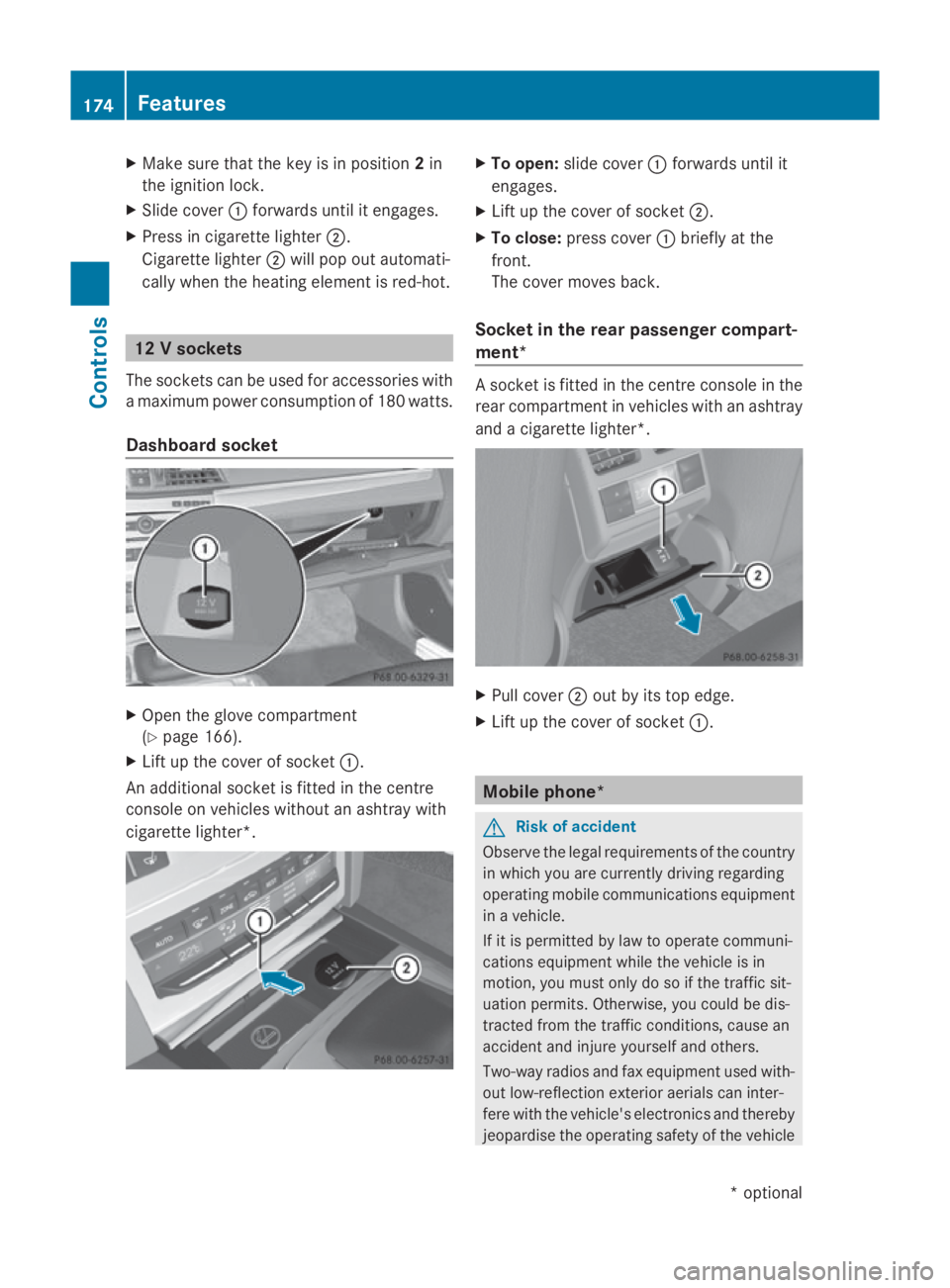
X
Make sure that the key is in position 2in
the ignition lock.
X Slide cover 0046forwards until it engages.
X Press in cigarette lighter 0047.
Cigarette lighter 0047will pop out automati-
cally when the heating element is red-hot. 12
Vsockets
The socketsc an be used for accessories with
am aximum power consumption of 180 watts.
Dashboard socket X
Open the glove compartment
(Y page 166).
X Lift up the cover of socket 0046.
An additional socket is fitted in the centre
console on vehicles without an ashtray with
cigarette lighter*. X
To open: slide cover 0046forwards until it
engages.
X Lift up the cover of socket 0047.
X To close: press cover 0046briefly at the
front.
The cover moves back.
Socket in the rear passenger compart-
ment* As
ocket is fitted in the centre console in the
rear compartmentinv ehicles with an ashtray
and acigarette lighter*. X
Pull cover 0047out by its top edge.
X Lift up the cover of socket 0046. Mobile phone*
G
Risk of accident
Observe the legal requirements of the country
in which you are currently driving regarding
operating mobile communications equipment
in av ehicle.
If it is permitted by law to operate communi-
cations equipment while the vehicle is in
motion, you must only do so if the traffic sit-
uation permits. Otherwise, you could be dis-
tracted from the traffic conditions, cause an
accident and injure yourself and others.
Two-way radios and fax equipment used with-
out low-reflection exterior aerials can inter-
fere with the vehicle's electronic sand thereby
jeopardise the operating safety of the vehicle 174
FeaturesControls
*o
ptional
207_AKB; 2; 3, en-GB
mkalafa,
Version: 2.11.8.1 2009-07-23T10:23:49+02:00-Seite 174
Page 178 of 313
and your safety. Therefore, you must only use
this equipment if it is correctly connecte dto
as eparate reflection-free exterio raerial. G
Ris
kofi njury
Excessive levels of electromagnetic radiation
may caus edamage to your healt hand the
healt hofo thers. Usin ganexterio raerial takes
int oa ccoun tcurren tscientific discussions
relating to th epossible healt hrisk pose dby
electromagnetic fields.
To ensure optimum reception qualit yfor
mobile phones in th evehicle ,and to minimise
mutual influences between th evehicle elec-
tronics and mobile phones, Mercedes-Benz
recommend sthe use of an approved exterior
aerial. An exterio raerial conduct sthe elec-
tromagnetic field sgenerated by awireless
device to th eexterio rofthevehicle ;the field
strengt hwithin th evehicle interio rislower
than in avehicle that does no thave an exte-
rior aerial.
i Ther eare various mobile phon ebrackets
that may be fitte dtoyour vehicle ;insome
cases, these are country-specific .You can
obtain these mobile phon ebrackets from a
qualifie dspecialist workshop ,e.g.a
Mercedes-Ben zServic eCentre.
The function sand services available when
you use th ephon edepen dony our mobile
phon emodeland servic eprovider.
Insertin gthe mobile phone
X Open th etelephone compartment
(Y page 167).
X Plac ethe mobile phon ebracke tint ot he
pre-installe dfitting; see th eseparate
mobile phon ebracke tfittin ginstructions.
X Inser tthe mobile phon eintot he mobile
phon ebracket; see th eseparate mobile
phon ebracke tfittin ginstructions.
If th emobile phon eisinserted in th emobile
phon ebracket, you can speak to th eperson
you are callin gusingthe hands-free system. You can operate th
etelephone usin gthe
006A and007F button sonthemulti-function
steering wheel. You can operate other mobile
phon efunction svia th eon-board computer
(Y page 114).
When you tak ethe keyo ut of th eignition lock,
th em obile phon estays on but you can no
longer use th ehands-free system.
If you are making acall and you would like to
tak ethe keyo ut of th eignition lock, first
remove th emobile phon efromt hebracket.
Otherwise, th ecall will be ended. Floormat
*onthedriver's side G
Ris
kofa ccident
Mak esure that there is sufficient clearance
aroun dthe pedals when floormats are used,
and that th efloormats are properly secured.
The floormats must be correctly secured at all
times usin gretainers and press-studs.
Before you driv eoff,c he ck th efloormats and
secure if necessary. Afloormat whic hisnot
properly secured can slip and, thereby, inter-
fer ew ith th emovemen tofthepedals.
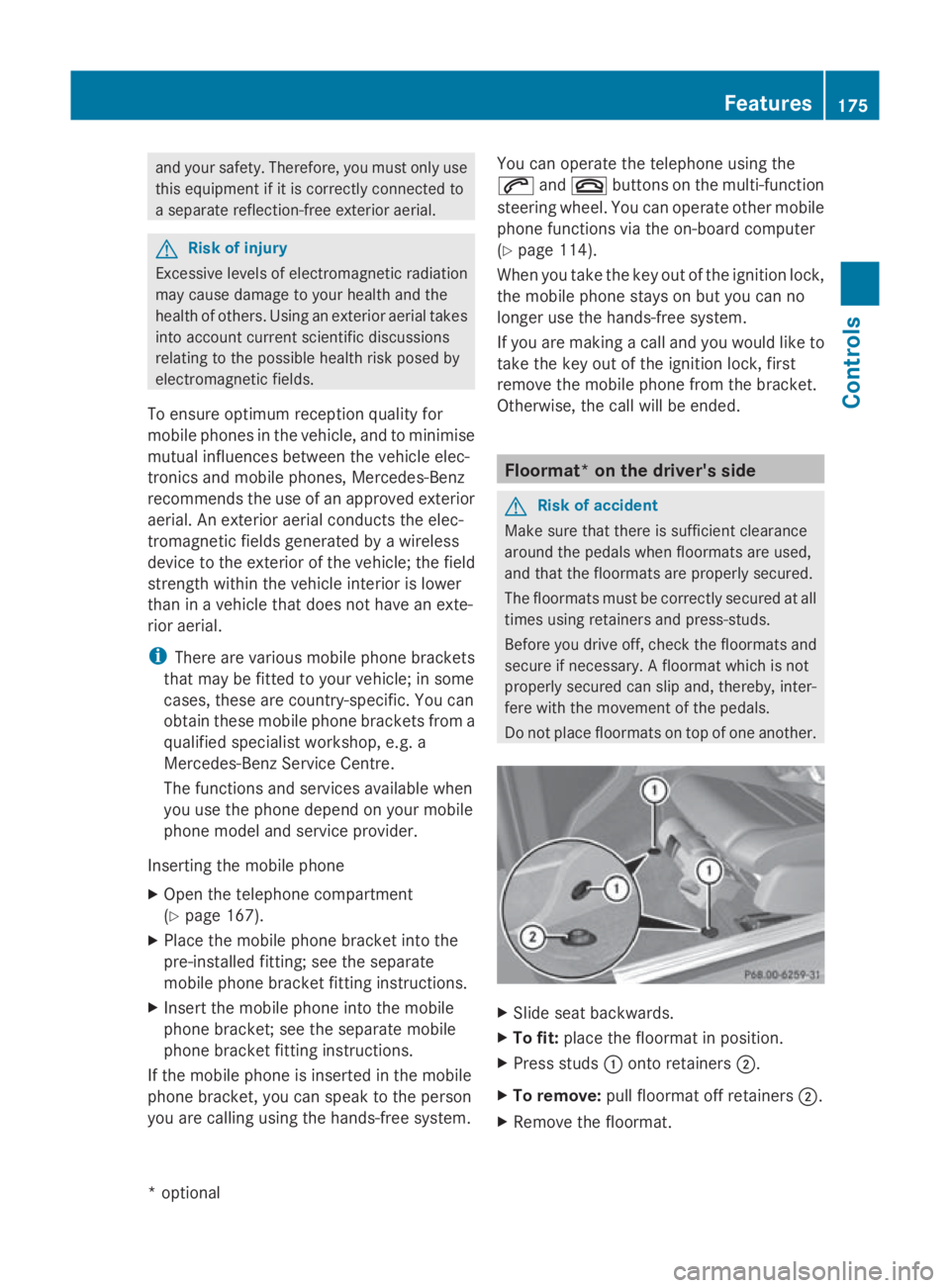
Do no tplace floormats on to pofoneanother. X
Slid eseat backwards.
X To fit: place th efloormat in position.
X Pres sstuds 0046 onto retainers 0047.
X To remove: pull floormat off retainers 0047.
X Remov ethe floormat. Features
175Controls
*optional
207_AKB
;2;3,en-GB
mkalafa, Version:2.11.8.1
2009-07-23T10:23:49+02:00
-Seite 175 Z
Page 186 of 313
imum mark on the dipstick
,the engine or
catalytic converter could be damaged.
Have excess oil siphoned off.
X Replace cap 0046on the filler nec kand
tighten clockwise.
Ensure that the cap lock sintop lace
securely.
For further information on engine oil, see
(Y page 288). Coolant
Only chec kthe coolan tlevel when the vehicle
is on alevel surface and the engine has cooled
down.
X Turn the key to position 2(Y page 65) in
the ignition lock.
X Check the coolan ttemperature gauge in
the instrumen tcluster. G
Risk of injury
The cooling system is pressurised. Therefore,
only unscrew the cap onc ethe engine has
coole ddown. The coolan ttemperature gauge
must display less than 70 †. Otherwise, you
could be scalde difhot coolan tescapes.
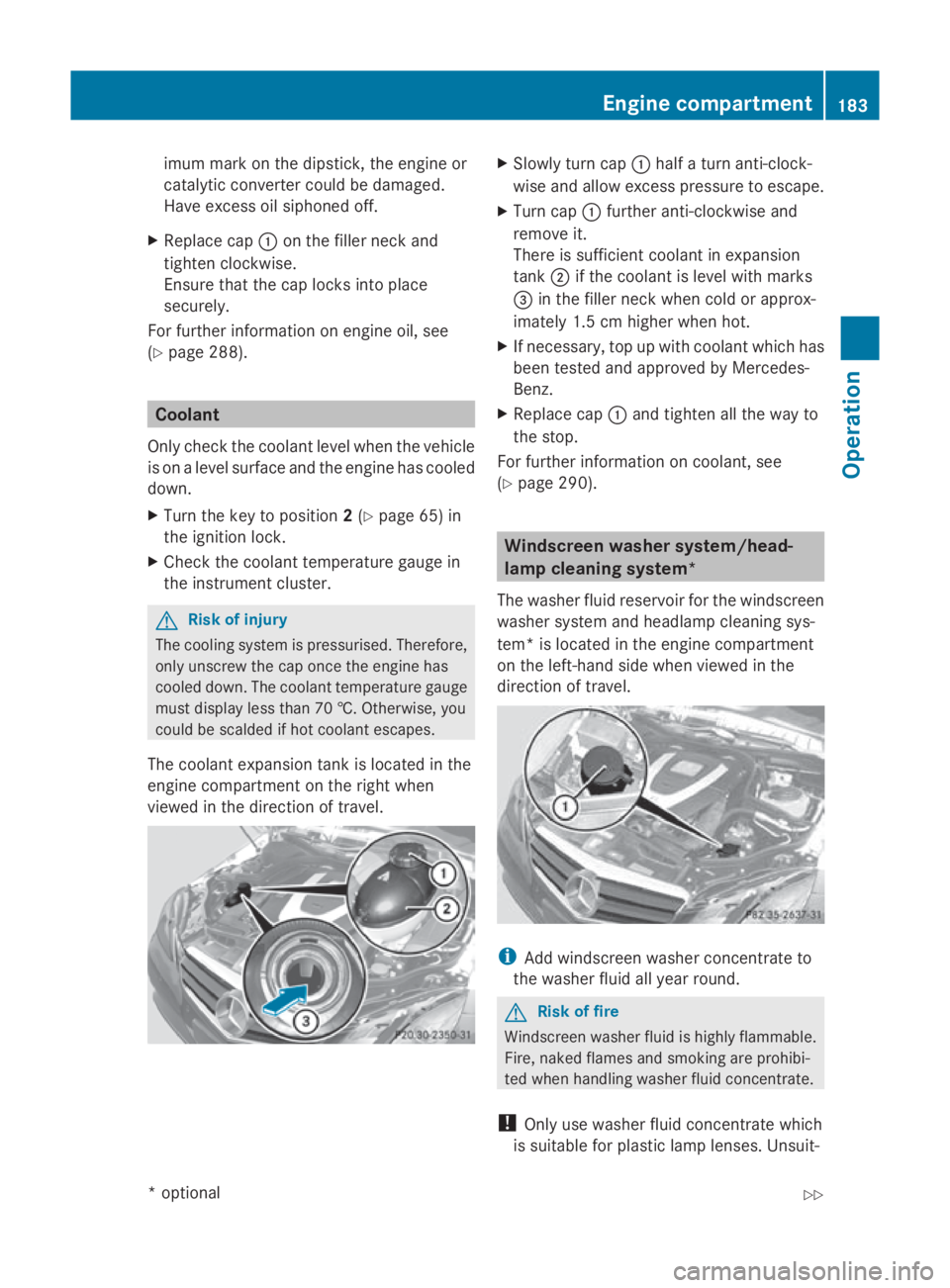
The coolan texpansion tan kislocated in the
engine compartmen tonthe right when
viewed in the direction of travel. X
Slowly tur ncap 0046 half aturna nti-clock-
wise and allow excess pressure to escape.
X Turn cap 0046further anti-clockwise and
remove it.
There is sufficien tcoolan tinexpansion
tank 0047if the coolan tislevel with marks
008A in the filler nec kwhen cold or approx-
imately 1. 5cmhigher when hot.
X If necessary, top up with coolan twhich has
been tested and approved by Mercedes-
Benz.
X Replace cap 0046and tighten all the way to
the stop.
For further information on coolant, see
(Y page 290). Windscreen washer system/head-
lam
pcleaning system*
The washer fluid reservoir for the windscreen
washer system and headlamp cleaning sys-
tem *isl ocated in the engine compartment
on the left-han dside when viewed in the
direction of travel. i
Add windscreen washer concentrate to
the washer fluid all year round. G
Risk of fire
Windscreen washer fluid is highly flammable.
Fire ,naked flames and smoking are prohibi-
ted when handlin gwasher fluid concentrate.
! Only use washer fluid concentrate which
is suitable for plastic lamp lenses. Unsuit- Engine compartment
183Operation
*optional
207_AKB; 2; 3, en-GB
mkalafa,
Version: 2.11.8.1
2009-07-23T10:23:49+02:0
0-Seite1 83 Z
Page 195 of 313
New brak
epads/linings For safety reasons, Mercedes-Benz recom-
mend
stha tyou onl yhaveb rake pads/linings
fitted to your vehicl ewhich have been
approved for Mercedes-Benz vehicles or
which correspond to an equivalent quality
standard. Brake pads/lining swhich have not
been approved for Mercedes-Benz vehicles or
which ar enot of an equivalent quality could
affec tyou rv ehicle' soperating safety. G
Ris
kofa ccident
New brake pads/lining sonlyr each their opti-
mu mb raking effect after several hundred kil-
ometres of driving. Before thi soptimum brak-
ing effect is reached, yo ushoul dcompensate
for the reduced braking effect by applying
greate rpressure when braking .Thisa lso
applie safter the brake discs or the brake
pads/lining shaveb eenr eplaced. Tyre grip
G
Ris
kofa ccident
Whil ethe vehicl ecan be full ycontrolle data
certai nspeed on dry roads ,you must reduce
your spee donwetor icy roads to achieve the
same roa dsafety .Otherwise, yo ucould cause
an accident.
Pa yp articula rattentio ntothe roa dconditions
at temperatures around freezing point.
If ice ha sformed on the roa dsurface (e.g.
fro mf og), athinf ilmofw ater rapidl yforms on
the ice when yo ubrake, considerabl yreduc-
ing tyr egrip. Drive with particula rcareins uch
weather conditions. Driving on we
troads
If water ha saccumulate dtoacertaindepth
on the roa dsurface, there is adangerofa qua-
planing occurring, eve nif:
R yo ud rive at lo wspeeds
R the tyres have adequate trea ddepth For thi
sreason, do not drive in tyr eruts, and
brake carefully. Driving on flooded roads
If yo uhavetod rive on stretche sofroadon
which water ha scollected ,pleas ebearin
mind that:
R the maximum permissibl estill water depth
is 25 cm.
R yo us houl ddrive no faste rtha natw alking
pace.
! Bea rinm indt hatv ehicles travelling in
front or in the opposite directio ncreate
waves .Thism aycause the maximum per-
missibl ewater depth to be exceeded.
Failur etoo bserve these note smayresult
in damage to the engine ,electrica lsys tems
and transmission. Driving abroad
Points to remember
An extensive Mercedes-Benz Service network
is also availabl einother countries .The
Service Hotline's current telephone numbers
for us ewheny ou area broa da reto be found
in the "Service24h" chapte rofthe Service
Booklet.
Onl ylow -octan efuelisa vailable in certain
countries.
Yo uc an find furthe rinformation abou tfuel
grade son(Ypage 178). Symmetrical dipped beam
If your journey take syou to countries where
vehicles ar edriven on the opposite side of the
roa dtot he country in which the vehicl eis
registered, your headlamps must be switched
to symmetrical dipped beam .Thisp revents
oncoming traffi cfromb eing dazzled.
Have the headlamps converte dasclose as
possibl etothe borde rbefor ed riving in these 192
Driving ab
roadOperation
207_AKB; 2; 3, en-GB
mkalafa, Version: 2.11.8.1 2009-07-23T10:23:49+02:00-Seite 192
Page 234 of 313
Problem Possible causes/consequences and
0050
0050Solutions The rear-window heat-
ing has switched off
prematurely or cannot
be switched on. The on-board voltage is too low, because too many consumers are
switched on.
X
Switch off consumers that are not required, e.g. seat heating*
or interior lighting.
Once the battery is sufficiently charged, the rear window heating
will switch back on automatically. Vehicles with auto-
matic child seat recog-
nition on the front-
passenger seat*:
The
007F0080indica-
tor lamp on the centre
console is lit. As
pecial Mercedes-Ben zchild seat with automatic child seat rec-
ognition has been fitted to the front-passenger seat .The front-
passenger airbag has therefore been disabled as desired. G
Risk of injury
There is no child seat fitted to the front-passenger seat .The auto-
matic child seat recognition *ismalfunctioning.
X Remove electronic equipmen tfromt he front-passenger seat,
for example:
R notebook
R mobile phone
R card swith transponders, e.g. ski passes or access passes
If the 007F0080indicator lamp remain slit:
X Visit aqualified specialist workshop. Troubleshooting
231Practical advice
*optional
207_AKB; 2; 3, en-GB
mkalafa,
Version: 2.11.8.1 2009-07-23T10:23:49+02:00-Seite2 31 Z