2009 MERCEDES-BENZ CL COUPE parking brake
[x] Cancel search: parking brakePage 206 of 421

tutes a health hazard and could lead to loss
of consciousness or even death.
! Do not depress the accelerator pedal
when starting the engine.
Automatic transmission DIRECT SELECT lever
P
Park position with parking lock
N Neutral
R Reverse gear
D Drive position
X Before starting, make sure Pis selected.
i The engine can also be started when the
DIRECT SELECT lever is in position N.
Starting the engine using the key X
Turn the key to position 3(Y page 182) in
the ignition lock and release it as soon as
the engine is running.
Starting the engine using KEYLESS
GO* G
Risk of injury
Your vehicle can be started using a valid KEY-
LESS GO* key. For this reason, children
should never be left unsupervised in the vehi-
cle. Always take the key with you when leaving
the vehicle, even if you are only leaving it for
a short time. i
The Start/Stop button can be used to
start the vehicle without inserting the key
in the ignition lock. X
Depress the brake pedal and keep it
depressed.
X Press Start/Stop button :once.
The engine starts. Pulling away
! Warm up the engine quickly. Do not use
the engine's full performance until it has
reached operating temperature.
Only shift into reverse gear when the vehi-
cle is stationary.
Where possible, avoid spinning the drive
wheels when pulling away on slippery
roads. Otherwise, you could damage the
drive train.
! AMG vehicles: at low engine tempera-
tures (below +20 †), the maximum engine
speed is restricted in order to protect the
engine. Avoid driving at full throttle when
the engine is cold in order to protect the
engine and maintain smooth engine oper-
ation.
i It is only possible to move the DIRECT
SELECT lever to the desired position from
position Pif you depress the brake pedal.
Only then is the parking lock released. Driving and parking
203Controls
* option al
216_AKB; 2; 3, en-GB
bjanott
,V ersion: 2.11.7.7
2009-02-27T14:54:17+01:00 - Seite 203 Z
Dateiname: 6515230602_buchblock.pdf; erzeugt am 04. Mar 2009 11:15:47; WK
Page 207 of 421

i
The vehicle locks centrally once you have
pulled away. The locking knobs in the doors
drop down.
You can open the doors from the inside at
any time.
You can also deactivate the automatic lock-
ing feature (Y page 167).
X Depress the brake pedal and keep it
depressed.
X Move the DIRECT SELECT lever to position
D or R.
X Release the brake pedal.
X Carefully depress the accelerator pedal.
The electric parking brake is automatically
released (Y page 205).
i Upshifts take place at higher engine
speeds after a cold start. This helps the
catalytic converter to reach its operating
temperature more quickly.
Hill start assist Hill start assist helps you when pulling away
on uphill gradients. It holds the vehicle for a
short time after you have removed your foot
from the brake pedal. This gives you time to
move your foot from the brake pedal to the
accelerator pedal and depress it before the
vehicle begins to roll. G
Risk of accident
Never leave the vehicle when it is held by hill
start assist. After approximately one second,
hill start assist will no longer brake your vehi-
cle and it could roll away.
X Take your foot off the brake pedal.
i Once you have taken your foot off the
brake pedal, the vehicle is held for around
one second.
X Pull away. Hill start assist will not function if:
R
you are pulling away on a level road or a
downhill gradient.
R the DIRECT SELECT lever is in position N.
R the vehicle is secured with the electric
parking brake.
R ESP ®
is malfunctioning. Parking
G
Risk of accident
Only remove the key from the ignition lock
when the vehicle is stationary, as you cannot
steer the vehicle with the key removed.
Never leave children unsupervised in the vehi-
cle. They might release the electric parking
brake. This could lead to a serious or fatal
accident. G
Risk of fire
Make sure that the exhaust system does not
under any circumstances come into contact
with flammable materials such as dry grass or
petrol. The material could otherwise ignite
and set the vehicle on fire.
To ensure that the vehicle is secured against
rolling away unintentionally:
R the parking brake must be applied
R move the DIRECT SELECT lever into posi-
tion Pand remove the ignition key
R for steep uphill or downhill gradients, turn
the front wheels towards kerb 204
Driving and parkingControls
216_AKB; 2; 3, en-GB
bjanott,
Version: 2.11.7.7 2009-02-27T14:54:17+01:00 - Seite 204
Dateiname: 6515230602_buchblock.pdf; erzeugt am 04. Mar 2009 11:15:47; WK
Page 208 of 421
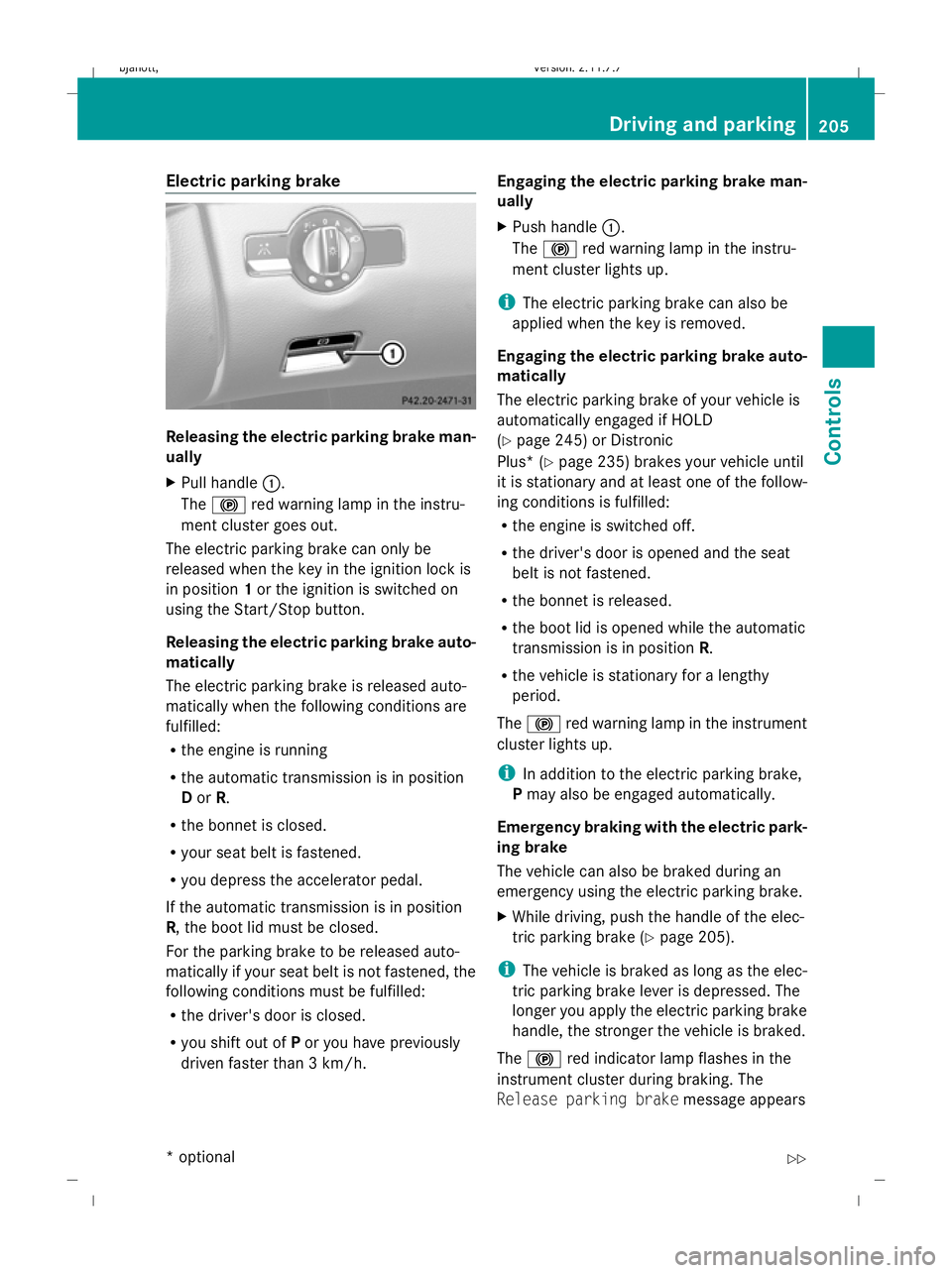
Electric parking brake
Releasing the electric parking brake man-
ually
X
Pull handle :.
The ! red warning lamp in the instru-
ment cluster goes out.
The electric parking brake can only be
released when the key in the ignition lock is
in position 1or the ignition is switched on
using the Start/Stop button.
Releasing the electric parking brake auto-
matically
The electric parking brake is released auto-
matically when the following conditions are
fulfilled:
R the engine is running
R the automatic transmission is in position
D or R.
R the bonnet is closed.
R your seat belt is fastened.
R you depress the accelerator pedal.
If the automatic transmission is in position
R, the boot lid must be closed.
For the parking brake to be released auto-
matically if your seat belt is not fastened, the
following conditions must be fulfilled:
R the driver's door is closed.
R you shift out of Por you have previously
driven faster than 3 km/h. Engaging the electric parking brake man-
ually
X
Push handle :.
The ! red warning lamp in the instru-
ment cluster lights up.
i The electric parking brake can also be
applied when the key is removed.
Engaging the electric parking brake auto-
matically
The electric parking brake of your vehicle is
automatically engaged if HOLD
(Y page 245) or Distronic
Plus* ( Ypage 235) brakes your vehicle until
it is stationary and at least one of the follow-
ing conditions is fulfilled:
R the engine is switched off.
R the driver's door is opened and the seat
belt is not fastened.
R the bonnet is released.
R the boot lid is opened while the automatic
transmission is in position R.
R the vehicle is stationary for a lengthy
period.
The ! red warning lamp in the instrument
cluster lights up.
i In addition to the electric parking brake,
P may also be engaged automatically.
Emergency braking with the electric park-
ing brake
The vehicle can also be braked during an
emergency using the electric parking brake.
X While driving, push the handle of the elec-
tric parking brake (Y page 205).
i The vehicle is braked as long as the elec-
tric parking brake lever is depressed. The
longer you apply the electric parking brake
handle, the stronger the vehicle is braked.
The ! red indicator lamp flashes in the
instrument cluster during braking. The
Release parking brake message appears Driving and parking
205Controls
* option al
216_AKB; 2; 3, en-GB
bjanott
,V ersion: 2.11.7.7
2009-02-27T14:54:17+01:00 - Seite 205 Z
Dateiname: 6515230602_buchblock.pdf; erzeugt am 04. Mar 2009 11:15:48; WK
Page 209 of 421

in the multi-function display and a warning
tone sounds.
When the vehicle has been braked to a stand-
still, the electric parking brake is applied. Switching off the engine
G
Risk of accident
If the engine is not running, there is no power
assistance for the steering and brakes. Steer-
ing and braking will then require significantly
greater effort.
As a result, you might lose control of the vehi-
cle, cause an accident and injure yourself and
others.
Therefore, do not switch off the engine while
you are driving.
X Move the DIRECT SELECT lever to position
P.
Using the key
X Turn the key to position 0(Y page 182) in
the ignition lock and remove it.
The parking lock is activated.
i If you switch the engine off with the trans-
mission in position Ror D, the automatic
transmission automatically shifts to N.
If you then open the driver's door or the
front-passenger door or remove the key
from the ignition, the automatic transmis-
sion shifts to P.
If you shift the automatic transmission to
N before switching off the engine, the auto-
matic transmission remains in Neven when
a door is opened.
Using KEYLESS GO*
X Press the Start/Stop button (Y page 182).
The engine stops and all the indicator
lamps in the instrument cluster go out
(Y page 27).
i If you use the Start/Stop button to switch
off the engine, the automatic transmission automatically shifts to
N. If you open the
driver's or front-passenger door, the auto-
matic transmission shifts to P.
i The engine can be turned off while the
vehicle is in motion by pressing and holding
the Start/Stop button for three seconds. Automatic transmission
Notes on the transmission
G
Risk of accident
The movement of the pedals must not be
impaired in any way. Do not keep any objects
in the driver's footwell. Make sure that floor-
mats or carpets are correctly secured and
that there is sufficient clearance for the ped-
als.
Do not place several floormats on top of one
another. G
Risk of accident
Do not change down for additional engine
braking on a slippery road surface. This could
cause the drive wheels to lose their grip and
the vehicle could skid. This could cause you
to lose control of your vehicle and cause an
accident. Automatic transmission
! Warm up the engine quickly. Do not use
the engine's full performance until it has
reached operating temperature.
Only set the automatic transmission to the
respective drive positions when the vehicle
is stationary.
Where possible, avoid spinning the drive
wheels when pulling away on slippery
roads. Otherwise, you could damage the
drive train. 206
Automatic transmissionCont
rols
* option al
216_AKB; 2; 3, en-GB
bjanott
,V ersion: 2.11.7.7
2009-02-27T14:54:17+01:00 - Seite 206
Dateiname: 6515230602_buchblock.pdf; erzeugt am 04. Mar 2009 11:15:48; WK
Page 210 of 421
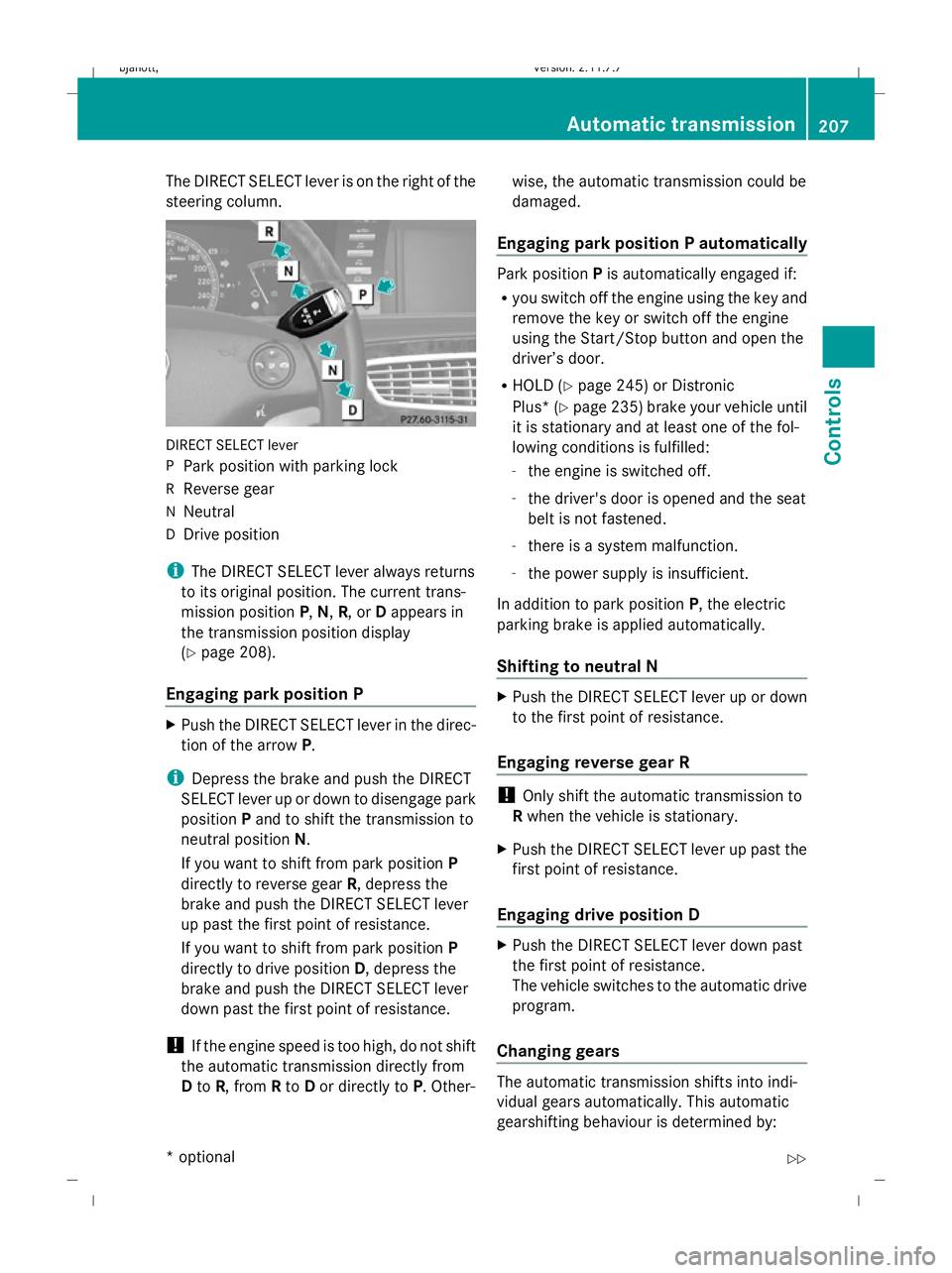
The DIRECT SELECT lever is on the right of the
steering column.
DIRECT SELECT lever
P Park position with parking lock
R Reverse gear
N Neutral
D Drive position
i The DIRECT SELECT lever always returns
to its original position. The current trans-
mission position P,N, R, or Dappears in
the transmission position display
(Y page 208).
Engaging park position P X
Push the DIRECT SELECT lever in the direc-
tion of the arrow P.
i Depress the brake and push the DIRECT
SELECT lever up or down to disengage park
position Pand to shift the transmission to
neutral position N.
If you want to shift from park position P
directly to reverse gear R, depress the
brake and push the DIRECT SELECT lever
up past the first point of resistance.
If you want to shift from park position P
directly to drive position D, depress the
brake and push the DIRECT SELECT lever
down past the first point of resistance.
! If the engine speed is too high, do not shift
the automatic transmission directly from
D to R, from Rto Dor directly to P. Other- wise, the automatic transmission could be
damaged.
Engaging park position P automatically Park position
Pis automatically engaged if:
R you switch off the engine using the key and
remove the key or switch off the engine
using the Start/Stop button and open the
driver’s door.
R HOLD (Y page 245) or Distronic
Plus* (Y page 235) brake your vehicle until
it is stationary and at least one of the fol-
lowing conditions is fulfilled:
- the engine is switched off.
- the driver's door is opened and the seat
belt is not fastened.
- there is a system malfunction.
- the power supply is insufficient.
In addition to park position P, the electric
parking brake is applied automatically.
Shifting to neutral N X
Push the DIRECT SELECT lever up or down
to the first point of resistance.
Engaging reverse gear R !
Only shift the automatic transmission to
R when the vehicle is stationary.
X Push the DIRECT SELECT lever up past the
first point of resistance.
Engaging drive position D X
Push the DIRECT SELECT lever down past
the first point of resistance.
The vehicle switches to the automatic drive
program.
Changing gears The automatic transmission shifts into indi-
vidual gears automatically. This automatic
gearshifting behaviour is determined by: Automatic transmission
207Controls
* optional
216_AKB; 2; 3, en-GB
bjanott,
Version: 2.11.7.7 2009-02-27T14:54:17+01:00 - Seite 207 Z
Dateiname: 6515230602_buchblock.pdf; erzeugt am 04. Mar 2009 11:15:48; WK
Page 229 of 421
cal beam is activated, the edge of the carria-
geway is no longer illuminated as wide and
high. Note that not all light functions are avail-
able when tourist mode is activated.
When you again drive on the same side of the
road as in the country of registration, have
tourist mode deactivated at a qualified spe-
cialist workshop, e.g. a Mercedes-Benz
service centre, as soon as possible after
crossing the border.
Showing/hiding the additional speed-
ometer The additional speedometer can be shown in
the multi-function display.
Vehicles with a kilometre speedometer: the
additional speedometer has mph units.
Vehicles with a miles speedometer: the addi-
tional speedometer has km/h units.
X Press the =or; button to select the
Settings menu.
X Press 9or: to select Dig.
speedo.
X Press the abutton.
X To activate/deactivate: pressa
again.
Selecting the units for speed/distance The
Display unit Speed-/odometer:
function allows you to choose whether the
multi-function display shows km/h or mph in
certain cases.
The selected units apply to:
R the analogue speedometer
R the total distance recorder and the trip
meter
R the trip computer
R the digital speedometer in the Tripmenu
R the distance values in the navigation sys-
tem*
R cruise control R
Speedtronic
R Distronic*
R Distronic Plus*
R the ASSYST PLUS service interval display
The digital speedometer shows alternative
speed units (Y page 226).
X Press the =or; button to select the
Settings menu.
X Press 9or: to select Units.
X Press the abutton.
X To select a different display unit: press
a again.
The unit switches km/handmph.
Activating/deactivating the radar sen-
sor system* !
You must deactivate the radar sensor sys-
tem in certain countries and near radio
telescope facilities. Further information
can be found in the index under "Radar
sensor system".
Vehicles with a navigation system*: the radar
sensor system is deactivated automatically if
you are close to radio telescope facilities.
The following systems are switched off when
the radar sensor system is deactivated:
R Distronic Plus* (Y page 235)
R BAS PLUS* (Y page 49)
R Park Assist* (Y page 251) and Parking
Guidance*(Y page 254)
R PRE-SAFE ®
Brake* (Y page 52)
R Blind Spot Assist* (Y page 260)
X Press the =or; button to select the
Settings menu.
X Press 9or: to select Radar sen‐
sor system. 226
On-board computerControls
* optional
216_AKB; 2; 3, en-GB
bjanott,
Version: 2.11.7.7 2009-02-27T14:54:17+01:00 - Seite 226
Dateiname: 6515230602_buchblock.pdf; erzeugt am 04. Mar 2009 11:15:54; WK
Page 230 of 421

X
Press the abutton.
X To activate/deactivate: pressa
again. Driving systems
Overview of driving systems
The vehicle's driving systems are described
on the following pages:
R cruise control, Distronic*, Distronic Plus*
and Speedtronic, which are used to control
the speed of the vehicle
R HOLD, which makes pulling away easier,
particularly on steep uphill gradients
R AIRMATIC* and Active Body Control (ABC),
which is used to adjust the vehicle’s sus-
pension system
R 4MATIC* (permanent four-wheel drive), for
optimum traction
R PARKTRONIC and Park Assist*, which
assist you when parking
R reversing camera*, which assists you when
parking
R Night View Assist*, which assists you when
driving in the dark
R Parking Guidance*, which assists you when
looking for a parking space and assists you
when parking
R Blind Spot Assist*, which assists you when
changing lanes
The ABS, BAS, BAS PLUS*, adaptive brake
lights, ESP ®
, EBV, ADAPTIVE BRAKE, distance
warning function* and PRE-SAFE ®
Brake*
driving systems are described in the "Driving
safety systems" section (Y page 48).Cruise control
Cruise control maintains a constant road
speed for you. It brakes automatically in order
to avoid exceeding the set speed. On long and steep downhill gradients, especially if the
vehicle is laden, you must select shift range
1,
2or 3in good time. By doing so, you will
make use of the braking effect of the engine,
which relieves the load on the brake system
and prevents the brakes from overheating
and wearing too quickly. G
Risk of accident
Do not change down for additional engine
braking on a slippery road surface. This could
cause the drive wheels to lose their grip and
the vehicle could skid.
Use cruise control only if road and traffic con-
ditions make it appropriate to maintain a
steady speed for a prolonged period. You can
store any road speed above 30 km/h. G
Risk of accident
Cruise control cannot take account of road
and traffic conditions.
Always pay attention to traffic conditions
even when cruise control is activated.
Cruise control is only an aid designed to assist
driving. You are responsible for the vehicle's
speed and for braking in good time. G
Risk of accident
Do not use cruise control:
R in road and traffic conditions which do not
allow you to maintain a constant speed (e.g.
heavy traffic or winding roads). You could
otherwise cause an accident.
R on slippery roads. Braking or accelerating
could cause the drive wheels to lose trac-
tion and the vehicle could then skid.
R when there is poor visibility, e.g. due to fog,
heavy rain or snow
Cruise control lever You can operate cruise control and variable
Speedtronic with the cruise control lever. Driving systems
227Controls
* optional
216_AKB; 2; 3, en-GB
bjanott,
Version: 2.11.7.7 2009-02-27T14:54:17+01:00 - Seite 227 Z
Dateiname: 6515230602_buchblock.pdf; erzeugt am 04. Mar 2009 11:15:54; WK
Page 232 of 421
X
Briefly pull the cruise control lever towards
you =.
X Remove your foot from the accelerator
pedal.
The first time cruise control is activated, it
stores the current speed or regulates the
speed of the vehicle to the previously
stored speed.
Setting a speed X
Press the cruise control lever to the pres-
sure point, up :for a higher speed or
down ?for a lower speed.
X Keep the cruise control lever pressed until
the desired speed is reached.
X Release the cruise control lever.
The new speed is stored.
i Cruise control is not deactivated if you
depress the accelerator pedal. For exam-
ple, if you accelerate briefly to overtake,
cruise control adjusts the vehicle's speed
to the last speed stored after you have fin-
ished overtaking.
Making fine adjustments in 1 km/h
increments X
Briefly press the cruise control lever to the
pressure point, up :for a higher speed or
down ?for a lower speed.
The last speed stored is increased or
reduced.
Making adjustments in 10 km/h incre-
ments X
Briefly press the cruise control lever
beyond the pressure point, up :for a
higher speed or down ?for a lower speed.
The last speed stored is increased or
reduced. Deactivating cruise control There are several ways to deactivate cruise
control:
X
Briefly press the cruise control lever for-
wards B.
or
X Brake.
or
X Briefly press the cruise control lever in the
direction of arrow A.
Variable Speedtronic is selected. LIM indi-
cator lamp ;in the cruise control lever
lights up.
Cruise control is automatically deactivated if:
R you engage the electric parking brake
R you drive at less than 30 km/h
R ESP ®
intervenes or you deactivate ESP ®
R you shift the automatic transmission to N
while driving
If cruise control is deactivated, you will hear
a warning tone. You will see the Cruise
control off message in the multi-function
display for approximately five seconds.
i The last speed stored is cleared when you
switch off the engine. Distronic*
i Distronic is only available for certain
countries.
Distronic regulates the speed and automati-
cally maintains the distance to the vehicle in
front. It brakes automatically in order to avoid
exceeding the set speed. On long and steep
downhill gradients, especially if the vehicle is
laden, you must select shift range 1,2or 3in
good time. By doing so, you will make use of
the braking effect of the engine, which
relieves the load on the brake system and
prevents the brakes from overheating and
wearing too quickly. Driving systems
229Controls
* optional
216_AKB; 2; 3, en-GB
bjanott,
Version: 2.11.7.7 2009-02-27T14:54:17+01:00 - Seite 229 Z
Dateiname: 6515230602_buchblock.pdf; erzeugt am 04. Mar 2009 11:15:55; WK