Page 158 of 622
157
2-3. Operating the lights and windshield wipers
2
When driving
GS_G_U (OM30B43U)
April 27, 2009 10:40 am
■Automatic light off system
The headlights and tail lights turn off 30 seconds after all doors are closed if the
“ENGINE START STOP” switch has been switched to ACCESSORY mode or
turned OFF while the headlights are turned on. (The lights turn off immediately if
the button on the key is pressed after all doors are locked.)
To turn the lights on again, switch to IGNITION ON mode, or turn the light switch
off once and then back to the or position.
■Automatic headlight leveling system
The level of the headlights is automatically adjusted according to the number of
passengers and the loading condition of the vehicle to ensure that the headlights do
not interfere with other road users.
■If the indicator flashes...
It may indicate a malfunction in th e system. Contact your Lexus dealer.
■Customization that can be configured at Lexus dealer
Settings (e.g. light sensor sensitivity) can be changed.
(Customizable features →P. 5 9 2 )
NOTICE
■To prevent 12 volt battery discharge
Do not leave the lights on longer than necessary when the engine is off.
GS_U_G.book Page 157 Monday, April 27, 2009 10:50 AM
Page 163 of 622

162
2-3. Operating the lights and windshield wipers
GS_G_U (OM30B43U)
April 27, 2009 10:40 am
■The windshield wiper and washer can be operated when
The “ENGINE START STOP” switch is in IGNITION ON mode.
■Dripping prevention wiper sweep
After washing and wiping operation several times, the wipers operate one more
time after a short delay to prevent dripping.
However, the last sweep will not happen if the vehicle is traveling above 106 mph
(170 km/h).
■Effects of vehicle speed on wiper operation
Vehicle speed affects the following even when the wipers are not “AUTO” mode.
●Intermittent wiper interval ( mode)
●Wiper operation when the washer is being used (delay until drip prevention
wiper sweep occurs)
With selected, wiper operation will be switched from low speed to intermit-
tent wiper operation only when the vehicle is stationary.
■Rain drop sensor (vehicles equipped with rain-sensing windshield wipers)
The sensor judges the amount of raindrops.
GS_U_G.book Page 162 Monday, April 27, 2009 10:50 AM
Page 165 of 622
164
2-3. Operating the lights and windshield wipers
GS_G_U (OM30B43U)
April 27, 2009 10:40 am
Headlight cleaner switch∗
■The headlight cleaner can be operated when
The “ENGINE START STOP” switch is in IGNITION ON mode and the headlight
switch is turned ON.
NOTICE
■When the washer fluid tank is empty
Do not press the switch continually, as the washer fluid pump may overheat.
∗: If equipped
Washer fluid can be sprayed on the headlights.
Press the switch to clean the
headlights.
GS_U_G.book Page 164 Monday, April 27, 2009 10:50 AM
Page 172 of 622
171
2-4. Using other driving systems
2
When driving
GS_G_U (OM30B43U)
April 27, 2009 10:48 am
■Selecting conventional constant speed control mode
Press the “ON-OFF” button
to activate the cruise control.
Press the button once more to
deactivate the cruise control.
Switch to constant speed
control mode.
(Push the lever away from
you and hold for approxi-
mately 1 second.)
Vehicle-to-vehicle distance con-
trol mode is always reset when
the “ENGINE START STOP”
switch is switched to IGNITION
ON mode.
■Adjusting the speed setting
Increase speed
Decrease speed
Hold the lever until the desired
speed setting is displayed.
In the constant speed control
mode, fine adjustment of the set
speed can be made by lightly
pressing the lever up or down
and releasing it.
GS_U_G.book Page 171 Monday, April 27, 2009 10:50 AM
Page 173 of 622
172
2-4. Using other driving systems
GS_G_U (OM30B43U)
April 27, 2009 10:48 am
■Canceling and resuming the speed setting
Cancel
Pull the lever towards you to
cancel cruise control.
The setting is also canceled
when the brake pedal is
depressed.
Resume
To resume cruise control and
return to the set speed, push the
lever up.
■Changing the vehicle-to-vehicle distance
Each pull of the switch changes
the vehicle-to-vehicle distance
Long
Medium
Short
The vehicle-to-vehicle distance
is automatically set to the long
mode when the “ENGINE
START STOP” switch is set to
the IGNITION ON mode.
A mark will be displayed to indi-
cate the presence of the vehicle
if a vehicle is running ahead of
you.
Preceding
vehicle mark
GS_U_G.book Page 172 Monday, April 27, 2009 10:50 AM
Page 192 of 622

191
2-4. Using other driving systems
2
When driving
GS_G_U (OM30B43U)
April 27, 2009 10:48 am
■The intuitive parking assist can be operated when
The “ENGINE START STOP” switch is in the IGNITION ON mode.
■When the system malfunctions
●If a malfunction occurs and no obstacles have been detected, a warning is dis-
played, and a malfunction beep sounds for 7 seconds.
If an obstacle has been detected, or another malfunction occurs in a different
sensor, the malfunction beeps will not sound.
●In the following circumstances the displayed warning will disappear:
• If you switch the screen to a different mode.
• If you turn off the intuitive parking assist main switch.
• If the vehicle speed exceeds 6 mph (10 km/h). Once the vehicle speed dropsbelow 6 mph (10 km/h), the warning will be displayed again.
●If the malfunction screen is displayed, the detection range of the dual sensors is
shortened. In this case, the necessity fo r obstacle evasion (whether the obstacle
will come within 0.8 ft. [25 cm] of the vehicle or not) will not be calculated.
GS_U_G.book Page 191 Monday, April 27, 2009 10:50 AM
Page 229 of 622
228
3-1. Using the touch screen
GS_G_U (OM30B43U)
April 27, 2009 10:48 am
The initial screenIf the “ENGINE START STOP”
switch is set to ACCESSORY or
IGNITION ON mode, the initial-
izing screen will be displayed for a
few seconds as the system starts
up.
Trip information
Trip information such as driving di stance, average vehicle speed, fuel
consumption, etc. can be di splayed on the screen. The displayed figure is
for general information and may not always reflect precise and actual
conditions.
■ Displaying the screen
Press .
Touch on the “Information” screen.
Average fuel consumption
Cruising range
Average vehicle speed
Total distance
STEP1
STEP2
GS_U_G.book Page 228 Monday, April 27, 2009 10:50 AM
Page 244 of 622
243
3-2. Using the air conditioning system and defogger
3
Interior features
GS_G_U (OM30B43U)
April 20, 2009 4:34 pm
Rear window and outside rear view mirror defoggers
■Operating conditions
The “ENGINE START STOP” switch must be in the IGNITION ON mode.
CAUTION
■When the outside rear view mirror defoggers are on
Do not touch the rear view mirror surface s, as they can become very hot and burn
you.
NOTICE
■To prevent 12 volt battery discharge
Turn the defoggers off when the engine is off.
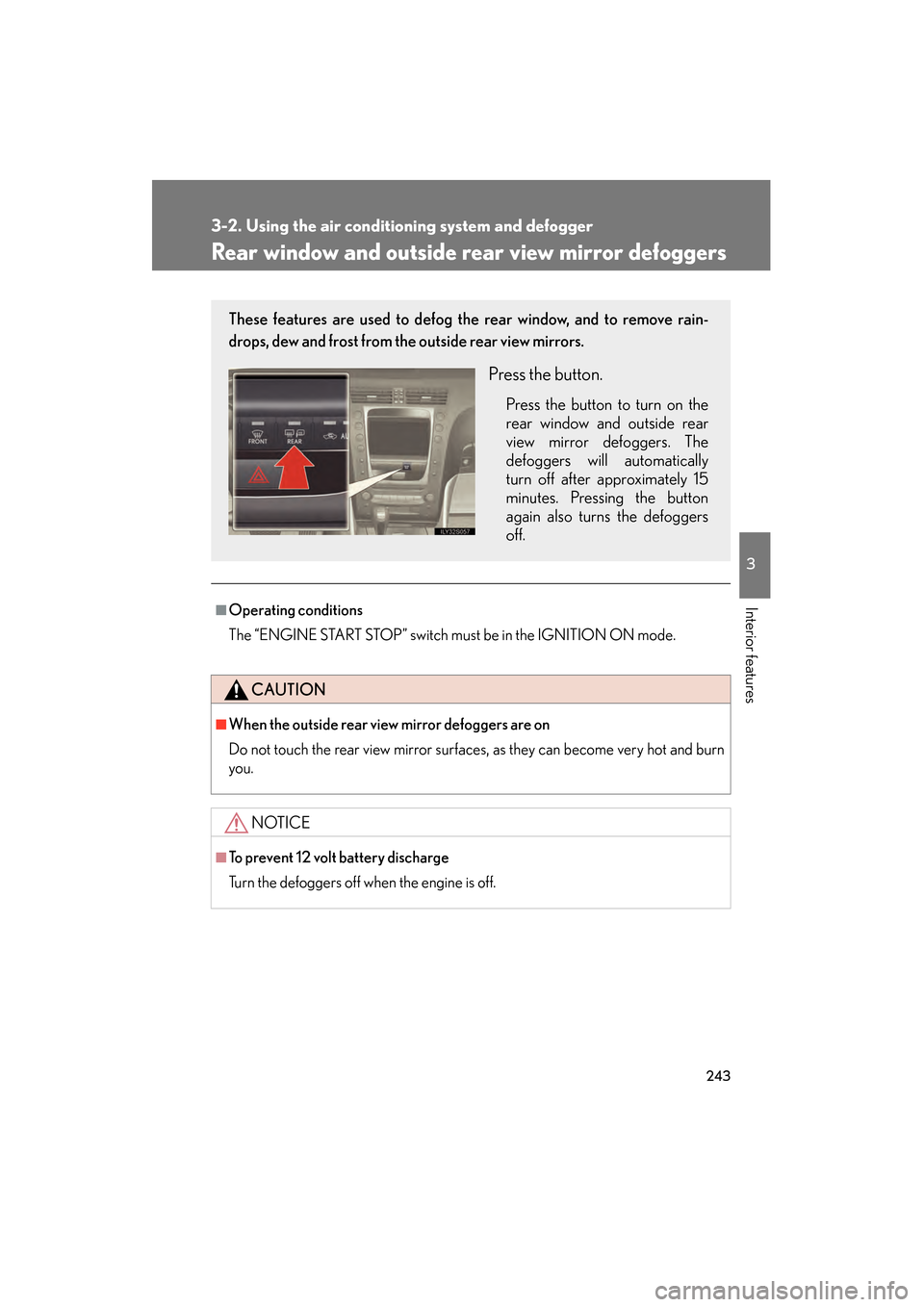
These features are used to defog the rear window, and to remove rain-
drops, dew and frost from the outside rear view mirrors.
Press the button.
Press the button to turn on the
rear window and outside rear
view mirror defoggers. The
defoggers will automatically
turn off after approximately 15
minutes. Pressing the button
again also turns the defoggers
off.
GS_U_G.book Page 243 Monday, April 27, 2009 10:50 AM