Page 245 of 622
244
3-2. Using the air conditioning system and defogger
GS_G_U (OM30B43U)
April 20, 2009 4:34 pm
Windshield wiper de-icer∗
■Operating conditions
The “ENGINE START STOP” switch must be in the IGNITION ON mode.
CAUTION
■When the windshield wiper de-icer is on
Do not touch the glass at the lower part of the windshield or to the side of the front
pillars as the surfaces can become very hot and burn you.
∗: If equipped
This feature is used to prevent ice fr om building up on the windshield and
wiper blades.
Press .
ON/OFF
Touch the switch to turn on the
windshield wiper de-icer. The
windshield wiper de-icer will
automatically turn off after
approximately 15 minutes.
Touching the switch again also
turns the de-icer off.
STEP1
STEP2
GS_U_G.book Page 244 Monday, April 27, 2009 10:50 AM
Page 272 of 622

271
3-3. Using the audio system
3
Interior features
GS_G_U (OM30B43U)
April 27, 2009 10:48 am
Loading a disc■ Loading a single disc
Push .
When the indicator changes from flashing amber to green, insert
a disc after the DVD player door opens.
■ Loading multiple discs
Press and hold until you hear a beep.
When the indicator changes from flashing amber to green, insert
a disc after the DVD player door opens.
After inserting a disc, wait until the indicator changes from flash-
ing amber to green, then insert the next disc after the DVD player
door has opened.
Repeat steps 2 and 3 until you have inserted all discs.
To cancel the operation, press the or button. If you do not
insert a disc within 15 seconds, loading will be canceled automatically.
■DVD hint screen
This screen appears when a DVD
video, DVD audio or video CD is
first selected with the “ENGINE
START STOP” switch in ACCES-
SORY or IGNITION ON mode.
Touch once you have
read the message.
STEP1
STEP2
STEP1
STEP2
STEP3
STEP4
GS_U_G.book Page 271 Monday, April 27, 2009 10:50 AM
Page 274 of 622
273
3-3. Using the audio system
3
Interior features
GS_G_U (OM30B43U)
April 27, 2009 10:48 am
Playing DVD video/audio
For safety reasons, you can enjoy the visual contents of discs only when the
vehicle is completely stopped with the “ENGINE START STOP” switch in
ACCESSORY or IGNITION ON mode and the parking brake applied.
While you are driving, only audio contents may be played.
■ Video control screen
Press while the disc is playing, the following screen appears.
Return to video screen
Change screen mode ( →P. 3 0 5 )
GS_U_G.book Page 273 Monday, April 27, 2009 10:50 AM
Page 286 of 622
285
3-3. Using the audio system
3
Interior features
GS_G_U (OM30B43U)
April 27, 2009 10:48 am
Playing video CD (with DVD player)
For safety reasons, you can enjoy the visual contents of discs only when the
vehicle is completely stopped with the “ENGINE START STOP” switch in
ACCESSORY or IGNITION ON mode and the parking brake applied.
While you are driving, only audio contents may be played.
■ Video control screen
Press while the disc is playing, the following screen appears.
Return to video screen
Change screen mode (→ P. 3 0 5 )
GS_U_G.book Page 285 Monday, April 27, 2009 10:50 AM
Page 318 of 622

317
3-4. Using the hands-free system (for cellular phone)
3
Interior features
GS_G_U (OM30B43U)
April 27, 2009 10:48 am
Bluetooth® phone connection
There are two connection methods av ailable—automatic and manual.
Press .
Touch on the “Information” screen.
Touch on the “Telephone” screen.
Choose one of the following methods. Automatic connection
If the “ENGINE START STOP”
switch is in the ACCESSORY or
IGNITION ON mode, the system
will automatically connect to the
Bluetooth
® phone. Touching auto-
matic connection will turn it on/off.
Manual connection
If automatic connection fails or is
turned off, connection must be
made manually.
If the message “Bluetooth* con-
nection successful” is displayed,
connection is complete.
*: Bluetooth is a registered trade- mark of Bluetooth SIG. Inc.
STEP1
STEP2
STEP3
STEP4
■Reconnecting to the Bluetooth® phone
If the system cannot connect due to poor signal strength with the “ENGINE START
STOP” switch in the ACCESSORY or IGNI TION ON mode, the system will auto-
matically attempt to reconnect.
If the phone is turned off, the system will not attempt to reconnect. In this case, con-
nection must be made manually, or the phone must be re-selected.
GS_U_G.book Page 317 Monday, April 27, 2009 10:50 AM
Page 369 of 622
368
3-7. Other interior features
GS_G_U (OM30B43U)
April 27, 2009 10:48 am
Clock
■The clock is displayed when
The “ENGINE START STOP” switch is in ACCESSORY or IGNITION ON mode.
■When the 12 volt battery is disconnected
The time display will automatically be set to 1:00.
■Adjust clock
With navigation system
→ “Navigation System Owner’s Manual”.
Without navigation system
Perform the following steps.
Press .
To u c h . Adjusts hours.
Adjusts minutes.
Rounds to the nearest hour.
Turns daylight saving time on.
Turns daylight saving time off.
After setting, touch .
STEP1
STEP2
STEP3
GS_U_G.book Page 368 Monday, April 27, 2009 10:50 AM
Page 370 of 622
369
3-7. Other interior features
3
Interior features
GS_G_U (OM30B43U)
April 27, 2009 10:48 am
Outside temperature display
■The outside temperature is displayed when
The “ENGINE START STOP” switch is in IGNITION ON mode.
■When “--” or “E” is displayed
The system may be malfunctioning. Take your vehicle to your Lexus dealer.
■On the multi-information display
→P. 1 5 3
■Display
In the following situations, the correct outside temperature may not be displayed, or
the display may take longer than normal to change.
●When stopped, or driving at low speeds (less than 12 mph [20 km/h])
●When the outside temperature has changed suddenly (at the entrance/exit of a
garage, tunnel, etc.)
The displayed temperature ranges from -40°F (-40°C) up to 122°F
(50°C).
GS_U_G.book Page 369 Monday, April 27, 2009 10:50 AM
Page 372 of 622
371
3-7. Other interior features
3
Interior features
GS_G_U (OM30B43U)
April 27, 2009 10:48 am
Cigarette lighter
■The cigarette lighter can be used when
The “ENGINE START STOP” switch is in ACCESSORY or IGNITION ON mode.
CAUTION
■To avoid burns or fires
●Do not touch the metal parts of the cigarette lighter.
●Do not hold the cigarette lighter down. It could overheat and cause a fire.
●Do not insert anything other than the cigarette lighter into the outlet.
■When not in use
Keep the ashtray lid closed.
Injuries may result in the event of sudden braking, sudden swerving or an accident.
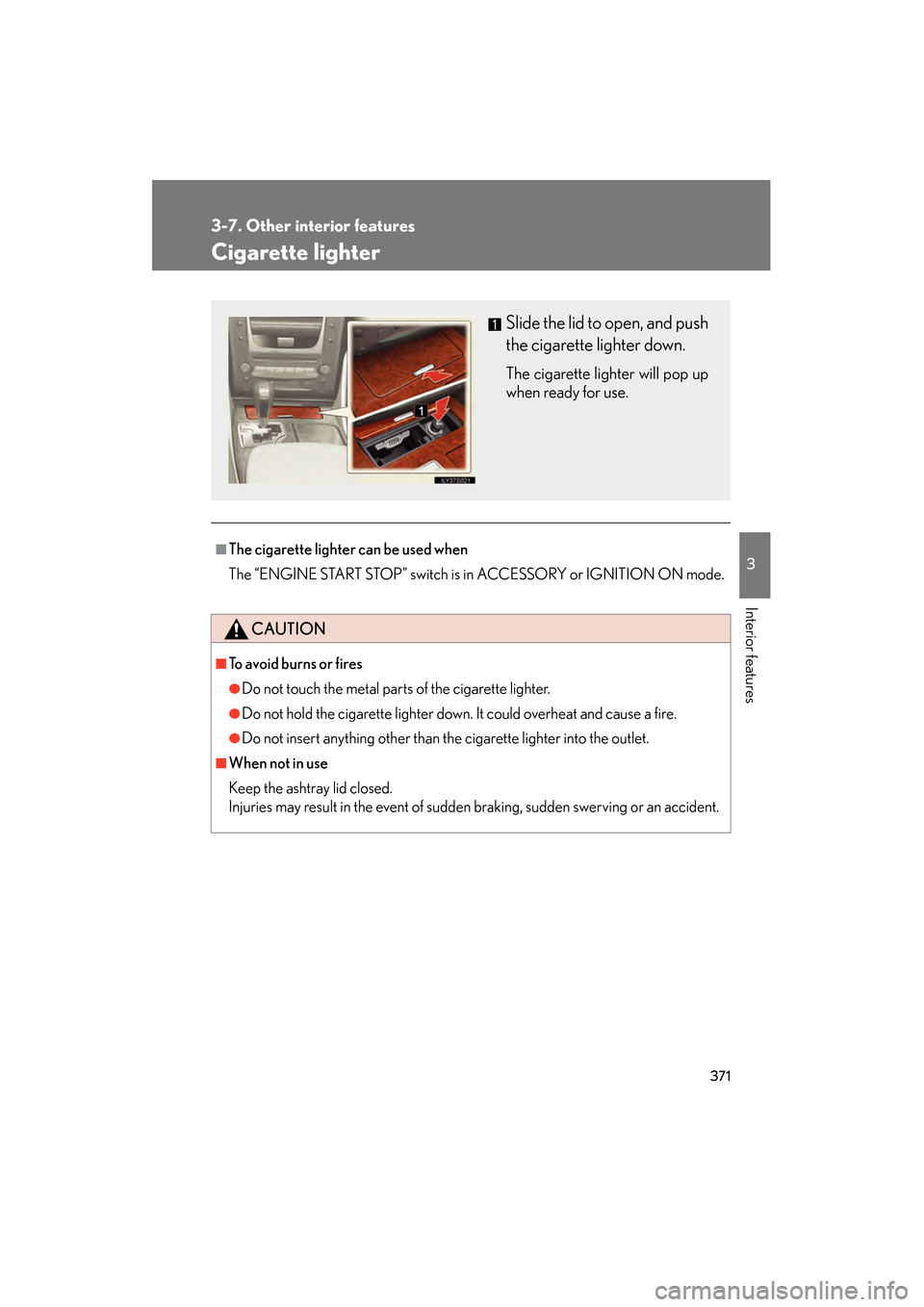
Slide the lid to open, and push
the cigarette lighter down.
The cigarette lighter will pop up
when ready for use.
GS_U_G.book Page 371 Monday, April 27, 2009 10:50 AM