Page 20 of 502

Rearming The System
If something triggers the alarm, and no action is taken to
disarm it, the Vehicle Security Alarm will turn off the
horn after three minutes, turn off all of the visual signals
after 15 minutes, and then the Vehicle Security Alarm will
rearm itself.
To Set the Alarm
The Vehicle Security Alarm will set when you use the
Remote Keyless Entry (RKE) transmitter to lock the doors
and swing gate, or when you use the power door lock
switch while the door is open. After all the doors are
locked and closed, the Vehicle Security Light (located on
the instrument cluster) will flash rapidly for about 16 sec-
onds to signal that the Vehicle Security Alarm is arming.
During this 16 second arming period, opening any door
or the swing gate will cancel the arming. If the Vehicle
Security Alarm successfully arms, the Vehicle Security
Light will flash at a slower rate to indicate the Vehicle
Security Alarm is set.
To Disarm the System
To disarm the Vehicle Security Alarm, you will need to
press the UNLOCK button on the RKE transmitter, or
turn the ignition key to the ON position. If something has
triggered the Vehicle Security Alarm in your absence, the
horn will sound three times when you unlock the doors.
Check the vehicle for tampering.
The Vehicle Security Alarm is designed to protect your
vehicle; however, you can create conditions where the
Vehicle Security Alarm will arm unexpectedly. If you
remain in the vehicle and lock the doors with the RKE
transmitter, once the Vehicle Security Alarm is armed
(after 16 seconds), when you pull the door handle to exit,
the alarm will sound. If this occurs, press the UNLOCK
button on the RKE transmitter to disarm the Vehicle
Security Alarm. You may also accidentally disarm the
Vehicle Security Alarm by unlocking the driver’s door
with the key and then locking it. The door will be locked
but the Vehicle Security Alarm will not arm.
18 THINGS TO KNOW BEFORE STARTING YOUR VEHICLE
Page 21 of 502
ILLUMINATED ENTRY
The interior lights will come on when you open any door.
The lights will remain on after all of the doors are closed,
and then fade to off or they will immediately fade to off
once the ignition switch is turned on.
REMOTE KEYLESS ENTRY (RKE) — IF
EQUIPPED
This system allows you to lock or unlock the doors,
swing gate, and activate the Panic Alarm from a maxi-
mum distance of 66 ft (20 m) using a Remote Keyless
Entry (RKE) transmitter. The RKE transmitter does not
need to be pointed at the vehicle to activate the system.NOTE:The line of transmission must not be blocked
with metal objects.
Three Button RKE Transmitter
1 — Lock
2 — Unlock
2
THINGS TO KNOW BEFORE STARTING YOUR VEHICLE 19
Page 22 of 502

To Unlock the Doors and Swing Gate
Press and release the RKE transmitter UNLOCK button
once to unlock the driver’s door only, or twice to unlock
all the doors and swing gate. When the RKE transmitter
UNLOCK button is pressed, the Illuminated Entry will
initiate and the parking lights will flash twice.
The system can be programmed to unlock all the doors
upon the first RKE transmitter UNLOCK button press,
using the following procedure:
1. Press and hold the LOCK button on a programmed
RKE transmitter.
2. Continue to hold the RKE transmitter LOCK button
for at least four seconds, but not longer than 10 seconds,
then press and hold the RKE transmitter UNLOCK
button.3. Release both buttons at the same time.
4. Test this feature while outside of the vehicle, by
pressing the LOCK/UNLOCK button on the RKE trans-
mitter.
NOTE:
Pressing the RKE transmitter LOCK button
while you are inside of the vehicle will activate the
Vehicle Security Alarm. Opening a door with the Vehicle
Security Alarm activated will cause the alarm to sound.
Press the RKE transmitter UNLOCK button to deactivate
the Vehicle Security Alarm.
5. If the desired programming was not achieved or to
reactivate this feature, repeat the above steps.
20 THINGS TO KNOW BEFORE STARTING YOUR VEHICLE
Page 23 of 502

To Lock the Doors and Swing Gate
Press and release the LOCK button on the RKE transmit-
ter to lock all doors. The turn signals will flash and the
horn will chirp once to acknowledge the lock signal. If
desired, the “Sound Horn On Lock” feature can be
turned on or off using the following steps:
1. Press the RKE transmitter LOCK button for 4 to
10 seconds.
2. While the LOCK button is pressed (after four seconds),
press the RKE transmitter PANIC button. Release both
buttons.
The “Sound Horn On Lock” feature can be reactivated by
repeating this procedure.
Using The Panic Alarm
To turn the Panic Alarm feature on or off, press and hold
the PANIC button on the RKE transmitter for at least one
second and release. When the Panic Alarm is activated,the headlights and park lights will flash, the horn will
pulse on and off and the interior lights will turn on.
The Panic Alarm will stay on for three minutes unless
you turn it off by pressing the PANIC button a second
time, or if the vehicle speed is 5 mph (8 km/h) or greater.
NOTE:
When you turn off the Panic Alarm by pressing
the PANIC button a second time, you may have to be
closer to the vehicle due to the radio frequency noises of
the system.
To Turn Off “Flash Lights With Lock”
NOTE: The “Flash Lights With Lock” feature can be
turned on or off using the following steps:
1. Press the RKE transmitter UNLOCK button for 4 to
10 seconds.
2
THINGS TO KNOW BEFORE STARTING YOUR VEHICLE 21
Page 24 of 502

2. While the UNLOCK button is pressed, (after four
seconds) press the RKE transmitter LOCK button. Re-
lease both buttons.
3. Test the “Flash Lights With Lock” feature outside of
the vehicle, by pressing the RKE transmitter LOCK
button with the ignition in the LOCK position, and the
key removed.
NOTE:Pressing the RKE transmitter LOCK button
while you are in the vehicle will activate the Vehicle
Security Alarm. Opening a door with the Vehicle Security
Alarm activated will cause the alarm to sound. Press the
RKE transmitter UNLOCK button to deactivate the Ve-
hicle Security Alarm.
The “Flash Lights With Lock” feature can be reactivated
by repeating this procedure.Programming Additional Transmitters
Refer to Sentry Key� “Customer Key Programming.”
If you do not have a programmed RKE transmitter,
contact your authorized dealer for details.
General Information
This device complies with part 15 of FCC rules and with
RS-210 of Industry Canada. Operation is subject to the
following conditions:
1. This device may not cause harmful interference.
2. This device must accept any interference that may be
received including interference that may cause undesired
operation.
NOTE: Changes or modifications not expressly ap-
proved by the party responsible for compliance could
void the user’s authority to operate the equipment.
22 THINGS TO KNOW BEFORE STARTING YOUR VEHICLE
Page 26 of 502

NOTE:If the RKE transmitter is equipped with a screw,
reinstall and tighten the screw until snug.
REMOTE STARTING SYSTEM — IF EQUIPPED
This system uses the Remote Keyless Entry
(RKE) transmitter to start the engine conve-
niently from outside the vehicle while still
maintaining security. The system has a range of
approximately 328 ft (100 m).
NOTE: The vehicle must be equipped with an auto-
matic transmission to be equipped with Remote Start.
How to Use Remote Start
All of the following conditions must be met before the
engine will remote start:
•Shift lever in PARK
•Doors closed
•Hood closed
•Hazard switch off
•Brake switch inactive (brake pedal not pressed)
•Ignition key removed from ignition switch
•Battery at an acceptable charge level
•RKE PANIC button not pressed
WARNING!
•Do not start or run an engine in a closed garage or
confined area. Exhaust gas contains Carbon Mon-
oxide (CO) which is odorless and colorless. Car-
bon monoxide is poisonous and can cause serious
injury or death when inhaled.
•Keep Remote Keyless Entry (RKE) transmitters
away from children. Operation of the Remote Start
System, windows, door locks or other controls
could cause serious injury or death.
24 THINGS TO KNOW BEFORE STARTING YOUR VEHICLE
Page 28 of 502
To Exit Remote Start Mode and Drive the Vehicle
Before the end of the 15-minute cycle, press and release
the UNLOCK button on the RKE transmitter to unlock
the doors and disarm the Vehicle Security Alarm (if
equipped). Then, prior to the end of the 15-minute cycle,
insert the key into the ignition switch and turn the switch
to the ON position.
NOTE:The ignition switch must be in the ON position
in order to drive the vehicle.
DOORS
CAUTION!
Careless handling and storage of the removable door
panels may damage the seals, causing water to leak
into the vehicles interior.
Upper Half Door Window Removal — If Equipped
1. Grasp the half door window and pull upward.
Upper Half Door Window
26 THINGS TO KNOW BEFORE STARTING YOUR VEHICLE
Page 30 of 502
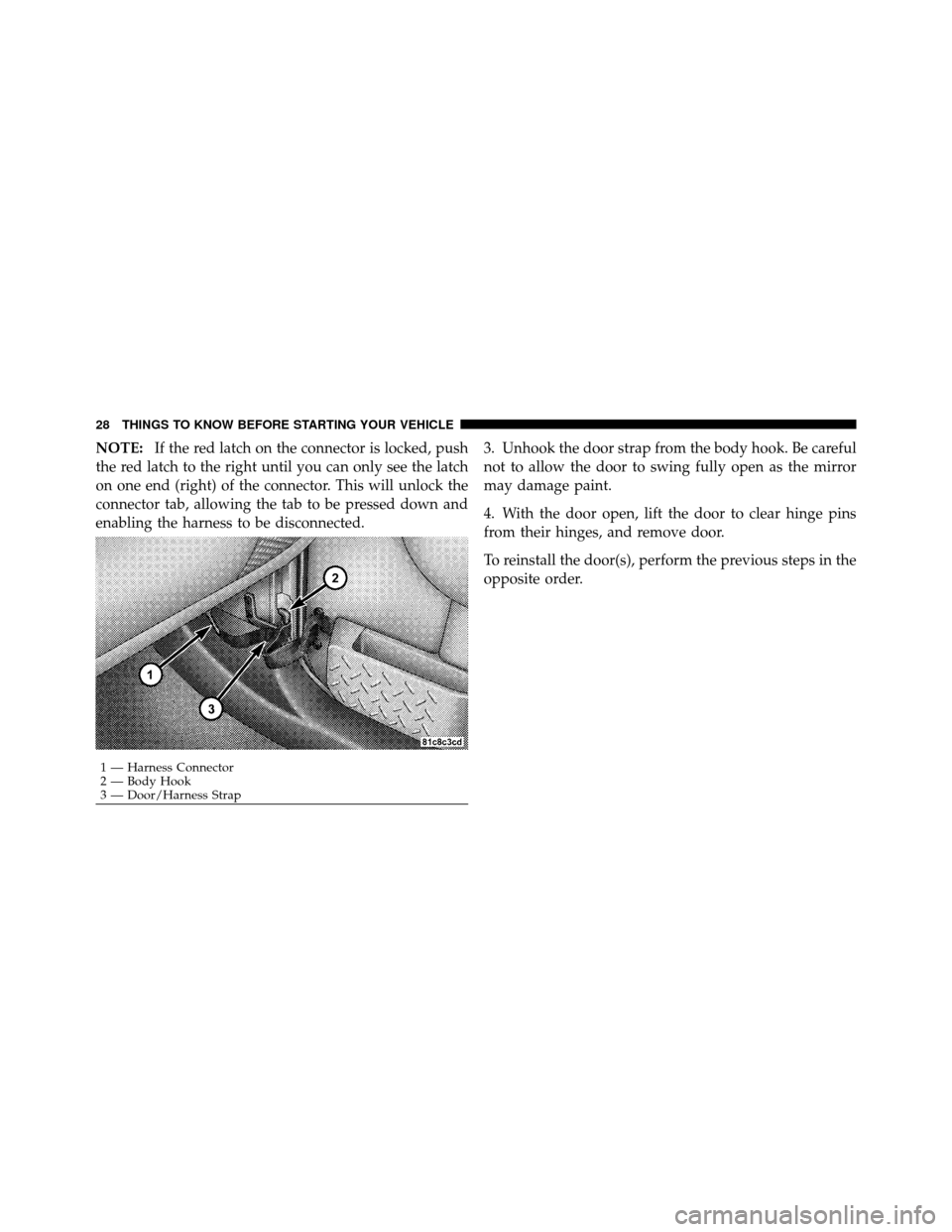
NOTE:If the red latch on the connector is locked, push
the red latch to the right until you can only see the latch
on one end (right) of the connector. This will unlock the
connector tab, allowing the tab to be pressed down and
enabling the harness to be disconnected. 3. Unhook the door strap from the body hook. Be careful
not to allow the door to swing fully open as the mirror
may damage paint.
4. With the door open, lift the door to clear hinge pins
from their hinges, and remove door.
To reinstall the door(s), perform the previous steps in the
opposite order.
1 — Harness Connector
2 — Body Hook
3 — Door/Harness Strap
28 THINGS TO KNOW BEFORE STARTING YOUR VEHICLE