Page 29 of 506
NOTE:Changes or modifications not expressly ap-
proved by the party responsible for compliance could
void the user’s authority to operate the equipment.
If your RKE transmitter fails to operate from a normal
distance, check for these two conditions:
1. Weak battery in RKE transmitter. The expected life of
the battery is from one to two years.
2. Closeness to a radio transmitter such as a radio station
tower, airport transmitter, and some mobile or CB radios.
REMOTE STARTING SYSTEM — IF EQUIPPED
This system uses the Remote Keyless Entry
(RKE) transmitter to start the engine conve-
niently from outside the vehicle while still
maintaining security. The system has a range of
328 ft (100 m).
NOTE: The vehicle must be equipped with an auto-
matic transmission to be equipped with Remote Start.
How To Use Remote Start
All of the following conditions must be met before the
engine will remote start:
•Shift lever in PARK.
•Doors closed.
•Hood closed.
•Liftgate closed.
•Hazard switch off.
•Brake switch inactive (brake pedal not pressed).
•Ignition key removed from ignition switch.
•Battery at an acceptable charge level.
•RKE PANIC button not pressed.
THINGS TO KNOW BEFORE STARTING YOUR VEHICLE 27
2
Page 49 of 506
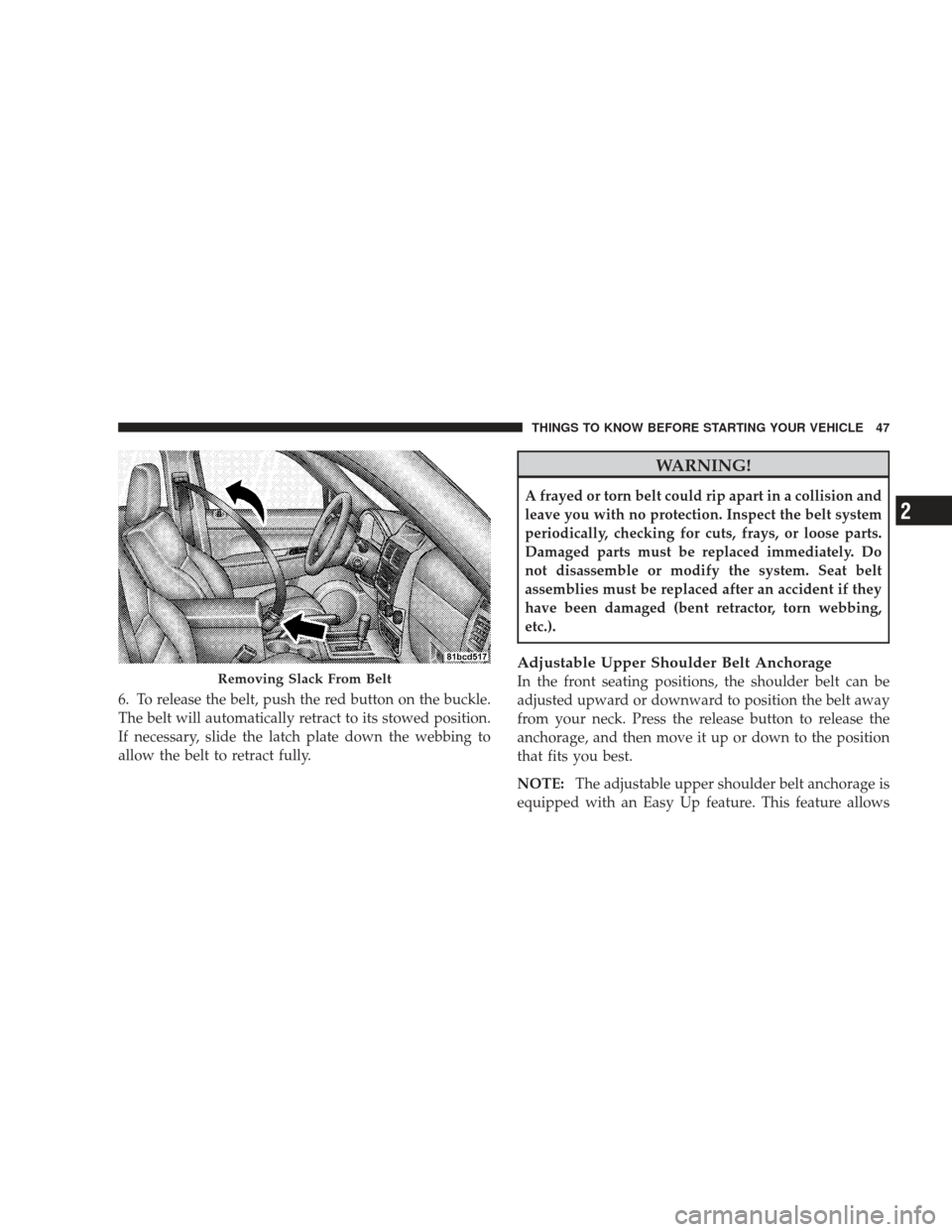
6. To release the belt, push the red button on the buckle.
The belt will automatically retract to its stowed position.
If necessary, slide the latch plate down the webbing to
allow the belt to retract fully.
WARNING!
A frayed or torn belt could rip apart in a collision and
leave you with no protection. Inspect the belt system
periodically, checking for cuts, frays, or loose parts.
Damaged parts must be replaced immediately. Do
not disassemble or modify the system. Seat belt
assemblies must be replaced after an accident if they
have been damaged (bent retractor, torn webbing,
etc.).
Adjustable Upper Shoulder Belt Anchorage
In the front seating positions, the shoulder belt can be
adjusted upward or downward to position the belt away
from your neck. Press the release button to release the
anchorage, and then move it up or down to the position
that fits you best.
NOTE:The adjustable upper shoulder belt anchorage is
equipped with an Easy Up feature. This feature allowsRemoving Slack From Belt
THINGS TO KNOW BEFORE STARTING YOUR VEHICLE 47
2
Page 92 of 506
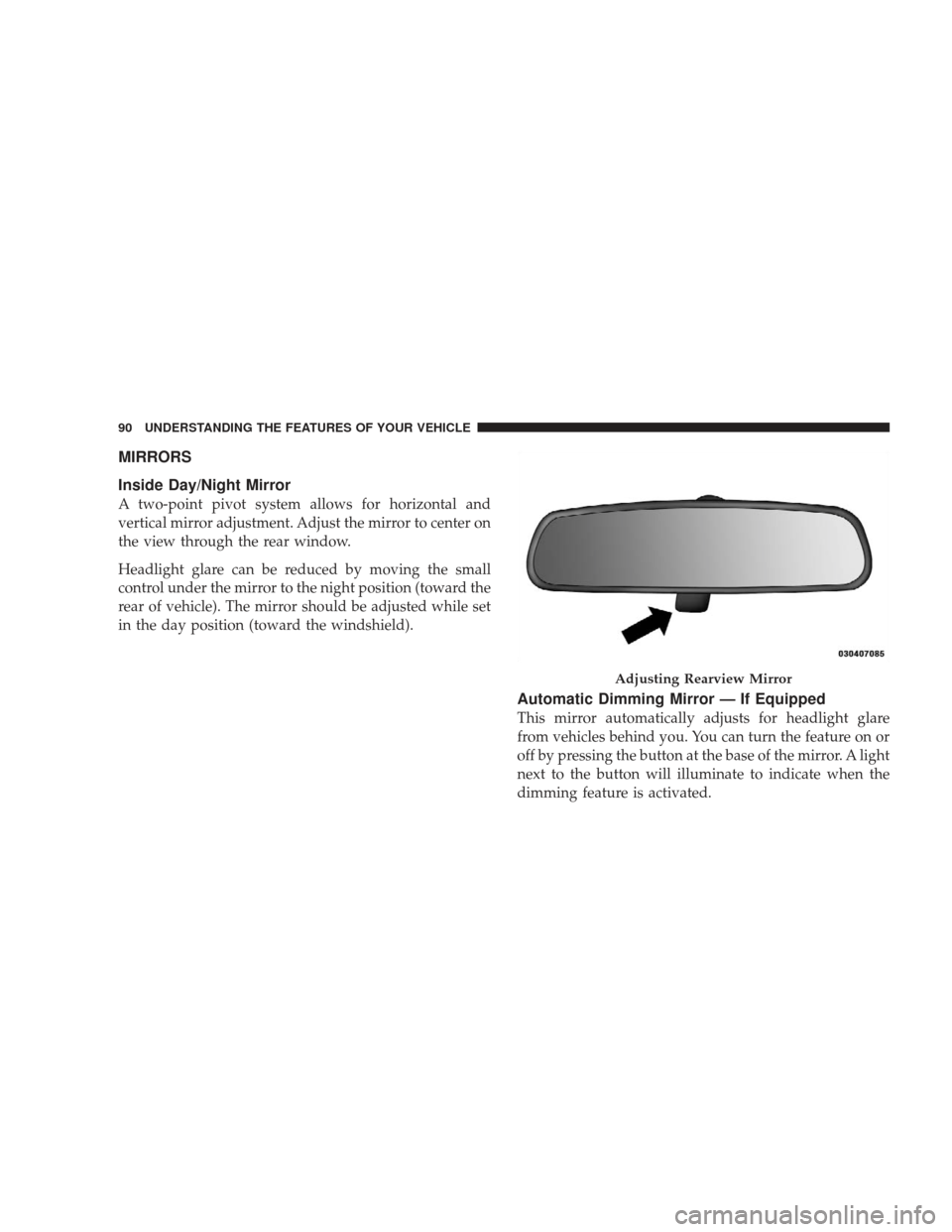
MIRRORS
Inside Day/Night Mirror
A two-point pivot system allows for horizontal and
vertical mirror adjustment. Adjust the mirror to center on
the view through the rear window.
Headlight glare can be reduced by moving the small
control under the mirror to the night position (toward the
rear of vehicle). The mirror should be adjusted while set
in the day position (toward the windshield).
Automatic Dimming Mirror — If Equipped
This mirror automatically adjusts for headlight glare
from vehicles behind you. You can turn the feature on or
off by pressing the button at the base of the mirror. A light
next to the button will illuminate to indicate when the
dimming feature is activated.
Adjusting Rearview Mirror
90 UNDERSTANDING THE FEATURES OF YOUR VEHICLE
Page 96 of 506
2. Unclip the visor from the center clip.
3. Pull the sun visor toward the inside rearview mirror to
extend it.
uconnect�phone — IF EQUIPPED
NOTE: The sales code RER and REU radios contain an
integrated uconnect� phone. Refer to your “Navigation
User’s Manual” for uconnect� phone operating instruc-
tions for these radios. Radio sales code can be located
on the lower right corner of the Radio faceplate.
uconnect� phone is a voice-activated, hands-free, in-
vehicle communications system. uconnect� allows you to
dial a phone number with your cellular phone using
simple voice commands (e.g., �Call”�“Mike” �”Work� or
�Dial” �“248-555-1212�). Your cellular phone’s audio is
transmitted through your vehicle’s audio system; the
system will automatically mute your radio when using
the uconnect� phone. NOTE:
The uconnect� phone requires a cellular phone
equipped with the Bluetooth�� Hands-Free Profile,�Ve r -
sion 0.96 or higher. See the uconnect� website for sup-
ported phones.
For uconnect� customer support, visit the following
websites:
•www.chrysler.com/uconnect
•www.dodge.com/uconnect
•www.jeep.com/uconnect
•or call 1–877–855–8400
uconnect� allows you to transfer calls between the sys-
tem and your cellular phone as you enter or exit your
vehicle and enables you to mute the system’s microphone
for private conversation.
The uconnect� phone is driven through your Bluetooth�
“Hands-Free Profile” cellular phone. uconnect� features
94 UNDERSTANDING THE FEATURES OF YOUR VEHICLE
Page 97 of 506
Bluetooth�technology - the global standard that enables
different electronic devices to connect to each other
without wires or a docking station, so uconnect �phone
works no matter where you stow your cellular phone (be
it your purse, pocket, or briefcase), as long as your phone
is turned on and has been paired to the vehicle’s
uconnect� phone. The uconnect� phone allows up to
seven cellular phones to be linked to the system. Only
one linked (or paired) cellular phone can be used with the
system at a time. The system is available in English,
Spanish, or French languages.
Phone Button The rearview mirror contains the microphone
for the system (depending on the type of
mirror and radio equipped), and either the
radio or the mirror has the two control buttons
(PHONE Button and VOICE RECOGNITION button)
that will enable you to access the system. Voice Recognition Button
Actual button location may vary with the ra-
dio. The individual buttons are described in the
“Operation” section.
The uconnect� phone can be used with any Hands-Free
Profile certified Bluetooth� cellular phone. See the
uconnect� website for supported phones. If your cellular
phone supports a different profile (e.g., Headset Profile)
you may not be able to use any uconnect� phone
features. Refer to your cellular service provider or the
phone manufacturer for details.
The uconnect� phone is fully integrated with the vehi-
cle’s audio system. The volume of the uconnect� phone
can be adjusted either from the radio volume control
knob or from the steering wheel radio control (right
switch), if so equipped.
UNDERSTANDING THE FEATURES OF YOUR VEHICLE 95
3
Page 110 of 506
Canada and 060 for Mexico). The number dialed may
not be applicable with the available cellular service
and area.
•If supported, this number may be programmable on
some systems. To do this, press the PHONE button
and say ‘Setup’, followed by ‘Emergency’.
•The uconnect�phone does slightly lower your chances
of successfully making a phone call as to that for the
cellular phone directly.
WARNING!
Your phone must be turned on and paired to the
uconnect� phone to allow use of this vehicle feature
in emergency situations, when the cellular phone has
network coverage and stays paired to the uconnect �
phone.
Towing Assistance
If you need towing assistance:
•Press the PHONE button to begin.
•After the �Ready�prompt and the following beep, say
�Towing Assistance.�
NOTE:
•The towing assistance number dialed is based on the
country where the vehicle is purchased (1-800-528-
2069 for the U.S., 1-877-213-4525 for Canada, 55-14-
3454 for Mexico City and 1-800-712-3040 for outside
Mexico City in Mexico).
•If supported, this number may be programmable on
some systems. To do this, press the PHONE button
and say “Setup”, followed by “Towing Assistance”.
108 UNDERSTANDING THE FEATURES OF YOUR VEHICLE
Page 123 of 506
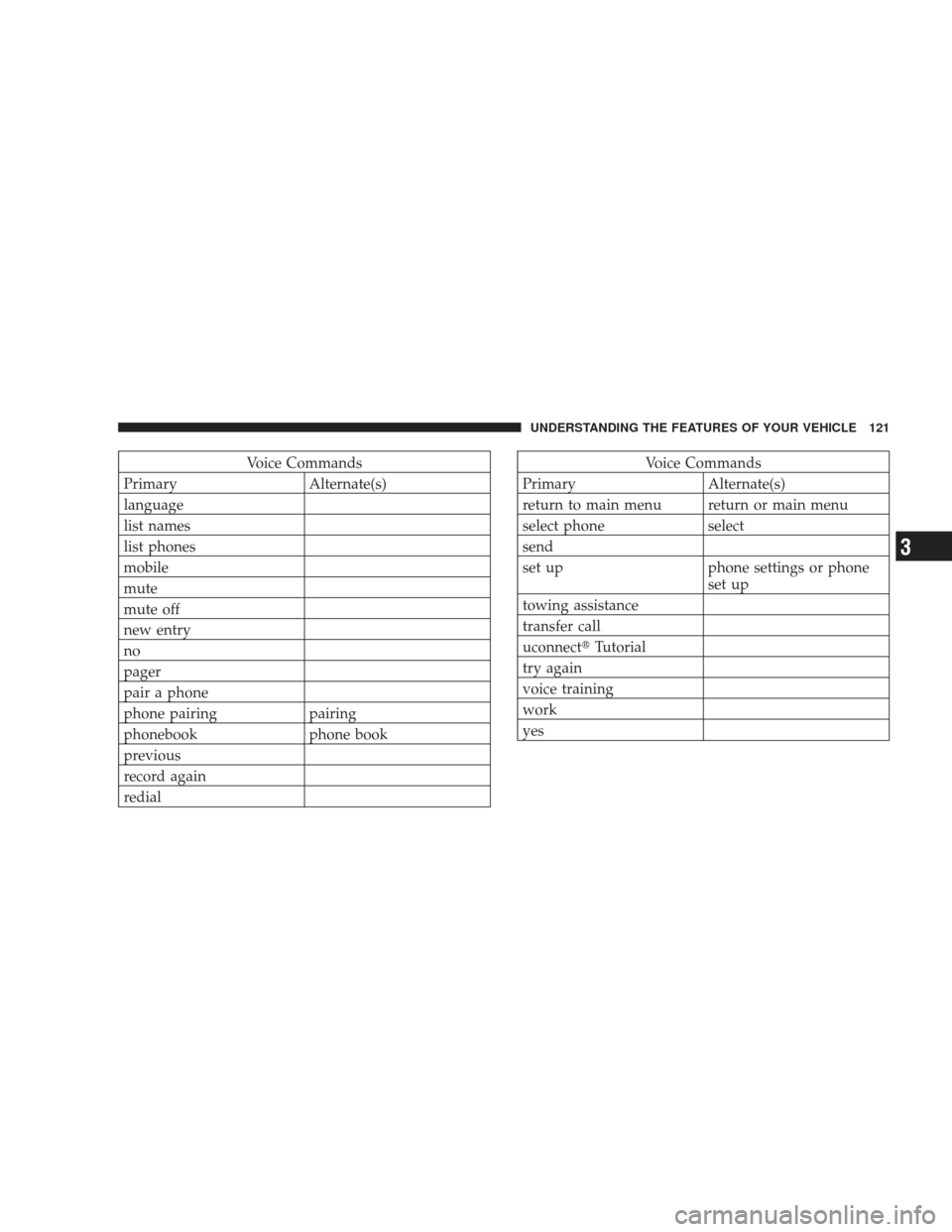
Voice Commands
Primary Alternate(s)
language
list names
list phones
mobile
mute
mute off
new entry
no
pager
pair a phone
phone pairing pairing
phonebook phone book
previous
record again
redialVoice Commands
Primary Alternate(s)
return to main menu return or main menu
select phone select
send
set up phone settings or phone set up
towing assistance
transfer call
uconnect� Tutorial
try again
voice training
work
yes
UNDERSTANDING THE FEATURES OF YOUR VEHICLE 121
3
Page 136 of 506
WARNING! (Continued)
•Do not allow people to ride in any area of your
vehicle that is not equipped with seats and seat
belts.
•Be sure everyone in your vehicle is in a seat and
using a seat belt properly.
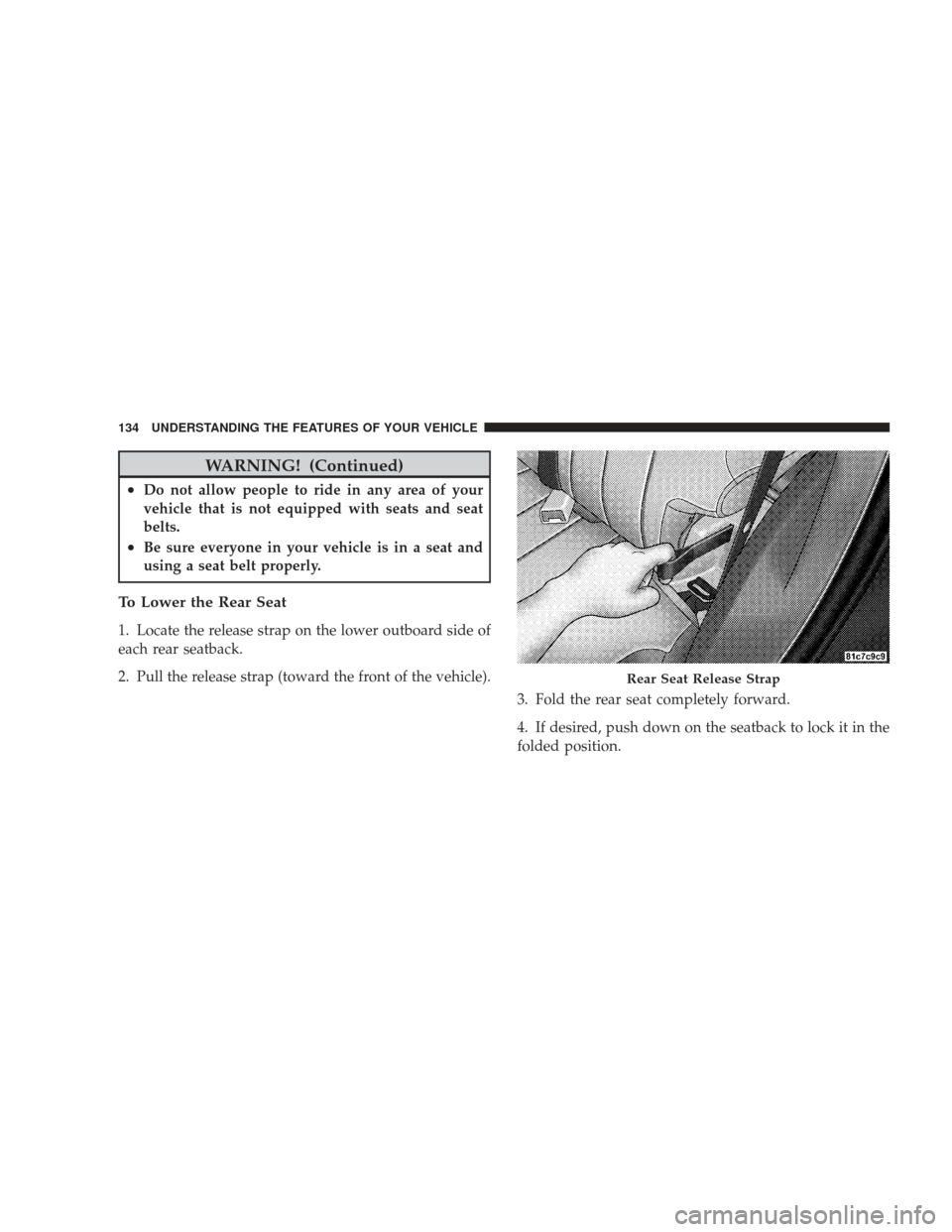
To Lower the Rear Seat
1. Locate the release strap on the lower outboard side of
each rear seatback.
2. Pull the release strap (toward the front of the vehicle).3. Fold the rear seat completely forward.
4. If desired, push down on the seatback to lock it in the
folded position.
Rear Seat Release Strap
134 UNDERSTANDING THE FEATURES OF YOUR VEHICLE