Page 333 of 506
Hill Descent Control (HDC) — If Equipped
HDC is only intended for low speed off-road driving.
HDC maintains vehicle speed while descending hills in
off-road driving conditions by applying the brakes when
necessary.
When enabled, HDC senses the terrain and activates
when the vehicle is descending a hill. HDC speed may be
adjusted by the driver to suit the driving conditions. The
speed corresponds to the transmission gear selected.
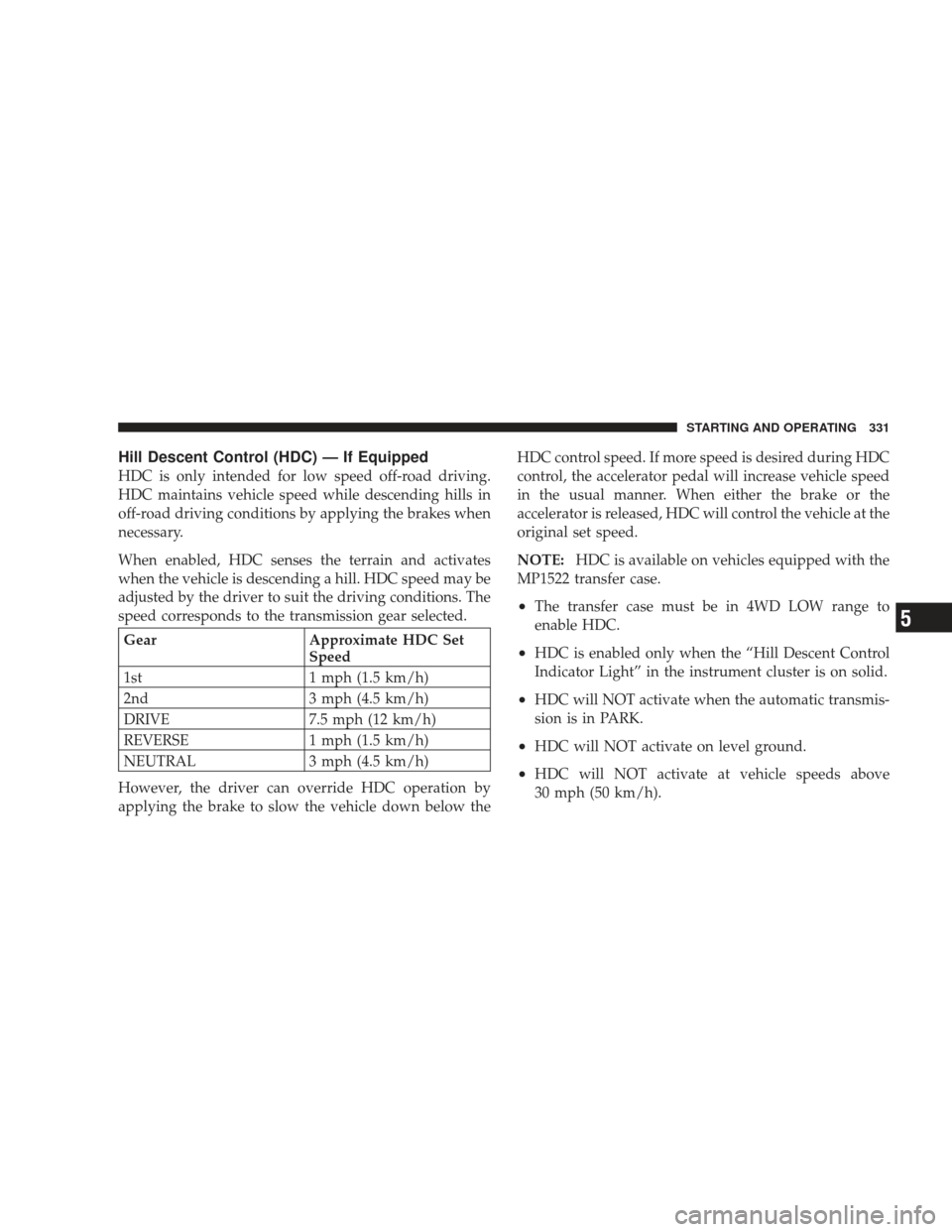
GearApproximate HDC Set
Speed
1st 1 mph (1.5 km/h)
2nd 3 mph (4.5 km/h)
DRIVE 7.5 mph (12 km/h)
REVERSE 1 mph (1.5 km/h)
NEUTRAL 3 mph (4.5 km/h)
However, the driver can override HDC operation by
applying the brake to slow the vehicle down below the HDC control speed. If more speed is desired during HDC
control, the accelerator pedal will increase vehicle speed
in the usual manner. When either the brake or the
accelerator is released, HDC will control the vehicle at the
original set speed.
NOTE:
HDC is available on vehicles equipped with the
MP1522 transfer case.
•The transfer case must be in 4WD LOW range to
enable HDC.
•HDC is enabled only when the “Hill Descent Control
Indicator Light” in the instrument cluster is on solid.
•HDC will NOT activate when the automatic transmis-
sion is in PARK.
•HDC will NOT activate on level ground.
•HDC will NOT activate at vehicle speeds above
30 mph (50 km/h).
STARTING AND OPERATING 331
5
Page 334 of 506
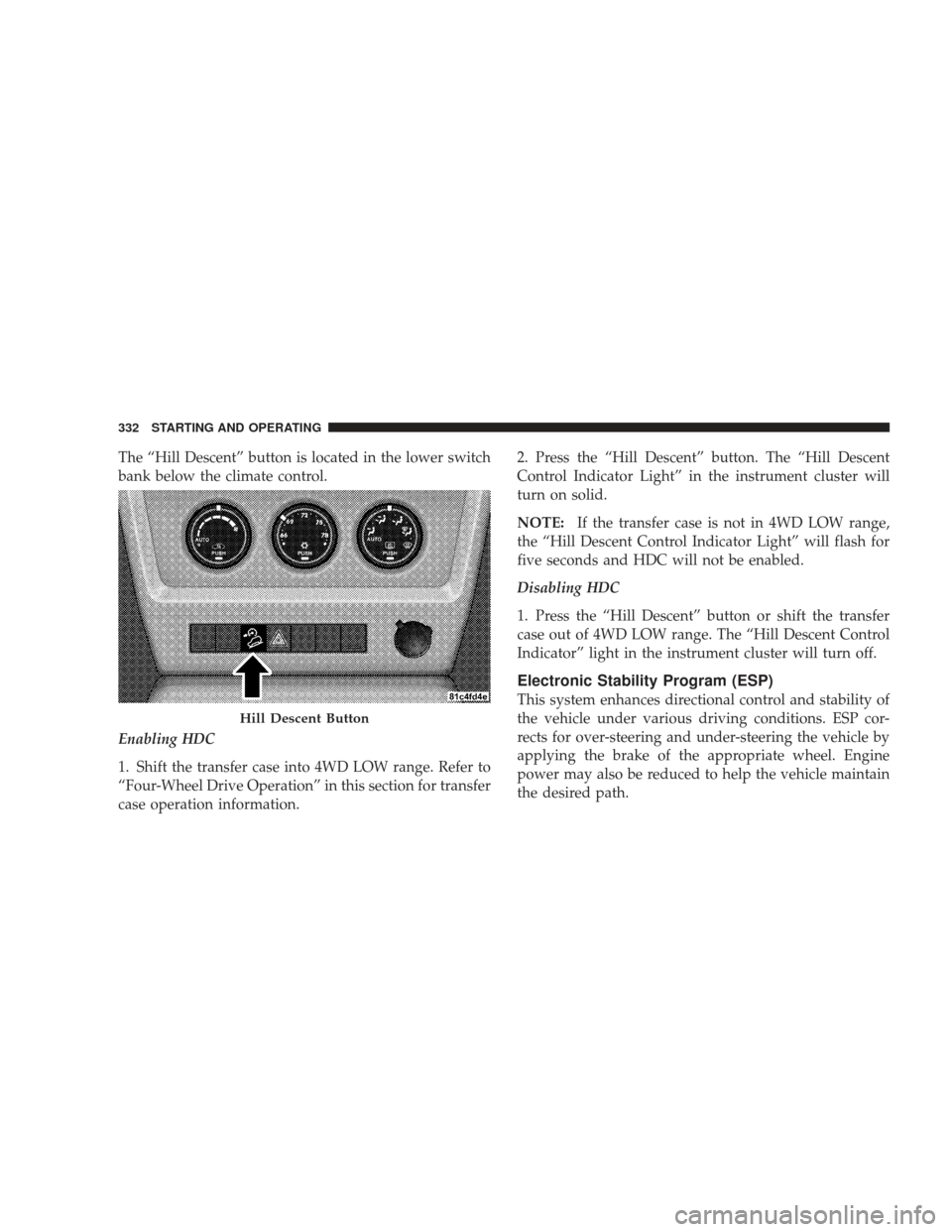
The “Hill Descent” button is located in the lower switch
bank below the climate control.
Enabling HDC
1. Shift the transfer case into 4WD LOW range. Refer to
“Four-Wheel Drive Operation” in this section for transfer
case operation information.2. Press the “Hill Descent” button. The “Hill Descent
Control Indicator Light” in the instrument cluster will
turn on solid.
NOTE:
If the transfer case is not in 4WD LOW range,
the “Hill Descent Control Indicator Light” will flash for
five seconds and HDC will not be enabled.
Disabling HDC
1. Press the “Hill Descent” button or shift the transfer
case out of 4WD LOW range. The “Hill Descent Control
Indicator” light in the instrument cluster will turn off.
Electronic Stability Program (ESP)
This system enhances directional control and stability of
the vehicle under various driving conditions. ESP cor-
rects for over-steering and under-steering the vehicle by
applying the brake of the appropriate wheel. Engine
power may also be reduced to help the vehicle maintain
the desired path.
Hill Descent Button
332 STARTING AND OPERATING
Page 335 of 506

The ESP uses sensors in the vehicle to determine the path
that the driver intends to steer the vehicle and compares
it to the actual path of the vehicle. When the actual path
does not match the intended path, the ESP applies the
brake of the appropriate wheel to assist in counteracting
the condition of over-steer or under-steer.
•Oversteer - when the vehicle is turning more than
appropriate for the steering wheel position.
•Understeer - when the vehicle is turning less than
appropriate for the steering wheel position.
ESP/TCS Indicator Light
The�ESP/TCS Indicator Light” located in the
instrument cluster, starts to flash as soon as the
tires lose traction and the ESP system becomes
active. The �ESP/TCS Indicator Light” also
flashes when TCS is active. If the �ESP/TCS Indicator
Light” begins to flash during acceleration, ease up on the accelerator and apply as little throttle as possible. Be sure
to adapt your speed and driving to the prevailing road
conditions.
WARNING!
The ESP (Electronic Stability Program) cannot pre-
vent the natural laws of physics from acting on the
vehicle, nor can it increase the traction afforded by
prevailing road conditions. ESP cannot prevent acci-
dents, including those resulting from excessive speed
in turns, driving on very slippery surfaces, or hydro-
planing. Only a safe, attentive, and skillful driver can
prevent accidents. The capabilities of an ESP-
equipped vehicle must never be exploited in a reck-
less or dangerous manner, which could jeopardize
the user’s safety or the safety of others.
STARTING AND OPERATING 333
5
Page 336 of 506
Depending upon model and mode of operation, the ESP
system has up to three operating modes: “ESP On”
“Partial Off,” and “Full Off.”
ESP On — Two-Wheel Drive Vehicles and Four-Wheel
Drive Vehicles in 2WD and 4WD High Range
This is the normal operating mode for ESP when operat-
ing a two-wheel drive vehicle. It is also the normal mode
for operating a four-wheel drive vehicle in 2WD or 4WD
HIGH range. The ESP system will be in “ESP On” mode
whenever the vehicle is started or the transfer case (if
equipped) is shifted out of 4WD LOW range. This mode
should be used for most driving situations. ESP should
only be turned to “Partial Off” or “Full Off” for specific
reasons as noted. Refer to “Partial Off” and to “Full Off”
for additional information.Partial Off — Two-Wheel Drive Vehicles and
Four-Wheel Drive Vehicles in 2WD and 4WD High
Range
The “Partial Off” mode is intended for driving in deep
snow, sand, or gravel. This mode raises the threshold for
TCS and ESP activation, which allows for more wheel
spin than what ESP normally allows.
The “ESP OFF” button is located in the lower switch bank
below the climate control. To enter the “Partial Off”
mode, momentarily depress the “ESP OFF” button and
the
�ESP/TCS Indicator Light” will illuminate. To turn
the ESP on again, momentarily depress the �ESP OFF�
button and the �ESP/TCS Indicator Light” will turn off.
This will restore the normal “ESP On” mode of operation.
334 STARTING AND OPERATING
Page 337 of 506
NOTE:To improve the vehicle’s traction when driving
with snow chains, or when starting off in deep snow,
sand, or gravel, it may be desirable to switch to the
“Partial Off” mode by momentarily depressing the “ESP
OFF” button. Once the situation requiring “Partial Off” mode is overcome, turn ESP back on by momentarily
depressing the “ESP OFF” button. This may be done
while the vehicle is in motion.
Full Off — Four-Wheel Drive Vehicles in 4WD High
and 4WD Low Range
The “Full Off” mode is intended for off-highway and
off-road use when ESP stability features could inhibit
vehicle maneuverability due to trail conditions.
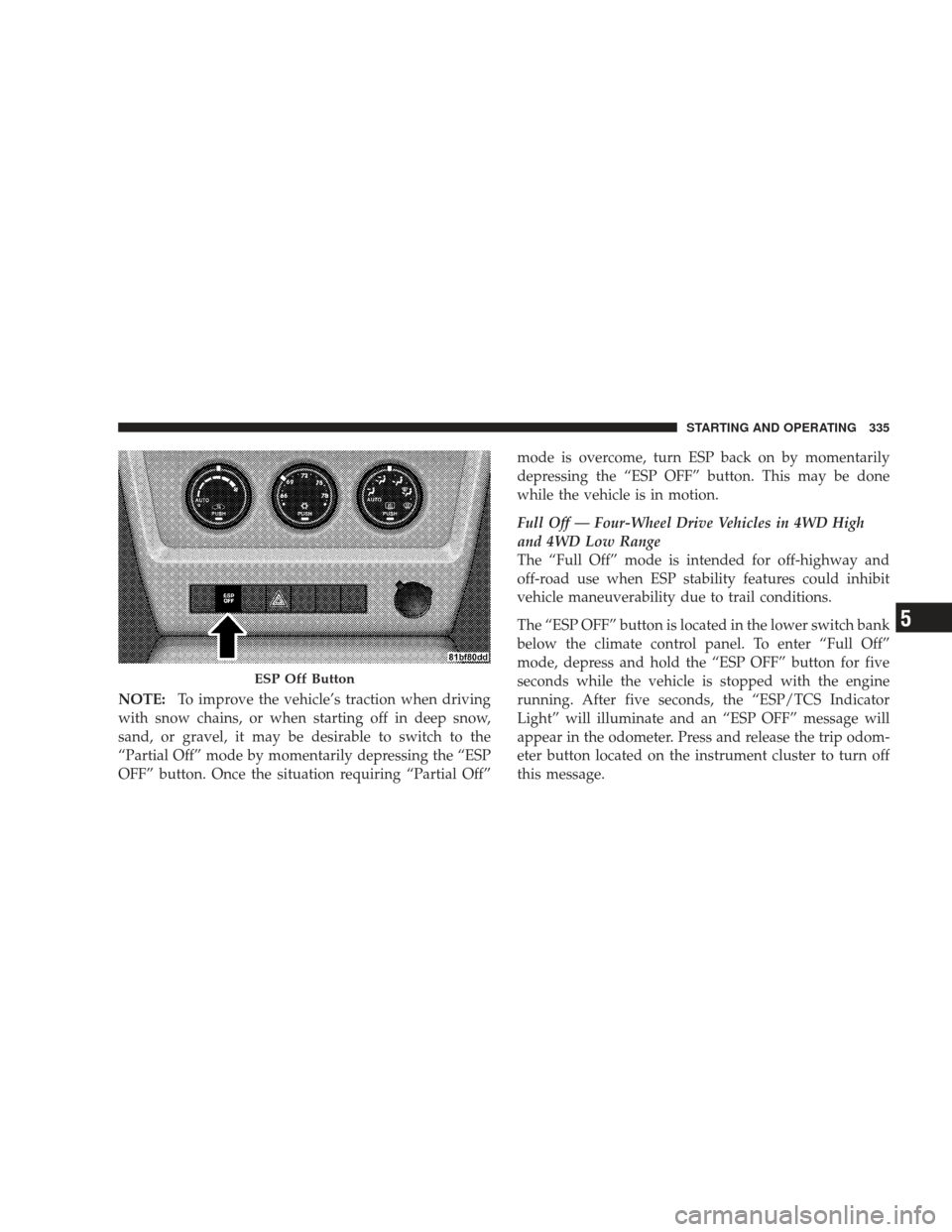
The “ESP OFF” button is located in the lower switch bank
below the climate control panel. To enter “Full Off”
mode, depress and hold the “ESP OFF” button for five
seconds while the vehicle is stopped with the engine
running. After five seconds, the “ESP/TCS Indicator
Light” will illuminate and an “ESP OFF” message will
appear in the odometer. Press and release the trip odom-
eter button located on the instrument cluster to turn off
this message.
ESP Off Button
STARTING AND OPERATING 335
5
Page 338 of 506
In this mode, ESP and TCS are turned off (except for the
“limited slip” feature described in the TCS section) until
the vehicle reaches a speed of 40 mph (64 km/k). At
speeds over 40 mph (64 km/k), the system automatically
switches to “Partial Off” mode, described above. When
the vehicle speed returns to less than 35 mph (56 km/h),
the ESP system will return to “Full Off” mode. The
“ESP/TCS Indicator Light” is always illuminated when
ESP is off. To turn ESP on again, momentarily depress the
“ESP OFF” button. This will restore the normal “ESP On”
mode of operation.
NOTE:
•“Full Off” is the only operating mode for ESP in 4WD
LOW range. The ESP system will be in this mode
whenever the vehicle is started in 4WD LOW range or
the transfer case is shifted into 4WD LOW range.
•The “ESP OFF” message will display and a chime will
sound when the shift lever is moved from any positionto the PARK position and then moved out of the PARK
position. This will occur even if the message was
cleared previously.
WARNING!
With the ESP switched off, the enhanced vehicle
stability offered by ESP is unavailable. In an emer-
gency evasive maneuver, the ESP system will not
engage to assist in maintaining stability. “Full Off”
mode is only intended for off-highway or off-road use.
ESP/BAS Warning Light and ESP/TCS Indicator
Light
The malfunction indicator for the ESP is com-
bined with the BAS indicator. The “ESP/BAS
Malfunction Indicator Light” and the “ESP/
TCS Indicator Light” in the instrument cluster
both turn on when the ignition switch is turned to the
ON position. They should both turn off with the engine
336 STARTING AND OPERATING
Page 339 of 506
running. If the “ESP/BAS Malfunction Indicator Light”
turns on continuously with the engine running, a mal-
function has been detected in either the ESP or the BAS
system, or both. If this light remains on after several
ignition cycles, and the vehicle has been driven several
miles/kilometers at speeds greater than 30 mph
(48 km/h), see your authorized dealer as soon as possible
to have the problem diagnosed and corrected.
NOTE:
•�The ESP/TCS Indicator Light” and the “ESP/BAS
Malfunction Indicator Light” will turn on momen-
tarily each time the ignition switch is turned ON.
•Each time the ignition is turned ON, the ESP System
will be ON even if it was turned off previously.
•The ESP Control System will make buzzing or clicking
sounds when it is active. This is normal; the sounds
will stop when ESP becomes inactive following the
maneuver that caused the ESP activation.
TIRE SAFETY INFORMATION
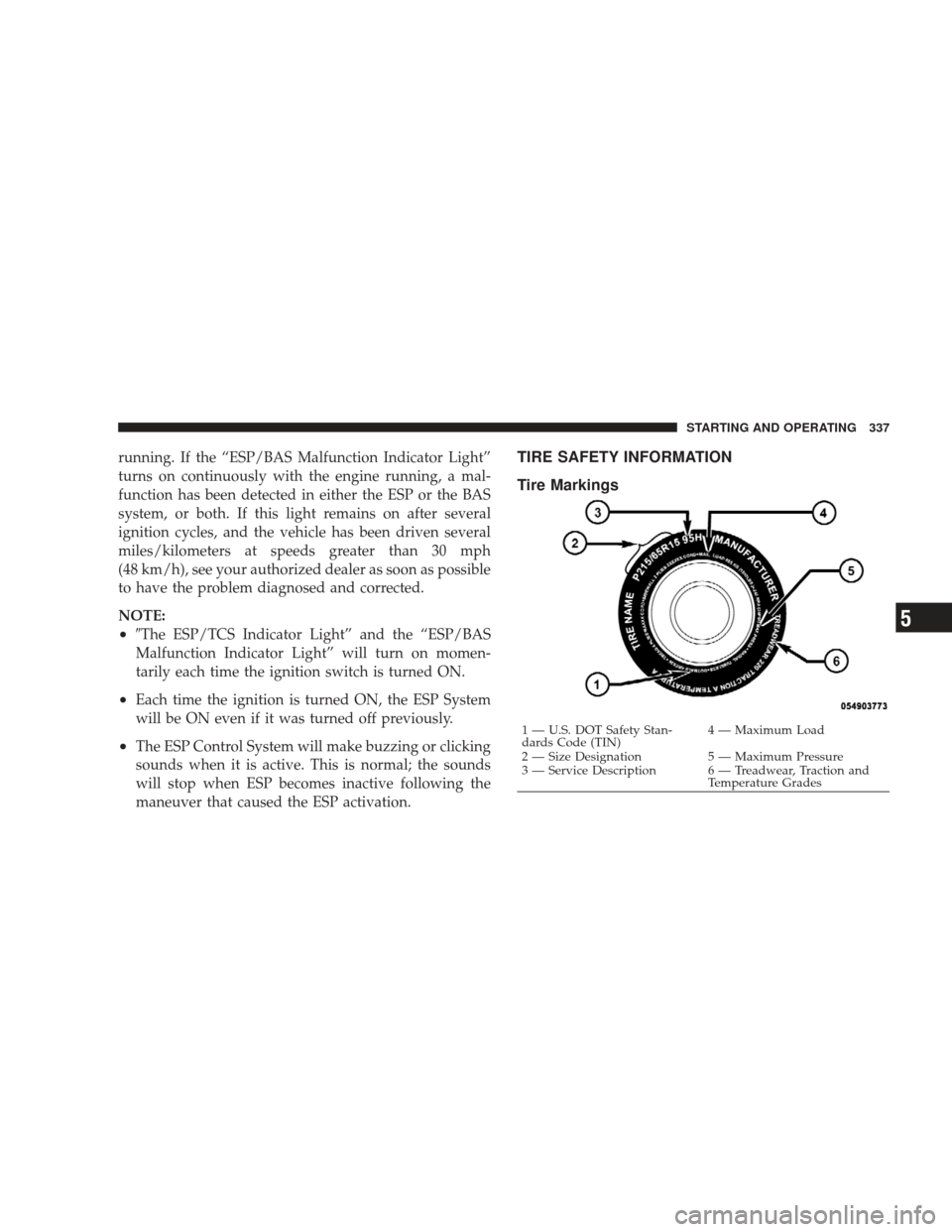
Tire Markings
1 — U.S. DOT Safety Stan-
dards Code (TIN)4 — Maximum Load
2 — Size Designation 5 — Maximum Pressure
3 — Service Description 6 — Treadwear, Traction and Temperature Grades
STARTING AND OPERATING 337
5
Page 342 of 506
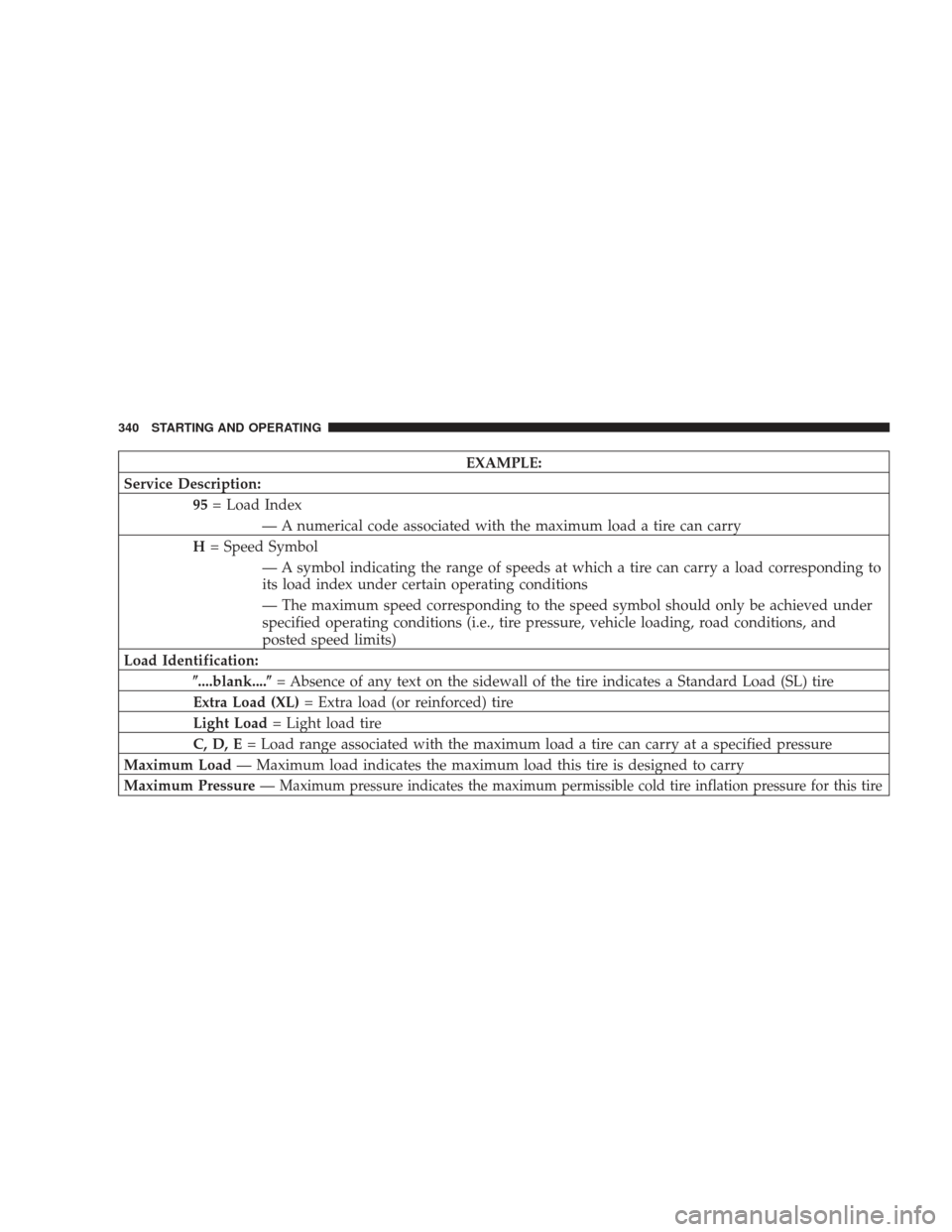
EXAMPLE:
Service Description: 95= Load Index
— A numerical code associated with the maximum load a tire can carry
H = Speed Symbol
— A symbol indicating the range of speeds at which a tire can carry a load corresponding to
its load index under certain operating conditions
— The maximum speed corresponding to the speed symbol should only be achieved under
specified operating conditions (i.e., tire pressure, vehicle loading, road conditions, and
posted speed limits)
Load Identification: \b....blank....\b = Absence of any text on the sidewall of the tire indicates a Standard Load (SL) tire
Extra Load (XL) = Extra load (or reinforced) tire
Light Load = Light load tire
C, D, E = Load range associated with the maximum load a tire can carry at a specified pressure
Maximum Load — Maximum load indicates the maximum load this tire is designed to carry
Maximum Pressure —
Maximum pressure indicates the maximum permissible cold tire inflation pressure for this tire
340 STARTING AND OPERATING