Page 112 of 506
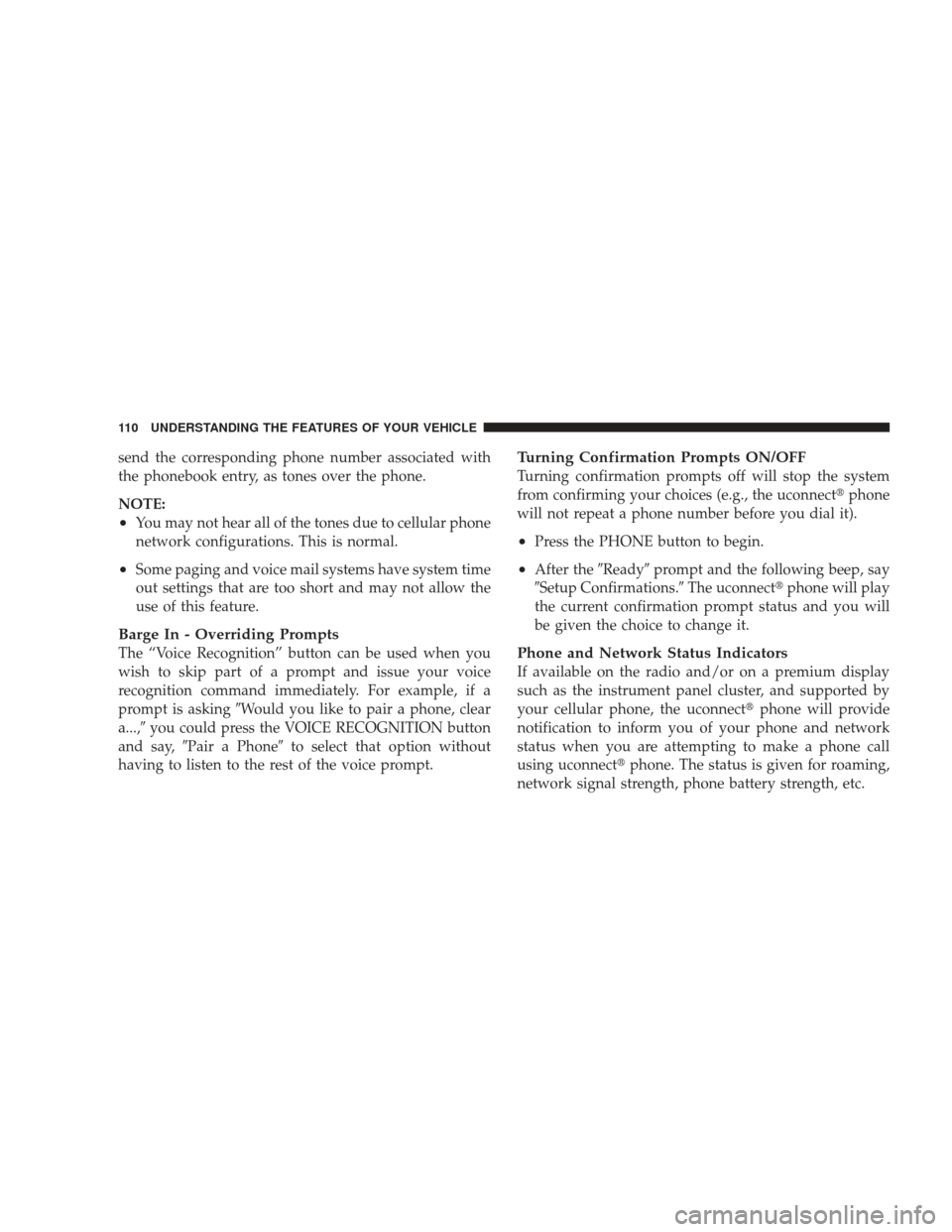
send the corresponding phone number associated with
the phonebook entry, as tones over the phone.
NOTE:
•You may not hear all of the tones due to cellular phone
network configurations. This is normal.
•Some paging and voice mail systems have system time
out settings that are too short and may not allow the
use of this feature.
Barge In - Overriding Prompts
The “Voice Recognition” button can be used when you
wish to skip part of a prompt and issue your voice
recognition command immediately. For example, if a
prompt is asking�Would you like to pair a phone, clear
a...,� you could press the VOICE RECOGNITION button
and say, �Pair a Phone� to select that option without
having to listen to the rest of the voice prompt.
Turning Confirmation Prompts ON/OFF
Turning confirmation prompts off will stop the system
from confirming your choices (e.g., the uconnect� phone
will not repeat a phone number before you dial it).
•Press the PHONE button to begin.
•After the �Ready�prompt and the following beep, say
�Setup Confirmations.� The uconnect�phone will play
the current confirmation prompt status and you will
be given the choice to change it.
Phone and Network Status Indicators
If available on the radio and/or on a premium display
such as the instrument panel cluster, and supported by
your cellular phone, the uconnect� phone will provide
notification to inform you of your phone and network
status when you are attempting to make a phone call
using uconnect� phone. The status is given for roaming,
network signal strength, phone battery strength, etc.
110 UNDERSTANDING THE FEATURES OF YOUR VEHICLE
Page 122 of 506
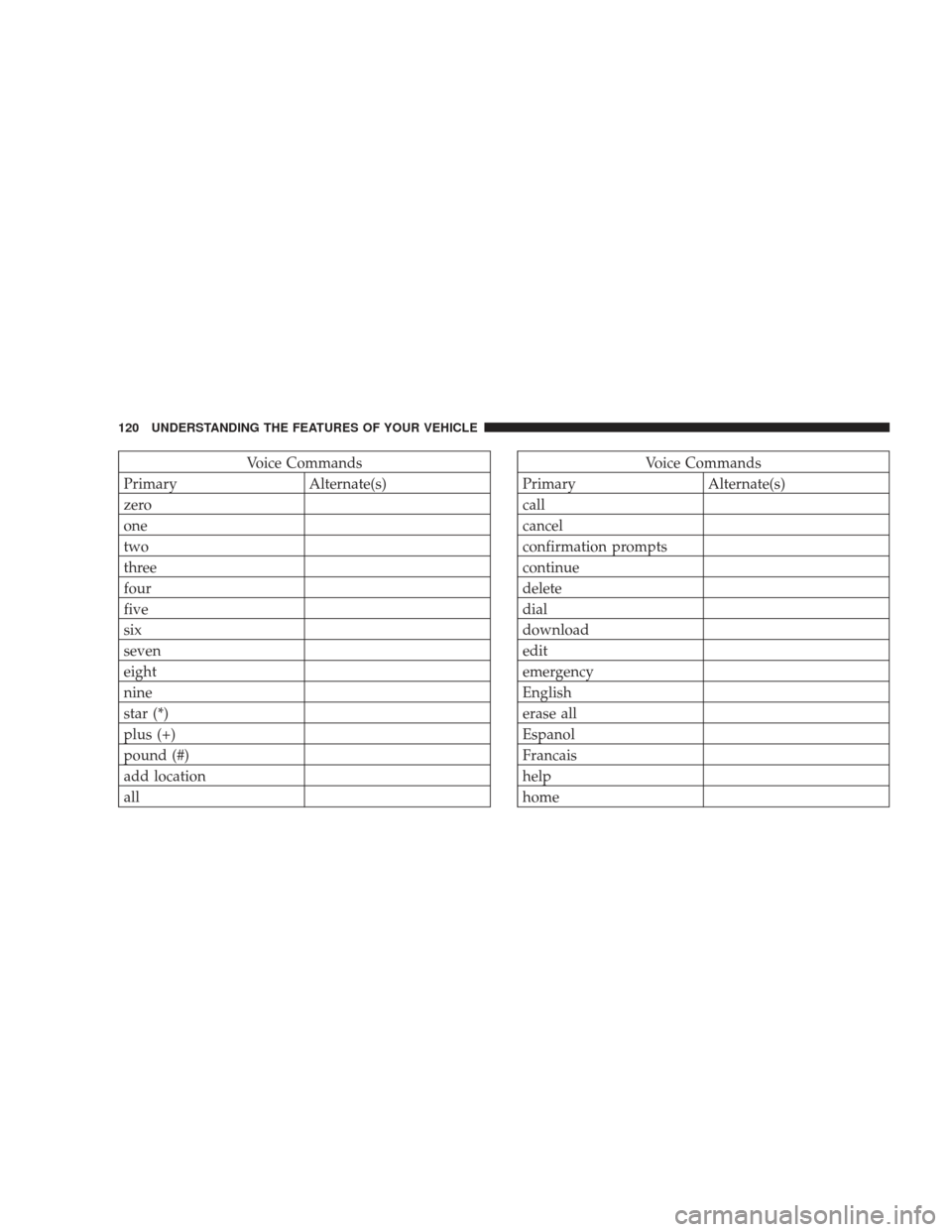
Voice Commands
Primary Alternate(s)
zero
one
two
three
four
five
six
seven
eight
nine
star (*)
plus (+)
pound (#)
add location
allVoice Commands
Primary Alternate(s)
call
cancel
confirmation prompts
continue
delete
dial
download
edit
emergency
English
erase all
Espanol
Francais
help
home
120 UNDERSTANDING THE FEATURES OF YOUR VEHICLE
Page 124 of 506
General Information
This device complies with Part 15 of the FCC rules and
RSS 210 of Industry Canada. Operation is subject to the
following conditions:
•Changes or modifications not expressly approved by
the party responsible for compliance could void the
user’s authority to operate the equipment.
•This device may not cause harmful interference.
•This device must accept any interference received,
including interference that may cause undesired
operation.
VOICE RECOGNITION (VR) SYSTEM — IF
EQUIPPED
Voice Recognition (VR) System Operation
This Voice Recognition system allows you to
control your AM, FM radio, satellite radio, disc
player, and a memo recorder.
NOTE: Take care to speak into the Voice Interface
System as calmly and normally as possible. The ability of
the Voice Interface System to recognize user voice com-
mands may be negatively affected by rapid speaking or a
raised voice level.
WARNING!
Any voice commanded system should be used only
in safe driving conditions and all attention should be
kept on the roadway ahead. Failure to do so may
result in an accident causing serious injury or death.
122 UNDERSTANDING THE FEATURES OF YOUR VEHICLE
Page 135 of 506
NOTE:When a heat setting is selected, heat will be felt
within two to five minutes.
WARNING!
•Persons who are unable to feel pain to the skin
because of advanced age, chronic illness, diabetes,
spinal cord injury, medication, alcohol use, ex-
haustion or other physical condition must exercise
care when using the seat heater. It may cause burns
even at low temperatures, especially if used for
long periods.
•Do not place anything on the seat that insulates
against heat, such as a blanket or cushion. This
may cause the seat heater to overheat.
60/40 Split Folding Rear Seat with Fold-Flat
Feature
To provide additional storage area, each rear seat can be
folded flat. This allows for extended cargo space and still
maintains some rear seating room.
NOTE: Prior to folding the rear seat, it may be necessary
to position the front seat to its mid-track position. Also,
be sure that the front seats are fully upright and posi-
tioned forward. This will allow the rear seat to fold down
easily.
WARNING!
•It is extremely dangerous to ride in a cargo area,
inside or outside of a vehicle. In a collision, people
riding in these areas are more likely to be seri-
ously injured or killed.
(Continued)
UNDERSTANDING THE FEATURES OF YOUR VEHICLE 133
3
Page 148 of 506
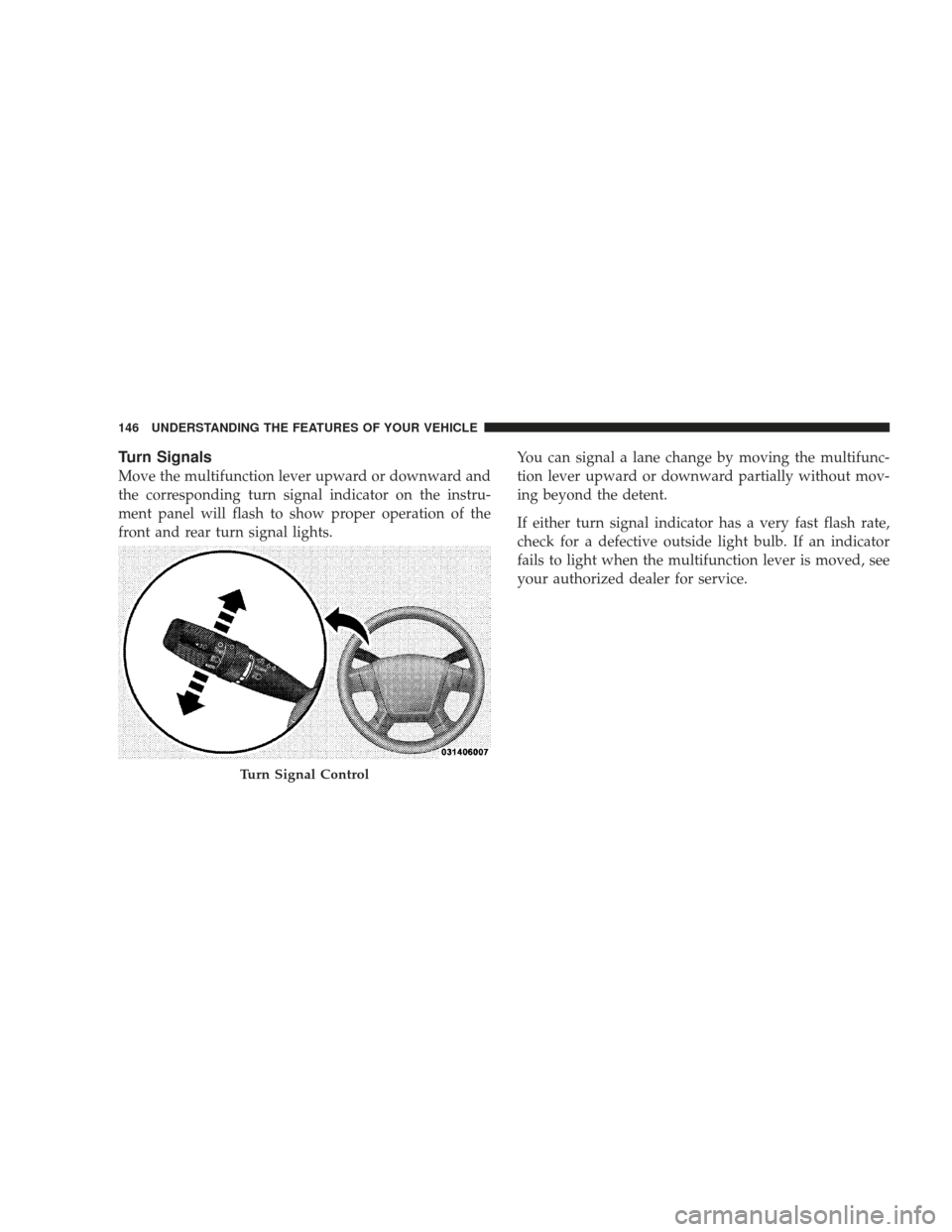
Turn Signals
Move the multifunction lever upward or downward and
the corresponding turn signal indicator on the instru-
ment panel will flash to show proper operation of the
front and rear turn signal lights.You can signal a lane change by moving the multifunc-
tion lever upward or downward partially without mov-
ing beyond the detent.
If either turn signal indicator has a very fast flash rate,
check for a defective outside light bulb. If an indicator
fails to light when the multifunction lever is moved, see
your authorized dealer for service.
Turn Signal Control
146 UNDERSTANDING THE FEATURES OF YOUR VEHICLE
Page 154 of 506
Headlights with Wipers (Available with Auto
Headlights Only)
When this feature is active, the headlights will turn on
approximately 10 seconds after the wipers are turned on
if the multifunction lever (on the left side of the steering
column) is placed in the AUTO position. In addition, the
headlights will turn off when the wipers are turned off if
they were turned on by this feature.
The Headlights with Wipers feature can be turned on or
off through the Electronic Vehicle Information Center
(EVIC) — if equipped. For details, refer to ”Headlights
On with Wipers,” under “Personal Settings (Customer-
Programmable Features)” under “Electronic Vehicle In-
formation Center” in Section 4 of this manual.
Rain Sensing Wipers — If Equipped
This feature senses moisture on the windshield and
automatically activates the wipers for the driver. This
feature is especially useful for road splash or oversprayfrom the windshield washers of the vehicle ahead. Rotate
the end of the windshield wiper/washer control lever to
one of the five intermittent wiper settings to activate this
feature.
The sensitivity of the system is adjustable from the
windshield wiper/washer control lever. Wiper delay
position 1 is the least sensitive and wiper delay position
5 is the most sensitive. Choose position 3 for normal rain
conditions. Choose position 2 or 1 if you desire less wiper
sensitivity. Choose position 4 or 5 if you desire more
sensitivity. Place the lever in the off position when not
using the system.
NOTE:
•The rain-sensing feature will not operate when the
wiper speed is in the low or high position.
•The rain-sensing feature may not function properly
when ice or dried salt water is present on the wind-
shield.
152 UNDERSTANDING THE FEATURES OF YOUR VEHICLE
Page 162 of 506
CAUTION! (Continued)
•The vehicle must be driven slowly when using the
Rear Park Assist System to be able to stop in time
when the obstacle is detected. It is recommended
that the driver looks over his/her shoulder when
using the Rear Park Assist System.
•Clean the Rear Park Assist Sensors with water, car
wash soap, and a soft cloth. Do not use rough or
hard cloths. Do not scratch or poke the sensors.
Otherwise, you could damage the sensors.
WARNING!
•Drivers must be careful when backing up even
when using the Rear Park Assist System. Always
check carefully behind your vehicle, look behind
you, and be sure to check for pedestrians, animals,
other vehicles, obstructions, and blind spots be-
fore backing up. You are responsible for safety and
must continue to pay attention to your surround-
ings. Failure to do so can result in serious injury or
death.(Continued)
160 UNDERSTANDING THE FEATURES OF YOUR VEHICLE
Page 173 of 506
General Information
This device complies with FCC rules Part 15 and Industry
Canada RSS-210. Operation is subject to the following
two conditions:
1. This device may not cause harmful interference.
2. This device must accept any interference that may be
received including interference that may cause undesired
operation.
NOTE:The transmitter has been tested and it complies
with FCC and IC rules. Changes or modifications not
expressly approved by the party responsible for compli-
ance could void the user ’s authority to operate the
device.
The term IC before the certification/registration number
only signifies that Industry Canada technical specifica-
tions were met.
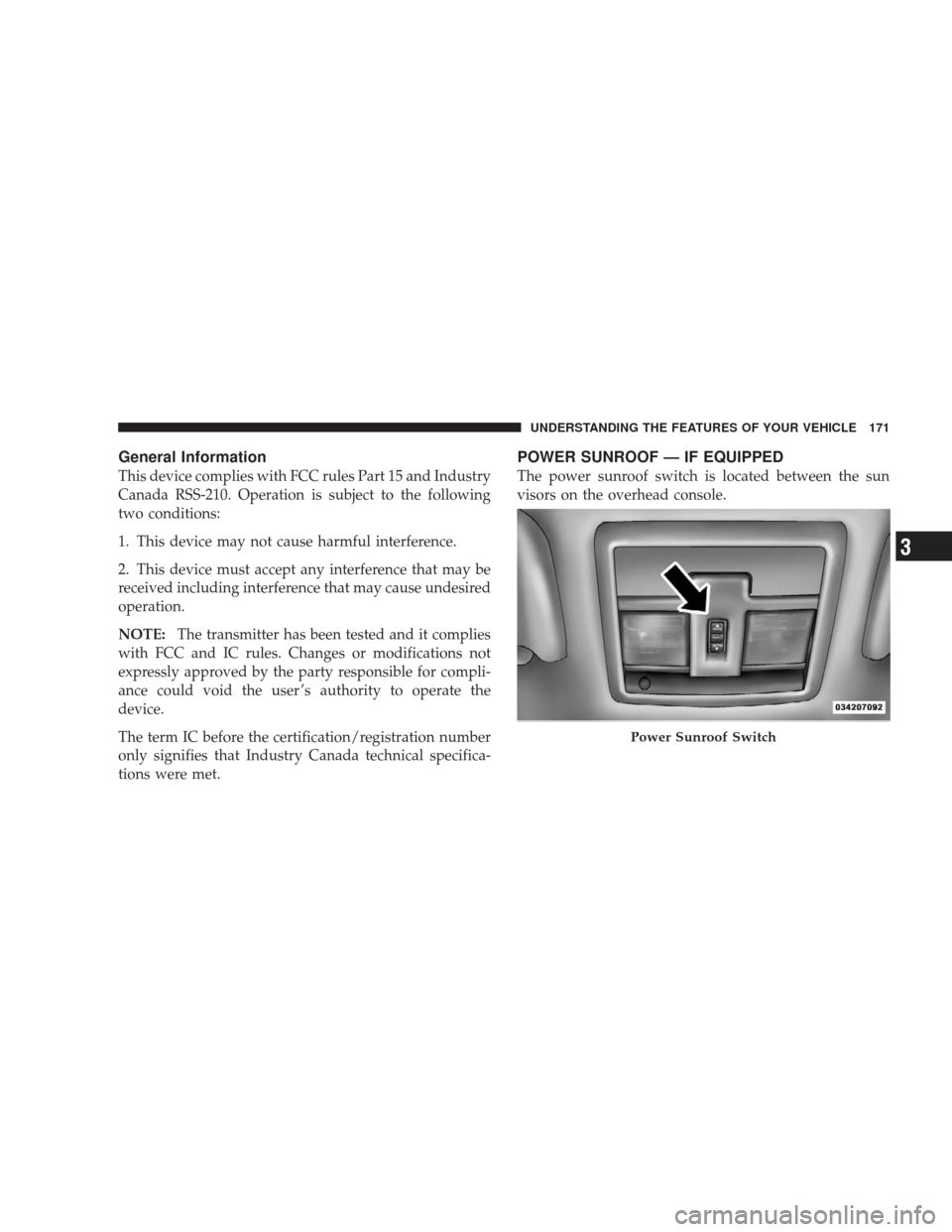
POWER SUNROOF — IF EQUIPPED
The power sunroof switch is located between the sun
visors on the overhead console.
Power Sunroof Switch
UNDERSTANDING THE FEATURES OF YOUR VEHICLE 171
3