Page 73 of 521

Airbag Warning Light
The light should come on and remain on for six to eight
seconds as a bulb check when the ignition switch is first
turned ON. If the light is not lit during starting, see your
authorized dealer. If the light stays on, flickers, or comes
on while driving, have the system checked by an autho-
rized dealer.
Defroster
Check operation by selecting the defrost mode and place
the blower control on high speed. You should be able to
feel the air directed against the windshield. See your
authorized dealer for service if your defroster is
inoperable.
Periodic Safety Checks You Should Make Outside
The Vehicle
Tires
Examine tires for excessive tread wear and uneven wear
patterns. Check for stones, nails, glass, or other objectslodged in the tread. Inspect the tread and sidewall for
cuts and cracks. Check the wheel nuts for tightness.
Check the tires (including spare) for proper pressure.
Lights
Have someone observe the operation of exterior lights
while you work the controls. Check turn signal and high
beam indicator lights on the instrument panel.
Door Latches
Check for positive closing, latching, and locking.
Fluid Leaks
Check area under vehicle after overnight parking for fuel,
engine coolant, oil, or other fluid leaks. Also, if gasoline
fumes are detected or if fuel, power steering fluid, or
brake fluid leaks are suspected, the cause should be
located and corrected immediately.
THINGS TO KNOW BEFORE STARTING YOUR VEHICLE 71
2
Page 77 of 521
▫Headlights And Parking Lights.......... 130
▫Automatic Headlight System —
If Equipped........................ 131
▫SmartBeams — If Equipped............. 132
▫Daytime Running Lights — If Equipped.... 133
▫Automatic Headlight Leveling — HID
Headlights Only..................... 133
▫Instrument Panel And Interior Lights...... 134
▫Battery Saver Feature................. 135
▫Lights-On Reminder.................. 135
▫Fog Lights — If Equipped.............. 135
▫Turn Signals........................ 136
▫High Beam Switch................... 137
▫Flash-To-Pass....................... 137▫Headlight Time Delay................. 137
▫Interior Lights...................... 137
▫Front Map/Reading Lights............. 138
�Windshield Wipers And Washers.......... 139
▫Mist............................. 140
▫Speed Sensitive Intermittent Wiper System . . 140
▫Rain Sensing Wipers — If Equipped....... 141
�Tilt/Telescoping Steering Column.......... 142
�Adjustable Pedals — If Equipped.......... 143
�Electronic Speed Control — If Equipped..... 144
▫To Activate......................... 145
▫To Set At A Desired Speed.............. 145
▫To Deactivate....................... 145
UNDERSTANDING THE FEATURES OF YOUR VEHICLE 75
3
Page 134 of 521
SmartBeams — If Equipped
The SmartBeam system provides increased forward light-
ing at night by automating high beam control through
the use of a digital camera mounted on the inside
rearview mirror. This camera detects vehicle specific light
and automatically switches from high beams to low
beams until the approaching vehicle is out of view.
NOTE:If the windshield or SmartBeam mirror is re-
placed, the SmartBeam mirror must be re-aimed to
ensure proper performance. See your local authorized
dealer.
To Activate
1. Select “Auto Headlamp Low/High Beams? — Low/
High Beam.” Refer to “EVIC — Customer-Programmable
Features” in Section 4 of this manual.
2. Turn the end of the multifunction lever to the AUTO
headlight position.
3. Push the multifunction lever away from you (toward
front of vehicle) to engage the high beam mode.
NOTE:This system will not activate until the vehicle is
at or above 20 mph (32 km/h).
132 UNDERSTANDING THE FEATURES OF YOUR VEHICLE
Page 135 of 521
To Deactivate
1. Pull back on the multifunction lever to manually
deactivate the system (normal operation of low beams).
2. Push back on the multifunction lever once again to
reactivate the system.
NOTE:Broken, muddy, or obstructed headlights and
taillights of vehicles in the field of view will cause
headlights to remain on longer (closer to the vehicle).
Also, dirt, film, and other obstructions (sticker, toll box,
etc.) on the windshield or camera lens will cause the
system to function improperly.
Daytime Running Lights — If Equipped
The high beam headlights come on at a low intensity
level whenever the engine is running, and the transmis-
sion is not in the PARK position. The lights will remain
on until the ignition switch is turned to LOCK/ACC, or
the parking brake is engaged. The headlight switch must
be used for normal nighttime driving.
Automatic Headlight Leveling — HID Headlights
Only
This feature prevents the headlights from interfering
with the vision of oncoming drivers. Headlight leveling
automatically adjusts the height of the headlight beam in
reaction to changes in vehicle pitch.
UNDERSTANDING THE FEATURES OF YOUR VEHICLE 133
3
Page 138 of 521
NOTE:
•Turning on the high beam headlights turns off the fog
lights.
•A front fog light is a lighting device that provides
illumination in front of the vehicle under conditions of
fog, rain, snow, or dust. The front fog lights supple-
ment the lower beam of a standard headlight system.
•Proper aim and adjustment of the front fog lights
should be made to prevent excessive glare for other
drivers.
Turn Signals
Move the multifunction lever up or down, and the
arrows on each side of the instrument cluster will flash to
show proper operation of the left and right turn signal
lights. You can signal a lane change by moving the
multifunction lever partially up or down.Turn Signal Auto-Mode
Tap the multifunction lever once, and the turn signal (left
or right) will flash three times and automatically turn off.
Turn Signal Control
136 UNDERSTANDING THE FEATURES OF YOUR VEHICLE
Page 139 of 521
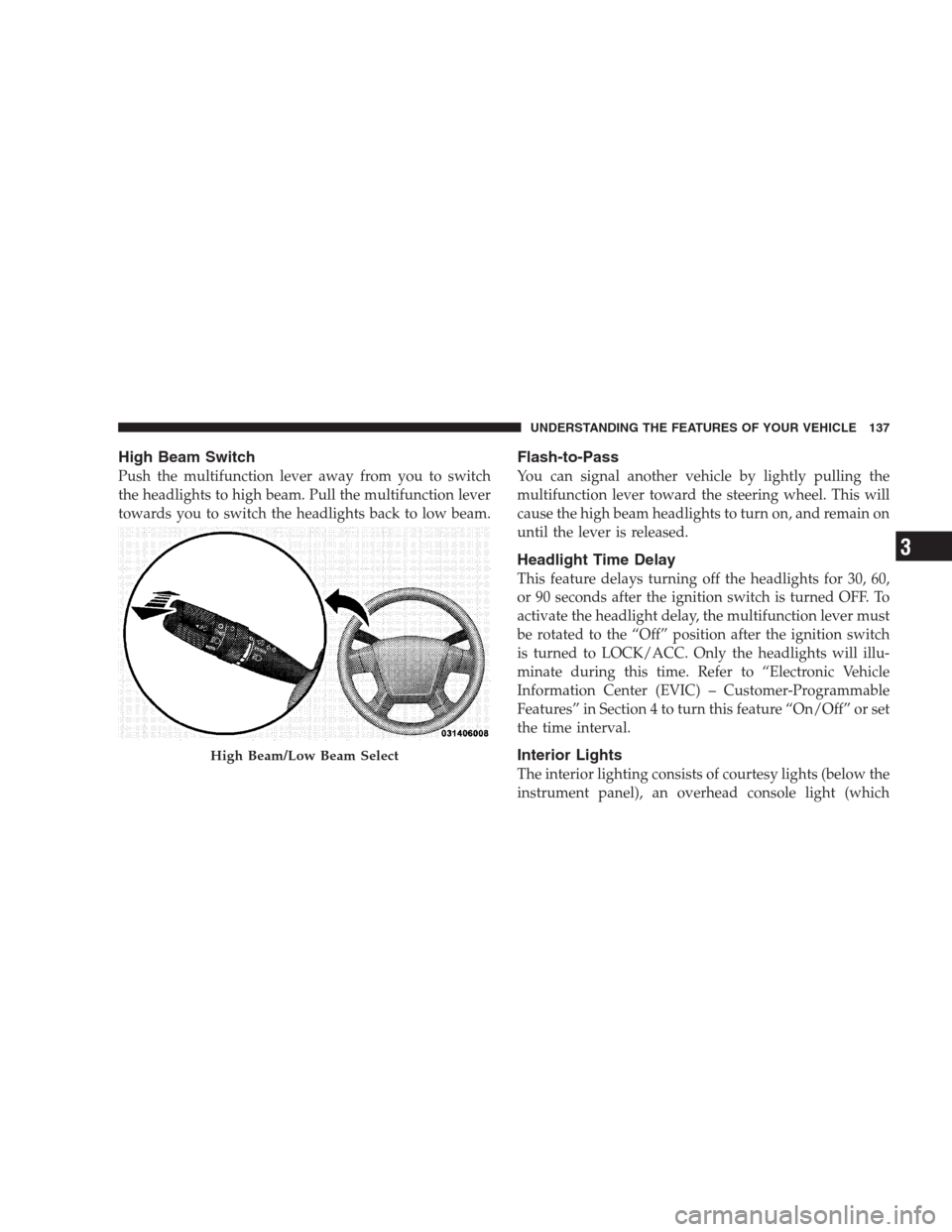
High Beam Switch
Push the multifunction lever away from you to switch
the headlights to high beam. Pull the multifunction lever
towards you to switch the headlights back to low beam.
Flash-to-Pass
You can signal another vehicle by lightly pulling the
multifunction lever toward the steering wheel. This will
cause the high beam headlights to turn on, and remain on
until the lever is released.
Headlight Time Delay
This feature delays turning off the headlights for 30, 60,
or 90 seconds after the ignition switch is turned OFF. To
activate the headlight delay, the multifunction lever must
be rotated to the “Off” position after the ignition switch
is turned to LOCK/ACC. Only the headlights will illu-
minate during this time. Refer to “Electronic Vehicle
Information Center (EVIC) – Customer-Programmable
Features” in Section 4 to turn this feature “On/Off” or set
the time interval.
Interior Lights
The interior lighting consists of courtesy lights (below the
instrument panel), an overhead console light (which
High Beam/Low Beam Select
UNDERSTANDING THE FEATURES OF YOUR VEHICLE 137
3
Page 187 of 521

WARNING!
Driving a vehicle with the red brake light on is
dangerous. Part of the brake system may have failed.
It will take longer to stop the vehicle. You could have
an accident. Have the vehicle checked immediately.
Vehicles equipped with the Anti-Lock Brake System
(ABS), are also equipped with Electronic Brake Force
Distribution (EBD). In the event of an EBD failure, the
Brake Warning Light will turn on along with the ABS
Light. Immediate repair to the ABS system is required.
Operation of the Brake Warning Light can be checked by
turning the ignition switch from the OFF position to the
ON position. The light should illuminate for approxi-
mately two seconds. The light should then turn off unless
the parking brake is applied or a brake fault is detected.
If the light does not illuminate, have the light inspected
by an authorized dealer.The light also will turn on when the parking brake is
applied with the ignition switch in the ON position.
NOTE:This light shows only that the parking brake is
applied. It does not show the degree of brake application.
3. Turn Signal Indicator
The arrows will flash with the exterior turn signals
when the turn signal lever is operated. A tone will
chime if the turn signals are left on for more than one
mile (2 km).
4. High Beam Indicator
Indicates that headlights are on high beam.
5. Malfunction Indicator Light (MIL)
The Malfunction Indicator Light (MIL) is part of
an onboard diagnostic system called OBD II that
monitors engine and automatic transmission con-
trol systems. The light will illuminate when the key is in
UNDERSTANDING YOUR INSTRUMENT PANEL 185
4
Page 198 of 521
•LIFTGATE/HOOD OPEN (with graphic)
•HOOD/GLASS/DOOR OPEN (with graphic)
•HOOD/GLASS/DOORS OPEN (with graphic)
•HOOD/GATE/DOOR OPEN (with graphic)
•HOOD/GATE/DOORS OPEN (with graphic)
•LIFTGLASS/DOOR OPEN (with graphic)
•LIFTGLASS/DOORS OPEN (with graphic)
•LIFTGLASS/HOOD OPEN (with graphic)
•WASHER FLUID LOW (with graphic)
•COOLANT LOW (with graphic)
•OIL CHANGE REQUIRED
•OIL CHANGE RESET
•CHECK GAUGES
•AUTO HIGH BEAMS ON
•AUTO HIGH BEAMS OFF
•PARK ASSIST DISABLED
•SERVICE SUSPENSION
•SERVICE PARK ASSIST SYSTEM
•TRANSMISSION OVER TEMP
•CHECK SHIFT PROCEDURE
•SERVICE 4WD SYSTEM
•4WD SYSTEM IN NEUTRAL
•LOW BRAKE FLUID LEVEL
•WARNING! LIMIT SPEED
•CHECK GASCAP
•ESP OFF
196 UNDERSTANDING YOUR INSTRUMENT PANEL