2009 JAGUAR XF key
[x] Cancel search: keyPage 317 of 391

317
Telephone
MAKING A CALL
Before you make a call, your mobile phone
must be paired and docked with the vehicle’s
Bluetooth system.
From the Home menu, select Comms.
Key in the phone number, including the area
code, if applicable - the number will be
displayed. Touch the connect icon.
Changing a phone number
When entering a number, you can change the
phone number shown on the touch-screen
using the C button.
A momentary touch erases a single digit, a long
touch erases the complete number.
Receiving a call
If the audio system is in use when the phone
becomes active, the audio system source is
suppressed for the dur ation of the call. If automatic answer has been programmed, the
call will automatically answer after a few
seconds. Refer to
Answer options.
To answer a call: The preferred method to
accept an incoming call, if Automatic answer is
not active, is to use th e hands-free controls on
the steering wheel (refer to Hand-free
controls ). Alternatively, you can accept or
reject the incoming call, from the pop-up
displayed on the touch-screen.
Ending a call
The preferred method to end a call is to use the
hands-free controls on the steering wheel.
Refer to Hands-free controls .
Alternatively, select the End call icon
(arrowed).
Continuity of calls
Whilst in a call, the ca ll remains connected if
the vehicle is in convenience mode. When the
call ends, another call cannot be made or
received through the vehicle system, unless
the ignition is on and the touch-screen system
active.
Home
Audio/TV
Climate
Comms
Navigation
VehicleExternal
Left Right
20 17CC
15C
.5 .5
DAB radio DAB1
BBC 5Live Xtra
BBC National DAB
TA FM DAB i Subch. PL II
Valet12 : 26 pm
E96908
Digit Dial
Names
Last 10
Settings
7
1
4
*8
2
5
0 9
3
6
Options
C
E96924
Comms02476303080Digit Dial
Names
Last 10
Settings
7
1
4
*8
2
5
0 9
3
6
Options
C
E96925
Comms
00:00:05
Page 318 of 391
Telephone
318
NAMES
Directory name search
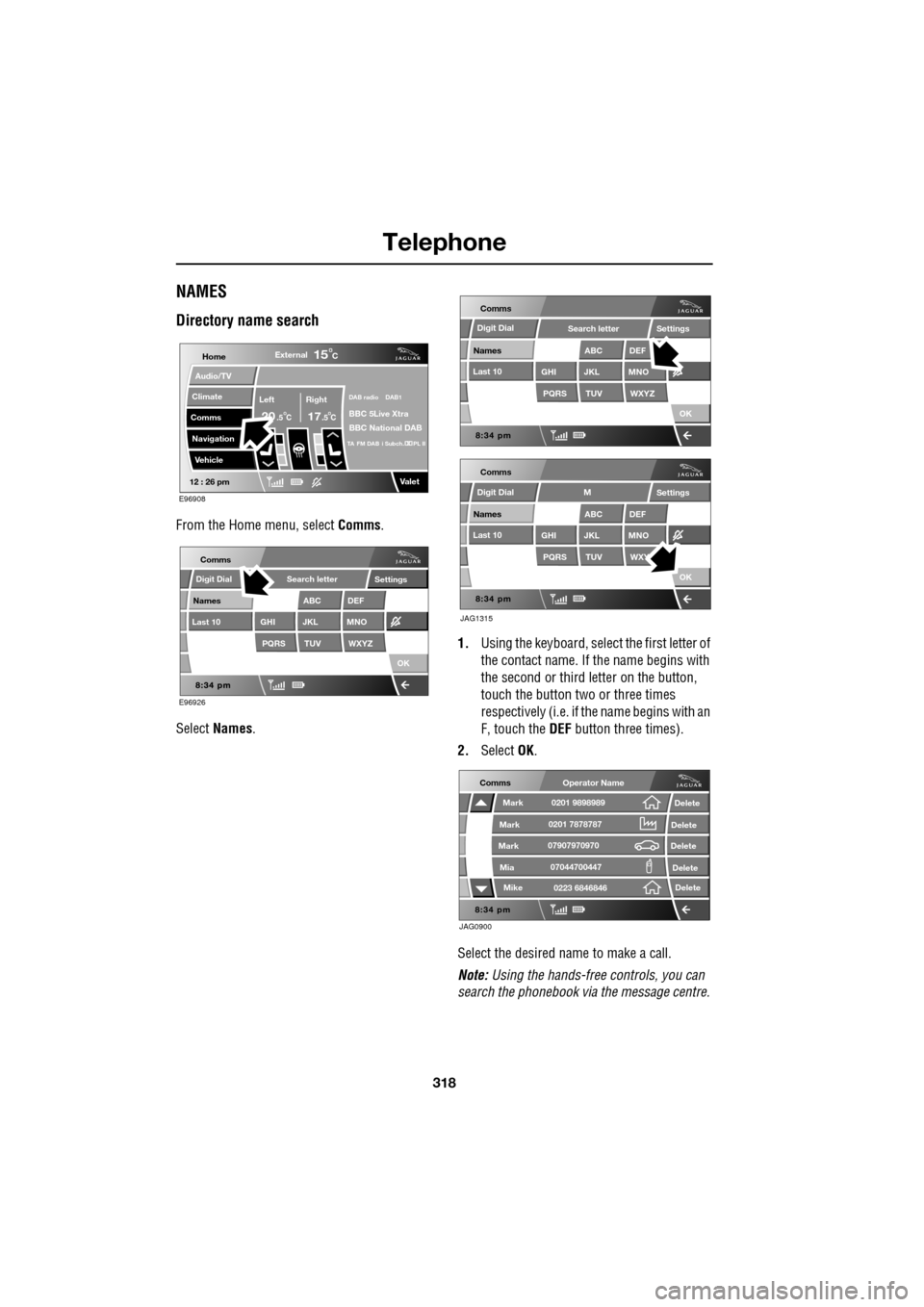
From the Home menu, select Comms.
Select Names . 1.
Using the keyboard, select the first letter of
the contact name. If th e name begins with
the second or third letter on the button,
touch the button two or three times
respectively (i.e. if th e name begins with an
F, touch the DEF button three times).
2. Select OK.
Select the desired name to make a call.
Note: Using the hands-free controls, you can
search the phonebook via the message centre.
Home
Audio/TV
Climate
Comms
Navigation
VehicleExternal
Left Right
20 17CC
15C
.5 .5
DAB radio DAB1
BBC 5Live Xtra
BBC National DAB
TA FM DAB i Subch. PL II
Valet12 : 26 pm
E96908
E96926
Comms
Digit Dial
Names
Last 10
Settings
PQRS
GHITUV
ABC
JKL
WXYZ
DEF
MNO
Search letter
OK
Comms
Comms
Names
Last 10
Settings
PQRS
GHITUV
ABC
JKL
WXYZ
DEF
MNO
Search letter
OK
Names
Last 10
Settings
PQRS
GHITUV
ABC
JKL
WXY
DEF
MNO
M
OK
JAG1315
Digit Dial
Digit Dial
JAG0900
Comms
Delete
Delete
Delete
Delete
Delete
Mark
Mark
Mark
Mike
Mia0201 9898989
0201 7878787
0223 6846846
07907970970
07044700447
Operator Name
Page 319 of 391
319
Telephone
Directory contact types
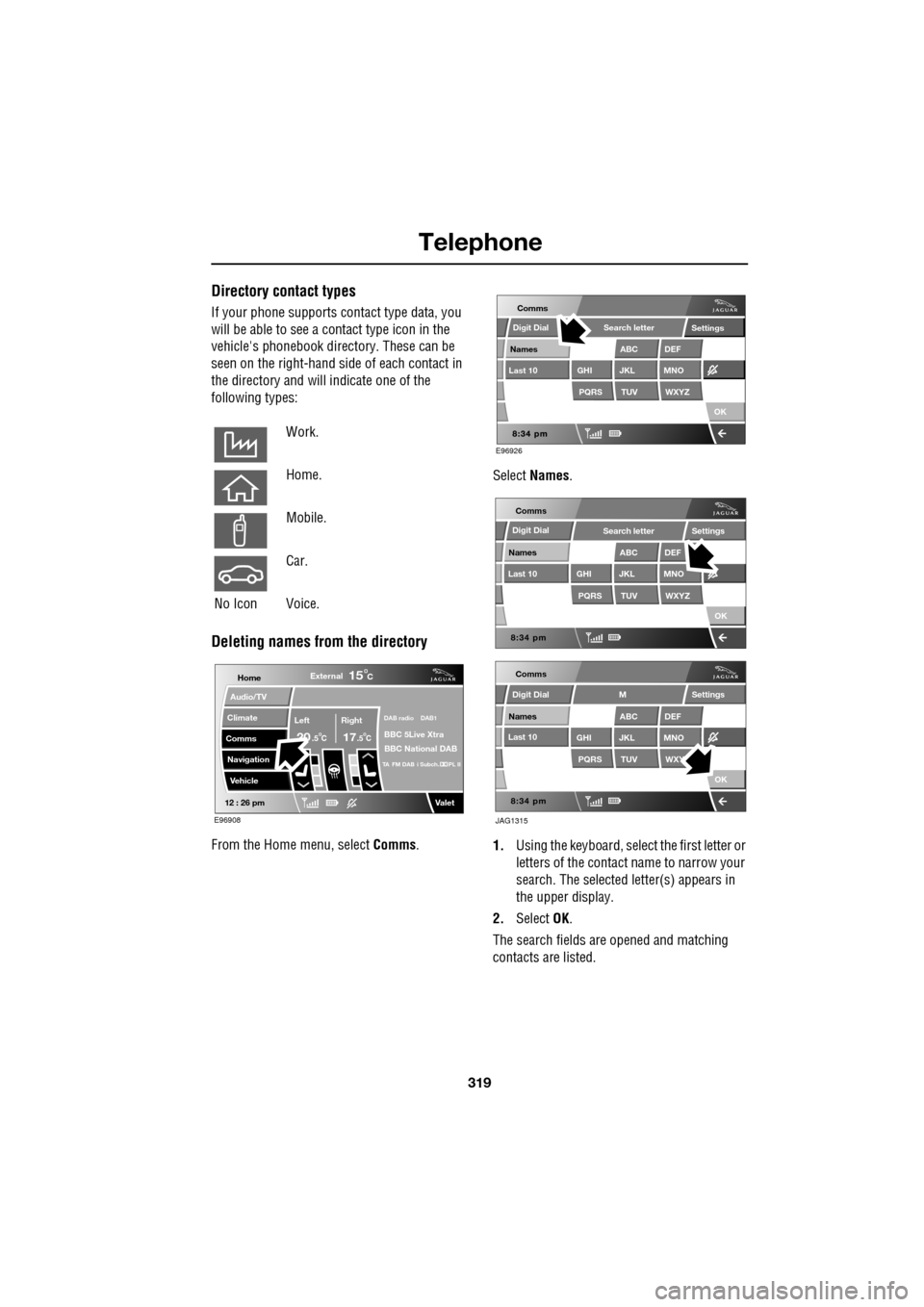
If your phone supports contact type data, you
will be able to see a contact type icon in the
vehicle's phonebook dire ctory. These can be
seen on the right-hand side of each contact in
the directory and will indicate one of the
following types:
Deleting names from the directory
From the Home menu, select Comms. Select
Names .
1. Using the keyboard, select the first letter or
letters of the contact name to narrow your
search. The selected letter(s) appears in
the upper display.
2. Select OK.
The search fields ar e opened and matching
contacts are listed.
Work.
Home.
Mobile.
Car.
No Icon Voice.
Home
Audio/TV
Climate
Comms
Navigation
VehicleExternal
Left Right
20 17CC
15C
.5 .5
DAB radio DAB1
BBC 5Live Xtra
BBC National DAB
TA FM DAB i Subch. PL II
Valet12 : 26 pm
E96908
E96926
Comms
Digit Dial
Names
Last 10
Settings
PQRS
GHITUV
ABC
JKL
WXYZ
DEF
MNO
Search letter
OK
Comms
Comms
Names
Last 10
Settings
PQRS
GHITUV
ABC
JKL
WXYZ
DEF
MNO
Search letter
OK
Names
Last 10
Settings
PQRS
GHITUV
ABC
JKL
WXY
DEF
MNO
M
OK
JAG1315
Digit Dial
Digit Dial
Page 322 of 391
Telephone
322
Making/ending a call
To dial:
Key in the phone number, including the area
code. The number will be displayed.
To connect:
To end a call:
OTHER FEATURES
Keyboard magnification
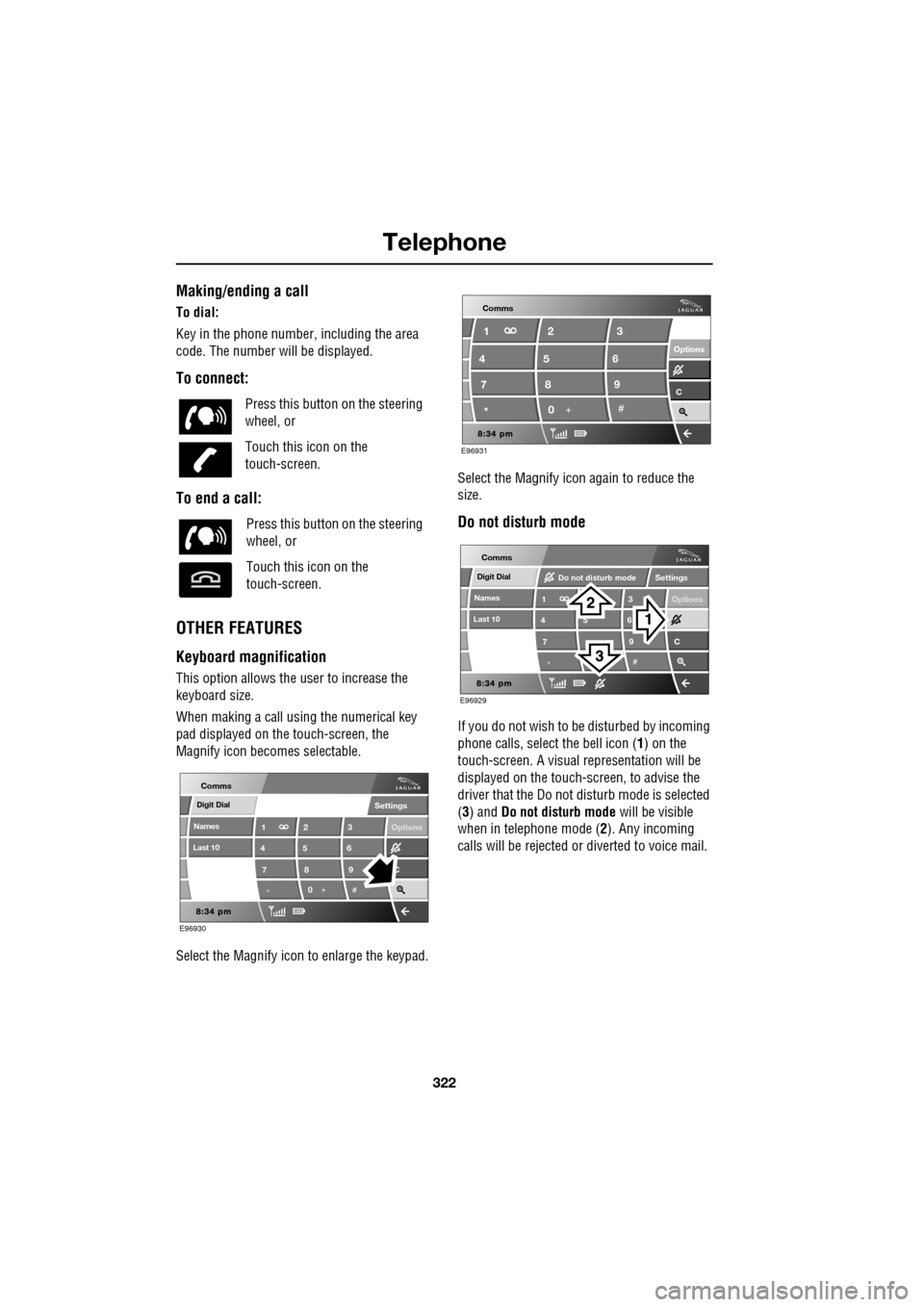
This option allows the user to increase the
keyboard size.
When making a call using the numerical key
pad displayed on the touch-screen, the
Magnify icon becomes selectable.
Select the Magnify icon to enlarge the keypad. Select the Magnify icon
again to reduce the
size.
Do not disturb mode
If you do not wish to be disturbed by incoming
phone calls, select the bell icon (1) on the
touch-screen. A visual representation will be
displayed on the touch-screen, to advise the
driver that the Do not di sturb mode is selected
(3) and Do not disturb mode will be visible
when in telephone mode ( 2). Any incoming
calls will be rejected or diverted to voice mail.
Press this button
on the steering
wheel, or
Touch this icon on the
touch-screen.
Press this button on the steering
wheel, or
Touch this icon on the
touch-screen.
Digit Dial
Names
Last 10
Settings
7
1
4
*8
2
5
0 9
3
6
Options
C
E96930
Comms
E96931
Comms
Options Options
C7 1
4
* 82
5
0 93
6
Digit Dial
Names
Last 10
Settings
7
1
4
*
5 9
3
6
Options
C
E96929
Comms
Do not disturb mode
Page 331 of 391
331
Television
Analogue/Digital option
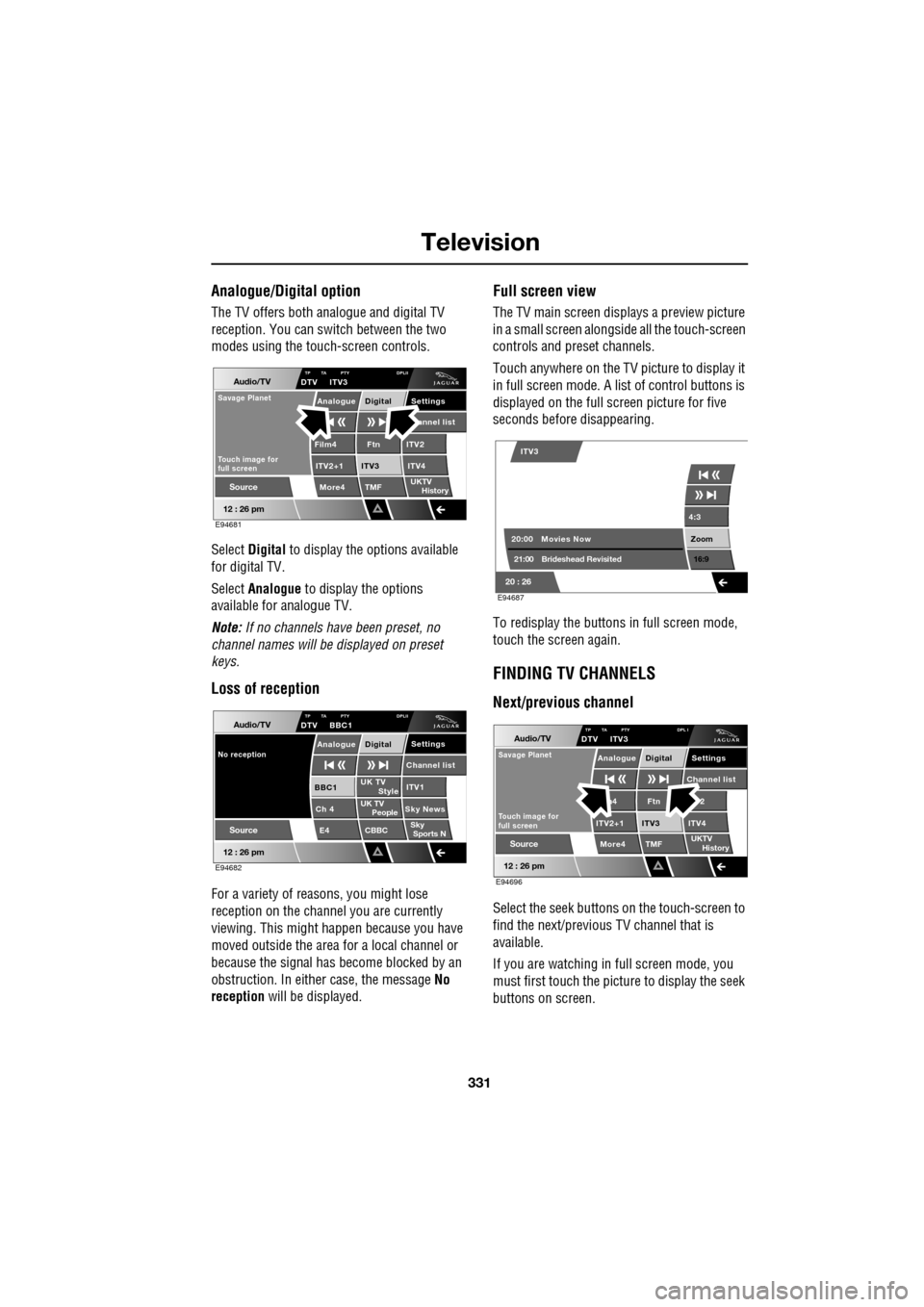
The TV offers both analogue and digital TV
reception. You can switch between the two
modes using the touc h-screen controls.
Select Digital to display the options available
for digital TV.
Select Analogue to display the options
available for analogue TV.
Note: If no channels have been preset, no
channel names will be displayed on preset
keys.
Loss of reception
For a variety of reasons, you might lose
reception on the channel you are currently
viewing. This might happen because you have
moved outside the area for a local channel or
because the signal has become blocked by an
obstruction. In either case, the message No
reception will be displayed.
Full screen view
The TV main screen disp lays a preview picture
in a small screen alongsid e all the touch-screen
controls and preset channels.
Touch anywhere on the TV picture to display it
in full screen mode. A list of control buttons is
displayed on the full screen picture for five
seconds before disappearing.
To redisplay the buttons in full screen mode,
touch the screen again.
FINDING TV CHANNELS
Next/previous channel
Select the seek buttons on the touch-screen to
find the next/previous TV channel that is
available.
If you are watching in full screen mode, you
must first touch the picture to display the seek
buttons on screen.
Audio/TV
12 : 26 pm
More4 TMF
TP TA PTY DPLIIDTV ITV3
UKTV
HistorySource
ITV2
ITV2+1 ITV4Film4
Settings annel listAnalogue Digital
Ftn
ITV3
Touch image for
full screen
Savage Planet
E94681
Audio/TV
12 : 26 pm
UK TV ITV1
Ch 4 Sky News E4 CBBCBBC1
Settings
Channel list
TP TA PTY DPLIIDTV BBC1
Style
UK TV People
SkySports N
Source
No receptionAnalogue Digital
E94682
4:3
Zoom 16:9
ITV3
20:0021:00 Movies Now
Brideshead Revisited
20 : 26 E94687
Audio/TV
12 : 26 pm
More4 TMF
TP TA PTY DPL IDTV ITV3
UKTV
HistorySource
2
ITV2+1 ITV4m4
Settings
Channel listAnalogue Digital
Ftn
ITV3
Touch image for
full screen
Savage Planet
E94696
Page 332 of 391
Television
332
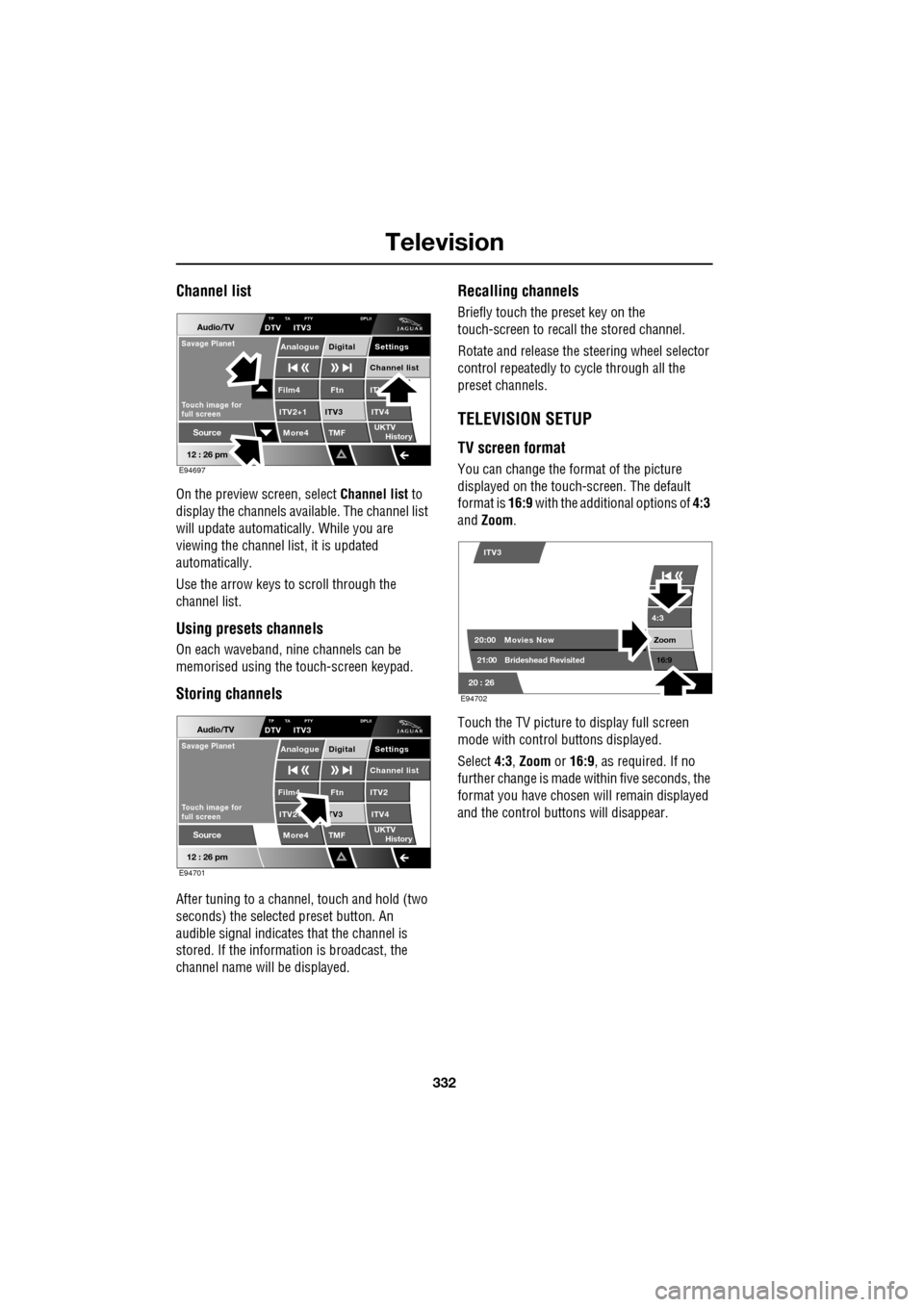
Channel list
On the preview screen, select Channel list to
display the channels available. The channel list
will update automatically. While you are
viewing the channel list, it is updated
automatically.
Use the arrow keys to scroll through the
channel list.
Using presets channels
On each waveband, ni ne channels can be
memorised using the touch-screen keypad.
Storing channels
After tuning to a channe l, touch and hold (two
seconds) the selected preset button. An
audible signal i ndicates that the channel is
stored. If the informat ion is broadcast, the
channel name wi ll be displayed.
Recalling channels
Briefly touch the preset key on the
touch-screen to recall the stored channel.
Rotate and release the steering wheel selector
control repeatedly to cycle through all the
preset channels.
TELEVISION SETUP
TV screen format
You can change the format of the picture
displayed on the touch-screen. The default
format is 16:9 with the additional options of 4:3
and Zoom .
Touch the TV picture to display full screen
mode with control buttons displayed.
Select 4:3, Zoom or 16:9 , as required. If no
further change is made within five seconds, the
format you have chosen will remain displayed
and the control butt ons will disappear.
Audio/TV
12 : 26 pm
More4 TMF
TP TA PTY DPLIIDTV ITV3
UKTV
HistorySource
ITV
ITV2+1 ITV4Film4
Settings
Channel listAnalogue Digital
Ftn
ITV3
Touch image for
full screen
Savage Planet
E94697
Audio/TV
12 : 26 pm
More4 TMF
TP TA PTY DPLIIDTV ITV3
UKTV
HistorySource
ITV2
ITV2+ ITV4Film4
Settings
Channel listAnalogue Digital
Ftn
TV3
Touch image for
full screen
Savage Planet
E94701
4:3
Zoom 16:9
ITV3
20:0021:00 Movies Now
Brideshead Revisited
20 : 26 E94702
Page 340 of 391

Navigation system
340
MEASUREMENT UNITS
Distances are shown on the screen and given in
voice guidance, either in metric units
(kilometres and metres) or in Imperial units
(miles and yards) and can only be changed
from the vehicle touch-screen menu, not from
the navigation system menu.
To change the measur ement units, select
Vehicle on the vehicle touch screen, then select
Unit Change .
To change the units: The unit choices are
selected by touching either km or Mls.
KEYBOARD LAYOUT
The keyboard layout ca n be changed from a
QWERTY type to ABC DEF type, from the User
Settings screen, accessible from the
Navigation Setup screen.
Touch the bar to change the keyboard layout,
then touch OK.
Display set
Preferences
Button audio
Mls. MPH MPG km km/h 1/100
VehicleF
C
0
0
Display language English UKVol. presetsChange
JOL4657ENG
Navigation Setup
Selection
Calibration
RestoreUser
Settings
Defaults Quick POI
12 : 26 pm
RDS-TMC
Language
Selection
12 : 26 pm
Low Fuel Warning
User Settings
Display Petrol Station POI
Text Size on the MAP
Key board layout
Medium
OK
Default
ABC
JOL4658ENG
LUTON
LUTON
Menu
12 : 26 pm
Stored
Destination
Auto Voice
Entry
Guidance Off
Locations
Navigation SetupRoute Options
Page 344 of 391

Navigation system
344
SETTING A DESTINATION
After touching Agree, the initial map screen is
displayed, now select Menu
From the Navigation Menu, select Destination
Entry .
Note: If you wish to view the map without the
buttons showing, touch anywhere on the map
display. To display the buttons, touch Menu. If at any time you make a mistake, use the back
arrow key on the lower right side of the screen
to either go back one le
tter or number at a time
or repeatedly touch it un til the previous screen
is shown.
The Destination Entry menu provides a choice
of methods for entering a destination. For this
example, the destinatio n address, 81 Austin
Place, Abingdon, Oxford shire will be used.
From the Destination screen select Address
and input the Town name.
N
LUTON
Menu
Stored
Destination
Auto Voice
Entry
Guidance Off
N
LUTON
F RD ORD
M 4 0m
Menu
2mi
12 : 26 pm
12 : 26 pm
Locations
Navigation
Setup
Route Options
JOL4502ENG
Menu
12 : 26 pm
Stored
Destination
Auto Voice
Entry
Guidance Off
Locations
Navigation
Setup
Route Options
JOL4503ENG
Address
Street
To w n
Intersection
House
Display Map GBR
Destination
POI
Postcode
Map
Coordinates
Address
HomeGBR
12 3 4 5
vious
Motorway
Memory
Last 5
KETTERING(KETTERING),NClear
NUNEATON(NUNEATON),WA
LEAMINGTON SPA,WARWIC
Not Registered
Not Registered
GBR
Town Name
Nearest 5 Search
Area
12 : 26 pm
12 : 26 pm
12 : 26 pm
SearchArea
Search
Area
Number
JOL4536ENG