2009 JAGUAR XF key
[x] Cancel search: keyPage 247 of 391

247
Fuses
Passenger compartment fuse box
Fuse No Rating (amps) Fuse
Colour Circuit
F1 - - Not used.
F2 - - Not used.
F3 20A Blue Driver's seat adjustment.
F4 20A Blue Driver's seat adjustment.
F5 - - Not used.
F6 - - Not used.
F7 - - Not used.
F8 20A Blue Front passenger's seat adjustment.
F9 20A Blue Front passenger's seat adjustment.
F10 20A Blue Left-hand rear door controls.
F11 20A Blue Right-hand rear door controls.
F12 - - Not used.
F13 10A Red Steering column adjust.
F14 - - Not used.
F15 - - Not used.
F16 5A Tan Sunblind.
F17 - - Not used.
F18 - - Not used.
F19 - - Not used.
F20 5A Tan Remote control receiver.
F21 5A Tan Foot brake.
F22 5A Tan Electric parking brake.
F23 5A Tan Driver's seat. Audio system. Auto headlamps. Upper centre console switches.
F24 10A Red Front passen ger seat. Electric windows. Mirror adjustment.
F25 20A Yellow Driver's heated/climate seat
F26 15A Blue Trailer power connector. Road pricing system.
F27 20A Yellow Front passenger's heated/climate seat.
F28 15A Blue Auxiliary power socket.
F29 20A Yellow Keyless entry system.
F30 10A Red Air conditioning.
Page 248 of 391

Fuses
248
Luggage compartment fuse box
F31 15A Blue Sunroof.
F32 5A Tan Jaguar Smart Key docking station.
F33 5A Tan Diagnostic connector.
F34 5A Tan Instrument pack.
F35 15A Blue Interior lamps.
F36 10A Red Suspension system.
Fuse No Rating
(amps) Fuse
Colour Circuit
Fuse No Rating
(amps) Fuse
Colour Circuit
F1 30A Pink Air blower.
F2 30A Pink Electric parking brake.
F3 - - Not used.
F4 - - Not used.
F5 - - Not used.
F6 - - Not used.
F7 30A Pink Heated rear screen.
F8 30A Pink Audio system (Premium audio only).
F9 50A Red RBD link.
F10 40A Green Rear electronic differential (e-Diff).
F11 - - Not used.
F12 - - Not used.
F13 - - Not used.
F14 5A Tan Telephone.
F15 10A Red TV. DVD. DAB radio.
F16 - - Not used.
F17 - - Not used.
F18 - - Not used.
F19 - - Not used.
F20 - - Not used.
F21 - - Not used.
F22 - - Not used.
Page 256 of 391
Vehicle recovery
256
TOWING THE VEHICLE ON FOUR
WHEELS
Note: The recommended recovery method is
to raise all four wheels.
Towing procedure
1. The vehicle should be parked on firm level
ground, with the parking brake on, and the
gear selector in P (Park).
2. Secure the towing attachment from the
recovery vehicle to the front towing eye.
See TOWING POINTS (page 253).
3. Dock the Jaguar Smart Key and switch on
the ignition. See GENERAL INFORMATION
(page 132). 4.
Apply the foot brake and release the
parking brake.
5. With the foot brake st ill applied, activate
the Emergency Park Release (EPR).
See TRANSPORTING THE VEHICLE
(page 254).
6. The vehicle can now be towed a maximum
of 0.8 km (0.5 miles) at a maximum speed
of 48 kmh (30 mph).
7. Upon arrival at the destination, ensure
wherever possible that the vehicle is
parked on firm level ground.
8. Lower the Emergency Park Release (EPR)
lever, to cancel EP R and to re-engage P
(Park).
9. Apply the parking brake.
10. Switch off the ignition and remove the
Jaguar Smart Key.
11. Remove the towing attachment from the
towing eye.
WARNINGS
Ensure that the remote control
remains docked whilst the vehicle is
being towed. Removing the remote
control will engage the steering lock, which
will prevent the vehicle from steering
correctly.
If the engine cannot be run whilst the
vehicle is being towed, there will be
no power assistance for the steering
or brakes. This will result in greater effort
being required to steer or slow the vehicle, and
greatly increased stopping distances.
CAUTIONS
The vehicle should only be towed in a
forward direction with all four wheels on
the ground.
The vehicle should only be towed for a
maximum of 0.8 km (0.5 miles), at a
maximum speed of 48 km/h (30 mph). Towing
for a greater distance or at a higher speed, may
result in serious damage to the transmission.
CAUTION
Leaving the ignition switched on for
extended periods will cause the battery
to drain.
WARNING
Use extreme caution when detaching
towing equipment. Vehicle movement
is possible which can result in serious
injuries.
Page 275 of 391
275
Audio unit operation
STATION PRESET BUTTONS
Tuning stations
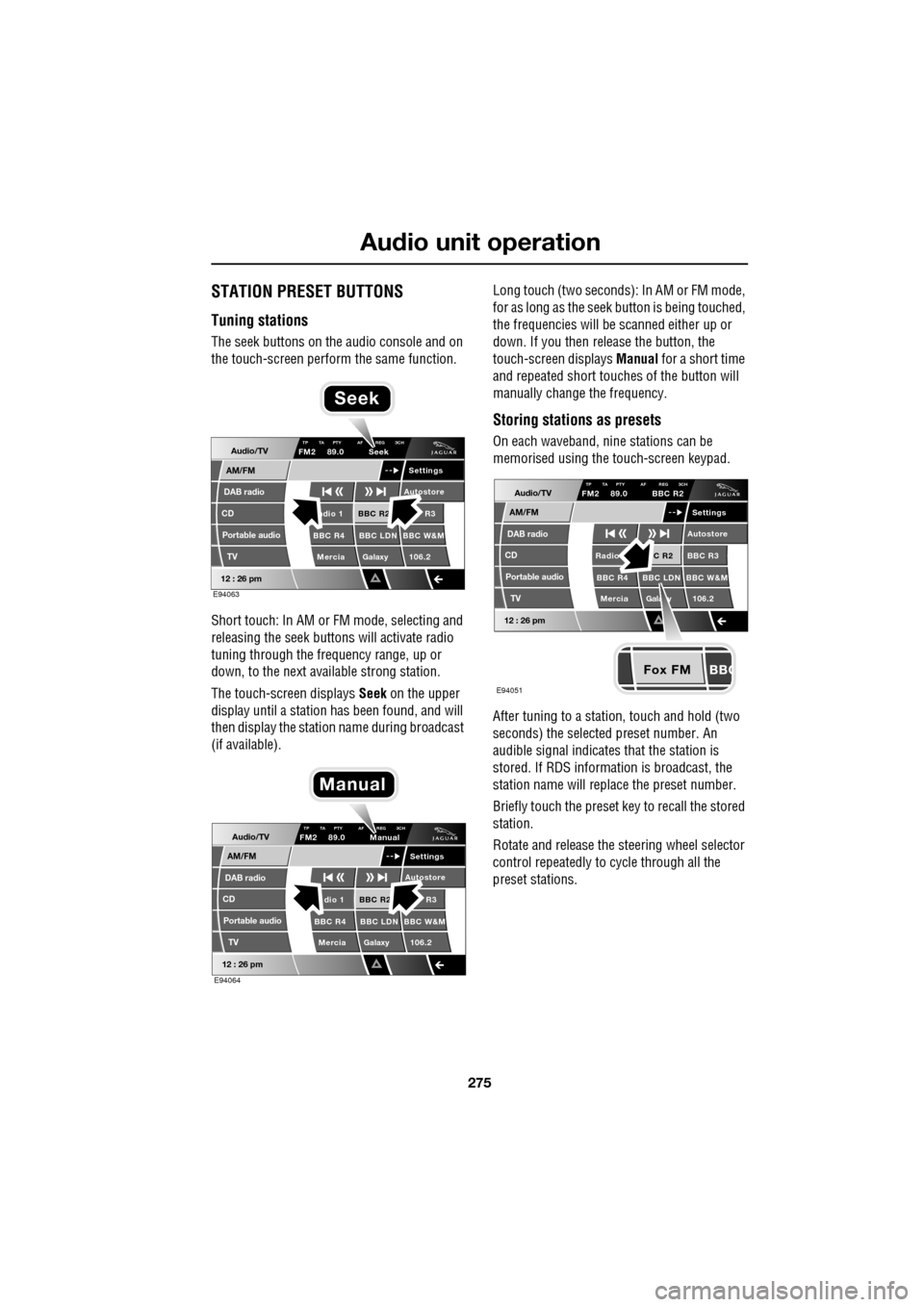
The seek buttons on the audio console and on
the touch-screen perform the same function.
Short touch: In AM or FM mode, selecting and
releasing the seek buttons will activate radio
tuning through the frequency range, up or
down, to the next available strong station.
The touch-screen displays Seek on the upper
display until a station has been found, and will
then display the station name during broadcast
(if available). Long touch (two seconds): In AM or FM mode,
for as long as the seek
button is being touched,
the frequencies will be scanned either up or
down. If you then release the button, the
touch-screen displays Manual for a short time
and repeated short touc hes of the button will
manually change the frequency.
Storing stations as presets
On each waveband, ni ne stations can be
memorised using the touch-screen keypad.
After tuning to a stati on, touch and hold (two
seconds) the selected preset number. An
audible signal indicates that the station is
stored. If RDS informat ion is broadcast, the
station name will replace the preset number.
Briefly touch the preset key to recall the stored
station.
Rotate and release the steering wheel selector
control repeatedly to cycle through all the
preset stations.Audio/TV
DAB radio
CD
AM/FM
12 : 26 pm
BBC R2 R3
BBC R4 BBC LDN BBC W&M Mercia Galaxy 106.2adio 1
Settings
Autostore
TP TA PTY AF REG 3CHFM2 89.0 Seek
Portable audio TV
E94063
Seek
Audio/TV
DAB radio
CD
AM/FM
12 : 26 pm
BBC R2 R3
BBC R4 BBC LDN BBC W&M Mercia Galaxy 106.2dio 1
Settings
Autostore
TP TA PTY AF REG 3CHFM2 89.0 Manual
Portable audio TV
E94064
Manual
Fox FM
Audio/TV
DAB radio
CD
AM/FM
12 : 26 pm
C R2 BBC R3
BBC R4 BBC LDN BBC W&M
Mercia Gala y 106.2Radio
Settings
Autostore
TP TA PTY AF REG 3CHFM2 89.0 BBC R2
Portable audio TV
E94051
Page 287 of 391
287
Digital audio broadcasting
PRESET BUTTONS
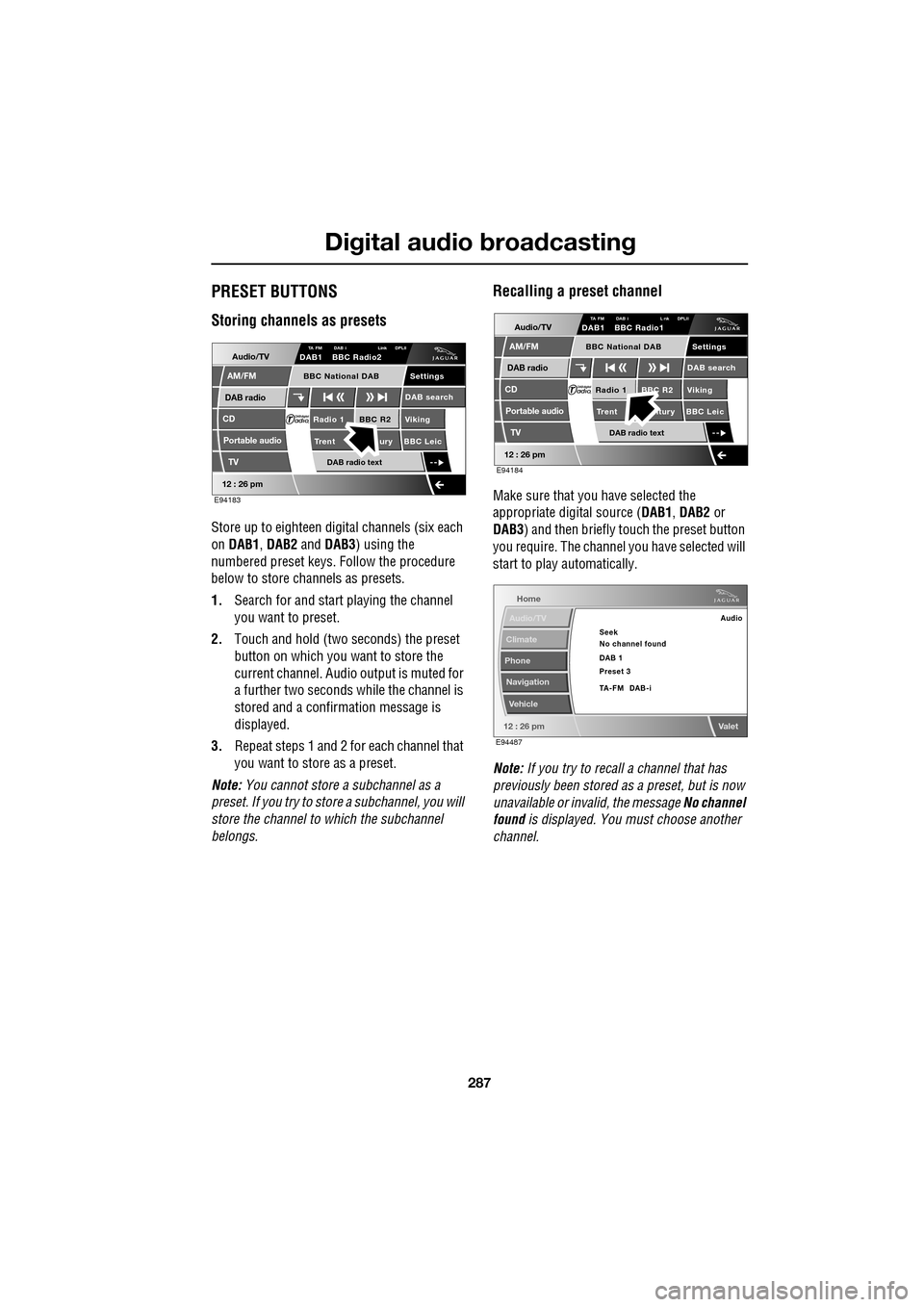
Storing channels as presets
Store up to eighteen digital channels (six each
on DAB1 , DAB2 and DAB3 ) using the
numbered preset keys. Follow the procedure
below to store channels as presets.
1. Search for and start playing the channel
you want to preset.
2. Touch and hold (two seconds) the preset
button on which you want to store the
current channel. Audi o output is muted for
a further two seconds while the channel is
stored and a confirmation message is
displayed.
3. Repeat steps 1 and 2 for each channel that
you want to store as a preset.
Note: You cannot store a subchannel as a
preset. If you try to stor e a subchannel, you will
store the channel to which the subchannel
belongs.
Recalling a preset channel
Make sure that you have selected the
appropriate digital source ( DAB1, DAB2 or
DAB3 ) and then briefly touch the preset button
you require. The channel you have selected will
start to play automatically.
Note: If you try to recall a channel that has
previously been stored as a preset, but is now
unavailable or invalid, the message No channel
found is displayed. You must choose another
channel.
Audio/TV
DAB radio
CD
AM/FM
12 : 26 pm
BBC R2 Viking
Trent ury BBC LeicRadio 1
Settings
DAB search
TA FM DAB i Link DPLIIDAB1 BBC Radio2
Portable audio
TV
DAB radio text
BBC National DAB
E94183
Audio/TV
DAB radio
CD
AM/FM
12 : 26 pm
BBC R2 Viking
Trent ntury BBC LeicRadio 1
Settings
DAB search
TA FM DAB i L nk DPLIIDAB1 BBC Radio1
Portable audio
TV
DAB radio text
BBC National DAB
E94184
Home
Audio/TV
Climate
Phone
Navigation
Vehicle
Valet12 : 26 pm
Audio
Seek
No channel found
Preset 3 DAB 1
TA-FM DAB-i
E94487
Page 290 of 391
Digital audio broadcasting
290
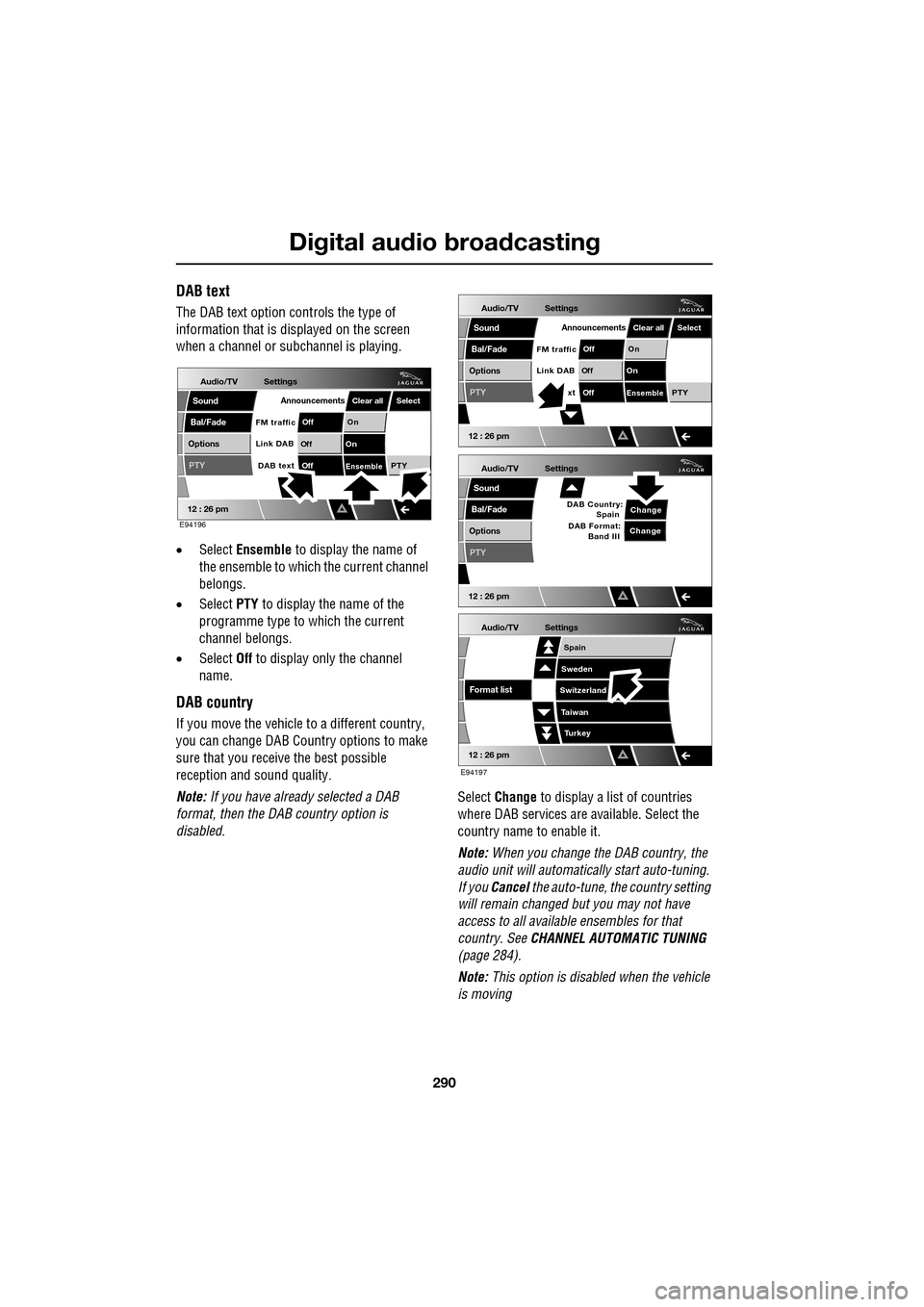
DAB text
The DAB text option controls the type of
information that is displayed on the screen
when a channel or s ubchannel is playing.
• Select Ensemble to display the name of
the ensemble to which the current channel
belongs.
• Select PTY to display the name of the
programme type to which the current
channel belongs.
• Select Off to display only the channel
name.
DAB country
If you move the vehicle to a different country,
you can change DAB Count ry options to make
sure that you receive the best possible
reception and sound quality.
Note: If you have already selected a DAB
format, then the DAB country option is
disabled. Select
Change to display a list of countries
where DAB services are available. Select the
country name to enable it.
Note: When you change the DAB country, the
audio unit will automati cally start auto-tuning.
If you Cancel the auto-tune, the country setting
will remain changed but you may not have
access to all available ensembles for that
country. See CHANNEL AUTOMATIC TUNING
(page 284).
Note: This option is disabled when the vehicle
is moving
Audio/TV
Bal/Fade
Options
Sound
12 : 26 pm
Settings
Announcements
On
Of f
On
Of f
EnsemblePTY
Of f
DAB text
Link DAB
FM trafficPTY
Select
Clear all
E94196
Audio/TV
Bal/Fade
Options
Sound
12 : 26 pm
Settings
Announcements
On
Of f
On
Of f
EnsemblePTY
Of f
xt
Link DAB
FM trafficPTY
Select
Clear all
Audio/TV
Bal/Fade
Options
Sound
12 : 26 pm
Settings
Change
PTY
Change
DAB Country:
Spain
DAB Format: Band III
Audio/TV
12 : 26 pm
Settings
Turkey
Spain
Sweden
Switzerland
T aiwan
Format list
E94197
Page 291 of 391
291
Digital audio broadcasting
DAB format
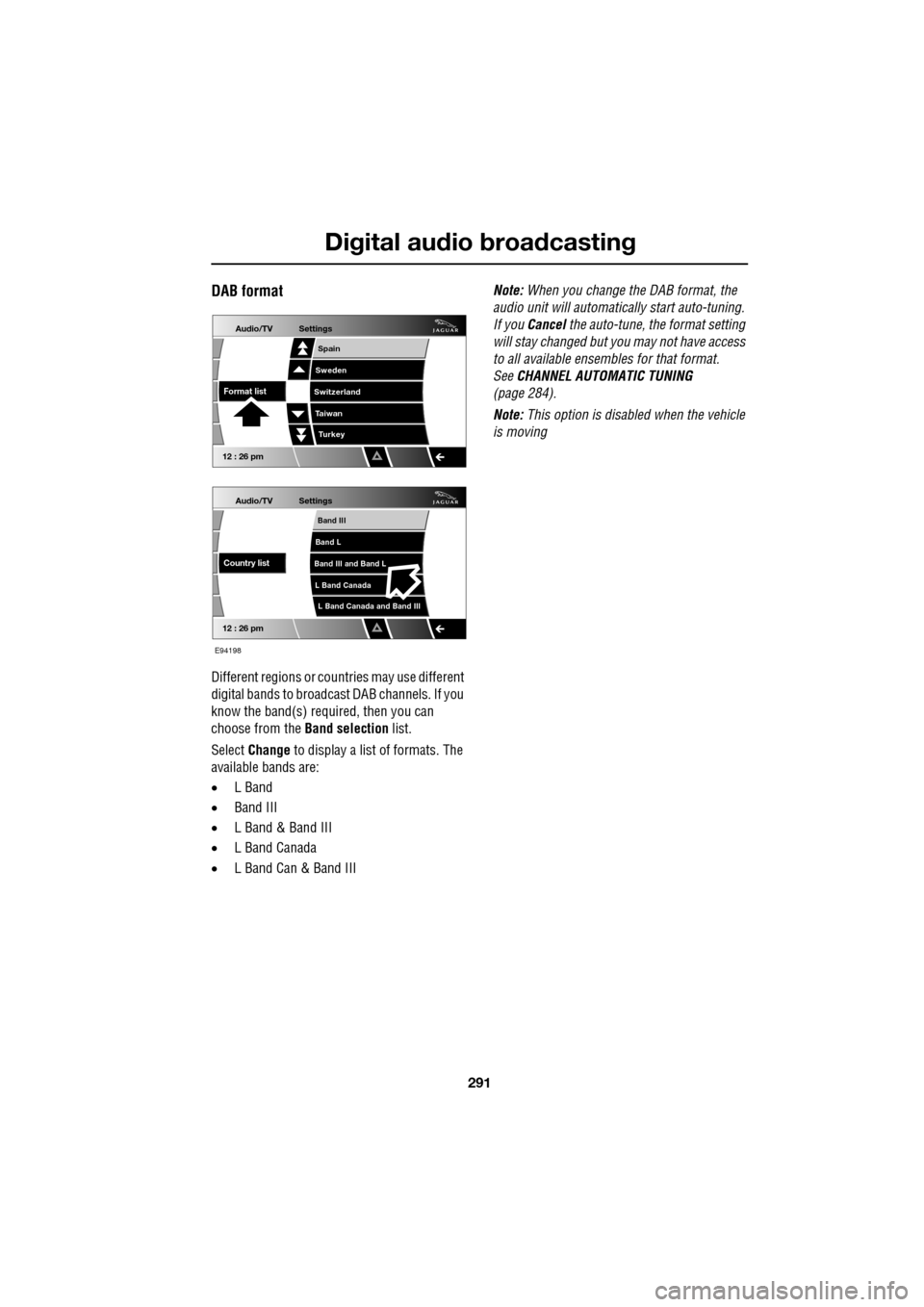
Different regions or countries may use different
digital bands to broadcast DAB channels. If you
know the band(s) required, then you can
choose from the Band selection list.
Select Change to display a list of formats. The
available bands are:
• L Band
• Band III
• L Band & Band III
• L Band Canada
• L Band Can & Band III Note:
When you change the DAB format, the
audio unit will automati cally start auto-tuning.
If you Cancel the auto-tune, the format setting
will stay changed but y ou may not have access
to all available ensembles for that format.
See CHANNEL AUTOMATIC TUNING
(page 284).
Note: This option is disabled when the vehicle
is moving
Audio/TV
12 : 26 pm
Settings
L Band Canada and Band III
Band III
Band L
Band III and Band L
L Band Canada
Country list
Audio/TV
12 : 26 pm
Settings
Turkey
Spain
Sweden
Switzerland
T aiwan
Format list
E94198
Page 305 of 391
305
Portable audio
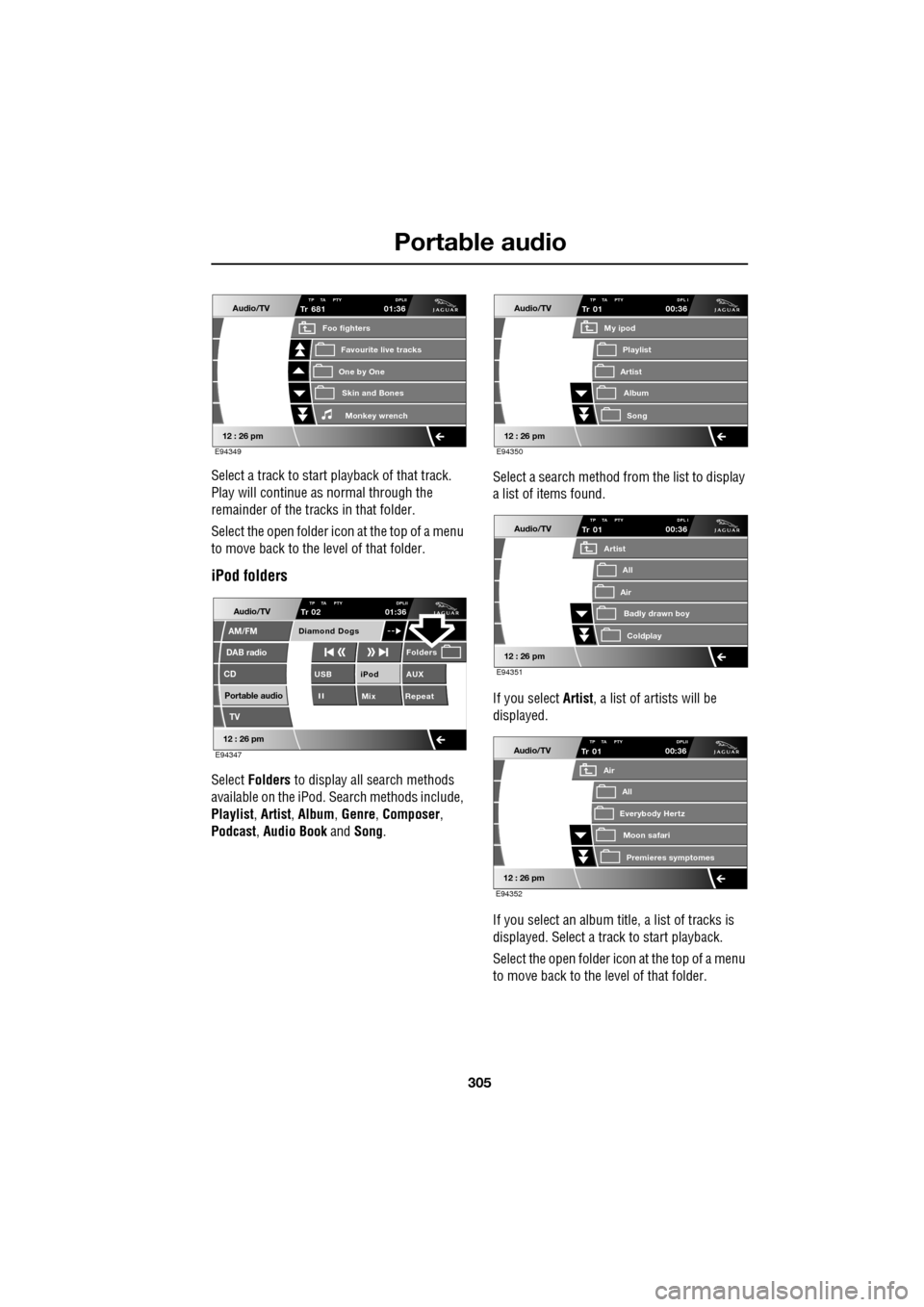
Select a track to start playback of that track.
Play will continue as normal through the
remainder of the tracks in that folder.
Select the open folder icon at the top of a menu
to move back to the level of that folder.
iPod folders
Select Folders to display all search methods
available on the iPod. Search methods include,
Playlist , Artist , Album , Genre , Composer ,
Podcast , Audio Book and Song. Select a search method from the list to display
a list of items found.
If you select Artist
, a list of artists will be
displayed.
If you select an album title, a list of tracks is
displayed. Select a track to start playback.
Select the open folder icon at the top of a menu
to move back to the level of that folder.
Audio/TV
12 : 26 pm
Tr
One by One
Foo fighters
Skin and BonesMonkey wr ench
Favourite live tracks
681TP TA PTY DPLII01:36
E94349
Audio/TV
DAB radio
CD
AM/FM
12 : 26 pm
iPod AUX
Mix RepeatUSB
Folders
TP TA PTY DPLIITr 02
Portable audio
TV
Diamond Dogs
01:36
E94347
Audio/TV
12 : 26 pm
Tr
Artist
My ipod
AlbumSong
Playlist
01TP TA PTY DPL I00:36
E94350
Audio/TV
12 : 26 pm
Tr
Air
Artist
Badly drawn boyColdplay
All
01TP TA PTY DPL I00:36
E94351
Audio/TV
12 : 26 pm
Tr
Everybody Hertz
Air
Moon safariPr emier
es symptomes
All
01TP TA PTY DPLII00:36
E94352