2009 JAGUAR XF lock
[x] Cancel search: lockPage 86 of 391

Lighting
86
Number plate lamp bulb
1.Using a small flat-bla ded screwdriver as
shown, lever out the si de of the lamp unit
and remove.
2. Twist the bulb holder 90° counter-
clockwise to access the bulb.
3. Pull to remove the bulb from the holder.
Other rear lamp bulbs
The following rear lamps are LED units and
should not be replaced by the owner:
•Tail lamps.
• Brake lamps.
• Rear fog lamps.
• High level brake lamp.
• Rear side marker lamps.
E94737
1
2
3
CAUTION
LED lamp units should only be replaced
by a Dealer/Authorised Repairer.
Page 90 of 391

Wipers and washers
90
Low screen wash
If the low washer fluid warning is on, the
windscreen wipers will not operate when the
wash/wipe is activated, even though there may
be washer fluid remaining in the reservoir
which is sprayed onto the screen. This is to
prevent damage to the wiper blades, scratching
of the glass or smearing dirt across the screen.
Normal, fast or single wipe can be selected
manually, to clear any spray from the
windscreen.
Timed jet function
If the timed jet func tion is configured,
the washer jets will only operate on the
up stroke of the wipers.
This function can be enabled/disabled by your
Dealer/Authorised Repairer.
Drip wipe
If the drip wipe function is configured,
the wipers will operate four seconds
after a wash wipe cycle has finished, to
clear any remaining drips from the windscreen.
This function can be enabled/disabled by your
Dealer/Authorised Repairer.
Blocked jets
If a washer jet becomes blocked, use a thin
strand of wire to unblock the jet by inserting
the wire into the jet. Ensure that the wire is
completely remove d after unblocking.
HEADLAMP WASHERS
Headlamp power wash operates automatically
with the windscreen wash, and will only
operate if the headlamps are switched on and
there is sufficient washer fluid in the reservoir.
Headlamp wash operates with every fourth
operation of the screen wa shers, provided that
ten minutes have elapsed since the last
operation of the headlamp washers.
Note: The power wash sequence is reset when
the headlamps or the ignition are turned off.
Note: Headlamp power wash is inhibited when
the low washer fluid warning is on.
CHECKING THE WIPER BLADES
The wiping edge of the blades should be
checked and cleaned periodically. Check the
blade rubber and replace the blade immediately
if cracks, splits or roughness are detected, to
prevent damage to the glass.
Clean the blade edge by wiping with a soft cloth
or sponge, using wa rm soapy water.
If the wipers fail to clear the windscreen when
operated, check the cond ition of the blade and
replace if necessary.
WARNING
Do not operate the washer jets during
adjustment. Windscreen washer fluid
may cause irritation to the eyes and
skin. Always read and observe the washer fluid
manufacturers instructions.
WARNING
Only use cleani ng products which
have been approved for use on
automotive glass and rubber.
Inappropriate products can cause smearing,
and increase glare.
E80573
Page 93 of 391

93
Windows and mirrors
ELECTRIC WINDOWS
With the ignition on or engine running, press a
switch down to lower the window, pull it up to
raise the window. Release the switch at any
point to stop window movement.
The windows will operate for five minutes after
the engine is switched off, as long as none of
the doors are opened.
One-shot operation
All four windows have one-shot operation.
Briefly pull the switch up and release, the
window will continue to raise until fully closed.
Briefly press the switch down and release, the
window will continue to lower until fully open.
Pressing or pulling the switch again will stop
the window.
Overriding anti-trap protection
Anti-trap protection will stop window
movement if an obstruction or resistance is
detected. Check the window and its aperture
and remove any obstructions, ice, etc. If it is
still necessary to raise the window, the override
procedure is as follows:-
1. Attempt to close the window. Anti-trap will
prevent closure and lower the window.
2. Within ten seconds, attempt to raise the
window again. Anti-t rap will prevent
closure and lower the window.
3. Attempt to close the window for a third
time, this time holding the switch in the
close position. The window will raise
whilst the switch is held. Hold until closed.
Note: If this procedure fails to remove the
blockage, the window operation may need to
be reset.
Window reset
The windows will need to be reset if the battery
is disconnected, becomes discharged or power
supply is interrupted.
Reset as follows:-
1. Close the window fully.
2. Release the switch, then lift it to the close
position and hold for two seconds.
3. Open the window fully.
4. Release the switch, then push it to the
open position and hold for two seconds.
5. Lift and release the switch to operate the
one-shot function.
6. Repeat the procedure on each window.
WARNING
All of the windows have an anti-trap
protection system. However, before
closing a window care must be taken
to ensure that none of the occupants have any
part of their body in a position where it could
be trapped. Even with an anti-trap system
serious injury or death can occur.
E94755
Page 96 of 391
Windows and mirrors
96
Automatic folding
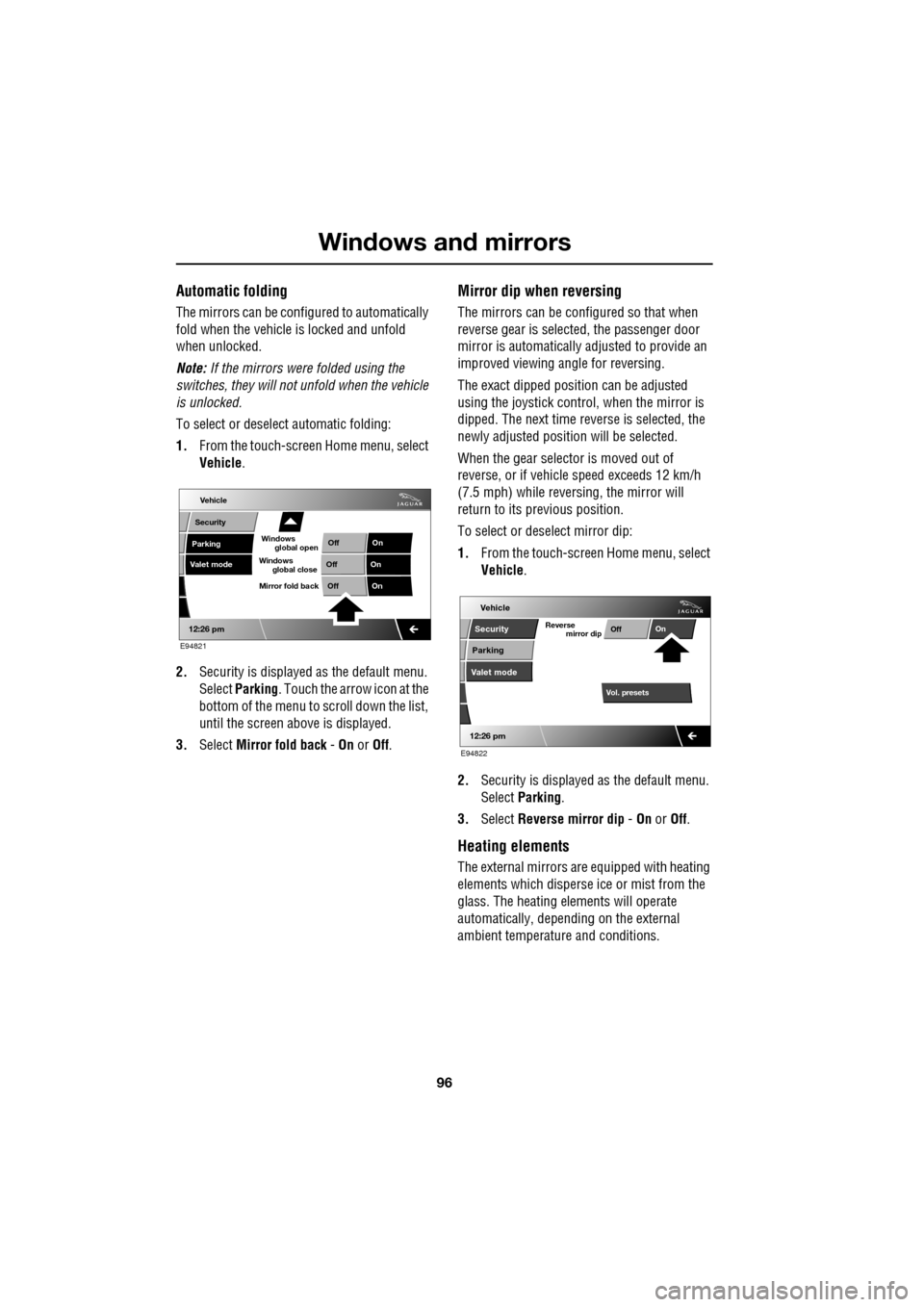
The mirrors can be configured to automatically
fold when the vehicle is locked and unfold
when unlocked.
Note: If the mirrors were folded using the
switches, they will not unfold when the vehicle
is unlocked.
To select or deselect automatic folding:
1. From the touch-screen Home menu, select
Vehicle .
2. Security is displayed as the default menu.
Select Parking . Touch the arrow icon at the
bottom of the menu to scroll down the list,
until the screen a bove is displayed.
3. Select Mirror fold back - On or Off.
Mirror dip when reversing
The mirrors can be configured so that when
reverse gear is select ed, the passenger door
mirror is automatically adjusted to provide an
improved viewing a ngle for reversing.
The exact dipped positi on can be adjusted
using the joystick contro l, when the mirror is
dipped. The next time reverse is selected, the
newly adjusted position will be selected.
When the gear selector is moved out of
reverse, or if vehicle speed exceeds 12 km/h
(7.5 mph) while revers ing, the mirror will
return to its previous position.
To select or deselect mirror dip:
1. From the touch-screen Home menu, select
Vehicle .
2. Security is displayed as the default menu.
Select Parking .
3. Select Reverse mirror dip - On or Off.
Heating elements
The external mirrors are equipped with heating
elements which disperse ice or mist from the
glass. The heating el ements will operate
automatically, depending on the external
ambient temperatur e and conditions.
Vehicle
Valet mode
Security
Parking Off
On
Off On
12:26 pm
OffOn
Mirror fold back
E94821
global open
Windows
global close
Windows
mirror dip
Vol. presetsOff
On
Vehicle
Security
Parking
Valet mode
Reverse
12:26 pm
E94822
Page 98 of 391

Windows and mirrors
98
BSM is designed to work most effectively when
driving on multi-lane highways.
If an object is identified by the system as being
an overtaking vehicle/object, an amber
warning icon ( 1) illuminates in the relevant
exterior mirror, to alert the driver that there is a
potential hazard in the vehicle's blind spot and
therefore, that a lane change might be
dangerous.
Note: If an overtaking vehicle is detected on
both sides of the vehicle simultaneously, the
warning icons in both mirrors will illuminate.
Note: BSM is automatically turned off when
reverse ( R) gear is selected, when the vehicle is
in park ( P), the vehicle is travelling below
16 km/h (10 mph) and also when the electrical
connector for the trailer socket is plugged in on
vehicles with a factory-fitted towing bracket.
When in these conditions, an amber warning
indicator within the exterior mirror is
displayed.Sensor blockage
The BSM system will automatically disable if
either of the sensors become completely
obscured, an amber wa rning indicator dot (2)
is displayed in the exterior mirror and the
message BSM sensor blocked appears in the
message centre.
Note: Blockage testing is only initiated when
vehicle speed is above 32 km/h (20 mph) and
will take at least two minutes of accumulated
time travelling above th is speed, to determine
that the sensor is blocked.
If the sensors become blocked, then please
check that there is nothing obscuring the rear
bumper and that it is cl ear from ice, frost and
dirt.
System fault
If a fault with one of the radar sensors is
detected, an amber warn ing indicator dot is
displayed in the exterior mirror and the
message BSM not available is displayed in the
message centre.
Note: Even if the detected fault only affects the
radar sensor on one side of the vehicle, the
whole system is disabled. If the fault is
temporary, the system will operate correctly
once the engine has been switched off and then
on again.
If a fault in the system occurs, consult your
Dealer/Authorised Repairer.
E96411
12
Page 100 of 391

Instruments
100
WARNING LAMPS AND INDICATORS
1.Anti-lock Braking System (ABS)/
Electronic Parking Brake (EPB).
2. Adaptive Cruise Control (ACC).
3. Glow plugs (diesel only).
4. Adaptive front lighting system (AFL).
5. Engine malfunction.
6. Tyre Pressure M onitoring System
(TPMS).
7. Airbag.
8. Right-hand direct ion indicator.
9. Rear fog lamp.
10. Dynamic Stability Control (DSC).
11. High beam.
12. Side lamps.
13. Seat belt.
14. Message centre.
15. Automatic Speed Limiter (ASL).
16. Forward alert.
17. Brakes - Electric Parking Brake (EPB)
On/Brake fluid low/El ectronic Brakeforce
Distribution (EBD)
18. Left-hand direction indicator. RED
warning indicators are for primary
warnings. A primary warning must be
investigated immediately by the driver or seek
qualified assistance as soon as possible.
AMBER warning indicators are for secondary
warnings, to indicate that a vehicle system is in
operation or that the driver must take action
and then seek qualified assistance.
Other indicators within the instrument panel
indicate system status (e .g. blue for main beam
or green for direction indicators, when in use).
Indicator check
An indicator bulb check is initiated when the
ignition system is switched on and lasts for
three seconds (excepting the airbag warning
indicator which will remain on for six seconds).
If any warning indicator remains on after this
period, investigate the cause before driving.
Some warning indicators have associated
messages displayed on the message centre.
Note: Not all warning indicators are included in
the check (e.g. main beam headlamps and
direction indicators).
Akm
l/100km
JAG1631
123456
789101817161514131211
Page 102 of 391

Instruments
102
Anti-lock Braking System (ABS)/
Electronic Parking Brake (EPB) - Amber
Illuminates if a fault has been
detected in the ABS (accompanied
by a warning message in the
message centre).
The brake system will c ontinue to function
normally, but without ABS braking.
The warning indicator will also illuminate if a
fault has been detected in the EPB system
(accompanied by a warning message in the
message centre).
If the warning indicato r illuminates or stays
illuminated after the bulb check cycle, seek
qualified assistance as soon as possible.
Adaptive Front Lighting - Amber
Illuminates when there is a system
fault. Seek qualified assistance as
soon as possible.
Engine malfunction - Amber
Illuminates when the ignition
system is on and remains
illuminated until the engine is
started.
If the indicator illuminates when the engine is
running, there is an engine malfunction.
Specialised diagnostic equipment is required
to repair such faults. Seek qualified assistance
as soon as possible. The vehicle may acti
vate limp-home mode,
with the possibility of reduced engine
performance. Driv e with caution.
Dynamic Stability Control (DSC) - Amber
The indicator will flash twice every
second when DSC is operating.
The message DSC NOT AVAILABLE
will be displayed and the indicator will
illuminate continuously, if a fault is detected.
When Trac DSC is selected, the message TRAC
DSC is displayed for f our seconds and the
warning indicator remains illuminated.
When DSC is switched off, a chime will sound,
the message DSC OFF is displayed in the
message centre and the warning indicator
remains illuminated.
Rear fog lamps - Amber
Illuminates when the rear fog lamps
are switched on.
Adaptive Cruise Control - Amber
Illuminates when adaptive cruise
control is active, to indicate that the
vehicle is in follow mode.
Forward alert - Amber
Illuminates when the forward alert
function is active.
Airbag - Amber
Flashes if the airbag system
develops a fault, then illuminates
permanently until the fault has been
diagnosed and cleared.
Seek qualified assistance as soon as possible.
WARNING
If the ABS and brake warning
indicators are illuminated at the same
time, do not drive the vehicle until the
fault is rectified. Seek qualified assistance
immediately.
Page 105 of 391

105
Information displays
GENERAL INFORMATION
The driver message centre display is situated
within the instrument panel between the
tachometer and speedometer gauges. The
message centre is active as soon as a door is
opened for access.
The primary function of the message centre is
to inform the driver of the following:
• Warning messages.
• Temporary alert messages.
• Information messages.
• Turn-by-turn navigation.
The message centre screen is divided into
various zones displaying the following:
1. Gear selection, automatic or manual.
2. Warning messages, accompanied by a red
or amber backlight, if system faults are
detected. Status messages are displayed
to indicate changes in state of certain
vehicle functions (e.g. navigation). When there are no current warning
messages, turn-by-turn navigation
information is displayed, giving
instructions for the next junction. This
facility can be turned off via the
touch-screen. See
TURN-BY-TURN
NAVIGATION (page 339).
The clock can be shown when no other
information is required to be displayed.
See CLOCK (page 124).
3. Trip computer information, including total
distance covered by the vehicle. See TRIP
COMPUTER (page 107).
4. Set trip computer information display
relating A, B or Auto trip computer.
See PERSONALISED SETTINGS
(page 111).
On diesel and V8 petrol models, the
electronic engine oil dipstick reading can
also be displayed, when selected using the
trip computer button. See ENGINE OIL
CHECK - V8 Petrol engines (page 199).
5. The fuel level gauge. The small arrow on
the top of the fuel pump symbol denotes
which side of the vehi cle the fuel filler cap
is located.
Automiles
Inst Fuelmpg
BOOT OPEN
E95066
1
2
3
4
5