2009 JAGUAR XF Message centre
[x] Cancel search: Message centrePage 67 of 391
67
Steering wheel
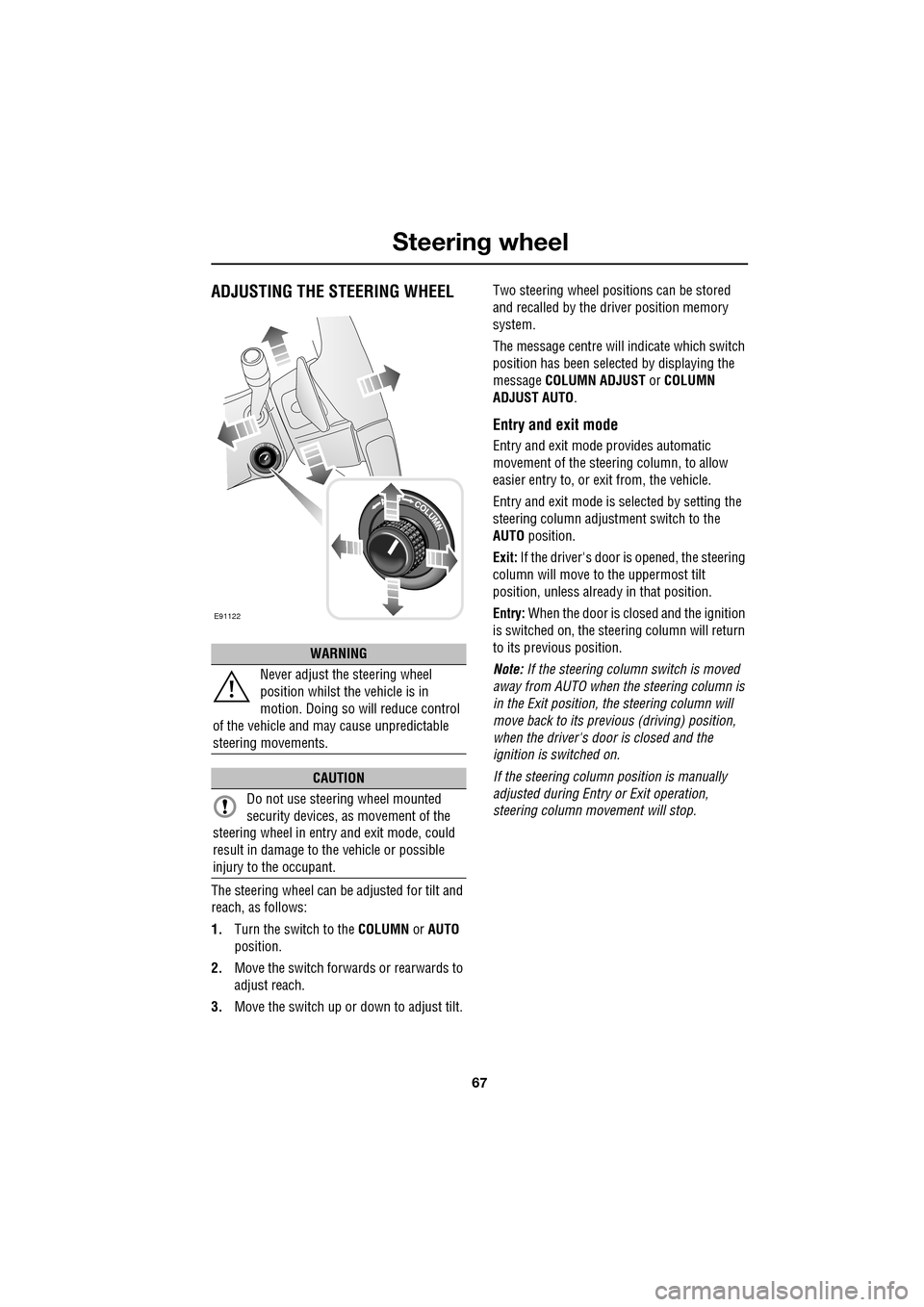
ADJUSTING THE STEERING WHEEL
The steering wheel can be adjusted for tilt and
reach, as follows:
1.Turn the switch to the COLUMN or AUTO
position.
2. Move the switch forwards or rearwards to
adjust reach.
3. Move the switch up or down to adjust tilt. Two steering wheel positions can be stored
and recalled by the dr
iver position memory
system.
The message centre will indicate which switch
position has been select ed by displaying the
message COLUMN ADJUST or COLUMN
ADJUST AUTO .
Entry and exit mode
Entry and exit mode provides automatic
movement of the steering column, to allow
easier entry to, or exit from, the vehicle.
Entry and exit mode is selected by setting the
steering column adjustment switch to the
AUTO position.
Exit: If the driver's door is opened, the steering
column will move to the uppermost tilt
position, unless alread y in that position.
Entry: When the door is closed and the ignition
is switched on, the steering column will return
to its previous position.
Note: If the steering column switch is moved
away from AUTO when the steering column is
in the Exit position, the steering column will
move back to its previous (driving) position,
when the driver's door is closed and the
ignition is switched on.
If the steering column position is manually
adjusted during Entry or Exit operation,
steering column movement will stop.
WARNING
Never adjust the steering wheel
position whilst the vehicle is in
motion. Doing so will reduce control
of the vehicle and may cause unpredictable
steering movements.
CAUTION
Do not use steering wheel mounted
security devices, as movement of the
steering wheel in entr y and exit mode, could
result in damage to the vehicle or possible
injury to the occupant.
E91122
Page 70 of 391

Steering wheel
70
Activating the system
To activate voice control, press the voice
button on the steering wheel. A tone will be
heard and LISTENING will be displayed in the
message centre, to indicate that the system is
now waiting for a voice command.
Note: It is only necessary to press the voice
button at the beginning of each voice session.
Language and accent
Voice feedback is give n in the same language
as is set for Voice recognition. For example, if
the Voice recognition language is set to UK
English, the system wi ll not recognise other
languages (e.g. US English). The language for
the system can be changed using the
touch-screen as follows:
1. From the Home menu, select Comms.
2. From the Comms menu, select Voice and
then select Settings.
3. Select Change, then select the desired
language from the options available. Note:
Changing the Voice recognition language
will not affect the language settings for the
touch-screen.
Giving a command
Note: If background noise is excessive (e.g.
driving with windows open), the voice system
may not recognise a given voice command.
Press and release the Voice button on the
steering wheel and, after the tone, say one of
the commands listed later in this section, or
one of the commands given in either the
Telephone voice section or the Navigation
voice section, as appropriate. See TELEPHONE
VOICE CONTROL (page 323). SeeUSING
VOICE CONTROL (page 373).
Note: Always wait until the tone finishes
sounding before giving a voice command.
Give commands while facing forwards, in a
natural speaking voice as if talking to a
passenger or on the phon e. Most accents are
understood without difficul ty, but if the system
does not recognise the command, the system
will respond with SORRY and allow two more
attempts to say the command.
The system will repe at the command (as
understood by the system ) back to you as
confirmation. The comma nd will then be acted
on or the system will ask for further
information - always wait until after the tone
has sounded before speaking.
Once you are familiar with system requests, it
is possible to skip to the end of the request (to
when the tone sounds) to give your response.
To achieve this, briefly press and release the
voice button on the steering wheel during the
system request.
Note: If the Voice button on the steering wheel
is pressed before the system is ready to receive
a command, VOICE NOT READY will be
displayed in the message centre.
Voice
12 : 26 pm
Add phone nametags
Command list Operating guide
Settings
E96024
Voice
12 : 26 pm
Feedback Volume
Voice language
English UKChange
Page 74 of 391

Steering wheel
74
CRUISE CONTROL
1. SET - Rotate and releas e to engage cruise
control (at the vehicle's current speed).
With cruise control operating, rotate up or
down to increase or decrease the speed in
2 km/h (1 mph) steps.
2. CANCEL - Press to cancel cruise control.
The previously programmed set speed will
be retained and can be reselected by
pressing RESUME.
3. RESUME - Press to resume the previously
programmed set speed (e.g. after cruise
control has been cancelled).
4. GAP (ACC only) - Rotate up or down to
increase or decrease the time gap to the
vehicle ahead. The gap can be set to one of
four pre-defined inte rvals. The current
setting will be displayed in the message
centre.
For more information about cruise control:
See USING CRUISE CONTROL (page 156).
For more information about adaptive cruise
control (ACC): See USING ACC (page 159).
DISPLAY SHOW
NAVIGATION
The Navigation main
menu is displayed on the
touch-screen (the
navigation caution must
be accepted before the
menu is displayed).
DISPLAY ON Turns the touch-screen on.
DISPLAY OFF Turns the touch-screen off.
NOTEPAD HELP Play s information on
notepad commands.
RECORD NOTE Allows recording of a note, up to 30 seconds
long.
PLAY NOTEPAD Plays all currently stored notes.
CLEAR NOTEPAD Deletes all notes currently
stored in notepad.
Command Description
E9707923
41
Page 75 of 391

75
Lighting
LIGHTING CONTROL
Note: If the ignition system is switched off and
the lamps are left on, the message centre will
display LIGHTS ON.
The exterior lamps are controlled by the
left-hand column stalk switch.
The rotary collar on the stalk has three
positions for turning the exterior lamps on or
off and positions for auto lamps and exit delay.
Off
All exterior lamps off (except vehicles provided
with daylight running lamps).
Side lamps
Switches on the side lamps, tail, number plate
and any other marker lamps required by local
legislation. The instrument panel will also be lit.
Headlamps
Select this positi on to switch on the
headlamps. Headlamp flash:
Pull the switch towards the
steering wheel and release to flash the high
beam on and off. The high beam will remain on
for as long as the switch is held.
High beam: With the headlamps on, push the
switch away from the steering wheel to switch
to high beam.
The blue warning indicator on the instrument
panel will illuminate.
To turn high beam off and return to low beam,
pull the column switch towards the steering
wheel.
Note: If the rotary control switch is moved to
the OFF position, with hi gh beam still activated,
both low and high beam will be extinguished.
Both low and high beam will illuminate when
the headlamps are turned on again.
E91137
E91138
E91139
E91140
E91141
Page 77 of 391

77
Lighting
Exit delay
Three settings on the rotary collar set the time
that the headlamps will remain on after the
driver’s door has closed:
1.30 seconds.
2. 60 seconds.
3. 120 seconds.
The message centre displays the selected delay
time (e.g. AUTOLAMP DELAY 0:60 ) or displays
AUTOLAMP DELAY OFF when the autolamp
delay function has been turned off.
Note: If the lamp switch ro tary collar is in the
AUTO position there will be no exit delay and
the headlamps will extinguish when the ignition
system is turned off.
REAR FOG LAMPS
Rear fog lamps will only operate when
headlamp dipped beam or Auto lamps are
selected. Press the rear fog lamp button to
switch on, press again to switch off.
HAZARD WARNING FLASHERS
Press the switch to turn the hazard warning
lamps on. When the hazard warning lamps are
operating, the indicator warning lamps will
flash in time with the hazard warning lamps.
Press again to turn the lamps off.
Use only in an emergency, to warn traffic of a
vehicle breakdown or approaching danger.
Note: Hazard warning lamps can be used when
the ignition is on or off.
JAG0924
1
2
3
JAG1332
E94710
Page 98 of 391

Windows and mirrors
98
BSM is designed to work most effectively when
driving on multi-lane highways.
If an object is identified by the system as being
an overtaking vehicle/object, an amber
warning icon ( 1) illuminates in the relevant
exterior mirror, to alert the driver that there is a
potential hazard in the vehicle's blind spot and
therefore, that a lane change might be
dangerous.
Note: If an overtaking vehicle is detected on
both sides of the vehicle simultaneously, the
warning icons in both mirrors will illuminate.
Note: BSM is automatically turned off when
reverse ( R) gear is selected, when the vehicle is
in park ( P), the vehicle is travelling below
16 km/h (10 mph) and also when the electrical
connector for the trailer socket is plugged in on
vehicles with a factory-fitted towing bracket.
When in these conditions, an amber warning
indicator within the exterior mirror is
displayed.Sensor blockage
The BSM system will automatically disable if
either of the sensors become completely
obscured, an amber wa rning indicator dot (2)
is displayed in the exterior mirror and the
message BSM sensor blocked appears in the
message centre.
Note: Blockage testing is only initiated when
vehicle speed is above 32 km/h (20 mph) and
will take at least two minutes of accumulated
time travelling above th is speed, to determine
that the sensor is blocked.
If the sensors become blocked, then please
check that there is nothing obscuring the rear
bumper and that it is cl ear from ice, frost and
dirt.
System fault
If a fault with one of the radar sensors is
detected, an amber warn ing indicator dot is
displayed in the exterior mirror and the
message BSM not available is displayed in the
message centre.
Note: Even if the detected fault only affects the
radar sensor on one side of the vehicle, the
whole system is disabled. If the fault is
temporary, the system will operate correctly
once the engine has been switched off and then
on again.
If a fault in the system occurs, consult your
Dealer/Authorised Repairer.
E96411
12
Page 99 of 391

99
Instruments
INSTRUMENT PANEL OVERVIEW
Instrument panel
1.Speedometer.
2. Message centre.
3. Tachometer.
4. Fuel gauge.
The instruments will not show correct
information until the i gnition system is on.
Speedometer
Indicates road speed.
Message centre
Displays warning and information messages
and gear selector mode and position
information. See WARNING AND
INFORMATION MESSAGES (page 106).
See AUTOMATIC TRANSMISSION (page 137).
Tachometer
Indicates engine speed in revolutions per
minute (RPM) x 1000.
Fuel gauge
The message centre will display FUEL LEVEL
LOW , when the fuel level is approximately 1/16
of tank capacity. This gives an approximate
range of 50 to 65 km (30 to 40 miles).
As a reminder for the location of the fuel filler,
there is an arrow above the fuel pump symbol,
which points to the releva nt side of the vehicle.
Akm
l/100km
JAG1630
123
4
CAUTION
Never allow the vehicle to run out of fuel.
The resulting misfire may cause serious
damage to the catalytic convertor.
Page 100 of 391

Instruments
100
WARNING LAMPS AND INDICATORS
1.Anti-lock Braking System (ABS)/
Electronic Parking Brake (EPB).
2. Adaptive Cruise Control (ACC).
3. Glow plugs (diesel only).
4. Adaptive front lighting system (AFL).
5. Engine malfunction.
6. Tyre Pressure M onitoring System
(TPMS).
7. Airbag.
8. Right-hand direct ion indicator.
9. Rear fog lamp.
10. Dynamic Stability Control (DSC).
11. High beam.
12. Side lamps.
13. Seat belt.
14. Message centre.
15. Automatic Speed Limiter (ASL).
16. Forward alert.
17. Brakes - Electric Parking Brake (EPB)
On/Brake fluid low/El ectronic Brakeforce
Distribution (EBD)
18. Left-hand direction indicator. RED
warning indicators are for primary
warnings. A primary warning must be
investigated immediately by the driver or seek
qualified assistance as soon as possible.
AMBER warning indicators are for secondary
warnings, to indicate that a vehicle system is in
operation or that the driver must take action
and then seek qualified assistance.
Other indicators within the instrument panel
indicate system status (e .g. blue for main beam
or green for direction indicators, when in use).
Indicator check
An indicator bulb check is initiated when the
ignition system is switched on and lasts for
three seconds (excepting the airbag warning
indicator which will remain on for six seconds).
If any warning indicator remains on after this
period, investigate the cause before driving.
Some warning indicators have associated
messages displayed on the message centre.
Note: Not all warning indicators are included in
the check (e.g. main beam headlamps and
direction indicators).
Akm
l/100km
JAG1631
123456
789101817161514131211