2009 JAGUAR XF Start
[x] Cancel search: StartPage 301 of 391

301
Portable audio
Connecting an auxiliary device
On the audio Home screen, select Audio/TV
and then select Portable audio.
Note: You can also press the SOURCE button
repeatedly to select Portable audio device .
Insert the AUX jack plug into the socket
indicated.
Select AUX.
Play will start when you switch on and start
playing the auxiliary device.
Note: You cannot operate or search the
auxiliary audio device using the touch-screen,
so all buttons on the touch-screen are
unavailable.
Connecting more than one device
You can connect an iPod and a USB device
simultaneously to the portable audio interface
and switch between them using the
touch-screen. Select iPod, USB or AUX , to
switch between modes.
The device docked first will remain the active
device until you choose to change.
If, after changing to the newly-docked device,
you change back to the first device, play will
resume at the point you left it (USB and iPod
only).
Note: You cannot use a USB hub to connect
more than one USB device to the audio unit.
Note: Devices connected to the iPod and USB
ports will be charged, but devices that are fully
discharged will not play. Please disconnect
your iPod when leaving the vehicle. Failure to
do so may result in the iPod battery
discharging.
Note: Options such as Repeat and Mix relate
to the device currently playing, they will not
apply to any subsequent device.
E94340
Audio/TV
DAB radio
CD
AM/FM
12 : 26 pm
iPod AUX
RepeUSB
Settings
Folders
TP TA PTY DPLIITr 04
Portable audio
TV
Sing for absolution
00:36
E94709
Page 302 of 391
Portable audio
302
AUXILIARY INPUT DEVICES
Playing a portable device
If you are using a USB mass storage device or
iPod, you can control playback using the
touch-screen controls.
If you are using any por table audio device via
the AUX socket, then you must control
playback from the device itself.
Autoplay
Whenever a USB device is docked, play will
start automatically at the first track in the first
available folder.
For an iPod, play will always resume from the
current track, whether previously docked or
not.
Pause
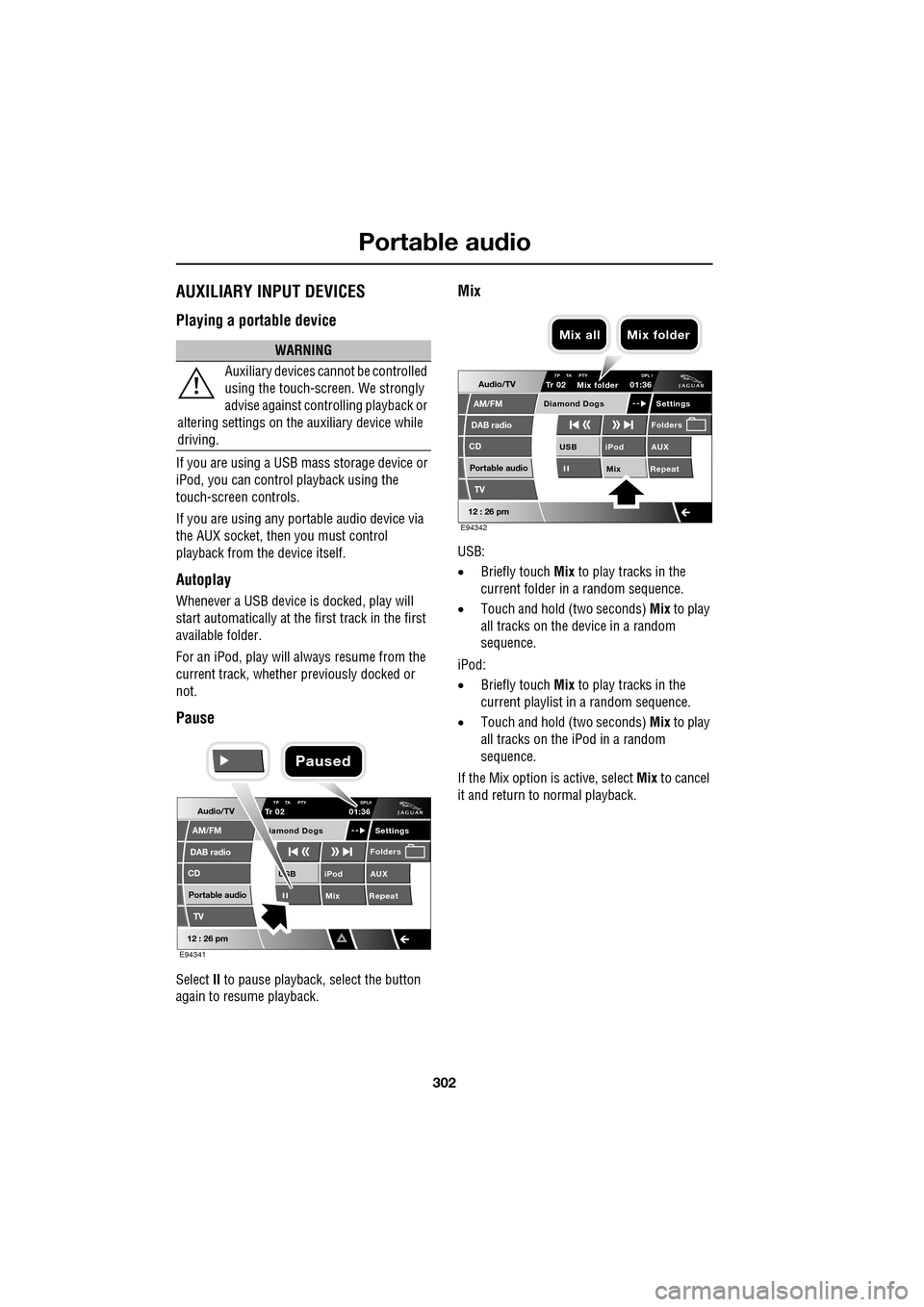
Select II to pause playback , select the button
again to resume playback.
Mix
USB:
• Briefly touch Mix to play tracks in the
current folder in a random sequence.
• Touch and hold (two seconds) Mix to play
all tracks on the device in a random
sequence.
iPod:
• Briefly touch Mix to play tracks in the
current playlist in a random sequence.
• Touch and hold (two seconds) Mix to play
all tracks on the iPod in a random
sequence.
If the Mix option is active, select Mix to cancel
it and return to normal playback.
WARNING
Auxiliary devices ca nnot be controlled
using the touch-screen. We strongly
advise against controlling playback or
altering settings on the auxiliary device while
driving.
Audio/TV
DAB radio
CD
AM/FM
12 : 26 pm
iPod AUX
Mix RepeatUSB
Settings
Folders
TP TA PTY DPLIITr 02
Portable audio
TV
iamond Dogs
01:36
E94341
Paused
Audio/TV
DAB radio
CD
AM/FM
12 : 26 pm
iPod AUX
Mix RepeatUSB
Settings
Folders
TP TA PTY DPL ITr 02
Portable audio
TV
Diamond Dogs
01:36
E94342
Mix folder
Mix all Mix folder
Page 305 of 391
305
Portable audio
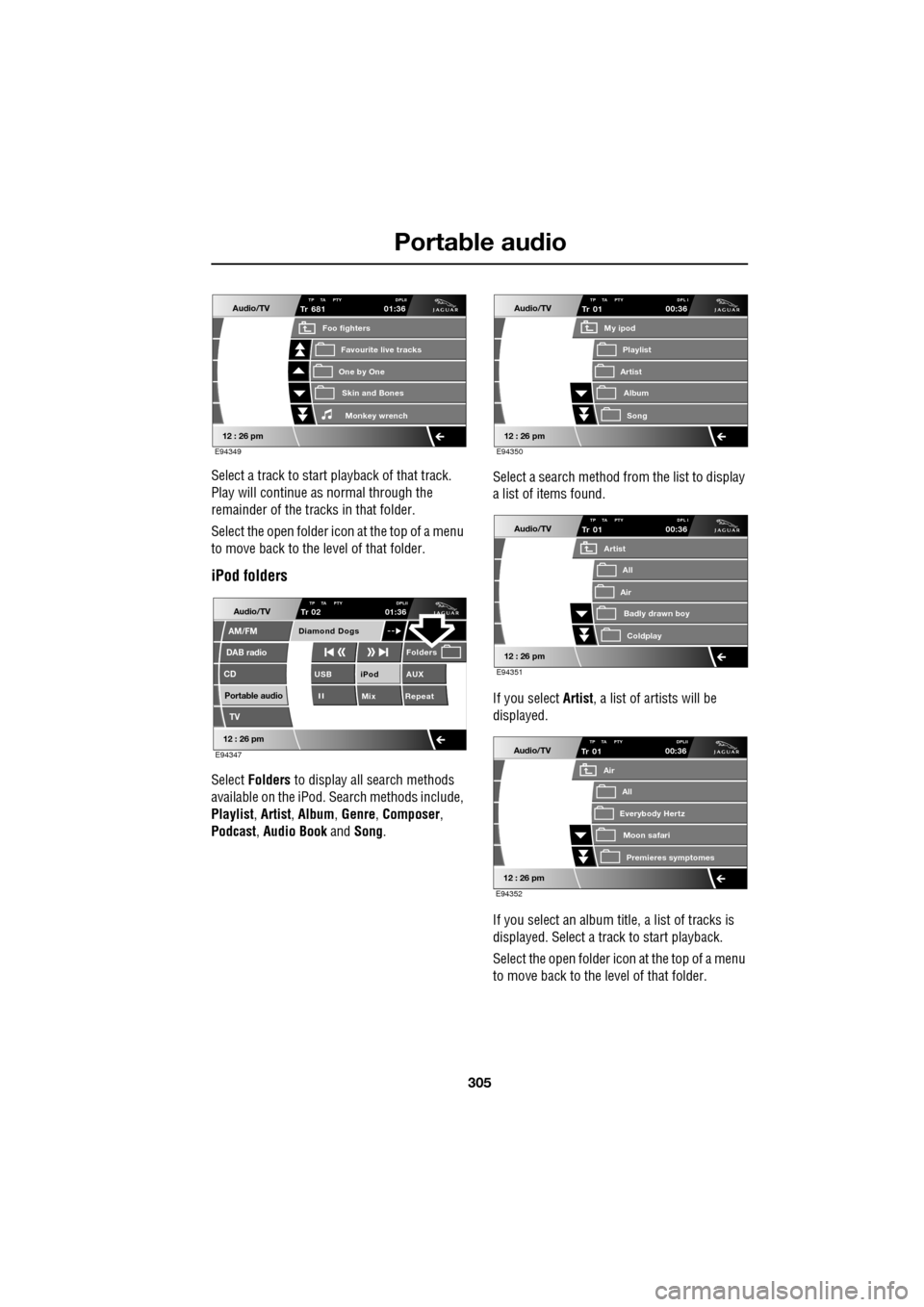
Select a track to start playback of that track.
Play will continue as normal through the
remainder of the tracks in that folder.
Select the open folder icon at the top of a menu
to move back to the level of that folder.
iPod folders
Select Folders to display all search methods
available on the iPod. Search methods include,
Playlist , Artist , Album , Genre , Composer ,
Podcast , Audio Book and Song. Select a search method from the list to display
a list of items found.
If you select Artist
, a list of artists will be
displayed.
If you select an album title, a list of tracks is
displayed. Select a track to start playback.
Select the open folder icon at the top of a menu
to move back to the level of that folder.
Audio/TV
12 : 26 pm
Tr
One by One
Foo fighters
Skin and BonesMonkey wr ench
Favourite live tracks
681TP TA PTY DPLII01:36
E94349
Audio/TV
DAB radio
CD
AM/FM
12 : 26 pm
iPod AUX
Mix RepeatUSB
Folders
TP TA PTY DPLIITr 02
Portable audio
TV
Diamond Dogs
01:36
E94347
Audio/TV
12 : 26 pm
Tr
Artist
My ipod
AlbumSong
Playlist
01TP TA PTY DPL I00:36
E94350
Audio/TV
12 : 26 pm
Tr
Air
Artist
Badly drawn boyColdplay
All
01TP TA PTY DPL I00:36
E94351
Audio/TV
12 : 26 pm
Tr
Everybody Hertz
Air
Moon safariPr emier
es symptomes
All
01TP TA PTY DPLII00:36
E94352
Page 307 of 391

307
Telephone
GENERAL INFORMATIONNote: The vehicle telephone system is
designed to function with a wide variety of
Bluetooth® telephones.
As these telephones have a wide range of audio
and echo characteristics, it may take a few
seconds for the vehicle telephone system to
adapt and deliver optimum audio performance.
It may be necessary to reduce the in-vehicle
volume slightly, to fully optimise audio
performance and reduce echo.
In order to achieve th e best possible audio
performance, it may be necessary to select a
lower speed on the heat er blower and reduce
the system volume slightly, when using certain
mobile phones.
Telephone networks
The telephone network standard allows you to
use your telephone in many countries.
However, telephone rece ption may be poor or
unavailable in remote re gions. This may be due
to the inadequate power of the transmitter,
which results in a weak signal or incomplete
coverage.
What is Bluetooth®?
Jaguar Bluetooth® Connectivity was
developed to be used wi th a selected range of
mobile phones, from a number of different
manufacturers. Some mobile phones feature
different operating soft ware versions - the
correct version is needed for successful
integration with the Jaguar Bluetooth®
system.
Bluetooth is an intern ational standard that
allows electronic com ponents to communicate
with each other, using a short-range radio link.
Bluetooth eliminates the need for wires or
cables: Typically, devices can communicate at
a range of up to 10 metres (33 feet).
WARNING
Using the telephone near the car: Do
not telephone inside a garage or near
an open car bonnet. The air may
contain fuel vapours a nd the telephone could
produce sparks and start a fire.
Unusual ambient conditions: Switch
off the telephone in areas where high
explosives are being used. High
frequency remote controls could be interfered
with and cause an explos ion. Switch off your
telephone in areas with a high explosion risk.
This includes filling st ations, fuel storage
areas or chemical factories, as well as places
where the air contains fuel vapour, chemicals
or metal dust. The telephone might produce
sparks and cause a fire or explosion.
Medical equipment: The functioning
of cardiac pacemakers or hearing aids
may be impaired when the phone is in
use. Check with a doctor or manufacturer
whether any such devices you or your
passengers are using, are sufficiently
protected against high-frequency energy.
Always stow your mobile phone
securely. In an accident, loose items
can cause injury.
Using any hand-held appliance while
driving, can be dangerous and is
illegal in cert ain countries.
Page 310 of 391

Telephone
310
6.When the vehicle's Bluetooth system is
discovered, your mob ile phone will list
Jaguar as a discovered Bluetooth device.
Select this device from the list.
7. You will now be requested to enter a
Bluetooth PIN. When pairing and docking
from your mobile phone, this number is
always 1313.
Once your phone is paired to the vehicle's
Bluetooth system, it can connect automatically.
If the phone does not automatically connect,
you will have to conne ct manually with the
Jaguar Bluetooth System, via the mobile
phone. Please consul t the mobile phone's
handbook for further information.
Note: Some mobile phones require you to
authorise the connection each time you start
the system. To change this, you must set
Jaguar as ‘authorised’ in the mobile phone’s
known device list. This will enable connections
from the vehicle to the mobile phone to take
place automatically without confirmation each
time. Please consul t the mobile phone’s
handbook for further information.
Pairing and docking using the
touch-screen
1. Switch on your mobile phone’s Bluetooth
connection, using the phone’s menu. Make
sure that your mobile phone is in Bluetooth
discoverable mode, sometimes referred to
as find me mode (s ee your phone’s
operating instructions for more
information).
2. Switch the ignition system on, ensure that
the touch-screen is active. 3.
From the home menu select Comms. If
your car is not fitted with JaguarVoice,
Phone will appear in the position occupied
by Comms .
4. Select Settings .
5. Select Search new . The system will search
for all Bluetooth phones that are in range.
If a phone is already docked, it will be
automatically undocked when a Search is
initiated.
Home
Audio/TV
Climate
Comms
Navigation
VehicleExternal
Left Right
20 17CC
15C
.5 .5
DAB radio DAB1
BBC 5Live Xtra
BBC National DAB
TA FM DAB i Subch. PL II
Valet12 : 26 pm
E96908
Digit Dial
Names
Last 10
Settings
7
1
4
*8
2
5
0 9
6
Options
C
E96912
Comms
Page 315 of 391

315
Telephone
PHONEBOOK
The phonebook option (3), allows you to
download your mobile phone's directory
(either automatically or manually) or erase it
from the vehicle’s memory, assuming that the
phone supports this feature.
The system can store a maximum of 750
entries, although this fi gure varies, depending
on the type of mobile phone used. Refer to
Phone capacity.
Note: It may take several minutes to copy the
phonebook to the vehi cle, depending on the
phone and number of entries stored. The
telephone system may not be operational
during this period.
Automatic download
Any phone numbers stored in your mobile
phonebook, can be copi ed to the vehicle’s
phonebook.
If Auto Download is on, the mobile phone
phonebook will be transferred to the vehicle
every time the phone is connected (docked).
This feature will only work on phones that
support AT Phonebook Profile. Refer to your
phone’s operating instructions.
To change Auto Download: Select Phone
options (1), then select Phonebook (3). Select
Off or On.
If On is selected, the vehicle will automatically
download the entire directory, each time the
phone is docked.
Manual download
If your phone does not support AT Phonebook
(automatic phonebook download), you may be
able to manually send your phonebook
(individual entries or in full) to the vehicle's
Bluetooth system usi ng the phone's Object
push facility. Refer to your phone's operating
instructions to determine whether this feature
is available.
To initiate a manual download, select Phone
options , then Phonebook and then Start
manual download .
nametag
Register
Voice mail
Answer options
Phone options
E96917
Comms
Add phone
Ring tones
Phonebook
E96914
Comms
Off OnAuto download
Start manual download
Erase entire phonebook
E96957
Comms
OffOnAuto download
Start manual download
Erase entire phonebook
Page 330 of 391

Television
330
Steering wheel controls
1.Rotate up or down to increase or decrease
volume.
2. Rotate up or down and release repeatedly
to scroll through preset TV channel. Rotate
up and hold for two seconds to select next
strong TV channel.
3. Press repeatedly to scroll through all
sources.
4. This button can be used to mute the TV
sound at any time.
USING THE TELEVISION
On/off control
To operate the TV, the ignition system must be
on (press the engine START/STOP button).
Press the audio on/off and volume control on
the audio console. On the touch-screen
Home menu, select
Audio/TV , then select TV. The buttons on the
left of the screen will slide away and be
replaced by the TV preview picture. To
redisplay the buttons for five sec onds, select
the Source button under the TV preview
picture. See TELEVISION CONTROLS
(page 329).
Volume control
The volume of the TV output can be adjusted in
one of two ways:
Rotate the audio on/off and volume control on
the audio console, or;
Rotate the volume control on the steering
wheel.
E94043
12
43
E94044
Audio/TV
DAB radio
CD
AM/FM
12 : 26 pm
Portable audio
TV
UK TV ITV1
Ch 4 Sky News E4 CBBCBBC1
Settings
Channel list
TA PTY DPLIIDTV BBC1
Style
UK TV People
SkySports NTP
Analogue Digital
E94680
E94085
E94086
Page 336 of 391

Navigation system
336
GETTING STARTED
If the screen is already displaying another
function (radio, phone, etc.), touch either the
back arrow or the Home button below the
touch-screen to access the Home Menu.
Select Navigation .
Read the caution and touch Agree or select
Language if you need to select a different
navigation language.
Non-European countries only
The introduction screen text for non-European
countries is as shown be low and not as seen on
the previous illustration:
Most functions are inhibited whilst the vehicle
is in motion. Please read the handbook for
operating instructions. Always obey traffic
regulations
Note: In some countries the front seat
passenger may enter data whilst the vehicle is
in motion.
Home
Audio/TV
Climate
hone
Navigation
Vehicle
Valet12:26 pm
JAG1523
External15C
Left Right
20 17CC.5 .5DAB radio DAB1BBC 5Live Xtra
BBC National DAB
TA FM DAB i Subch
Caution
Distraction may cause accidents.
Never enter data whilst driving.
Always concentrate on driving
and obey traffic regulations.
See Owners Handbook.
Language Agree
12 : 26 pm
JOL4500ENG