Page 138 of 308
483
Features of your vehicle
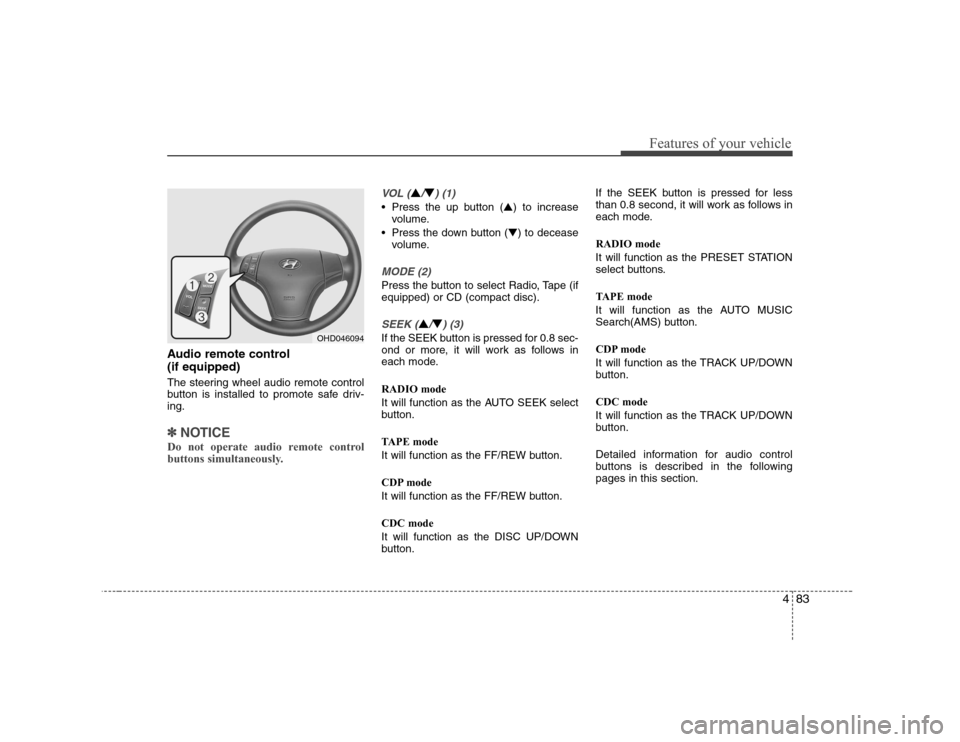
Audio remote control (if equipped)
The steering wheel audio remote control
button is installed to promote safe driv-ing.
✽✽NOTICE
Do not operate audio remote control
buttons simultaneously.
VOL (▲/▼) (1)
• Press the up button ( ▲) to increase
volume.
Press the down button ( ▼) to decease
volume.
MODE (2)
Press the button to select Radio, Tape (if equipped) or CD (compact disc).
SEEK (▲/▼) (3)
If the SEEK button is pressed for 0.8 sec-
ond or more, it will work as follows in
each mode. RADIO mode
It will function as the AUTO SEEK select
button.
TAPE mode
It will function as the FF/REW button.
CDP mode
It will function as the FF/REW button. CDC mode
It will function as the DISC UP/DOWN
button. If the SEEK button is pressed for less
than 0.8 second, it will work as follows in
each mode. RADIO mode
It will function as the PRESET STATION
select buttons.
TAPE mode
It will function as the AUTO MUSIC
Search(AMS) button.
CDP mode
It will function as the TRACK UP/DOWN
button. CDC mode
It will function as the TRACK UP/DOWN
button.
Detailed information for audio control
buttons is described in the followingpages in this section.OHD046094
Page 143 of 308
Features of your vehicle
88
4
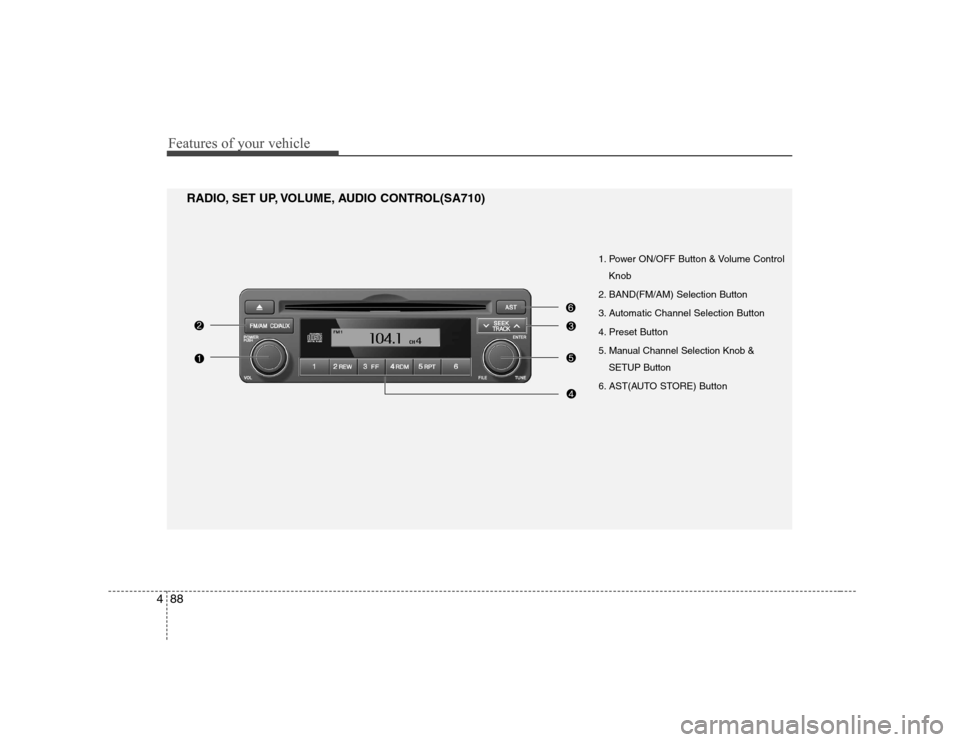
1. Power ON/OFF Button & Volume Control
Knob
2. BAND(FM/AM) Selection Button
3. Automatic Channel Selection Button
4. Preset Button
5. Manual Channel Selection Knob & SETUP Button
6. AST(AUTO STORE) Button
RADIO, SET UP, VOLUME, AUDIO CONTROL(SA710)
Page 144 of 308
489
Features of your vehicle
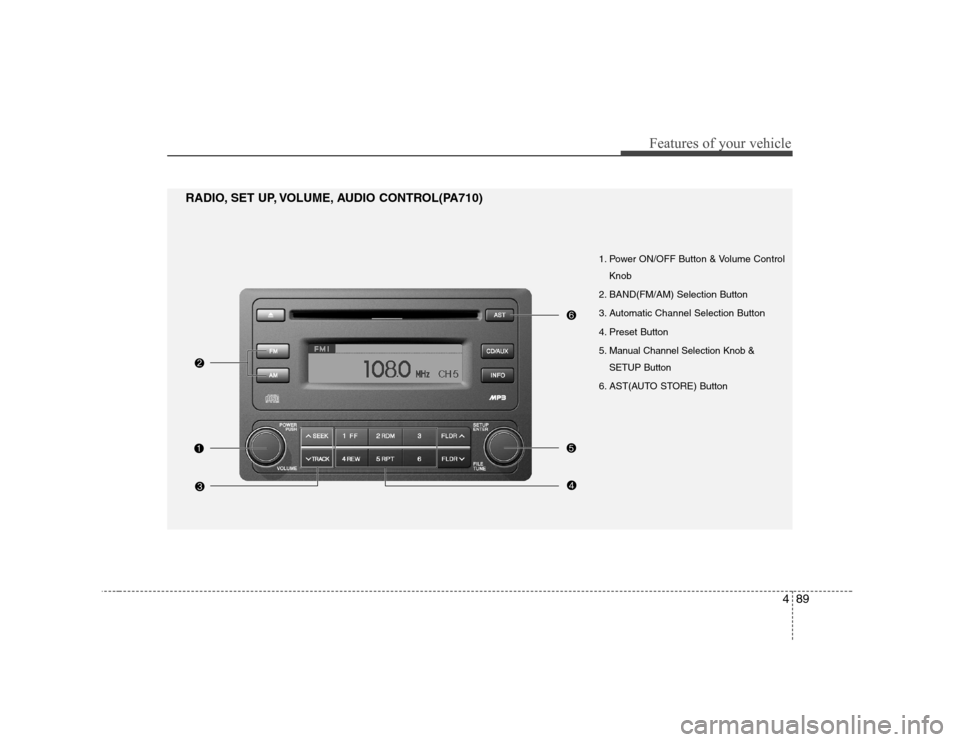
1. Power ON/OFF Button & Volume ControlKnob
2. BAND(FM/AM) Selection Button
3. Automatic Channel Selection Button
4. Preset Button
5. Manual Channel Selection Knob & SETUP Button
6. AST(AUTO STORE) Button
RADIO, SET UP, VOLUME, AUDIO CONTROL(PA710)
Page 145 of 308
Features of your vehicle
90
4
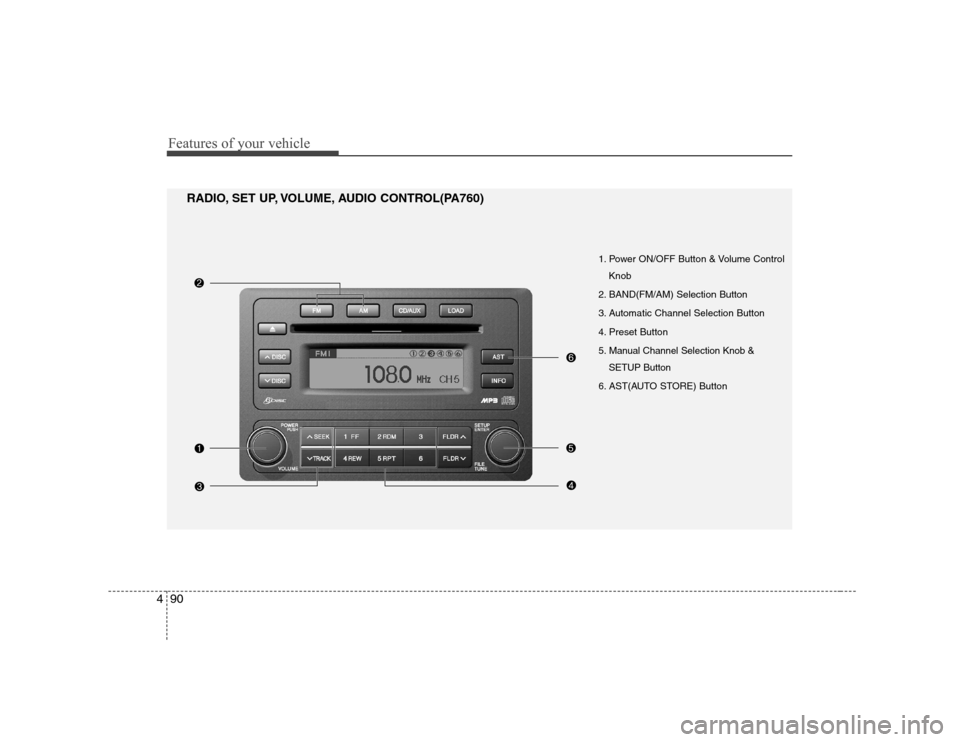
1. Power ON/OFF Button & Volume Control
Knob
2. BAND(FM/AM) Selection Button
3. Automatic Channel Selection Button
4. Preset Button
5. Manual Channel Selection Knob & SETUP Button
6. AST(AUTO STORE) Button
RADIO, SET UP, VOLUME, AUDIO CONTROL(PA760)
Page 146 of 308
491
Features of your vehicle
1. Power ON/OFF Button &Volume Control Knob
Turns the set on/off when the ignition
switch is on ACC or ON. If the button is
turned to the right, it increases the vol-
ume and left,decreases the volume.
2. BAND(FM/AM) Selection Button
Pressing the FM button changes the
FM1 and FM2 bands.
Pressing the AM button selects AMband.
3. Automatic Channel Selection Button
] button is pressed, it increases the band frequency to auto-matically select a channel.
Stops at the previous frequency if no
channel is found.
] button is press- ed, it reduces the band frequency toautomatically select a channel.
Stops at the previous frequency if no
channel is found. 4. Preset Button
Push [1]~[6] buttons less than 0.8 sec-
ond to play the channel saved in each
button. Push [PRESET] button for 0.8
second or longer to save current channel
to the respective button with a beep.
5. Manual Channel Selection
Knob & SETUP Button
Manual Channel Selection knob
Turn this knob while listening to a radio
channel to manually adjust frequency.
Turn clockwise to increase frequency and
counterclockwise to reduce frequency. SETUP Button
Press this button to turn to the SCROLL
option and SOUND adjustment mode. If
no action is taken for 5 seconds after
pressing the button, it will return to the
play mode.(After entering SETUP mode,
move between items using the left, right
and PUSH functions of the [TUNE] but-ton.)
The setup item changes from SCROLL ➟ TONE ➟ POSITION... Audio Control Knob
In SETUP mode, SCROLL option or
TONE, POSITION settings can be adjust-
ed. After selecting each mode by pushing
Sound Control knob, rotate the knob to
adjust and push again to changes take
effect.
SCROLL option When "ON" is selected, long file name
scrolls continuously while playing.
TONE adjustment Sound tone(BASS/MIDDLE/TREBLE) can
be adjusted by rotating the knob. To select
next item, press the knob again.
POSITION adjustment
Sound position(FADER/BALANCE) can
be adjusted by rotating the knob. FADER
adjusts FRONT/REAR position, and BAL-ANCE adjusts LEFT/RIGHT position of
the speaker sound. To select next item,press the knob again.
RETURN
Exits SETUP mode and returns to play
mode. Pressing AM,FM or CD/AUX button
also exits SETUP mode and switches to
selected mode.
Page 147 of 308
Features of your vehicle
92
4
6. AST(AUTO STORE) Button
When the button is pressed, it automati-
cally selects and saves channels with
high reception rate to [PRESET] buttons
[1]~[6] and plays the channel saved in PRESET1.
If no channel is saved after AST, it will
play the previous channel.
Page 189 of 308
527
Driving your vehicle
To temporarily accelerate with the
cruise control on:
If you want to speed up temporarily when
the cruise control is on, depress the
accelerator pedal. Increased speed will
not interfere with cruise control operationor change the set speed.
To return to the set speed, take your foot
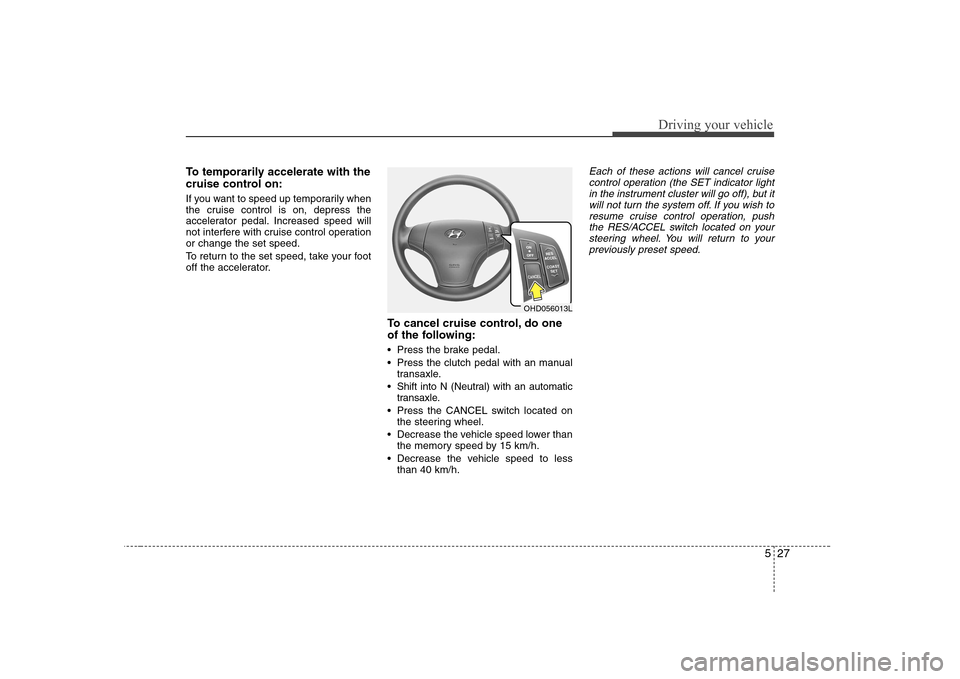
off the accelerator.To cancel cruise control, do one
of the following:
Press the brake pedal.
Press the clutch pedal with an manualtransaxle.
Shift into N (Neutral) with an automatic transaxle.
Press the CANCEL switch located on the steering wheel.
Decrease the vehicle speed lower than the memory speed by 15 km/h.
Decrease the vehicle speed to less than 40 km/h.Each of these actions will cancel cruise
control operation (the SET indicator light in the instrument cluster will go off), but it
will not turn the system off. If you wish to resume cruise control operation, pushthe RES/ACCEL switch located on your
steering wheel. You will return to yourpreviously preset speed.
OHD056013L
Page 255 of 308
Maintenance
30
7
Battery recharging
Your vehicle has a maintenance-free,
calcium-based battery.
If the battery becomes discharged in a
short time (because, for example, the
headlights or interior lights were left on
while the vehicle was not in use),
recharge it by slow charging (trickle)
for 10 hours.
If the battery gradually discharges because of high electric load while the
vehicle is being used, recharge it at 20-
30A for two hours. Reset items
Items should be reset after the battery
has been discharged or the battery hasbeen disconnected.
Sunroof (See Chapter 4)
Trip computer (See Chapter 4)
Climate control system
(See Chapter 4)
Clock (See Chapter 4)
Audio (See Chapter 4)
Auto up/down window (See chapter 4)(Continued)
When lifting a plastic-cased bat- tery, excessive pressure on the
case may cause battery acid to
leak, resulting in personal injury.
Lift with a battery carrier or with
your hands on opposite corners.
Never attempt to recharge the battery when the battery cablesare connected.
The electrical ignition system works with high voltage. Never
touch these components with theengine running or the ignition
switched on.
Failure to follow the above warn-
ings can result in serious bodily
injury or death.
![Hyundai Elantra 2009 Инструкция по эксплуатации (in Russian) Features of your vehicle
92
4
6. AST(AUTO STORE) Button
When the button is pressed, it automati-
cally selects and saves channels with
high reception rate to [PRESET] buttons
[1]~[6] and plays the c](/manual-img/35/14598/w960_14598-146.png "Hyundai Elantra 2009 Инструкция по эксплуатации (in Russian) Features of your vehicle
92
4
6. AST(AUTO STORE) Button
When the button is pressed, it automati-
cally selects and saves channels with
high reception rate to [PRESET] buttons
[1]~[6] and plays the c")