Page 116 of 578
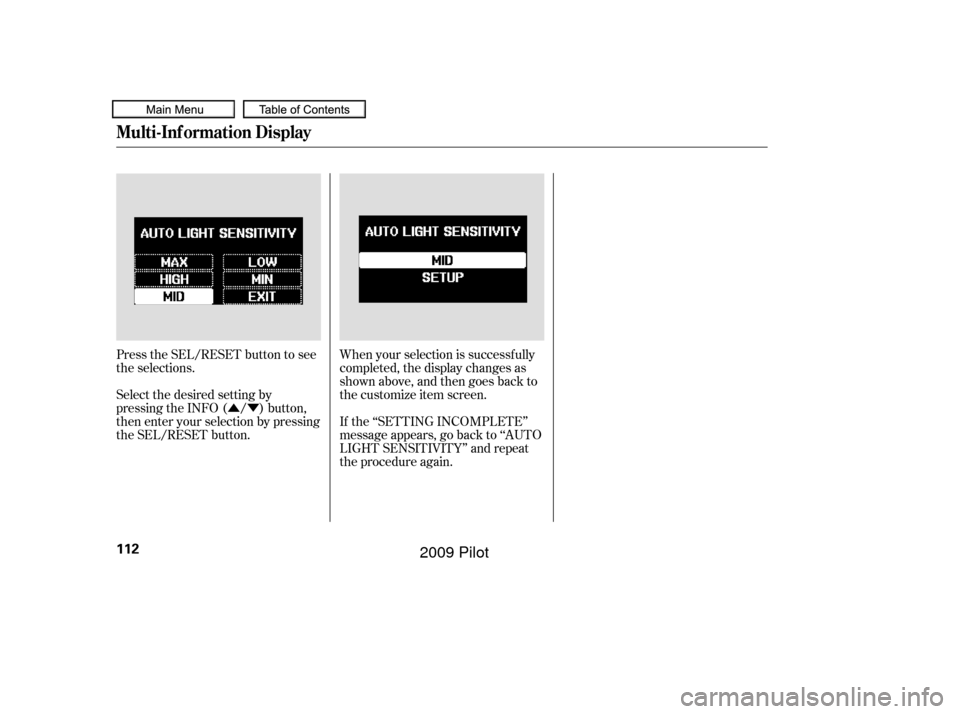
�Û�ÝWhen your selection is successf ully
completed, the display changes as
shown above, and then goes back to
the customize item screen.
If the ‘‘SETTING INCOMPLETE’’
message appears, go back to ‘‘AUTO
LIGHT SENSITIVITY’’ and repeat
the procedure again.
Press the SEL/RESET button to see
the selections.
Select the desired setting by
pressing the INFO ( / ) button,
then enter your selection by pressing
the SEL/RESET button.
Multi-Inf ormation Display
112
�����—�����—�
���y�
�������������y���
�(�/���������y���
�
���y
2009 Pilot
Page 122 of 578
�Û�Ý�Û�Ý
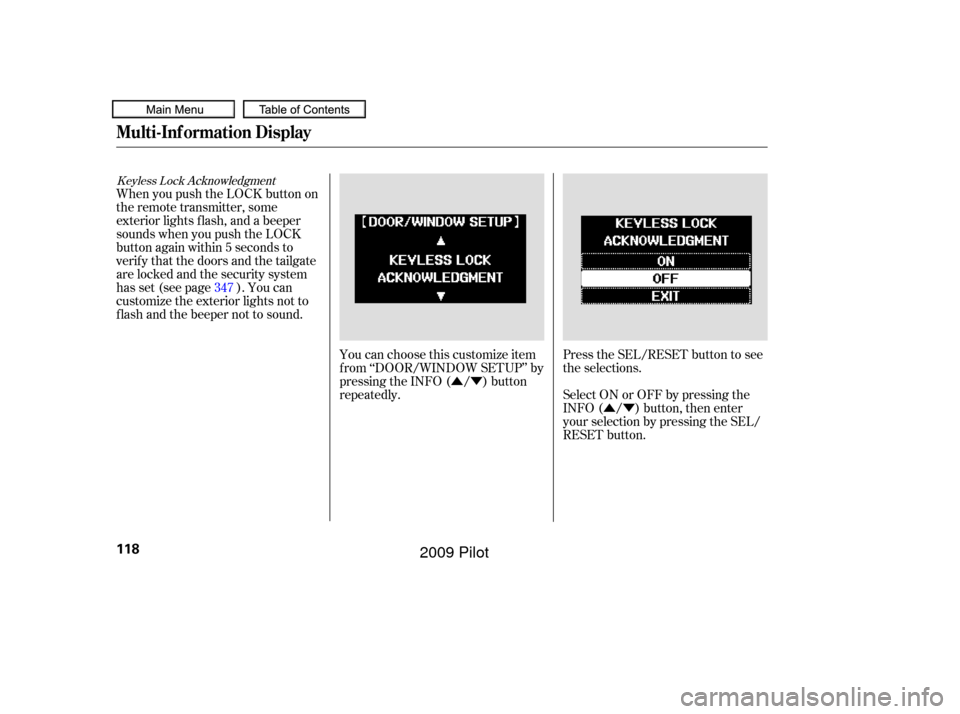
Keyless Lock Acknowledgment
When you push the LOCK button on
the remote transmitter, some
exterior lights f lash, and a beeper
sounds when you push the LOCK
button again within 5 seconds to
verify that the doors and the tailgate
arelockedandthesecuritysystem
has set (see page ). You can
customize the exterior lights not to
f lash and the beeper not to sound.
You can choose this customize item
f rom ‘‘DOOR/WINDOW SETUP’’ by
pressing the INFO ( / ) button
repeatedly.Press the SEL/RESET button to see
the selections.
Select ON or OFF by pressing the
INFO ( / ) button, then enter
your selection by pressing the SEL/
RESET button.
347
Multi-Inf ormation Display
118
�����—�����—�
���y�
�������������y���
�(�/���������y���
�����y
2009 Pilot
Page 125 of 578

�Î
�Î
�Î
�Î �Î
�Î
�Î
�Î �Î
�Î
�Î �Î
�Î
�Î
�Î
�Î
To use the horn, press the center pad of the steering wheel.
Only on vehicles equipped with navigation system. Ref er to the navigation system manual.
If equipped
1:
2:
3:
4 : 4WD models only
Controls Near the Steering Wheel
Inst rument s and Cont rols
121
HORN HAZARD WARNING
BUTTON
Vehicle with navigation system is shown. (P.169)
(P.143) (P.
162 )
GLASS HATCH RELEASE BUTTON/
POWER TAILGATE SWITCH
(P.131)
(P.399)
FUEL FILL DOOR RELEASE
HANDLE POWER WINDOW
SWITCHES POWER DOOR LOCK MASTER
SWITCH MIRROR CONTROLS DRIVING POSITION MEMORY
SYSTEM
(P.171)
VEHICLE STABILITY ASSIST
SYSTEM OFF SWITCH
PARKING SENSOR SYSTEM
SWITCH (P.124) HEADLIGHT/TURN SIGNAL/
FRONT FOG LIGHTS
STEERING WHEEL AUDIO CONTROLS
(P.309)
(P.361) BLUETOOTH
HANDSFREELINKSYSTEM
VOICE CONTROL BUTTONS
PARKING BRAKE RELEASE
HANDLE (P.167)
(P.136)
(P.163) (P.128)
(P.348)
(P.
184 )
(P.
422 )
STEERING WHEEL
ADJUSTMENT
VOICE CONTROL
BUTTONS
(P.436)
WINDSHIELD WIPERS/
WASHERS
PASSENGER AIRBAG
OFF INDICATOR
(P.
34)
VTM-4 LOCK
BUTTON
ACCESSORY POWER
SOCKET
SEAT HEATER
SWITCHES
CRUISE CONTROL
BUTTONS
MULTI-INFORMATION
BUTTONS
(P. 85)
(P.
122 )
(P.390) REAR WINDOW
DEFOGGER/HEATED
MIRROR BUTTON
(P.128,170)
1
3
3
3 3
3
3
2 4
3
3 3
�����—�����—�
���y�
����
��������y���
�(�/���������y���
�����y
2009 Pilot
Page 128 of 578
�µ�µ �µ
�Î
�Î
�Î
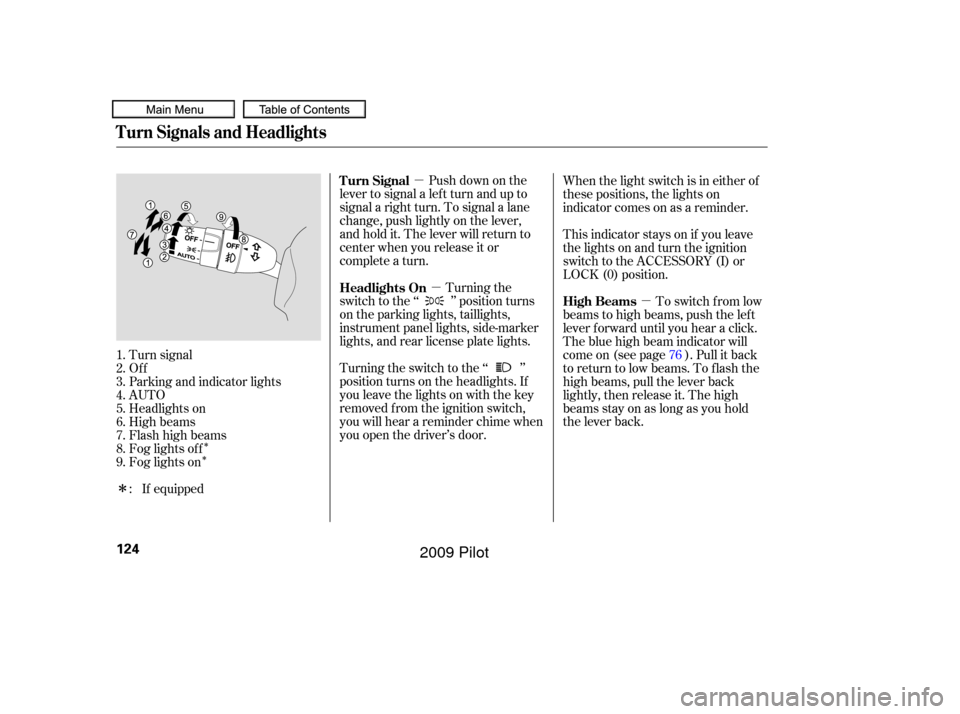
Push down on the
lever to signal a lef t turn and up to
signal a right turn. To signal a lane
change, push lightly on the lever,
and hold it. The lever will return to
center when you release it or
complete a turn.
Turning the
switch to the ‘‘ ’’ position turns
on the parking lights, taillights,
instrument panel lights, side-marker
lights, and rear license plate lights.
Turning the switch to the ‘‘ ’’
position turns on the headlights. If
you leave the lights on with the key
removed f rom the ignition switch,
you will hear a reminder chime when
you open the driver’s door. This indicator stays on if you leave
the lights on and turn the ignition
switch to the ACCESSORY (I) or
LOCK (0) position. When the light switch is in either of
these positions, the lights on
indicator comes on as a reminder.
To switch f rom low
beams to high beams, push the lef t
lever f orward until you hear a click.
The blue high beam indicator will
come on (see page ). Pull it back
to return to low beams. To flash the
high beams, pull the lever back
lightly, then release it. The high
beamsstayonaslongasyouhold
the lever back.
Turn signal
Of f
Parking and indicator lights
AUTO
Headlights on
High beams
Flashhighbeams
Fog lights of f
Fog lights on
1.
2.
3.
4.
5.
6.
7.
8.
9.
: If equipped 76
Turn Signal
Headlights On
High Beams
Turn Signals and Headlights
124
�����—�����—�
���y�
�����������
�y���
�(�/���������y���
�����y
2009 Pilot
Page 129 of 578

�µThe automatic lighting
f eature turns on the headlights and
all other exterior lights, when it
senses low ambient light.
To turn on automatic lighting, turn
the light switch to AUTO at any time.
The lights will come on automatically
when the outside light level becomes
low (at dusk, f or example). The
lights on indicator comes on as a
reminder. The lights and indicator
will turn of f automatically when the
system senses high ambient light.
The lights will remain on when you
turn of f the ignition switch. They will
turn of f automatically when you
remove the key and open the driver’s
door. To turn them on again, either
turn the ignition switch to the ON
(II) position or turn the light switch
to the position. Even with the automatic lighting
f eature turned on, we recommend
thatyouturnonthelightsmanually
when driving at night or in a dense
f og, or when you enter dark areas
such as long tunnels or parking
f acilities.
To change the ‘‘AUTO LIGHT
SENSITIVITY’’ setting, see page
.
Do not leave the light switch in
AUTO if you will not be driving the
vehicle f or an extended period (a
weekormore).Youshouldalsoturn
of f the lights if you plan to leave the
engine idling or of f f or a long time. The automatic lighting f eature is
controlledbyasensorlocatedontop
of the dashboard. Do not cover this
sensor or spill liquids on it.
111
On Touring models
Headlights
AUTO
Inst rument s and Cont rols
125
LIGHT SENSOR
�����—�����—�
���y�
�������������y���
�(�/���������y���
�����y
2009 Pilot
Page 130 of 578

Turn the f og lights on and of f by
turning the switch next to the
headlight switch.
You can use the f og lights only when
the headlights are on low beam.
With the light switch in the AUTO
position, you can also use the f og
lights when the headlights turn on
automatically. They will go of f when
the headlights turn of f .With the headlight switch off, the
daytime running lights come on
when you turn the ignition switch to
the ON (II) position and release the
parkingbrake.Theyremainonuntil
you turn the ignition switch of f , even
if you set the parking brake.
When the headlights are on, the
daytime running lights are of f .
If you see a ‘‘CHECK DRL
SYSTEM’’ message on the multi-
inf ormation display, there is a
problem with the daytime running
light system. Take your vehicle to a
dealer to have it checked.
When the multi-information display
shows a ‘‘DRL OFF’’ message, the
daytime running lights are of f .
Follow the procedure in the lef t
column to turn them on.
Except LX models
On Touring models
Headlights
Fog L ights
Daytime Running L ights
126
�����—�����—�
���y�
�������������y���
�(�/���������y���
���
�y
2009 Pilot
Page 131 of 578
This f eature turns of f the headlights,
all other exterior lights, and the
instrument panel lights within 15
seconds after you remove the key
and close the driver’s door.
The automatic lighting of f f eature
activates if you leave the headlight
switch in the ‘‘ ’’ or ‘‘ ’’
position or if the lights are turned on
by setting the switch in the ‘‘AUTO’’
position, and you remove the key,
then open and close the driver’s door. To change the ‘‘HEADLIGHT AUTO
OFF TIMER’’ setting, see page .If you turn the ignition switch to the
LOCK (0) position with the
headlight switch on, but do not open
the door and get out, the lights turn
of f af ter 10 minutes (3 minutes, if
the switch is in the ‘‘AUTO’’
position).
The lights turn on again when you
unlock or open the driver’s door.
If you unlock the door, but do not
open it within 15 seconds, the lights
go of f . With the driver’s door open,
you will hear a lights-on reminder
chime.
110
On Touring models
Headlights
Automatic Lighting Of f Feature
Inst rument s and Cont rols
127
�����—�����—�
���y�
�������������y���
�(�/���������y���
�����y
2009 Pilot
Page 132 of 578

Make sure the rear window is clear
and you have good visibility bef ore
starting to drive.
The rear window def ogger will clear
fog, frost, and thin ice from the
window. Push the def ogger button to
turn it on and off. The indicator in
the button lights to show the
def ogger is on. If you do not turn it
of f , the def ogger will shut itself of f
af ter about 15 minutes. It also shuts
of f when you turn of f the ignition.
You have to turn it on again when
you restart the vehicle. The def ogger wires on the inside of
the rear window can be accidentally
damaged. When cleaning the glass,
always wipe side-to-side.
Pushing this button also turns the
mirror heaters on or of f . For more
inf ormation, see page .
Pushthebuttontoturnonthe
hazard warning lights (f our-way
flashers). This causes all four
outside turn signals and both turn
indicators in the instrument panel to
f lash. Use the hazard warning lights
if you need to park in a dangerous
area near heavy traffic, or if your
vehicle is disabled. 170
Except U.S. LX model
Rear Window Def ogger
Hazard Warning Button
Hazard Warning Button, Rear Window Def ogger
128
�����—�����—�
���y�
�������������y���
�(�/���������y���
�����y
2009 Pilot