Page 79 of 578
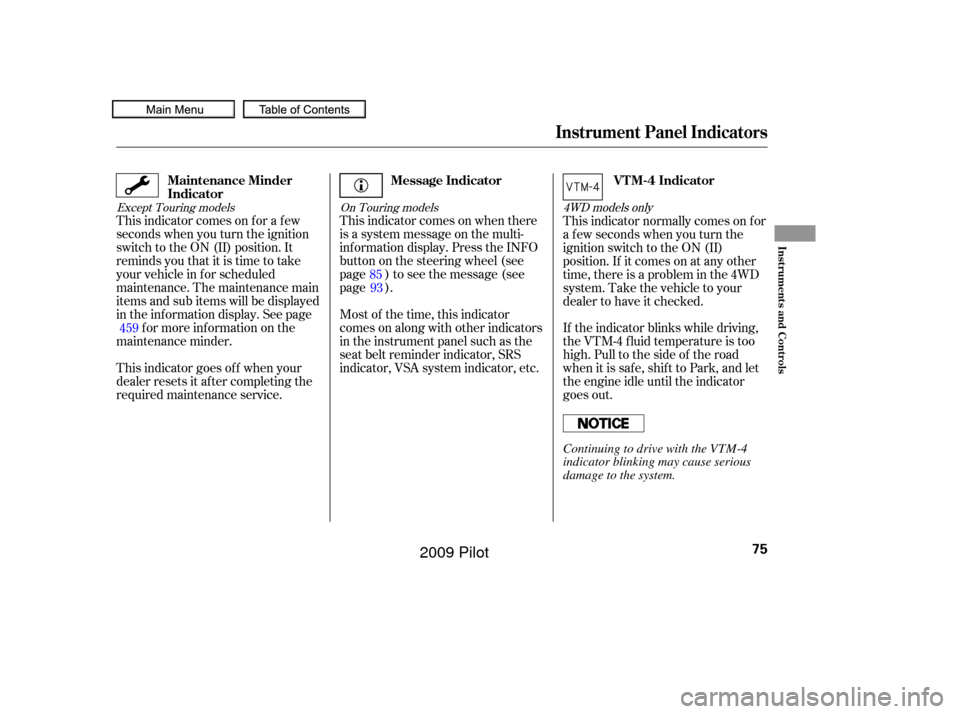
This indicator comes on when there
is a system message on the multi-
inf ormation display. Press the INFO
button on the steering wheel (see
page ) to see the message (see
page ).
Most of the time, this indicator
comes on along with other indicators
in the instrument panel such as the
seat belt reminder indicator, SRS
indicator, VSA system indicator, etc.
This indicator comes on f or a f ew
seconds when you turn the ignition
switch to the ON (II) position. It
remindsyouthatitistimetotake
your vehicle in f or scheduled
maintenance. The maintenance main
items and sub items will be displayed
in the inf ormation display. See page
f or more inf ormation on the
maintenance minder.
This indicator goes of f when your
dealer resets it after completing the
required maintenance service. This indicator normally comes on f or
a f ew seconds when you turn the
ignition switch to the ON (II)
position. If it comes on at any other
time, there is a problem in the 4WD
system. Take the vehicle to your
dealer to have it checked.
If the indicator blinks while driving,
the VTM-4 fluid temperature is too
high. Pull to the side of the road
when it is saf e, shif t to Park, and let
the engine idle until the indicator
goes out.
85
93
459
Except Touring models On Touring models4WD models only
Message Indicator
Maintenance Minder
Indicator VTM-4 Indicator
Instrument Panel Indicators
Inst rument s and Cont rols
75
Continuing to drive with the VTM-4
indicator blinking may cause serious
damage to the system.
�����—�����—�
���y�
�������������y���
�(�/���������y���������y
2009 Pilot
Page 81 of 578

This indicator normally comes on f or
a f ew seconds when you turn the
ignition switch to the ON (II)
position. If it comes on at any other
time, there is a problem with the
automatic lighting control system.
Have your vehicle checked by your
dealer as soon as possible.
If you see a ‘‘CHECK LIGHT
CONTROL SYSTEM’’ message on
the multi-information display, there
is a problem with the automatic
headlight control system. Take your
vehicle to a dealer to have it checked.If this indicator comes on when the
ignition switch is turned to the ON
(II) position and the parking brake is
released, it means there is a problem
in the high beam headlight’s circuit.
Have your vehicle checked by your
dealer.
If you see a ‘‘CHECK DRL
SYSTEM’’ message on the multi-
inf ormation display, there is a
problem with the daytime running
light system. Take your vehicle to a
dealer to have it checked.While the engine is operating in its
most economical range, this
indicator may come on and stay on.
It goes of f when your vehicle uses
extra f uel.
This indicator comes on if any door
is not closed tightly.
On Touring models
On Touring models
Except Touring models
Except Touring models
Light Control IndicatorDaytime Running Lights
Indicator
Door-open Indicator Fuel Economy Indicator
Instrument Panel Indicators
Inst rument s and Cont rols
77
�����—�����—�
���y�
���������
���y���
�(�/���������y���������y
2009 Pilot
Page 86 of 578
When either of the trip meters (trip
A or B) is displayed, your vehicle’s
average fuel mileage since you last
resetthattripmetercanbeshown
on the inf ormation display (mpg on
U.S. models and l/100 km on
Canadian models). This number is
updated once per 10 seconds. To see
the average f uel mileage, press and
release the select/reset knob
repeatedly.
When you reset a trip meter, the
average fuel mileage for that trip
meter also resets.This display shows the estimated
distance you can travel on the fuel
remaining in the tank.
This distance is estimated f rom the
f uel economy you have achieved
over the last f ew miles (kilometers),
so it will vary with changes in speed,
traffic condition, etc.
This display shows the current, or
instant fuel mileage you are getting.
It shows the number of mpg (U.S.)
or l/100 km (Canada). Current Fuel Mileage
Average Fuel MileageRange (Estimated Distance)
Gauges
82
�����—�����—�
���y�
�������������y���
�(�/���������y���������y
2009 Pilot
Page 87 of 578

�¶�¶�µ�µ
�µ�µ�µ
�µ�µ�µ
In certain weather conditions,
temperature readings near f reezing
(32°F, 0°C) could mean that ice is
f orming on the road surf ace.
If the outside temperature is
incorrectly displayed, you can adjust
it up to 5°F in U.S. models ( 3°C
in Canadian models) warmer or
cooler.
NOTE: The temperature must be
stabilized bef ore doing this
procedure. To adjust the outside temperature
indicator, press and hold the select/
reset knob f or 10 seconds. The
f ollowing sequence will appear f or 1
secondeach:0,1,2,3,4,5, 5, 4,
3, 2, 1, 0 (U.S.) or 0, 1, 2, 3,
3, 2, 1, 0 (Canada).
When the temperature reaches the
desired value, release the select/
reset knob. You should see the new
outside temperature displayed.
This indicator displays the outside
temperature in Fahrenheit (U.S.
models) or Centigrade (Canadian
models).
The temperature sensor is in the
f ront bumper. The temperature
reading can be affected by heat
ref lection f rom the road surf ace,
engine heat, and the exhaust f rom
surrounding traf f ic. This can cause
an incorrect temperature reading
when your vehicle speed is under
19 mph (30 km/h). When you start
your trip, the sensor is not f ully
acclimatized, theref ore it may take
several minutes until the proper
temperature is displayed.
Except LX models
Gauges
Outside Temperature Indicator
Inst rument s and Cont rols
83
�����—�����—�
���y�
�����������
�y���
�(�/���������y���������y
2009 Pilot
Page 95 of 578
This shows the estimated distance
you can travel on the fuel remaining
in the f uel tank. This distance is
estimated f rom the f uel economy
you received over the last several
miles(U.S.) or kilometers (Canada),
so it will vary with changes in speed,
traf f ic, etc.
This shows the average speed you
are traveling in miles per hour (mph)
forU.S.modelsorkilometersper
hour (km/h) f or Canadian models.This shows the time passed traveled
since you last reset it. When you turn
the ignition switch to the ON (II)
position, ELAPSED TIME is reset.
You can customize the TRIP A INFO
(Trip A, AVERAGE FUEL A,
ELAPSED TIME A, and AVERAGE
SPEED A) reset condition in the
multi-inf ormation display (see page
).
This shows your current f uel
mileage.
This shows your vehicle’s average
f uel economy in mpg (U.S. models)
or liter/100 km (Canadian models)
since you last reset the Trip A or
Trip B.
104
RANGE
AVERAGE SPEED A/B EL A PSED T IME A /B
INST A NT FUEL MPG (U.S.
models)/INST A NT FUEL L /100 km(Canadian models)
AVERAGE FUEL A/B
Multi-Inf ormation Display
Inst rument s and Cont rols
91
�����—�����—�
���y�
�����������
�y���
�(�/���������y���������y
2009 Pilot
Page 101 of 578
�Î
�Î
�Î �Î
�Î
�Î
�Î
�Î �Î
�Î
�Î
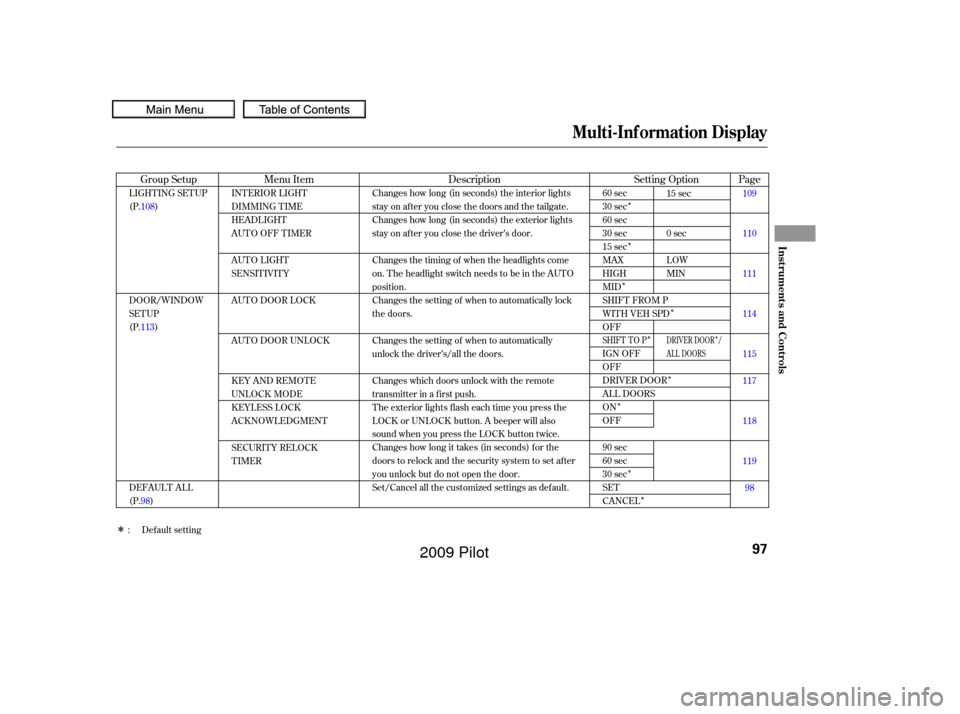
Setting Option
Description
Group Setup Menu Item Page
60 sec
30 sec
60 sec
30 sec
15 sec
MAX
HIGH
MID
SHIFT FROM P
WITH VEH SPD
OFF
IGN OFF
OFF
DRIVER DOOR
ALL DOORS
ON
OFF
90 sec
60 sec
30 sec
SET
CANCEL
Changes how long (in seconds) the interior lights
stay on after you close the doors and the tailgate.
Changes how long (in seconds) the exterior lights
stay on after you close the driver’s door.
Changes the timing of when the headlights come
on. The headlight switch needs to be in the AUTO
position.
Changes the setting of when to automatically lock
the doors.
Changes the setting of when to automatically
unlock the driver’s/all the doors.
Changes which doors unlock with the remote
transmitter in a first push.
The exterior lights flash each time you press the
LOCK or UNLOCK button. A beeper will also
sound when you press the LOCK button twice.
Changes how long it takes (in seconds) for the
doors to relock and the security system to set after
you unlock but do not open the door.
Set/Cancel all the customized settings as default.
LIGHTING SETUP
(P.108)
DOOR/WINDOW
SETUP
(P.113)
DEFAULT ALL
(P.98) INTERIOR LIGHT
DIMMING T IME
HEADLIGHT
AUTO OFF TIMER
AUTO LIGHT
SENSITIVITY
AUTO DOOR LOCK
AUTO DOOR UNLOCK
KEY AND REMOTE
UNLOCK MODE
KEYLESS LOCK
ACKNOWLEDGMENT
SECURITY RELOCK
TIMER
15 sec
0sec
LOW
MIN
109
110
111
114
115
117
118
119
98
: Default setting
SHIFT TO PDRIVER DOOR /
AL L DOORS
Multi-Inf ormation Display
Inst rument s and Cont rols
97
�����—�����—�
���y�
�������������y���
�(�/���������y���
�����y
2009 Pilot
Page 102 of 578
�Û�Ý�Û�Ý
If you want to set the def ault settings,
press the INFO ( / ) button to
select DEFAULT ALL, then press
the SEL/RESET button. When DEFAULT ALL is set, you will
see the above display for several
seconds, then the screen returns to
CUSTOMIZE ENTRY.
If the setting is not successf ully
completed, ‘‘FAILED’’ is shown f or
several seconds, and then the screen
goes back to the normal message
mode. Repeat the same procedure to
select DEFAULT ALL.
If you want to cancel DEFAULT
ALL, select CANCEL, then press the
SEL/RESET button. The screen
goes back to the previous display. To set the def ault settings, press the
INFO ( / ) button to select SET
then press the SEL/RESET button.
DEFAUL T AL L
Multi-Inf ormation Display
98
�����—�����—�
���y�
������
������y���
�(�/���������y���
�����y
2009 Pilot
Page 129 of 578

�µThe automatic lighting
f eature turns on the headlights and
all other exterior lights, when it
senses low ambient light.
To turn on automatic lighting, turn
the light switch to AUTO at any time.
The lights will come on automatically
when the outside light level becomes
low (at dusk, f or example). The
lights on indicator comes on as a
reminder. The lights and indicator
will turn of f automatically when the
system senses high ambient light.
The lights will remain on when you
turn of f the ignition switch. They will
turn of f automatically when you
remove the key and open the driver’s
door. To turn them on again, either
turn the ignition switch to the ON
(II) position or turn the light switch
to the position. Even with the automatic lighting
f eature turned on, we recommend
thatyouturnonthelightsmanually
when driving at night or in a dense
f og, or when you enter dark areas
such as long tunnels or parking
f acilities.
To change the ‘‘AUTO LIGHT
SENSITIVITY’’ setting, see page
.
Do not leave the light switch in
AUTO if you will not be driving the
vehicle f or an extended period (a
weekormore).Youshouldalsoturn
of f the lights if you plan to leave the
engine idling or of f f or a long time. The automatic lighting f eature is
controlledbyasensorlocatedontop
of the dashboard. Do not cover this
sensor or spill liquids on it.
111
On Touring models
Headlights
AUTO
Inst rument s and Cont rols
125
LIGHT SENSOR
�����—�����—�
���y�
�������������y���
�(�/���������y���
�����y
2009 Pilot