Page 199 of 578
�Û�Ý
To turn the system completely off,
press the ON/OFF button.
Keep the system completely of f
f or short periods only.
To keep stale air and mustiness
f rom collecting, you should have
the f an running at all times.
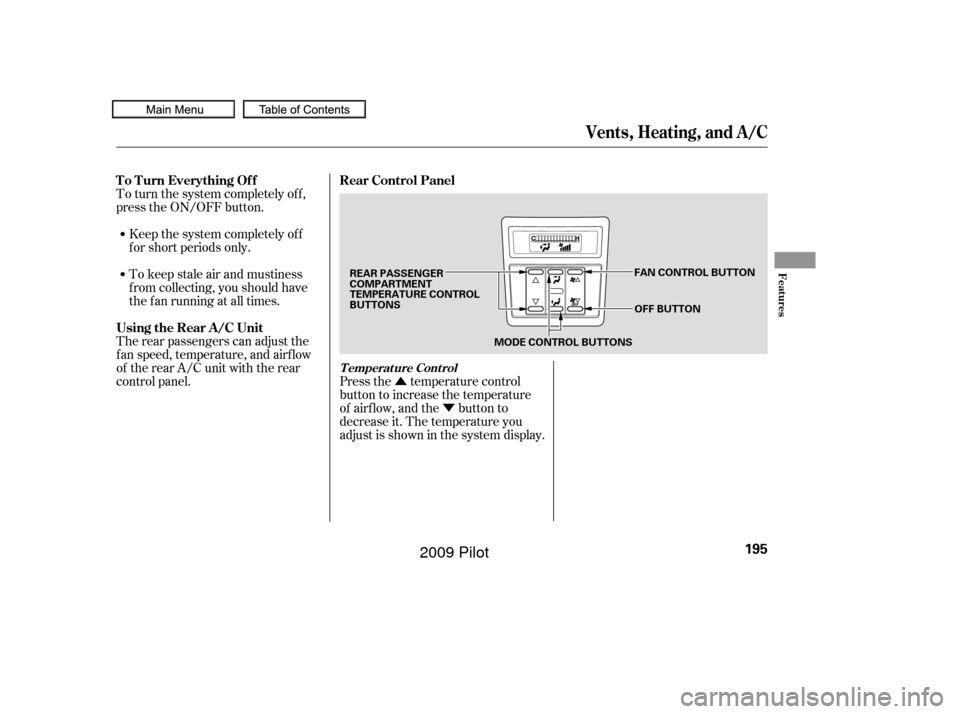
The rear passengers can adjust the
f an speed, temperature, and airf low
of the rear A/C unit with the rear
control panel. Press the temperature control
button to increase the temperature
of airflow, and the button to
decrease it. The temperature you
adjust is shown in the system display.
Vents, Heating, and A/C
To Turn Everything Off
Using the Rear A/C Unit Rear Control Panel
T emperat ure Cont rol
Features
195
MODE CONTROL BUTTONS
OFF BUTTON
REAR PASSENGER
COMPARTMENT
TEMPERATURE CONTROL
BUTTONS
FAN CONTROL BUTTON
�����—�����—�
���y�
�������������y���
�(�/���������y���������y
2009 Pilot
Page 201 of 578
Climate Control System
FRONT CONT ROL PA NELREA R CONT ROL PA NEL
Except L X models
Features
197
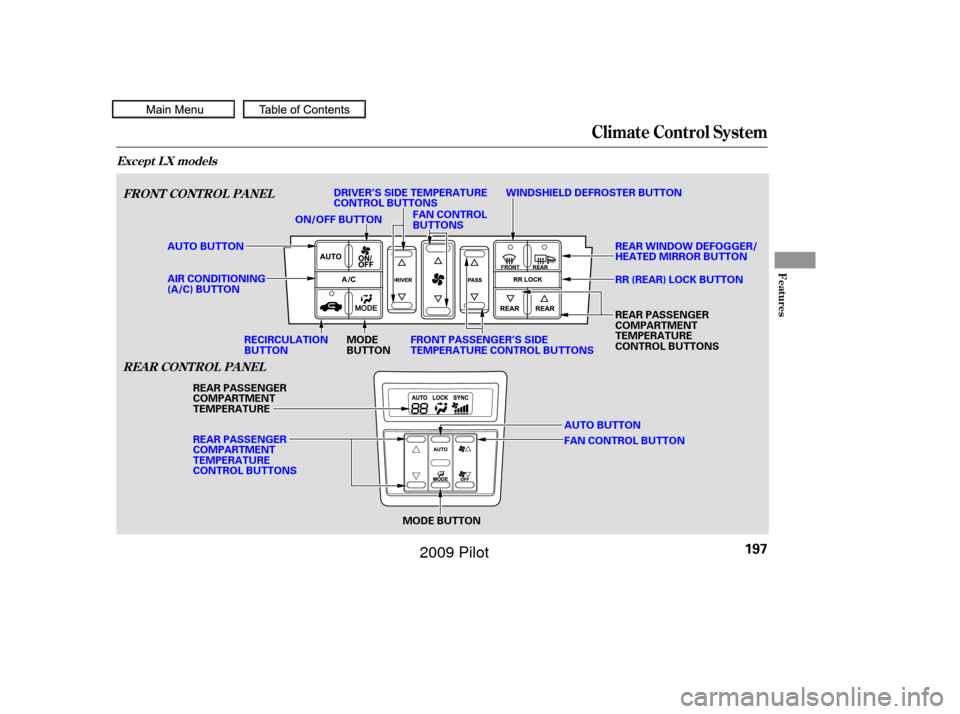
AUTO BUTTON
MODE BUTTON
MODE
BUTTON
RECIRCULATION
BUTTON FAN CONTROL
BUTTONS
WINDSHIELD DEFROSTER BUTTON
REAR WINDOW DEFOGGER/
HEATED MIRROR BUTTON
ON/OFF BUTTON
AUTO BUTTON
REAR PASSENGER
COMPARTMENT
TEMPERATURE
REAR PASSENGER
COMPARTMENT
TEMPERATURE
CONTROL BUTTONS
FAN CONTROL BUTTONRR (REAR) LOCK BUTTON
REAR PASSENGER
COMPARTMENT
TEMPERATURE
CONTROL BUTTONS
AIR CONDITIONING
(A/C) BUTTON DRIVER’S SIDE TEMPERATURE
CONTROL BUTTONS
FRONT PASSENGER’S SIDE
TEMPERATURE CONTROL BUTTONS
�����—�����—�
���y�
�������������y���
�(�/���������y���������y
2009 Pilot
Page 202 of 578

�Û
�Ý
Press the Auto button on the front
control panel.
Set the desired temperature with
the temperature control buttons.
You will see AUTO in the system’s
display.
The automatic climate control
system in your vehicle picks the
proper combination of air
conditioning, heating, and ventilation
to maintain the interior temperature
you select. The system also adjusts
the fan speed and airflow levels.
You can set the driver’s side
temperature, the passenger’s side
temperature, and the temperature
of the rear passenger
compartment separately. The system automatically selects
the proper mix of conditioned
and/or heated air that will, as
quickly as possible, raise or lower
the interior temperature to your
pref erence.
The driver’s side temperature, the
passenger’s side temperature and
the rear passenger compartment
temperature can be set separately.
Press the button of the
appropriate temperature control to
increase the temperature of airf low.
Press the button to decrease it.
Each set temperature is shown in the
display. The rear temperature is
showninthedisplayonthebackof
the center console.
The climate control system can also
be operated by voice control. See the
Navi section in your quick start
guide f or an overview of this system,
and the navigation system manual
f or complete details.
1.
2.
3.
On vehicles with navigation system
Using A utomatic Climate Control
Voice Control System
T emperat ure Cont rol
Climate Control System
198
�����—�����—�
���y�
���������
���y���
�(�/���������y���������y
2009 Pilot
Page 206 of 578
�Û�Ý
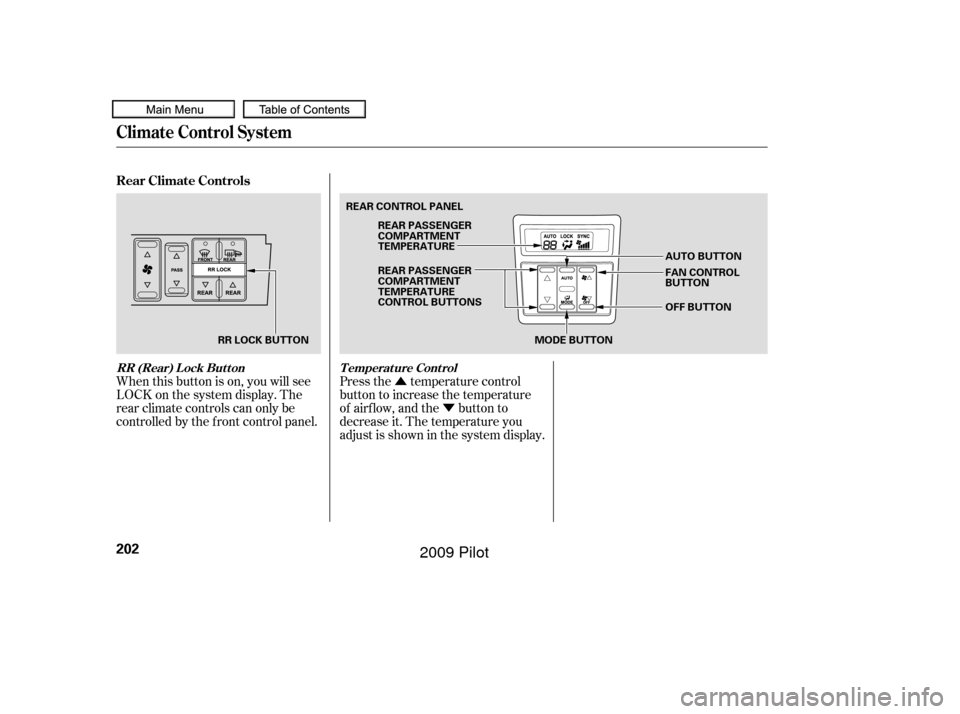
When this button is on, you will see
LOCK on the system display. The
rear climate controls can only be
controlled by the f ront control panel. Press the temperature control
button to increase the temperature
of airflow, and the button to
decrease it. The temperature you
adjust is shown in the system display.
Rear Climate Controls
RR (Rear) Lock Button
Temperature Control
Climate Control System
202
MODE BUTTON
RR LOCK BUTTON REAR CONTROL PANEL
AUTO BUTTON
OFF BUTTON
REAR PASSENGER
COMPARTMENT
TEMPERATURE
REAR PASSENGER
COMPARTMENT
TEMPERATURE
CONTROL BUTTONS
FAN CONTROL
BUTTON
�����—�����—�
���y�
�������������y���
�(�/���������y���������y
2009 Pilot
Page 207 of 578
�Û
�Ý�Û�Ý
Press the fan control button
to increase the f an speed and airf low.
Press the button to
decrease it. The level of the f an
speed is shown in the display.
Each time you press the mode
button, the mode display changes
from to .
When is selected, air f lows
f rom the upper vents on the back of
the center console.
When is selected, air f lows
f rom the lower vents. Pressing the AUTO button puts the
system in automatic operation mode.
The rear system automatically
adjusts the fan speed and airflow
levels to maintain the selected
temperature of the rear passenger
compartment. You will see AUTO in
the display.
To shut of f the rear climate control
system, press the OFF button until
the system shuts off.
The temperatures of the driver’s side
and the front passenger’s side are
controlled independently.
When the RR (REAR) LOCK button
is of f , the temperature of the rear
passenger compartment can be
controlled independently.
To adjust each temperature, press
either of the temperature control
buttons ( or ) on the climate
control panel.
Climate Control System
Fan Cont rol
Mode Cont rol Automatic OperationTriple Zone Temperature Control
Features
203
�����—�����—�
���y�
�������������y���
�(�/���������y���������y
2009 Pilot
Page 212 of 578
Playing the FM/AM Radio (LX model)
208
SKIP BUTTONS
PRESET BUTTONS FM BUTTON
AM BUTTON POWER/VOLUME KNOB
TITLE BUTTON
TUNE/SOUND KNOB
FOLDER BAR A.SEL (AUTO SELECT) BUTTON
�����—�����—�
���y�
�������������y���
�(�/���������y�����
���y
2009 Pilot
Page 213 of 578
�µ
�µ �µ
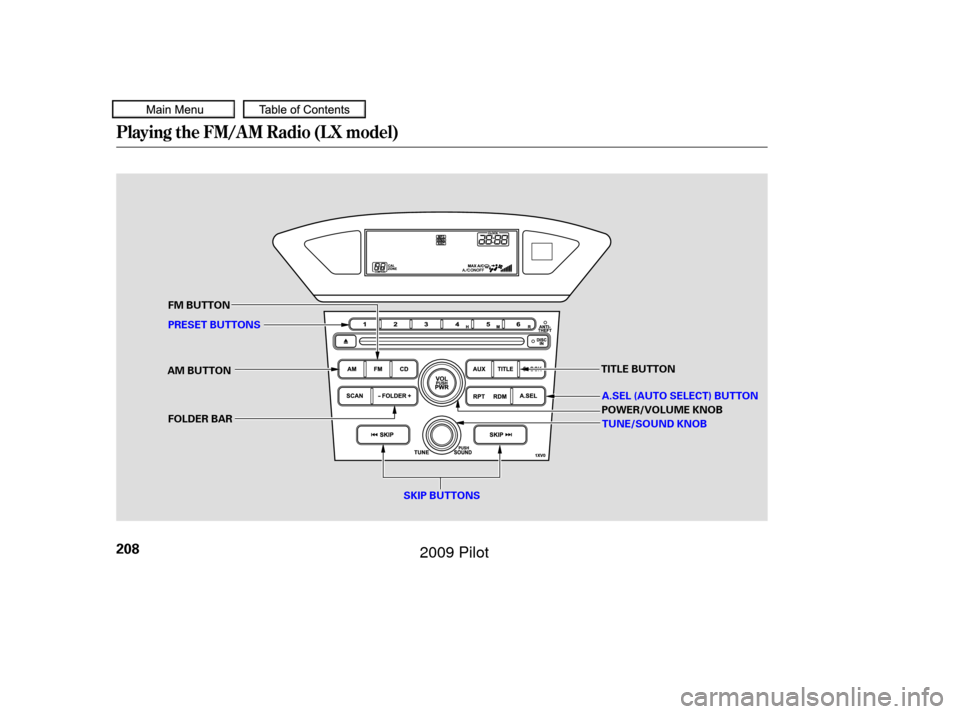
The ignition switch must be in the
ACCESSORY (I) or ON (II) position.
Turn the system on by pushing the
power/volume knob or the AM or
FM button. Adjust the volume by
turning the power/volume knob.
The band and f requency that the
radio was last tuned to is displayed.
To change bands, press the AM or
FM button. On the FM band, ST will
be displayed if the station is broad-
castinginstereo.Stereo
reproduction on AM is not available.
On the AM band, AM noise
reduction turns on automatically. You can use any of f ive methods to
f ind radio stations on the selected
band: tune, skip, scan, the preset
buttons, and auto select.
On the FM band, you can also use
the f eatures provided by the radio
data system (RDS). For more
inf ormation on the RDS, see page
.
Use the TUNE knob to
tune the radio to a desired f requency.
Turn the knob to the right to tune to
a higher f requency, and turn it to the
lef t to tune to a lower f requency.
The skip f unction searches
up and down f rom the current
f requency to f ind a station with a
strong signal. To activate it, press
either of the SKIP buttons ( or ), then release it. The scan f unction samples
all stations with strong signals on the
selected band. To activate it, press
the SCAN button, then release it.
You will see SCAN in the display.
The system will scan f or a station
with a strong signal. When it f inds
one, it will stop and play that station
f or about 10 seconds.
If you do nothing, the system will
then scan f or the next strong station
and play it f or 10 seconds. When it
plays a station you want to listen to,
press the SCAN button again.
211
CONT INUED
To Select a Station
To Play the FM/AM Radio
TUNE
SK IPSCAN
Playing the FM/AM Radio (LX model)
Features
209
�����—�����—�
���y�
�������������y���
�(�/���������y�����
���y
2009 Pilot
Page 214 of 578
�µ
�µ
�µ If you are
traveling far from home and can no
longer receive your preset stations,
you can use the auto select feature to
find stations in the local area. If you do not like the stations auto
select has stored, you can store
other f requencies on the preset
buttons as previously described.
Each preset button can
store one f requency on AM and two
f requencies on FM.
Select the desired band, AM or
FM. FM1 and FM2 let you store
two f requencies with each preset
button.
Repeat steps 1 through 3 to store a
total of six stations on AM and
twelve stations on FM. Pick a preset button (1 6), and
hold it until you hear a beep. Usethetune,skip,scan,orRDS
function to tune the radio to a
desired station. Press the A. SEL button. You will see
A. SEL f lashing in the display, and
the system goes into scan mode f or
several seconds. It stores the
f requencies of six AM, and twelve
FM stations in the preset buttons.
You will see a ‘‘0’’ displayed af ter
pressing a preset button if auto
select cannot f ind a strong station f or
every preset button. ,pressthe
A. SEL (auto select) button. This
restores the presets you originally
set.
For inf ormation on FM/AM radio
f requencies and reception, see page .
1.
2.
3.
4.
306
To turn of f auto select
AUTO SELECT
Preset
Playing the FM/AM Radio (LX model)
210
�����—�����—�
���y�
�������������y���
�(�/���������y�����
���y
2009 Pilot