2009 HONDA FIT change time
[x] Cancel search: change timePage 142 of 352
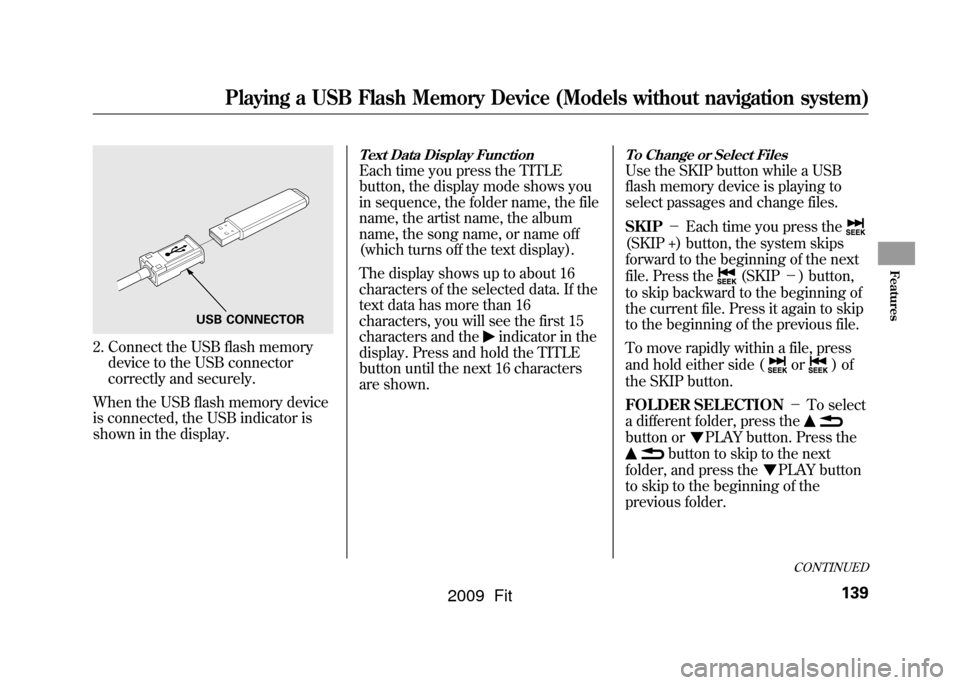
2. Connect the USB flash memorydevice to the USB connector
correctly and securely.
When the USB flash memory device
is connected, the USB indicator is
shown in the display.
Text Data Display FunctionEach time you press the TITLE
button, the display mode shows you
in sequence, the folder name, the file
name, the artist name, the album
name, the song name, or name off
(which turns off the text display).
The display shows up to about 16
characters of the selected data. If the
text data has more than 16
characters, you will see the first 15
characters and the
indicator in the
display. Press and hold the TITLE
button until the next 16 characters
are shown.
To Change or Select FilesUse the SKIP button while a USB
flash memory device is playing to
select passages and change files.
SKIP -Each time you press the(SKIP +) button, the system skips
forward to the beginning of the next
file. Press the
(SKIP -) button,
to skip backward to the beginning of
the current file. Press it again to skip
to the beginning of the previous file.
To move rapidly within a file, press
and hold either side (
or
)of
the SKIP button.
FOLDER SELECTION -To select
a different folder, press the
button or
PLAY button. Press the
button to skip to the next
folder, and press the
PLAY button
to skip to the beginning of the
previous folder.
USB CONNECTOR
CONTINUED
Playing a USB Flash Memory Device (Models without navigation system)
139
Features
2009 Fit
Page 143 of 352
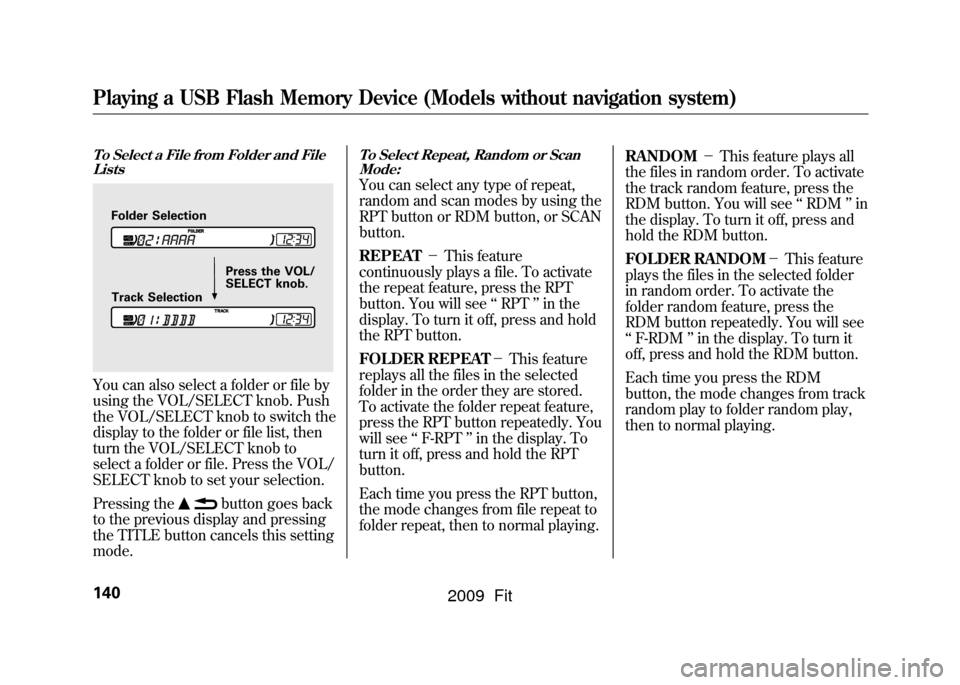
To Select a File from Folder and FileListsYou can also select a folder or file by
using the VOL/SELECT knob. Push
the VOL/SELECT knob to switch the
display to the folder or file list, then
turn the VOL/SELECT knob to
select a folder or file. Press the VOL/
SELECT knob to set your selection.
Pressing the
button goes back
to the previous display and pressing
the TITLE button cancels this setting
mode.
To Select Repeat, Random or Scan
Mode:You can select any type of repeat,
random and scan modes by using the
RPT button or RDM button, or SCAN
button.
REPEAT -This feature
continuously plays a file. To activate
the repeat feature, press the RPT
button. You will see ‘‘RPT ’’in the
display. To turn it off, press and hold
the RPT button.
FOLDER REPEAT -This feature
replays all the files in the selected
folder in the order they are stored.
To activate the folder repeat feature,
press the RPT button repeatedly. You
will see ‘‘F-RPT ’’in the display. To
turn it off, press and hold the RPT
button.
Each time you press the RPT button,
the mode changes from file repeat to
folder repeat, then to normal playing. RANDOM
-This feature plays all
the files in random order. To activate
the track random feature, press the
RDM button. You will see ‘‘RDM ’’in
the display. To turn it off, press and
hold the RDM button.
FOLDER RANDOM -This feature
plays the files in the selected folder
in random order. To activate the
folder random feature, press the
RDM button repeatedly. You will see
‘‘ F-RDM ’’in the display. To turn it
off, press and hold the RDM button.
Each time you press the RDM
button, the mode changes from track
random play to folder random play,
then to normal playing.
Folder Selection
Track Selection Press the VOL/
SELECT knob.
Playing a USB Flash Memory Device (Models without navigation system)140
2009 Fit
Page 144 of 352
SCAN-This feature samples all
files in the selected folder in the
order they are stored. To activate the
scan feature, press the SCAN button.
You will see ‘‘SCAN ’’in the display.
You will get a 10 second sampling of
each file in the folder. Press and hold
the SCAN button to get out of the
scan mode and play the last file
sampled.
FOLDER SCAN -This feature
samples the first file in each folder in
the order they are stored. To activate
the folder scan feature, press the
SCAN button repeatedly. You will
see ‘‘F-SCAN ’’in the display. You
will get a 10 second sampling of each
first file in the folder(s). Press and
hold the SCAN button to get out of
the folder scan mode and play the
last file sampled.
Each time you press the SCAN
button, the mode changes from file
scan to folder scan, then to normal
playing. To Stop Playing a USB Flash
Memory Device
To play the radio when a USB flash
memory device is playing, press the
FM/AM button. If a disc is in the
audio unit, press the CD button to
play the disc.
Disconnecting a USB Flash Memory
DeviceYou can disconnect the USB flash
memory device in any time even if
the USB mode is selected on the
audio system. Always follow the USB
flash memory device ’s instructions
when you remove it.
When you disconnect the USB flash
memory device while it is playing,
the display shows
‘‘ USB NO DATA. ’’
If you reconnect the same USB flash
memory device, the system will
begin playing where it left off. USB Flash Memory Device Error
Messages
If you see an error message in the
display, see page
142.
Playing a USB Flash Memory Device (Models without navigation system)
141
Features
2009 Fit
Page 147 of 352

Voice Control System
In addition to the standard audio
controls, the audio system in your
vehicle can be operated using the
voice control system. See the
navigation section in your quick start
guide for an overview of this system,
and the navigation system manual for
complete details.
To Play the AM/FM Radio
The ignition switch must be in the
ACCESSORY (I) or ON (II) position.
Turn the system on by pushing the
power/volume knob or the AM/FM
button. Adjust the volume by turning
the power/volume knob.
Pushing the AUDIO button will also
turn on the system.You can also operate the audio
system without using the control
icons on the audio screen. Use the
control buttons on the left side of the
screen. The status bar appears on the
bottom of the screen each time you
operate any of the control buttons.
On the navigation screen, you can
also see audio information by
touching the AUDIO INFO icon on
the lower of the screen.
The band and frequency that the
radio was last turned to are
displayed. To change bands, press
the AM/FM button, or touch the
desired band icon (FM1, FM2, or
AM). On the FM band, STEREO will
be displayed if the station is
broadcasting in stereo. Stereo
reproduction on AM is not available.To Select a Station
You can use any of five methods to
find radio stations on the selected
band: tune, seek, scan, the preset
buttons, and auto select.
TUNE
-Use the TUNE bar to tune
the radio to a desired frequency.
Press the
side of the bar to tune to
a higher frequency, and press the
side to tune to a lower frequency.
Press and hold the
or
side of
the TUNE bar until you hear two
beeps to change the frequency
rapidly. Release the bar when the
display reaches the desired
frequency.
Playing the AM/FM Radio (Models with navigation system)144
2009 Fit
Page 151 of 352
Screen ModeYou can select the background
screen to display the sound level.
There are three screen modes: level
(the sound level is shown with the
vertical bars), spectrum analysis (the
sound level appears as ripples of
water), and off. Each time you touch
the background icon, the display
changes.Audio System Lighting
You can use the instrument panel
brightness control knob to adjust the
illumination of the control panel (see
page76).The audio system
illuminates when the parking lights
are on, even if the radio is turned off.Playing the AM/FM Radio (Models with navigation system)148
2009 Fit
Page 155 of 352
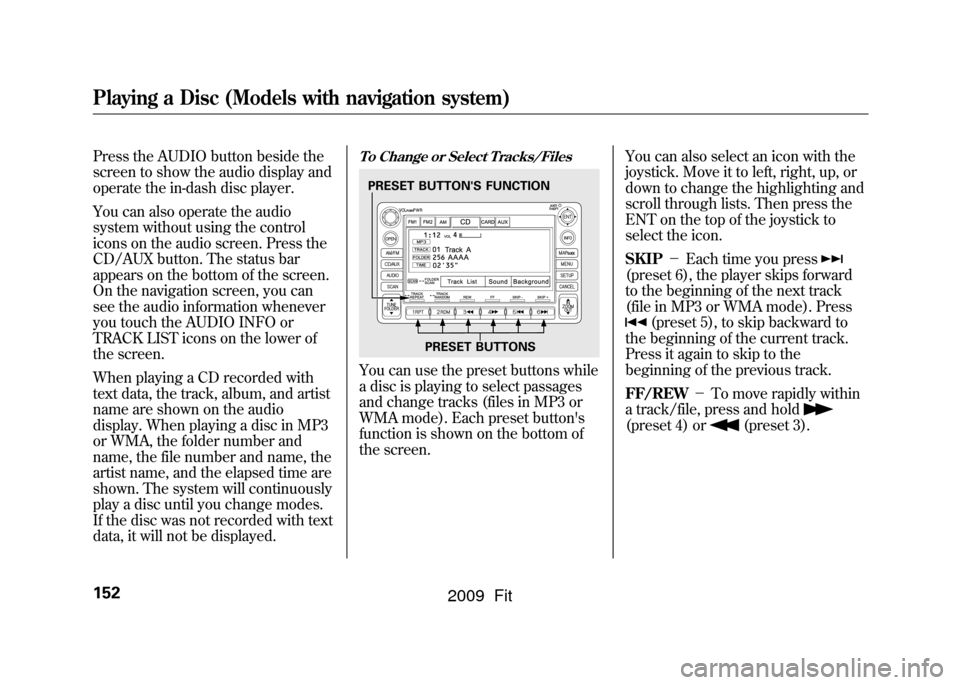
Press the AUDIO button beside the
screen to show the audio display and
operate the in-dash disc player.
You can also operate the audio
system without using the control
icons on the audio screen. Press the
CD/AUX button. The status bar
appears on the bottom of the screen.
On the navigation screen, you can
see the audio information whenever
you touch the AUDIO INFO or
TRACK LIST icons on the lower of
the screen.
When playing a CD recorded with
text data, the track, album, and artist
name are shown on the audio
display. When playing a disc in MP3
or WMA, the folder number and
name, the file number and name, the
artist name, and the elapsed time are
shown. The system will continuously
play a disc until you change modes.
If the disc was not recorded with text
data, it will not be displayed.
To Change or Select Tracks/FilesYou can use the preset buttons while
a disc is playing to select passages
and change tracks (files in MP3 or
WMA mode). Each preset button's
function is shown on the bottom of
the screen.You can also select an icon with the
joystick. Move it to left, right, up, or
down to change the highlighting and
scroll through lists. Then press the
ENT on the top of the joystick to
select the icon.
SKIP
-Each time you press
(preset 6), the player skips forward
to the beginning of the next track
(file in MP3 or WMA mode). Press
(preset 5), to skip backward to
the beginning of the current track.
Press it again to skip to the
beginning of the previous track.
FF/REW -To move rapidly within
a track/file, press and hold
(preset 4) or
(preset 3).
PRESET BUTTON'S FUNCTION
PRESET BUTTONS
Playing a Disc (Models with navigation system)152
2009 Fit
Page 176 of 352
If the audio system still does not
recognize the iPod, the iPod may
need to be reset. Follow the
instructions that came with your
iPod, or you can find reset
instructions online at
www.apple.com/
ipod
.
The current file number and total of
the selected playable files are
displayed on the screen. It also
shows the artist, album and track
(file) names on the screen.
To Change or Select FilesUse the SKIP button while an iPod is
playing to select passages and
change files.
SKIP -Each time you press the
SKIP + button (Preset 6), the system
skips forward to the beginning of the
next file. Press the SKIP -button
(Preset 5), to skip backward to the
beginning of the current file. Press it
again to skip to the beginning of the
previous file.
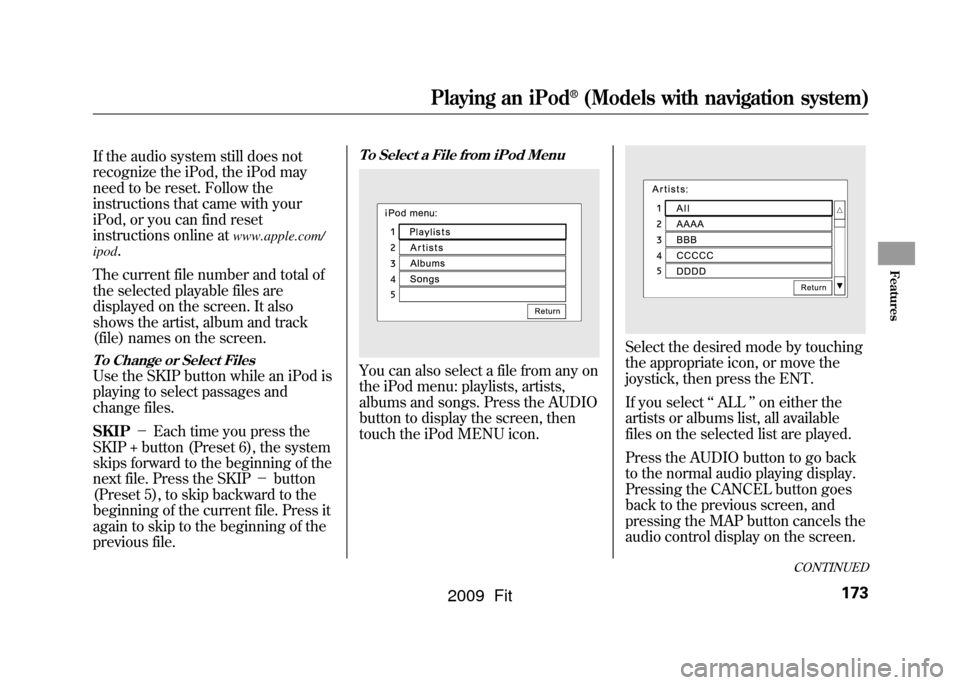
To Select a File from iPod MenuYou can also select a file from any on
the iPod menu: playlists, artists,
albums and songs. Press the AUDIO
button to display the screen, then
touch the iPod MENU icon.
Select the desired mode by touching
the appropriate icon, or move the
joystick, then press the ENT.
If you select ‘‘ALL ’’on either the
artists or albums list, all available
files on the selected list are played.
Press the AUDIO button to go back
to the normal audio playing display.
Pressing the CANCEL button goes
back to the previous screen, and
pressing the MAP button cancels the
audio control display on the screen.
CONTINUED
Playing an iPod
®
(Models with navigation system)
173
Features
2009 Fit
Page 183 of 352
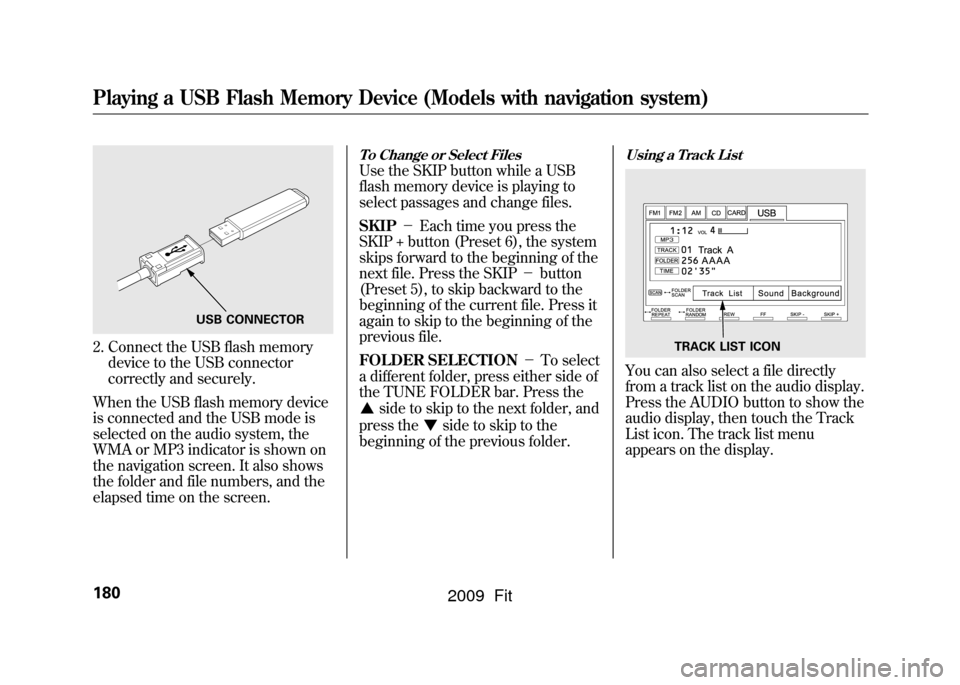
2. Connect the USB flash memorydevice to the USB connector
correctly and securely.
When the USB flash memory device
is connected and the USB mode is
selected on the audio system, the
WMA or MP3 indicator is shown on
the navigation screen. It also shows
the folder and file numbers, and the
elapsed time on the screen.
To Change or Select FilesUse the SKIP button while a USB
flash memory device is playing to
select passages and change files.
SKIP -Each time you press the
SKIP + button (Preset 6), the system
skips forward to the beginning of the
next file. Press the SKIP -button
(Preset 5), to skip backward to the
beginning of the current file. Press it
again to skip to the beginning of the
previous file.
FOLDER SELECTION -To select
a different folder, press either side of
the TUNE FOLDER bar. Press the
side to skip to the next folder, and
press the
side to skip to the
beginning of the previous folder.
Using a Track ListYou can also select a file directly
from a track list on the audio display.
Press the AUDIO button to show the
audio display, then touch the Track
List icon. The track list menu
appears on the display.
USB CONNECTOR
TRACK LIST ICON
Playing a USB Flash Memory Device (Models with navigation system)180
2009 Fit