2009 HONDA FIT change time
[x] Cancel search: change timePage 192 of 352
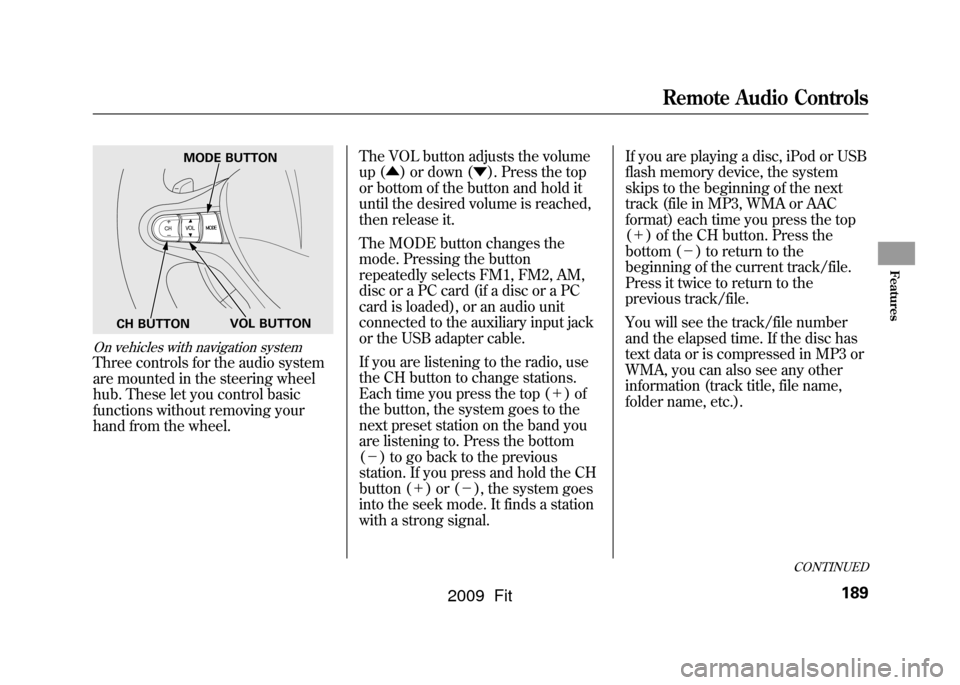
On vehicles with navigation systemThree controls for the audio system
are mounted in the steering wheel
hub. These let you control basic
functions without removing your
hand from the wheel.The VOL button adjusts the volume
up (
▲) or down ( ▼). Press the top
or bottom of the button and hold it
until the desired volume is reached,
then release it.
The MODE button changes the
mode. Pressing the button
repeatedly selects FM1, FM2, AM,
disc or a PC card (if a disc or a PC
card is loaded), or an audio unit
connected to the auxiliary input jack
or the USB adapter cable.
If you are listening to the radio, use
the CH button to change stations.
Each time you press the top ( +)of
the button, the system goes to the
next preset station on the band you
are listening to. Press the bottom
( - ) to go back to the previous
station. If you press and hold the CH
button ( +)or( -), the system goes
into the seek mode. It finds a station
with a strong signal. If you are playing a disc, iPod or USB
flash memory device, the system
skips to the beginning of the next
track (file in MP3, WMA or AAC
format) each time you press the top
(
+ ) of the CH button. Press the
bottom ( -) to return to the
beginning of the current track/file.
Press it twice to return to the
previous track/file.
You will see the track/file number
and the elapsed time. If the disc has
text data or is compressed in MP3 or
WMA, you can also see any other
information (track title, file name,
folder name, etc.).
MODE BUTTON
VOL BUTTON
CH BUTTON
CONTINUED
Remote Audio Controls
189
Features
2009 Fit
Page 195 of 352
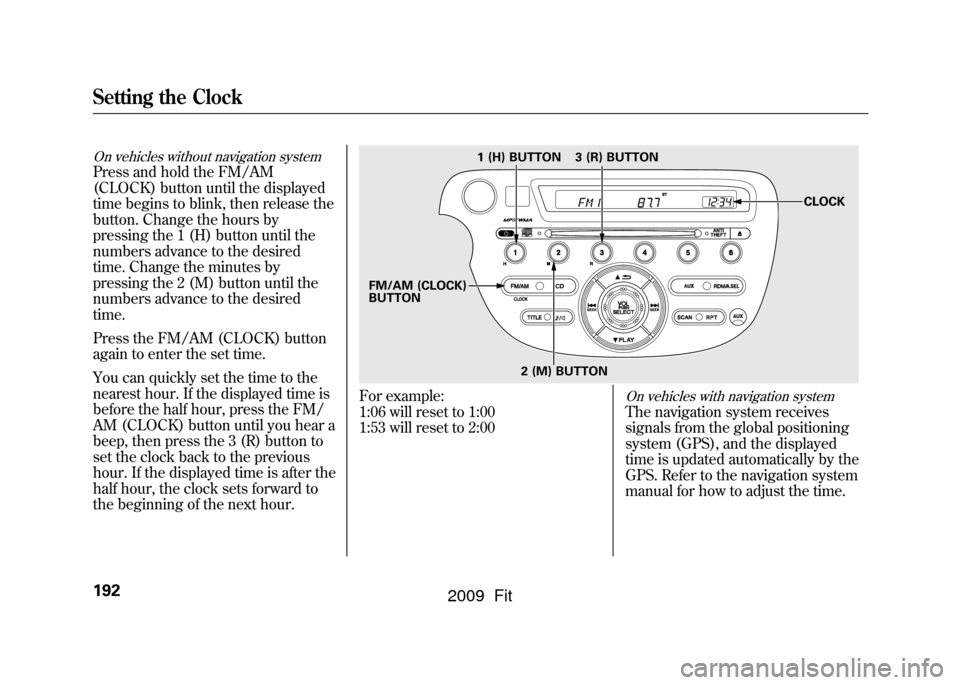
On vehicles without navigation systemPress and hold the FM/AM
(CLOCK) button until the displayed
time begins to blink, then release the
button. Change the hours by
pressing the 1 (H) button until the
numbers advance to the desired
time. Change the minutes by
pressing the 2 (M) button until the
numbers advance to the desired
time.
Press the FM/AM (CLOCK) button
again to enter the set time.
You can quickly set the time to the
nearest hour. If the displayed time is
before the half hour, press the FM/
AM (CLOCK) button until you hear a
beep, then press the 3 (R) button to
set the clock back to the previous
hour. If the displayed time is after the
half hour, the clock sets forward to
the beginning of the next hour.
For example:
1:06 will reset to 1:00
1:53 will reset to 2:00
On vehicles with navigation systemThe navigation system receives
signals from the global positioning
system (GPS), and the displayed
time is updated automatically by the
GPS. Refer to the navigation system
manual for how to adjust the time.
1 (H) BUTTON
FM/AM (CLOCK)
BUTTON 3 (R) BUTTON
CLOCK
2 (M) BUTTON
Setting the Clock192
2009 Fit
Page 201 of 352

Break-in Period
Help assure your vehicle's future
reliability and performance by paying
extra attention to how you drive
during the first 600 miles (1,000 km).
During this period:●Avoid full-throttle starts and rapid
acceleration.●Avoid hard braking for the first 200
miles (300 km).●Do not change the oil until the
scheduled maintenance time.
You should also follow these
recommendations with an
overhauled or exchanged engine, or
when the brakes are replaced. Fuel Recommendation
Your vehicle is designed to operate
on unleaded gasoline with a pump
octane number of 87 or higher. Use of
a lower octane gasoline can cause a
persistent, heavy metallic rapping
noise that can lead to engine damage.
We recommend using quality
gasolines containing detergent
additives that help prevent fuel
system and engine deposits.
In addition, in order to maintain good
performance, fuel economy, and
emissions control, we strongly
recommend, in areas where it is
available, the use of gasoline that
does NOT contain manganese-based
fuel additives such as MMT.
Use of gasoline with these additives
may adversely affect performance,
and cause the malfunction indicator
lamp on your instrument panel to
come on. If this happens, contact your
authorized dealer for service.
Some gasoline today is blended with
oxygenates such as ethanol or
MTBE. Your vehicle is designed to
operate on oxygenated gasoline
containing up to 10% ethanol by
volume and up to 15% MTBE by
volume. Do not use gasoline
containing methanol.
If you notice any undesirable
operating symptoms, try another
service station or switch to another
brand of gasoline.
For further important fuel-related
information, please refer to your
Quick Start Guide.
Break-in Period, Fuel Recommendation198
2009 Fit
Page 235 of 352

If the ABS indicator and the brake
system indicator come on together,
and the parking brake is fully
released, the EBD system may also
be shut down.
Test your brakes as instructed on
page305.If the brakes feel normal,
drive slowly and have your vehicle
repaired by your dealer as soon as
possible. Avoid sudden hard braking
which could cause the rear wheels to
lock up and possibly lead to a loss of
control.On vehicles with VSA systemThe VSA indicator will come on
along with the ABS indicator.Important Safety Reminders
ABS does not reduce the time or
distance it takes to stop the
vehicle.
It only helps with the
steering control during braking.
ABS will not prevent a skid that
results from changing direction
abruptly, such as trying to take a
corner too fast or making a sudden
lane change. Always drive at a safe
speed for the road and weather
conditions.
ABS cannot prevent a loss of
stability. Always steer moderately
when you are braking hard. Severe
or sharp steering wheel movement
can still cause your vehicle to veer
into oncoming traffic or off the road. A vehicle with ABS may require a
longer distance to stop
on loose or
uneven surfaces, such as gravel or
snow, than a vehicle without anti-
lock.Anti-lock Brakes (ABS)232
2009 Fit
Page 250 of 352
The maintenance item code or codes
indicate the main and sub items
required at the time of the oil change
(see page248).
You can switch the information
display from the engine oil life
display to the odometer or the trip
meter. Press and release the select/
reset knob on the instrument panel.
When the engine oil life is 15 to 1
percent, the maintenance minder
indicator (
) comes on every time
you turn the ignition switch to the
ON (II) position, then it goes out if
you switch the information display.
When you see this message, have
the indicated maintenance performed
by your dealer as soon as possible.
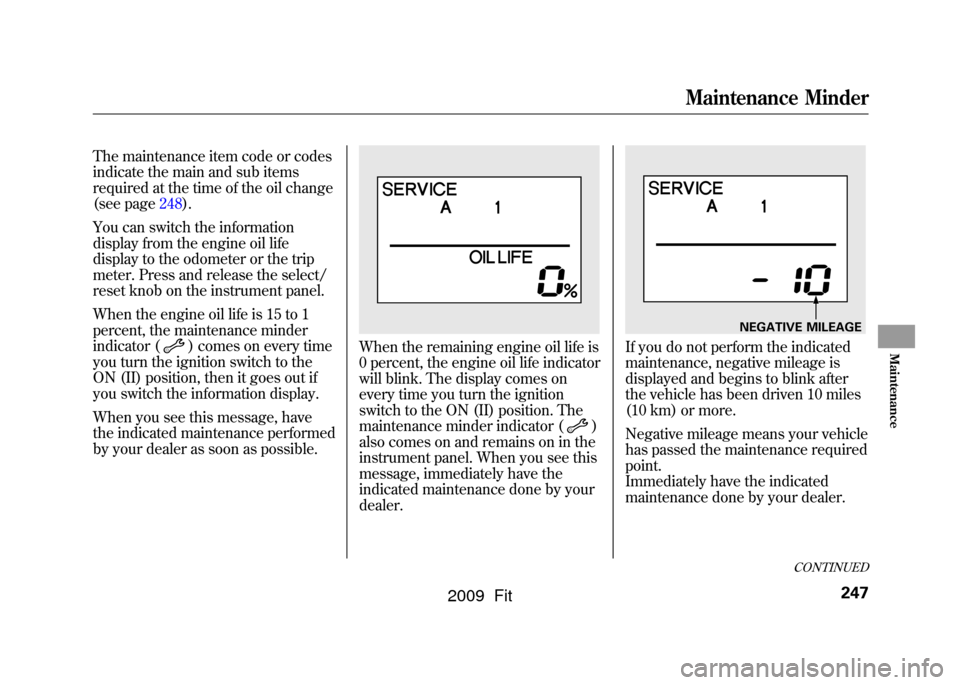
When the remaining engine oil life is
0 percent, the engine oil life indicator
will blink. The display comes on
every time you turn the ignition
switch to the ON (II) position. The
maintenance minder indicator (
)
also comes on and remains on in the
instrument panel. When you see this
message, immediately have the
indicated maintenance done by your
dealer.
If you do not perform the indicated
maintenance, negative mileage is
displayed and begins to blink after
the vehicle has been driven 10 miles
(10 km) or more.
Negative mileage means your vehicle
has passed the maintenance required
point.
Immediately have the indicated
maintenance done by your dealer.
NEGATIVE MILEAGE
CONTINUED
Maintenance Minder
247
Maintenance
2009 Fit
Page 251 of 352
To change the information display
from the engine oil life display to the
odometer, the trip meter or average
fuel mileage, press and release the
select/reset knob.
When the engine oil life is 0 percent
or negative mileage, the maintenance
minder indicator (
) remains on
even if you change the information
display.
Immediately have the service
performed, and make sure to reset
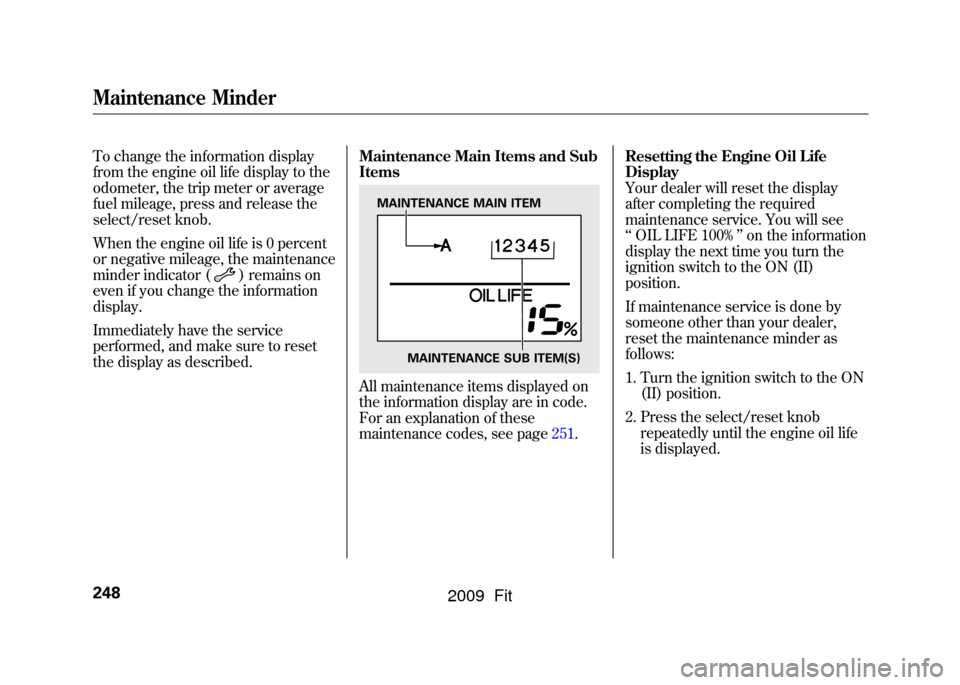
the display as described. Maintenance Main Items and Sub
Items
All maintenance items displayed on
the information display are in code.
For an explanation of these
maintenance codes, see page251.Resetting the Engine Oil Life
Display
Your dealer will reset the display
after completing the required
maintenance service. You will see
‘‘
OIL LIFE 100% ’’on the information
display the next time you turn the
ignition switch to the ON (II)
position.
If maintenance service is done by
someone other than your dealer,
reset the maintenance minder as
follows:
1. Turn the ignition switch to the ON (II) position.
2. Press the select/reset knob repeatedly until the engine oil life
is displayed.
MAINTENANCE MAIN ITEM
MAINTENANCE SUB ITEM(S)
Maintenance Minder248
2009 Fit
Page 349 of 352
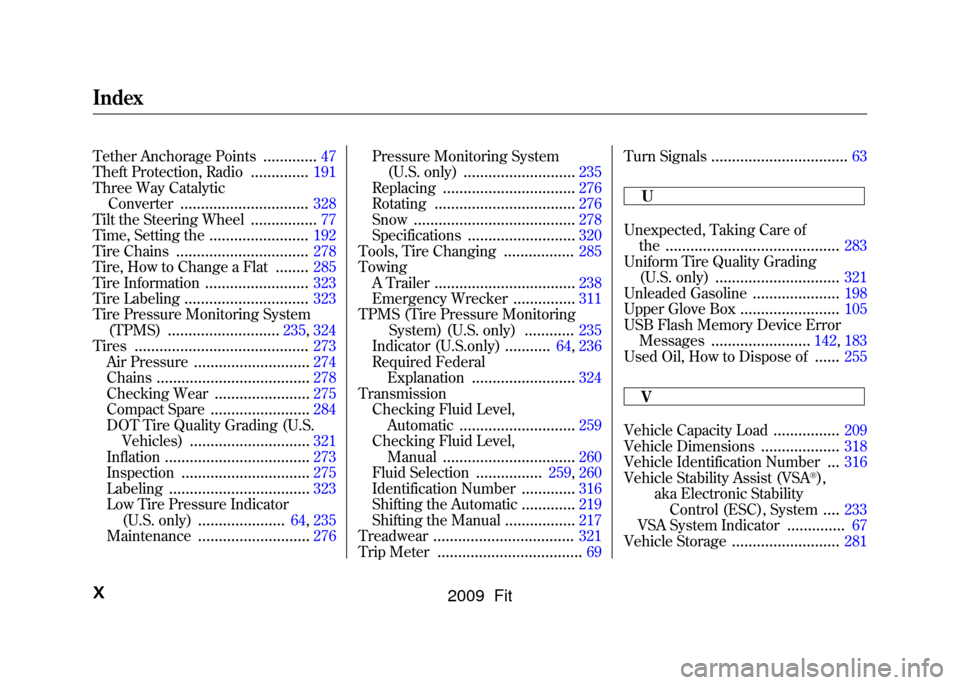
Tether Anchorage Points
.............
47
Theft Protection, Radio
..............
191
Three Way Catalytic Converter
...............................
328
Tilt the Steering Wheel
................
77
Time, Setting the
........................
192
Tire Chains
................................
278
Tire, How to Change a Flat
........
285
Tire Information
.........................
323
Tire Labeling
..............................
323
Tire Pressure Monitoring System (TPMS)
...........................
235, 324
Tires
..........................................
273
Air Pressure
............................
274
Chains
.....................................
278
Checking Wear
.......................
275
Compact Spare
........................
284
DOT Tire Quality Grading (U.S. Vehicles)
.............................
321
Inflation
...................................
273
Inspection
...............................
275
Labeling
..................................
323
Low Tire Pressure Indicator
(U.S. only)
.....................
64, 235
Maintenance
...........................
276 Pressure Monitoring System
(U.S. only)
...........................
235
Replacing
................................
276
Rotating
..................................
276
Snow
.......................................
278
Specifications
..........................
320
Tools, Tire Changing
.................
285
Towing A Trailer
..................................
238
Emergency Wrecker
...............
311
TPMS (Tire Pressure Monitoring System) (U.S. only)
............
235
Indicator (U.S.only)
...........
64, 236
Required Federal Explanation
.........................
324
Transmission Checking Fluid Level, Automatic
............................
259
Checking Fluid Level, Manual
................................
260
Fluid Selection
................
259, 260
Identification Number
.............
316
Shifting the Automatic
.............
219
Shifting the Manual
.................
217
Treadwear
..................................
321
Trip Meter
...................................
69 Turn Signals
.................................
63
U
Unexpected, Taking Care of the
..........................................
283
Uniform Tire Quality Grading (U.S. only)
..............................
321
Unleaded Gasoline
.....................
198
Upper Glove Box
........................
105
USB Flash Memory Device Error Messages
........................
142, 183
Used Oil, How to Dispose of......
255
V
Vehicle Capacity Load
................
209
Vehicle Dimensions
...................
318
Vehicle Identification Number
...
316
Vehicle Stability Assist (VSA
®),
aka Electronic Stability Control (ESC), System....
233
VSA System Indicator
..............
67
Vehicle Storage
..........................
281
IndexX
2009 Fit
Page 352 of 352

OWNER_________________________________________________________
______________________________________________________________________________
ADDRESS _______________________________________________________
STREET
_________________________________ _________________________________ ___________________
CITY STATE/PROVINCE ZIP CODE/
POSTAL CODE
V. I. N. ___________________________________________________________
DELIVERY DATE __________________________________________________
(Date sold to original retail purchaser)
DEALER NAME___________________ DEALER NO. ___________________
ADDRESS _______________________________________________________
STREET
_________________________________ _________________________________ ___________________
CITY STATE/PROVINCE ZIP CODE/
POSTAL CODE
OWNER'S SIGNATURE ___________________________________________
DEALER'S SIGNATURE ___________________________________________
This owner's manual should be considered a
permanent part of the vehicle and should
remain with the vehicle when it is sold.
This owner's manual covers all models of the
Fit. You may find descriptions of equipment
and features that are not on your particular
vehicle.
The information and specifications included
in this publication were in effect at the time of
approval for printing. Honda Motor Co., Ltd.
reserves the right, however, to discontinue or
change specifications or design at any time
without notice and without incurring any
obligation whatsoever.
POUR CLIENTS CANADIEN AVIS
IMPORTANT: Si vous avez besoin d'un
Manuel du Conducteur en français,
veuillez demander à votre
concessionnaire de commander le
numéro de pièce 33TK6C00
Owner's Identification
2009 Fit